Soft-lock — at-rest seed lock
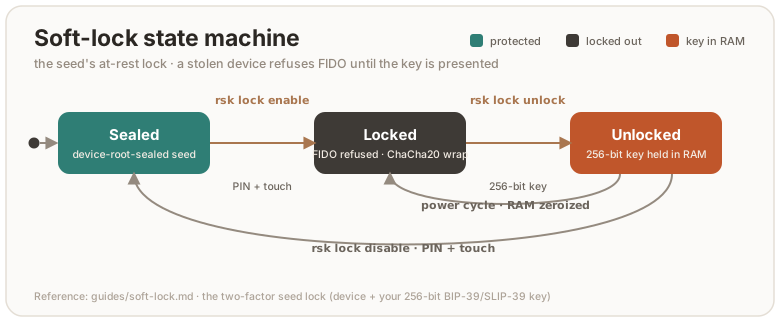
Optional hardening: with the lock engaged, the FIDO master seed exists in flash only encrypted to a 32-byte key that you hold (as BIP-39/SLIP-39 words or hex). A stolen board refuses every FIDO operation until that key is presented, even powered up, even running genuine firmware. Your identity becomes device + words, two factors.
This is the same idea as a wallet passphrase. It composes with (does not replace) the silicon protections: once provisioned, the OTP root and secure boot (production.md, otp-fuses.md) stop flash-dump and foreign-firmware attacks. The soft-lock additionally stops your own device in the wrong hands.
Needs firmware with soft-lock support (bcdDevice >= 0x0742). Older builds
answer rsk lock status with “firmware too old”. Check with rsk status.
Prerequisite: a FIDO2 PIN
enable and disable ride authenticatorConfig, which the firmware always
gates on a pinUvAuthToken with the acfg permission. So a FIDO2 PIN must
already be set, and you pass it with --pin. With no PIN configured the
command stops with “authenticatorConfig needs the acfg pinUvAuthToken”. Set
one first:
rsk fido set-pin # see fido2.md
unlock is the exception: it needs neither PIN nor touch (below).
Enable
rsk lock enable --pin 1234 # PIN + touch gated; typed confirmation
Generates a random 32-byte lock key, prints it once (default 24-word BIP-39), wraps the seed value with ChaCha20-Poly1305 under it into flash, and deletes the plaintext-sealed copy. Touch the device (BOOTSEL button) when prompted. Treat the key like the backup words: paper, not a file.
Choose how the key is rendered:
--scheme | What it prints | Reconstruct with |
|---|---|---|
bip39 (default) | 24 words | the same 24 words |
slip39 | Shamir shares (--threshold/--shares, default 2-of-3) | any threshold shares |
hex | 64 hex characters | the same hex |
rsk lock enable --pin 1234 --scheme slip39 --threshold 2 --shares 3
--key-out FILE also writes the raw key hex to a 0600 file. A test/CI
convenience, not for production: it defeats the point of holding the key only
on paper.
The wrap is over the seed value, independent of the at-rest format tag and of the kbase the plain file was sealed under. So locking and the OTP re-sealing (otp-fuses.md) stay orthogonal.
Daily use — unlock at power-up
rsk lock status            # locked? unlocked this session?
rsk lock unlock            # prompts for the 24 words; seed goes to RAM only
status prints four flags read straight from the device:
| Flag | Meaning |
|---|---|
sealed | the one-time backup-export window is closed (seed-backup.md) |
has_seed | a plaintext-sealed seed is on flash (false while locked) |
locked | the wrapped blob is what’s stored — an unlock is required |
unlocked | a RAM copy from this power cycle’s unlock is live |
The lock re-engages at every power cycle: the unlocked seed lives only in
RAM and is zeroized on unplug. While locked with no unlock this session, the
seed loader fails and the firmware errors out of every credential operation:
registration (makeCredential) and assertion (getAssertion/U2F) alike.
Browsers show a generic failure and ssh says the key refused, until you
unlock.
Unlock takes the key the same three ways and can run headless in a script:
rsk lock unlock --scheme bip39 --mnemonic "word1 word2 … word24"
rsk lock unlock --key-hex 0011…  # 64 hex chars
rsk lock unlock --scheme slip39  # prompts for shares, one per line, blank to finish
Unlock needs no PIN and no touch. Knowledge of the 256-bit key is the
authorization (it is verified by the AEAD decrypt succeeding). A wrong key
fails closed with unlock failed: 0x… (wrong key?) and leaves the device
locked. Unlocking a device that isn’t locked reports device is not locked.
Disable
rsk lock disable --pin 1234 # needs an unlocked session + PIN + touch
Disable proves you hold the key by requiring the seed already unlocked this
power cycle, then writes it back plaintext-sealed (device-root-sealed) and
deletes the wrapped blob. If you haven’t unlocked yet, pass the key and
disable unlocks first:
rsk lock disable --pin 1234 --mnemonic "word1 … word24"
rsk lock disable --pin 1234 --key-hex 0011…
Calling disable without an unlock prompts for the lock key (or pass
--mnemonic/--key-hex). Supply nothing valid and it fails with the lock
still engaged.
How it composes with seed backup
The soft-lock and the seed backup are independent (backup exports/imports the seed value, the lock wraps that same value), but their ordering matters:
- Back up before you lock. A mnemonic taken before ENABLE still restores the original identity onto a fresh board later.
- Restore is refused while locked.
rsk backup restore(firmwareBACKUP_LOAD) returns “not allowed” on a locked device. A restore next to a live wrapped blob would leave two competing seeds.disable(or a reset) first. - Export works once unlocked. With the seed unlocked this session,
rsk backup exportserves the in-RAM copy normally (subject to the one-time export window).
Lost the lock key?
Unrecoverable by design. The way forward is a FIDO factory reset, which
deletes the locked blob and generates a fresh identity (ykman fido reset,
which needs the opt-in VIDPID=Yubikey5 build, or any WebAuthn “reset security
key” UI on the default build). Replug the key first: a screenless build accepts
the reset only within ten seconds of a power-up (see
fido2.md). Your
seed backup, if you made one before locking, still
restores the old identity afterwards. Without it the old credentials
(ssh ed25519-sk keys, U2F registrations) are gone.
Honest caveats
- The flash log keeps the superseded plaintext-sealed record until natural compaction overwrites it. The at-rest guarantee hardens over time after ENABLE rather than instantly. (That lingering record is still sealed to the device root, so this only matters against an attacker who has also defeated the OTP tier; see threat-model.md.)
- A compromised host at unlock time cannot read the key from the wire (the channel is an ephemeral ChaCha20-Poly1305 tunnel) or the seed (never leaves the device). But while the device sits unlocked and plugged in, it can drive normal FIDO operations, like any session. Unplug when done.
- The lock protects the FIDO seed only. OpenPGP, PIV, and OATH keys are sealed to the chip independently and are not gated by it. To gate those, rely on their own PINs and on the OTP/secure-boot tier.