Backup key — a primary + backup pair
A single security key is a single point of failure. Lose it, break it, leave it at the office, or have it stolen, and you are locked out of everything it was your only key for. The fix is the one hardware-key vendors recommend: keep two keys, a primary you carry and a backup you store somewhere safe, and register both with every account. Lose one and the other already works, with no recovery dance.
This page is the why and the how. The seed-backup mnemonic (seed-backup.md) is a different, complementary safety net. The two are compared at the end.
Why two independent keys
The pair are two separate devices with different seeds, not one identity copied onto two sticks. That independence is the point:
- No single point of failure. A primary that is lost, bricked, or left behind doesn’t lock you out. The backup is already enrolled everywhere.
- No shared secret. Because the seeds differ, compromising one key tells an attacker nothing about the other. (Cloning the same seed onto both would make a single leak break both, the opposite of what a backup is for.)
- It is how WebAuthn is meant to be used. Every serious account lets you add more than one security key precisely so you can enroll a backup. You are using the platform’s built-in redundancy, not working around it.
- Resident credentials aren’t seed-portable anyway. Passkeys, PIV, and OpenPGP keys are sealed to the chip, so even with a seed backup you would re-enroll them on a replacement. Two live keys sidestep that entirely.
The model
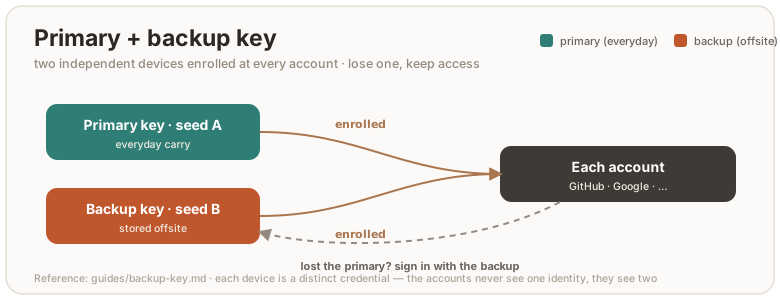
Both keys are enrolled on every account. Day to day you use the primary. The backup sits in a drawer or a safe. If the primary is gone, the backup logs you in to remove the lost key and enroll a fresh replacement. No downtime, no restore.
Set it up — rsk pair
rsk pair walks you through it. It reads each device in turn (touch-free),
confirms they are two different physical keys, and prints the checklist:
rsk pair # plug in the primary, then the backup, when prompted
Then, working down the checklist:
- Give each device its own PIN (in your browser / OS security-key settings).
- Back up each seed separately. Two independent seeds means two different
mnemonics (seed-backup.md). Do
rsk backup exportwith each device, thenrsk backup finalize. - Register both keys on every important account. In each service’s security-key settings, add the primary and the backup. Don’t stop at the accounts you remember. Email and your password manager first, since they gate everything else.
- Store the backup key somewhere separate from the primary (a different building is ideal, since fire and theft take whatever is in one place).
- Test the backup by signing in with only it, once, before you rely on it.
Different seeds — on purpose
Each RS-Key generates its own seed on first boot, so two fresh keys are already
independent. You don’t have to do anything to make their seeds differ. The one
way to accidentally defeat this is to rsk backup restore the same mnemonic
onto both, which turns them into clones. Don’t. If you want the same identity on a
replacement board, that’s the seed-backup flow, not the pair flow.
rsk paircan’t cryptographically prove the seeds differ. RS-Key credentials are randomized (a fresh key handle per registration), so there is no stable seed-derived value to compare between two devices, and the device attestation key is per-chip, not per-seed. The wizard confirms two distinct physical devices and relies on the self-generated-seed property above. If you want to check by hand,rsk backup exportboth and compare the phrases (they must differ).
If you lose a key
Losing one of a registered pair is a routine event, not an emergency:
- Sign in with the surviving key. It is already enrolled everywhere.
- Remove the lost key from each account. In each service’s security-key settings, delete the missing authenticator so it can no longer be used.
- Get a new key and make it the new backup.
rsk pairagain with the survivor as the primary, then enroll the new one across your accounts.
A stolen key is gated by its PIN (a few wrong tries lock it), but removing it from your accounts is what actually retires it. Do that promptly.
This vs. the seed-backup mnemonic
| Primary + backup pair | Seed-backup mnemonic | |
|---|---|---|
| What it protects | live access, a second key already enrolled | one identity, recoverable later |
| Recover by | grabbing the backup key (no steps) | restoring the phrase onto a new board |
| Secret exposure | none shared, two independent seeds | the seed passes through the host at export |
| Covers passkeys / PIV / OpenPGP | enroll them on each key | no (sealed to the chip) |
| Cost | register both keys everywhere | write the words down, keep them safe |
They are complementary. The pair gives you redundancy with zero recovery effort. The mnemonic resurrects an identity onto a replacement when you only had one key. Many people do both: two keys, and a written mnemonic for each.