RS-Key
An open-source hardware passkey. Flash one file onto a Raspberry Pi RP2350
board and it becomes a USB security key: passkey logins in the browser, ssh
and git signing, GPG, PIV, and TOTP codes.
| What this is | Firmware. A .uf2 file you drop onto a board. Nothing here is for sale. |
| What you need | Any RP2350 board (from about $5) and a USB cable. No soldering, no programmer, no toolchain. |
| What you get | A USB authenticator your browser, ssh, gpg and ykman already know how to talk to. |
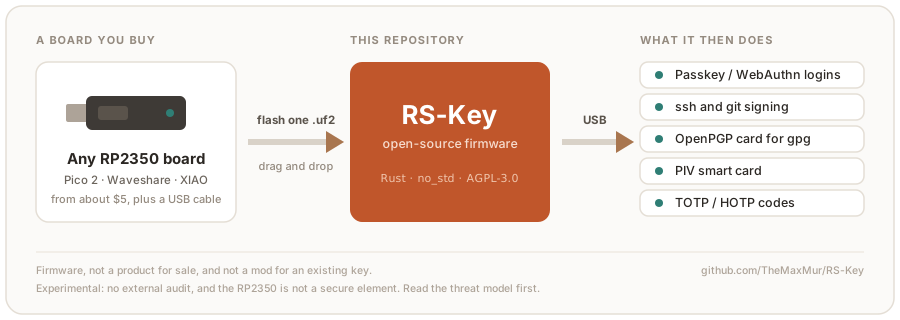
This project is experimental. It has had no external security audit. The RP2350 is not a secure element. A stolen board is only as strong as the optional OTP / secure-boot hardening you have applied to it. Do not use it to guard credentials you cannot afford to lose or have stolen. Read the threat model and limitations before trusting it with anything real.
Written in Rust (no_std, embassy). Under the hood it is
FIDO2/WebAuthn/U2F, an OpenPGP card, PIV, OATH and Yubico-style OTP, plus the
host-side tooling to drive and provision all of it.
Start here
- Quick start: flash a released image, set a PIN, enroll something. No toolchain needed; the images are on the releases page and releases.md says which one to take
- No board yet? The emulator runs the same applet code over sockets, and its
--displaymode opens the trusted screen in a window — the Approve/Deny ceremony can be tried with a mouse before buying anything (testing.md) - Hardware: supported boards and the knobs for them
- Build options: every compile-time flag and environment knob
- Using the device: per-feature guides for FIDO2, SSH, OpenPGP, PIV, OATH, OTP, seed backup, soft-lock, and more
- Production hardening: OTP master key + secure boot (irreversible fuses; read it end to end first)
- Security: threat model, limitations,
and the
unsafeaudit - Project: Contributing · Security policy · Licensing & compliance
What it is, plainly
- It aims to behave like a USB security key and to work with the host software
people already use:
ssh,gpg, browsers, libfido2, andykman(which needs the opt-inVIDPID=Yubikey5build, see below). What has actually been checked on hardware is recorded in the interop matrix, with dates. - It is not a certified hardware security key, and not a drop-in replacement for an audited commercial key in production. There is no secure element.
- The default USB identity is RS-Key’s own (VID
0x1209/ PID0x0001, from pid.codes, the open-source USB VID), presenting as “RS-Key Security Key”. An opt-inVIDPID=Yubikey5build instead borrows a YubiKey’s identity (VID0x1050/ PID0x0407) so thatykmanand Yubico Authenticator (which key off the “Yubico YubiKey” reader name) work without custom rules. That flavor is for interop only and is never distributed. See limitations. RS-Key is not affiliated with or endorsed by Yubico, Nitrokey, or Raspberry Pi.
License
AGPL-3.0-only. RS-Key is a from-scratch Rust reimplementation of the AGPL-3.0-only pico-keys firmware family, so it inherits that license and cannot be relicensed. See NOTICE and COMPLIANCE.md.
Quick start
From zero to a working security key in about ten minutes.
This is experimental firmware with no security audit and no secure element. It’s fine for trying things out and for credentials you can afford to lose. See the threat model before using it for anything real.
flowchart TD
a["download rs-key-<version>-default.uf2<br/>(or build it yourself)"] --> c["hold BOOT, plug in"]
c --> d["flash: drag-and-drop or picotool load"]
d --> e["board reboots, enumerates over USB"]
e --> f["set PIN, enroll a passkey / ssh key"]
What you need
- An RP2350 board (tested: Waveshare RP2350-One; any RP2350 with USB works)
- A USB cable
That is the whole list. You only need a toolchain if you want to build the firmware yourself instead of downloading it.
No board yet? The emulator runs the
same applet code on your machine — enough to drive the protocol suites, and with
--display, to try the trusted screen’s Approve/Deny ceremony with a mouse.
0. Easy way: use the web flasher
Use the RS-Key Web Flasher for a guided browser flow. It can download, verify, sign, and flash the firmware.
Browser requirement: Flashing requires a desktop Chromium-based browser, such as Google Chrome or Microsoft Edge.
1. Get the firmware
Download the newest rs-key-<version>-default.uf2 from the
releases page. Take
2mb, 16mb or display instead if that is your board;
releases.md has the table of all fourteen images, the cosign
signature check, and the reproducibility check.
Every published image is a touch build: FIDO operations (registering, logging in) require a press of the presence button, BOOTSEL by default.
Or build it yourself
You need Nix with flakes enabled; the dev shell
provides the toolchain, picotool and the host tools. Without Nix: rustup +
rustup target add thumbv8m.main-none-eabihf + picotool ≥ 2.0, and the Python
deps from flake.nix.
nix develop                                  # first run downloads the toolchain
cargo build --release -p firmware
scripts/pt.sh target/thumbv8m.main-none-eabihf/release/firmware firmware-pt.elf
picotool uf2 convert firmware-pt.elf -t elf firmware.uf2
pt.sh embeds the partition table that keeps the USB bootloader out of the key’s
storage — cargo build cannot, since it is added after linking
(build.md). nix build .#firmware does it for
you.
Set PRESENCE_PIN=<gpio> for a dedicated presence button instead of BOOTSEL.
For a no-touch build (needed by the automated test suites, or if your board is
hard to reach) add --features no-touch. All build knobs: build.md.
2. Flash
To flash the firmware manually:
-
Hold the BOOT button while plugging the board in (or hold BOOT, tap RESET). A mass-storage drive named
RP2350appears. -
Flash it, either way (
firmware.uf2here is whichever.uf2you got in step 1):- Drag-and-drop:
cp firmware.uf2 /Volumes/RP2350/(macOS) or copy it to the mounted drive on Linux. - picotool (more reliable: it verifies and skips the mass-storage layer):
picotool load -v firmware.uf2 && picotool reboot.
The
RP2350drive is a fake FAT volume the bootrom emulates. It only understands the UF2 blocks written to it, not a real filesystem. On some machines the OS’s mass-storage layer breaks that (macOS resource-fork sidecar files and Spotlight, buffered or reordered writes, the board rebooting the instant the last block lands), so the copy errors or silently does nothing.picotool loadspeaks the bootrom’s PICOBOOT protocol directly, so reach for it whenever the drive never appears or the copy fails. - Drag-and-drop:
-
The board reboots itself and enumerates as
RS-Key Security Key. (The default build uses the project’s own USB identity, VID:PID0x1209:0x0001from pid.codes; the PC/SC reader name contains “RS-Key”. For a build that presents the YubiKey USB identity soykman/Yubico Authenticator auto-recognize it, build the opt-inVIDPID=Yubikey5flavor; see build.md.)
Check it (optional, needs the host tools from the dev shell or tools/):
rsk status        # FIDO getInfo + secure-boot + backup state, over USB
ykman info        # needs the opt-in VIDPID=Yubikey5 build: YubiKey 5A, firmware 5.8.0, 6 apps
On Linux, the CCID half (OpenPGP/PIV/OATH) needs pcscd + a polkit rule
first. See linux.md. FIDO works as soon as the udev rules are in
place.
Or from a GUI, with no terminal at all:
PicoForge (third-party, from the
librekeys project) shows the same state on one screen — identity and firmware
build, FIDO2 info, storage use, LED settings, boot mode — with sections for
passkeys, PIV, OpenPGP, OTP slots, the audit journal, backup, soft-lock and
attestation. It writes the same phy record rsk hw writes, over the interface
documented in
protocol.md §11. It is not part
of this repo and ships on its own schedule.
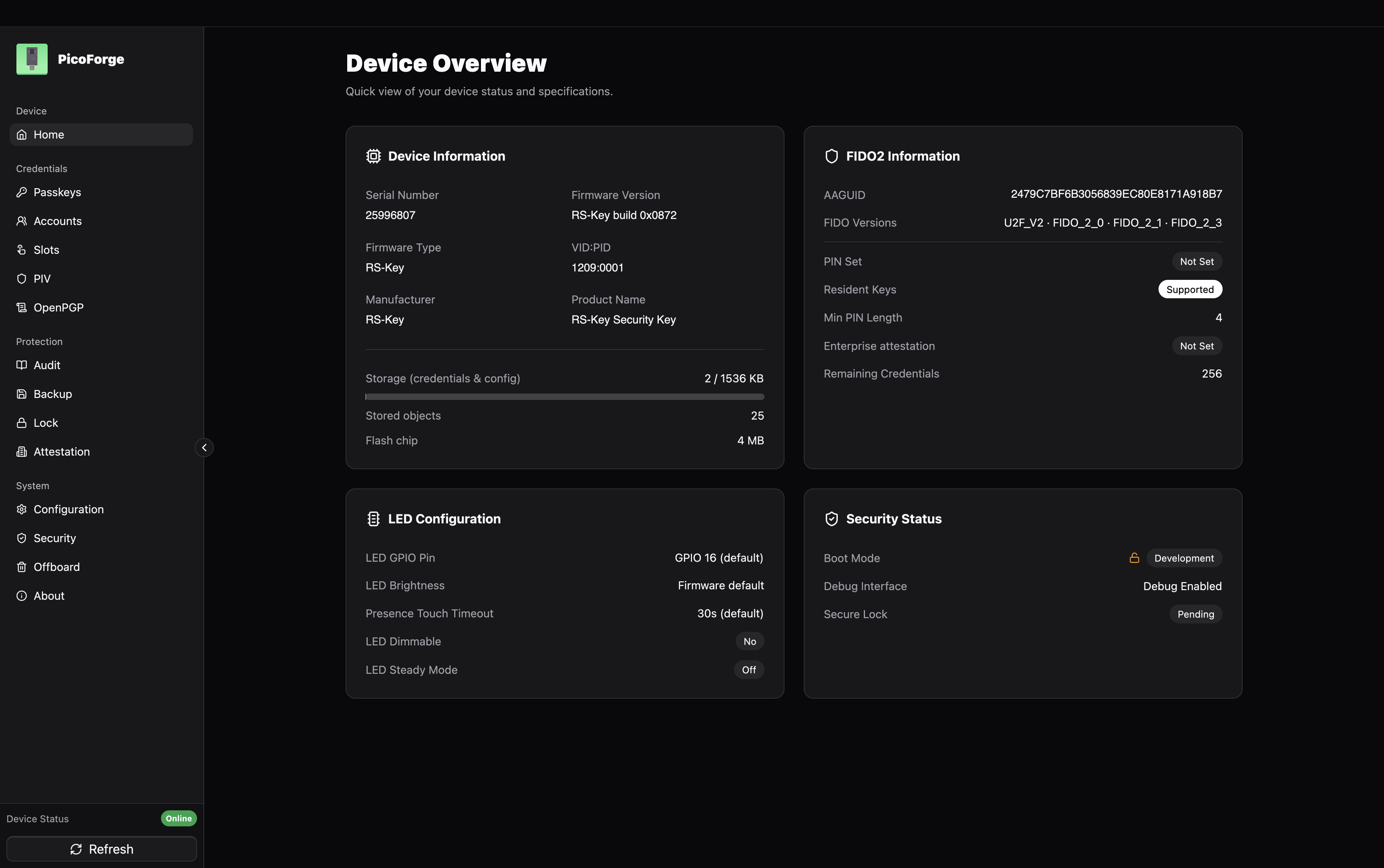
That is a board straight out of step 2, so the screen reads the way yours will:
the identity is the default 1209:0001, no PIN is set yet (that is step 3), and
the boot mode is still Development. production.md is what turns
the last one into a locked-down key — irreversibly, so read it first.
3. Set a PIN (recommended)
rsk fido set-pin
Without the host tools, your browser does the same job: it offers to set a PIN the first time you register a passkey.
Browsers and ssh-keygen will prompt for it when enrolling. 8 wrong attempts
lock the PIN until a reset. Standard security-key behaviour.
4. Enroll something
A passkey: go to any WebAuthn site (or https://webauthn.io to try), register a security key, touch the button when the LED asks.
An SSH key:
ssh-keygen -t ed25519-sk -f ~/.ssh/id_ed25519_sk    # touch twice, enter PIN
ssh-copy-id -i ~/.ssh/id_ed25519_sk you@server
ssh -i ~/.ssh/id_ed25519_sk you@server              # one touch to log in
The id_ed25519_sk file is a handle, not a key. It is useless without the
board. Copy it to other machines you ssh from.
macOS note: Apple’s
/usr/bin/sshhas no FIDO support. Use Homebrew OpenSSH (brew install openssh, then the absolute path/opt/homebrew/opt/openssh/bin/sshor put it first inPATH). Details: guides/ssh.md.
5. Back up your identity (optional but wise)
rsk backup export --scheme bip39          # 24 words, write them down
rsk backup finalize                       # seals the export window
The words recover your deterministic FIDO identity (ssh-sk logins, 2FA
registrations) onto a fresh board with rsk backup restore. Anyone who has the
words can recreate that identity on their own board, so store them like cash.
They do not cover resident passkeys, OpenPGP or PIV keys. See
guides/seed-backup.md.
Where next
- Feature guides: OpenPGP with gpg, PIV, OATH codes, OTP slots, soft-lock, LED colors
- production.md: fuse the master key into OTP + enable secure boot (irreversible, read first)
- threat-model.md: what this device protects against
Hardware
What RS-Key runs on, and the build knobs you need for a board other than the reference one. The full knob reference is in build.md. This page is the short version.
Supported boards
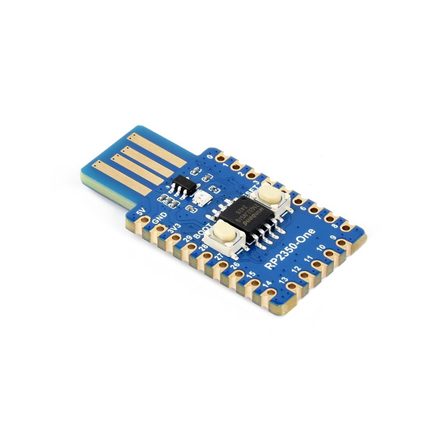 |
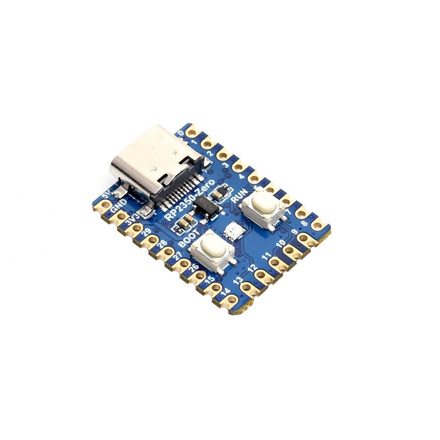 |
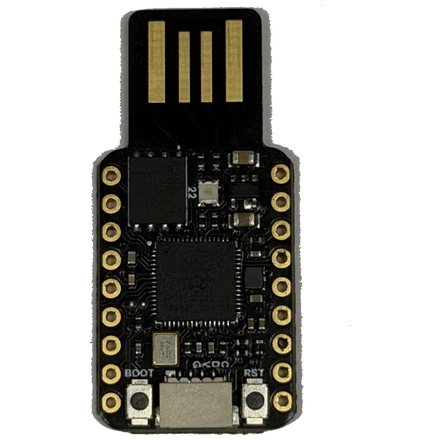 |
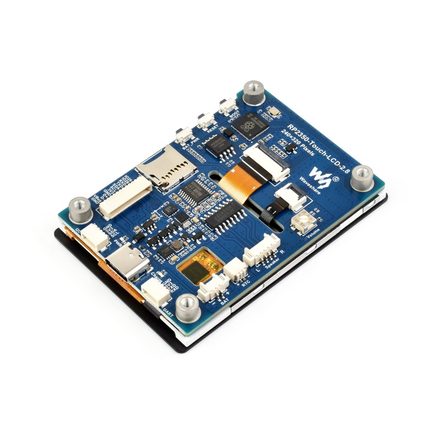 |
| RP2350-One reference · USB-A WS2812 on GPIO16 |
RP2350-Zero mini stick · USB-C |
TenStar RP2350-USB USB-A stick WS2812 on GP22 |
RP2350-Touch-LCD-2.8 trusted display · 2.8″ LCD |
Board photos: Waveshare (RP2350-One / Zero / Touch-LCD-2.8).
Any RP2350 board with a USB connector should work. Development and on-device
testing happen on the Waveshare RP2350-One, where the WS2812 status LED on
GPIO16 works out of the box. Boards without an addressable LED run fine. The
indicator is optional and the firmware just runs dark. A board whose LED sits
behind a power gate — the Seeed XIAO RP2350 powers its WS2812 through GP23 —
lights up once that enable pin is set with LED_POWER_PIN (below).
The RP2350’s dual Cortex-M33, 520 KB SRAM, hardware TRNG, OTP fuses, and glitch detectors do the work. There is no secure element and no debugger requirement: the firmware flashes over USB BOOTSEL, so a bare board and a USB cable are enough.
Defaults and the knobs to change them
The default build targets a 4 MB flash chip with the LED on GPIO16, uses BOOTSEL for user presence, and assumes a standard 12 MHz crystal. For a different board, three compile-time knobs usually cover it:
| Knob | Default | When to change it |
|---|---|---|
FLASH_SIZE | 4M | A board with a different QSPI flash chip (e.g. 8M). build.rs regenerates memory.x from it. Must be ≤ 16 MB and leave ≥ 1 MB for code after the KV store; a 2 MB board also needs a smaller KVMAIN (below). |
KVMAIN | 1408K | A 2 MB board (Seeed XIAO RP2350, Waveshare RP2350-Zero-CM): the default 1408K KV main partition leaves too little for the ~900K image. Shrink it — FLASH_SIZE=2M KVMAIN=896K — to fit. A fully provisioned key uses only a few hundred KB. See build.md. |
LED_PIN | 16 | A board that uses GPIO16 for something else, or wires its addressable LED elsewhere (RP2350A: GPIO 0..=29). |
LED_POWER_PIN | none | A board whose LED sits behind a power gate that must be driven high to light it (e.g. the Seeed XIAO RP2350’s WS2812 on GP23). Set the enable GPIO; it must differ from LED_PIN and any GPIO PRESENCE_PIN. |
USR_LED_PIN | none | A board with a nuisance onboard user LED that lights by default (the Seeed XIAO RP2350’s active-low USR LED on GP25). Set the GPIO to park it off at boot; flip USR_LED_ACTIVE_HIGH=1 for an active-high LED. Must differ from LED_PIN, LED_POWER_PIN, and any GPIO PRESENCE_PIN. |
PRESENCE_PIN | bootsel | A board with a dedicated user-presence button on a GPIO. Set a pin number (0..=29); active-low with a pull-up by default (e.g. 0 for GPIO0-to-GND). |
PRESENCE_ACTIVE_HIGH | 0 | A presence button/sensor that reads high when pressed (a capacitive touch sensor, or a button to VCC). 1 flips the GPIO to pull-down + active-high. Only with a GPIO PRESENCE_PIN. |
LED_KIND | ws2812 | ws2812 (addressable RGB, default), gpio (plain on/off), pimoroni (3-pin PWM RGB), or none (no indicator). See build.md. |
LED_ORDER | rgb | A ws2812 board whose red and green come out swapped (blue fine): set grb (the WS2812B standard). The Waveshare RP2350-One is rgb; most other parts are grb. |
MAX_LEDS | 8 | A board with more than 8 daisy-chained addressable LEDs. The buffer ceiling; the actual connected count is set at runtime (guides/led.md). |
# example: an 8 MB board with a plain LED on GPIO25
env FLASH_SIZE=8M LED_KIND=gpio LED_PIN=25 cargo build --release -p firmware

# example: a 16 MB TenStar RP2350-USB — WS2812 on GP22, standard GRB order
env FLASH_SIZE=16M LED_PIN=22 LED_ORDER=grb cargo build --release -p firmware

# example: a Seeed XIAO RP2350 — WS2812 on GP22, GRB, power-gated by GP23 (driven high),
# its active-low USR LED on GP25 parked off, and its 2 MB flash (smaller KVMAIN)
env FLASH_SIZE=2M KVMAIN=896K LED_PIN=22 LED_ORDER=grb LED_POWER_PIN=23 USR_LED_PIN=25 cargo build --release -p firmware

# example: WS2812 on GP22 and a button-to-GND on GP0 (active-low)
env LED_PIN=22 PRESENCE_PIN=0 cargo build --release -p firmware

# example: an active-high capacitive touch sensor on GP0
env PRESENCE_PIN=0 PRESENCE_ACTIVE_HIGH=1 cargo build --release -p firmware
The four LED knobs (LED_PIN / LED_KIND / LED_ORDER / MAX_LEDS) set only the
boot defaults. A non-none build compiles all three backends, so the pin,
driver, wire order, and buffer ceiling are also changeable at runtime (no
reflash) with rsk hw or PicoForge, which write them to the device’s phy
record
(guides/led.md). The build knobs still matter for picking a
lean none build and for the out-of-the-box default.
Most RP2350A boards work with at most a one-line change. Everything else (USB descriptors, applets, flash layout) is board-independent.
Enclosures
A bare board works fine, but a printed case makes it pocketable. Four community designs fit the boards above:
- Waveshare RP2040-One / RP2350-One case by Patrick van der Leer. Sized for the reference board.
- RP2350 USB case by Vladimir Varzaru (a remix of Patrick’s design). A slimmer USB-stick form.
- Pico 2 Zero FIDO2 case (RP2350) on MakerWorld. Fits the RP2350-Zero.
- Waveshare RP2350 2.8-inch case by @cofob. Designed for RS-Key and recommended for the RP2350-Touch-LCD-2.8. PETG is the recommended print material.
- Waveshare RP2350 2.8-inch case by Mono. Designed for RS-Key, reliable USB and button performance as well as sturdyness. PETG material recommended.
The two Printables designs as well as the Thingiverse design are licensed CC BY-SA 4.0: print, sell, and remix them freely, as long as you credit the authors and keep any derivative under the same license. Check each MakerWorld page for the design license before you reuse the design. All are third-party designs, linked for convenience, not part of this project.
What the hardware does not give you
The OTP fuses and secure boot (production.md) are real hardening, but the RP2350 is a general-purpose microcontroller, not a certified secure element. Physical attacks are out of scope: decapping, microprobing, fault injection beyond the on-chip glitch detectors, power/EM side channels. See the threat model and limitations.
Build options
Every knob is compile-time. Set environment variables and cargo features at
cargo build and they bake into the image. Nothing here changes at runtime
(except where noted for the phy record).
# the general shape
nix develop -c env KNOB=value cargo build --release -p firmware [--features ...]
nix develop -c scripts/pt.sh target/thumbv8m.main-none-eabihf/release/firmware firmware-pt.elf
picotool uf2 convert firmware-pt.elf -t elf firmware.uf2
The middle step embeds the partition table; skip it and
the key ships with its storage exposed to the bootloader. nix build .#firmware
folds all three together.
flowchart TD
    knobs["env knobs + cargo features"] --> build["cargo build (or nix build)"]
    build --> elf["firmware.elf"]
    elf --> pt["scripts/pt.sh<br/>embed partition table"]
    pt --> conv["picotool uf2 convert"]
    conv --> uf2["firmware.uf2"]
    uf2 --> flash["BOOTSEL flash"]
    pt -. "secure boot only — seal the ELF" .-> seal["picotool seal --sign<br/>signing key (host-only)"]
    seal -.-> sconv["picotool uf2 convert"]
    sconv -.-> signed["firmware-signed.uf2"]
    signed -.-> flash
Cargo features
| Feature | Default | Effect |
|---|---|---|
no-touch | off | Auto-confirm user presence. FIDO operations (makeCredential, getAssertion, U2F, reset, selection) and OpenPGP UIF data objects no longer require a press of the presence button (BOOTSEL by default, or PRESENCE_PIN when set). Requiring a touch is the default and is not a feature; --features no-touch is the explicit escape hatch for the automated suites (tests/, python-fido2, OpenPGP card tests), which cannot press a button and would hang on the (default) touch build. Never ship a no-touch build. |
advertise-pqc | off | Prepends ML-DSA-87 (COSE −50), ML-DSA-65 (−49) and ML-DSA-44 (−48) to the getInfo algorithms list, in descending security order. Off by default because released Firefox versions abort the entire getInfo parse on an unknown COSE id and report the authenticator broken. PQC capability is on regardless of this flag. makeCredential negotiates −49 / −48 from the request’s pubKeyCredParams; the flag only controls advertising. |
fips-profile | off | Bakes a locked FIPS-style policy into the image: ES256K (secp256k1) leaves the FIDO menu, the minimum PIN rises to 6 and trivially guessable PINs are refused (the strong-pin policy below), the vendor seed export is refused, and PIV refuses new 3DES management keys and RSA-1024. The default build is unchanged; with secure boot the policy is sealed by your signature. A profile, not a FIPS validation. Details and rationale: guides/fips.md. |
strong-pin | off | Raises the FIDO clientPIN minimum to 6 code points (from CTAP’s default 4) and refuses the most guessable PINs: a repeated period (000000, 121212, 123123), a ±1 run (123456, 654321), two or fewer distinct code points (112211 — two smudges on the glass is a two-symbol search space at any length), and ten denylisted keypad shapes (159753, 123321, …). Every rule counts code points, not bytes, matching the floor beside it. A narrow PIN-hardening knob: unlike fips-profile (which bundles this same PIN policy with dropping secp256k1, refusing the seed export, and constraining PIV), it changes only the PIN policy. Off by default; the default build keeps the CTAP-standard 4-code-point floor. Rationale: on the RP2350 a BOOTSEL flash snapshot/restore rolls back the wrong-PIN counter (#37), so a longer, non-trivial PIN is the practical bound on offline brute force. Enforced on the host setPIN/changePIN path and the trusted-display PIN pad. |
strict-up | off | Require a touch on every getAssertion. By default RS-Key honors the platform’s silent pre-flight probe (up:false): it returns the discovery assertion with no touch and the UP flag clear, so a WebAuthn login with an allowCredentials (non-resident) credential is a single touch, matching the CTAP2 spec and YubiKey. With strict-up the button is polled even for that probe, so such a login asks for two touches (one for the probe, one for the real assertion). A deliberately stricter “every assertion needs an explicit gesture” stance for those who want it; it is not spec-conformant for up:false. Resident-credential / passkey logins are a single touch either way. fido-conformance enables this implicitly (the conformance pass was validated with it). |
always-uv | off | Bake the CTAP 2.1 alwaysUv option on by default, so the key requires user verification (a PIN — or the display build’s built-in UV pad) for every makeCredential / getAssertion straight out of the box, with no post-flash ykman fido config toggle-always-uv. The shipped image leaves alwaysUv off until a platform turns it on; this flag flips the default. It stays runtime-toggleable — toggleAlwaysUv writes an override that survives reboots but not an authenticatorReset, which restores this compiled default. Set a PIN after flashing: with alwaysUv on and no PIN, FIDO operations return CTAP2_ERR_PUAT_REQUIRED until one is set — the standard cue for the platform (Windows, Chrome) to prompt for a PIN. While alwaysUv is on the CTAP1/U2F interface is disabled (CTAP 2.1 §7.2.4, as on a YubiKey): U2F only proves presence, never verification, so legacy U2F-only logins stop working, and getInfo drops U2F_V2 from its advertised versions; WebAuthn / CTAP2 (passkeys) are unaffected. The one exception §7.2.4 allows is a build “protected by a built-in user verification method”: on a display build with a PIN set, U2F stays available and every register / authenticate collects the PIN on the panel instead of a touch. |
largeblob-ext | off | Serve the CTAP 2.3 §12.4 largeBlob extension instead of the CTAP 2.1 large-blob design. Not additive, and not a choice the firmware could dodge: §12.4 says “Authenticators MUST NOT support both extensions”, so enabling it withdraws the largeBlobKey extension, the authenticatorLargeBlobs command (0x0C, which then answers CTAP1_ERR_INVALID_COMMAND), the largeBlobs option and maxSerializedLargeBlobArray. Blobs then live per credential (discoverable credentials only) instead of in one platform-managed array, and a whole blob rides in the getAssertion that reads or writes it — up to 4046 bytes, sealed at rest under the device seed with the credential id as AAD, which the 2.1 design does not need because the platform encrypts that array itself. Off by default, and think before turning it on: the 2.1 pair is what every shipping browser drives today, so a largeblob-ext key loses WebAuthn largeBlob support with current clients. |
display | off | Experimental trusted-display build for a screen + touch board (Waveshare RP2350-Touch-LCD-2.8). Adds an on-screen Approve / Deny that paints the real relying party for every touch (Deny refuses with OPERATION_DENIED), an on-device PIN pad (built-in user verification (options.uv), plus a CCID pinpad so GnuPG / OpenSC collect the OpenPGP / PIV PIN on the panel, never over USB), a read-only Apps browser (OpenPGP / PIV / OATH state, no PIN), a Passkeys manager (delete / rename on-device), and Settings (device & FIDO PINs, an optional scrambled PIN pad, on-screen BIP-39 / SLIP-39 recovery export, audit log, factory reset). Entirely dep:-gated. A standard key compiles none of it, so its image is unaffected. Build it LED_KIND=none FLASH_SIZE=16M … --features display (the panel takes GPIO16 for its backlight; a compile-time guard enforces LED_KIND=none). Full walkthrough with screenshots: guides/display.md. |
strict-config | off | Restores the historical strict admin-write authorization. The DEFAULT build is now the permissive, full-ykman/YubiKey-compatible admin surface: device-config writes (CCID Management WRITE CONFIG, FIDO vendor CONFIG_WRITE, the CTAPHID 0x43 and OTP-HID 0x15 transport writes) are ungated, and Management RESET (device-wide factory reset) plus the OTP-HID DEVICE_CONFIG / SCAN_MAP / NDEF slots are served. --features strict-config re-imposes the presence/PIN gates and refuses the ungated transport writes — the historical shipped behavior. This deliberately weakens the DEFAULT threat model: any USB host can rewrite the reported identity with no operator confirmation (threat-model.md). Not the runtime flash flag EF_HARDENED. Ship it as firmware-strict-config. |
Environment variables
| Variable | Default | Values | Effect |
|---|---|---|---|
BOARD | none | a file name under firmware/boards/ (abrobot-4m, abrobot-16m, waveshare-one, waveshare-touch-lcd, tenstar-usb, seeed-xiao) | Load that board’s knob set instead of setting the LED / presence / flash / display variables one by one. Every variable below still wins when you set it explicitly, so a board file is a default set, not a lock. It selects no cargo features — a display board still needs --features display. Each shipped board file is smoke-built in CI. |
VIDPID | RSKey | RSKey, Yubikey5, YubikeyNeo, YubiHSM, NitroHSM, NitroFIDO2, NitroStart, NitroPro, Nitro3, Gnuk, GnuPG, Pico, Dev | USB VID/PID preset. The default RSKey (0x1209:0x0001) is this project’s own pid.codes identity, not a masquerade. The opt-in Yubikey5 (0x1050:0x0407) instead presents Yubico’s VID/PID and swaps the descriptor strings to Yubico / YubiKey RSK …. That is what makes ykman, Yubico Authenticator and the stock Yubico udev rules recognize the device; build it only for local interop / the interop suite. Pico = the Raspberry Pi generic id (0x2E8A:0x10FD); Dev = a non-colliding placeholder (0xFEFF:0xFCFD). An unknown preset fails the build. The vendor-mimicking presets are for local interop only. Never distribute hardware carrying them. |
USB_VID / USB_PID | from preset | 0xHHHH | Raw override, applied on top of the preset (you can override either half alone). |
USB_MANUFACTURER / USB_PRODUCT | from preset | string | Raw override of the USB descriptor strings. The default is RS-Key / RS-Key Security Key; the Yubico VID instead bakes Yubico / YubiKey RSK OTP+FIDO+CCID. The project’s own tools (rsk, rsk-tui) match the reader by the RS-Key (or RSK) token in the product string. |
FW_VERSION | 5.8.0 | X.Y.Z or X.Y | The firmware version reported everywhere a tool looks: management DeviceInfo (ykman info), FIDO getInfo, CTAPHID INIT, OATH/OTP/PIV version fields, OpenPGP’s vendor VERSION (INS 0xF1). Yubico tools gate features on it; 5.8.0 mimics a current YubiKey 5. Does not change the OpenPGP card version (3.4) or the USB bcdDevice (an internal build counter). |
XOSC_DELAY_MULT | 128 | 1..=1024 | Crystal-oscillator startup-delay multiplier (“delayed boot”). A longer settle wait is intended to harden the early-boot clock-switch window against glitch/fault injection. 128 is the embassy default. |
FLASH_SIZE | 4M | bytes, 0xHEX, or <n>K/<n>M | External QSPI flash size. build.rs regenerates memory.x from it. The KV store (KVMAIN + KVCNT) stays pinned at the top and the code region is the rest; 4M with the default KVMAIN reproduces the checked-in layout byte-for-byte. Use this for boards with a different flash chip (e.g. 8M); must be ≤ 16 MB and leave ≥ 1 MB for code after the KV store (a 2 MB board needs a smaller KVMAIN, below). |
KVMAIN | 1408K | bytes, 0xHEX, or <n>K/<n>M | Size of the KV main partition (credentials, keys, OpenPGP DOs). The default 1408K is the checked-in layout; shrink it to free code space on a small flash. A 2 MB board (Seeed XIAO RP2350, Waveshare RP2350-Zero-CM) can’t fit the firmware (~900K) under a 1408K KVMAIN, so build it FLASH_SIZE=2M KVMAIN=896K (896K creds + 128K counters + 1024K code). Sector-aligned, min 128K; the counter partition (KVCNT, 128K) is fixed. Baked into both memory.x and flash_storage.rs from one value, so the two never drift. Set at build time only — changing it on a provisioned device shifts the partition offsets and orphans the store. |
LED_PIN | 16 | 0..=29 | The status-LED GPIO for the ws2812 and gpio backends (RP2350A). Default GPIO16 is the Waveshare RP2350-One. Point it at a free GPIO on boards that use 16 for something else; the indicator simply drives whatever pin you pick. (Unused by pimoroni, which has fixed PWM pins, and by none.) |
LED_POWER_PIN | none | none or 0..=29 | An optional GPIO driven high at boot to power a gated LED rail — some boards put the addressable LED behind a load switch. The Seeed XIAO RP2350 is the case in point: its onboard WS2812 data is on GP22 but its power sits behind GP23, so the LED stays dark until GP23 is high (LED_PIN=22 LED_ORDER=grb LED_POWER_PIN=23). Held for the device’s lifetime; must differ from LED_PIN and a GPIO PRESENCE_PIN (rejected at compile time). Boot-only, so it is not in the runtime phy record. Ignored by LED_KIND=none. |
USR_LED_PIN | none | none or 0..=29 | An optional GPIO wired to a nuisance onboard user/status LED that the firmware drives to its OFF level at boot and holds. The Seeed XIAO RP2350’s USR LED sits on GP25, is active-low, and comes up lit (weak pull-down); USR_LED_PIN=25 parks it high so it stays dark. Independent of the addressable status LED, so it works on a LED_KIND=none build too. Held for the device’s lifetime; must differ from LED_PIN, LED_POWER_PIN, and a GPIO PRESENCE_PIN (rejected at compile time), and is unsupported on a display build (the panel replaces the onboard LED). Boot-only, not in the runtime phy record. |
USR_LED_ACTIVE_HIGH | 0 | 0 / 1 | Polarity of the USR_LED_PIN LED. 0 (default) = active-low (lit when the pin is low, so OFF = drive high — the XIAO USR LED). 1 = active-high (lit when high, so OFF = drive low). Ignored without a USR_LED_PIN. |
PRESENCE_PIN | bootsel | bootsel or 0..=29 | User-presence input source. Default bootsel keeps the BOOTSEL hardware-button path. Set a GPIO number for a dedicated button (active-low with an internal pull-up by default; flip with PRESENCE_ACTIVE_HIGH). Example: PRESENCE_PIN=0 for a button to ground on GPIO0. |
PRESENCE_ACTIVE_HIGH | 0 | 0 / 1 | GPIO presence-button polarity, only meaningful with a GPIO PRESENCE_PIN. 0 (default) = active-low: button to ground, internal pull-up, a press reads low. 1 = active-high: internal pull-down, a press reads high, for a capacitive touch sensor or a button to VCC. Ignored for the BOOTSEL default. |
WAKE_PIN | 25 | none or 0..=29 | display builds only. The button that wakes the panel from display sleep. Default 25 is the Waveshare RP2350-Touch-LCD-2.8’s BAT_PWR button. none makes wake touch-only (no button); any other GPIO selects a different button. A value in the LCD/touch range (10..=18) is rejected at compile time. The display-sleep timeout itself is set on-device (Settings → Display sleep). |
WAKE_ACTIVE_HIGH | 0 | 0 / 1 | Wake-button polarity (display builds, with a GPIO WAKE_PIN). 0 (default) = active-low (internal pull-up, press reads low, e.g. BAT_PWR to ground); 1 = active-high (internal pull-down). |
LED_KIND | ws2812 | ws2812 / gpio / pimoroni / none | The LED driver backend, and the boot default. A non-none build compiles all three so the driver/pin/order are runtime-switchable via rsk hw / PicoForge (see below). ws2812 = a single addressable RGB on LED_PIN (the Waveshare default). gpio = a plain on/off LED on LED_PIN. Hue/brightness collapse to lit/unlit, but the blink pattern still distinguishes statuses. pimoroni = a 3-pin PWM RGB (Pimoroni Tiny 2350: R=GPIO18, G=GPIO19, B=GPIO20, common-anode). none = no indicator (the status engine still runs; nothing renders it, and the phy LED fields are ignored). |
LED_ORDER | rgb | rgb / grb | WS2812 wire byte order (ws2812 backend only). The Waveshare RP2350-One is unusually rgb (the default); standard WS2812B parts (e.g. the TenStar RP2350-USB) are grb. If a ws2812 board comes up with red and green swapped (blue fine), flip this to grb. |
MAX_LEDS | 1 | 1–64 | PIO state-machine and frame-buffer ceiling for addressable LEDs. The actual connected count is set at runtime via rsk hw --led-num and must be ≤ MAX_LEDS. Default 1 is a single onboard LED; a board with a chain of N builds with MAX_LEDS=N (up to 64). |
FAKE_MKEK / FAKE_DEVK | unset | 64 hex chars | Test builds only. Bakes a fake OTP master key / device key into the image instead of reading the OTP fuses, so the whole OTP migration path can be exercised with zero fuse writes. The build prints a loud warning and the key is greppable in the binary. Flashing a FAKE build onto a provisioned device migrates its data under the fake key. Going back orphans that data (recovery = per-applet resets). Never flash one on a device you care about. |
The LED_PIN / LED_KIND / LED_ORDER / MAX_LEDS values are boot defaults
only. A
non-none build compiles all three backends, so the LED pin, driver, and wire
order are runtime-configurable (no reflash) with rsk hw (or PicoForge),
which write them to the device’s phy record. The build knobs decide the
out-of-the-box behaviour and let you drop to a lean none build. Everything
else is a rsk hw call away (guides/led.md).
Verify what got baked without flashing:
rg PK_USB_VID  target/thumbv8m.main-none-eabihf/release/build/firmware-*/output   # decimal: 4617 = 0x1209
rg PK_FW_VERSION target/thumbv8m.main-none-eabihf/release/build/rsk-sdk-*/output
rg PK_XOSC_DELAY_MULT target/thumbv8m.main-none-eabihf/release/build/firmware-*/output
The firmware-* glob matches one build dir per feature combination you have
built, so a stale entry can show an old value. Read the freshest one (or
cargo clean -p firmware first) if the output looks doubled.
Flash size and the memory map
FLASH_SIZE regenerates memory.x: the KV store stays pinned to the top
of flash and only the code region grows. A 16 MB board just gets more (unused)
code headroom. The credential capacity is unchanged (why the flash is mostly
empty by design: architecture.md).
One exception, and only at 16 MB: the store stops a sector short of the top,
because the bootrom’s RP2350-E10 workaround owns the last 256 bytes of the XIP
window (0x10FFFF00) and picotool partition create refuses a table that claims
them — so a 16 MB image could not carry the fence at all. The reserved 4 KB is
outside every partition, which is where the bootrom needs it.
The KV store is 1.5 MB by default (KVMAIN 1408K + KVCNT 128K). On a 2 MB
board that leaves too little for the ~900K image, so the firmware can’t link.
KVMAIN shrinks the main partition to make room: build a 2 MB Seeed XIAO RP2350
or Waveshare RP2350-Zero-CM with FLASH_SIZE=2M KVMAIN=896K (896K creds + 128K
counters + 1024K code). build.rs bakes the size into both memory.x and
flash_storage.rs, so the two partitions never disagree, and it rejects a split
that leaves under 1 MB for code with a message that names the fix. A fully
provisioned key needs only a few hundred KB, so 896K is ample.
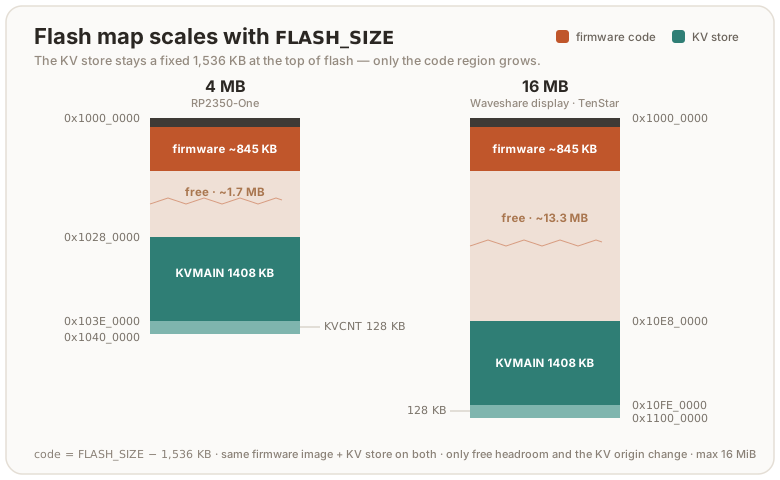
At the 4M default the code region is 2560K; the shipping image uses roughly a
third of it. check.sh enforces a ratchet well under that: a ceiling that
hugs the current image, so a runaway dependency (a whole extra EC curve is
~150 KiB) or any surprise growth trips it long before the linker’s hard limit.
Lower FIRMWARE_FLASH_BUDGET_KIB when the image shrinks; raise it in the same
commit when a real feature legitimately grows it.
RAM has the mirror-image ratchet, FIRMWARE_STACK_FLOOR_KIB. Whatever .data
and .bss do not take is stack, so a new static costs stack depth — and the
deepest paths on this chip (ML-DSA-65 keygen, the RSA modexp chain) run close
enough to the ceiling that it has already wedged a device. The gate reads the
figure straight out of the ELF and fails under the floor. The images link
through flip-link, which places
the stack below the statics, so an overflow faults on unmapped memory instead of
quietly overwriting them; that needs rust-lld on PATH, which the dev shell
arranges, so build inside nix develop.
The partition table
The shipped image carries an RP2350 partition table that fences the KV store off
from the USB bootloader: picotool save and picotool load over the store answer
permission failure, while the running firmware keeps full access to it. It is a
defence-in-depth layer against the BOOTSEL snapshot/restore rollback, and it is a
real barrier only where secure boot is on — read
threat-model.md
before quoting it as protection.
scripts/pt.sh reads the fence out of the built ELF’s own __kvmain_start /
__kvcnt_end symbols — the same ones flash_storage.rs uses to find the store —
so it follows FLASH_SIZE / KVMAIN / BOARD with no second copy of the layout
to keep in step. check.sh asserts the emitted table back against those symbols,
because a table that misses the store still links, still boots, and then loses the
firmware’s writes at runtime.
⚠️ A bare
cargo builddoes not produce it. The table is added after linking, sotarget/…/release/firmwarecarries none and a key flashed straight from that ELF is unfenced.nix build .#firmwareapplies it; for a local cargo build, apply it yourself:cargo build --release -p firmware scripts/pt.sh target/thumbv8m.main-none-eabihf/release/firmware firmware-pt.elf picotool load firmware-pt.elf -t elf
Examples
# default: touch build, RS-Key identity (0x1209:0x0001), fw 5.8.0
cargo build --release -p firmware

# opt-in Yubico interop flavor (so ykman / Yubico Authenticator see the device)
env VIDPID=Yubikey5 cargo build --release -p firmware

# no-touch test build (for the automated suites)
cargo build --release -p firmware --features no-touch

# Nitrokey FIDO2 identity with its own version number
env VIDPID=NitroFIDO2 FW_VERSION=1.4.0 cargo build --release -p firmware

# advertise PQC in getInfo (breaks released Firefox — see above)
cargo build --release -p firmware --features advertise-pqc

# ship with CTAP 2.1 alwaysUv enabled by default (set a PIN after flashing)
cargo build --release -p firmware --features always-uv

# strict admin-write posture (the historical default; config writes stay gated)
cargo build --release -p firmware --features strict-config
nix build (hermetic, no dev shell)
The flake exposes the firmware as a package, so you can build a UF2 without entering the dev shell or having a Rust toolchain installed. Nix pins the toolchain, the cross target, and every dependency:
nix build .#firmware                 # default touch image
ls result/                           # firmware.elf  firmware.uf2
result/firmware.uf2 is functionally the image the dev-shell cargo build
produces. Unlike the dev-shell build, it is bit-for-bit
reproducible: the derivation remaps the two absolute build inputs out of
the binary (the per-build sandbox dir and the toolchain store path; both
land in panic-location strings in .rodata, plus DWARF in the .elf) with
stable --remap-path-prefix, so one flake.lock yields one firmware.uf2
on every machine of a platform. The daily repro job in
deep-checks
proves it (nix build twice, the second with --rebuild so nix compares
every output byte) and publishes the canonical sha256 in its run summary.
To verify a published image: nix build .#firmware at the release commit
and compare hashes. A sealed image can’t be reproduced by a third party
(the signature is the signer’s); verify the unsigned payload instead, then
check the seal with picotool. The flavors mirror the
CI matrix:
| Attribute | Image |
|---|---|
.#firmware (default) | touch build, RS-Key identity (0x1209:0x0001), fw 5.8.0 |
.#firmware-no-touch | --features no-touch (the test build) |
.#firmware-fips | --features fips-profile |
.#firmware-pqc | --features advertise-pqc |
.#firmware-strong-pin | --features strong-pin (6-code-point PIN floor + trivial-PIN block; also .#firmware-strong-pin-pqc) |
.#firmware-always-uv | --features always-uv (CTAP 2.1 alwaysUv on by default; also .#firmware-always-uv-pqc) |
.#firmware-strict-up | --features strict-up (touch on every assertion — not spec-conformant for up:false; also .#firmware-strict-up-pqc) |
.#firmware-display | --features display, FLASH_SIZE=16M, LED_KIND=none (experimental, Waveshare RP2350-Touch-LCD-2.8) |
.#firmware-2mb | default features + RS-Key identity, FLASH_SIZE=2M, KVMAIN=896K (2 MB boards: Seeed XIAO RP2350, Waveshare RP2350-Zero-CM) |
.#firmware-16mb | default features + RS-Key identity, FLASH_SIZE=16M (16 MB boards, e.g. TenStar RP2350-USB) |
.#firmware-strict-config | --features strict-config (historical strict admin-write posture; the default firmware is now the permissive full-ykman admin surface) |
Two caveats:
-
The output is UNSIGNED. On a secure-boot device you still seal it with your key. The signing key deliberately never enters the build sandbox:
# the ELF, not the UF2: sealing a UF2 leaves the image's own unsigned
# IMAGE_DEF first in the chain, and a secure-boot device refuses that
picotool seal --sign --hash result/firmware.elf -t elf firmware-signed.elf -t elf \
    ~/.rs-key-secrets/secure_boot_key.pem ~/.rs-key-secrets/otp_secureboot.json \
    --major 1 --minor 0 --rollback 1
picotool uf2 convert firmware-signed.elf -t elf firmware-signed.uf2
The
.pemis your signing key, the.jsonis wheresealwrites the boot-key fingerprint, and--major/--minorstamp an image version into the boot metadata: a plainmajor.minorlabel, separate from both the firmware version RS-Key reports (5.8.0by default) and the rollback version. The full meaning of each flag is in production.md.If you have enabled anti-rollback, the seal additionally needs
--rollback <your board's floor>, a separate, deliberate step with its own rules and a finite OTP budget. Don’t add it blindly; the full flashing-with-rollback workflow is in anti-rollback.md. -
The env knobs above are declarative Nix args, not ambient env. A plain
nix buildbakes the defaults; to customize, pass them to the builder. For a config you reuse, add a one-line preset package (the flake shipsfirmware-pico = mkFirmware { name = "firmware-pico"; vidpid = "Pico"; }as a copy-me example) and build it:nix build .#firmware-picoFor a one-off without committing a package, call the exposed builder. (The
--impurehere only letsgetFlakeread the working tree; the knobs themselves are pure. A committed/pushed flakeref needs no flag.)nix build --impure --expr \ '(builtins.getFlake (toString ./.)).lib.${builtins.currentSystem}.mkFirmware { name = "fw"; vidpid = "Nitro3"; fwVersion = "2.0.0"; }'Knobs:
vidpid,usbVid,usbPid,fwVersion,xoscDelayMult,flashSize,ledPin,presencePin,fakeMkek,fakeDevk(mirroring the env vars above). As a convenience each also falls back to the like-named env var, soVIDPID=Pico nix build --impure .#firmwareworks for a quick throwaway, but the declarative arg is the reproducible path and needs no--impure.
nix run — host tools without the dev shell
The host tooling is also exposed as flake apps, so it runs straight from the
flake without nix develop (Nix pins every dependency):
nix run .#rsk -- status          # the Python device CLI (rsk --help for groups)
nix run .#rsk-tui                # the live ratatui dashboard (prebuilt binary)
nix run .#flash -- --help        # build + sign + flash, one command (secure boot)
#rsk wraps the bundled tools/rsk package on the pinned interpreter; #rsk-tui
is a prebuilt host binary (no compile-on-run). Both are also buildable as
packages (nix build .#rsk-tui).
nix run .#flash wraps the secure-boot flash ritual end to end: it seals
(signs) an unsigned image, reboots the device into BOOTSEL, loads it, then
reboots. With no argument it seals the reproducible default firmware
(.#firmware); pass a path to seal a flavor you built yourself
(nix run .#flash -- firmware-no-touch.uf2). It reads the signing key from the
host (~/.rs-key-secrets/{secure_boot_key.pem,otp_secureboot.json} by default,
override the directory with RS_KEY_SECRETS) and stamps --rollback 1 into the
seal (set RSK_ROLLBACK to change). It prompts before flashing (-y skips). The
device must already run secure boot with the matching boot key provisioned; the
full ritual, the anti-rollback rules, and recovery are in
production.md and anti-rollback.md.
Runtime overrides (phy record)
The rescue applet can store a small config record in flash (rsk /
rsk-tui expose the safe fields). At boot, a stored VID/PID and product
string override the compile-time defaults, useful to re-identify a device
without rebuilding. A bad value can make the device enumerate strangely;
recovery is a BOOTSEL reflash (which never reads the record) or rewriting the
record over CCID.
The effective identity is resolved in this order:
flowchart TD
    a["VIDPID preset"] --> b["USB_VID / USB_PID raw override (compile time)"]
    b --> c["phy record (runtime, at boot)"]
    c --> d["effective VID/PID + product string"]
Notes
- The PC/SC reader name comes from the USB strings. The default build reads
RS-Key RS-Key Security Key …, and the project’s own tools (rsk,rsk-tui) match theRS-Keytoken.ykmanand Yubico Authenticator derive the device’s PID purely from that name. They need theYubico YubiKeywords and theOTP/FIDO/CCIDtokens, which only the opt-inVIDPID=Yubikey5flavor supplies (Yubico YubiKey RSK OTP+FIDO+CCID); on the default build those tools do not see the device.gpg,ssh -sk, browsers, libfido2 and OpenSC are identity-independent and work on either build. bcdDevice(USB device release) is an internal build counter, not the firmware version.- The two UF2 flavors on a release build of this repo:
firmware.uf2(touch) andfirmware-test.uf2(no-touch).scripts/check.shbuilds both.
Releases & verification
Releases live on the GitHub Releases
page. Each is cut from a v* git tag by the
release workflow.
It builds every artifact reproducibly, hashes it, and signs the manifest.
What a release contains
-
Fourteen firmware images:
rs-key-<tag>-<flavor>.uf2. Every published image requires a physical touch; theno-touchtest builds are never released (a signed presence-bypass asset would remove the consent gate):flavor flags use defaulttouch the normal build; start here pqc+ advertise-pqc advertises all three ML-DSA sets in getInfo (breaks old Firefox) fips+ fips-profile the locked FIPS-style policy (guides/fips.md) fips-pqc+ both strong-pin+ strong-pin 6-code-point PIN floor + trivial-PIN block (build.md, threat-model.md) strong-pin-pqc+ both always-uv+ always-uv bakes CTAP 2.1 alwaysUvon: user verification (a PIN) for every operation, U2F disabled. Set a PIN after flashing (build.md)always-uv-pqc+ both strict-up+ strict-up not spec-conformant: a touch on every assertion, so a WebAuthn allowCredentialslogin asks for two touches (build.md). Pick it only if you want that stricter stancestrict-up-pqc+ both display+ display experimental trusted-display build (Waveshare RP2350-Touch-LCD-2.8, guides/display.md) 2mbFLASH_SIZE=2M KVMAIN=896K2 MB boards (Seeed XIAO RP2350, Waveshare RP2350-Zero-CM) 16mbFLASH_SIZE=16M16 MB boards (e.g. TenStar RP2350-USB) strict-config+ strict-config the historical strict admin-write posture: config writes stay presence/PIN-gated and the ungated transport writes are refused (build.md, threat-model.md). The defaultbuild is now the permissive full-ykman admin surfaceAll fourteen present the default RS-Key USB identity (
0x1209:0x0001). For the YubiKey-interop identity, buildVIDPID=Yubikey5yourself (build.md). -
SHA256SUMS: a checksum for every image and the SBOM. -
SHA256SUMS.sigstore.json: a keyless cosign signature ofSHA256SUMS(sigstore/Fulcio; the signer is the reusable build workflow’s GitHub OIDC identity,release-build.yml, see the verify step below; logged in Rekor). Releases up to and including v0.4.10 carry the same file under the older nameSHA256SUMS.cosign.bundle— identical bytes, and.sigstore.jsonis simply the canonical extension for what it always was (application/vnd.dev.sigstore.bundle.v0.3+json). Those releases are immutable and cannot be renamed in place, so both names exist in the wild. -
rs-key-<tag>.intoto.jsonl: the build-provenance attestation, as a file. The authoritative copy stays in GitHub’s attestation API and in Rekor; this one is for checking a download offline. -
rs-key-<tag>-sbom.cdx.json: a CycloneDX software bill of materials for the firmware’s dependency tree.
The images are UNSIGNED for secure boot. The cosign signature attests who built them, not the boot seal. On a secure-boot device you seal an image with your own key before flashing.
nix run .#flashdoes it, or see production.md. The reproducibility claim is about the unsigned payload (a seal is signer-specific and not reproducible by a third party).
Verify a download
Grab the images you want plus SHA256SUMS and the signature —
SHA256SUMS.sigstore.json, or SHA256SUMS.cosign.bundle on releases up to
v0.4.10. Same bytes either way; substitute the name you actually downloaded.
# 1. the checksums file is authentic (keyless cosign — needs cosign >= 2.0)
#    The signer is the *reusable* build workflow (release-build.yml), not the
#    thin release.yml caller: a workflow_call job's OIDC identity is its own
#    job_workflow_ref, so that is what the Fulcio cert's SAN carries.
cosign verify-blob \
  --bundle SHA256SUMS.sigstore.json \
  --certificate-identity-regexp '^https://github\.com/TheMaxMur/RS-Key/\.github/workflows/release-build\.yml@refs/tags/v.*' \
  --certificate-oidc-issuer 'https://token.actions.githubusercontent.com' \
  SHA256SUMS

# 2. the images match the (now-trusted) checksums
sha256sum -c SHA256SUMS
Both must pass. Step 1 proves SHA256SUMS was produced by this repo’s release
workflow; step 2 ties each .uf2 (and the SBOM) to it.
Verify the build is reproducible
The images are bit-for-bit reproducible per platform, per flake.lock, so you can
rebuild them yourself and compare (no need to trust the published binary):
git checkout <tag>
nix build .#firmware              # the default flavor (others: .#firmware-fips, …)
sha256sum result/firmware.uf2     # compare against SHA256SUMS for rs-key-<tag>-default.uf2
A match on Linux reproduces the CI-built artifact exactly. (Cross-platform identity, macOS vs Linux, is not guaranteed; the canonical bytes are the Linux ones the workflow publishes.)
Supply chain
How a downloaded RS-Key release proves it came from this source tree, was built by this project’s CI, and pulls in only reviewed dependencies. And how you verify each claim yourself.
No private keys are involved here. The build provenance is keyless (sigstore/Fulcio, signed against this workflow’s GitHub OIDC identity, recorded in the public Rekor transparency log). The only signing key in the project is the secure-boot key. That is a different thing entirely. It seals an image so the RP2350 bootrom will run it. It has nothing to do with the supply chain. See production.md for that.
What every release carries
| Layer | Artifact | What it proves |
|---|---|---|
| Reproducible build | the 14 .uf2 flavors | the binary is a pure function of the source at the tag. Anyone can rebuild it — which says the BUILD is deterministic, not that the machine code preserves what the source proves |
| Repro gate | (CI, blocking) | the release job fails if any flavor doesn’t rebuild bit-identical, so a non-reproducible image is never published |
| Checksums + signature | SHA256SUMS + SHA256SUMS.sigstore.json | the hashes were signed by this repo’s release workflow (keyless cosign). Up to v0.4.10 the same file is named SHA256SUMS.cosign.bundle |
| Build provenance | a GitHub attestation, plus rs-key-<tag>.intoto.jsonl on the release | which reusable workflow, at which commit, on which runner built each .uf2. SLSA v1 Build L3, keyless via attest-build-provenance. The API copy is authoritative; the file is for offline checking |
| SBOM | rs-key-<tag>-sbom.cdx.json | the CycloneDX bill of materials for the firmware crate |
| Dependency audit | supply-chain/ (in-repo) | every dependency is covered by an imported audit or a recorded exemption (cargo-vet) |
The toolchain that builds it
A reproducible build says the binary is a pure function of the source and the
toolchain. This is the toolchain half: every tool a shipped byte passes through,
and every tool whose word a published verification result rests on, with the file
that pins each one. The table is generated from
assurance/toolchain.toml
and re-read out of flake.lock, Cargo.lock, .github/workflows/ and
assurance/platform.toml on every check.sh run.
Generated by scripts/toolchain_gate.py from assurance/toolchain.toml and the files that pin it. Each pin below was re-read out of its provenance on the run that wrote this table; a row whose file no longer says the same thing fails check.sh.
| Tool | Role | Pinned by | Pin |
|---|---|---|---|
arm-none-eabi-as | assembler | flake.lock:nixpkgs | 331800de5053fcebacf6813adb5db9c9dca22a0c |
arm-none-eabi-gcc | compiler | flake.lock:nixpkgs | 331800de5053fcebacf6813adb5db9c9dca22a0c |
arm-none-eabi-nm | packager | flake.lock:nixpkgs | 331800de5053fcebacf6813adb5db9c9dca22a0c |
cargo | packager | flake.lock:fenix | 3a556b6fbd42412b6f3f0ea8d35959b1826f86ff |
cargo-kani | prover | workflow:.github/workflows/ci.yml:KANI_VERSION | 0.67.0 |
cbmc | checker | nothing | open obligation PLAT-TOOL-003 |
cortex-m | assembler | Cargo.lock:cortex-m | 8ec610d8f49840a5b376c69663b6369e71f4b34484b9b2eb29fb918d92516cb9 |
flip-link | linker | flake.lock:nixpkgs | 331800de5053fcebacf6813adb5db9c9dca22a0c |
jre8 | runtime | flake.lock:nixpkgs | 331800de5053fcebacf6813adb5db9c9dca22a0c |
picotool | packager | flake.lock:nixpkgs | 331800de5053fcebacf6813adb5db9c9dca22a0c |
rust-lld | linker | flake.lock:fenix | 3a556b6fbd42412b6f3f0ea8d35959b1826f86ff |
rustc | compiler | flake.lock:fenix | 3a556b6fbd42412b6f3f0ea8d35959b1826f86ff |
tlaplus | checker | flake.lock:nixpkgs | 331800de5053fcebacf6813adb5db9c9dca22a0c |
Root inputs of flake.lock deliberately outside this TCB:
flake-utils— eachDefaultSystem plumbing (flake.nix:36). It emits no binary into any build; it decides which systems the outputs are instantiated for.nixpkgs-sdl2— SDL2 alone, for the tools/emu –display window (flake.nix:9-15). Nothing from this pin enters a firmware build, a Kani run or a TLC run; it exists because unstable’s sdl2-compat emits SDL3 window events the Rust crate aborts on.
The FFI boundaries. Every place a name in this tree binds to a symbol Rust does not define, read out of the tree on the run that wrote this table: an item an extern block declares (import), an item defined here for a foreign caller (export), and a foreign translation unit a build.rs compiles into the image (unit). The set is held both ways — a crossing no [[boundary]] row claims fails check.sh, and so does a row for a crossing that is no longer there.
| Boundary | Kind | Derived from | Foreign side produced by |
|---|---|---|---|
bignum_modexp_private_exponent | import | crates/rsk-rsa/src/lib.rs, extern "C", #[cfg(target_os = "none")] | arm-none-eabi-gcc |
bignum_modexp_public_exponent | import | crates/rsk-rsa/src/lib.rs, extern "C", #[cfg(target_os = "none")] | arm-none-eabi-gcc |
rsa_private_exp_crt | import | crates/rsk-rsa/src/lib.rs, extern "C", #[cfg(target_os = "none")] | arm-none-eabi-gcc |
__kvcnt_end | import | firmware/src/main.rs, extern "C", unconditional | rust-lld |
__kvcnt_start | import | firmware/src/main.rs, extern "C", unconditional | rust-lld |
__kvmain_end | import | firmware/src/main.rs, extern "C", unconditional | rust-lld |
__kvmain_start | import | firmware/src/main.rs, extern "C", unconditional | rust-lld |
_stack_end | import | firmware/src/main.rs, extern "C", unconditional | flip-link |
crates/rsk-rsa/csrc/bignum_asm.S | unit | crates/rsk-rsa/build.rs, cc::Build | arm-none-eabi-as |
crates/rsk-rsa/csrc/bignum_high_level.c | unit | crates/rsk-rsa/build.rs, cc::Build | arm-none-eabi-gcc |
Coverage against the six TCB categories. Enumerated here, each with a pin held against its source file:
- assembler —
arm-none-eabi-as,cortex-m - compiler —
arm-none-eabi-gcc,rustc - ffi — the 10 boundary(s) in the table above, each joined to the pinned tool that produces its foreign half
- linker —
flip-link,rust-lld
Not enumerated by this generator at all, and not by any other:
- bootrom — burned into the RP2350; no file here records a version or a hash for it (assurance/platform.toml’s PLAT-ROM-001 stands in its place)
- llvm-passes — rustc’s LLVM version is written in no file of this tree and its pass pipeline in none anywhere;
rustc -vVwould answer for one machine
What the table proves is that each tool it names carries a pin equal to the value in the file that pins it. It does not prove that the tool which actually ran was that version, that a contributor’s PATH holds it, or that a /nix/store path still matches its narHash.
And the boundaries are the boundaries of this tree. A dependency declares its own, in its own source, where no reader of this checkout can see them: 25 of Cargo.lock’s 276 checksummed crates carry extern "C" or #[no_mangle], cortex-m and cortex-m-rt among them. For those, what is recorded here is the pin that fixes the crate, not the symbols it crosses on.
The release procedure, command by command
The table above pins the tools. This one records the procedure: every command
a release runs, the inputs each one consumes, and — one column at a time — what
that command actually settles. It is generated from
release.yml,
release-build.yml
and
firmware.nix
on every check.sh run: every command, flavor, action pin and asset name below
is read out of those three files rather than typed here.
Deriving the commands is not the same as holding the pipeline, and the earlier
wording claimed it was. A key beside the commands decides whether the steps run
at all, on which machine, and with which token — and a derivation that reads
commands never sees one. Sixteen such edits were measured past the first version
of this row, from if: false on the job to a set +e inside the reproducibility
gate. They are refused by the same row now, by rule rather than by derivation:
the job’s own keys, its runner and its scopes are pinned, a step that may not run
or whose block is not bash is refused, and so is a caller that runs steps of its
own or releases a tag outside v*. What is neither derived nor pinned is listed
under What this table does not read, at the end.
Generated by scripts/release_gate.py from .github/workflows/release.yml, .github/workflows/release-build.yml, nix/firmware.nix and scripts/pt.sh. Every command and every input below was read out of those files on the run that wrote this table; a file that no longer says the same thing fails check.sh.
This is a recipe, not a record. It says what a release runs, over which inputs. It is bound to no tag, no commit and no artifact — see the open obligations at the end.
Two words that are not each other.
bit-for-bit— the same inputs produce the same output bytes. A property of the build, established below.source->binary— the emitted machine code does what the source says. A property of the compiler, established by nothing here.PLAT-TOOLCHAIN-001inassurance/platform.tomlowns it and ispending; it writes the same gapsource-to-binaryin prose.
A miscompilation reproduces exactly as well as a correct compilation does, so no rebuild can settle the second word. The subject column is held against the shape of each step’s own command, and the second word is not a value that column can take.
What a subject means
The closed vocabulary the Subject column below is drawn from. Printed here because a gloss nothing reads is a gloss anything can be written into: rewriting one to say what source->binary says, under a key this gate was comparing and never opening, was the third way past the rule above.
| Subject | What claiming it means |
|---|---|
admission | which commits may become a release at all |
bit-for-bit | the same inputs produce the same output bytes |
integrity | the bytes you have are the bytes that were published |
inventory | what went into the artifact |
none | produces or publishes an artifact; establishes nothing on its own |
origin | which workflow, at which commit, on which runner built it |
The steps a release runs
| # | Step | Subject | What it settles |
|---|---|---|---|
| 1 | actions/checkout | none | Fetches the tagged tree, deep enough that the tag gate below can read origin/main out of it. |
| 2 | DeterminateSystems/nix-installer-action | none | Installs Nix. The build’s determinism rests on the sandbox this provides, not on the runner image. |
| 3 | nix-community/cache-nix-action | none | A cache keyed on flake.lock. A cache hit and a cache miss must produce the same bytes; the rebuild step is what says they do. |
| 4 | actions/cache | none | The cargo registry cache. Outside the Nix sandbox, so it feeds no shipped byte — nix build vendors from Cargo.lock. |
| 5 | sigstore/cosign-installer | none | Installs the signer. Its pin is part of the trust base: this is the code that holds the OIDC token. |
| 6 | resolve tag | admission | Shape, charset, and an ancestor-of-main test. Defence in depth only: an actor who can push a tag also controls this file at that ref, so the primary control is a repository tag ruleset. |
| 7 | build the 14 reproducible firmware flavors | none | Produces the images. A build alone establishes nothing — it is the rebuild below that turns it into evidence. |
| 8 | reproducibility gate — rebuild all 14, require bit-identical | bit-for-bit | Recompiles every flavor already in the store and fails on a hash mismatch, so a non-reproducible image is never published. Says the BUILD is a function of its inputs; says nothing about what the machine code means. |
| 9 | generate the CycloneDX SBOM | inventory | The firmware crate’s dependency tree, scoped to the shipped target. |
| 10 | checksums | integrity | A digest of every .uf2 and of the SBOM. It does not cover itself, its own signature or the provenance bundle — the last two are written after this step, and the attestation is what stands behind them. |
| 11 | attest build provenance | origin | GitHub build provenance for the .uf2 files this step is handed, bound to THIS reusable workflow’s identity — the difference between SLSA Build L3 and L2. |
| 12 | attach the provenance bundle as a release asset | none | An offline copy of the attestation. The API and Rekor stay authoritative; immutable releases forbid adding it later, so it is attached at create time. |
| 13 | sign SHA256SUMS (keyless cosign) | integrity | Keyless cosign over the checksum file. No private key exists: the signer is this workflow’s OIDC identity. |
| 14 | extract release notes from CHANGELOG | none | Extracts the version’s CHANGELOG section. Cosmetic, and capped because an oversized body fails the job after the tag is already pushed. |
| 15 | create the GitHub Release | none | Publishes dist/*. Refuses to publish a no-touch asset, which would ship a build with the physical-consent gate removed. |
The commands those steps run, as this gate reads them: \ continuations joined, and a comment cut where a shell would cut one — a # inside a quoted string is part of the command, so an awk '…' program’s own text stays whole and nothing hides behind a quote.
# 1. uses: actions/checkout@3d3c42e5aac5ba805825da76410c181273ba90b1 # v7.0.1
# 2. uses: DeterminateSystems/nix-installer-action@3138316df39ed29be04236d7ffc686fa525866aa # v23
# 3. uses: nix-community/cache-nix-action@7df957e333c1e5da7721f60227dbba6d06080569 # v7.0.2
# 4. uses: actions/cache@55cc8345863c7cc4c66a329aec7e433d2d1c52a9 # v6.1.0
# 5. uses: sigstore/cosign-installer@6f9f17788090df1f26f669e9d70d6ae9567deba6 # v4.1.2
# 6. resolve tag
case "$TAG" in
v[0-9]*.[0-9]*.[0-9]*) ;;
*) echo "refusing: tag is not vMAJOR.MINOR.PATCH" >&2; exit 1 ;;
esac
case "$TAG" in
*[!0-9A-Za-z.+-]*)
echo "refusing: tag has characters not allowed in a release tag" >&2
exit 1 ;;
esac
git fetch --no-tags --quiet origin +refs/heads/main:refs/remotes/origin/main
if ! git merge-base --is-ancestor "$TAG^{commit}" origin/main; then
echo "refusing: $TAG does not point at a commit on main" >&2
exit 1
fi
echo "tag=$TAG" >> "$GITHUB_OUTPUT"
echo "version=${TAG#v}" >> "$GITHUB_OUTPUT"
# 7. build the 14 reproducible firmware flavors
tag="${{ steps.tag.outputs.tag }}"
mkdir -p dist
for pkg in firmware firmware-pqc firmware-fips firmware-fips-pqc firmware-strong-pin firmware-strong-pin-pqc firmware-always-uv firmware-always-uv-pqc firmware-strict-up firmware-strict-up-pqc firmware-display firmware-2mb firmware-16mb firmware-strict-config; do
echo "::group::nix build .#$pkg"
out="$(nix build ".#$pkg" --no-link --print-out-paths)"
label="${pkg#firmware}"; label="${label#-}"
[ -z "$label" ] && label="default"
cp "$out/$pkg.uf2" "dist/rs-key-${tag}-${label}.uf2"
echo "::endgroup::"
done
ls -l dist
# 8. reproducibility gate — rebuild all 14, require bit-identical
for pkg in firmware firmware-pqc firmware-fips firmware-fips-pqc firmware-strong-pin firmware-strong-pin-pqc firmware-always-uv firmware-always-uv-pqc firmware-strict-up firmware-strict-up-pqc firmware-display firmware-2mb firmware-16mb firmware-strict-config; do
echo "::group::nix build .#$pkg --rebuild"
nix build ".#$pkg" --rebuild --no-link
echo "::endgroup::"
done
echo "all 14 flavors rebuilt bit-identical"
# 9. generate the CycloneDX SBOM
tag="${{ steps.tag.outputs.tag }}"
nix develop -c cargo cyclonedx --manifest-path firmware/Cargo.toml --target thumbv8m.main-none-eabihf --format json
sbom="firmware/firmware.cdx.json"
if [ ! -f "$sbom" ]; then
for f in firmware/*.cdx.json; do
[ -e "$f" ] || continue
sbom="$f"
break
done
fi
if [ ! -f "$sbom" ]; then echo "no SBOM produced" >&2; exit 1; fi
cp "$sbom" "dist/rs-key-${tag}-sbom.cdx.json"
# 10. checksums
cd dist
sha256sum ./*.uf2 ./*.cdx.json > SHA256SUMS
cat SHA256SUMS
# 11. uses: actions/attest-build-provenance@4d101475d8b20a2381f78447822ac1eab6504dd8 # v4.2.2
# 12. attach the provenance bundle as a release asset
cp "${{ steps.attest.outputs.bundle-path }}" "dist/rs-key-${{ steps.tag.outputs.tag }}.intoto.jsonl"
# 13. sign SHA256SUMS (keyless cosign)
cosign sign-blob --bundle dist/SHA256SUMS.sigstore.json dist/SHA256SUMS
# 14. extract release notes from CHANGELOG
ver="${{ steps.tag.outputs.version }}"
awk -v v="$ver" '
$0 ~ "^## \\[" v "\\]" { f = 1; print; next }
/^## \[/ { if (f) exit }
f { print }
' CHANGELOG.md > release-notes-full.md
cp release-notes-full.md release-notes.md
if [ ! -s release-notes.md ]; then
echo "RS-Key ${{ steps.tag.outputs.tag }}" > release-notes.md
fi
if [ "$(wc -c < release-notes.md)" -gt 118000 ]; then
awk '
/^### / && $0 !~ /^### TL;DR/ { exit }
{ print }
' release-notes.md > release-notes.short
if [ "$(wc -c < release-notes.short)" -lt 200 ]; then
awk '
{ total += length($0) + 1 }
total > 115000 { exit }
/^- \*\*/ { last = NR }
{ line[NR] = $0; kept = NR }
END {
stop = (last > 1) ? last - 1 : kept
for (i = 1; i <= stop; i++) print line[i]
}
' release-notes.md > release-notes.short
fi
mv release-notes.short release-notes.md
{
echo
echo "_Shortened to fit GitHub's release-body limit._"
echo "_Every entry is in [CHANGELOG.md](https://github.com/${{ github.repository }}/blob/${{ steps.tag.outputs.tag }}/CHANGELOG.md) at this tag._"
} >> release-notes.md
fi
if grep -qE '<!-- @increase-anti-rollback-epoch([^>]*)-->' release-notes-full.md; then
marker="$(grep -oE '<!-- @increase-anti-rollback-epoch([^>]*)-->' release-notes-full.md | head -n1)"
if ! grep -qF "$marker" release-notes.md; then
printf '\n%s\n' "$marker" >> release-notes.md
fi
fi
{
echo
echo "---"
echo "Verify a download: https://github.com/${{ github.repository }}/blob/${{ steps.tag.outputs.tag }}/docs/supply-chain.md"
} >> release-notes.md
cat release-notes.md
# 15. create the GitHub Release
tag="${{ steps.tag.outputs.tag }}"
if ls dist/*no-touch* >/dev/null 2>&1; then
echo "refusing to publish a no-touch firmware asset" >&2
exit 1
fi
gh release create "$tag" --title "RS-Key $tag" --notes-file release-notes.md dist/*
The image each flavor is
The build step and the reproducibility gate iterate the same list, and a difference between them is a check.sh failure. Every published image is nix/firmware.nix’s package of the same name.
| Flavor | Published as | Build selection |
|---|---|---|
firmware | rs-key-<tag>-default.uf2 | no flags, no knobs |
firmware-pqc | rs-key-<tag>-pqc.uf2 | --features advertise-pqc |
firmware-fips | rs-key-<tag>-fips.uf2 | --features fips-profile |
firmware-fips-pqc | rs-key-<tag>-fips-pqc.uf2 | --features fips-profile,advertise-pqc |
firmware-strong-pin | rs-key-<tag>-strong-pin.uf2 | --features strong-pin |
firmware-strong-pin-pqc | rs-key-<tag>-strong-pin-pqc.uf2 | --features strong-pin,advertise-pqc |
firmware-always-uv | rs-key-<tag>-always-uv.uf2 | --features always-uv |
firmware-always-uv-pqc | rs-key-<tag>-always-uv-pqc.uf2 | --features always-uv,advertise-pqc |
firmware-strict-up | rs-key-<tag>-strict-up.uf2 | --features strict-up |
firmware-strict-up-pqc | rs-key-<tag>-strict-up-pqc.uf2 | --features strict-up,advertise-pqc |
firmware-display | rs-key-<tag>-display.uf2 | --features display, flashSize = "16M", ledKind = "none" |
firmware-2mb | rs-key-<tag>-2mb.uf2 | flashSize = "2M", kvmain = "896K" |
firmware-16mb | rs-key-<tag>-16mb.uf2 | flashSize = "16M" |
firmware-strict-config | rs-key-<tag>-strict-config.uf2 | --features strict-config |
Inside the sandbox
What nix build .#<flavor> runs, out of nix/firmware.nix:
# buildPhase
export PATH="${toolchain}/lib/rustlib/$(rustc -vV | sed -n 's/^host: //p')/bin:$PATH"
cargo build --release --offline --frozen -p firmware --target ${target} --config "target.${target}.rustflags=[\"--remap-path-prefix=$NIX_BUILD_TOP=/build\",\"--remap-path-prefix=${toolchain}=/toolchain\"]" ${lib.escapeShellArgs cargoFlags}
# installPhase
mkdir -p "$out"
bash scripts/pt.sh "target/${target}/release/firmware" "$out/${name}.elf"
picotool uf2 convert "$out/${name}.elf" -t elf "$out/${name}.uf2"
Inputs
The files that decide what a release is. A digest here covers the parts the tables above do not print, and it moves when its file moves and at no other time.
| File | sha256 |
|---|---|
.github/workflows/release.yml | 943eae75595831de403c51f1468be0d255b182a20fb155ab9a9eca956c54270f |
.github/workflows/release-build.yml | 1ddbf12b1acfd1e09793a9b574128e2e692cf76351b5e5614545086894655584 |
nix/firmware.nix | 93468064b0328a06e8059b418e3e220df3ee4f273b4445052494f832eb5e26d8 |
scripts/pt.sh | c55ba6255421a664c13ba8b1e3b05b01af842d3ba8e95cd986a7a46005c877ed |
The CI code that runs them, pinned by commit:
| Action | Pin | Release |
|---|---|---|
actions/checkout | 3d3c42e5aac5ba805825da76410c181273ba90b1 | v7.0.1 |
DeterminateSystems/nix-installer-action | 3138316df39ed29be04236d7ffc686fa525866aa | v23 |
nix-community/cache-nix-action | 7df957e333c1e5da7721f60227dbba6d06080569 | v7.0.2 |
actions/cache | 55cc8345863c7cc4c66a329aec7e433d2d1c52a9 | v6.1.0 |
sigstore/cosign-installer | 6f9f17788090df1f26f669e9d70d6ae9567deba6 | v4.1.2 |
actions/attest-build-provenance | 4d101475d8b20a2381f78447822ac1eab6504dd8 | v4.2.2 |
The toolchain closure — flake.lock, Cargo.lock and the tools they pin — is the table above this section, and is deliberately not restated here: one copy, one place it can rot.
Published assets: SHA256SUMS, SHA256SUMS.sigstore.json, rs-key-<tag>-16mb.uf2, rs-key-<tag>-2mb.uf2, rs-key-<tag>-always-uv-pqc.uf2, rs-key-<tag>-always-uv.uf2, rs-key-<tag>-default.uf2, rs-key-<tag>-display.uf2, rs-key-<tag>-fips-pqc.uf2, rs-key-<tag>-fips.uf2, rs-key-<tag>-pqc.uf2, rs-key-<tag>-sbom.cdx.json, rs-key-<tag>-strict-config.uf2, rs-key-<tag>-strict-up-pqc.uf2, rs-key-<tag>-strict-up.uf2, rs-key-<tag>-strong-pin-pqc.uf2, rs-key-<tag>-strong-pin.uf2, rs-key-<tag>.intoto.jsonl.
What this table does not read
- a step’s
with:andenv:blocks. They are inside the digest above and are printed nowhere, so a statement in the table must not rest on one —subject-path,fetch-depthandCOSIGN_YESare settings this page describes only in the round. - the workflow’s own header comments. They are prose about the procedure, not the procedure.
- what a pinned action DOES. The
uses:steps run code out of another repository; the table above records which commit of it a release runs, and nothing whatsoever about what that commit does. - what a command MEANS. The
subjectcolumn is decided by a command’s shape; a step that is present, spelled right and wrong about the world is outside every rule here.
Open obligations
- no entry on this page is bound to a release artifact. Binding one needs a
v*tag and arelease-build.ymlrun: the tag, the commit, the runner, the per-.uf2sha256 and the Rekor entry all come into existence there and in no checkout. Cost: one tagged release, by the maintainer, plus a manifest field per bound value and a gate rule holding it against the attestation API. Until then this page is a recipe: what a release runs, not what one ran. source->binaryis established by nothing here.PLAT-TOOLCHAIN-001inassurance/platform.tomlowns it and is stillpending. A reproducible build is a statement about determinism; a miscompilation reproduces exactly as well as a correct compilation does.
Verifying a download
1. Reproducible build
Rebuild from the tagged source and compare. This is the strongest check, because it needs no trust in the publisher at all:
git checkout <tag>
nix build .#firmware            # or .#firmware-pqc, .#firmware-fips, …
sha256sum result/firmware.uf2   # compare against SHA256SUMS
CI already enforces this: the release job rebuilds all fourteen flavors with
nix build --rebuild and fails on any bit-level difference before publishing.
2. Checksum signature (keyless cosign)
cosign verify-blob \
  --bundle SHA256SUMS.sigstore.json \
  --certificate-identity-regexp '^https://github.com/TheMaxMur/RS-Key/\.github/workflows/release-build\.yml@.*$' \
  --certificate-oidc-issuer https://token.actions.githubusercontent.com \
  SHA256SUMS
sha256sum -c SHA256SUMS          # then check the artifacts against it
The certificate identity is release-build.yml, not release.yml: cosign
runs inside the reusable builder. Sigstore stamps the cert with the reusable
workflow’s identity (job_workflow_ref).
3. Build provenance (GitHub attestation)
gh attestation verify rs-key-<tag>-default.uf2 \
  --repo TheMaxMur/RS-Key \
  --signer-workflow TheMaxMur/RS-Key/.github/workflows/release-build.yml
This confirms the .uf2 was built by the release-build.yml reusable
workflow in this repo. The attestation records the workflow, commit and
runner, so a hand-built upload won’t verify. Pinning --signer-workflow to the
reusable builder is the SLSA Build L3 check: it proves a specific, trusted
workflow produced the artifact, not merely that something in the repo did.
(Dropping --signer-workflow still verifies an attestation exists for this repo,
a weaker Build-L2-style check.) The provenance is a GitHub attestation
(Sigstore-signed, logged in Rekor) kept in the attestation API rather than as a
release asset, so it stays available even though the published release is
immutable.
Dependency review — cargo-vet
cargo-deny already blocks bad licenses and known advisories. cargo-vet
answers a different question (has anyone actually reviewed this crate’s code?)
by requiring every dependency to be covered by a recorded audit.
The audit set lives in supply-chain/:
imported audits from Mozilla, Google, ISRG and Zcash, plus our own
exemptions for everything they don’t cover. The gate runs in check.sh:
nix develop -c cargo vet --locked
Honest scope. RS-Key is an embedded tree: embassy, the RP2350 HAL, defmt
and many RustCrypto crates are not in the big organizations’ audit sets, so they
are recorded as exemptions (grandfathered in, not yet line-reviewed). The
point isn’t that every line is audited. It’s that a new, unreviewed crate
cannot enter the tree silently. It fails cargo vet until it’s audited,
imported, or explicitly exempted. To see the current state and shrink the
exemption list:
nix develop -c cargo vet              # what's audited vs exempted
nix develop -c cargo vet suggest      # diffs to review next
The host tools/tui workspace is separate and not yet under cargo-vet. It is
covered by Dependabot and cargo-deny.
Transparency-log monitoring
The Rekor log that backs every signature above is tamper-evident, not
tamper-proof: it records misuse, but only if someone looks. A scheduled
workflow,
rekor-monitor.yml,
does the looking. Every hour it runs
sigstore/rekor-monitor and files
a GitHub issue listing any Rekor entry signed as an RS-Key GitHub-Actions
identity (any …/RS-Key/.github/workflows/* subject under the GitHub OIDC
issuer).
This is the detection half that complements the verification above: the
attestations prove a legitimate release is genuine, while the monitor surfaces
an illegitimate signature, one made with our identity by something we didn’t
run (a compromised OIDC token, repo, or runner). Each real release adds a couple
of expected entries from release-build.yml, so a known issue or two per release
is normal. The alarm is an entry you don’t recognise.
What’s deliberately not here
- No
cargo-vetof a fully line-reviewed tree. See the honest scope above. - No image encryption / signed-for-boot release artifacts. The published
.uf2s are unsigned for secure boot by design. You seal them with your own key (production.md). The signatures on this page attest the build, not the boot.
See also: releases.md for the release index, and COMPLIANCE.md for the licensing posture.
Linux host setup
The board enumerates as a composite FIDO HID + CCID device. By default it
uses the project’s own RS-Key USB identity 0x1209:0x0001 (pid.codes), with the
PC/SC reader name containing RS-Key. The opt-in VIDPID=Yubikey5 interop build
instead presents the YubiKey identity 0x1050:0x0407 (other presets:
build.md). The two transports have different host requirements on
Linux:
| Transport | Used by | Out of the box? |
|---|---|---|
FIDO HID (0xF1D0) | WebAuthn, ssh ed25519-sk, fido2-token, python-fido2 | yes, once the yubico udev rules grant your user access to the hidraw node |
| CCID (PC/SC) | OpenPGP, PIV, OATH, Yubico-OTP, gpg --card-status (ykman only on the opt-in VIDPID=Yubikey5 build) | needs pcscd running and a polkit rule to use it as a non-root / SSH-session user |
flowchart TD
    a["FIDO HID<br/>WebAuthn · ssh-sk · fido2-token"] --> b["hidraw + yubico udev rules<br/>(usually works out of the box)"]
    c["CCID (PC/SC)<br/>ykman · gpg · OpenPGP / PIV / OATH"] --> d["pcscd + polkit rule<br/>(+ disable-ccid for gpg)<br/>— needs both pieces"]
FIDO generally works after installing the standard yubico udev rules. CCID needs
three more pieces: the CCID driver’s reader list must contain this device’s
USB id at all (next section — on the default identity it does not, and that alone
hides every applet), a polkit rule (so a non-root user, including one over
SSH, may talk to pcscd), and, if you also use GnuPG, disable-ccid in
scdaemon.conf so gpg’s scdaemon goes through pcscd instead of grabbing
the raw CCID interface and locking out ykman/pcsc-tools.
Verified on a NixOS 25.11 host (kernel 6.18.x): FIDO
getInfoworks as a plain user over SSH once the udev rule below is in place, andgpg --card-statusworks withdisable-ccid.ykman infoworks the same way on the opt-inVIDPID=Yubikey5build (it gates on theYubico YubiKeyreader name, which the default RS-Key build does not present).
Replace youruser with your login name throughout.
The CCID driver’s reader list (default identity only)
Read this first if the applets are missing. pcscd does not drive readers
itself — the ccid driver does, and it binds only USB ids that appear in its
own reader list (supported_readers.txt, compiled into
ifd-ccid.bundle/Contents/Info.plist). The default RS-Key identity
0x1209:0x0001 is not in that list, so the CCID interface is skipped
silently: FIDO keeps working, pcsc_scan shows nothing, and OpenPGP, PIV,
OATH and Yubico-OTP all look absent rather than broken. No polkit or udev change
fixes this — those govern access to a reader the driver never claimed.
Why it is not simply fixed upstream: 0x1209:0x0001 is pid.codes’ shared
prototype id, not an allocation to this project. Listing it in the ccid driver
would bind every unrelated prototype using the same id. A dedicated VID/PID is
pending, and the upstream submission waits on it.
Until then, pick one:
- Build the interop identity —
VIDPID=Yubikey5(build.md) presents0x1050:0x0407, which is already in the driver’s list, and the stock yubico udev rules cover it too. Nothing to patch; this is why the applets work out of the box on that build. - Apply this flake’s ccid overlay (NixOS) — the same driver with that one line already in its reader list, and nothing else changed; the build refuses to produce a bundle the id did not reach.
- Add the id to your local ccid driver. Building from source, a one-line
addition to
supported_readers.txtbefore the build; on an FHS distro, edit/usr/lib/pcsc/drivers/ifd-ccid.bundle/Contents/Info.plist, which holdsifdVendorID,ifdProductIDandifdFriendlyNameas three parallel arrays — add one entry to each, at the same position, or the mapping shifts. Restartpcscdand re-plug.
Both routes are user reports rather than something CI covers: the source-patch
route in #67, the Info.plist
route in discussion #58.
NixOS (declarative)
Add to your configuration.nix:
{ pkgs, ... }:
{
  # PC/SC daemon for the CCID applets (OpenPGP / PIV / OATH / OTP).
  services.pcscd.enable = true;

  # udev rules that grant access to the FIDO hidraw node. The stock yubico
  # rules match VID 0x1050 only, so the default RS-Key identity (0x1209) needs
  # its own rule; build VIDPID=Yubikey5 instead if you want to reuse the stock
  # yubico rules unchanged.
  services.udev.packages = [
    pkgs.yubikey-personalization
    pkgs.libfido2
  ];
  services.udev.extraRules = ''
    # RS-Key own identity (pid.codes 0x1209:0x0001) — FIDO HID + CCID access.
    SUBSYSTEM=="hidraw", ATTRS{idVendor}=="1209", ATTRS{idProduct}=="0001", TAG+="uaccess"
    SUBSYSTEM=="usb", ATTRS{idVendor}=="1209", ATTRS{idProduct}=="0001", TAG+="uaccess"
  '';

  # Let a non-root user (e.g. over SSH) talk to pcscd. Without this, CCID works
  # only as root and `ykman`/`gpg --card-status` fail from an SSH session.
  security.polkit.extraConfig = ''
    polkit.addRule(function(action, subject) {
      if ((action.id == "org.debian.pcsc-lite.access_pcsc" ||
           action.id == "org.debian.pcsc-lite.access_card") &&
          subject.user == "youruser") {
        return polkit.Result.YES;
      }
    });
  '';

  # Optional: the host tools (ykman, gpg, openssh with FIDO support).
  environment.systemPackages = with pkgs; [
    yubikey-manager   # ykman
    libfido2          # fido2-token, fido2-assert
    opensc            # opensc-tool -l, pkcs11
    pcsctools         # pcsc_scan
  ];
}
nixos-rebuild switch, then re-plug the board (or restart pcscd).
On the default identity that is not yet enough — the ccid driver still has to know the id (see above). This flake carries an overlay for it; add the repo as an input of your system flake and apply it:
# flake.nix: inputs.rs-key.url = "github:TheMaxMur/RS-Key";
{
  nixpkgs.overlays = [ inputs.rs-key.overlays.ccid-rs-key ];
}
The overlay replaces pkgs.ccid, which is exactly what the pcscd module puts in
its plugin list, so there is nothing else to set. If you would rather not override
the attribute for the whole system, name the package instead — with lib.mkForce,
because the module contributes its own [ pkgs.ccid ] and two ccid bundles collide
in the plugin buildEnv:
services.pcscd.plugins = lib.mkForce [
  inputs.rs-key.packages.${pkgs.system}.ccid-rs-key
];
Generic Linux (Debian / Ubuntu / Fedora / Arch)
-
Install the stack. Package names vary by distro:
- Debian/Ubuntu:
pcscd pcsc-tools libfido2-1 yubikey-manager opensc - Fedora:
pcsc-lite pcsc-tools libfido2 yubikey-manager opensc - Arch:
pcsclite ccid yubikey-manager libfido2 opensc
- Debian/Ubuntu:
-
Enable pcscd:
sudo systemctl enable --now pcscd.socket -
udev rules. The stock yubico rules that ship with
libfido2/yubikey-personalization/libu2f-hostmatch VID0x1050only, so they do not cover the default RS-Key identity (0x1209). Add your own rule. Create/etc/udev/rules.d/70-rsk.rules:# RS-Key own identity (pid.codes 0x1209:0x0001) — FIDO HID + CCID access. SUBSYSTEM=="hidraw", ATTRS{idVendor}=="1209", ATTRS{idProduct}=="0001", TAG+="uaccess", GROUP="plugdev", MODE="0660" SUBSYSTEM=="usb", ATTRS{idVendor}=="1209", ATTRS{idProduct}=="0001", TAG+="uaccess", GROUP="plugdev", MODE="0660"Then
sudo udevadm control --reload && sudo udevadm triggerand re-plug. (Alternatively, buildVIDPID=Yubikey5to reuse the stock yubico rules unchanged.) If your user still can’t open the device, confirm you’re in the right group (plugdevon Debian/Ubuntu). -
polkit rule for non-root pcscd access. Create
/etc/polkit-1/rules.d/41-pcsc-rsk.rules:polkit.addRule(function(action, subject) { if ((action.id == "org.debian.pcsc-lite.access_pcsc" || action.id == "org.debian.pcsc-lite.access_card") && subject.user == "youruser") { return polkit.Result.YES; } });(Use
subject.isInGroup("plugdev")instead ofsubject.user == …to grant a whole group.) Restart polkit/pcscd or re-plug afterwards.
GnuPG (gpg --card-status, OpenPGP)
scdaemon defaults to grabbing the CCID interface directly, which fights
pcscd and locks out ykman/pcsc_scan. Route it through pcscd instead by
adding to ~/.gnupg/scdaemon.conf:
disable-ccid
pcsc-shared
Then reload it: gpgconf --kill scdaemon. After this, gpg --card-status and
pcsc_scan (and ykman, on the opt-in VIDPID=Yubikey5 build) coexist (they
share the one reader through pcscd).
FIDO / SSH (ed25519-sk)
Once the udev rules are in place, OpenSSH with libfido2 support works directly. No pcscd involved (FIDO is HID, not CCID):
ssh-keygen -t ed25519-sk -f ~/.ssh/id_ed25519_sk   # enroll (touch + PIN)
ssh -i ~/.ssh/id_ed25519_sk youruser@host          # login (one touch)
The key file is a handle, copyable between machines. Use lowercase -i (not
-I, which is PKCS#11). Most distro OpenSSH builds already link libfido2; if
ssh-keygen reports “no FIDO SecurityKeyProvider”, install libfido2 and point
SSH_SK_PROVIDER / SecurityKeyProvider at libsk-libfido2.so.
Going further (NixOS quality-of-life)
The FIDO-based YubiKey-on-NixOS recipes (PAM U2F for sudo/login, LUKS
FIDO2 unlock, gpg-agent SSH) bind the FIDO HID usage page (or the OpenPGP
card via PC/SC), not the VID/PID, so they apply to the default RS-Key build
unchanged. (Recipes that gate on ykman or the Yubico YubiKey reader name
need the opt-in VIDPID=Yubikey5 build.) A good walkthrough:
Improving QoL on NixOS with a YubiKey.
Substitute this device wherever it says YubiKey.
Troubleshooting
pcsc_scan(orykman, on theVIDPID=Yubikey5build) says no reader, or “Failed to connect”:scdaemon(from a priorgpg) is holding the reader exclusively.gpgconf --kill scdaemon, then retry. Thedisable-ccid+pcsc-sharedconfig above prevents the recurrence.ykmandoes not see the device at all:ykmanderives the device purely from the PC/SC reader name, which must containYubico YubiKey. The default RS-Key build names the readerRS-Key Security Key, soykmanwill not recognize it. Build the opt-inVIDPID=Yubikey5flavor (reader nameYubico YubiKey RSK OTP+FIDO+CCID) to useykman(see build.md).- Everything hangs after heavy USB debugging: the
pcscd+scdaemon+ kernel USB stack can wedge in a way that survivingpcscd/scdaemonrestarts or a re-plug do not clear. A full host reboot does. This is a host-stack quirk, not a firmware issue. - Verify the reader:
pcsc_scan(oropensc-tool -l) should listRS-Key Security Keyon the default build (orYubico YubiKey RSK OTP+FIDO+CCIDon the opt-inVIDPID=Yubikey5build). On that opt-in build,ykman infoshould report5.8.0with all six applications enabled.
Windows host setup
The board enumerates as a composite FIDO HID + CCID device. By default it
uses the project’s own RS-Key USB identity 0x1209:0x0001 (pid.codes), with the
PC/SC reader name containing RS-Key. The opt-in VIDPID=Yubikey5 interop build
instead presents the YubiKey identity 0x1050:0x0407 (other presets:
build.md). The two transports have different host requirements on
Windows:
| Transport | Used by | Out of the box? |
|---|---|---|
FIDO HID (0xF1D0) | WebAuthn, ssh ed25519-sk (see ssh.md), browser passkeys | yes — Windows drives it through the built-in webauthn.dll, no driver install |
| CCID (PC/SC) | OpenPGP (gpg / Kleopatra), PIV, OATH, Yubico-OTP | yes — the Windows Smart Card service binds the standard CCID class; the friction is arbitration, not drivers |
FIDO needs nothing: WebAuthn talks to the HID interface directly. CCID needs no driver either — the device is a standard CCID smart card — but the whole card is a single reader carrying several applets (OpenPGP, PIV, OATH, OTP), and only one host program can hold that one reader at a time. That is the crux of the Windows friction below.
Not yet hardware-verified on Windows. The Linux remedy in linux.md is confirmed on real hardware; the steps here mirror it and the cross-platform GnuPG behaviour, but have not been checked on a Windows host. Treat them as a starting point and please report corrections via an issue. (The Linux page carries the tested reference config.)
The single-reader contention (issue #44)
RS-Key presents OpenPGP and PIV on one CCID card, exactly as a YubiKey does. On Windows two different stacks then compete for that one card:
- GnuPG’s
scdaemonclaims it to drive the OpenPGP applet (Kleopatra,gpg --card-status). - The Windows PIV minidriver (and any PKCS#11 layer such as OpenSC/
ykcs11) claims the same card to drive the PIV applet.
Because a smart-card SELECT switches the whole card between applets, two stacks talking at once stomp on each other’s selection. The visible symptoms in issue #44 — Kleopatra showing the device as two cards, a PIV error that then makes the OpenPGP keys look gone, and PicoForge unable to reconnect until you unplug and re-plug — are this host-side arbitration, not a fault on the card. The keys are never lost: OpenPGP clears only its PIN-verified state on an applet switch (spec-required, same as a YubiKey), and re-selecting the card shows them again.
Reducing the contention
There is no driver to install. The fixes are arbitration hygiene:
-
One PC/SC app at a time. Close PicoForge (and any other tool that opened the card) before using Kleopatra/
gpg, and vice-versa. If a tool wedges and will not reconnect, unplug and re-plug the board — this clears the held reader handle. -
Let
scdaemonshare the reader. By defaultscdaemoncan grab the reader exclusively and lock out other tools. Route it through the Windows Smart Card service and let it share. Edit (create if absent)%APPDATA%\gnupg\scdaemon.conf:pcsc-shared disable-ccidThen reload it from a terminal:
gpgconf --kill scdaemonpcsc-sharedis the key line (share the reader instead of taking it exclusively);disable-ccidforcesscdaemononto the Windows PC/SC stack rather than its own internal CCID driver. Re-plug the board afterwards. -
Prefer one PIV path. For PIV, either the native Windows minidriver or OpenSC/
ykcs11(PKCS#11) — not both against the card at the same moment. If OpenSC and GnuPG clash, drive PIV throughykcs11and keep OpenPGP in Kleopatra, one operation at a time.
FIDO / SSH (ed25519-sk)
FIDO uses the HID transport and the built-in webauthn.dll; no PC/SC, no
scdaemon, so none of the contention above applies. OpenSSH for Windows enrols
and authenticates directly:
ssh-keygen -t ed25519-sk -f %USERPROFILE%\.ssh\id_ed25519_sk
ssh -i %USERPROFILE%\.ssh\id_ed25519_sk user@host
See ssh.md for the WebAuthn/OpenSSH details.
Troubleshooting
- Kleopatra shows two cards / a serial unrelated to the PIV one: expected —
one physical card surfaced through two host stacks (OpenPGP via
scdaemon, PIV via the minidriver). Recent firmware aligns the OpenPGP card serial with the device serial the other applets report; older firmware showed a divergent OpenPGP serial. - PIV certificates unusable / signing “pending” under CAPI (CryptoAPI), or a
certificate login failing with
NTE_BAD_KEYSET(“the keyset does not exist”): the Windows inbox PIV minidriver enumerates the card’s containers from its CHUID and reads the mandatory Card Capability Container (5FC107) while opening one. Firmware 0x09DB and later serves both automatically, so a freshly flashed card is usable; on older firmware, provision them (ykman piv objects generate chuid,ykman piv objects generate ccc). A Yubico-VID build avoids the inbox minidriver entirely — Yubico’s own does not ask for the container object. (The RSA/EC signing itself is unaffected — it matches a real YubiKey byte-for-byte.) - PicoForge / a PC/SC tool cannot connect until re-plug: another program is
holding the single reader. Close it (PicoForge, Kleopatra, a stray
gpg), or unplug and re-plug.gpgconf --kill scdaemonreleases agpg-held handle. gpg --card-statusand another PC/SC tool cannot coexist: apply thepcsc-shared+disable-ccidconfig above, thengpgconf --kill scdaemon.ykmandoes not see the device:ykmanmatches on the PC/SC reader name containingYubico YubiKey, which the default RS-Key build does not present. Build the opt-inVIDPID=Yubikey5flavor (reader nameYubico YubiKey RSK OTP+FIDO+CCID) to useykman(see build.md).
rsk — the device CLI
rsk is the host-side command-line tool for an RS-Key. It consolidates every
day-to-day and production task into one command: device status, seed backup,
secure-boot provisioning, OTP fuses, FIDO2 management, OpenPGP reset, audit
verification, fleet inventory, offboarding. It talks to the device directly:
CTAPHID over hidapi for the FIDO interface, and the CCID applets over PC/SC.
It is the canonical interface. The terminal cockpit (rsk-tui) is a
read-mostly companion that points you back here for anything irreversible, and
PicoForge is a third-party desktop GUI
over the same device-config surface (protocol.md
§11) for anyone who would
rather click than type — it is not part of this repo. Most other guides in this
section assume rsk is on your PATH and show the exact rsk <group> … command
for the task.
flowchart LR
    cli["rsk (host CLI)"] -->|hidapi / CTAPHID| fido["Device — FIDO<br/>backup · audit · lock · attestation"]
    cli -->|PC/SC / pcscd| ccid["Device — CCID applets<br/>OpenPGP · PIV · OATH · rescue"]
    cli -->|USB BOOTSEL / picotool| boot["Device — bootloader<br/>secure-boot · OTP fuses"]
Running it
In the Nix dev shell, rsk is already on PATH with every dependency pinned:
nix develop
rsk status            # FIDO getInfo + secure-boot + backup state
rsk --help            # all command groups
rsk <group> --help    # a group's subcommands and flags
Without Nix
rsk also runs on any host with Python ≥ 3.9, packaged at tools/. With
uv (no install step, an ephemeral environment),
from the repo root:
uvx --from ./tools rsk status
uvx --from ./tools rsk --help
Or install it as a persistent tool, so plain rsk is on your PATH:
uv tool install ./tools        # then: rsk status
pipx install ./tools           # or pipx
pip install ./tools            # or a venv + pip
Two dependencies wrap system libraries: hidapi (the CTAPHID transport) and
pyscard (PC/SC, for the CCID applets). macOS ships both frameworks and the
wheels work out of the box. On Linux install pcsclite and run pcscd for the
CCID half, plus udev rules for non-root HID. The full setup and the Apple-Silicon
pyscard rebuild note are in tools/README.md
and Linux host setup.
The Nix shell stays the primary, reproducible path (it also carries picotool,
ykman, gpg, and the test suites). The uv/pip path is for hosts without Nix.
Command groups
| Group | What it does | Guide |
|---|---|---|
status | one-shot device overview (FIDO getInfo + secure-boot + backup) | quickstart |
inventory | fleet enumeration (list) + identity proof (verify) | Fleet tooling |
identify | blink a key’s indicator so you can tell it from the others plugged in | LED |
backup | wallet-style seed export / restore / finalize (BIP-39, SLIP-39) | Seed backup |
pair | guided primary + backup (two independent keys) enrollment | Backup key |
lock | at-rest soft-lock of the FIDO seed (enable/unlock/disable) | Soft-lock |
secure-boot | secure-boot provisioning + key rotation (irreversible) | Production, OTP fuses |
otp | burn + lock the at-rest master key (MKEK) into OTP (irreversible) | OTP fuses |
fido | FIDO2 management: set-pin, list-passkeys, attestation | FIDO2, Attestation |
led | LED color / brightness per device state | LED |
openpgp | OpenPGP applet utilities (e.g. reset to factory PINs) | OpenPGP card |
reboot | reboot to the app or to BOOTSEL, over CCID | — |
audit | read + cryptographically verify the tamper-evident journal | Audit journal |
offboard | guided full wipe + signed receipt; prompts for a replug (destructive) | Fleet tooling |
Note the two distinct “OTP“s:
rsk otpburns the device’s at-rest master key into RP2350 one-time-programmable fuses (a production ritual). The Yubico-style OTP slots feature (touch-to-type codes) is a runtime applet managed withykman. They share a name, not a mechanism.
Conventions
These hold across the whole CLI, so each group’s guide does not repeat them.
Entering a PIN
Every command that needs the FIDO2 clientPIN accepts it the same way: pass
--pin <value> for scripting, or omit it and rsk prompts interactively
(hidden input). You never have to remember which form a given command supports.
rsk backup export --pin 1234     # explicit, for scripts / CI
rsk backup export                # prompts:  FIDO2 PIN:
The prompt is only shown when the device actually has a clientPIN set. A
touch-only key is never asked, so the plug-and-touch flow is unchanged. If stdin
is not a terminal (a pipe) and no --pin was given, rsk skips the prompt and
lets the device report device requires a PIN rather than hanging. The
PIN-gated commands are:
backup export/backup restoreaudit log/audit verifylock enable/lock disableinventory verifyfido list-passkeys,fido attestation import/clearfido set-pin:--pinis the current PIN when changing.--new-pinsets the new one (prompted, with confirmation, if omitted)
This is always the FIDO2 clientPIN (the one rsk fido set-pin manages), never
an OpenPGP PW1/PW3 or a PIV PIN. Those are entered only in their own tools
(gpg, ykman).
Touch
Operations that release or sign over a secret require a physical touch: a
press of the BOOTSEL button while the LED blinks, within a 30-second window.
rsk prints touch the device … to stderr before blocking. Touch-gated
commands include backup export/restore/finalize, audit verify,
inventory verify, lock enable/disable, and fido attestation import/
clear. Read-only commands (status, inventory list, */status) need no
touch. audit log needs one only on a device with no PIN (the PIN token gates
it otherwise).
One press approves one operation. Consent is per-operation, so a press is
spent the moment the ceremony it approved returns. Holding the button through a
second prompt does nothing: lift your finger and press again. This matters
because requests from every transport are serialised, so a browser, gpg and
ykman can queue behind each other — without the rule, one long hold would
approve whatever ran next. The touch window is 30 seconds by default and never
shorter than 10, even if the device config asks for less.
Machine-readable output
status and inventory list take --json for scripting: a stable object you
can pipe to jq. Everything else is human-formatted text.
rsk status --json | jq '.serial, .secure_boot, .fido.clientPin'
rsk inventory list --json        # one JSON object per connected key, per line
Irreversible actions
Destructive or fuse-burning commands (offboard, secure-boot, otp,
lock enable, openpgp reset) require a typed confirmation: you type an
exact token (e.g. LOCK-SEED) rather than pressing a single key. Anything else
aborts. The OTP and secure-boot rituals burn one-time-programmable fuses and
cannot be undone. Read Production setup before running them.
Errors and exit codes
On failure rsk prints error: <message> to stderr and exits non-zero (1),
so it composes in scripts. A device-reported status is surfaced with its CTAP
code where it helps (e.g. a wrong PIN, a sealed export window, a missing OTP
DEVK) instead of a bare stack trace.
Where next
- A linear first-run walkthrough: Quick start.
- The read-mostly TUI companion: Terminal cockpit.
- Each task in depth via the Command groups table above.
For contributors
The CLI lives in tools/rsk/: one module per group, each exposing a
register(sub) that adds its argparse subparser, wired together in
__main__.py. Shared helpers (error exit, the --pin flag + PIN resolution,
the picotool runner, the FIDO HID connect) live in common.py. The raw CTAPHID
transport and CBOR codec are in ctaphid.py.
PIN entry goes through one chokepoint, common.resolve_pin (flag-or-prompt)
and common.add_pin_arg (the shared flag), so consistency is structural, not
per-command discipline. The pure-logic unit tests need no device:
# from tools/ (or: uv run --extra test python -m pytest …)
nix develop -c bash -c 'cd tools && python -m pytest rsk/'
Host-tool changes like these do not bump the firmware bcdDevice. See
Versions.
FIDO2 / WebAuthn / U2F
The FIDO half of the device: passkeys, two-factor security-key logins, and
legacy U2F. It speaks CTAP2 (FIDO_2_0) and CTAP1 (U2F_V2) over the HID
interface, so standard WebAuthn browsers and OS dialogs drive it without extra
software. It passes the FIDO Alliance Conformance Tools clean (CTAP2.3
235/0, U2F 55/0, a self-run pass, not a paid certification; see
testing). What has been checked against
real client software is in the interop matrix.
The default build enumerates as “RS-Key”, its own USB identity
(0x1209:0x0001, the pid.codes FOSS VID), not a YubiKey one
(build.md). FIDO clients don’t care: browsers, python-fido2,
and libfido2 bind the FIDO HID usage page, not the VID/PID, so everything on this
page works regardless of USB identity. The one exception is ykman, which gates
on a “Yubico YubiKey” reader name and so needs the opt-in
VIDPID=Yubikey5 interop build (build.md). The reported firmware
version is 5.8.0, which is what FIDO tooling reads back. It is a build constant,
not the RS-Key release.
Touch is always required
On the default (touch) build every FIDO operation needs a press of the
BOOTSEL button: both registration (makeCredential) and login
(getAssertion). The firmware’s user-presence bit is implicitly true and it does
not honour a request to skip it. WebAuthn userVerification/up cannot turn
the touch off, and OpenSSH’s -O no-touch-required is silently ignored on this
device. A “no-touch” SSH key still asks for the touch at login. The LED tells
you when the device is waiting. See led.md for the colours. A request
times out after no touch (the browser shows its own timeout UI). No button wired
on a custom board means presence confirms instantly.
Set a PIN first
rsk fido set-pin            # set, or change once one exists
ykman fido access change-pin   # the same operation via ykman (needs the VIDPID=Yubikey5 build)
The clientPIN gates credential creation once it exists. It unlocks anything a site requests user verification (UV) for. Rules from the firmware:
| Value | |
|---|---|
| Length | 4–63 characters (6–63 on the fips-profile build), counted in Unicode code points — 密码 is two, not six |
| Per-power-cycle | 3 wrong attempts → PIN_AUTH_BLOCKED (0x34), re-plug to retry |
| Retry budget | 8 wrong attempts (across power cycles) |
| On exhaustion | PIN locks until a factory reset, no separate unblock |
After 3 wrong attempts in a single power cycle the device returns
PIN_AUTH_BLOCKED (0x34) and refuses more PIN entry until you unplug and
re-insert it. The 8-attempt budget is the across-power-cycle hard limit.
“Power cycle” means a real one. Both the block and the count of wrong attempts that arms it are held in a register a warm reset preserves and only a power-on reset clears, so a host that reboots the device — which it can do without any credential — cannot restart the batch and walk through the 8-attempt budget unattended.
The retry counter resets on a correct PIN. There is no PUK or admin override:
once it is locked, the only way back is ykman fido reset, which wipes everything
and has to run within ten seconds of a replug (see Factory
reset). rsk fido set-pin asks for the current PIN when changing,
the new one twice, and prints the resulting clientPin state.
Once a PIN is set, registering a passkey refuses to run without it (CTAP
PUAT_REQUIRED, 0x36). The browser collects the PIN and retries. That is
expected, not a fault.
Registering a plain second-factor credential (non-discoverable, what a site asks
for with userVerification: "discouraged") needs only a touch, PIN or no PIN —
the CTAP 2.1 makeCredUvNotRqd option, as on a YubiKey. Sites that want the PIN
on every registration ask for UV, and ykman fido config toggle-always-uv (or
the always-uv build) forces it device-wide.
Passkeys (resident / discoverable credentials)
Register on any site offering a passkey or “security key” method. The browser drives the device. You touch the button when the LED pulses. These are stored on the device and surface at login without the site sending an allow-list.
Capacity: 256 resident passkeys (and 256 relying parties), flash-bound. When
the store is full, makeCredential returns KEY_STORE_FULL (0x28) and the
browser reports the key is out of space. Delete some first.
Inspect and clean up (PIN required, credentialManagement is PIN-gated):
rsk fido list-passkeys              # relying parties + user handles + free slots
ykman fido credentials list        # same, via ykman (needs the VIDPID=Yubikey5 build)
ykman fido credentials delete <id>  # remove one (same build; browsers expose this too)
rsk fido list-passkeys prints the existing count and remaining slots, then each
relying party with its user names and a credential-id prefix. There is no
rsk-native delete yet. Use ykman or the browser/OS passkey manager for that.
credProtect. A site can mark a passkey UV-required (credProtect level 3). The firmware then hides it from discovery and from exclude-list checks until you verify with the PIN, so it never leaks its existence to an unauthenticated caller. RS-Key applies a credProtect level only when the relying party asks for one. It does not silently force a default.
Second-factor registrations (non-resident)
The classic security-key flow (GitHub, Google, GitLab, …) stores nothing on the device. The credential is derived deterministically from the master seed and handed back as an opaque id the site presents at login. This path is effectively unlimited (it costs no flash). The registrations survive a seed backup → restore onto a new board: the same derivation on the same seed reproduces the same keys.
Legacy U2F (CTAP1, U2F_V2) works the same way for older 2FA setups: the
register/authenticate pair is non-resident, with a monotonic signature counter,
attested by the device’s end-entity certificate.
Signature counters
Every assertion carries a signature counter, the tripwire a relying party watches for a cloned key. RS-Key keeps one per resident credential: a passkey starts at 0 and only its own logins advance it, so colluding sites can’t read a shared global counter to gauge how much you use the key elsewhere (WebAuthn §6.1.1). A non-resident second-factor credential stores nothing on the device, so it reports 0. Legacy U2F keeps the single monotonic counter that protocol expects.
A counter the flash cannot serve is refused rather than reported as 0: an assertion the device could not count is not one it signs, so a read fault costs you the login instead of the tripwire. So is a counter the flash cannot advance: the login fails instead of signing a number the next one would repeat.
Upgrading an existing key is forward-safe for passkeys: each seeds its counter from the old global value on first use, so the reported number never counts backwards.
Advertised algorithms
getInfo advertises these COSE algorithms. A relying party picks one in its
pubKeyCredParams:
| COSE alg | Curve / scheme | Notes |
|---|---|---|
-7 ES256 | NIST P-256 | the universal default |
-8 EdDSA | Ed25519 | |
-35 ES384 | NIST P-384 | slow keygen/sign (pure-Rust arithmetic) |
-36 ES512 | NIST P-521 | slow keygen/sign |
-47 ES256K | secp256k1 | dropped from new credentials on fips-profile |
RS-Key selects the first supported algorithm a site offers, so put your preferred curve first in the list.
The curve-explicit COSE ids (-9 ESP256, -19 Ed25519, -51 ESP384, -52
ESP512) are accepted too, and a credential comes back stamped with the id the
site asked for — offer only -9 and the attested key says -9, not -7.
They name the same curves and the same keys as the classic spellings; only the
label differs. They are not advertised in getInfo, like -8, -47 and the
ML-DSA ids: a host that knows to ask gets them, and one that reads the
advertisement offers a classic spelling instead. A YubiKey refuses all four —
we are deliberately wider here.
Post-quantum credentials
The device implements all three FIPS 204 parameter sets — ML-DSA-44 (COSE
-48), ML-DSA-65 (-49) and ML-DSA-87 (-50) — for makeCredential and
getAssertion. They obey the same first-supported rule as everything else, so a
site that wants one lists it before its classic fallback. Nothing mainstream
requests them yet. A client that does (e.g. a python-fido2 script offering
-50) gets a PQC credential today. All three are backed by the in-tree,
stack-optimized rsk-mldsa implementation, which streams the FIPS 204 matrix A
on the fly so even ML-DSA-87’s 2592-byte key and 4627-byte signature fit the
RP2350 stack.
The getInfo advertisement is build-gated behind advertise-pqc
(build.md) because shipped Firefoxes (authenticator-rs before
2026-06-02) hard-fail the whole getInfo parse on an unknown COSE id. The
capability is always on. Only the advertisement is opt-in, and it lists the
three sets in descending security order: ML-DSA-87 (-50), ML-DSA-65 (-49),
ML-DSA-44 (-48).
Extensions supported
getInfo advertises seven extensions:
| Extension | What it does | Limit |
|---|---|---|
hmac-secret | per-credential secret keyed by a salt (the WebAuthn PRF maps onto it) | 32-byte output |
hmac-secret-mc | the same evaluation at registration time | |
credProtect | UV-gated credential visibility (levels 1–3) | |
credBlob | small opaque blob stored with the credential | 128 bytes |
largeBlobKey + large blobs | per-credential key into a device blob store | 4 KB store |
largeBlob (CTAP 2.3) | the blob itself, per credential, inside the assertion | 4046 B/credential; replaces the row above, largeblob-ext build only |
minPinLength | the device hands its PIN-length policy to the RP | |
thirdPartyPayment | the secure-payment-confirmation marker |
hmac-secret has a use outside the browser: it is what lets age encrypt to
this device with no smart card involved. See age.md.
Enterprise attestation is supported but off until enabled. The ep option flips
to true once an org key is installed. See attestation.md.
Factory reset
ykman fido reset # needs the VIDPID=Yubikey5 build; or any WebAuthn "reset security key" UI
Wipes all FIDO state: resident passkeys, the PIN, and the master seed (so all derived non-resident credentials and U2F registrations die too). It regenerates a fresh identity and signature counter. The OpenPGP / PIV / OATH applets are untouched: each applet’s reset wipes only its own files, and a FIDO reset deliberately steps around them even where the file ids interleave.
Replug the key first. The wipe is gated by a physical touch and by the
CTAP 2.1 §6.6 power-up window: the firmware accepts authenticatorReset only
within 10 seconds of the key attaching to USB. Later than that it answers
CTAP2_ERR_NOT_ALLOWED (0x30) straight away, before asking for the touch, and
the host tool reports the reset as failed. So the flow is: unplug, plug back in,
run the reset, touch within ten seconds.
Two details that catch people out:
- A software reboot does not reopen the window — it closes it. A host can ask
the device to reboot without any credential (
rsk reboot, a phy config write), so a window a host could restart at will would be no protection. Pull the key out. - Trusted-display builds are exempt. There the prompt names the operation on screen, so the window is not what stands between you and an accidental wipe; the reset works whenever you confirm it on the panel.
The flash wipe is bounded: if storage keeps reporting a record after a successful
delete, reset returns CTAP2_ERR_OTHER instead of staying in the processing state
indefinitely.
rsk offboard handles this for you: it sends the reset, and only if the device
refuses does it prompt for the replug and retry.
Troubleshooting
- “device not eligible / already registered”. Expected: the site sent an exclude-list matching a credential already on the device.
- “PIN required” / repeated PIN prompts at registration. A PIN is set and the
site is registering a passkey, so makeCredential needs it (
PUAT_REQUIRED 0x36). Enter it. If you have forgotten it, only a reset clears it — replug first. - The reset fails immediately with
CTAP2_ERR_NOT_ALLOWED(0x30), without ever asking for a touch. The key was plugged in more than ten seconds ago. Unplug it, plug it back in, re-run. Arsk rebootdoes not count: only a real power cycle opens the window. - A site demands UV but you have no PIN. Set one (
rsk fido set-pin); UV on this device means the FIDO PIN. - “no space” / store-full at registration. 256 resident passkeys is the cap
(
KEY_STORE_FULL 0x28). Delete some withykman fido credentials delete(needs theVIDPID=Yubikey5build) or your browser/OS passkey manager. rsk fido …says “missing dependency: python-fido2”. Runrskfrom insidenix develop. The management commands need thepython-fido2library.- A “no-touch” SSH key still asks for a touch. By design: the firmware
always polls the button (see the top of this page). For the
ssh-keygenPIN / touch / resident flags, see ssh.md. - Linux permissions / the device is invisible to the browser. Udev rules in linux.md.
SSH with FIDO keys (ed25519-sk / ecdsa-sk)
Hardware-backed SSH keys. The private key is generated on the device and never
leaves it. The file on disk is only a handle that points at it. Logging in
takes one touch (and a PIN, if you ask for one). This is the OpenSSH “security
key” (-sk) feature. The device is a FIDO2 authenticator, and RS-Key supports
both key types it can use:
| Key type | Algorithm | Use it when |
|---|---|---|
ed25519-sk | Ed25519 (EdDSA) | the default: smallest, fastest |
ecdsa-sk | NIST P-256 (ES256) | a server or old client rejects ed25519-sk |
Requirements
- OpenSSH 8.2+ for
-skkeys (8.3+ to download resident keys with-K). - A FIDO middleware: distro OpenSSH links
libfido2; check withssh -Q key | grep sk. - macOS: Apple’s
/usr/bin/sshships without FIDO support and fails withPermission deniedbefore touching the device. Use Homebrew OpenSSH:brew install openssh export PATH="/opt/homebrew/opt/openssh/bin:$PATH" # ahead of /usr/bin - Linux: OpenSSH links
libfido2almost everywhere; you only need the FIDO udev rules (see linux.md). FIDO is local to whereversshruns, so logging in to a remote box needs nothing special there. - Windows: OpenSSH for Windows routes
-skkeys through the Windows WebAuthn API (webauthn.dll), which only offers algorithms the device advertises in its FIDOgetInfo.ed25519-skneeds firmware that advertises EdDSA: RS-KeybcdDevice 0x077Dor newer (seersk status). On older firmwareed25519-skfails at create with a generic error whileecdsa-skstill works, so either reflash or useecdsa-sk. macOS and Linux talk tolibfido2directly and send the algorithm regardless, so they are unaffected.
Enroll
ssh-keygen -t ed25519-sk -f ~/.ssh/id_ed25519_sk -C "you@laptop"
# → enter the FIDO PIN if one is set, then touch the button
The -C comment is free text that ends up in the .pub and on the server. It
is handy for telling keys apart. Two files appear:
id_ed25519_sk: the handle. Not a private key; useless without the physical device. Copy it (and the.pub) to every machine you ssh from. The device is the second factor, the file is just a pointer.id_ed25519_sk.pub: the public key, forauthorized_keys.
Then install it on a server:
ssh-copy-id -i ~/.ssh/id_ed25519_sk.pub you@server
ssh -i ~/.ssh/id_ed25519_sk you@server      # one touch
Enrollment options (-O)
Pass -O flags at ssh-keygen time to shape the credential:
-O option | Effect |
|---|---|
resident | store the key on the device so it can be downloaded later (see below) |
verify-required | demand the FIDO PIN on every login, not just a touch |
application=ssh:NAME | tag the credential (default ssh:); a distinct string is a distinct key |
user=NAME | user handle stored with a resident key (for listing/telling them apart) |
no-touch-required | mark the key as not needing a touch; see the note below |
write-attestation=FILE | save the enrollment attestation for later verification |
challenge=FILE | use a fixed challenge (for reproducible attestation) |
# PIN on every login, and store the key on the device:
ssh-keygen -t ed25519-sk -O resident -O verify-required \
    -O application=ssh:work -f ~/.ssh/id_work_sk
no-touch-requireddoes nothing useful on RS-Key. The default (touch) build always polls the button on every assertion. The firmware does not honorup:false. The flag still marks the credential, but you will be asked to touch regardless. The touch is the point; enroll without it.
PIN and touch: what to expect
RS-Key follows the standard FIDO2 flow, the same as a YubiKey: the PIN unlocks a session token silently (no touch for the PIN itself), and then each operation takes one touch.
| Action | PIN | Touch |
|---|---|---|
Enroll (ssh-keygen -t …-sk) | once | once* |
| Log in, normal key | — | once |
Log in, verify-required key | once | once |
* You only touch twice at enrollment when several FIDO devices are plugged in at once: the first touch is a CTAP “selection” gesture (which key did you mean?), the second authorizes the key creation. With one device connected it is a single touch.
So a single login asks for the PIN at most once. If you ever see the PIN
prompt twice in one action, two separate operations are running. Usually the
key is offered by both ssh-agent and an IdentityFile (add IdentitiesOnly yes), or git push opened two SSH channels (use ControlMaster /
ControlPersist, see the git guide).
A real YubiKey behaves identically in those setups. It is the client, not the
device.
Resident (discoverable) keys
-O resident stores the key handle on the device itself, so you can recover it
onto any machine later instead of carrying the file:
ssh-keygen -K                      # download handles into the current dir (PIN)
# → writes id_ed25519_sk_rk[...]  and the matching .pub
ssh-add -K                         # load resident keys straight into the agent
rsk fido list-passkeys             # see what's stored on the device
Resident keys cost one of the device’s 256 discoverable-credential slots. For most people the non-resident default plus a seed backup is better: non-resident keys are re-derivable from the seed, so a restored board logs in with the same handle files. No slot used, nothing to download. Reach for resident keys when you want to walk up to a fresh machine with only the device in your pocket.
ssh-agent and ~/.ssh/config
Add the key to the agent so you are not retyping -i:
ssh-add ~/.ssh/id_ed25519_sk       # non-resident: add the handle file
ssh-add -K                         # resident: pull from the device
ssh-add -l                         # list loaded keys
A config block makes plain ssh host use the right key (and the Homebrew binary
on macOS):
# ~/.ssh/config
Host server
    HostName server.example.com
    User you
    IdentityFile ~/.ssh/id_ed25519_sk
    IdentitiesOnly yes
IdentitiesOnly yes stops the agent from offering every other key first. Worth
it so each connection prompts for exactly one touch.
Server side
The .pub goes in ~/.ssh/authorized_keys like any key. You can also pin
requirements there, independent of how the key was enrolled:
# authorized_keys — require the FIDO PIN for this key (touch is omitted = required)
verify-required sk-ssh-ed25519@openssh.com AAAA... you@laptop
sshd enforces verify-required from OpenSSH 8.4+; older servers accept the
key but skip the check. A key enrolled verify-required always asks for the PIN
on the client regardless of the server. (Adding no-touch-required here would
relax the touch requirement, but RS-Key touches anyway, as above.)
Signing git commits
The same key signs git commits and tags (no GPG needed). See the git guide. The short version:
git config gpg.format ssh
git config user.signingkey ~/.ssh/id_ed25519_sk.pub
git config commit.gpgsign true     # one touch per commit
Using the OpenPGP AUT slot instead
If you already run an OpenPGP key on the card, its authentication subkey doubles
as an SSH key via gpg-agent, a different path that needs no -sk support in
the client. See openpgp.md (gpg --export-ssh-key,
enable-ssh-support).
Troubleshooting
Permission deniedinstantly on macOS → you are on/usr/bin/ssh; use the Homebrew binary (above).Key enrollment failed: requested feature not supported→ the client lacksed25519-skmiddleware; installlibfido2/ Homebrew OpenSSH, or fall back to-t ecdsa-sk.device not found/ no prompt → FIDO udev rules missing (linux.md), or a browser /gpg-agentis holding the device; close it and retry.- Asks for a PIN you never set → some client builds require a PIN to enroll;
set one with
rsk fido set-pinand retry. sign_and_send_pubkey: signing failedon login → the wrong device is plugged in, or the key is resident on a device you reset. Re-plug the right key, orssh-add -Kagain.- After a factory FIDO reset, old
id_*_skfiles stop working. The seed they derive from is gone. Re-enroll, or restore the seed first so the same handles work again.
Git with the device
Two jobs you do with git and a hardware key: sign your commits and tags, and authenticate to push, pull, and clear the forge’s 2FA / “confirm access” challenges. The same RS-Key handles both. They are just different credentials on it. Signing comes first. Authentication and 2FA are at the end.
Signing keeps the key off the disk and takes a touch per signature. It has two flavours. RS-Key supports both:
| SSH signing | OpenPGP signing | |
|---|---|---|
| Key | your -sk SSH key (ssh.md) | a key on the OpenPGP card (openpgp.md) |
| Needs | git 2.34+, nothing else | gpg + scdaemon |
| Trust model | an allowed_signers file you curate | the OpenPGP web of trust |
| Touch / PIN | touch per signature | PIN once, then touch per signature (UIF) |
| Best when | you only want commit signing, no GPG | you already use GPG, or want WoT |
If you have no GPG setup and just want verified commits, use SSH signing. It is the smaller path. If you already keep a GPG identity, use OpenPGP.
SSH signing
Point git at your -sk public key and turn signing on:
git config --global gpg.format ssh
git config --global user.signingkey ~/.ssh/id_ed25519_sk.pub
git config --global commit.gpgsign true     # sign every commit
git config --global tag.gpgsign true        # sign every tag
Now git commit asks for one touch. Drop --global to scope it to a single
repo (handy if only some repos should be signed by the device).
git commit -m "…"          # touch the device when the LED blinks
git log --show-signature   # see the signature on each commit
Verify locally
Verification needs an allowed_signers file mapping identities to public keys:
mkdir -p ~/.config/git
echo "you@example.com namespaces=\"git\" $(cat ~/.ssh/id_ed25519_sk.pub)" \
    >> ~/.config/git/allowed_signers
git config --global gpg.ssh.allowedSignersFile ~/.config/git/allowed_signers

git verify-commit HEAD              # "Good \"git\" signature for you@example.com"
git log --show-signature -1
Without that file git can make signatures but reports every commit as “No signature” on verify. That means the file is missing, not a bad signature.
On GitHub / GitLab
Add the same .pub as a Signing key. On GitHub this is a separate entry
from an authentication key (Settings → SSH and GPG keys → New SSH key → Key
type: Signing Key). Commits then show as Verified. Turn on vigilant mode
(GitHub) to flag any unsigned commit on your account as Unverified.
OpenPGP signing
First put a signing-capable key on the card and learn its key id. See openpgp.md. Then:
git config --global gpg.format openpgp        # the git default; set it explicitly
git config --global user.signingkey 0xLONGKEYID
git config --global commit.gpgsign true
git config --global tag.gpgsign true
# if gpg isn't found by name on your platform:
git config --global gpg.program $(command -v gpg)
git commit now goes through gpg → scdaemon → the card: the User PIN
once per session, then a touch per signature if the SIG slot’s UIF touch
policy is on (openpgp.md).
git commit -m "…"
git log --show-signature        # "Good signature from …" via your gpg keyring
git verify-tag v1.0
On GitHub / GitLab
Export the public key and add it as a GPG key (Settings → SSH and GPG keys → New GPG key):
gpg --armor --export 0xLONGKEYID # paste the block into the forge
The email on a signing UID must match your commit email for the forge to mark it Verified.
Authenticating: push, pull, and 2FA
Signing proves who wrote a commit. Authenticating is how you push, pull, and get past the forge’s security-key prompts. The device does this too, with separate credentials from the signing key.
Push / pull over SSH
The cleanest path: use the device’s -sk SSH key (or the OpenPGP AUT subkey
via gpg-agent) as your transport. Add the public key to the forge as an
Authentication key. On GitHub this is a separate entry from the signing
key (Settings → SSH and GPG keys → New SSH key → Key type: Authentication).
Point the remote at SSH, and each connection is a challenge the key answers with
a touch:
git remote set-url origin git@github.com:you/repo.git
git push                     # touch when the LED blinks
That is one touch per connection, not per command. To keep a burst of pushes under a single touch, reuse the SSH channel:
# ~/.ssh/config
Host github.com
    User git
    IdentityFile ~/.ssh/id_ed25519_sk
    IdentitiesOnly yes
    ControlMaster auto
    ControlPath ~/.ssh/cm-%r@%h:%p
    ControlPersist 10m         # one touch covers everything in the window
The key setup itself is the SSH guide. Here it just doubles as the git transport.
Push / pull over HTTPS
Over HTTPS git authenticates with a token, not the key. The device isn’t in
that path. But it protects the account the token comes from: gh auth login,
or signing in to mint a token, triggers the 2FA challenge below, which a tap
clears.
Account 2FA and “confirm access” challenges
The forges require 2FA and re-challenge for sensitive actions: signing in on a new machine, changing keys, deleting a repo (GitHub calls this sudo mode). Register the device once and a tap answers every such prompt:
- GitHub: Settings → Password and authentication → add a Passkey (one tap, no password) or a Security key (second factor).
- GitLab: Settings → Account → enable a WebAuthn Device.
A passkey is a resident credential. It costs one of the device’s 256 discoverable slots (ssh.md). A security key 2FA credential is non-resident. Either way the browser shows “use your security key”, you touch, and the challenge clears.
One device, three jobs: a signing key for commits, an SSH auth key for push/pull, and a passkey / 2FA credential for the account. Three independent credentials on the same RS-Key, each its own touch.
Living with the touch
Every signature is one touch. That is the security benefit (malware can’t sign in the background), but it adds up on a rebase that re-signs many commits.
- SSH signing always touches. There is no caching. For a big rebase, sign the
final result rather than every intermediate commit, or temporarily set
commit.gpgsign falsefor the rebase and re-sign at the end. - OpenPGP caches the PIN (via
gpg-agent,default-cache-ttl), but the touch still happens per signature when UIF is on. Turn UIF off on the SIG slot if you want PIN-only signing (weaker: any process with the cached PIN can then sign). git commit --no-gpg-signskips signing for a one-off commit.
Troubleshooting
error: gpg failed to sign the data(SSH mode) →gpg.formatisn’tssh, oruser.signingkeypoints at a missing file. Re-check both.git verify-commitsays “No signature” but the commit is signed → theallowed_signersfile isn’t configured (above).- OpenPGP:
No secret key/selecting card failed→scdaemonlost the reader (often afterykman/another tool grabbed it):gpgconf --kill scdaemonand retry. On Linux apply the linux.md scdaemon settings. - Commits show Unverified on the forge → the signing key/GPG key isn’t added to your account, or the commit email doesn’t match the key’s identity.
git pushsaysPermission denied (publickey)→ the authentication key isn’t on the forge (it is a separate entry from the signing key), or the remote is HTTPS not SSH. Check withgit remote -vandssh -T git@github.com.- The device never prompts for a touch → another process is holding it (a
browser,
gpg-agent, the TUI). Close it and retry.
OpenPGP card
A full OpenPGP card 3.4 over CCID: three key slots (signature, decryption, authentication), works with stock GnuPG. The same slots cover commit signing, SSH login (via gpg-agent), and end-to-end mail/file encryption.
Prereqs: on Linux, pcscd + the scdaemon.conf lines from
linux.md. Check the card is visible:
gpg --card-status # reader: RS-Key Security Key …, OpenPGP v3.4
gpg works regardless of the reader name. scdaemon identifies the card by its
ATR and applet SELECT, not the USB identity. The default build reports the
reader as “RS-Key”; the opt-in VIDPID=Yubikey5 flavor reports it as “Yubico
YubiKey” (build.md).
PINs
| Default | Length | Unlocks | |
|---|---|---|---|
| User PIN (PW1) | 123456 | 6–127 | signing, decryption, authentication |
| Admin PIN (PW3) | 12345678 | 8–127 | key import/generation, card settings |
| Reset Code (RC) | unset | 8–127 | unblocking PW1 without PW3 |
Those columns are exclusive: the admin PIN authorises no key operation. It cannot sign, decrypt or authenticate, however recently it was entered — that is the card spec’s rule and what a YubiKey does. (Earlier RS-Key builds let PW3 stand in for PW1 here. If you have a script that unlocks signing with the admin PIN, it needs the user PIN now.)
The same split governs the four private-use data objects: 0101 and 0103 are
the cardholder’s and open to the user PIN, 0102 and 0104 are the admin’s.
There is no admin override on the cardholder’s pair — 0101 and 0103 answer
6982 to PW3, as a YubiKey does. (Earlier RS-Key builds took the admin PIN on
those two as well; a script that stashes data there needs the user PIN now.)
The card enforces those lengths itself: a CHANGE REFERENCE DATA or RESET RETRY COUNTER carrying a new value outside the range is refused with 6985,
whatever the host’s own policy is. gpg applies the same ≥ 6 / ≥ 8 minima
before it ever reaches the card. A shorter reference stored by an older firmware
keeps verifying; only new ones are checked.
A verify of a value outside the range is refused the same way, with 6A80 —
and it costs no retry and leaves an already-entered PIN standing, because a
password the reference could not be is a malformed request rather than a wrong
guess. On a card still holding a legacy out-of-range reference the check is off,
so that reference stays verifiable.
A fresh card has no Reset Code. It stays deactivated until an admin sets one
(passwd option 4, below), so RESET RETRY COUNTER in its RC form cannot run
against a known default.
Each PIN has its own retry counter, default 3. Every attempt is charged
against it before the card compares anything, and a correct entry gives the
charge back; a wrong one keeps it. The one visible consequence: pulling the key
out mid-VERIFY can cost a try the holder never used. That is the safe
direction — charging afterwards would mean an interrupted write leaves a wrong
guess free, and this counter is the only limit the card has. gpg --card-status prints them
as PIN retry counter : 3 3 3 (PW1, RC, PW3: all three default to 3).
Change them first:
gpg --card-edit
gpg/card> admin
gpg/card> passwd            # menu: 1 change PW1 · 3 change PW3 · 4 set Reset Code
The same menu sets the Reset Code (option 4, under admin), which lets a
holder who has forgotten PW1 reset it without the admin PIN. Useful when the
admin PIN lives somewhere offline.
Two ways admin operations lock:
- Three wrong PW3 blocks the admin PIN. Unlike PW1, the admin PIN has no higher authority to unblock it. Recovery is a factory reset of the applet (below). Plan to keep PW3 written down somewhere offline.
- Three wrong PW1 blocks the user PIN. This one is recoverable: unblock it with the admin PIN or the Reset Code (see Unblocking PW1).
KDF (kdf-setup) — hashing the PIN before it leaves the host
The card supports the OpenPGP 3.4 KDF-DO, so gpg can salt-and-hash your
PINs on the host and send the hash instead of the passphrase:
gpg --card-edit
gpg/card> admin
gpg/card> kdf-setup          # three salts (PW1, Reset Code, PW3)
gpg/card> kdf-setup single   # or one salt shared by PW1 and PW3
gpg/card> kdf-setup off      # back to sending the passphrase
gpg does not change the PINs afterwards — it just writes the DO and starts
sending KDF output. The DO carries the hashes of the factory PINs so the card
can follow, so kdf-setup puts both PINs back to their defaults: 123456
and 12345678, hashed. Turning it off does the same thing in reverse. So:
Run kdf-setup first, then change your PINs. In the other order you lose the
PINs you chose. This is how a YubiKey and a Gnuk behave too.
Two consequences worth knowing:
- A card that already holds a key refuses it, with
6985—gpg: error for setup KDF: Conditions of use not satisfied. Otherwise the DO would hand123456to whoever asked next, beside a key that is still there. To change the setting on a provisioned card, factory-reset the applet first. - An existing Reset Code is deactivated. The DO has a salt for it but no
initial hash, so there is nothing to carry it across; set a new one with
passwdoption 4 afterwards. (A YubiKey leaves the Reset Code in place here and goes on advertising three tries for it, but the code itself stops working — measured,RESET RETRYthen answers6A80whatever you send it. RS-Key deactivates it so the counter tells the truth.)
Both PIN retry counters go back to 3 with the PINs, and an admin PIN entered before the command stays valid after it — as on a YubiKey.
Generate keys on-card
gpg --card-edit
gpg/card> admin
gpg/card> key-attr           # per slot, pick the algorithm (table below)
gpg/card> generate           # makes all three keys + a gpg keyring entry
key-attr is asked once per slot (signature, then encryption, then
authentication), so you can mix: e.g. Ed25519 for signing and authentication,
Cv25519 for encryption (gpg’s default modern pair), or RSA across the board.
Supported per-slot attributes (advertised via DO 0xFA, the list ykman and
gpg read back):
| Family | Choices | Notes |
|---|---|---|
| ECC (sign/auth) | Ed25519, NIST P-256 / P-384 / P-521, secp256k1, brainpoolP256r1 / P384r1 | EdDSA on Ed25519; ECDSA on the Weierstrass curves |
| ECC (encrypt) | Cv25519 (X25519), NIST P-256 / P-384 / P-521, secp256k1, brainpoolP256r1 / P384r1 | ECDH; the DEC slot only |
| RSA | 2048 / 3072 / 4096, plus 1024 | exponent fixed at 65537 (what gpg imports) |
Changing a slot’s algorithm after a key exists invalidates that slot’s old private/public key pair. Re-select the intended attribute before generating or importing the replacement; writing the same attribute leaves the key intact.
RSA-1024 is advertised and it works — a YubiKey does not offer it at all. It is below every current guidance (NIST SP 800-131A retired it in 2013) and it is here only so a key generated under an older build keeps working. Do not pick it for a new key.
Not supported: X448, Ed448 and brainpoolP512r1. gpg will offer them;
the card advertises none of the three in DO 0xFA and refuses the key-attr
write with 0x6A80, so a slot cannot end up announcing a curve it will not use.
No mature no_std Rust arithmetic exists for those yet, so shipping them would
mean unaudited curve math.
On-card generation means the private keys never existed anywhere else, and cannot be backed up. gpg’s “make an off-card backup” prompt covers the encryption key only, and only if you say yes. (A lost signing or authentication key is regenerated, not recovered.) RSA generation is slow on this hardware. The firmware races both RP2350 cores for the two primes and streams CCID keepalives while gpg waits:
| Size | Typical on-card keygen |
|---|---|
| RSA-2048 | ≈ 4–6 s |
| RSA-3072 | ≈ 22 s |
| RSA-4096 | ≈ 50 s |
| any EC curve | instant |
The spread is wide because the prime search is random. RSA-4096 has been seen anywhere from ~17 s to ~120 s on the same board. See ../limitations.md for the measured dual-core numbers. EC is the pragmatic default unless a peer needs RSA.
Or import existing keys
If you already have a GnuPG key (and want a recoverable off-card copy), import the subkeys instead of generating:
gpg --expert --edit-key YOURKEY
gpg> toggle                  # show secret subkeys (ssb)
gpg> key 1                   # select the subkey to move (repeat per subkey)
gpg> keytocard               # pick the matching slot: 1 sig · 2 enc · 3 auth
gpg> save
keytocard moves the selected subkey onto the card, replacing the on-disk
copy with a stub that points at the device. Set key-attr to match the
incoming key’s algorithm before keytocard, or the card refuses the import.
The size counts as much as the family: a 2048-bit key offered to a slot
announcing RSA-4096 is refused, because the attribute is what gpg --card-status and every other host reads back as the truth about that slot.
A mismatched algorithm/curve/size returns “Wrong data” / “Function not supported”
and a missing admin (PW3) session returns “Security status not satisfied”. gpg
surfaces one of these as a card refusal.
Importing keeps an off-card copy in your keyring until you delete it. Your call which way the trade-off goes. The usual recoverable setup: generate the master key offline, move only the three subkeys to the card, and store the master key material on encrypted offline media.
The card records which way each slot was filled and reports it in DO 0xDE,
because that is the difference between a key that can only exist here and one
that has a copy somewhere. A slot filled by a build older than this one, or one
whose GENERATE lost power partway, reads as imported: the card will not
claim on-card generation it cannot prove. Generate into the slot again if you
want the stronger claim back.
Daily use
Signing and decryption
echo hi | gpg --clearsign                 # PW1, then a touch if UIF is on
gpg --encrypt -r alice@example.com file    # public-key op, no card needed
gpg --decrypt file.gpg                     # PW1 (PW2), card does the ECDH/RSA
gpg drives the slots automatically: the SIG slot signs, the DEC slot decrypts. Encryption to a recipient is a public-key operation and never touches the card. Only decryption does.
By default PW1 stays valid for the session after the first signature. That session ends when the key is unplugged or another application is selected on the card — a PIV or OATH tool reaching for the same key mid-session does exactly that. Selecting OpenPGP again does not end it (§4.2 spends its rule on “a SELECT to a different DF”), so a tool that re-selects before each command keeps the PIN it already gave. To force a PIN on every signature, flip the PW1 status byte:
gpg/card> admin
gpg/card> forcesig          # toggles "PW1 valid for one signature only"
SSH authentication via gpg-agent
The AUT slot doubles as an SSH key through gpg-agent:
# one-time agent setup
echo enable-ssh-support >> ~/.gnupg/gpg-agent.conf
gpgconf --kill gpg-agent

# add the authentication subkey's keygrip to sshcontrol
gpg --list-keys --with-keygrip YOURKEY     # find the [A] subkey's keygrip
echo <KEYGRIP> >> ~/.gnupg/sshcontrol

# export the public key in OpenSSH format and install it
gpg --export-ssh-key YOURKEY > ~/.ssh/id_rsk.pub
ssh-copy-id -f -i ~/.ssh/id_rsk.pub you@server
Then export SSH_AUTH_SOCK=$(gpgconf --list-dirs agent-ssh-socket) (in your
shell rc) and ssh you@server prompts for PW1 and logs in. This is the
standard gpg-agent recipe, nothing device-specific.
For FIDO-backed SSH (
ed25519-sk, no gpg) see ssh.md; for signing git commits and tags with the SIG slot see git.md.
Touch policies (UIF)
Each slot has an independent user-interaction flag. When on, every use of
that key additionally requires a button press. The firmware polls the BOOTSEL
button and fails the operation (0x6600) if it is not pressed in time. PIN
alone is no longer enough. A remote attacker holding your unlocked session
still cannot sign or decrypt without physical access.
gpg/card> admin
gpg/card> uif 1 on          # 1 sig · 2 enc · 3 auth   (off to disable)
gpg/card> uif 1 permanent   # irreversible: only a factory reset clears it
UIF is per-slot, so you can require a touch for signing but not decryption, or any mix. On a board with no button configured the check is a no-op.
on is revocable with the admin PIN, so it protects against a stolen user PIN,
not a stolen admin PIN. permanent (the card’s UIF value 02) cannot be lowered
by any command — PUT DATA answers 6985 — so a host that learns PW3 still
cannot turn your signatures touchless. Clearing it takes TERMINATE DF +
ACTIVATE FILE, which wipes the applet. Set it only when you mean it.
AES encryption (PSO)
The card carries one AES key, in DO D5. It belongs to the card, not to a key
slot — the spec names it by the commands it serves, and ENCIPHER uses no key
slot at all. The card seeds it as AES-256 the first time you generate an
encryption keypair, so the feature works out of the box. Tools that expose the
card’s symmetric PSO (e.g. gpg-card) can ENCIPHER / DECIPHER arbitrary
block-aligned data with it (raw AES-CBC, zero IV; output is 0x02 || cryptogram). It needs PW1 (PW2). Most users never touch this. Public-key
encryption is the normal path.
A host can also supply the key itself, with PUT DATA on DO D5 under the
admin PIN: 16 bytes for AES-128 or 32 for AES-256, and no other length.
Once a key is there nothing replaces it but another PUT DATA D5 — generating or
importing a keypair leaves it alone, on every slot. There is no way to remove
it short of TERMINATE DF + ACTIVATE FILE, which wipes the applet, and the card
cannot tell you a key is there: DO D5 is write-only.
Recovery and reset
Unblocking PW1
Three wrong user-PIN tries block PW1 but not the keys. Two ways back:
# with the admin PIN
gpg --card-edit
gpg/card> admin
gpg/card> unblock           # verify PW3, set a new PW1

# or with the Reset Code, if one was set (no admin PIN needed)
gpg/card> passwd            # menu option 2: "unblock PIN" via Reset Code
Both reset PW1’s retry counter and re-seal its key material under the new PIN.
A PIN change interrupted by unplugging the key
Changing a PIN rewrites two things: the PIN’s verifier, and the copy of the key
that PIN unwraps. Pull the key out of the port between the two — during
gpg --change-pin — and the card reports a memory error.
Since firmware 0x0889 the card finishes the interrupted change itself on the
next VERIFY, so there is nothing to do. On an older build the card comes back
in a state that looks fatal and is not: the affected PIN verifies, and every
operation that needs a key answers “Card error”. Do not factory-reset it.
The card keeps one copy of the key per PIN and only the copy belonging to the PIN you changed was damaged, so the repair is to reach the key through a different PIN. Which one depends on which PIN you were changing, and the two recipes are not interchangeable:
The admin PIN (PW3) was being changed — verify the user PIN first, in the same session, then change PW3 again:
gpg --card-edit
gpg/card> verify            # PW1 — its copy of the key is untouched
gpg/card> admin
gpg/card> passwd            # change PW3 again; the card is repaired
The user PIN (PW1) was being changed — use the admin unblock, and do not verify PW1 anywhere in that session:
gpg --card-edit
gpg/card> admin
gpg/card> passwd            # menu option 1, "unblock PIN" — sets PW1 via PW3
The order matters for a reason worth knowing: the card reaches for PW1’s copy of
the key whenever PW1 is verified, ahead of the admin’s. So for a torn PW1 change,
verifying PW1 — even with the PIN that now works — puts the damaged copy back in
front and the repair fails. unblock never verifies PW1, which is why it is the
one that works there.
Factory reset (OpenPGP only)
rsk openpgp reset # or: gpg --card-edit → admin → factory-reset
rsk openpgp reset blocks both PINs, then drives the spec-compliant
TERMINATE (0xE6) + ACTIVATE (0x44) and reseeds factory defaults
(PW1 123456, PW3 12345678). It wipes the OpenPGP applet (keys, PINs, DOs,
reset code) and nothing else. FIDO / PIV / OATH / OTP survive (the
TERMINATE is scoped to the OpenPGP FIDs). This is also the only way out of a
PW3 that you have blocked: a blocked admin PIN cannot be unblocked, only reset
away, along with the keys it protected. It also works when the admin verifier
itself is unusable — a card provisioned by an older firmware with an empty PW3
could otherwise neither verify nor terminate, leaving a device-wide factory reset
as the only escape.
It is destructive but idempotent, so it is the clean way to clear non-default PINs a prior gpg session left behind (which otherwise block the test suite at VERIFY).
Troubleshooting
gpg: selecting card failed: No such device→ scdaemon vs pcscd fight; apply linux.md’sdisable-ccid, thengpgconf --kill scdaemon.ykmanstops seeing the device after gpg used it → same fix; gpg’s scdaemon holds the reader.gpgconf --kill scdaemonreleases it.- A card refusal on
keytocard/generate(gpg may report “Function not supported”, “Wrong data”, or “Security status not satisfied”) → the slot’skey-attrdoesn’t match the key, or you skippedadmin(no PW3 session). gpg --card-statusshowsPIN retry counter : 0 …→ that PIN is blocked; see Recovery and reset.- RSA
generateseems to hang → it isn’t; on-card RSA keygen takes the times above and gpg shows no progress bar. Wait it out, or use an EC curve. ykman openpgp info(needs the opt-inVIDPID=Yubikey5build:ykmanonly sees the device when the reader name contains “Yubico YubiKey”) →ERROR: Incorrect TLV lengthon firmware before0x0759: the GET DATA6Ereply was missing its constructed-DO wrapper, which ykman’s strict parser requires (gpgtolerated it). Fixed in0x0759; flash it and re-run. See interop.md.
PIV
A PIV smart-card (NIST SP 800-73-4) over CCID: X.509 client certificates,
S/MIME, PIV-aware OS login, SSH and age through PKCS#11. Driven with
ykman piv or yubico-piv-tool; the applet also speaks the Yubico extensions
(metadata, serial, attestation, move/delete, set-retries) those tools use.
ykman piv and yubico-piv-tool gate on the “Yubico YubiKey” reader name,
which the default RS-Key build (VID:PID 0x1209:0x0001) does not present. They
need the opt-in VIDPID=Yubikey5 interop build (build.md). The
PKCS#11 / OpenSC and OS-native (macOS CryptoTokenKit, Windows) routes below
identify the card by its applet, not the reader name, so they work on the default
build.
Windows note: the card serves a default CHUID automatically — the Windows PIV minidriver needs it to enumerate the certificate containers — and the mandatory Card Capability Container (
5FC107) on the same terms, so neitherykman piv objects generate chuidnorykman piv objects generate cccis required on firmware 0x09DB or later.
Prereqs: on Linux, pcscd plus the polkit rule from linux.md;
if you also use GnuPG, the disable-ccid line so scdaemon and pcscd stop
fighting over the reader. Check the card is visible (the ykman commands here
assume the opt-in VIDPID=Yubikey5 build):
ykman piv info # PIV version 5.8.0, slot + PIN/PUK/mgmt-key state
Defaults
| Default | Notes | |
|---|---|---|
| PIN | 123456 | 6–8 chars; padded to 8 with 0xFF on the wire |
| PUK | 12345678 | 6–8 chars; unblocks a blocked PIN |
| Management key | 010203040506070801020304050607080102030405060708 | AES-192, the well-known YubiKey 5.7-era default |
| PIN / PUK retries | 3 / 3 | resets to full on each correct entry |
Change all three before real use:
ykman piv access change-pin
ykman piv access change-puk
ykman piv access change-management-key --generate --protect
--protect stores the new management key on the card, encrypted under the PIN,
so ykman can recover it from the PIN alone (no separate hex string to carry).
The applet accepts AES-128/192/256 management keys; under the FIPS-style build
it refuses to set a new 3DES key, though an existing 3DES key still
authenticates so a reflashed device can migrate itself to AES.
PIN protection is per key and does not survive a rotation. Setting a new management key clears the protected flag, so the new key is not PIN-readable unless you opt in again —
ykman piv access change-management-key --protectre-writes the flag as part of the same operation, so nothing changes for the command above. It matters if you rotate with anything else (a rawSET MANAGEMENT KEYAPDU,yubico-piv-tool): the card then holds a key only the hex string opens, andykman piv inforeports it as not protected. Rotating away from a protected key is also how you revoke that PIN-only access. The flag is cleared only once the new key is stored, so a rotation that fails part-way leaves the escrow describing the key that is still on the card — you are never left holding aPRINTED-only key the card no longer admits to escrowing.
On the panel (trusted-display builds). The PIV PIN and PUK can be changed
(and a blocked PIN unblocked with the PUK) on the device, no host needed:
Settings → Security → PIV PIN → Change PIN / Change PUK / Unblock PIN.
Each verifies the current PIN/PUK against the applet’s own retry counter (shown
on the pad) and stores the new value in the 8-byte 0xFF-padded wire form, so a
later ykman / yubico-piv-tool VERIFY accepts it.
A 24-byte management key can’t be typed on a numeric pad, so the panel sets a
random, PIN-protected one instead: Settings → Security → PIV PIN →
Protect mgmt key. The device generates a random AES-256 management key, seals
it, and marks it PIN-protected (the ykman --protect scheme), so a host then
uses it with just the PIV PIN. ykman piv info shows it as protected and
ykman piv operations no longer need the hex key. Security: once protected,
the PIV PIN alone grants management access (it unlocks the random key), so
treat the PIN accordingly; the panel states this and gates the action behind the
device PIN and a hold. (ykman piv access change-management-key --generate --protect installs a random PIN-protected key from the host too.) If you had
raised the management key’s touch policy (--touch, below), the panel action
keeps it — it replaces the key, not the gate, so admin actions still ask for a
press. The host command does not: ykman sends the policy in the command itself
and defaults it to off, so re-run it with --touch if you want the gate back.
The panel manages PINs/PUKs that follow the standard PIV convention (6–8
digits, padded to 8 bytes with 0xFF), which is what ykman, yubico-piv-tool
and OpenSC all use. Since firmware 0x088A the card refuses to store a value
shorter than six bytes at all, so a sub-6-digit reference can no longer be
provisioned by any route. A reference stored unpadded by an older build is
still possible, and it can’t be verified on the panel; re-set it with ykman
first. The factory defaults follow the convention, so the panel works out of the
box.
If an older build shortened both the PIN and the PUK, the only way back destroys the keys. Since
0x08D1aCHANGE REFERENCE DATA/RESET RETRY COUNTERbody is sixteen bytes or nothing, so no build can enter this state any more — but a card already in it has no non-destructive exit. A shortened PIN alone is repaired byykman piv access unblock-pin(the PUK still works), and a shortened PUK alone byykman piv access set-retries(the PIN still works), both with every key intact. With both shortened, neither repair is presentable: block both counters with wrong guesses and runykman piv reset, which wipes every PIV key and certificate. The state needed an older build and a host that sent a fourteen-byte reference pair, which no shipped tool emits, so it is unlikely you are here — but if you are, restore the slots from backup after the reset rather than looking for a gentler command.
The defaults are public. Until you change the PIN, PUK and management key, anyone with physical access can generate, import or delete keys. Treat a default-credential card as unprovisioned.
Slots
| Slot | Role | Typical use | Default PIN policy |
|---|---|---|---|
9a | PIV Authentication | system / domain login, SSH, client TLS | once per session |
9c | Digital Signature | document & email signing | every operation |
9d | Key Management | decryption, key agreement (ECDH) | once per session |
9e | Card Authentication | physical-access / contactless | no PIN |
82–95 | Retired Key Management | 20 slots for old decryption keys | once per session |
9b | Management Key | admin auth (not an asymmetric key) | — |
f9 | Attestation | signs slot attestation certs (on-card) | — |
The signature slot (9c) demands the PIN before every private-key
operation; the other slots cache the PIN for the rest of the session after one
VERIFY. A session ends when the card loses power or another application is
selected on it — an OpenPGP or OATH tool reaching for the same key mid-session
does exactly that. Selecting PIV again does not end it (SP 800-73-4 Part 2
§3.1.1), so a tool that re-selects before each command keeps the PIN it already
gave. 9e is the exception at the other end: SP 800-73-4 makes the Card
Authentication Key the one usable without a PIN, so a default-policy 9e key
signs with no VERIFY at all — which is what makes it usable for physical-access
and contactless readers. Give it --pin-policy ONCE (or ALWAYS) at generate
time if you want it gated like the rest.
Algorithms. On-card generation and import accept RSA-2048 / 3072 / 4096,
RSA-1024 (disabled under the FIPS-style build, SP 800-131A), ECC P-256 /
P-384, and the Curve25519 pair Ed25519 (signing) and X25519 (key
agreement), the Yubico 5.7 PIV algorithm ids 0xE0 / 0xE1, so ykman drives
them as --algorithm ED25519 / X25519. An Ed25519 key generates with a
self-signed certificate like the other curves; an X25519 key is key-agreement-only
and can’t self-sign, so generation writes no auto-certificate (provision one
from a CA via ykman piv certificates import). RSA-3072/4096 keygen is slow on
this hardware (tens of seconds to a minute-plus).
Generate a key on-card
ykman piv keys generate --algorithm ECCP256 9a pub.pem   # on-card key, public part out
ykman piv certificates generate --subject "CN=me" 9a pub.pem   # self-signed cert into 9a
ykman piv info
Generating in a slot already writes a self-signed certificate into that slot’s
certificate object, so a GET DATA serves one immediately even before you run
certificates generate. Management-key auth is required to generate.
For a real CA, emit a CSR instead of a self-signed cert:
ykman piv certificates request --subject "CN=me" 9a pub.pem me.csr
# … sign me.csr at your CA, then import the issued cert:
ykman piv certificates import 9a issued.pem
On-card generation means the private key never existed off-device and cannot be exported or backed up. Losing the card loses the key (that is the point). RSA generation is slow on this hardware (RSA-2048 takes 4–6 s on the reference board and about twice that on others, and the prime search is random so run-to-run times vary; the device streams CCID keepalives so the connection stays alive; it is not a hang). See limitations.md for the measured dual-core figures and which board they are from. EC generation is instant.
Or import an existing key
ykman piv keys import 9d existing.pem        # PEM with the private key
ykman piv certificates import 9d existing-cert.pem
Import is management-key gated and also accepts RSA-2048/1024, P-256/P-384 and Ed25519/X25519. An imported key keeps whatever copy you imported it from. Your call which way the trade-off goes. Imported keys cannot be attested (see below): attestation proves on-card generation, which import didn’t do.
PIN and touch policy per key
Both policies are fixed at generate/import time and stored in the slot metadata:
ykman piv keys generate --pin-policy ALWAYS --touch-policy ALWAYS 9a pub.pem
--pin-policy | Effect |
|---|---|
NEVER | no PIN to use the key (default for 9e) |
ONCE | PIN once per session (default for 9a/9d/retired) |
ALWAYS | PIN before every operation (default for 9c) |
ALWAYS means the VERIFY has to be the last thing before the operation: a
private-key operation at any PIN-gated slot uses it up — including one that
fails after reaching the key — so
VERIFY → sign at 9a → sign at 9c refuses the second signature with 6982.
Verify again between them. Nothing else is affected — the PIN itself stays
verified, so a 9c signature does not close the ONCE slots, the PIN-protected
management key or a plain VERIFY status query, and a NEVER-policy key never
uses anything up.
--touch-policy | Effect |
|---|---|
NEVER | no button press — the default, for slot keys and the 9b management key alike |
ALWAYS | a physical touch before every private-key operation |
CACHED | treated as ALWAYS on this device (see below) |
Ask for the press and you get it on every sign / decrypt / ECDH, and a declined
touch fails the operation with 6982. Don’t ask, and the key never prompts —
which is what makes pkcs11, age-plugin and SSH usable unattended. Raise the
management key’s own policy with ykman piv access change-management-key --touch if you want admin actions gated too.
CACHEDis treated asALWAYS. The device has no wall clock, so it cannot honour the 15-second touch cache a real YubiKey offers; it errs strict and asks every time. If you setCACHED, expectALWAYSbehaviour.
Data objects that need the PIN to read
Most PUT DATA objects are readable by anything that can open the reader — that
is what SP 800-73-4 pt1 Table 3 says, and a certificate is public anyway. Four
are not:
| Object | Name |
|---|---|
5FC103 | Cardholder Fingerprints |
5FC108 | Cardholder Facial Image |
5FC109 | Printed Information |
5FC121 | Cardholder Iris Images |
ykman piv objects export 5fc103 - on one of those needs a VERIFY first, or
the card answers 6982. The refusal comes before the lookup, so an empty object
and a populated one are indistinguishable without the PIN. The management key
does not substitute for it: writing these is management-gated, reading them
is PIN-gated, and the two are separate conditions.
5FC109 has a second job: it is where a PIN-protected management key is read
back from. While protection is on, PRINTED is that escrow and nothing else —
the read answers with the key, synthesized from slot 9b, and a write of any
other content is refused with 6985 rather than accepted and hidden underneath
it. Revoke the protection first (ykman piv access change-management-key
without --protect, or set a new key any other way) and it is ordinary storage
again. Note that ykman’s own revoke clears PRINTED as its first step, so
anything stored there before you turned protection on does not survive the round
trip.
The one write the card never keeps is a PivmanProtectedData body — exactly
88 L { 89 L <key> }, what --protect sends — which is acknowledged and
dropped, because the key it carries is already sealed in 9b and a second copy
would sit in flash in plaintext. The match is on that exact shape, so printed
information that merely happens to contain those tags is stored like anything
else. One consequence worth knowing: --protect fails on a card that already
has other content in PRINTED, because ykman tries to parse it as an escrow
record. Clear the object first.
Attestation
ykman piv keys attest 9a attestation.pem
Proves a slot key was generated on-device, not imported. The attestation
certificate is signed on-card by the f9 key (a P-384 CA key, self-signed at
first boot) and carries the standard Yubico OIDs: firmware version, device
serial, and the slot’s pin/touch policy. Subject/issuer names are
C=ES, O=RS-Key, CN=RS-Key PIV …. Read the f9 CA cert with:
ykman piv certificates export f9 attestation-ca.pem
Attestation only works for generated keys; an imported key returns
6A80 / WRONG DATA (there is nothing to attest). For the FIDO side of
attestation (org-provisioned enterprise attestation) see
attestation.md.
An interrupted keys import or keys move fails closed: the target slot’s
metadata is dropped before the new key is written, so a power cut between the two
leaves a slot that reads as empty (GET METADATA → 6A88) rather than one whose
key and its recorded provenance disagree. Re-run the import; the slot works again
once it completes. That ordering is what keeps attestation honest — it can never
certify an imported key as generated on-device.
Move and delete keys
ykman piv 5.7 can move a key (with its certificate and metadata) between
slots, or delete it:
ykman piv keys move 9a 82          # 9a → retired slot 82, cert + metadata follow
ykman piv keys delete 9c           # wipe the signature slot's key
Moves go both ways — a key parked in a retired slot can come back to an active one. Moving a key onto its own slot is refused, because the source-delete would erase what the move just wrote. Both operations require management-key auth.
Use it
The card shows up as a standard PIV token; nothing here is RS-Key-specific.
-
PKCS#11 (browsers, VPNs, SSH,
age): point the app at OpenSC’sopensc-pkcs11.so, found at/usr/lib/x86_64-linux-gnu/opensc-pkcs11.soon Debian,/usr/lib/opensc-pkcs11.soon many distros, or the Nix store path under NixOS (linux.md). -
SSH via PKCS#11:
ssh-keygen -D /usr/lib/opensc-pkcs11.so          # print the slot 9a public key
ssh -I /usr/lib/opensc-pkcs11.so you@host        # log in with it (touch + PIN per policy)
For an
ed25519-skhardware SSH key the FIDO path is simpler (see ssh.md). PIV-over-PKCS#11 is the route when you need an RSA or NIST-curve key, a smart-card-login certificate, or a server that wants a real X.509 chain. -
ageencryption:age-plugin-yubikeydrives PIV slots directly for identity files but, likeykman, keys off the “Yubico YubiKey” reader name, so it wants the opt-inVIDPID=Yubikey5build; on the default RS-Key build use any PKCS#11-awareagebuild againstopensc-pkcs11.so. age.md covers the other route, over FIDO2, which needs neither. -
ECDH / key agreement (
9dand retired slots, P-256/P-384 and X25519):ykman piv ...exposes it (ykman piv keys calculate-secretfor X25519); at the wire level it is GENERAL AUTHENTICATE with tag0x85, the operationyubico-piv-tooland OpenSC use for decryption. -
Windows / macOS native smart-card stacks pick the PIV applet up as-is; macOS CryptoTokenKit binds its
pivtoken.appexto the reader (interop.md).
At rest
PIV private keys are stored AES-256-GCM-sealed under the device root (the
sealed blob is nonce ‖ ciphertext ‖ tag, authenticated against the device
serial). Once the OTP master key is fused, a flash dump does
not yield key material; before that burn, the seal’s root derives from
on-chip state an attacker with the flash and chip could reconstruct, so at-rest
protection is only meaningful after provisioning (see
threat-model.md). The seal is bound to the device, not the
slot, so a keys move re-homes the blob verbatim (no re-encryption).
Factory reset (PIV only)
ykman piv reset
Wipes PIV keys, certificates and PINs only; the other applets are untouched.
The reset is only accepted once both the PIN and the PUK are blocked;
ykman blocks them for you first. To wipe every applet at once (PIV included),
use rsk offboard, which blocks PIN+PUK then resets PIV as part of a full-device
wipe with a signed receipt (see fleet.md).
9000 from the reset means every PIV file is gone — private keys, public-key
caches, certificates, the data objects a host wrote through PUT DATA, and the
PIN/PUK files, which are then re-seeded to the factory defaults. The sweep runs
until the enumeration comes back empty rather than for a fixed number of passes,
and its safety budget counts files actually deleted, so neither a card stuffed
with PUT DATA objects nor one whose flash holds many superseded copies of them
can outrun it.
If the flash refuses a delete — or reports an enumeration it could not finish, so
“nothing left” cannot be proven — the command answers 6581 (MEMORY_FAILURE)
instead of claiming a wipe it did not complete. Treat that as “the card is still
provisioned” and retry: a failed reset still re-creates the PIN, PUK and
retry-counter files it deleted first, so the next attempt behaves like the first
one instead of answering 6A88 for the rest of the power cycle.
There is no rsk piv command group: PIV is provisioned entirely through
ykman piv / yubico-piv-tool / PKCS#11, with rsk only involved for a
whole-device offboard.
Troubleshooting
ykmancan’t connect → linux.md (pcscd + polkit + thedisable-ccidscdaemon note).ykmanstops seeing the card aftergpgused it →scdaemongrabbed the raw CCID interface; applydisable-ccidandgpgconf --kill scdaemon(openpgp.md).- PIN blocked →
ykman piv access unblock-pin(needs the PUK). PUK blocked too → onlyykman piv resetrecovers, and it wipes the slots. ykman piv keys attestfails withINCORRECT PARAMS→ the key in that slot was imported, not generated; attestation is generated-keys-only.change-management-keyrejects 3DES on the FIPS-style build → expected; set an AES-128/192/256 key instead.- RSA-2048 generate takes a few seconds (≈ 4–6 s on the reference board, ≈ 10 s on other boards, occasionally longer since the prime search is random) → that’s the prime search on this hardware, not a hang; the device keeps the CCID connection alive with keepalives.
age encryption + secretspec
Encrypt files — and a project’s secrets — to a key that only opens with the
device in your hand. Two layers, and this page is in that order: age on its
own, then secretspec on top of it.
RS-Key drives both over FIDO2, not the smart card. The plugin asks for the
CTAP hmac-secret extension over CTAPHID, so nothing here wants PKCS#11,
OpenSC, or a particular reader name, and the stock build works as shipped.
PIV is the other route to age and buys something different — the
trade-off is at the end of this page.
What you are trusting.
hmac-secretunwraps anageidentity into host memory. Whoever lifts it from there decrypts your past and future files with no token at all. The device gates access; it is not a wall the key never crosses. On the PIV route the private key does stay on the card. threat-model.md draws that line, and this page sits on the permissive side of it.
What the token actually does
FIDO2 has no asymmetric decryption to offer, so nothing here is “decrypted by
the key”. hmac-secret returns 32 deterministic bytes for a given (credential,
salt) pair; the plugin uses them to unwrap an age identity it stored in the
recipient, or in the encrypted file’s own stanza.
What it costs on the device: nothing persistent. The credential is
non-discoverable, so it takes no slot in the credential store and shows up
in no passkey list. Its relying party is age-encryption.org, and the same
token mints as many independent recipients as you care to ask for.
Install
nix shell nixpkgs#age nixpkgs#age-plugin-fido2-hmac
Or from source — it is Go plus libfido2:
go install github.com/olastor/age-plugin-fido2-hmac/cmd/age-plugin-fido2-hmac@latest
age finds the plugin by name on PATH; there is nothing to configure. On
Linux you need the FIDO udev rules, same as for SSH keys — see
linux.md. The plugin is pre-1.0 and ships no Windows build.
Create an identity
age-plugin-fido2-hmac -g > identity.txt
It walks you through, in this order:
- finds the token (it waits up to 50 s, so plug in whenever),
- asks for the FIDO PIN, but only if one is set on the device,
- asks for a touch, and mints the credential,
- asks whether to require the PIN for decryption — again only if a PIN is set, otherwise decryption is touch-only,
- asks whether you want a separate identity. Yes gives you a file to keep; no is “data-less”, where the credential id travels inside every encrypted file and anyone holding one can read it.
Its yes/no questions want a digit, not a letter — 1 for yes, 2 for no —
and it reads them straight from /dev/tty, so the prompts survive redirecting
stdout to a file but a pipe on stdin will not answer them.
-g writes the recipients into the file as comment lines. Pull one out and
encrypt to it:
grep '^# public key:' identity.txt | sed 's/^.*: //' > recipient.txt
echo 'secret' | age -R recipient.txt -o secret.age
age -d -i identity.txt secret.age          # with an identity file
age -d -j fido2-hmac secret.age            # data-less
An ordinary run prints two of them — a plain age1… X25519 recipient and,
because deriving it is nearly free, an age1pq… post-quantum hybrid on a
# public key (pq safe): line. Take one or the other, never both: age refuses
a roster that mixes post-quantum and classic recipients. The grep above anchors
on the colon so it picks the classic one; swap the pattern to
'^# public key (pq safe):' for the hybrid.
Do not pattern-match on age1fido2-hmac1 — that prefix appears only in the
symmetric mode. To recover a recipient from an identity later,
age-plugin-fido2-hmac -y identity.txt derives it, but that one needs the token.
Encryption needs no token. The recipient carries an X25519 public key, so
age -R runs on a machine that has never seen the device. Only decryption
touches it. (-s/--symmetric is the exception: it re-salts every encryption
and wants the token both ways.)
Algorithms RS-Key accepts
-a picks the credential’s signature algorithm. It never signs anything here —
hmac-secret is the whole point — but the device still has to accept it at
enrollment:
-a | COSE | On RS-Key |
|---|---|---|
es256 | −7 | the default, works |
eddsa | −8 | works on every shipped build |
rs256 | −257 | refused. RS-Key advertises ES256, ES384, ES512 and EdDSA — no RSA |
If you pick rs256 the enrollment fails with an unsupported-algorithm error
before anything is written. Nothing is left behind; just rerun with es256.
PIN and touch
| Action | FIDO PIN | Touch |
|---|---|---|
-g enrollment, no PIN on the device | — | once |
-g enrollment, PIN set | once | once |
Encrypt (age -R) | — | — |
| Decrypt, require-PIN answered no | — | once |
| Decrypt, require-PIN answered yes | once | once |
On an
always-uvbuild, answer yes. The shipped image leavesalwaysUvoff, so the touch-only path above is the default. Build with--features always-uv(or flip it withykman fido config toggle-always-uv) and amakeCredentialcarrying no PIN token is refused whatever else it asks for — seetests/16_always_uv_gate.py. So set a FIDO PIN first, then answer yes to the require-PIN question.
RS-Key packs the whole credential into the credential id, because a
non-discoverable credential has nowhere else to live. That id rides inside the
identity string, and inside each encrypted file’s stanza when you go data-less,
so both run long. The recipient does not carry it — an ordinary run hands you a
plain X25519 age1…, the same length as any other.
secretspec on top
secretspec separates which secrets a
project needs from where they live. The declaration goes in secretspec.toml
and gets committed; the values go to a provider. Its age provider keeps them
in one age-encrypted blob, which is exactly the file the plugin above can
lock.
[project]
name = "my-app"
revision = "1.0"

[providers]
vault = "age://secrets.age?identity=identity.txt&recipients-file=recipient.txt"

[profiles.default]
DATABASE_URL = { description = "PostgreSQL connection string", providers = ["vault"] }
secretspec set DATABASE_URL          # no token — writes to the recipient
secretspec get DATABASE_URL          # touch (and PIN, if required)
secretspec run -- ./my-app           # same, secrets exported as env vars
The asymmetry is the useful part: writing a secret never needs the key, so
CI and colleagues can add values against the committed recipient file, and only
reading asks for the token. Commit secrets.age and recipient.txt; keep
identity.txt off the repo, or drop it entirely and let the stanza carry the
credential id.
Two things that will bite you:
- secretspec can ask for a
--reason. Itsrequire_reasonpolicy defaults to"agents", and every command above is refused in an environment it reads as one until you pass--reason "<why>"or setSECRETSPEC_REASON. Putrequire_reason = falsein[project]to switch it off. - Everyone on the roster reads the whole blob.
agerecipients decrypt the file, not individual keys. Split anything with a narrower audience into its own blob with its own recipients file.
Which route
Both end at age; they differ in where the key is when it is used.
FIDO2 hmac-secret (this page) | PIV + age-plugin-yubikey | |
|---|---|---|
| Transport | CTAPHID | CCID / PKCS#11 |
| Stock build | works | wants the VIDPID=Yubikey5 build, or opensc-pkcs11.so — the plugin matches on the reader name |
| Key at decryption | identity in host RAM | private key stays on the card |
| Device state | none — non-discoverable credential | occupies a PIV slot |
| Recipients per token | unlimited | one per slot |
Pick hmac-secret for convenience on a stock key and for secrets you would
otherwise leave in a .env. Pick PIV when “the key never leaves the card” is
the property you actually need.
What was measured
The CTAP exchange below is the plugin’s own, taken from its source at c490421
and replayed call for call.
On a board. RS-Key’s getInfo advertises hmac-secret (and
hmac-secret-mc), so the plugin’s device filter accepts it. With alwaysUv
turned on and a PIN set, the plugin’s makeCredential carrying no PIN token is
refused PUAT_REQUIRED — the warning above, on hardware — while rs256 is
refused UNSUPPORTED_ALGORITHM first, so the algorithm check runs ahead of the
UV gate. An authenticatorReset brings the shipped image back with alwaysUv
off, which is the state the touch-only path assumes.
On the software emulator (tools/emu, see testing.md):
makeCredential(relying partyage-encryption.org, non-discoverable,hmac-secret) is served fores256andeddsaand refused forrs256. Credential ids came back at 131 and 135 bytes.getAssertionreturns a 32-bytehmac-secretoutput, identical across calls for one salt and different for another — the contract the plugin checks before it will unwrap anything.tests/24_extensions.pyasserts the same thing as part of the suite.- secretspec’s
ageprovider round-tripsset/get/run/checkwith a plain identity and the provider declared insecretspec.tomlas above, and it spawnsage-plugin-fido2-hmac --age-plugin=identity-v1when the identity is a plugin one — so plugin identities are wired through it.
Still unmeasured: a full round trip driven by the plugin itself — enroll, encrypt, decrypt — and the same through secretspec. Every step of it needs a physical touch, so it takes someone at the device; nothing in the exchange is in doubt, only the end-to-end run.
OATH — TOTP / HOTP codes
The device stores authenticator-app secrets and computes the 6/8-digit codes on-card, over Yubico’s YKOATH protocol (CCID). The HMAC secret is written once and never leaves the chip again: every code is derived inside the firmware and only the digits come back. Up to 255 accounts.
Clients are the stock Yubico tooling: ykman oath on the command line and the
Yubico Authenticator desktop/mobile app over USB. There is no rsk oath
subcommand; OATH is driven entirely through those. Both ykman oath and the
Yubico Authenticator gate on a Yubico YubiKey reader name, so they only see
the device on the opt-in VIDPID=Yubikey5 build; the default RS-Key build
enumerates as RS-Key Security Key (VID:PID 0x1209:0x0001) and stays invisible
to them. Build that flavor when you want to drive OATH from the Yubico tools
(build.md).
On Linux this needs pcscd running plus the polkit rule from
linux.md; if you also use gpg, the disable-ccid line there
keeps scdaemon from grabbing the reader and locking ykman out.
ykman oath info # applet version + whether an access password is set
Add accounts
# Interactive: paste the base32 secret when prompted.
ykman oath accounts add github --issuer GitHub

# Straight from an otpauth:// URI (everything — secret, issuer, digits,
# algorithm, period — is parsed out of the URI):
ykman oath accounts uri 'otpauth://totp/GitHub:me@example.com?secret=BASE32SECRET&issuer=GitHub'
The account name shown in lists is issuer:account (here GitHub:me@example.com).
Most sites hand you the secret two ways at enrollment: a QR code and a
“can’t scan it?” base32 string. Either works:
- base32 string →
accounts add(oraccounts uriif they give the fullotpauth://link). - QR code on screen →
ykman oath accounts uri --reads it from the primary display, or the Yubico Authenticator GUI has a Scan QR code button that grabs whatever QR is visible.
Options that matter:
| Option | Effect | Default |
|---|---|---|
--touch | computing this account’s code needs a button press | off |
--oath-type {TOTP,HOTP} | counter-based vs time-based | TOTP |
--algorithm {SHA1,SHA256,SHA512} | HMAC hash | SHA1 |
--digits {6,7,8} | code length | 6 |
--period N | TOTP step in seconds | 30 |
--counter N | HOTP starting counter | 0 |
--force | overwrite an existing account of the same name without asking | — |
All three hashes are implemented on-card (SHA-1/256/512); RFC 6238/4226 test
vectors for each pass in crates/rsk-oath. Adding a name that already exists
overwrites the old secret in place (--force skips the prompt). There is
one credential per name.
Get codes
ykman oath accounts code            # every TOTP account at once
ykman oath accounts code github     # one account by name substring
code with no name runs the bulk path (CALCULATE ALL). Two kinds of account
are not computed there and show a placeholder instead:
- Touch-required accounts are listed but not calculated. Name them
explicitly (
ykman oath accounts code github) and the firmware waits for the press, then prints the code. This is deliberate: a bulk read can never make a touch account leak a code without the button. - HOTP accounts are never computed in bulk either (it would silently burn the counter). Name them to step the counter once.
The Yubico Authenticator GUI shows all TOTP codes live and re-derives them each period. Touch and HOTP entries get a tap-to-reveal button instead.
Touch-required accounts
ykman oath accounts add aws --issuer AWS --touch
# existing account → re-add with --touch --force, or toggle it in the GUI
With --touch, the firmware refuses to compute that account’s code until the
BOOTSEL button is pressed; a timeout or a declined press returns “security
status not satisfied” and nothing is computed. For HOTP this gate sits
before the counter advances, so a denied touch burns no counter. A refused
press leaves the account exactly where it was. The button is the same physical
press used by FIDO and OpenPGP UIF; only one prompt is outstanding at a time.
Accounts that only go forward
The YKOATH protocol has a second per-account property beside touch, only increasing, and the firmware enforces it the way a YubiKey does. A TOTP account carrying it remembers the highest challenge it has served and refuses anything at or below that, so its codes can only move forward in time. That is worth having against brief physical access: nobody can walk your clock backwards and harvest the windows you already used, and if someone does read a future window, your next legitimate code fails — which is how you find out.
The cost is that the account is only as usable as your clock. If the host’s time
jumps backwards (a bad NTP correction, a timezone-confused VM, a dual-boot
machine with a local-time RTC), the account stops answering until real time
catches up, and there is no way to lower the mark short of re-adding the account.
ykman does not expose the property today; a client that does will say so.
Ordinary accounts are unaffected — the mark exists only where the property was
set at enrollment.
The OATH access password
By default the credential list and codes are readable by anything that can reach the CCID interface. An optional access password gates the applet:
ykman oath access change            # set or change the password
ykman oath access remember          # cache it for this host (keyring)
ykman oath access forget            # drop the cached password
How it works on-card: the password becomes an HMAC key (PBKDF2 over the
password, salted with the device serial, done host-side by ykman). On every
fresh connection the card issues a random challenge; the host must answer with
HMAC(key, challenge) before any account command is allowed. The card
answers the host’s challenge with the same key (mutual proof). Selecting the
applet again re-locks it. The compare is constant-time and full-length, so a
truncated or guessed response can’t brute-force its way in one byte at a time.
Footguns:
- The password gates listing and computing codes over CCID. At rest the
secrets are protected separately: every credential record — name, secret,
HOTP counter — and the access password’s own validation key are individually
AES-256-GCM-sealed before they reach flash, under the device key
kbase(accounts enrolled before that landed are re-sealed on the next boot). The password is not part of the sealing key, deliberately: codes have to compute without a separate at-rest unlock, exactly like PIV slot keys. So the seal is device-bound, not password-bound. Once the OTP master key is burned a flash dump on its own no longer yields your secrets (threat-model.md); what it never buys is protection from something that can drive this chip’s firmware — that is what the access password and--touchare for. - There is no recovery for a forgotten access password short of
ykman oath reset, which wipes every account with it. --touchper account and the access password are independent hardenings. Use either, both, or neither.
The OTP PIN and the password safe
Alongside the OATH accounts the applet can store a login, a password and a note
per credential — the password-safe extension nitropy speaks. Those fields are
secrets in a way a TOTP code is not: a code expires, a stored password does not.
They are read by GET CREDENTIAL, and the rule is that an OTP PIN, once set,
is always required for it — on a fresh connection, whether or not an access
password is also configured, and again after every re-select. VERIFY CODE is
gated the same way. Set the PIN with nitropy nk3 secrets set-pin; the card
demands a touch when it mints one, so a PIN cannot be planted on a key someone
briefly picked up.
With neither a PIN nor an access password the store is open to anything on the CCID interface, exactly as the credential list is — that is the code-less default this applet shares with a YubiKey, not an oversight. If you keep passwords on the key, set one of the two.
A failed PIN attempt shuts the safe again, whether it arrives as a verify or as a PIN change with the wrong old PIN, and either way it spends a retry. So walking away mid-session no longer leaves the safe readable to whoever tries the PIN next: the three failed guesses that lock the card also close what the last correct PIN opened. A malformed request is not an attempt — it costs no retry and changes nothing.
Manage
ykman oath accounts list                       # account names (extended list also flags which need touch)
ykman oath accounts list -P                    # include the period column
ykman oath accounts rename github GitHub:work  # current name → new name
ykman oath accounts delete github              # remove one account
ykman oath reset                               # wipe the OATH applet only
rename rewrites the name in place and keeps the same secret and counter;
renaming to a name that already exists is rejected. delete of an unknown name
is a no-op error. reset clears all accounts, the access password, and the OTP
password-PIN. Nothing outside OATH is affected (FIDO/PIV/OpenPGP survive). To
wipe the whole key instead, see rsk offboard.
Notes
- Secrets live in device flash, each record sealed to this chip (see the
footgun above). Codes are computed on-card, so the secret never returns to
the host after
add. - OATH accounts are not covered by the seed backup and
do not come back on a backup key: they are sealed to this
chip, not derived from the FIDO seed. Keep your
otpauth://URIs/QRs somewhere safe, or re-enroll on loss. The device cannot export a secret once it is stored. - HOTP counters are persisted across reboots and continue from where they were. Touch-required HOTP accounts only advance the counter after the touch, so there are no drive-by increments. The advance is written before the code is sent: if the store refuses the write, the command fails and no code leaves the device, so the same code is never handed out twice.
- Enrollment is checked before anything is written, the way a YubiKey checks it:
the secret is 14–64 bytes, the name 1–64, the code 6/7/8 digits, the hash one
of SHA1/SHA256/SHA512. A client that sends anything else gets
6A80and nothing is stored — in particular, a rejectedaddover an existing account leaves that account working instead of replacing it with one that can never produce a code.ykmanand Yubico Authenticator stay inside these bounds, and zero-pad a secret shorter than 14 bytes before sending it; that changes no code, because HMAC pads its key with zeros anyway. - OATH interop (add → list → calculate → delete, plus TOTP crypto-verified
against RFC vectors, via both
ykman oathand Yubico Authenticator) is tracked in interop.md.
Troubleshooting
ykmanfinds no reader / “Failed to connect”: on Linux this is almost alwaysscdaemonholding the CCID interface after agpgcall. Apply thedisable-ccidline from linux.md and rungpgconf --kill scdaemon, then retry.- Adding an account fails with
6A80(“incorrect parameters in the command data”): the client sent something the enrollment rules above refuse, most often a secret shorter than 14 bytes that it did not pad. A 16-character base32 secret, which many sites hand out, is 10 bytes, and a YubiKey refuses it the same way. Use a client that pads (ykmandoes), or pad a 16-character secret yourself: remove the spaces and appendAAAAAAA. That is the same key zero-padded to 14 bytes, so the codes do not change. A client that sends the touch property as78 01 02instead of the bare78 02pair gets the same error. - Codes are rejected by the site: TOTP depends on the host clock. The card
has no battery-backed time and trusts the timestamp
ykman/the GUI sends. Fix the host’s clock (NTP) and re-read. For HOTP, a code is rejected once the server counter has moved past yours; resync on the server side. - “Touch” account prints nothing under
accounts code: that’s expected. Bulk read skips touch accounts. Name the account so the firmware prompts for the press. - Forgot the access password: there is no unlock;
ykman oath resetis the only way out, and it deletes every account.
OTP slots — Yubico OTP, challenge-response, static passwords
The YubiKey “OTP” feature: four slots, each holding one credential, output by a
button press or read over USB. Program slots 1–2 with stock ykman otp. Slots
3–4 are two extra slots reached over the same protocol with a slot offset.
ykman otpneeds the opt-in Yubico flavor.ykmangates on the “Yubico YubiKey” reader name. Only the opt-inVIDPID=Yubikey5build presents it. The defaultRSKeybuild (VID:PID0x1209:0x0001, reader “RS-Key”) is invisible to it. The HID-keyboard typing of a slot’s output is identity-independent and works on either build. Only programming and reading slots overykmanneeds the Yubico flavor.
Not the RP2350 fuses. This page is the Yubico one-time-password feature. The chip’s One-Time-Programmable fuses (secure-boot key, master sealing key) are a different thing with the same three letters. See otp-fuses.md.
The device is also a USB keyboard: pressing the button types the selected slot’s output wherever the cursor is. That keyboard is a third USB interface (standard boot keyboard). It sits after the FIDO HID and CCID interfaces. If your OS asks about a new keyboard at first plug, that’s this one.
flowchart LR
    press["button press"] --> kbd["USB HID keyboard"] --> types["types the slot output"]
    ykman["ykman otp"] --> c1["CCID / HID frame"] --> s12["slots 1-2"]
    raw["slot-offset APDU"] --> c2["CCID"] --> s34["slots 3-4"]
Slot selection by clicks
The firmware runs a click counter: clicks landing within 1 second of each other count toward one gesture. The gesture types that slot when the window closes.
A press the key asked for — a touch confirming a signature, a PIN change, a reset — is not a click, even if you keep holding it after the operation finishes: its release belongs to that ceremony. Only a press made while the key is idle counts toward a gesture.
| Clicks | Slot | ykman otp |
|---|---|---|
| 1 (short) | 1 | yes |
| 2 | 2 | yes |
| 3 | 3 | slot-offset APDU only |
| 4 | 4 | slot-offset APDU only |
ykman otp only knows slots 1 and 2, the classic short/long-press pair. Slots
3 and 4 use the same wire protocol with a 1- or 2-step slot offset (the
firmware addresses all four as one contiguous block). A tool has to send that
offset itself. Most setups never need them. Everything below targets 1/2 unless
noted.
What each slot type does
Four credential types share the slots. Only some type on a press:
| Type | On button press | Over USB (ykman otp calculate) |
|---|---|---|
| Yubico OTP | types a 44-char modhex OTP | — |
| Static password | types the stored password | — |
| OATH-HOTP | types the 6/8-digit code | — |
| Challenge-response (HMAC-SHA1) | nothing | answers the challenge |
| Challenge-response (Yubico mode) | nothing | answers the challenge |
A challenge-response slot types nothing on a press. The button only gates the USB calculate when the slot was programmed touch-required. So a slot can hold a Yubico OTP or a static password or a HOTP secret or a challenge-response secret, not several at once.
Program a slot
ykman otp info                                                   # what's in each slot
ykman otp yubiotp 1 --serial-public-id -g -G                     # classic Yubico OTP (random ids + key)
ykman otp chalresp 2 --generate --touch                          # HMAC-SHA1 challenge-response
ykman otp static 1 --generate --length 38                        # typed static password
ykman otp hotp 2 --digits 6 'base32secret'                       # OATH-HOTP
ykman otp swap                                                   # swap slots 1 and 2
ykman otp delete 2                                               # clear a slot
Notes on the options:
--touch(chalresp) sets the touch-trigger bit: the USB calculate then waits for a button press and refuses without one. Touch-typing slots (Yubico OTP, static, HOTP) always need the press anyway. That’s the only way to fire them.yubiotp:-S/--serial-public-iduses the device serial as the public id,-g/--generate-private-idrandomises the private id,-G/--generate-keyrandomises the AES key. All three together give a self-contained random credential.--lengthon a static slot is the typed-password length, max 38 characters (the slot stores 38 password bytes).--length 38fills it. By defaultstaticonly uses the modhex alphabet (cbdefghijklnrtuv) so the password types the same on any keyboard layout.--keyboard-layout us(etc.) widens the character set at the cost of layout-dependence.- Reprogramming a slot is destructive. The new secret overwrites the old. There is no “read it back.” Yubico OTP and chal-resp secrets are random and exist only on the device once programmed (see Validation below for the exception).
- Access code: set one with
ykman otp settings <slot> --new-access-code. The firmware then refuses to overwrite, update, delete, or swap that slot unless the code is presented (ykman otp --access-code <hex> …, given before the sub-command). Lose the code and the only way out is a factory reset of the OTP applet.
ykman otp reaches the device over the HID frame protocol on the keyboard
interface (and over CCID). Both work without any PIN. OTP slots are not
PIN-protected, only optionally access-code-protected.
Challenge-response from software
ykman otp calculate 2 <hex-challenge> # HMAC-SHA1, returns the 20-byte HMAC
This is the KeePassXC / LUKS pattern: the database (or disk) key is mixed with
the slot’s HMAC of a fixed challenge. --touch slots wait for a press first.
The keyboard interface answers the same protocol, so tools written for YubiKeys
(“YubiKey challenge-response” in KeePassXC, ykchalresp, the pam_yubico
HMAC mode) work unchanged.
Those tools are the ykpers/ykcore family, and on Linux they talk to the key
over raw libusb rather than through the kernel HID stack. That path has two
requirements a stock YubiKey satisfies implicitly:
- A Yubico VID. KeePassXC filters on Yubico’s (and OnlyKey’s) vendor id and
a fixed PID list, so a default
0x1209build is invisible to it — build the firmware withVIDPID=Yubikey5(see build.md). - libusb access to the device. Install Yubico’s udev rules
(
69-yubikey.rules/70-yubikey.rules, packaged asyubikey-personalizationon most distributions); without them libusb cannot open the device at all.
ykman otp calculate is not affected by either — it goes through hidraw.
Since bcdDevice 0x085A the frame protocol also answers on the FIDO interface,
the way a YubiKey does, so a tool that addresses OTP by interface index finds it
whatever the enabled interface set looks like. Turning the keyboard interface off
in the phy record still takes it away from both.
Two challenge-response modes exist:
- HMAC-SHA1 is the common one. Variable-length challenges (
HMAC_LT64) are supported with the classic YubiKey trim quirk: a short challenge is padded by repeating its last byte, and a challenge that ends in its own last byte loses that tail. KeePassXC andykchalresp -Halready account for this. - Yubico mode is a 6-byte challenge, AES-encrypted with the slot key after mixing in the device serial. Rarely used. HMAC-SHA1 is what tools expect.
Yubico OTP validation
A Yubico-OTP slot types 44-modhex one-time passwords (a 6-byte public id in clear, then an AES-128-ECB block over the private id, a 16-bit usage counter, a session counter, an uptime stamp, two random bytes and a CRC). A validation server decrypts and replay-checks them.
- The usage counter advances every power-up and every session wrap, so a token never repeats across reboots: the standard replay defence.
- Public validation (YubiCloud) requires uploading the slot’s AES key to
Yubico.
--generate-keyprints the key, public id and private id at programming time. Capture them then, because they cannot be read back later. - Self-hosted validation (
yubikey-val, or a custom verifier) keeps the AES key on your own server. Nothing leaves the building.
Static passwords
A static slot types a fixed string on each press. Handy for a long machine
password or a prefix you append a moving code to. It is not a secret store:
anyone who can press the button gets the password typed out, and a static
password is replayable by definition. The string is typed as raw HID scancodes,
so it is keyboard-layout independent up to the characters ykman will accept.
OATH-HOTP slots
An OTP-slot HOTP credential types an RFC 4226 code (6 or 8 digits, --digits)
and advances its counter on each press. This is the typed HOTP, distinct from
the full OATH applet, which stores many TOTP/HOTP accounts and is
read by an authenticator app rather than typed. Use a slot when you want one
HOTP typed by a button. Use the OATH applet for a list of accounts.
Reading status / serial
ykman otp info               # slot 1/2 programmed? touch? type?
ykman info                   # device serial, firmware version, enabled apps
The serial that OTP reports is the YubiKey-style 8-digit serial derived from the
chip id, the same value ykman info shows. A serial derived from the same chip
id is mixed into Yubico-mode challenge-response, though it draws on more of the
chip-id bytes than the reported 8-digit value, so the two aren’t byte-identical.
Disabling the keyboard interface
If the extra keyboard is unwanted (some KVMs or login screens dislike a button
that types), ykman config usb --disable otp now genuinely turns OTP off:
ykman config usb --disable otp        # disables the OTP application (enforced)
ykman config usb --list               # confirm what is on
ykman config usb --enable otp         # reversible — turns it back on
The write persists to the Yubico management capability blob (EF_DEV_CONF) and
the firmware enforces it live (no replug): a button press then types
nothing, and Yubico / HMAC challenge-response is refused on both the keyboard
frame protocol and the CCID OTP applet.
One caveat: the keyboard USB interface still enumerates. Whether the HID
interface is present at all is decided at boot by a separate mask in the rescue
phy record (EF_PHY / USB_ITF_KB), which a capability-bit change does not
touch — so the OS still sees an (now inert) keyboard. To drop the interface
itself, clear the USB_ITF_KB bit in the rescue phy mask via the rescue
applet (stock ykman can’t do it). If accidental typing was the only worry,
--disable otp — or leaving the slots empty / behind an access code — already
stops the presses.
Troubleshooting
ykman otp infohangs or errors right after gpg/ssh used the device → scdaemon is holding the CCID interface.gpgconf --kill scdaemon, then retry. See linux.md and openpgp.md.- A press types nothing → the slot is empty, or it’s a challenge-response
slot (those never type).
ykman otp infoshows which. A programmed typing slot can also stay silent if the key could not store the counter step that press owed — it will not type a code it cannot move past. Press it again: a Yubico-OTP slot owes that step on its first press and then rarely, an OATH-HOTP slot owes it on every press, so a failing store silences HOTP until it recovers. Do not re-plug to clear it — that starts a new power cycle, and if the store is refusing writes the key cannot advance its counter across one either, so what comes back is the previous cycle’s codes. Free space first (rsk statusshows it); a key whose store is genuinely failing needs re-provisioning. ykman otp calculatereturnsCONDITIONS_NOT_SATISFIED/ waits forever → the slot is--touch. Press the button.- Overwrite/delete refused → the slot has an access code. Pass it with
ykman otp --access-code <hex> …(before the sub-command), or factory-reset the OTP applet. - Slots 3/4 don’t show in
ykman otp info→ expected.ykman otponly enumerates 1 and 2. - A configure / update / swap /
set-scan-mapfails where the same command worked a moment ago → the key could not read, or could not write, a slot it had to touch, so it refused rather than treat an unreadable slot as an empty one. Check what actually happened before retrying — the refusal does not tell you. A read refused at the gate stops before anything moves and leaves the slots untouched, but a refusal that comes from the write half does not: a slot DELETE is reported failed if the key still finds the record afterwards, and aswapwrites its two slots one after the other, so one refused partway can leave the copy that already landed standing with both slots showing the same public id.ykman otp infoshows which case you are in; re-run the command from there. - KeePassXC on Linux says
Hardware key USB error: Pipe error, orykchalrespfails whileykman otp calculateworks → firmware older than bcdDevice0x0859enumerated the FIDO interface first, and these tools address the OTP interface as interface 0 unconditionally. Update the firmware. If the key isn’t listed at all, check the VID and udev requirements above. - A
--touchslot works fromykmanbut not from KeePassXC, and afterwards evenykinfofails for half a minute → firmware older than bcdDevice0x085Bstayed in the touch wait once a host had probed the slot and moved on, and answered “would block” to every command until it timed out. Update the firmware. A non-touch slot never hit this.
Notes and limits
- OTP slot secrets are not covered by the seed backup and not by a primary/backup-key pair. They’re sealed to this chip. Re-program the slots on a replacement board, or keep the AES keys / HOTP seeds you generated somewhere safe.
- Touch-triggered typing always requires the physical press. Only the challenge-response USB path honours each slot’s touch-trigger flag.
- No PINs here. Anything that can reach the USB interfaces can press-by-proxy a
typing slot and can run
calculateon a non-touch chal-resp slot. Make the sensitive ones--touch, and put an access code on slots you don’t want silently reprogrammed.
Seed backup — BIP-39 / SLIP-39
Hardware-wallet-style backup of the FIDO master seed. The 32-byte seed is
exported once and rendered as words. Later it can resurrect your deterministic
FIDO identity on a fresh board. Every non-resident credential (ssh ed25519-sk keys, classic 2FA registrations) derives from the seed. After a
restore the same key files and registrations keep working.
Not covered (sealed to the chip, not derivable from the seed): resident passkeys, OpenPGP keys, PIV keys, OATH accounts, OTP slots.
Two ways to stay recoverable
Seed backup is one strategy. A primary + backup device pair is the other. They are complementary:
- Back up the seed (this page): one identity, kept recoverable by its mnemonic. Restore it onto a replacement board to resurrect the same credentials. Simple, but it is a single secret, and resident passkeys / PIV / OpenPGP don’t come back.
- Primary + backup pair (backup-key.md): two independent keys with different seeds, both registered on every account. Lose one and the other already works. No restore, no shared secret to leak. The cost is registering both keys everywhere (and enrolling resident passkeys on each).
Many people do both: two devices and a written mnemonic for each.
Export (once, at setup)
rsk backup export --scheme bip39                       # 24 words
# or Shamir shares — any 2 of 3 reconstruct:
rsk backup export --scheme slip39 --threshold 2 --shares 3
Gates, all enforced by the firmware: an encrypted transport channel, a touch, the FIDO PIN (when set), and the setup window (below). Write the words on paper. The host that runs the export sees the seed, so do this on a machine you trust.
rsk backup finalize        # seals the export window — typed confirmation
rsk backup status
After finalize, export is refused forever (until a factory reset makes
a new seed). That’s the anti-exfiltration gate: malware on a later host
cannot quietly re-export your seed. Corollary: lost words cannot be
re-exported either, so pick a SLIP-39 share count with margin (2-of-3 minimum,
3-of-5 for the paranoid).
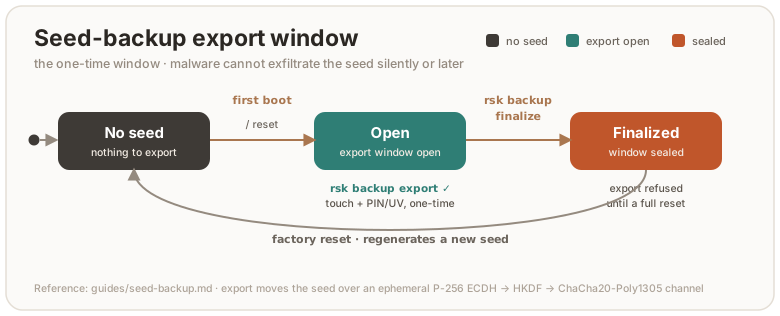
Restore (onto any RS-Key board)
rsk backup restore --scheme bip39          # prompts for the 24 words
# or: --scheme slip39                      # prompts for ≥ threshold shares
Touch + PIN gated. The incoming seed is re-sealed under the destination device’s own root. A restored board is cryptographically indistinguishable from the original for every derived credential. Restore overwrites the destination’s auto-generated seed (it warns; a fresh board loses nothing).
After restoring: your ~/.ssh/id_*_sk files log in again, 2FA
registrations answer again. Resident passkeys do not come back, so re-enroll
those.
The TUI
rsk-tui has the same export/restore/finalize flows interactively (BIP-39
only; SLIP-39 stays in the CLI), with the seed phrase revealed on-screen and
zeroized after.
Mechanics (for the curious)
The seed crosses USB only inside an ephemeral encrypted channel: P-256 ECDH →
HKDF-SHA256 → ChaCha20-Poly1305, fresh nonce per message. The mnemonic
encodings are entirely host-side. BIP-39 (24 words) and SLIP-39 (Shamir
T-of-N) both encode the same raw 32 bytes, so either reconstructs the seed.
The setup-window flag lives with the seed’s lifecycle: cleared when a seed is
generated (first boot, factory reset), set by finalize.
Backup key — a primary + backup pair
A single security key is a single point of failure. Lose it, break it, leave it at the office, or have it stolen, and you are locked out of everything it was your only key for. The fix is the one hardware-key vendors recommend: keep two keys, a primary you carry and a backup you store somewhere safe, and register both with every account. Lose one and the other already works, with no recovery dance.
This page is the why and the how. The seed-backup mnemonic (seed-backup.md) is a different, complementary safety net. The two are compared at the end.
Why two independent keys
The pair are two separate devices with different seeds, not one identity copied onto two sticks. That independence is the point:
- No single point of failure. A primary that is lost, bricked, or left behind doesn’t lock you out. The backup is already enrolled everywhere.
- No shared secret. Because the seeds differ, compromising one key tells an attacker nothing about the other. (Cloning the same seed onto both would make a single leak break both, the opposite of what a backup is for.)
- It is how WebAuthn is meant to be used. Every serious account lets you add more than one security key precisely so you can enroll a backup. You are using the platform’s built-in redundancy, not working around it.
- Resident credentials aren’t seed-portable anyway. Passkeys, PIV, and OpenPGP keys are sealed to the chip, so even with a seed backup you would re-enroll them on a replacement. Two live keys sidestep that entirely.
The model
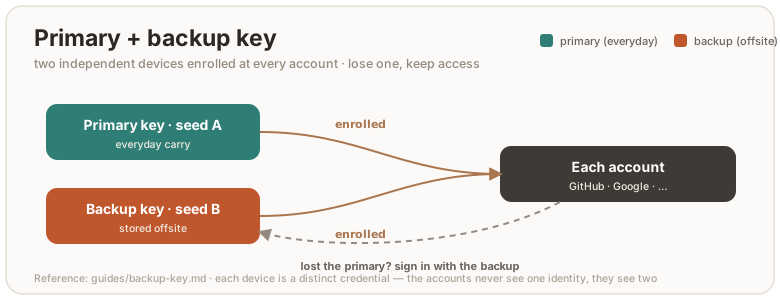
Both keys are enrolled on every account. Day to day you use the primary. The backup sits in a drawer or a safe. If the primary is gone, the backup logs you in to remove the lost key and enroll a fresh replacement. No downtime, no restore.
Set it up — rsk pair
rsk pair walks you through it. It reads each device in turn (touch-free),
confirms they are two different physical keys, and prints the checklist:
rsk pair # plug in the primary, then the backup, when prompted
Then, working down the checklist:
- Give each device its own PIN (in your browser / OS security-key settings).
- Back up each seed separately. Two independent seeds means two different
mnemonics (seed-backup.md). Do
rsk backup exportwith each device, thenrsk backup finalize. - Register both keys on every important account. In each service’s security-key settings, add the primary and the backup. Don’t stop at the accounts you remember. Email and your password manager first, since they gate everything else.
- Store the backup key somewhere separate from the primary (a different building is ideal, since fire and theft take whatever is in one place).
- Test the backup by signing in with only it, once, before you rely on it.
Different seeds — on purpose
Each RS-Key generates its own seed on first boot, so two fresh keys are already
independent. You don’t have to do anything to make their seeds differ. The one
way to accidentally defeat this is to rsk backup restore the same mnemonic
onto both, which turns them into clones. Don’t. If you want the same identity on a
replacement board, that’s the seed-backup flow, not the pair flow.
rsk paircan’t cryptographically prove the seeds differ. RS-Key credentials are randomized (a fresh key handle per registration), so there is no stable seed-derived value to compare between two devices, and the device attestation key is per-chip, not per-seed. The wizard confirms two distinct physical devices and relies on the self-generated-seed property above. If you want to check by hand,rsk backup exportboth and compare the phrases (they must differ).
If you lose a key
Losing one of a registered pair is a routine event, not an emergency:
- Sign in with the surviving key. It is already enrolled everywhere.
- Remove the lost key from each account. In each service’s security-key settings, delete the missing authenticator so it can no longer be used.
- Get a new key and make it the new backup.
rsk pairagain with the survivor as the primary, then enroll the new one across your accounts.
A stolen key is gated by its PIN (a few wrong tries lock it), but removing it from your accounts is what actually retires it. Do that promptly.
This vs. the seed-backup mnemonic
| Primary + backup pair | Seed-backup mnemonic | |
|---|---|---|
| What it protects | live access, a second key already enrolled | one identity, recoverable later |
| Recover by | grabbing the backup key (no steps) | restoring the phrase onto a new board |
| Secret exposure | none shared, two independent seeds | the seed passes through the host at export |
| Covers passkeys / PIV / OpenPGP | enroll them on each key | no (sealed to the chip) |
| Cost | register both keys everywhere | write the words down, keep them safe |
They are complementary. The pair gives you redundancy with zero recovery effort. The mnemonic resurrects an identity onto a replacement when you only had one key. Many people do both: two keys, and a written mnemonic for each.
Soft-lock — at-rest seed lock
Optional hardening: with the lock engaged, the FIDO master seed exists in flash only encrypted to a 32-byte key that you hold (as BIP-39/SLIP-39 words or hex). A stolen board refuses every FIDO operation until that key is presented, even powered up, even running genuine firmware. Your identity becomes device + words, two factors.
This is the same idea as a wallet passphrase. It composes with (does not replace) the silicon protections: once provisioned, the OTP root and secure boot (production.md, otp-fuses.md) stop flash-dump and foreign-firmware attacks. The soft-lock additionally stops your own device in the wrong hands.
Needs firmware with soft-lock support (bcdDevice >= 0x0742). Older builds
answer rsk lock status with “firmware too old”. Check with rsk status.
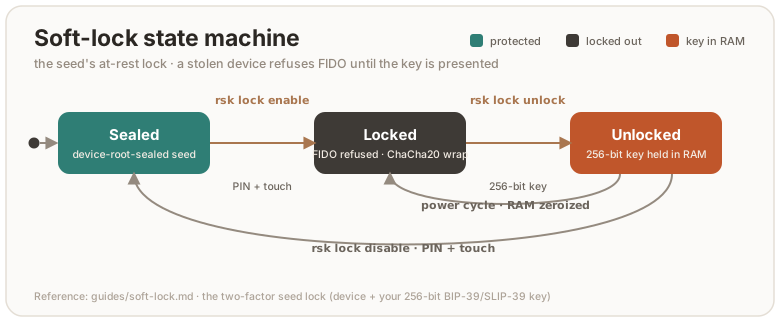
Prerequisite: a FIDO2 PIN
enable and disable ride authenticatorConfig, which the firmware always
gates on a pinUvAuthToken with the acfg permission. So a FIDO2 PIN must
already be set, and you pass it with --pin. With no PIN configured the
command stops with “authenticatorConfig needs the acfg pinUvAuthToken”. Set
one first:
rsk fido set-pin # see fido2.md
unlock is the exception: it needs neither PIN nor touch (below).
Enable
rsk lock enable --pin 1234 # PIN + touch gated; typed confirmation
Generates a random 32-byte lock key, prints it once (default 24-word BIP-39), wraps the seed value with ChaCha20-Poly1305 under it into flash, and deletes the plaintext-sealed copy. Touch the device (BOOTSEL button) when prompted. Treat the key like the backup words: paper, not a file.
Choose how the key is rendered:
--scheme | What it prints | Reconstruct with |
|---|---|---|
bip39 (default) | 24 words | the same 24 words |
slip39 | Shamir shares (--threshold/--shares, default 2-of-3) | any threshold shares |
hex | 64 hex characters | the same hex |
rsk lock enable --pin 1234 --scheme slip39 --threshold 2 --shares 3
--key-out FILE also writes the raw key hex to a 0600 file. A test/CI
convenience, not for production: it defeats the point of holding the key only
on paper.
The wrap is over the seed value, independent of the at-rest format tag and of the kbase the plain file was sealed under. So locking and the OTP re-sealing (otp-fuses.md) stay orthogonal.
Daily use — unlock at power-up
rsk lock status            # locked? unlocked this session?
rsk lock unlock            # prompts for the 24 words; seed goes to RAM only
status prints four flags read straight from the device:
| Flag | Meaning |
|---|---|
sealed | the one-time backup-export window is closed (seed-backup.md) |
has_seed | a plaintext-sealed seed is on flash (false while locked) |
locked | the wrapped blob is what’s stored — an unlock is required |
unlocked | a RAM copy from this power cycle’s unlock is live |
The lock re-engages at every power cycle: the unlocked seed lives only in
RAM and is zeroized on unplug. While locked with no unlock this session, the
seed loader fails and the firmware errors out of every credential operation:
registration (makeCredential) and assertion (getAssertion/U2F) alike.
Browsers show a generic failure and ssh says the key refused, until you
unlock.
Unlock takes the key the same three ways and can run headless in a script:
rsk lock unlock --scheme bip39 --mnemonic "word1 word2 … word24"
rsk lock unlock --key-hex 0011…  # 64 hex chars
rsk lock unlock --scheme slip39  # prompts for shares, one per line, blank to finish
Unlock needs no PIN and no touch. Knowledge of the 256-bit key is the
authorization (it is verified by the AEAD decrypt succeeding). A wrong key
fails closed with unlock failed: 0x… (wrong key?) and leaves the device
locked. Unlocking a device that isn’t locked reports device is not locked.
Disable
rsk lock disable --pin 1234 # needs an unlocked session + PIN + touch
Disable proves you hold the key by requiring the seed already unlocked this
power cycle, then writes it back plaintext-sealed (device-root-sealed) and
deletes the wrapped blob. If you haven’t unlocked yet, pass the key and
disable unlocks first:
rsk lock disable --pin 1234 --mnemonic "word1 … word24"
rsk lock disable --pin 1234 --key-hex 0011…
Calling disable without an unlock prompts for the lock key (or pass
--mnemonic/--key-hex). Supply nothing valid and it fails with the lock
still engaged.
How it composes with seed backup
The soft-lock and the seed backup are independent (backup exports/imports the seed value, the lock wraps that same value), but their ordering matters:
- Back up before you lock. A mnemonic taken before ENABLE still restores the original identity onto a fresh board later.
- Restore is refused while locked.
rsk backup restore(firmwareBACKUP_LOAD) returns “not allowed” on a locked device. A restore next to a live wrapped blob would leave two competing seeds.disable(or a reset) first. - Export works once unlocked. With the seed unlocked this session,
rsk backup exportserves the in-RAM copy normally (subject to the one-time export window).
Lost the lock key?
Unrecoverable by design. The way forward is a FIDO factory reset, which
deletes the locked blob and generates a fresh identity (ykman fido reset,
which needs the opt-in VIDPID=Yubikey5 build, or any WebAuthn “reset security
key” UI on the default build). Replug the key first: a screenless build accepts
the reset only within ten seconds of a power-up (see
fido2.md). Your
seed backup, if you made one before locking, still
restores the old identity afterwards. Without it the old credentials
(ssh ed25519-sk keys, U2F registrations) are gone.
Honest caveats
- The flash log keeps the superseded plaintext-sealed record until natural compaction overwrites it. The at-rest guarantee hardens over time after ENABLE rather than instantly. (That lingering record is still sealed to the device root, so this only matters against an attacker who has also defeated the OTP tier; see threat-model.md.)
- A compromised host at unlock time cannot read the key from the wire (the channel is an ephemeral ChaCha20-Poly1305 tunnel) or the seed (never leaves the device). But while the device sits unlocked and plugged in, it can drive normal FIDO operations, like any session. Unplug when done.
- The lock protects the FIDO seed only. OpenPGP, PIV, and OATH keys are sealed to the chip independently and are not gated by it. To gate those, rely on their own PINs and on the OTP/secure-boot tier.
LED
The status LED is the device’s only display. On the reference board (the Waveshare RP2350-One), it’s a WS2812 addressable RGB on GPIO16.
Build-time knobs
Three hardware properties of the indicator are compile-time knobs set by build
flags. A fourth, MAX_LEDS, sets the upper bound for the PIO buffer. The actual
number of connected LEDs is configured at runtime via rsk hw --led-num (or
PicoForge) and must be ≤ MAX_LEDS.
| Knob | Default | When to change it |
|---|---|---|
LED_KIND | ws2812 | ws2812 (addressable RGB, default), gpio (plain on/off), pimoroni (3-pin PWM RGB), or none (no indicator). See build.md. |
LED_PIN | 16 | A board whose addressable LED is on a different GPIO (0..=29). |
LED_ORDER | rgb | A WS2812 board with swapped red/green: set grb (the WS2812B standard). The Waveshare RP2350-One is rgb; most other parts are grb. |
MAX_LEDS | 1 | A board with multiple daisy-chained addressable LEDs: set it to the chain length (max 64). Default 1 is a single onboard LED. The actual connected count is set at runtime with rsk hw --led-num. |
# example: build for a 4-LED board with standard GRB order
env MAX_LEDS=4 LED_ORDER=grb cargo build --release -p firmware
# then set the runtime count (persists across reboots):
rsk hw --led-num 4
Once built, a non-none build compiles all backends, so the pin, driver, wire
order, and LED count are runtime-changeable (no reflash) with rsk hw
(build.md). The build knobs set the boot defaults.
What the LED shows (colour, brightness, and the visual effect) is runtime-configurable separately, covered next.
Effects
Each of the four states can run one of several animated effects. The effect
determines how the LED(s) display the state’s colour and brightness. All
effects work with any number of LEDs. vapor and sparkle shine on a single
LED too. bounce and flow naturally reduce to a static colour or a single
pixel when there is only one LED.
Effects only render on the ws2812 backend (addressable RGB). The gpio and
pimoroni backends always use the classic on/off blink, regardless of the
effect setting. They lack per-LED control and pixel-level colour.
| Effect | ID | What you see | Suits |
|---|---|---|---|
legacy | 0 | Classic on/off blink (TIMING table) | Original blink behaviour |
vapor | 1 | All LEDs breathe together, smooth triangle-wave brightness | Idle (default) |
bounce | 2 | A wide hump of light glides back and forth with half-step interpolation | Touch (default) |
flow | 3 | Yellow→red gradient flowing left to right with a trailing wake | Processing (default) |
sparkle | 4 | Each LED flashes an independent random colour | Boot (default) |
Default mapping (multiple LEDs)
| State | Default effect | Default colour | Means |
|---|---|---|---|
| idle | vapor: gentle breathing | green | ready, nothing in flight |
| processing | flow: warm-colour flow | yellow→red gradient | handling an APDU / crypto op |
| waiting for touch | bounce: smooth bounce | yellow | press the button to confirm |
| boot | sparkle: random sparkle | red | the brief power-up state |
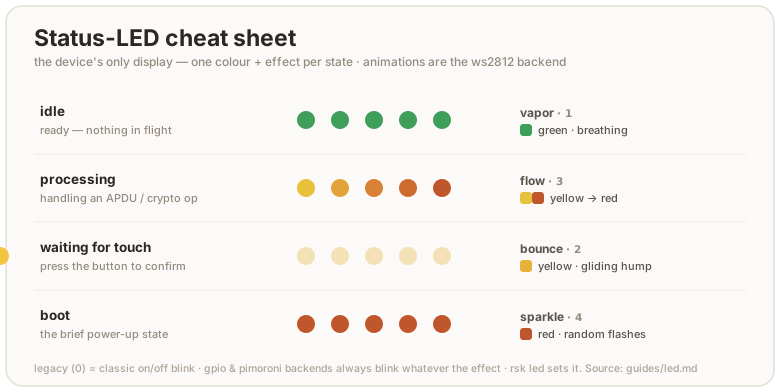
A few honest details:
- No dedicated error colour. The firmware does not light a distinct “error” state. A failed operation just drops back to idle. Read the host tool’s exit code, not the LED, for success or failure.
- The touch state needs the touch build. It is only ever shown on the
default touch build. A no-touch build (
--features no-touch) never enters it. The processing state still flashes during the operation either way (build.md). - Default brightness is gentle. 16 of 255 per channel, so the indicator is visible without being a flashlight. Turn it up if you want.
- Boot is brief. You normally see it only for the moment between power-up and the first idle, so don’t tune your eye to it.
This is not the BOOTSEL / picotool state. Holding the button while
plugging in puts the RP2350 in its ROM bootloader, where this firmware (and
therefore this LED engine) isn’t running, so the LED is dark or shows
whatever the ROM does. That mode is for flashing firmware and OTP, covered in
build.md and otp-fuses.md.
Customize
Colour & brightness
Per-state colour and per-channel brightness are configurable. The values
persist in flash (EF_LED_CONF) and apply live, no reboot:
rsk led --get                                  # print the current config
rsk led --status idle --color blue             # recolor a state
rsk led --status idle --brightness 64          # 0–255; 0 = that state goes dark
rsk led --status idle --color blue --brightness 64
touchcannot be switched off, and its colour is reserved. On a build without the trusted display the touch state is the only signal that the key is waiting for your consent. You can restyle it — colour, effect, speed, brighter — but the firmware normalizes four things on every write, whatever transport it came in on (rsk led,rsk led --transport fido, or a boot reload of the stored record):
--color offon--status touchbecomes the default yellow.--brightness 0on--status touchis raised to8.--speed 1is raised to2. At1the breathing effect renders an all-black frame every tick while the brightness byte still reads fine.- no other state may wear the touch state’s colour. One that does is reset to its own factory look, whatever its effect, brightness or speed. The rule keys on colour alone because a brightness or speed one unit off is identical to the eye, and the effect is no signal at all in
--steadymode or on a one-LED board.Every other state still goes fully dark on
--brightness 0.rsk led --getshows what the device is actually rendering, so read it back after a write that hits one of these rules.
There is one case where touch gives way instead. If the state wearing the touch
colour has that colour as its own factory colour, resetting it would not resolve
the clash, so touch reverts to its factory look (yellow, bounce). Only boot
(red) and idle/processing (green) can trigger that:
rsk led --status touch --color red      # sticks — unless boot is red
rsk led --status touch --color green    # sticks — unless idle or processing is green
rsk led --status boot  --color blue     # …then a red touch is legitimate and kept
What this does not promise. Two states in different colours can still be
hard to tell apart. On a single-colour (gpio) build hue collapses to lit or
unlit; red, green and yellow are mutually confusable under red-green colour
blindness; and on a one-LED board bounce, flow and steady mode all render the
same solid frame. What separates the states there is the per-state blink timing
(touch 1000/100 ms vs idle 500/500 ms), which no host write can change — but
--steady suppresses blinking altogether, so on a single-colour build it leaves
nothing to distinguish them. If the consent signal has to be unambiguous, use a
trusted-display build, which names the operation on screen.
Effect & speed
Each state’s effect and animation speed are configurable the same way:
rsk led --status idle --effect vapor          # change the effect
rsk led --status touch --effect bounce --speed 15  # custom speed (ticks per step)
rsk led --status processing --effect legacy   # revert to classic on/off blink
--speed 0 (or omitting --speed) uses the effect’s built-in default.
Steady / blink
--steady and --blink are global, not per-state: the firmware keeps each
state’s timing internally, but a single flag decides whether any of them
blink. --steady makes the whole indicator a solid lamp whose colour tracks
the current state. --blink brings the blink patterns back.
rsk led --status idle --color cyan --steady    # solid cyan at idle, no pulse
rsk led --blink                                # back to the blink patterns
rsk-tui has a “cycle idle color” action that steps the idle state through
the palette, plus “Read LED state”. For per-state colour, brightness, or the
steady toggle, use rsk led.
Identify (CTAPHID wink)
A host can ask the key to point at itself — CTAPHID_WINK — which is how you tell
two identical keys apart when both are plugged in. The indicator answers with four
fast blinks over about half a second in the touch colour, then goes back to
whatever it was showing.
rsk identify              # wink every attached key in turn, naming each
rsk identify --repeat 3   # three bursts each, if you looked away
rsk-tui has the same thing as “Identify this key” in Overview — that one winks
the device the dashboard is showing, rather than walking them all.
The burst deliberately overrides the configured effect and --steady: the
command is only useful if the key visibly flashes. It also uses the touch
colour because that is the one state rsk led keeps above a visibility floor,
so a key dimmed everywhere else still answers something you can see.
Two bounds follow from borrowing that colour. Repeated WINKs do not extend a burst already running — it always ends 600 ms after the first one — and a WINK arriving while the key is waiting for a touch shows the real prompt, not the burst. Without both, a host could hold the awaiting-touch indicator lit and forge the one consent signal a build without the display has.
A build with no indicator (LED_KIND=none, which includes the display build)
does not advertise the wink capability at all, rather than accepting the command
and doing nothing.
Selectors and values
| Flag | Values |
|---|---|
--status | idle, processing, touch, boot (default idle) |
--color | off, red, green, blue, yellow, magenta, cyan, white |
--brightness | 0–255 per channel (0 = off, except --status touch, see above) |
--effect | legacy, vapor, bounce, flow, sparkle |
--speed | 0–255 (0 = effect’s built-in default; 1 is raised to 2 on --status touch) |
--steady | solid colour, no blinking, global, affects every state |
--blink | the opposite: restore blinking |
Hardware wiring (rsk hw)
See the phy record spec for the full reference. The LED wiring
(pin, driver, wire order) lives in the phy record, shared with PicoForge:
rsk hw --led-pin 22                     # move the WS2812/gpio data pin to GPIO22
rsk hw --led-driver gpio                # switch to a plain on/off LED
rsk hw --led-order grb                  # fix a red/green swap on a GRB part
By default rsk hw speaks CCID (PC/SC). On a host where pcscd can’t read or
write the card, add --transport fido to do the same read-modify-write over the
FIDO HID transport instead. It is gated by a device touch and, if a PIN is set,
--pin (a pinUvAuthToken). rsk led takes the same flag. Wiring (rsk hw)
applies on the next boot, so re-plug the device. Colours (rsk led) apply live:
rsk hw  --transport fido --touch-timeout 45   # wiring; approve with a touch
rsk led --transport fido --status idle --color blue   # colours, applied live
--touch-timeout has a floor of 10 seconds. A shorter window can expire
while your finger is still on the button, and the next queued request would then
inherit that same press as its consent. rsk hw refuses anything below 10, and
the firmware raises it anyway if some other host writes the record directly.
It bounds the whole ceremony, not just the wait for a press: a key that confirms and then waits for the finger to lift stops waiting at the same deadline, so no one request occupies a button key for longer than the window. (A trusted-display key may add up to 3 s absorbing a finger already on the panel.)
Reset to defaults
rsk led --status idle       --color green  --brightness 16 --effect vapor
rsk led --status processing --color green  --brightness 16 --effect flow
rsk led --status touch      --color yellow --brightness 16 --effect bounce
rsk led --status boot       --color red    --brightness 16 --effect sparkle
rsk led --blink
Under the hood
rsk led talks to the firmware’s vendor applet over CCID
(tools/rsk/led.py, firmware/src/vendor.rs):
- SET LED (
INS 0x10) packs brightness intoP1and colour + the steady bit + the target state intoP2. When the caller sends 1–2 data bytes, they set the effect and speed for that state. - GET LED (
INS 0x11) returns the whole config block:[steady:1, (effect:1, color:1, brightness:1, speed:1) × 4](17 bytes).
The firmware writes the block to EF_LED_CONF and reloads it on every boot,
so your settings survive a power cycle but not an OpenPGP/FIDO factory reset
(those don’t touch this file). The led.rs module keeps per-status atomics
that the render task reads live. SET LED updates them immediately, then
persists the full block to flash — unless the record already holds exactly that
block, in which case it answers 9000 and leaves the flash alone.
The touch rules above live in the block codec (crates/rsk-led), not in any one
command handler, so they apply wherever a block is decoded: the CCID setter, the
FIDO CONFIG_WRITE LED target, and the boot reload. The CCID path persists the
normalized block; a FIDO CONFIG_WRITE stores your bytes as sent and normalizes
them on the way to the pixels, so CONFIG_READ can echo a record the device is
not rendering. rsk led --get (GET LED) always reports the rendered values.
For the wiring half (rsk hw), see the phy record spec. It
writes to EF_PHY via the rescue applet and applies at next boot.
Troubleshooting
- LED is dark and stays dark. Either the board has no addressable LED, or
the data pin / driver is wrong for your wiring. Fix it live with
rsk hw --led-pin N/--led-driver …(or rebuild with the rightLED_PIN/LED_KIND, build.md). If a known-good board goes dark mid-session, the firmware task is likely wedged, not the LED. - Red and green look swapped. Wrong wire order for your LED part. Flip it
with
rsk hw --led-order grb(or build withLED_ORDER=grb). See the RGB-vs-GRB note above. - Only the first LED lights up; the rest stay dark. The board has multiple
daisy-chained addressable LEDs, but the runtime LED count was never set.
Run
rsk hw --led-num <your count>to configure it (persists across reboots; the change applies after a warm reboot). If you need a higher buffer ceiling, rebuild withMAX_LEDS=<n>. rsk ledcan’t reach the device. It needs the CCID interface up (pcscdon Linux). Ifgpg --card-status/rsk statusalso fail, fix that first (linux.md).- An app looks frozen. Check for the long-on yellow touch state and tap the button. If the LED is idle-green and the app is still stuck, it isn’t waiting on the device.
Trusted display
Experimental. An RS-Key variant for a screen-and-touch RP2350 board (the reference target is the Waveshare RP2350-Touch-LCD-2.8). The screen turns the key into a trusted display: the operations that matter (approving a sign-in, typing a PIN) happen on the device’s own glass, not on the host. A compromised or phishing host cannot fake what you see or capture what you type. Concretely:
- An Approve / Deny prompt paints the real relying party for every
signature. A signature cannot be obtained without a physical tap on a screen
showing the true
rpId. - PINs are entered on-screen (a FIDO
clientPIN/UV, a device PIN, and the OpenPGP / PIV PINs over CCID) and never cross USB. - An on-device browser lets you inspect and prune credentials (delete a passkey, read the applet state) without a host.
The whole feature is dep:-gated. A standard key without a screen compiles
none of the UI or driver code (the gate asserts the rsk-ui crate is absent
from the default firmware image), so an ordinary build is byte-for-byte
unaffected.
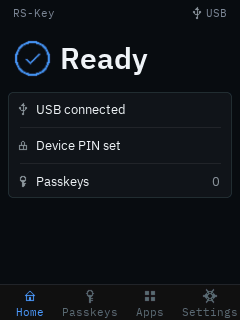
The full GUI uses always-on antialiasing. Text uses four-bit IBM Plex Sans and Mono coverage data. Icons, circles, status rings, rounded cards, and controls blend their edges into the surface below them. The device does this with integer math and retained panel writes. It does not use a framebuffer or a heap. A full page is recorded once as compact drawing commands. The firmware compares keyed 128-bit tags for 32×32 visual-state tiles and merges the changed tiles. Typed UI components can provide smaller exact damage before composition. Each changed rectangle uses two 8-row RGB565 buffers while PIO DMA sends the other buffer. Common background rows are copied from raster templates in flash instead of being generated for every band. The buffers use the active stack and do not reduce permanent RAM. RLE checkpoints and a vertical command index let each band start at its own data. One panel address window stays open for each rectangle. Small animations still use direct partial redraws, and there is no antialiasing setting to manage. A scene or SPI failure stops UI input before an incomplete prompt can stay active.
The display build runs the RP2350 at 160 MHz. A TX-only PIO program emits one serial bit every two cycles, for an 80 MHz panel clock. A complete 240×320 RGB565 transfer has a 15.36 ms wire-time floor. Both of those numbers are past what the parts are rated for — the RP2350 is specified to 150 MHz and this project had recorded 62.5 MHz as the ST7789’s write ceiling — so what that costs, and which of this repo’s measurements stop covering this flavor, is written down in limitations.md. A key without a screen sets no clock and is unaffected.
Try it without a board
The screens on this page are not photographs — they are what rsk_ui::render
draws, at the panel’s own 240×320. The same renderer runs in a window:
cargo run --manifest-path tools/emu/Cargo.toml --target "$HOST" -- --display
That is the whole flow, not a viewer. The ambient loop, the Approve/Deny hold,
the on-screen PIN pad and the Settings menu are the code the board runs
(crates/rsk-display); a mouse held on a button enters it through the same
TouchPad a finger does, and the power button is the space bar. So the ceremony
this page is about — a signature cannot be had without a tap on a screen naming
the true relying party — can be tried before deciding whether to buy the
hardware.
--taps <file> replaces the mouse with a script — one contact per line,
x,y[,hold_ms[,gap_ms]] in panel pixels, # for a comment — so a sequence that
takes six taps to reach can be replayed instead of performed:
# Settings → Security → FIDO PIN
209,301
119,123
119,123
The images themselves are regenerated with rsk-emu --screenshots docs/images
when a screen changes.
Building and flashing
The panel takes over the addressable-LED pin, so the display flavor is built
LED_KIND=none (a compile-time guard enforces this) with the larger flash the UI
assets want:
env LED_KIND=none FLASH_SIZE=16M cargo build --release -p firmware --features display
# or the hermetic package:
nix build .#firmware-display        # → result/firmware.uf2
GPIO16 (the WS2812 pin on a standard board) drives the backlight here.
WAKE_PIN (default 25, the board’s BAT_PWR button) both wakes the panel from
display sleep and, while awake, sleeps it on demand from any screen. A press
blanks the panel and (when a device PIN is set) locks the on-device UI, aborting
any host prompt it interrupts. See the full knob table in build.md;
the display-only knobs are WAKE_PIN / WAKE_ACTIVE_HIGH.
Flash it like any other image (BOOTSEL → picotool load, hardware.md).
Two notes:
- The build output is unsigned. On a secure-boot device you still
picotool seal --signit before loading (signing-keys.md, anti-rollback.md). The RP2350 boot ROM verifies the signature on boot. - You can reach BOOTSEL from the panel itself: Settings → Firmware → reboot to BOOTSEL (a deliberate hold). The reboot routes through the worker so live RAM secrets are scrubbed first.
What’s on screen
A bottom navigation bar carries four peer tabs, each captioned:
| Tab | What it shows |
|---|---|
| Home | A calm “Ready” and a status card: USB, whether a device PIN is set, and the resident-passkey count (cached, refreshed only at modal boundaries). |
| Passkeys | The resident credentials, one row per relying party. |
| Apps | A read-only browser for the OpenPGP / PIV / OATH applets. |
| Settings | Display, Security, Firmware, Audit log, Backup, Factory reset. |
Approve / Deny — the anti-phishing core
Any operation that needs user presence paints a trusted prompt naming the operation and the real relying party, and waits for a deliberate action:
- A WebAuthn registration shows a Save new passkey? card (relying party + account, Cancel / Save).
- A sign-in and the generic OpenPGP / PIV touch prompts share an approve
screen (shield + relying party + a hold-to-approve button). Deny refuses
with
OPERATION_DENIED.
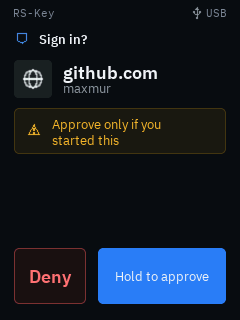
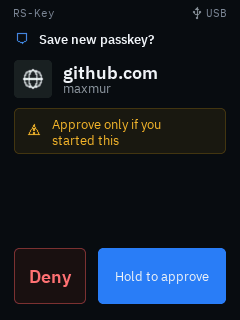
Every prompt waits for the previous finger to lift before it will accept a tap, and a prompt that runs out of time is denied rather than approved — a finger resting on Save when the window expires cancels the registration, it does not confirm it. The release wait has a floor of its own, so shortening the presence timeout in the device config cannot shrink it away.
Because the device only knows the relying-party string (and its hash), it
shows that string verbatim, never a host-supplied brand logo. A relying-party id
too long for the box is clipped with a truncation marker, and the clip keeps
the registrable-domain suffix (a leading … ellipsis) rather than the head.
So a padded look-alike such as accounts.google.com.attacker.com can never hide
its real domain (…attacker.com) behind the cut.
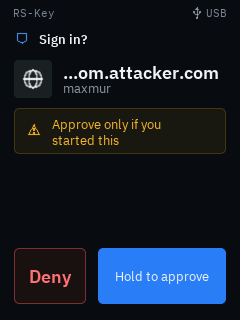 This holds on every screen that
shows an attacker-chosen
This holds on every screen that
shows an attacker-chosen rpId: the approve and enrollment prompts and the
Passkeys manager’s list, service-detail title and Confirm-Delete card. A
device-local nickname (which you set, not the host) keeps its head instead.
Entering a PIN on the trusted screen
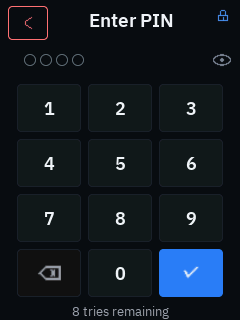
The panel has an on-screen numeric PIN pad: digits are masked, an eye toggle reveals them briefly so you can check before committing, and the minimum length shows as placeholder dots. Every PIN screen names which credential it is collecting in the header (Device PIN, FIDO PIN, PIV PIN / PIV PUK, or the OpenPGP PINs), so the independent PINs are never confused. The New / Confirm / current step rides in the caption beneath. The PIN never leaves the device.
Whichever way the PIN arrives — typed on the pad or sent by the host — the panel asks
before a pinUvAuthToken is issued (CTAP 2.1 §6.5.5.7 requires the consent on any
authenticator with a display). Declining ends the operation with OPERATION_DENIED
and costs no PIN retry, since the question comes before the PIN is checked. So
ykman fido and anything else needing a token waits on a tap here.
This backs four things:
- Built-in user verification. getInfo advertises
options.uv. A PIN typed on the pad mints apinUvAuthTokenviaclientPIN(getPinUvAuthTokenUsingUvWithPermissions), checked against the sameEF_PINthe hostclientPINpath uses. A platform can also skip the token:makeCredential/getAssertioncarryingoptions: {uv: true}collect the PIN on the pad directly (CTAP 2.1 §6.1.2 step 11.2), and that entry counts as the ceremony’s user presence, so the response setsupwithout the spec requiring a second gesture. The panel still asks: pad first, then the Approve / Deny card, because that card is the only screen naming the relying party — the pad carries a trusted, firmware-supplied title and never relying-party text. WithalwaysUvon, a request that brings nopinUvAuthParamtakes the same route instead of being refused withPUAT_REQUIRED. Declining on the pad ends the operation withOPERATION_DENIED— deliberately, since the code CTAP would have the device send instead (PUAT_REQUIRED) asks the host to prompt for the same PIN, which would make the refusal meaningless. A wrong PIN still falls back to the host path. - CCID secure PIN entry (pinpad). A display build advertises
bPINSupportand handlesPC_to_RDR_Secure, so GnuPG (OpenPGP PW1/PW3) and OpenSC (PIV PIN) collect the PIN on the trusted screen. The PIN never crosses USB in pinpad mode. Details and host-driver caveats: protocol.md §1.3. - U2F under alwaysUv. A screenless key has to switch CTAP1/U2F off once
alwaysUvis on, since a touch proves no verification. A pad with a PIN set is the exception CTAP 2.1 §7.2.4 allows, so U2F keeps working here — each register and authenticate names itself on screen (Register key? / Sign in?) and then collects the PIN on the panel. TurningalwaysUvon before setting a PIN still disables it; there would be nothing to verify against. - First-run onboarding. A fresh, PIN-less device offers a Set a PIN? screen
at first run. Declining is remembered (a flag in
EF_DISPLAY) so the offer isn’t repeated until a factory reset.
Passkeys
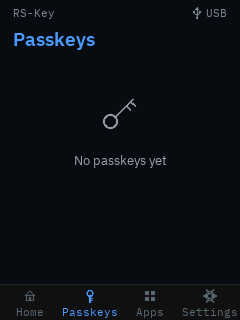
The Passkeys tab lists resident credentials by relying party (real rpId +
account count) and drills into a per-account detail where a passkey can be
deleted on-device (gated by the device PIN, then a hold), decrypted on the
device, never on the host. The detail’s pencil opens a character-wheel rename
that sets a short device-local nickname for the relying party, shown in place
of its rpId. The nickname is sealed at rest (a dedicated EF_RPNICK region),
wiped by a reset, and (unlike a host updateUserInformation) never re-seals the
credential, so the passkey keeps working. The trade-off: the nickname is
device-local and not seen by host credential managers.
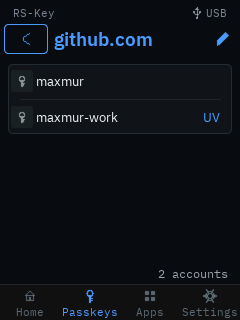
Apps — a read-only credential browser
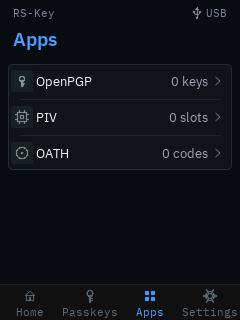
The Apps tab reads applet state without a PIN. No key material, PIN or public point is ever shown, and no OATH code is computed (the device has no clock).
- OpenPGP: the Signature / Encryption / Authentication slots with each one’s algorithm, the signature counter and PW1/PW3 attempts; a per-slot detail with the SHA-1 fingerprint and touch policy; and a Card holder row (name / login / URL / language).
- PIV: the 9A/9C/9D/9E slots with algorithm and PIN/PUK attempts, a per-slot detail (PIN/touch policy, key origin, cert presence), and a Retired & F9 row listing the populated retired key-management slots (82–95) and F9. From it, Generate key creates a key (EC P-256/P-384, Ed25519, X25519, or RSA 2048/3072/4096) into the next free retired slot, gated by the device PIN and a hold, restricted to empty slots (add-only, never overwrite). There is no management-key auth: physical presence at the panel is the authorisation.
- OATH: the stored credentials (label, TOTP/HOTP, a padlock when touch-gated), each with a detail (type, HMAC algorithm, digits, TOTP step).
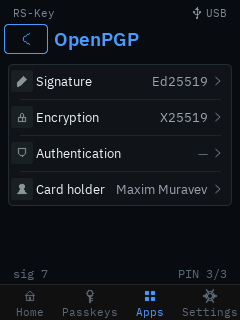
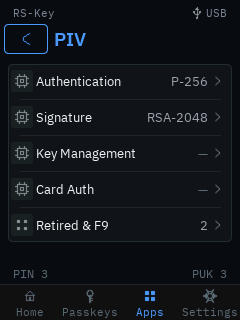
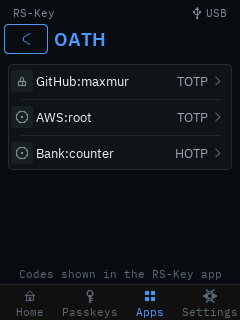
Settings
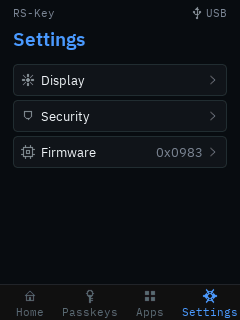
Grouped into three domains, plus the journal / backup / reset actions:
- Display: backlight brightness (PWM), the display-sleep timeout, and the
touch timeout, each adjusted live. All three persist across reboots:
brightness and sleep in an
EF_DISPLAYflash record; the touch timeout inEF_PHY’sPresenceTimeout, the same fieldrsk hw --touch-timeoutwrites, so the panel and the host tool stay in sync. - Security: set / change the device PIN and the FIDO clientPIN (each
chosen entirely on the panel). Changing the clientPIN asks for the current one
first, and that prompt is the card’s
changePINcheck: a wrong entry spends a retry and ends anypinUvAuthTokena plugged-in platform holds, exactly as a wrong old PIN sent over USB does — the platform just asks for the PIN again. Then a PIV PIN sub-menu: change the PIV PIN, change the PUK, unblock a blocked PIN with the PUK, or protect the management key. Protect mgmt key generates a random AES-256 management key, seals it and marks it PIN-protected, the ykman--protectscheme, so a host then uses the management key with just the PIV PIN (which alone grants management access, a trade-off the panel states and gates behind the device PIN and a hold). Any existing hostPivmanData(its PIN-change timestamp and other flags) is preserved (the obsolete derived-key salt is dropped, exactly as ykman does). Last on the page, Scramble PIN pad — a toggle, off by default. On, the ten digit keys are laid out afresh at random for every PIN entry (and again between the “New PIN” and “Confirm PIN” steps), so a fingerprint trail, a worn patch of glass, or an onlooker who sees your hand but not the panel learns nothing from where you tapped. It buys nothing against anyone who can see the screen — they read the digits off it — and it costs muscle memory: entry is slower and mistyping is likelier, against a limit of three wrong PINs per power cycle. That trade is the owner’s to make, which is why it ships off. - Firmware: the installed
bcdDevicebuild and chip serial, the real OTP secure-boot fuse state (it warns when secure boot is off rather than claiming a check it isn’t doing), and the hold-to-reboot into BOOTSEL for an over-USB update.
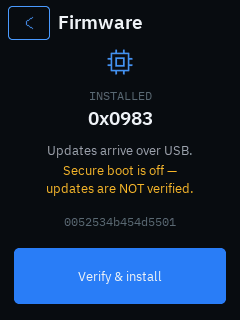
- Audit log: the most recent device-journal events (sign-ins, passkeys added, PIN changes, lockouts, resets, power cycles), colour-coded, newest first.
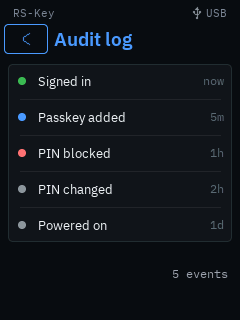
- Backup. An honest view of the recovery-seed export window: whether a
seed is present and whether its one-time export has been sealed. While the
window is open, Show recovery (gated by the device PIN) paints a 24-word
BIP-39 phrase or a
T-of-NSLIP-39 share set on the trusted screen, derived on the device, never crossing USB, behind a hold + warning, wiped the instant they’re shown. Seal backup closes the window for good (until a factory reset). See seed-backup.md.
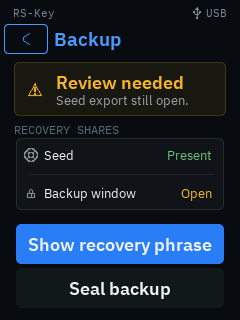
- Factory reset: erases every applet’s data (FIDO, PIV, OpenPGP, OATH), scrubs the flash, and reboots to a blank device (gated by the device PIN, then a hold). Only the org attestation and the fused OTP / secure-boot state survive.
A display build is also exempt from the power-up window
that makes a screenless key refuse a host authenticatorReset more than ten
seconds after it was plugged in. That window exists to stop a wipe being approved
by a press collected under some other pretext; here the panel names the operation,
so a host reset is accepted whenever you confirm it on screen — no replug.
Security model
The device PIN (EF_DEVICE_PIN, its own sealed record + retry counter) gates the
on-device UI (unlock, on-device delete, factory reset) independently of FIDO.
The device boot-locks when a device PIN is set. A forgotten device PIN is
cleared only by a host authenticatorReset (the sole recovery, since the lock
gates on-device Settings). Every device-driven ceremony (a granted Approve, an
on-device delete, a factory wipe) ends on a brief success confirmation.
This is an experimental variant. Read threat-model.md and limitations.md for what the trusted display does and does not defend against.
See also
- Build options: the
displayfeature and its knobs. - Hardware: boards and flashing.
- Host protocol §1.3: CCID pinpad secure PIN entry.
- FIDO2 / WebAuthn · PIV · OpenPGP · Seed backup.
rsk-tui — the terminal cockpit
rsk-tui is a host-side dashboard for an RS-Key. It talks to the device
directly (CTAPHID over hidapi and the CCID applets over PC/SC), so it does not
shell out to rsk or any other process. It lives in its own workspace
(tools/tui), separate from the firmware, and links the host PC/SC and HID
stacks.
It is a companion to the rsk CLI, not a replacement: the cockpit covers the
safe, day-to-day reads and a few in-band actions (LED, seed backup, reboot,
audit, identity verify). Irreversible production rituals (secure-boot staging,
OTP fuses, factory resets, soft-lock, attestation import) stay in the CLI on
purpose. The cockpit points you at the exact command instead of doing them.
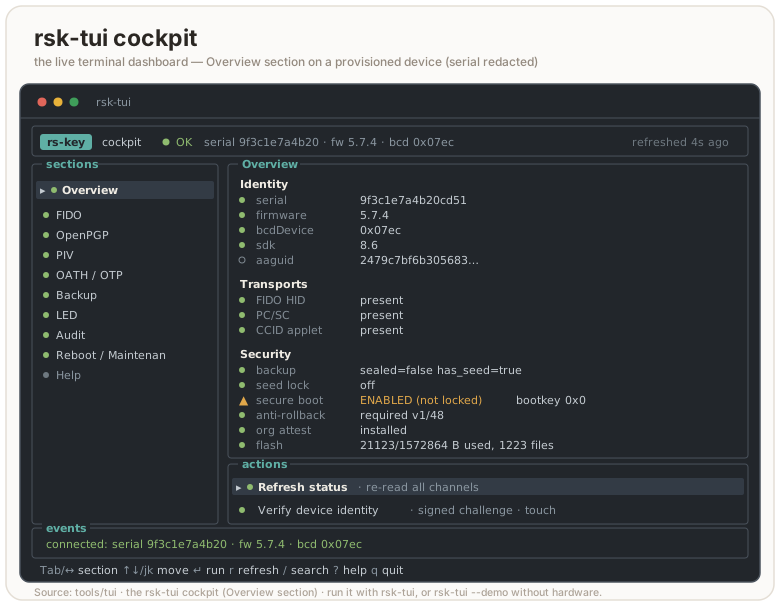
flowchart LR
    tui["rsk-tui (host process)"] -->|hidapi / CTAPHID| fido["Device — FIDO"]
    tui -->|PC/SC / pcscd| ccid["Device — CCID applets<br/>OpenPGP · PIV · OATH · OTP"]
Running it
In the dev shell rsk-tui is on PATH:
nix develop
rsk-tui              # interactive cockpit
Without Nix, run it from its workspace (the repo defaults to the firmware target, so name the host target explicitly; this is what the launcher does):
cargo run --release --manifest-path tools/tui/Cargo.toml \
  --target "$(rustc -vV | sed -n 's/host: //p')"
On Linux the CCID half needs pcscd + a polkit rule; see
linux.md. FIDO works as soon as the udev rules are in place. If
PC/SC is down, the cockpit still starts: the FIDO sections work and every CCID
field shows CCID unavailable rather than a fabricated value.
Flags
| Flag | Effect |
|---|---|
| (none) | interactive cockpit |
--demo, --mock | interactive cockpit against a simulated device, no hardware needed |
--once | print the gathered status once (human-readable) and exit |
--json | one-shot machine-readable status (JSON) and exit |
--identify | blink this key’s indicator and exit (the Overview action, scripted) |
--selftest [PIN] | native backup export/restore round-trip (needs a no-touch build) |
-h, --help | usage |
--demo is handy for screenshots, docs, and trying the navigation without a
key plugged in. Demo data is clearly labelled [DEMO] and every simulated
action is prefixed [demo]; it never pretends to touch hardware.
--json and --once are the scriptable paths. Both gather one snapshot and
exit, so they fit a health check or a CI probe. --json emits a stable,
explicit object (identity, fido, backup, secure_boot, rollback,
applets, led, pgp, piv_meta, errors, …); --once is the same data formatted for a human. Either
honours --demo, so you can shape a pipeline against the mock first:
rsk-tui --json | jq '.secure_boot, .rollback'
rsk-tui --once --demo            # see the field layout without a key
--selftest drives the native MSE channel + clientPIN token + BIP-39 path
end-to-end: export a seed, re-derive its fingerprint, restore it, confirm the
fingerprint is stable, all without revealing the seed. It needs a no-touch
firmware build (the touch build would block waiting for a button press), and
takes the FIDO2 PIN as an optional positional argument if one is set.
It talks to real hardware, so it refuses two invocations that would otherwise
mislead: a flag where the PIN should be (--selftest --demo would have sent the
literal string --demo as the PIN, spending a real retry), and --demo in any
position (it does not apply — there is no simulated round-trip).
A non-interactive snapshot of the simulated device (rsk-tui --once --demo)
gives a sense of what the cockpit reads:
[DEMO — simulated device]
device     : serial 37bebfdca282 · fw 5.7.4 · bcd 0x0759
transports : HID present  PC/SC present  CCID present
serial     : 37bebfdca282523b
firmware   : 5.7.4  bcdDevice 0x0759  sdk 3.4
fido       : U2F_V2, FIDO_2_0, FIDO_2_1  clientPin=true
backup     : sealed=false  has_seed=true
seed lock  : off
secure boot: ENABLED (not locked)  (enabled=true locked=false bootkey=0x1)
rollback   : not required  boot version 0/48
org attest : not installed
applets    : OpenPGP present  PIV present  OATH present  OTP present
openpgp    : 2 keys  serial 2a1b3c4d  retries PW1 3 RC 0 PW3 3
piv        : PIN 3/3 tries (default)
led        : steady  idle cyan  processing blue  touch green  boot white
Layout
┌ header: app · health · device identity · refreshed ─────────────┐
│ sections │ selected section: status fields + action menu        │
│  …       │                                                      │
├──────────┴──────────────────────────────────────────────────────┤
│ events: recent operations and errors                            │
├─────────────────────────────────────────────────────────────────┤
│ last result · key bindings                                      │
└─────────────────────────────────────────────────────────────────┘
The sidebar narrows and the event panel drops away on small terminals; the UI
keeps working down to a few rows. Status uses an OK / WARN / ERR / UNK / N/A
word plus a colored glyph, so it reads on a monochrome or color-blind terminal.
N/A is reserved for things the device supports but the TUI deliberately leaves
to the CLI. It is never a faked or unknown value. Set RSK_TUI_ASCII=1 (or run
in a non-UTF-8 locale) to force ASCII glyphs ([+] [!] [x] [?] [-] instead of
● ▲ ✖ ○ –); a UTF-8 LANG/LC_* is auto-detected otherwise.
Key bindings
| Key | Action |
|---|---|
Tab / Shift-Tab, ← / → | switch section |
↑ ↓ or j k | move selection in the action list |
Enter | run the selected action |
r | refresh device status |
/ | search actions across all sections |
? | jump to Help |
Esc | cancel a modal / input |
q or Ctrl-C | quit (terminal restored on exit) |
The status also auto-refreshes every few seconds while you are in the normal view, never while a modal is open, so a read can’t redraw over a PIN prompt or hammer the CCID bus mid-task.
Inside a modal the keys narrow to that modal: a text/PIN input takes characters +
Backspace, Enter submits, Esc cancels (and wipes the buffer); a yes/no
prompt takes y/n or Enter/Esc; a reveal panel dismisses on any key (a
shoulder-surfed secret clears fast); a message panel (audit output, LED state, a
verify report) scrolls with the arrows / j k / PgUp / PgDn / Home /
End and closes on Enter, Esc, q, or space. The / palette filters by a case-insensitive substring of the action label
as you type, ↑/↓ pick, Enter jumps to that action’s section and starts it.
Sections and what they do
| Section | Reads (safe) | In-band actions |
|---|---|---|
| Overview | identity (serial, fw, bcdDevice, sdk, aaguid), transports, backup/lock/secure-boot/rollback/attestation/flash | Refresh, Verify identity |
| FIDO | CTAPHID presence, versions, clientPIN, options | Count resident passkeys (PIN · credMgmt) |
| OpenPGP | applet presence, card serial, PIN retries, populated key slots (from 6E) | — |
| PIV | applet presence, PIN retries + default-PIN flag (from GET METADATA) | — |
| OATH / OTP | applet presence | — |
| Backup | seed / sealed / lock state | Export (BIP-39 · SLIP-39 2-of-3), Restore, Finalize |
| LED | LED mode + per-state color/brightness, with a live colour swatch | Read state, Cycle idle color |
| Audit | journal head + checkpoint key hint | Read journal, Verify identity |
| Reboot / Maintenance | device summary | Reboot → app, Reboot → BOOTSEL |
| Help | key bindings, section guide, safety model | — |
OpenPGP and PIV show a little more than presence, from unauthenticated reads in
the same gather: OpenPGP parses its 6E application-related data (card serial,
the PW1/RC/PW3 retry counters, and how many of the three key slots hold a key);
PIV reads the PIN’s GET METADATA (retries left, and whether the PIN is still the
factory default). OATH and OTP stay presence only. The full card contents
(individual keys, accounts) still need the applet’s own tooling, so those rows
point you at it: gpg --card-status (openpgp.md), ykman piv info, ykman oath accounts, and so on.
Verify identity issues a fresh 16-byte challenge, has the device sign it
with its DEVK-derived P-256 attestation key (vendor AUDIT_CHECKPOINT), and
verifies the ECDSA signature locally over tag‖head‖seq‖challenge. This is a
real cryptographic check, not a display of device-asserted bytes. On success it
prints an 8-byte fingerprint of the attestation public key. Record that
fingerprint: a later rsk inventory verify --expect-key <hex> (or rsk audit verify --expect-key …) pins it, so a swapped or cloned board fails the check
instead of quietly verifying. Verify needs a touch, the FIDO2 PIN if one is set,
and a provisioned OTP DEVK. Without the DEVK it says
no OTP DEVK provisioned — attestation unavailable rather than guessing.
Read journal dumps the tamper-evident audit log (vendor AUDIT_READ): a
hash-chained sequence of events (BOOT, MAKE_CREDENTIAL, GET_ASSERTION,
PIN_SET, BACKUP_EXPORT, CHECKPOINT, …) folded into an epoch, with the
running chain head. It is read-only (the device never lets the host rewrite
it) and asks for the FIDO2 PIN if one is set, or a physical touch if not. The full cross-check against the
signed head lives in rsk audit verify.
LED reads the four LED states the firmware drives (idle, processing,
touch, boot), each with a color and brightness, plus whether the idle LED is
steady or blinking. The section paints a colour swatch beside each state — a
background-filled block, so it shows with no block-glyph support, and the colour
name is printed too — refreshed live with the status. Cycle idle color steps the idle color through the palette
(red → green → blue → yellow → magenta → cyan → white, then wraps) and writes
it back; it is a cosmetic, unauthenticated setting, not a security control.
PINs in the cockpit
Every PIN the TUI asks for is the FIDO2 clientPIN (the same one
rsk fido set-pin manages), not an OpenPGP PW1/PW3 or a PIV PIN. It gates the
in-band actions that need it: Verify, Read journal, and seed Export/Restore (when
a PIN is set). If no clientPIN is set, those actions skip the prompt. OpenPGP and
PIV PINs are only ever entered in their own tools (gpg, ykman), never here.
CLI-only / unsupported in the TUI
These are surfaced as menu entries that, when selected, print the exact command to run. They are never performed from the cockpit:
- FIDO: set/change PIN (
rsk fido set-pin), list resident passkeys (rsk fido list-passkeys --pin …), factory reset (ykman fido reset) - OpenPGP / PIV / OATH / OTP: full card data and factory resets (
gpg --card-status,ykman piv info,ykman oath accounts,rsk openpgp reset,ykman piv reset, …). Theykmancommands gate on the “Yubico YubiKey” reader name, so they only see the device on the opt-inVIDPID=Yubikey5build;gpgandrskwork on the default RS-Key build. - Backup: SLIP-39 restore (recombining shares):
rsk backup restore --scheme slip39. SLIP-39 export is now in the cockpit (2-of-3 shares, via the in-treersk-slip39crate); other T-of-N splits stay in the CLI (seed-backup.md) - Maintenance (Reboot section): seed soft-lock (
rsk lock enable | unlock | disable), org-attestation import/clear (rsk fido attestation import | clear), secure-boot staging, OTP fuses. See production.md and otp-fuses.md
The FIDO section’s Count resident passkeys action reads the count over
credMgmt getCredsMetadata. It needs the FIDO2 PIN — there is no unauthenticated
way to read it — and reports how many passkeys are stored plus roughly how many
slots remain. Enumerating the passkeys themselves stays in the CLI: rsk fido list-passkeys --pin ….
Safety model — what is and is not logged
- Destructive or irreversible operations require a typed confirmation, not a
single keypress: export (
EXPORT), restore (RESTORE), finalize/seal (SEAL), reboot to BOOTSEL (BOOTSEL). The typed word must match exactly (case-sensitive); anything else cancels the action. Reboot to app uses a yes/no prompt. Finalize is refused outright once the window is already sealed. It explains rather than re-confirming. - PINs are masked on entry and never written to the event log. The log additionally redacts any live PIN/phrase substring as a backstop, and it is a bounded ring (the last 200 lines), so nothing accumulates on disk. It is only ever in memory.
- The seed is shown only after you confirm export. It appears once, in a modal, is zeroized from memory when you press a key, and never reaches the event log or any file. The same goes for a restore phrase you type in.
- Sensitive buffers (PIN, phrase, revealed seed) are wiped (
zeroize) on cancel, on submit, and on Ctrl-C.Ctrl-Cwipes the in-flight buffer before it quits, from any modal. - The terminal is restored on every exit path:
q,Ctrl-C, an I/O error, or a panic (device I/O can panic, so a panic hook leaves the alternate screen and raw mode first).
The seed backup flows here are exactly the BIP-39 export/restore/finalize of
rsk backup, just interactive: same touch + PIN + setup-window gates, same
forever-sealed semantics after finalize. Read seed-backup.md
for what a backup does and does not recover before you rely on it.
Architecture (for contributors)
tools/tui/src is split so rendering, state, and I/O stay separate and the UI
is testable without hardware:
model.rs: typed state (DeviceSnapshot,TransportStatus,Section,Action,ActionResult,EventLog, …) and--jsonserialization. No I/O.device.rs: native CTAPHID + PC/SC I/O behind aDeviceProvidertrait, withHardwareProvider(real) andMockProvider(--demo). Holds the native seed backup crypto: the MSE channel (P-256 ECDH → HKDF → ChaCha20-Poly1305) and the clientPIN protocol-two token (ECDH + HKDF + AES-CBC + HMAC).app.rs: app state, navigation, and the modal/confirmation flow.actions.rs: action dispatch + result handling (the one place that blocks on device I/O; it paints a “working — touch the device…” line and redraws before the blocking call so the prompt is visible).input.rs: key handling → state change +Flow.ui.rs: rendering only.theme.rs: styles, colors, ASCII fallback.
Because the UI is driven by a DeviceProvider, the whole cockpit (navigation,
confirmation flows, secret redaction, rendering) is unit-tested against the
mock with no device attached.
# fmt / clippy / test / build, host target (the merge gate runs these too):
H="$(rustc -vV | sed -n 's/host: //p')"
cargo fmt   --manifest-path tools/tui/Cargo.toml --check
cargo clippy --manifest-path tools/tui/Cargo.toml --target "$H" --all-targets -- -D warnings
cargo test   --manifest-path tools/tui/Cargo.toml --target "$H"
cargo build --release --manifest-path tools/tui/Cargo.toml --target "$H"
The --target "$H" is load-bearing: the repo’s .cargo/config.toml defaults to
the thumbv8m firmware target, and tools/tui is a detached workspace (note the
empty [workspace] table in its Cargo.toml) precisely so it builds for the
host instead. See build.md for the workspace layout.
Audit journal
A tamper-evident, on-device log of security events: boots, FIDO registrations and logins, factory resets, PIN set/change/lockouts, policy changes, seed backup and soft-lock activity.
rsk audit log              # export + print (add --pin if a PIN is set)
rsk audit verify           # log + DEVK-signed checkpoint (touch)
rsk audit verify --expect-key <hex>   # also pin the enrolled attestation key
log is a plain read. It pretty-prints the live window and the recomputed
chain head, no signature. It takes --pin on a device with a PIN, and a touch
on one with none (the read is never fully open). verify does the same read
and asks the device to sign the head. It is the command that actually proves
the log is real. Use log for a quick glance, verify when the answer matters.
What it records
| event | detail |
|---|---|
BOOT | first journal touch of each power cycle |
MAKE_CREDENTIAL / GET_ASSERTION / U2F_REGISTER / U2F_AUTH | first 8 bytes of the rpIdHash (only weakly pseudonymous, see Gating). A run of the two silent variants folds — see below |
RESET | factory reset (survives it — see below) |
PIN_SET / PIN_CHANGE / PIN_LOCKOUT | lockout aux: 0 = retries exhausted, 1 = per-boot block |
CFG_MIN_PIN | aux = new minimum; detail[0] = forceChangePin |
CFG_ENTERPRISE_ATT | no aux/detail (flag-only) |
CFG_EA_RPIDS | the vendor-facilitated enterprise RP list was rewritten; aux = how many RPs it now holds, 0 = cleared |
LOCK_ENGAGE / LOCK_RELEASE | soft-lock engage/release |
BACKUP_EXPORT / BACKUP_LOAD / BACKUP_FINALIZE | seed-backup lifecycle |
ATT_IMPORT / ATT_CLEAR | org attestation provisioning |
CFG_ALWAYS_UV | alwaysUv toggled; no aux/detail (flag-only) |
CONFIG_WRITE | a device-config write over the FIDO vendor channel. aux = the target that opened the entry (0 dev-conf, 1 phy, 2 led); detail = repeats(2 LE) ‖ targets(1) (see below) |
AUDIT_CFG | journalling itself: aux 1 = turned on, 0 = turned off (that entry is the last one written, so the trail shows when it stopped) |
CHECKPOINT | every signed checkpoint is itself logged |
Each entry is a fixed 20 bytes:
seq(4) ‖ uptime_ms(4) ‖ event(1) ‖ aux(1) ‖ detail(8) ‖ repeats(2 LE). There is
no wall clock on the device. uptime_ms counts from the moment the key
attached to USB, not from power-on — boot spends seconds before that on TRNG
seeding and flash migrations, and none of it is time a host could have used.
Every power cycle opens with a BOOT entry, and the sequence number gives total
order. Wall-clock attribution is the host’s job (e.g. record when you ran
rsk audit verify).
For the FIDO operations — MAKE_CREDENTIAL, GET_ASSERTION, U2F_REGISTER,
U2F_AUTH — the detail field carries the first 8 bytes of the rpIdHash and
nothing else: no RP names, user handles, or credential IDs. That is deliberate:
the log answers “how was this key used and how often” without revealing which
sites. See gating below. Other events use detail for their own small
payload (CFG_MIN_PIN’s forceChangePin flag, CONFIG_WRITE’s run counters); none
of them records a site.
Events a silent host can drive cost one slot per run
The journal is append-only with one bounded exception. Three events can be driven on demand with no touch and no PIN, so 128 of any one of them would otherwise evict every other entry from the 128-slot window:
CONFIG_WRITE, ungated on the default build;GET_ASSERTIONfrom agetAssertioncarryingup:false— the spec-mandated silent pre-flight, which needs a credential but no gesture;U2F_AUTHfrom anAUTHENTICATEwithP1=0x08(don’t-enforce-user-presence), for the same reason.
Each folds a run into a single entry that keeps the seq and the timestamp of
the first occurrence. The two shapes differ in where the count lives.
CONFIG_WRITE carries its own inside detail — repeats(2 LE) ‖ targets(1),
where targets is a 1 << target mask of every record the run touched — and
folds only into the newest entry. The two silent FIDO events instead keep the
detail of the first occurrence (so the rpIdHash shown is the first site of the
run) and count the rest in the entry’s trailing repeats(2 LE), scanning the
whole window rather than only the newest entry, so interleaving two of them does
not defeat the fold. A gestured assertion always earns its own slot.
rsk audit log renders both:
   seq      uptime  event              aux  detail
   201       8.2s  CONFIG_WRITE         1  300× write (phy+led)
   202       9.1s  GET_ASSERTION        0  a3f1c2...  ×128
Two consequences worth knowing:
- A run never folds across a power cycle, so the
BOOTentry between two runs is never swallowed. - A fold moves the chain head without advancing
seq_next. Seeing the sameseq_nextwith a different head is legitimate, not a tamper signal;verifyre-folds the exported window and still matches.
This bounds the flood, it does not remove it: a phy write latches a reboot, so a
host willing to make the key re-enumerate can still spend two slots per cycle
(a fresh BOOT plus a fresh run). Each cycle is a visible re-enumeration, and
building --features strict-config — which puts the write behind a touch and a
PIN token — is the complete answer.
A log run prints a header, the chain state, then the window:
window [72, 200)  —  128 entries, 72 folded into the epoch
epoch : 4f1c…           (the accumulator for evicted history)
head  : a93b…  (chain over the window — OK)

   seq      uptime  event              aux  detail
    72       3.4s  GET_ASSERTION        0  1a2b3c4d5e6f7081
    73     120.9s  MAKE_CREDENTIAL      0  9f8e7d6c5b4a3928
   …
How the tamper evidence works
The journal is a 128-entry flash ring. Each entry extends a SHA-256 hash
chain; when the ring is full, the oldest entry is folded into an epoch
accumulator (epoch' = SHA-256(epoch ‖ entry)) before its slot is reused, so
evicted history stays attested in aggregate even though its per-event details
are gone. The chain head is fold(epoch, window): the epoch run forward
through every entry still in the ring.
The chain is anchored, on an empty journal, at
SHA-256("RSK-AUDIT-GENESIS-v1" ‖ serial_hash), bound to the device so two
boards’ empty journals never share a head.
flowchart TD
    e["new event"] --> chain["SHA-256 hash chain (window)"]
    chain -->|ring full| fold["fold oldest into epoch accumulator"]
    fold --> reuse["slot reused"]
    chain --> head["chain head = fold(epoch, window)"]
rsk audit verify sends a fresh 16-byte random challenge. The device signs
"RSK-AUDIT-CKPT-v1" ‖ head ‖ seq_next ‖ challenge with an ECDSA P-256 key
derived (HKDF) from the OTP DEVK (production.md stage 1)
and returns the signature plus its 65-byte SEC1 public key. The host refolds
the exported window, verifies the signature over the message it reconstructs,
and checks that the signed head matches the refold. The challenge is what makes
the verdict fresh. A replayed old checkpoint signs a stale challenge and fails.
A successful verify prints the window, the head, and the attestation key with
a short fingerprint. The verdict depends on whether you pinned the key:
chain   : OK — head a93b…
sig     : OK — checkpoint over seq_next=201, fresh challenge
att key : 04a1b2…   (65-byte SEC1)
          fingerprint 9c4e7f12ab… — record this; pin later runs with --expect-key
verdict : chain + signature OK — the key is NOT pinned, so this does not prove
          which device signed it
With --expect-key the last line becomes
journal authentic ✓ (signed by the pinned key).
Meta updates are ordered so that a power cut at any point loses at most the newest event and never produces a false tamper verdict: when the ring is full the fold-and-advance meta is committed before the slot is reused.
Pinning the attestation key — --expect-key
The checkpoint key is deterministic and reset-stable (HKDF of the DEVK), so a given device always signs with the same public key. Record it once at provisioning, then pass it back on every later run:
rsk audit verify                         # first run: copy the printed "att key" hex
rsk audit verify --expect-key 04a1b2…    # afterwards: fail loudly on any mismatch
rsk audit verify --expect-key 9c4e7f12ab…   # the short fingerprint works too
A mismatch means the public key changed, which can only happen if the DEVK
changed. That means you are talking to a different device, or a clone that
was flashed without burning the same OTP. --expect-key takes either the full
65-byte SEC1 point (04 ‖ x ‖ y) or the 16-hex fingerprint, lower-case, and the
comparison is exact. The full key is the stronger pin. Stash it in your
provisioning record alongside the device serial.
Without a pin, verify proves nothing about identity. The public key it
checks against arrives in the same response it is checking, so an unpinned run
establishes only that the journal is internally consistent and self-signed — a
counterfeit signing with a key of its own passes it. The device refuses to sign
without an OTP DEVK, but a host cannot tell a DEVK-derived key from any other
P-256 point. Pinning is what turns “some key” into “your device”.
Reset semantics (privacy by design)
authenticatorReset does not erase the journal. It folds the whole
window into the epoch and deletes the per-event details, then logs the
RESET. A handed-over device therefore proves “N events happened, then a
reset” without revealing where it had been used. The chain (and the
checkpoint key, which is DEVK-derived) continue uninterrupted across resets, so
verify keeps working and the head still validates against the same
--expect-key.
Gating
| command | open device | PIN set |
|---|---|---|
audit log / AUDIT_READ | touch | pinUvAuthToken with the acfg permission |
audit verify / AUDIT_CHECKPOINT | touch | touch + acfg pinUvAuthToken |
AUDIT_READ(export). With a PIN set it needs a pinUvAuthToken carrying theacfg(authenticator-config) permission. With no PIN it needs a physical touch. The entries are only weakly pseudonymous. Adetailis a 64-bit rpIdHash prefix, never an RP name or user handle, but short enough to be dictionary-matched back to a domain. So the touch is what stops a silent host from harvesting a no-PIN device’s RP-usage history.AUDIT_CHECKPOINT. The same PIN gate plus a physical touch, and it refuses entirely without a provisioned OTP DEVK. An attestation that anyone could re-derive would be theatre. The signing step is what the touch protects. The read that precedes it isAUDIT_READ-gated as above.
If a PIN is set, both subcommands take --pin. The PIN is exchanged over the
standard CTAP pinUvAuth protocol (it is not sent in clear), and a wrong PIN
counts against the FIDO retry counter. Do not guess.
Troubleshooting
| symptom | meaning / fix |
|---|---|
device requires a PIN — pass --pin (status 0x36) | a FIDO PIN is set; add --pin <pin> |
checkpoint refused — no OTP DEVK provisioned (status 0x30) | dev board with no DEVK burned; verify cannot sign. log still works. See production.md |
denied — no touch within 30 s (status 0x27) | press the button when the LED blinks; rerun |
attestation key MISMATCH — this is not the enrolled device | --expect-key did not match: wrong device, or a clone flashed without your OTP |
signed head differs from the exported window | the journal changed between the read and the checkpoint. Rerun; if it persists, treat it as TAMPER |
checkpoint SIGNATURE INVALID — do not trust this journal | the signature did not verify under the returned key. Do not trust the log |
export length does not match the window | the exported entry bytes don’t match seq_next − start; a corrupt or truncated read |
The two “rerun first” verdicts are different. A head mismatch can happen benignly if an event landed between the read and the checkpoint (a login on another host, say). One rerun usually clears it. A signature failure or a key mismatch never has a benign cause. Do not retry your way past those.
What it does and does not prove
The log is written by the firmware, so its honesty is rooted in the boot
chain: with secure boot + the OTP master key (production.md,
otp-fuses.md) only your signed firmware can append to the
journal or wield the checkpoint key, and a flash dump cannot forge it. On an
unprovisioned dev board the journal still works as a debugging aid, but verify
is refused. There is no device-bound key to sign with, and a checkpoint without
one would prove nothing.
Two honest limits worth stating:
- The window is 128 entries. Older events are folded into the epoch and
their details are gone. You can prove they happened (the head still
covers them) but not read them back.
verifyregularly if you want a per-event record. The host transcript is your archive, the device is not. - There is no wall clock. The device cannot tell you when in calendar
time something happened, only the order and the milliseconds since that power
cycle’s USB attach. Pair the
seqandBOOTmarkers with your own host-side timestamps.
Enterprise attestation (org provisioning)
Out of the box, ordinary makeCredential returns packed basic attestation:
an ES256 signature by the device key over authData ‖ clientDataHash, with the
device’s own certificate as the x5c leaf. That certificate is a per-device
P-256 X.509 leaf (subject C=XX, O=RS-Key, OU=Authenticator Attestation, CN=RS-Key FIDO2) built over the seed at first boot, and U2F registration
presents the same one.
The two alternatives were both tried and both break clients. fmt:"none" with
an empty statement is rejected by OpenSSH below 10.0, which hands every
credential without a certificate to libfido2’s fido_cred_verify_self()
regardless of format. Packed self-attestation signs with the credential key
and so inherits its algorithm, and an Ed25519 statement fails on Windows
WinHello, which broke ed25519-sk enrollment (issue #26). Basic attestation
signs with ES256 whatever the credential algorithm is, so neither path is
reached.
Because the leaf is per-device it is a stable identifier: every relying party
that asks for attestation sees the same certificate, and two of them can tell
they met the same key. Browsers strip it unless the site explicitly requests
attestation: "direct" (WebAuthn §5.1.3 replaces the statement otherwise), but
native CTAP clients do not. There is also no root to publish — a per-device
self-signed leaf chains to nothing, so attestationRootCertificates in the
metadata statement stays empty and a relying party that requires a trusted
anchor will treat the attestation as untrusted.
An organization can replace that device cert with its own attestation key and certificate chain, so its relying parties can verify “this credential was created on one of our keys”. This is the CTAP 2.1 enterprise-attestation (EA) feature.
This page is for the team that provisions fleet keys. If you do not work for an org that has provisioned yours, it is a no-op: nothing here changes how an unprovisioned key behaves, and EA is never served unless a managed platform explicitly asks for it.
The key + chain model
Two pieces of state make up an org attestation, stored separately on the device:
| Stored as | Holds | Sealing |
|---|---|---|
EF_ATT_KEY (0xCE10) | the org attestation P-256 private scalar | kbase-sealed, exactly like the master seed |
EF_ATT_CHAIN (0xCE11) | the DER certificate chain, leaf first (count ‖ (len ‖ der)*) | public material, stored plain |
The key signs each attestation; the chain is what relying parties walk back to your CA. The leaf’s public key must match the imported scalar. The device does not check this (framing only), so a key/chain mismatch surfaces as your own relying party’s first signature-verification failure, not an import error.
Provisioning
Generate an attestation CA and a leaf however your PKI does it. The leaf’s
subject public key must be the P-256 point of the private key you import; only
P-256 (secp256r1) keys are accepted. rsk rejects any other curve before
it touches the device.
# host-side, with your PKI:
#   org-att.pem    P-256 private key (PEM)
#   org-chain.pem  leaf cert first, then intermediates, then (optionally) the CA
rsk fido attestation import --key org-att.pem --chain org-chain.pem [--pin …]
rsk fido attestation status
--chain takes a PEM bundle (concatenated -----BEGIN CERTIFICATE-----
blocks) or already-concatenated DER. Limits, enforced host-side and again in
firmware:
| Limit | Value |
|---|---|
| Curve | P-256 only |
| Chain size | ≤ 2048 bytes total |
| Certs in chain | ≤ 4 |
status is ungated and prints whether a chain is installed plus the
SHA-256 of the packed chain (so you can confirm a fleet is on the right CA
without moving any secret):
$ rsk fido attestation status
org attestation : installed
chain hash      : 9f2c…
To roll back to the factory self-signed cert:
rsk fido attestation clear [--pin …]
What changes once a chain is installed
- makeCredential with
enterpriseAttestation2 (platform-managed, sent by managed platforms) returns a full attestation: signature by the org key,x5c= your chain (leaf first), and theepresponse flag (true). Level 1 (vendor-facilitated) does the same, but only for a relying party on the device’s enterprise RP list — which is empty until you write it, so a level-1 request from an unlisted RP gets the ordinary per-device attestation and noep. - U2F / CTAP1 registration attests with the chain’s leaf instead of the self-signed device cert (classic batch attestation: a U2F response carries exactly one certificate, so only the leaf travels).
- Ordinary makeCredential is untouched: packed basic attestation under the
device’s own certificate, no org chain. EA fires only when the platform sets
the
enterpriseAttestationrequest field andenableEnterpriseAttestationis on (below).
Without an org chain (the default)
If no org key is provisioned, the request field still has an effect, per the spec:
| EA level | Without org key | With org key |
|---|---|---|
| (absent / 0) | basic, device cert | basic, device cert |
| 1 — vendor-facilitated, RP listed | basic, device cert, ep flag | full org attestation |
| 1 — vendor-facilitated, RP not listed | basic, device cert, no ep flag | basic, device cert, no ep flag |
| 2 — platform-managed | basic, device cert, ep flag | full org attestation |
Without an org key every level answers with the same per-device basic
attestation; what an EA request adds is the org chain and the ep response
flag. The device key and that self-signed cert are the same pair U2F register
uses.
Enabling EA on the device (enableEnterpriseAttestation)
Importing the key is not enough. A makeCredential with the EA field is
honored only after enableEnterpriseAttestation (CTAP 2.1
authenticatorConfig, subcommand 0x01) has been issued. RS-Key has no rsk
command for this. It is the managed platform’s job (the OS/MDM/browser
stack that drives EA), and it requires an acfg pinUvAuthToken, i.e. a FIDO PIN
must be set. getInfo reports the current state in the ep option, which the
firmware mirrors straight from EF_EA_ENABLED:
# python-fido2, the same library `rsk` uses:
python3 - <<'PY'
from fido2.hid import CtapHidDevice
from fido2.ctap2 import Ctap2
info = Ctap2(next(CtapHidDevice.list_devices())).info
print("ep =", info.options.get("ep"))   # True once enableEnterpriseAttestation ran
PY
enableEnterpriseAttestation persists across power cycles. It is
written to flash (EF_EA_ENABLED), as CTAP 2.1 specifies. It is cleared only by
authenticatorReset (see below).
Who gets vendor-facilitated (type 1) EA
Level 2 applies to every relying party the moment EA is enabled. Level 1 is
narrower by design: the spec leaves it to the vendor to say which RPs qualify, so
RS-Key keeps a list of relying parties on the device and honors a level-1
request only for one of them. The list holds up to 8 entries, is stored as
sha256(rpId) (EF_EA_RPIDS), and is empty on a device that has never been
told otherwise — including one upgraded from an older firmware. Until you write
it, level 1 qualifies nobody, which is exactly how RS-Key behaved before the list
existed.
rsk fido attestation set-rpids sso.corp.example vpn.corp.example
rsk fido attestation set-rpids --clear
Each write replaces the whole list — there is no add or remove, and no read
path: the device never hands the list back, so keep your own copy of what you
sent. More than 8 ids is refused outright (CTAP2_ERR_KEY_STORE_FULL) and the
previous list stays in place; nothing is ever silently truncated. The ids travel
as text and are hashed on the device, so the stored form cannot disagree with
what makeCredential compares against.
Authorization is the same as enableEnterpriseAttestation: an acfg
pinUvAuthToken, i.e. a FIDO PIN, and no touch. The list alone grants nothing —
with EA disabled, every level-1 request is still rejected outright — so the touch
that guards the seed would buy nothing here. Each write lands in the
audit journal as CFG_EA_RPIDS, with the new entry count as its aux.
Under the hood it is authenticatorConfig (0x0D) subCommand vendorPrototype
(0xFF), vendorCommandId 0x0e6841934e719be7, rpIds at subCommandParams key 4 —
specified in protocol.md for third-party tools.
Transport and gating
The P-256 private scalar crosses USB ChaCha20-Poly1305-wrapped on the same ephemeral-ECDH channel (MSE handshake: P-256 ECDH → HKDF-SHA256 → ChaCha20-Poly1305) the seed backup uses. The chain is public certificate material and travels in the clear, MAC-covered by the PIN token like every subcommand parameter.
Import (0x09) and clear (0x0A) are gated exactly like a seed move:
channel + PIN (when one is set) + physical touch. On this board the touch
is the BOOTSEL button (build.md). On a device with no PIN the
import asks for a second, named confirmation first (“Replace attestation
identity?”): the PIN half of the gate is waived in that state, and one generic
touch should not hand over the identity every later U2F registration signs with.
status (0x0B) is ungated;
the chain it returns is public. Both mutations land in the
audit journal (ATT_IMPORT / ATT_CLEAR), and so does an
enableEnterpriseAttestation (CFG_EA).
rsk fido attestation import …    # → "touch the device (BOOTSEL) to authorise…"
rsk fido attestation clear …     # → "touch the device (BOOTSEL) to remove…"
On the device the key is sealed under the same kbase arms as the master seed. The seal tag records which arm wrapped it, so importing before or after the OTP burn both stay loadable. Burn the OTP master key before importing and the sealed attestation key is rooted in fuses, not just flash (otp-fuses.md).
Reset semantics
authenticatorReset wipes FIDO user state, but the org provisioning splits
across that line:
| State | Survives authenticatorReset? |
|---|---|
EF_ATT_KEY (org key) | yes: org-provisioned device identity, not user data |
EF_ATT_CHAIN (chain) | yes |
EF_EA_ENABLED (the enable flag) | no: wiped with PIN, credentials, counter |
EF_EA_RPIDS (the type-1 RP list) | no: wiped with the flag it serves |
So a factory reset leaves the org attestation installed but switches EA off
and forgets who qualified for level 1: the managed platform must re-issue
enableEnterpriseAttestation, and an administrator must re-send the RP list,
before level-1 EA fires again. The reset itself is recorded in the audit journal. Removing the key
and chain is the explicit, gated attestation clear. Nothing else clears them.
Privacy note
A shared org chain makes credentials linkable to the organization across its relying parties. That is the entire point of EA, and why the spec gates it behind both an explicit per-request field and a device-wide enable. Ordinary (non-EA) makeCredential still carries the per-device certificate, which is linkable to the device but not to the organization; the org chain is served only on explicit EA requests.
Troubleshooting
attestation key must be P-256 (got …): the--keyPEM is the wrong curve. RS-Key attests with ECDSA P-256 only. Re-issue the org key on secp256r1.chain too large (… B, max 2048): trim the bundle. You rarely need the root CA inx5c; leaf + one intermediate is usually enough, and the leaf alone is all U2F can carry.device requires a PIN — pass --pin(status0x36): import/clear are gated; set a FIDO PIN first (rsk fido set-pin) and pass it.- An EA
makeCredentialcomes back self-attested (nox5c, noep). EitherenableEnterpriseAttestationwas never issued (checkoptions.ep), or it was cleared by a factory reset. Have the managed platform re-enable it. import failed: 0x33(PIN_AUTH_INVALID): the PIN was wrong, or its token lacked theacfgpermission. Re-run with the correct--pin(do not guess, wrong attempts burn PIN retries).- The import hangs at “touch the device…”: the physical touch never arrived. Press the BOOTSEL button while the prompt is up, then it completes.
AAGUID & metadata
Every FIDO2 authenticator model carries an AAGUID, a 128-bit identifier
that says “this is a Model X authenticator.” It rides inside the attested
credential data of every makeCredential. A relying party (RP) uses it to
look up the model’s Metadata Statement: a machine-readable description of
what the model can do and how it attests.
This page explains RS-Key’s AAGUID, the self-published Metadata Statement that ships in the repo, and (importantly) the line between what that buys you for free and what is gated behind FIDO certification.
RS-Key’s AAGUID
2479c7bf-6b30-5683-9ec8-0e8171a918b7
It is a UUIDv5, derived reproducibly so its provenance is self-evident:
python -c 'import uuid; print(uuid.uuid5(uuid.NAMESPACE_URL, "https://github.com/TheMaxMur/RS-Key"))'
# -> 2479c7bf-6b30-5683-9ec8-0e8171a918b7
An AAGUID is self-assigned. No central registration is required to pick
one. Earlier RS-Key builds inherited an upstream AAGUID (the bytes of
SHA-256("Pico FIDO2")), which meant the device claimed another project’s model
identity. As of firmware bcdDevice 0x075F it carries its own.
A few consequences worth knowing:
- One AAGUID for every flavor. It identifies the firmware model, not the USB branding, so the default pid.codes identity and the opt-in YubiKey-identity interop build report the same AAGUID. The YubiKey-identity build deliberately does not claim a real YubiKey AAGUID. That would be a forgery and would fail attestation anyway (it cannot chain to Yubico’s roots).
- Existing credentials keep working. The AAGUID only appears in attestation at registration time. Resident keys made on an older build still assert fine. Only new registrations report the new AAGUID. An RP that pinned the old AAGUID for attestation matching would need a re-enroll.
- Build-time override.
AAGUID=<uuid-or-32-hex> cargo buildbakes a custom AAGUID (build.rsvalidates it,consts.rsconst-parses it); omit the flag to keep the default above. A non-default build makes the checked-in Metadata Statement (and the drift guard below) no longer match — reserve it for a fork that ships its own metadata, not a cosmetic tweak.
The Metadata Statement
metadata/rs-key.metadata.json
is a FIDO Metadata Statement v3.1.1
describing the default build profile. It declares the AAGUID, the supported
authentication algorithms, the attestation type, key/matcher protection, and an
embedded authenticatorGetInfo that mirrors exactly what the device returns to
authenticatorGetInfo (CTAP 0x04).
| Field | RS-Key value |
|---|---|
attestationTypes | ["basic_full"]: packed attestation with an x5c leaf |
attestationRootCertificates | []: the leaf is per-device and self-signed, so there is no shareable root — the statement’s own legalHeader says so, since MDS defines this field as the anchors “for the batch chain” and an empty one otherwise reads as a broken chain rather than an absent one |
authenticationAlgorithms | secp256r1 / ed25519 / secp384r1 / secp521r1 / secp256k1 (ECDSA + EdDSA) |
keyProtection | ["hardware"]: RP2350 flash/OTP, not a separate certified secure element |
matcherProtection | ["on_chip"]: the PIN is verified on the device |
attachmentHint | ["external", "wired"]: a USB roaming token |
upv | 1.0: matches the FIDO_2_0 entry the device advertises in versions |
A drift guard, tests/62_metadata_statement.py,
checks the statement against both the firmware source (the default AAGUID in
build.rs) and a live device (the embedded authenticatorGetInfo vs the real
one). Run it by hand. It is not in the hardware gate.
Two caveats baked into the statement
- ML-DSA is not expressible. RS-Key implements post-quantum credential types
(COSE
-48/-49, ML-DSA-44 / ML-DSA-65), but the FIDO Metadata Statement registry has no enum value for ML-DSA/Dilithium, so they cannot appear inauthenticationAlgorithms. They are visible only inside the embeddedauthenticatorGetInfo(and only on theadvertise-pqcbuild). A strict MDS consumer will not see the PQC capability. - One profile per statement. The build features
advertise-pqc(adds COSE-48to the algorithm list),fips-profile(drops secp256k1, raises the PIN floor to 6) andlargeblob-ext(swaps thelargeBlobKeyextension, thelargeBlobsoption andmaxSerializedLargeBlobArrayfor the CTAP 2.3largeBlobextension) changegetInfo. The shipped statement describes the default build. A different profile needs its own statement.
What this does — and does not — get you
RS-Key works as a passkey/security key with the overwhelming majority of relying
parties without any of this. Self-attestation is accepted by GitHub,
Google, Microsoft consumer accounts, browsers, ssh, and any RP that does not
enforce attestation. The AAGUID and statement add a stable, honest identity
and a machine-readable capability description for tooling that wants one.
The hard boundary is attestation enforcement. Taking Microsoft Entra ID as the strict reference:
| Entra policy | What RS-Key needs |
|---|---|
| Attestation not enforced (the common case) | Nothing extra: none / packed-surrogate / a custom format ≤ 32 chars is accepted. RS-Key works today. |
| Attestation enforced | A packed attestation chaining to a root extracted from the FIDO MDS, the model’s metadata uploaded to the FIDO MDS, and a FIDO2 certification (any level). |
That second row is a deliberate non-goal here: official MDS listing and FIDO certification require FIDO Alliance membership, a certification lab, and money, none of which is a code change. The self-published statement is the part that is actionable: an RP or library that can import a local metadata file (rather than only trusting the MDS BLOB) can consume it directly. If RS-Key is ever certified, the statement is already authored and ready to submit.
See also: Enterprise attestation for the org-provisioned cert-chain path, and the interop matrix for what has actually been observed working on hardware.
Fleet tooling
Inventory, identity verification, and offboarding for a fleet of RS-Keys. Three commands cover the lifecycle:
| Command | Question it answers | Gates |
|---|---|---|
rsk inventory list | what is this key? | none — touch-free, PIN-free |
rsk inventory verify | is this the key we enrolled? | touch; --pin if set |
rsk offboard | wipe a returned key, keep proof | typed confirmation, up to 3 touches |
list reads only ungated state, so it is safe against a whole hub of keys.
verify is the enrollment anchor. offboard is destructive and is the only
one of the three that changes the device.
Inventory
rsk inventory list          # human-readable, one block per key
rsk inventory list --json   # one JSON object per line, for scripting
Walks every connected key over both transports. Prints one record per device with serial, firmware version, bcdDevice (the build counter), secure-boot state, flash usage, FIDO options, backup/soft-lock state, org-attestation state:
device 37bebfdca282523b  (ccid+hid)
  firmware   : 5.7.4  bcdDevice 0x0748  sdk 8.6
  secure boot: LOCKED  (bootkey 0x0)
  flash      : 16711/1572864 B used, 469 files
  fido       : U2F_V2, FIDO_2_0  clientPin=True
  backup     : sealed=False has_seed=True  seed lock: off
  org attest : installed  chain sha256 74d9f98c3fb0bb5c…
The serial is the RP2350’s OTP chip id, read from the rescue applet’s SELECT
response. It is unique per chip, unlike the USB descriptor serial (identical
across devices). Everything list reads is gate-free: no PIN, no touch, safe
to run against a hub full of keys.
secure boot decodes to one of three states: not enabled (a blank dev
board), ENABLED (the SECURE_BOOT_ENABLE fuse is set but the key pages are
not yet locked), LOCKED (fully sealed). The bootkey index is the active
key slot. See otp-fuses.md for what those fuses mean and
production.md for how they get burned.
With several keys connected the CCID and HID transports cannot be matched to
one another, so the records stay separate (tagged ccid / hid). The output
ends with a note: saying so. Plug keys in one at a time when you want a
single merged ccid+hid record per device.
The --json records
--json prints one object per line (JSON Lines, pipe it to jq, not
json.load). The fields present depend on which applets answered. A merged
record carries all of them:
| Field | Meaning |
|---|---|
transport | ccid, hid, or ccid+hid (merged) |
serial | RP2350 OTP chip id (CCID only) |
sdk | RS-Key rsk-sdk framework version (major.minor) from the rescue SELECT |
secure_boot | {enabled, locked, bootkey} |
flash | {free, used, kv_total, files, chip} (bytes) |
fw, bcd_device | firmware version string, build counter (HID) |
versions, client_pin | FIDO CTAP versions, PIN-set flag |
aaguid | the device AAGUID (hex) |
backup | {sealed, has_seed} — seed-export lifecycle |
lock | {locked, unlocked} — soft-lock state |
org_attestation | {installed, chain_sha256} |
error | populated if an applet threw mid-read |
A foreign PC/SC reader that does not answer the rescue SELECT is skipped, not
reported. list only emits records for things that identify as RS-Keys.
Dump a fleet sweep to a ledger keyed by serial:
rsk inventory list --json | jq -s '
  map(select(.serial)) | INDEX(.serial)' > fleet-$(date +%F).json
Flag any key not on the current firmware (replace with your floor):
rsk inventory list --json \
  | jq -r 'select(.bcd_device and (.bcd_device < "0x0759"))
           | "\(.serial // .product)\tstale \(.bcd_device)"'
Identity verification
rsk inventory verify                            # print the fingerprint (touch)
rsk inventory verify --expect-key 66573f74ca06359a   # pin it (--pin if set)
rsk inventory verify --expect-key 04ab…   # or the full 65-byte SEC1 pubkey
Challenge-response against the device’s attestation key: the host sends a
fresh 16-byte challenge, the device signs it (vendor AUDIT_CHECKPOINT) with
the ECDSA P-256 key derived from its OTP DEVK, and the host verifies the
signature. The printed fingerprint (SHA-256 of the public key, first 16 hex
digits) is the same one rsk audit verify prints. One identity anchor for
both workflows.
sequenceDiagram
    participant H as Host
    participant D as Device
    H->>D: fresh 16-byte challenge
    D-->>H: ECDSA-P256 signature (OTP-DEVK key) + public key
    H->>H: verify signature, match fingerprint vs record
--expect-key accepts either form printed by a prior run: the 16-hex
fingerprint or the full hex att key (65-byte uncompressed SEC1 point).
Either matches. The full key is the stronger pin since the fingerprint is a
truncated hash.
This only proves identity once the device has a provisioned OTP DEVK. On an
unprovisioned dev board there is no device-bound key and verify is refused.
The error messages map to the vendor status:
| Symptom | Status | Meaning |
|---|---|---|
device requires a PIN — pass --pin | 0x36 | a FIDO PIN is set; add --pin |
refused — no OTP DEVK provisioned | 0x30 | blank board, no device key (production.md) |
denied — no touch within 30 s | 0x27 | press the button when the LED blinks |
attestation key MISMATCH | — | not the enrolled device (or a clone without the OTP DEVK) |
SIGNATURE INVALID | — | the device could not prove identity at all |
Enrollment: when you hand a key out, run rsk inventory verify once and
record serial + fingerprint (or the full att key). Any later verify with
--expect-key <fingerprint> (or the full SEC1 public key) proves you are
talking to that physical chip. A clone without the OTP DEVK cannot answer.
Every verify is itself journaled as a CHECKPOINT event, so the device’s
audit log shows each time it was checked.
verify has no --json (only inventory list does), so at provisioning time
capture the two lines from its plain output, or just paste them into your
record by hand:
rsk inventory verify | sed -n 's/^\(serial\|fingerprint\) *: //p'
Offboarding
rsk offboard                       # guided, typed confirmation, a replug, ~3 touches
rsk offboard --report ret-42.json  # choose the receipt path
rsk offboard --no-receipt          # wipe only — no preflight, no receipt file
rsk offboard --verify ret-42.json  # re-check a saved receipt, no device
Decommissions a returned key: wipes the OTP slots, OATH credentials, PIV (block PIN+PUK, then factory reset), OpenPGP (block PWs, then factory reset), the FIDO seed/passkeys/PIN, and the org attestation, then signs a final audit checkpoint over the post-wipe journal window and saves it as a JSON receipt. It needs both interfaces (CCID for the applet wipes, FIDO HID for the reset and the signature). If either is missing it refuses before touching anything.
The receipt needs the audit journal, which is off by default. The RESET
event that makes the receipt mean anything is a journal entry, so on a device
where journalling was never enabled there is nothing to sign — and
after the wipe there is no way back. rsk offboard therefore probes the journal
state before the confirmation prompt and refuses, pointing at rsk audit enable. Enable it at provisioning time, or pass --no-receipt to wipe with no
attestation at all — that flag skips the preflight, the checkpoint touch and the
receipt file, so the run leaves no record of any kind.
The wipe is interrupted once, on purpose. The FIDO reset is only accepted
within ten seconds of a power-up (fido2.md), and by the
time the four CCID applets are wiped the key has been plugged in for far longer. So
rsk offboard sends the reset, and when the device refuses it prints an
unplug/replug prompt and retries in the fresh window:
the key refuses a reset this long after power-up (CTAP 2.1 §6.6):
UNPLUG it now and plug it straight back in — it must be the only
FIDO key attached, and the reset lands within 10s of
power-up. Waiting up to 60s…
Plug the same key back in and nothing else. rsk offboard refuses to start with
more than one FIDO device attached, because the USB serial is a constant and it
cannot tell two RS-Keys apart: the applet wipes go to the card it picked by reader
name, and the FIDO reset would go to whichever HID device enumerated first. A
trusted-display key never sees the replug prompt — it is exempt from the window —
and neither does firmware older than 0x0854.
The order is fixed and each step reports its own result:
| Step | What it does | Records on success |
|---|---|---|
| OTP | writes an all-zero config to slots 1–4 (the protocol’s “delete”) | ok |
| OATH | sends the OATH RESET command | ok |
| PIV | exhausts PIN + PUK retry counters with two distinct wrong values, then factory RESET | ok |
| OpenPGP | rsk openpgp reset (TERMINATE + ACTIVATE) | ok |
| FIDO | CTAP authenticatorReset — replug, then touch | ok |
| org attestation | clears the chain if one was installed — touch | cleared / none |
| receipt | signs a checkpoint over the post-wipe journal — touch | signed |
The PIV step blocks the PIN and PUK with two different wrong values
(00000000 then 11111111, eight tries each) before the reset, so even a
device whose real PIN happened to be one of those still ends up with a dead
retry counter. The reset then always succeeds regardless of the original
credentials.
The receipt is a cryptographic statement that this device (attestation
fingerprint) had its FIDO applet factory-reset (the signed window contains the
RESET event). It is split along that trust boundary: attested is what the
device signed plus the inputs needed to re-derive it, host_observations is
what the tool saw and the device never vouched for.
{
  "receipt_version": 2,
  "signed": true,
  "reset_attested": true,
  "notes": [],
  "attested": {
    "signed_head": "…", "seq": 414, "signature": "…",
    "attestation_pubkey": "04…", "fingerprint": "66573f74ca06359a",
    "challenge": "…", "epoch": "…", "entries": "…"
  },
  "host_observations": {
    "device": "37bebfdca282523b",
    "timestamp": "2026-06-13T14:22:09-04:00",
    "steps": {"otp": "ok", "oath": "ok", "piv": "ok", "openpgp": "ok",
              "fido_reset": "ok", "org_attestation": "cleared"},
    "journal_window": [{"seq": 412, "event": "RESET", "...": "..."}]
  }
}
attested.epoch and attested.entries are the raw journal window the signature
covers. Without them a reader can check the signature but cannot tie it to any
particular window, so the RESET claim would rest on a decoded list anyone could
hand-edit. Receipts written before this format (receipt_version absent) dropped
them, which is why --verify refuses those outright rather than pretending to
check them.
The default receipt path is offboard-<serial>-<YYYYMMDD-HHMMSS>.json in the
working directory. --report overrides it. The file is always written, even on a
partial failure or when a post-wipe check fails: a failed step leaves its error
string in steps, a failed check appends a {"code", "detail"} entry to notes
and clears reset_attested, the report still saves, and rsk offboard then exits
non-zero so a script notices.
Re-checking a receipt
rsk offboard --verify ret-42.json --expect-key <fingerprint-from-enrollment>
Offline, no device: it re-folds entries from epoch, requires the result to
equal the signed head, requires that bound window to contain the RESET event,
then checks the ECDSA P-256 signature over
"RSK-AUDIT-CKPT-v1" ‖ signed_head ‖ seq (LE32) ‖ challenge. --expect-key
takes the 16-hex fingerprint or the full SEC1 point; without it the run still
verifies the chain and the signature but says so — the key comes from the receipt
itself, so an unpinned check cannot tell you which device signed.
Pin the fingerprint you recorded at enrollment, from your inventory record —
not the one printed in the receipt you are checking. Pinning a receipt’s own
attested.fingerprint compares it against itself and proves nothing. rsk offboard says as much when it prints the re-check line at the end of a wipe.
The steps are host observations. The journal has no event type for PIV, OATH,
OpenPGP or OTP, so four of the five wipe steps are not attestable in principle;
only the FIDO reset is. --verify prints that caveat on every run.
Why it needs no PIN
No PIN is needed anywhere in the flow. Every wipe path is deliberately reachable without credentials (the PIV/OpenPGP paths block the PINs first, which is the spec’s own anyone-can-reset design; OATH and FIDO have resetting paths of their own), so a key that comes back with unknown PINs can still be offboarded. What it cannot do is impersonate: nothing in the wipe path can read or export secrets, and the receipt’s signature still requires the device’s own OTP DEVK. A wipe tool cannot forge it.
Footguns and partial wipes
- OTP slots protected by an access code are the one exception. They
refuse the PIN-free delete (
SW 6982), and the receipt’shost_observations.steps.otprecords exactly which slots stayed (e.g.slots [2] protected by access codes — NOT wiped). A follow-uprsk offboardafter recovering the code, or a fullrsk-wipeflash nuke, covers that case. - The CCID wipes are idempotent. A failed FIDO reset is recorded in
stepsand the run still writes the receipt for what was destroyed, then exits non-zero. Re-runrsk offboard; the applet wipes already done are harmless to repeat. no-sessioninnotesmeans the key was never replugged (or never came back) within the timeout, so there was no FIDO session left to sign with. The receipt is written anyway, unsigned, with the CCID steps that did complete andfido_resetrecording the abort — the applets are gone either way, and an irreversible step must not end with no artifact. Re-run to finish the FIDO half.- Unsigned receipt. On a board with no OTP DEVK the wipes still happen but
the checkpoint is refused (
0x30). The report saves with"signed": falseand ano-devknote. That is expected on dev boards, not a fault. no-reset-eventinnotesmeans the signed window did not contain theRESET, so the receipt does not certify a wipe (reset_attestedis false and the command exits non-zero). The wipe still happened and re-running cannot produce the missing event. The usual cause is journalling being off, which the preflight now catches before anything is destroyed; the other is the journal ring having evicted theRESETpast the export window.head-mismatchinnotesmeans the signed head did not fold from the window the device exported. Treat that as tampering or a broken device, not as a retryable error.
See also
- audit.md: the journal and
rsk audit verify; same attestation key and fingerprint asinventory verify. - attestation.md: the org-attestation chain that
offboardclears andlistreports. - seed-backup.md / backup-key.md: back up before you offboard if the key holds a recoverable seed.
- production.md, otp-fuses.md: burning
the OTP DEVK that makes
verifyand the signed receipt possible. - linux.md:
pcscd/scdaemonsetup so the CCID interface is visible to the inventory and offboard flows.
FIPS-style profile (fips-profile)
An opt-in build flavor that bakes a locked, FIPS-style algorithm policy into the image. Nothing is removed from the codebase or from the default build. Without the flag the firmware is byte-for-byte the usual one. With it, the policy is part of the signed image. Once secure boot is enabled the device runs nothing but that signed image: a policy you cannot toggle off at runtime, because there is no runtime knob to toggle.
cargo build --release -p firmware --features fips-profile
# or the reproducible Nix target (same flag):
nix build .#firmware-fips
# then sign + flash as usual (production.md)
A profile, not a validation. Nothing here is FIPS 140-3 validated: no CMVP certificate, no validated module boundary, no tested entropy source. This profile restricts the device to FIPS-approved algorithms and documents exactly where the line is drawn. If your compliance regime needs a certificate number, this is not it. If it needs “the device will not negotiate a non-approved algorithm,” this is exactly it.
What the profile locks
The flag wires through to two crates only: the FIDO applet
(rsk-fido/fips-profile) and the PIV applet (rsk-piv/fips-profile). Every
gate below is a compile-time cfg, so the restricted path is the only path
compiled into the image.
| Area | Default build | fips-profile build | Gate |
|---|---|---|---|
| FIDO algorithms | ES256, EdDSA, ES384, ES512, ES256K, (ML-DSA-44/-65/-87) | drops ES256K (secp256k1 — never NIST-approved) from both the advertised list and credential negotiation | getinfo.rs, makecredential.rs |
| FIDO minimum PIN | 4 | 6 (and setMinPINLength can only raise it, never lower it), plus trivially guessable PINs refused — a repeated period, a ±1 run, two or fewer distinct code points, or a denylisted keypad shape (the strong-pin policy) | consts.rs, clientpin.rs, config.rs |
| Seed backup | one-time export window | export refused — non-exportable key material; restore (BACKUP_LOAD) still works, so keys may migrate into a profile device, never out | vendor.rs |
| PIV management key | 3DES or AES | no new 3DES keys (SP 800-131A); an existing 3DES key still authenticates so a reflashed device can migrate itself to AES | piv/lib.rs |
| PIV RSA | 1024 / 2048 | no RSA-1024 generation or import | piv/keygen.rs |
Two things worth reading carefully:
- ES256K leaves on both sides.
getInfo’salgorithmslist no longer carries-47, so a relying party never offers it. Even if a client asks for-47anyway,makeCredentialmaps it to “unsupported” and declines. There is no path to a new secp256k1 FIDO credential. - RSA-1024 is blocked on two independent gates: the generation template
parser (
crates/rsk-piv/src/keygen.rs:47-50) and the separate import path (crates/rsk-piv/src/keygen.rs:596-598), which does not go through that parser. So neitherykman piv keys generate ... RSA1024nor importing an external 1024-bit key onto a slot succeeds. Both return6A 80(incorrect data).
What deliberately stays
- Ed25519 / X25519: approved by FIPS 186-5 (EdDSA) and SP 800-186.
ssh ed25519-skkeeps working, and so do Ed25519/cv25519 OpenPGP keys. - NIST P-256 / P-384 / P-521 FIDO and PIV keys. The whole point of the profile is to keep these and drop the curve that was never on the list.
- ML-DSA-44 / ML-DSA-65: FIPS 204. The post-quantum path is the point,
and the profile does not touch it. (Whether they are advertised in
getInfois the separateadvertise-pqcflag. Capability is on either way; see build.md.) - HMAC-SHA-1 in OATH HOTP/TOTP: RFC 4226 mandates it, and HMAC-SHA-1 (unlike bare SHA-1 signatures) remains approved.
- The whole OpenPGP applet, unchanged. The profile is FIDO + PIV. It does not narrow OpenPGP key attributes. If you want only approved curves there, that is a card-edit policy choice (openpgp.md), not something this flag enforces. State it honestly to anyone relying on the profile.
- Existing credentials still work. A secp256k1 credential created by a
default build still asserts after you reflash with the profile. The gate
is on
makeCredential(creation), not ongetAssertion(login). Same shape everywhere: an existing 3DES management key still authenticates (you can use it to set an AES one), existing RSA-1024 PIV keys still sign and decrypt. The profile gates creation and import, never your ability to keep using what is already on the device.
Migrating a device into the profile
Because the profile blocks creation but not use, an in-place migration is mechanical:
# 1. flash the profile image (signed, per production.md)
# 2. replace any non-approved long-lived keys:
ykman piv access change-management-key --algorithm AES256 --generate --protect
ykman piv keys generate 9a pub.pem            # re-issue any RSA-1024 slots as
                                              # ECC P-256 or RSA-2048
# 3. FIDO: re-register any sites that hold a secp256k1 credential with an
#    ES256 / EdDSA passkey; the old credential keeps working until you do.
ykmanneeds the opt-inVIDPID=Yubikey5build. It gates on the “Yubico YubiKey” reader name, which the default RS-Key build (0x1209:0x0001) does not present. Build that flavor for theykmancommands here and under Verifying below, or drive the device withrsk/rsk-tuion the default build.
There is no “convert” command. You generate a new approved key and retire the old one through normal applet flows. The old 3DES/RSA-1024/secp256k1 material lingers only as long as you let it.
Verifying a device runs the profile
ykman fido info        # Minimum PIN length: 6
ykman info             # firmware version, applet capabilities
A profile build shows Minimum PIN length: 6. The absence of -47 (ES256K)
is not something ykman fido info prints. It lists the AAGUID, options,
PIN retries and minimum PIN length, but not the COSE algorithms array. To
confirm secp256k1 is gone you need a raw getInfo dump (e.g. fido2-token -I
or python-fido2): read the 0x0A array and confirm -47 is absent.
That advertisement is evidence, not proof on its own. A default build can have its minimum PIN raised to 6 by hand, which makes the PIN field alone ambiguous. The proof is the image signature. Combined with secure boot, the firmware’s own signature is the policy attestation: the fuses boot only your signed profile image, and that image is the only code present, so “the device enforces the profile” reduces to “the device booted, and your signature is the only one it accepts.”
flowchart TD
    src["Source (one tree)"] --> def["Default image"]
    src --> fips["fips-profile image"]
    fips --> sign["Sign + flash"]
    sign --> sb["Secure boot fuses<br/>boot only your key"]
    sb --> dev["Device runs only<br/>the signed profile"]
    dev --> att["getInfo + signature<br/>= the attestation"]
Why compile-time, not a runtime switch
A runtime “FIPS mode” toggle is one admin command away from not being FIPS mode, and one malware-driven APDU away from being turned off without you noticing. A compile-time profile under secure boot is a different object: the restricted menu is the only code in the image, the image is signed, and the fuses only boot your signatures. Changing the policy means signing and flashing a different image. That is exactly the auditable, physical event you want a policy change to be, rather than a silent state flip.
This mirrors how the rest of RS-Key’s hardening works: every knob is compile-time, and the irreversible posture lives in OTP fuses, not in mutable runtime state.
Honest limits
- No CMVP certificate, no validated boundary. Read the first callout again: this is an algorithm policy, not a validation. The limitations and threat model pages apply unchanged.
- The entropy source is the RP2350’s, untested against SP 800-90B. A validated module needs a validated RNG. This profile does not provide one.
- OpenPGP and OATH are not narrowed by the flag. If your policy needs
approved-only algorithms there too, you enforce that through the applets’
own configuration, not through
fips-profile. - “Approved algorithm” ≠ “approved usage.” The profile keeps you from negotiating a disapproved primitive. It does not audit key sizes, rotation, or how you use the device. That part is on you.
Related
- build.md: all compile-time flags, including the
.#firmware-fipsNix target. - production.md: signing and the secure-boot fuse sequence that seals the profile in place.
- seed-backup.md: the seed export/finalize flow on a default build (and why the profile refuses it).
- piv.md, fido2.md, openpgp.md: the applets the profile narrows (and the one it leaves alone).
Production setup — signed boot + OTP master key
⚠️ EXPERIMENTAL. IRREVERSIBLE. BRICK RISK. Everything on this page burns one-time-programmable fuses or changes what the chip will ever boot again. A mistake can permanently brick the board or permanently lose your enrolled credentials. Read the whole page before running anything. The tools refuse to act without typed confirmations and support
--dry-run. Use it.
Out of the box, RS-Key’s at-rest encryption roots in a key derived on the device and stored sealed in flash. That stops casual key extraction. But a motivated attacker who steals the board can dump flash over BOOTSEL and grind offline. The production path closes that in two independent stages:
- OTP master key (MKEK): fuse a random 32-byte key into RP2350 OTP page 58 and re-root all at-rest sealing in it, then hard-lock the page so neither BOOTSEL nor non-secure code can ever read it. A flash dump alone is then worthless — for every record the burn actually re-roots; a PIN-derived one waits for its own reference to be presented (stage 1).
- Secure boot: fuse your public-key fingerprint and the
SECURE_BOOT_ENABLEbit so the bootrom runs only images you signed. Attacker-flashed firmware (the remaining way to read the OTP key) no longer runs.
A third, optional stage builds on those: anti-rollback, so that old images you signed (with bugs you have since fixed) stop booting too. It has its own page: anti-rollback.md.
Each stage is usable alone. Together they are the full story. All are driven
from the host. The firmware never burns a fuse behind your back. The two
exceptions are rows that physically cannot be written from BOOTSEL
(bootloader-read-only OTP pages): the page-58 lock and the
ROLLBACK_REQUIRED flag, each applied by the firmware on explicit command. The
fuses these stages write are explained in otp-fuses.md.
flowchart TD
    d["Default<br/>flash-derived root · any image boots"]
    d --> s1["Stage 1 — OTP master key<br/>burn page 58 · migrate · lock"]
    s1 --> s2a["Stage 2 — secure boot<br/>load-key · harden (non-enforcing)"]
    s2a --> s2b{{"ENABLE<br/>the one irreversible bit"}}
    s2b --> s2c["lock key slots + fuse pages"]
    s2c --> s3["Stage 3 — anti-rollback<br/>(optional)"]
    s2b -. "a correctly-signed UF2 can always be re-flashed over BOOTSEL" .-> rec["BOOTSEL recovery"]
Every command on this page, in order
The CLI groups by fuse family — rsk otp owns the OTP master key and the
rollback flag, rsk secure-boot owns the boot-key and enforcement fuses — while
this page groups by goal. The two cuts cross, which is why rsk otp shows up
in stage 1 and again in stage 3. Nothing is out of order; they are different
axes. The stages themselves are independent and usable alone, and this is the
order to run them in if you are doing all three.
| # | Command | Stage | What it writes | Undo |
|---|---|---|---|---|
| 1 | rsk otp burn | 1 | random MKEK + DEVK into OTP page 58 | never |
| 2 | rsk otp lock-page58 | 1 | the page-58 read lock | never |
| 3 | picotool seal --sign … | 2b | nothing — host-only, and it produces the otp.json step 4 needs | re-run it |
| 4 | rsk secure-boot load-key <otp.json> | 2c | boot-key fingerprint + KEY_VALID | never |
| 5 | rsk secure-boot harden | 2c | DEBUG_DISABLE + glitch detectors | never |
| 6 | rsk secure-boot enable | 2c | SECURE_BOOT_ENABLE — the brick bit | never |
| 7 | rsk secure-boot lock | 2c | revokes unused key slots, locks the fuse pages | never |
| 8 | rsk otp rollback-require | 3 | ROLLBACK_REQUIRED | never |
rsk secure-boot status reads the whole fuse state and is safe at any point.
Every burning command takes --dry-run and a typed confirmation.
Before you start
- Make a seed backup first if you haven’t:
rsk backup export(guides/seed-backup.md). It is the only thing that survives a board swap. The production path is exactly when you start caring about that. - Plan for the signing key. Stage 2 generates an ECDSA key. Losing it bricks the board for new firmware. Decide now where you’ll keep it durably.
- Understand the substrate. These stages write OTP fuses. otp-fuses.md explains what is irreversible and why.
- Rehearse. Every step supports
--dry-run, which prints the exactpicotoolcommands without touching anything.
Stage 1 — OTP master key
What it does: writes a random DEVK (device attestation key) and MKEK (master
sealing key) plus anti-imaging chaff into OTP page 58, ECC-verified, then
locks the page. On the next boot the firmware notices the provisioned key and
migrates what it can reach (FIDO seed, attestation key, the persistent
pcmr grant, PIV keys) under the new root. Anything keyed by a PIN is the
exception — re-keying it needs the secret — so each PIN verifier and the DEK copy
behind it moves at that reference’s own next VERIFY. OpenPGP’s private keys are
sealed under that DEK and never move. After the burn, verify PW3 once and set
your OpenPGP resetting code again: those are the two references ordinary use
does not present, and until they are presented they stay on the pre-burn root
(limitations). Your enrolled credentials
survive. That is the point of the migration layer.
At-rest hardening pass. The migration re-seals each secret under the new root. But the flash store is append-only, so the old chip-serial-sealed copies linger until their page is reclaimed. To stop a flash dump from recovering them, that same first post-burn boot runs a one-shot compaction that physically scrubs the credential partition. It is a multi-second stall that runs before the device re-attaches to USB, so on that one boot the device stays dark a little longer than usual. Don’t cut power during it. It runs once (a flash marker gates it) and re-runs if interrupted.
New deployments: burn OTP before you enroll. A seed generated after the burn is sealed under the fused root from birth, so no chip-serial-sealed copy ever exists and the hardening pass has nothing to scrub. The migrate-in-place path above is for hardening a device you have already been using.
rsk reboot bootsel               # picotool needs the chip in BOOTSEL
rsk otp burn --dry-run           # preview every step
rsk otp burn                     # typed confirmation; keys are generated and FORGOTTEN
picotool reboot -a               # back to the app; migration runs at boot
rsk otp lock-page58              # firmware applies the page-58 hard lock (typed confirm)
Facts to internalize first:
- The burn tool generates MKEK/DEVK randomly and forgets them. There is no copy to lose, and none to back up. The fuses are the key.
- After the burn, the device attestation public key changes (it now derives from the fused DEVK). FIDO/PIV identities survive. The rescue attestation key does not. That is expected, not data loss. If you use audit or fleet verification, re-record the device’s fingerprint afterward (guides/fleet.md).
- The lock is the half that matters for at-rest. Burning the MKEK without
lock-page58leaves the key fused but still readable over BOOTSEL. The flash dump is not yet worthless. Runlock-page58to actually close it. - After
lock-page58,picotool otp geton page 58 fails with a permission error forever. Only the secure-mode firmware can read the keys. That failure is the lock working. - A seed backup (
rsk backup) made before or after is unaffected. Backups carry the seed value, which gets re-sealed under whatever root the device has. - Never flash a
FAKE_MKEKtest build onto a provisioned board. It migrates the data under a fake, greppable key and orphans it (build.md).
Stage 2 — secure boot
What it does: the RP2350 bootrom verifies an ECDSA (secp256k1 + SHA-256) signature on every image against a fingerprint fused into OTP. Unsigned or foreign-signed images do not boot. The chip falls back to BOOTSEL, where you can always drag a correctly-signed UF2 (recovery path).
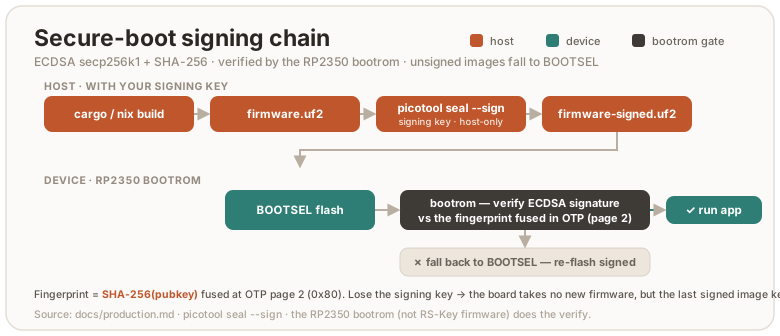
The permanent consequences:
- Every future flash must be signed with your key. The dev loop becomes
build →
picotool seal --sign→ flash. - Losing the signing key bricks the board for new firmware (the current signed image keeps booting). Back the key up before enabling enforcement.
DEBUG_DISABLEis burned along the way. SWD is gone (flashing is BOOTSEL anyway).
2a. Generate a signing key (once, off-repo)
mkdir -p ~/.rs-key-secrets && cd ~/.rs-key-secrets
openssl ecparam -genkey -name secp256k1 -noout -out secure_boot_key.pem
openssl ec -in secure_boot_key.pem -pubout -out secure_boot_pub.pem
chmod 600 secure_boot_key.pem
# BACK IT UP somewhere that survives this machine.
That is the whole of what you create by hand. The otp_secureboot.json the next
step passes around is produced by seal, not written here — see 2b.
This key is the root of trust for the board’s whole life. Treat it like the most
important secret you have here: if you lose it after enable, you can never
flash new firmware to that board (the running image keeps booting). It is also
what makes key rotation
possible later, so a single, well-kept key with a backup is the goal. The full
key lifecycle is in signing-keys.md: passphrase protection
(and the decrypt-for-seal step it implies), backup, one fresh key per
board, rotation, and recovery.
2b. Sign and prove a signed image boots (before any fuse)
# 1. an image to sign. The partition table has to be in it BEFORE sealing, or
#    the signature does not cover the fence (build.md#the-partition-table).
cargo build --release -p firmware
scripts/pt.sh target/thumbv8m.main-none-eabihf/release/firmware firmware-pt.elf
#    (or a single `nix build .#firmware`, whose result/firmware.elf already has it)

# 2. sign the ELF — NOT the UF2, and convert afterwards. `seal` retires the
#    image's own IMAGE_DEF (the linker's, carrying no signature and no rollback
#    version) only when handed an ELF; given a UF2 it appends its signed block and
#    leaves that one live and FIRST, which a SECURE_BOOT_ENABLE + ROLLBACK_REQUIRED
#    device meets first and refuses — while the host still prints
#    "signature: verified". otp_secureboot.json does NOT exist yet: you pick the
#    path, and `seal` creates the file there. It is the artifact stage 2c fuses.
picotool seal --sign --hash firmware-pt.elf -t elf firmware-signed.elf -t elf \
    ~/.rs-key-secrets/secure_boot_key.pem ~/.rs-key-secrets/otp_secureboot.json \
    --major 1 --minor 0 --rollback 1
picotool uf2 convert firmware-signed.elf -t elf firmware-signed.uf2
picotool info -a firmware-signed.elf   # "signature: verified", and block 1 "ignored"
ls -l ~/.rs-key-secrets/otp_secureboot.json    # seal wrote this; 2c needs it

# 3. BOOTSEL, then flash + confirm the device works:
picotool load -v firmware-signed.uf2 && picotool reboot   # or drag it onto the RP2350 drive
What otp_secureboot.json is for
The one part of this page with no obvious purpose until you see both ends of it.
The bootrom’s check is: does SHA-256(the public key inside this image) equal a
fingerprint fused in OTP? So that fingerprint has to get into the fuses. But
signing happens on your host, with a private key that must never go near the
device, while fusing happens against the board — two separate operations,
possibly on different machines and months apart. Nothing in the signed image can
carry the value across: the device is exactly what you don’t trust yet.
That file is the courier, and its whole job:
| Written by | picotool seal (2b) — it derives the fingerprint from your .pem |
| Read by | rsk secure-boot load-key <that file> (2c) — burns it into a boot-key slot |
| Contains | bootkey0 (the 32-byte fingerprint, length-checked before the burn) + key_valid + secure_boot_enable |
| Verified after the burn | load-key reads the slot back and compares it to the fingerprint it wrote — a mismatch fails with verify failed: slot N reads back … rather than leaving an unusable slot marked valid |
| Touched by anything else | no |
You do not back it up, and losing it costs nothing. It is a pure function of
your signing key — sealing any image with the same .pem regenerates it
byte-for-byte, and --major / --minor / --rollback do not change a byte of
it. It holds no private material, so it is not a secret either. The .pem is the
thing to protect; this is a derived artifact you can recreate in one command.
It is per-key, so with one key per board (recommended —
signing-keys.md) keep each next to the .pem that produced
it, under names you can tell apart.
The other arguments:
secure_boot_key.pem: your signing key. It signs the image.--major/--minor: an image version (major.minor) stamped into the RP2350 boot metadata. It is a plain version label, distinct from the firmware version RS-Key reports (5.8.0by default, build.md) and from the rollback version. The bootrom can use it to prefer the newer of two images in an A/B setup. RS-Key ships a single image, so here it is effectively a label. Keep1 0.--rollback: the anti-rollback version, a separate counter (not the image version). It is harmless before anti-rollback is enabled, and having a version in every sealed image from day one makes that stage cheap. What it means and how to choose it: anti-rollback.md.
picotool info firmware-signed.uf2 must report signature: verified. The
firmware’s image definition is already secure-boot compatible. The sealed UF2
carries the signature block.
Sealing also covers the image’s partition table, the fence that keeps the USB
bootloader out of the KV store (build.md). That is
the whole reason the fence is worth anything: on an unsigned board an attacker
simply flashes an image carrying a permissive table, while a sealed table cannot
be replaced without this key. It closes the one snapshot/restore gap secure boot
does not close by itself — writing the data region is not code execution
(threat-model.md).
Prove it, don’t assume it: picotool info -a firmware-signed.uf2 must show the
store partition as NSBOOT(-), and a byte flipped anywhere in the table must turn
hash: verified into hash: incorrect.
2c. Burn, staged
rsk secure-boot splits provisioning so every irreversible write is proven
by a real boot before the next. The only true point of no return is one
bit:
rsk secure-boot status      # read the current fuse state any time
rsk secure-boot load-key ~/.rs-key-secrets/otp_secureboot.json   # 1. boot-key fingerprint + KEY_VALID (non-enforcing)
rsk secure-boot harden      # 2. DEBUG_DISABLE + glitch detectors   (non-enforcing)
rsk secure-boot enable      # 3. SECURE_BOOT_ENABLE = 1  ← the brick bit
rsk secure-boot lock        # 4. revoke unused key slots + lock the fuse pages
Each step has --dry-run and a typed confirmation. Between steps, reboot and
confirm the device still works. After enable, verify the negative case:
drag an unsigned UF2. The bootrom must reject it and fall back to BOOTSEL.
Re-drag the signed one to recover.
lockand key rotation: a decision to make now. Thelockstage revokes the three unused boot-key slots (KEY_INVALID), maximizing hardening against an attacker who tries to inject their own key. It also forecloses key rotation, the escape valve if you ever exhaust the 48-step anti-rollback budget (you rotate to a new signing key and revoke the old one). If you want to keep that valve, don’t run the fulllock. Leave a slot. The trade-off is in anti-rollback.md. Most users should run the fulllock. You will almost certainly never reach the ceiling.
The new flash workflow (forever)
cargo build --release -p firmware
scripts/pt.sh target/thumbv8m.main-none-eabihf/release/firmware firmware-pt.elf
# seal the ELF, convert after — a UF2 in leaves the unsigned IMAGE_DEF first (2b)
picotool seal --sign --hash firmware-pt.elf -t elf firmware-signed.elf -t elf \
    ~/.rs-key-secrets/secure_boot_key.pem ~/.rs-key-secrets/otp_secureboot.json \
    --major 1 --minor 0 --rollback 1
picotool uf2 convert firmware-signed.elf -t elf firmware-signed.uf2
# BOOTSEL (hands-free: rsk reboot bootsel), then:
picotool load -v firmware-signed.uf2 && picotool reboot   # or drag it onto the RP2350 drive
The pt.sh line is not optional here, and its position is the point. It
embeds the partition table that fences the KV store off from the bootloader
(build.md); cargo build alone never produces
one. Running it before seal is what puts the table under the signature —
which is the only thing that stops an attacker flashing a permissive table of
their own. Seal a table-less image and you have signed away the fence without
any error telling you so.
The --rollback value is your board’s current floor (see
anti-rollback.md). 1 is the usual starting value.
To seal an image others can independently verify, build it with
nix build .#firmware instead of the dev-shell cargo build. That path is
bit-for-bit reproducible from the source tree
(build.md), so anyone can rebuild
at your release commit and confirm the payload you signed.
Stage 3 — anti-rollback (optional)
This stage stops your own older signed images from booting, so a bug you have since fixed can’t be re-introduced by downgrading. Read anti-rollback.md first. It is the full model: how the floor works, the 48-burn budget, when (and whether) to raise it, what to do at the ceiling, and the new-board case. This section is only the steps to turn it on.
The mechanism is two RP2350-native pieces: a per-image rollback version
(--rollback N at seal time) checked against a 48-bit OTP thermometer, and the
ROLLBACK_REQUIRED fuse that makes that check mandatory. Until the fuse is
burned, versionless images boot and the feature is off.
Turning it on
- Seal and flash firmware with a rollback version (start at
--rollback 1), reboot, and confirmrsk secure-boot statusreportsboot version 1/48. If it still reads0/48, stop and investigate. Never burn the fuse on an unproven setup. - Re-seal
rsk-wipeat the same version. The recovery escape hatch must stay bootable. - From the running firmware:
rsk otp rollback-require(typed confirmation;--dry-runreports state without burning). The firmware refuses unless secure boot is enabled, so it can only run from an image that itself passed the rollback check, and the “fuse before a versioned image” footgun can’t happen. - Negative-test: drag any versionless signed UF2. The bootrom must refuse it and fall back to BOOTSEL. Re-drag the current image to recover.
After it’s on
- Every
picotool sealmust include--rollback <your floor>. A versionless sealed image no longer boots (fail-closed). You find out at flash time and recover by re-sealing. - To raise the floor and close a downgrade-fix, seal one step higher
(
--rollback <floor + 1>). The default is not to raise it. When, why, and the budget math are all in anti-rollback.md. - A board that has burned to floor N never boots an image below N again. No undo.
Everything about whether to bump, the 48-budget, the ceiling, key rotation, and moving to a new board lives in anti-rollback.md.
Recovery and failure cases
| Situation | What happens / what to do |
|---|---|
| Bad or wrong flash | BOOTSEL stays enabled — drag a correctly-signed UF2 to recover. |
| Unsigned / foreign-signed image (secure boot on) | Bootrom refuses it, falls back to BOOTSEL. Drag your signed image. |
| Lost the signing key (secure boot on) | The current signed image keeps booting, but you can never flash new firmware. There is no recovery for the key — back it up before enable. |
| Image sealed below your rollback floor | Refused at boot → BOOTSEL. Re-seal at ≥ your floor. |
| Image sealed above your floor by accident | It boots and burns the thermometer up to it, spending budget irreversibly. Seal at exactly your floor unless you mean to raise it. |
rsk-wipe won’t boot after enabling anti-rollback | Re-seal it at your current floor — the recovery image must carry a version too. |
picotool save/load/erase over the store answers permission failure | Expected: the partition table denies the bootloader there (build.md). Erase from the running side instead — rsk-wipe and the rescue applet execute as secure code, which the table leaves rw. |
| 48-step rollback budget exhausted | Key rotation, or a new board — see anti-rollback.md. |
Page 58 read fails after lock-page58 | That’s the lock working — only secure firmware can read the keys now. |
| Replacing the board entirely | Provision the new chip with a new signing key; restore your FIDO identity with rsk backup restore. Resident passkeys / OpenPGP / PIV don’t migrate — see anti-rollback.md. |
Deliberate choices
- USB BOOTSEL stays enabled. It is the only reflash and the only recovery path (no debugger). It cannot bypass signature enforcement, and after the page-58 lock it cannot read the OTP keys. Disabling it (the datasheet’s full checklist) would turn every bad flash into a permanent brick.
- No image encryption. The code is open source. There is nothing secret in the image (secrets live sealed in flash, rooted in OTP). The RP2350 also has no transparent XIP decryption. Encrypted boot requires fitting the image in SRAM, which a ~1.7 MB image does not.
Residual risks (still open after all stages)
- XIP TOCTOU: the image executes from external QSPI flash. Hardware that swaps or emulates the flash chip between the bootrom’s signature check and execution can subvert it. Decap/side-channel-class attack, out of scope.
- A host compromised while the device is plugged in can drive normal operations (as with any security key). See threat-model.md.
- An older signed image of yours re-opens the store fence. The partition
table travels inside the image, so anything you signed before
0x0871carries none, and flashing it makes the KV store bootloader-writable again — the snapshot/restore rollback is back. This is an ordinary downgrade attack, so the version axis is what answers it: raise your rollback floor past your pre-table builds (anti-rollback.md). Until you do, the fence is worth exactly as much as your oldest signed artifact.
Signing keys (secure boot)
Once secure boot is enabled, a single key you hold is the root of trust for the board’s whole life: it signs every image the board will run. This page is the full key lifecycle: what the key is, how it relates to the other on-chip keys, and the correct flow to generate, back up, provision, use, rotate, and (if it comes to it) recover it.
⚠️ This key is the most important secret in the production path. Lose it after
enableand you can never flash new firmware to that board again. Read the backup section before you generate anything.
The keys on an RS-Key, and which one this is
Three different key concepts live on a provisioned board. Don’t conflate them:
| Key | Where it lives | Who holds it | This page? |
|---|---|---|---|
| Secure-boot signing key | private key on your host; only its fingerprint is fused in OTP | you | yes |
| MKEK / DEVK (master sealing / device attestation) | OTP page 58, generated on-device and forgotten | nobody; the fuses are the keys | no (production.md stage 1) |
| Per-applet secrets (FIDO seed, PIV/OpenPGP keys) | sealed in flash under the MKEK | the device | no (threat-model.md) |
The signing key is the only one you generate, hold, and must keep. The MKEK/DEVK are random and unrecoverable by design. The signing key is the opposite: you keep it, and keeping it is the whole job here.
Architecture — the trust chain
You sign images with the private key. The board never sees it; OTP holds
only a fingerprint (SHA-256 of the matching public key). The signed image
carries its public key plus an ECDSA signature. The bootrom checks both at
every boot:
flowchart TD
    priv["Private key<br/>(offline, backed up)"] -->|signs| seal["picotool seal --sign"]
    seal --> img["Signed image<br/>public key + ECDSA signature"]
    img -->|BOOTSEL flash| board["Board"]
    board --> rom{"bootrom: SHA-256(image's public key)<br/>matches a fused, valid slot?"}
    rom -->|no| reject["refuse → BOOTSEL"]
    rom -->|yes| verify["verify the ECDSA signature"]
    verify --> boot["boot the image"]
    slots["OTP boot-key slots (4)<br/>fingerprints + KEY_VALID / KEY_INVALID"] -. anchors .-> rom
Two consequences fall out of this shape and explain everything below:
- The board only ever holds the public fingerprint, so a stolen board can’t yield your signing key, but the board also can’t help you recover it.
- The bootrom matches against any valid slot and ignores which key signed, beyond the fingerprint. That is what makes key revocation a downgrade defense (see anti-rollback.md).
1. Generate (one fresh key per board, off-repo, ideally offline)
The RP2350 bootrom verifies secp256k1 + SHA-256, so the key must be secp256k1. Protect it with a passphrase. That is the difference between a stolen backup being your signing key and being ciphertext:
mkdir -p ~/.rs-key-secrets && cd ~/.rs-key-secrets
# generate, then encrypt at rest with a passphrase (openssl prompts you to set one):
openssl ecparam -genkey -name secp256k1 -noout \
  | openssl ec -aes256 -out secure_boot_key.pem
# derive the public key (prompts for the passphrase to read the private key):
openssl ec -in secure_boot_key.pem -pubout -out secure_boot_pub.pem
chmod 600 secure_boot_key.pem
Use a long, unique passphrase and back it up separately. Losing the
passphrase loses the key as surely as losing the file. If you would rather not
use one, drop the | openssl ec -aes256 … pipe and write the key straight out
(-out secure_boot_key.pem): simpler, but then any copy of the file is the
key. Either way, generate it on a machine you trust (ideally offline/air-gapped)
and never commit it. The hermetic nix build path deliberately keeps the key
out of the build sandbox (build.md);
signing is always a separate, local step.
One key per board, one board per key. Generate a brand-new key for every chip you provision and trust only it on that board. A new device is signed with a new key. Never carry an old board’s key onto a new one. That rule is also what keeps a replacement board’s rollback floor safe: the old images are signed by the old key, which the new board does not trust (anti-rollback.md).
2. Back it up — before you fuse anything
This is the step people skip and regret. After enable, the fused fingerprint
is permanent and only this key can sign images the board will boot. So:
- Make at least two durable copies, on media that survive this machine (and each other), e.g. an encrypted USB stick kept offline, plus a printout of the PEM in a safe.
- Encrypt it at rest. A passphrase-protected copy, or a copy held on a separate hardware token, is worth the friction.
- Keep it off networked machines. The host that signs only needs the key for
the few seconds of
picotool seal. - There is no recovery from the device. It holds only the public fingerprint. If every copy of the private key is gone, the board’s current signed image keeps booting but you can never flash it again.
If you reserve a slot for rotation you get one escape hatch later. Even so, treat the key as un-loseable.
3. Provision — fuse the fingerprint (slot 0)
picotool seal writes the fingerprint into the otp_secureboot.json it
produces. rsk secure-boot load-key fuses it into boot-key slot 0 without
enabling enforcement yet:
# seal once to produce the otp.json (also see production.md, stage 2b):
picotool seal --sign --hash firmware-pt.elf -t elf firmware-signed.elf -t elf \
    ~/.rs-key-secrets/secure_boot_key.pem ~/.rs-key-secrets/otp_secureboot.json \
    --major 1 --minor 0 --rollback 1
rsk secure-boot status                          # bootkey present: False
rsk secure-boot load-key ~/.rs-key-secrets/otp_secureboot.json   # fuses slot 0
load-key is non-enforcing: unsigned images still boot until enable. It
refuses if a key is already present, so it is a one-shot for slot 0. (If your key
is passphrase-protected, decrypt it to a temp file for this seal too, exactly as
in step 4.) The rest of the staged ritual
(harden → enable → lock) is in production.md.
4. Daily use — sign every flash
After enable, every image must be sealed with this key. picotool reads only
an unencrypted PEM (it has no passphrase prompt), so a passphrase-protected
key (recommended) is decrypted to a temporary file just for the seal and removed
straight after:
# decrypt for the seal only — best on a RAM-backed dir so the plaintext never
# touches disk; openssl prompts for the passphrase:
( umask 077; openssl ec -in ~/.rs-key-secrets/secure_boot_key.pem -out /tmp/sk.pem )
picotool seal --sign --hash firmware-pt.elf -t elf firmware-signed.elf -t elf \
    /tmp/sk.pem ~/.rs-key-secrets/otp_secureboot.json --major 1 --minor 0 --rollback 1
picotool uf2 convert firmware-signed.elf -t elf firmware-signed.uf2
rm -P /tmp/sk.pem        # overwrite + delete (Linux: shred -u /tmp/sk.pem)
# BOOTSEL, then:
picotool load -v firmware-signed.uf2 && picotool reboot   # or drag it onto the RP2350 drive
If your key has no passphrase, pass ~/.rs-key-secrets/secure_boot_key.pem
straight in as the <key> argument and skip the decrypt / rm lines.
The rsk-wipe recovery image must be sealed with a currently valid key too,
or it won’t boot on a secure-boot board. After a rotation
it must be re-signed with the new key. The full flag meaning is in
production.md;
if anti-rollback is on, add --rollback (anti-rollback.md).
Key slots and validity
The RP2350 has four boot-key slots, each holding one fingerprint, plus
KEY_VALID / KEY_INVALID masks that say which slots the bootrom trusts:
- The bootrom accepts an image whose public key matches any valid, non-revoked slot.
- The
lockstage (production.md) setsKEY_INVALIDon every slot the bootrom does not already trust, keeping the one the board actually boots from. Maximum hardening, but it also removes any room to add a key later. On a board mid-rotation — a new key provisioned but the old slot not yet revoked — two slots are trusted andlockrefuses rather than guess: runrevoke <old slot>first. - Reserving a slot vs. full lock-down is a decision you make at provisioning time. It is the same trade-off as the anti-rollback escape valve, laid out in anti-rollback.md. Most users should take the full lock. Reserve a slot only if you specifically want a future rotation path.
5. Rotate a key
You rotate when you want a new signing key to take over and the old one to stop being trusted. The two real reasons: a suspected key compromise or the anti-rollback budget ceiling (a new key revokes the old, killing old signed images by signature; see anti-rollback.md).
The flow, in order (never revoke the old key until the new one is proven):
- Generate a new key
K2(section 1) and back it up (section 2). - Provision
K2’s fingerprint into a free, un-revoked slot:rsk secure-boot load-key --slot <free> K2-otp.json. - Re-sign the current firmware with
K2, flash it, and confirm it boots (the board now validates it viaK2). - Revoke the old key
K1:rsk secure-boot revoke <K1-slot>. Old images signed only byK1now fail secure boot.
rsk secure-boot rotate K2-otp.json runs steps 2–4 as a guided flow: it
provisions the next free slot, then stops and tells you to flash and prove K2
before you revoke K1. It never revokes for you while only one key is proven.
Tooling. Rotation is driven by
rsk secure-boot, not hand-rolledpicotool otpwrites:load-key --slot Nprovisions any of the four slots,revoke <slot>retires one (refusing to revoke your last valid key), androtate <new.json>walks the whole flow: provision a free slot, then it tells you to flash and prove the new key before revoking the old one. It only works if you reserved a slot (didn’t run the fulllock, which leaves the key pages bootloader-writable); on a fully-locked board the commands refuse, and a fresh board is the only path. With four slots you can rotate roughly three times before they’re spent.
Loss and recovery — the cases
| Situation | Outcome |
|---|---|
Lost the key before load-key | No harm. Regenerate. Nothing is fused yet. |
Lost it after load-key, before enable | Enforcement is still off, so the board boots unsigned images and keeps working, but slot 0 is now fused to a key you don’t have. Provision a different slot for a new key, or treat the board as not worth securing. |
Lost it after enable | The key itself is unrecoverable, and the current signed image keeps booting forever. After a full lock, the unused slots are revoked and the key pages are locked, so you can never flash new firmware: a new board. If instead you reserved a free slot, you can still provision a new key into it and flash again (the bootrom never asks for the old key): rsk secure-boot load-key --slot <free> <new-otp.json> does it, no hand-rolled picotool needed. |
| Key compromised (someone else has it) | Rotate to a new key and revoke the old (needs a reserved slot), or move to a new board. The old key can sign images your board still trusts until it is revoked. |
| Replacing the board | Provision the new chip with a new key; restore your FIDO identity with rsk backup restore. See anti-rollback.md. |
Best practices, in one place
- secp256k1, generated offline, passphrase-protected at rest, never in the repo or a build sandbox.
- ≥2 durable, encrypted, offline backups (before you fuse anything).
- One fresh key per board for its life: a new board gets a new key, never the old one. Rotate only on compromise or the rollback ceiling, and only if you reserved a slot.
- Sign
rsk-wipewith the same key as your firmware (keep the recovery hatch bootable). - Decide lock-down vs. a reserved rotation slot up front. It can’t be changed
after
lock.
OTP fuses (RP2350)
The “production” hardening in RS-Key comes down to writing the RP2350’s OTP: the OTP master key, secure boot, and anti-rollback. This page explains what OTP is, why it is irreversible, how RS-Key writes it, and exactly which rows it touches. Read it before production.md. It is the substrate everything else stands on.
“OTP” here means One-Time-Programmable fuses on the chip, not the Yubico one-time-password feature (guides/otp.md). Different thing, same three letters.
What OTP is
OTP is a block of on-chip memory made of antifuses: writing a bit physically and permanently changes the silicon. A bit goes 0 → 1 and never back. There is no erase, no reset, no “factory default”. For OTP, factory is wherever you left it. Every chip has its own OTP. Nothing about it is shared between boards.
This is the whole point. The value of OTP for a security key is exactly that it cannot be undone: a key fused here can’t be un-fused, a secure-boot bit can’t be cleared, a rollback floor can’t be lowered. Hardening that you could reverse would be hardening an attacker could reverse too.
⚠️ Every write on this page is permanent. A mistake can lock you out of reading a value forever, or brick the board for new firmware. The tools refuse to act without typed confirmations and support
--dry-run. Use it.
Layout: pages, rows, and reliability copies
OTP is addressed in rows (24 bits each), grouped into pages of 64 rows
(so page N starts at row N × 0x40; page 58 begins at row 0xE80). Page
granularity matters because read/write locks are applied per page, not per
row.
A single antifuse can be marginal, so the values that the bootrom and firmware depend on are stored redundantly:
- RBIT-3: the value is written into three consecutive rows, and the reader takes the bitwise 2-of-3 majority. An interrupted burn that set only one copy doesn’t count. Two copies do. The secure-boot flags, the boot-key fingerprints, and the rollback rows are all RBIT-3.
- ECC: other pages store an error-correcting code alongside the data.
Who can write OTP, and when
Two paths write OTP, and the difference is central to how RS-Key stays safe:
- BOOTSEL /
picotool: with the board in BOOTSEL you can read and write OTP directly from the host. This is how the bulk of provisioning happens (the master key, the secure-boot key, the enable bits). - Secure firmware (the rescue applet): a handful of rows must be written by
the running, secure-boot-validated firmware, not from BOOTSEL. Two cases:
- rows that are made bootloader-read-only by a page lock (so BOOTSEL can no
longer write them) but stay secure-writable. The page-58 lock and the
ROLLBACK_REQUIREDflag are applied this way, byrsk otp lock-page58/rsk otp rollback-require, each guarded by an exact magic payload so a stray APDU can never trigger them.
- rows that are made bootloader-read-only by a page lock (so BOOTSEL can no
longer write them) but stay secure-writable. The page-58 lock and the
Each OTP page lock is a byte encoding three independent levels: LOCK_BL
(bootloader), LOCK_NS (non-secure), LOCK_S (secure), each of read-write /
read-only / inaccessible. That three-way split is what lets a page be
unreadable to BOOTSEL but still readable/writable by secure firmware (see
page 58 below).
What RS-Key burns
These are the rows RS-Key provisions, grouped by the stage that writes them. The
authoritative source is the code (tools/rsk/otp.py, tools/rsk/secureboot.py,
crates/rsk-rescue/src/rollback.rs). The table is the map.
| Region | Rows | What it holds | Written by |
|---|---|---|---|
| Page 58 | 0xE80… | DEVK (device attestation key), MKEK (master sealing key), anti-imaging chaff | rsk otp burn (BOOTSEL) |
| Page-58 lock | 0xFF5 | makes page 58 BOOTSEL-unreadable, secure read/write | rsk otp lock-page58 (firmware) |
| Boot key | 0x80… | SHA-256 fingerprint of your secure-boot public key (slot 0 of 4) | rsk secure-boot load-key <otp.json> |
BOOT_FLAGS1 | 0x4B | KEY_VALID / KEY_INVALID (which key slots are live / revoked) | load-key, lock |
CRIT1 | 0x40 | SECURE_BOOT_ENABLE, DEBUG_DISABLE, GLITCH_DETECTOR_ENABLE/SENS | harden, enable |
BOOT_FLAGS0 | 0x48 | ROLLBACK_REQUIRED (bit 11) | rsk otp rollback-require (firmware) |
DEFAULT_BOOT_VERSION | 0x4E, 0x51 | the 48-bit rollback thermometer (two 24-bit rows) | the bootrom, on boot |
| Page 1/2 locks | 0xF83, 0xF85 | make the flag + key pages bootloader-read-only | rsk secure-boot lock |
A few notes that matter:
- Page 58 is read-write to secure firmware even after the lock. The lock
value (
0x3C3C3C) sets BL and NS to inaccessible but leaves S read-write. So only secure-mode firmware can ever read the MKEK/DEVK again, and a BOOTSEL flash dump cannot. - The MKEK/DEVK are generated randomly and forgotten.
rsk otp burndoes not keep a copy. The fuses are the key. There is nothing to back up and nothing to lose. - The rollback thermometer is advanced by the bootrom, not by a host write, when a higher-version image boots. See anti-rollback.md.
- Pages 1 and 2 stay bootloader-read-only after
lock(0x141414), not inaccessible. The bootrom must read the keys and flags on every boot. They remain secure-writable, which is how the firmware appliesROLLBACK_REQUIREDafter the pages are otherwise locked down.
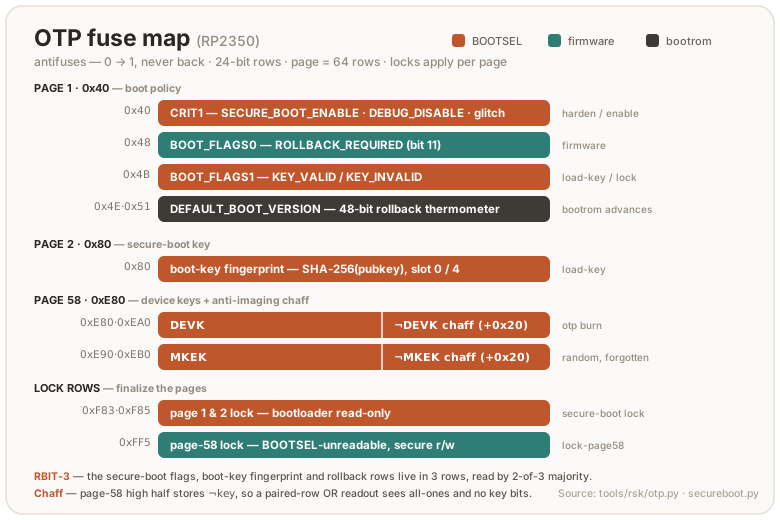
Anti-imaging chaff
Page 58 stores the keys in its low half and the bitwise complement of
every key row in its high half: DEVK at 0xE80…0xE8F with its complement at
0xEA0, MKEK at 0xE90…0xE9F with its complement at 0xEB0 (offset 0x20 =
half a page). The firmware never reads the high half. It plays no part in key
reconstruction (firmware/src/otp_keys.rs reads only the key rows). It exists for
one reason.
The cheapest invasive OTP read demonstrated against this antifuse family
(IOActive, RP2350 Challenge 1, see threat-model.md) recovers
the bitwise OR of two physically paired bitcell rows, not the rows
individually. Raspberry Pi’s mitigation is to put the key in one half of a page
and its complement in the opposite half, so each physical pair reads
OR(b, ¬b) = 1, a uniform all-ones pattern that carries no key bits. The
low-half / high-half placement here is exactly that scheme, and it neutralises the
demonstrated readout.
This defeats the demonstrated OR-read. IOActive note that a more advanced attack might separate the paired (even/odd) rows with additional effort, which would read the key half directly, and a plain complement does not stop that. Raspberry Pi have said a forthcoming application note will describe a storage scheme mitigating both the current attack and that hypothetical one. If it prescribes more than complement-in-opposite-half, revisit this.
Reading OTP
OTP is readable until a lock says otherwise:
rsk secure-boot status        # decodes the secure-boot + rollback rows for you
picotool otp get -r -n 0x48   # raw row read (BOOTSEL), if you want the bytes
rsk inventory list / rsk status surface the human-readable state. Once page
58 is locked, picotool otp get on it fails with a permission error forever.
That failure is the lock working, not a fault.
Honest limits
- OTP is not a secure element. It hardens against software- and BOOTSEL-level attacks, and the anti-imaging chaff above neutralises the demonstrated passive-voltage-contrast OTP readout. But the antifuses are still on a general-purpose die: a funded lab with a focused ion beam can image them, and that (like laser fault injection and power/EM analysis) is out of scope (threat-model.md). The antifuse readout is not fixed by any silicon stepping. Use A4 for the fault and boot-ROM fixes (our own boards are A2, the stepping broken in the public challenge).
- It is finite. The rollback thermometer is 48 bits for the board’s life. There are 4 key slots. Neither resets. See anti-rollback.md.
- It is per-chip. None of this carries to another board. A new board is a fresh, blank OTP.
Anti-rollback
Secure boot (production.md) refuses foreign images. Every image you signed stays valid forever. The first time a release fixes an exploitable bug, your previous signed image becomes a hole: an attacker with the device drags your old, signed UF2 over BOOTSEL and attacks the bug you already fixed. Anti-rollback closes that downgrade path.
Scope: this page is about rolling back the image. Rolling back the data — snapshotting flash over BOOTSEL and restoring it later to reset a wrong-PIN counter — is a separate attack with separate defenses, in threat-model.md. Neither mechanism sees the other’s rollback.
This page is the model and every case. The operational steps to turn it on are in production.md, stage 3; the fuses it touches are in otp-fuses.md. It is optional. Until you enable it, nothing here applies.
Read this whole page before enabling it. Anti-rollback burns one-time fuses. Once enforced, it changes which images your board will boot. None of it is reversible.
Two independent axes
The single most important idea: an old, vulnerable image can be refused by two different mechanisms. They do not depend on each other.
| Axis | What it refuses on | Budget per chip |
|---|---|---|
| Version | a rollback counter in OTP (“don’t boot below my floor”) | 48 steps |
| Key | the signature (“don’t boot if signed by a key I don’t trust”) | 4 key slots |
While you have version budget, the first axis does the work. When it runs out, the second takes over. A fresh chip with a fresh key resets both. The rest of this page is those two axes and what happens at their limits.
Axis 1 — version (the rollback floor)
Two different numbers
- Firmware version (
v0.3.1, semver): “which build is this”, changes every release. - Rollback floor: a number on your board. It refuses to boot anything below it. You move it, rarely, by hand.
RS-Key does not assign project-wide “epoch” numbers. There is only your own floor, on each board, and you manage it.
How it works in hardware
The floor lives in RP2350 OTP as a 48-bit thermometer (its value is the number of burned bits). At boot the bootrom (not our firmware) compares the image’s rollback version against your board’s floor:
- image version below the floor → refused, fall back to BOOTSEL;
- equal → boots;
- above → boots and immediately burns the thermometer up to the image’s version.
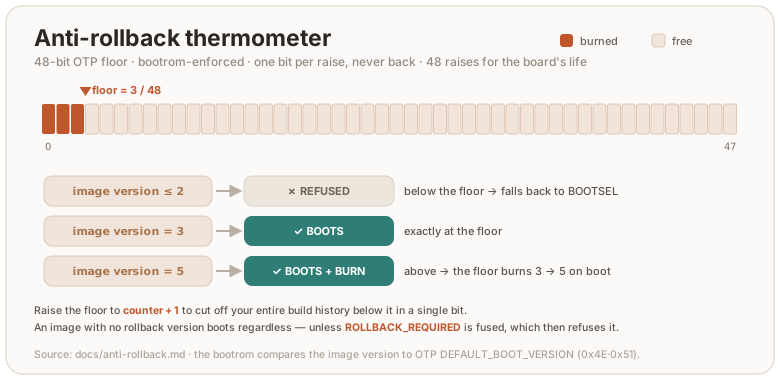
The whole mechanism has an on/off fuse, ROLLBACK_REQUIRED. Until it is burned,
images carrying no rollback version boot regardless (anti-rollback has no
teeth). You burn it from firmware:
rsk secure-boot status      # shows ROLLBACK_REQUIRED and the boot version N/48
rsk otp rollback-require     # fuse ROLLBACK_REQUIRED (requires secure boot enabled)
⚠️ Burning the thermometer is irreversible. OTP is one-time-programmable: a bit goes 0→1 and never back. See otp-fuses.md.
Budget: 48 steps per chip, for the board’s whole life
The thermometer is 48 bits, so the floor can advance 48 times over the entire life of that board, and never again. That is not “48 releases”. It is 48 burns. Treat each advance as spending an irreversible, finite resource.
The project flags downgrade-fixes; you decide
Because secure boot is rooted in your own signing key, there are no project-signed images. Every owner signs and chooses their own floor. So the project’s only job is to mark, in the changelog, which releases fix a downgrade-exploitable bug:
| Release | downgrade-fix? |
|---|---|
v0.2.0 (OATH features) | no |
v0.3.0 (PIN-bypass fix) | yes |
v0.4.0 (PIV slots) | no |
v0.5.0 (signature-check fix) | yes |
The marker a tool can read
That flag is also machine-readable, so a flasher (rs-key-flasher, or anything
else that watches releases) can raise it without a human reading the changelog.
A downgrade-fix release carries an HTML comment in its release body — bare:
<!-- @increase-anti-rollback-epoch -->
or with an optional JSON object whose reason is one sentence for the owner:
<!-- @increase-anti-rollback-epoch{"reason": "CVE-1234 was fixed"} -->
The name is exact and the whole marker is one line. It is written in this
repository’s CHANGELOG.md, inside the released version’s section, and
release-build.yml copies it into the release body — re-appending it if the
section had to be shortened, so a tool never has to care where in the notes it
was written. A release without the marker is not a downgrade-fix; absence is
the answer, not “unknown”.
What it means is what this page already says: your floor is worth raising, and
that is your decision to make (--rollback <your counter + 1>). It is not an
epoch the project assigns — there is none — and a tool must not burn anything on
its own.
When you build firmware, you check: were there downgrade-fix releases since my last build? If so, it is your call:
- Raise the floor (close those bugs): seal with
--rollback <your counter + 1>. The board burns up to it. Your older images below it stop booting. - Leave it (you accept the risk): seal with
--rollback <your current counter>. Everything still boots, nothing burns.
The default is not to burn. Raising the floor is a deliberate act tied to a specific security release, not routine.
If you don’t burn, the downgrade attack stays possible. Your old signed image will still boot. That is a fine, conscious trade-off (you keep your 48-budget and don’t orphan working images), but it is your choice of risk, not a default-protected state.
Why +1 is enough
The floor only needs to sit above your own vulnerable builds. Every build
you made was sealed at a version ≤ your current counter. So raising the floor to
counter + 1 cuts off your entire build history below it in a single bit.
There is no absolute number to “catch up” to.
A bonus falls out of this: “decline, decline, then raise once when you decide to care” spends fewer bits than raising the floor on every release, for the same protection, because all your older builds sit below the one bump.
Concretely:
rsk secure-boot status         # read your floor, say "boot version 2/48"
# build the fixed firmware, then seal it one step higher:
picotool seal --sign --hash firmware-pt.elf -t elf firmware-signed.elf -t elf \
    ~/.rs-key-secrets/secure_boot_key.pem ~/.rs-key-secrets/otp_secureboot.json \
    --major 1 --minor 0 --rollback 3        # 3 = counter (2) + 1
picotool uf2 convert firmware-signed.elf -t elf firmware-signed.uf2
# flash it; on boot the floor burns 2 → 3, and every image sealed ≤ 2 is now refused
One caveat for correctness: you must seal the fixed firmware strictly above the version you used for the vulnerable build. In practice that is
counter + 1. If you accidentally seal the fixed image at the same version as a vulnerable one, the floor didn’t rise and you are not protected.
Your floor is per-board
The floor is private to each board. It equals the highest version that that board has booted. It depends only on your burns, not on how many releases exist. Different boards carry different floors. This is normal and needs no coordination. The one rule: a board will not boot an image below its own floor. You cannot go back down past a floor you’ve burned.
At the ceiling (floor = 48)
The thermometer is full, but you can still update forever. You seal every future image at version 48 and it boots. You lose only the growth of version-based downgrade protection: a new release can no longer out-version a previous one (there is no 49th step). The device works. Secure boot still holds. From here, downgrade protection moves to axis 2.
Axis 2 — key (the signature)
How the bootrom checks a signature
- OTP holds not the key but a fingerprint (
SHA-256(public key)) in a boot-key slot. - A signed image carries, inside it, the full public key plus an ECDSA signature (secp256k1 + SHA-256) over the image hash.
- At boot the bootrom hashes the public key from the image and compares it to the fused fingerprints. No match → refused, before it even checks the signature. Match → it verifies the ECDSA signature with that key → boots.
This can’t be forged: an attacker can’t sign for a key they don’t hold, and they can’t make a different public key hash to a fused fingerprint (SHA-256).
Key revocation = downgrade defense without the thermometer
When the version budget is spent, you switch axes. For each new downgrade-fix:
- sign the fixed firmware with a new key K2;
- confirm it boots;
- revoke the old key K1 (
KEY_INVALID).
The old vulnerable image, signed by K1, now fails secure boot by signature. The version counter is not involved. RP2350 has 4 key slots, so this buys roughly 3 more rounds on top of the 48.
A decision you must make before the ceiling
Key revocation needs a free key slot reserved at provisioning time. Today
rsk secure-boot lock (stage D) revokes all three unused slots. After that
there is nowhere to rotate to. So this is a genuine trade-off, made up front:
Full lock (current default) | Reserve a slot for rotation | |
|---|---|---|
| Hardening against attacker key injection | maximum | the free slot is reachable by an attacker with physical access who can burn fuses |
| Escape valve at the 48 ceiling | none (new chip only) | ~3 key rotations |
Detail: after
lock, the key pages stay secure-writable (the firmware must still writeROLLBACK_REQUIREDand the page-58 lock), so a future firmware command could in principle provision a key into a free, un-revoked slot even after lock. That command does not exist yet.
When the 48 budget is exhausted — the ladder
- Rotate the key on the same board (~3 rounds, if you reserved a slot). Old images die by signature.
- New board + new key (next section): a fresh 48, and the whole old history is dead by signature.
- Accept the residual: secure boot still holds. A downgrade is then only possible to an attacker with physical access and one of your old signed artifacts. Document it; for most threat models this is acceptable.
This is the RP2350’s hard limit, not an RS-Key flaw. Any firmware on this chip has the same ceiling (48 versions + 4 keys). There is no software trick around it: a software rollback counter in the firmware would be weaker. It runs after the bootrom already booted the (possibly vulnerable) image, and its store would live in flash — which the same attacker can rewrite, by first flashing a partition table that permits it (threat-model.md: the table we ship fences BOOTSEL out, and only secure boot stops it being replaced).
Prevention beats cure. 48 genuine downgrade-exploitable fixes on a single
chip is beyond even commercial keys over a decade. If you are approaching the
limit, you are almost certainly flagging as “downgrade-fix” releases where
booting the old image gains the attacker nothing. The real discipline is: floor
+1 only when the old image is a working exploit.
Moving to a new board
A fresh chip gives a fresh 48 and fresh 4 slots. You provision a new signing key (yours, backed up) and trust only it on the new board.
Why the new board’s floor is 1, not a repeat of every old risk
This is the subtle part. Starting a new board at floor 1 can look like you are re-accepting every downgrade risk you defended against on the old board. You are not. The protection didn’t disappear. It moved from the version axis to the key axis:
- the old vulnerable images are signed with the old key;
- the new board trusts only the new key, so those images are refused by signature;
- and there are no vulnerable images signed with the new key. You signed only the current, fixed firmware with it.
So there is nothing below floor 1 (on the new key) to block. Floor 1 is safe precisely because no image exists that is both (a) vulnerable and (b) signed by a trusted key.
The rule that makes this work: an image is dangerous only if it is both signed by a trusted key and exists as a file. On the new board, old vulnerable images are signed by an untrusted key, and the new key has signed only the fixed firmware.
⚠️ Required condition: the new board trusts only the new key. If you also provision the old key on the new board, the old vulnerable images pass the signature check again and floor 1 will not stop them. New board ⇒ fresh key, old key not carried over.
What migrates, what doesn’t
- Migrates: your FIDO identity, via seed backup
(
ssh ed25519-sk, 2FA registrations), withrsk backup restore. - Does not migrate: resident passkeys, OpenPGP and PIV keys, sealed to the old chip, not derivable from the seed. Re-enroll those.
How to verify all of this
rsk secure-boot status              # fused boot-key fingerprint, ROLLBACK_REQUIRED, boot version N/48
picotool info firmware-signed.uf2   # the image's key fingerprint — compare to the fused one
Negative tests are the real proof:
- an unsigned UF2 → bootrom refuses it, falls back to BOOTSEL;
- an image below your floor → refused (the version axis works);
- an image signed by the old / a foreign key → refused by signature (the key axis works).
Cheat sheet
- Firmware version ≠ rollback floor. The project assigns no epochs. The floor is on your board and you control it.
- The project only flags a release as a downgrade-fix; you decide and you burn.
- Raise = your board’s current counter + 1. Default: don’t burn.
- Don’t burn ⇒ downgrade is possible (your conscious risk).
- Budget is 48 per chip; burning is irreversible.
- At the ceiling, updates still work; protection moves to key revocation.
- A new chip + new key is a clean restart at floor 1; the old history is dead by signature, not by version.
Threat model
What RS-Key defends against, what it deliberately does not, and the honest residuals in between. The defenses compose in tiers: each one assumes the ones before it.
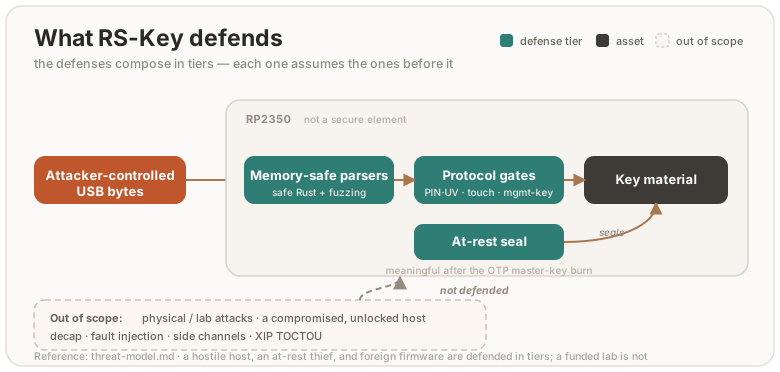
Assets
The FIDO master seed (every non-resident credential derives from it), resident passkeys, OpenPGP private keys and their DEK chain, PIV private keys, OATH secrets, OTP slot secrets, PINs.
Attackers, strongest defense first
1. A hostile host (malware on the computer)
Everything arriving over USB is attacker-controlled: CTAPHID frames, the CCID bulk stream, ISO-7816 APDUs, CTAP2 CBOR. Defenses:
- Memory safety.
no_stdRust end to end. The parsers and applet dispatch are safe code. The handful ofunsafesites are enumerated and justified in unsafe.md. - Fuzzing. Every parser and every applet’s full dispatch path has a
cargo-fuzztarget (30+). See testing.md. - Protocol gates. PINs/UV with retry counters and lockout, physical-touch requirements on FIDO operations and OpenPGP UIF, OATH access codes, PIV management-key auth.
- What a hostile host can do: drive any operation you have authorized while the device is plugged in and unlocked (sign, decrypt, assert). A security key authenticates presence and possession, not the intent of every byte the host sends. Touch requirements bound the rate.
- A flash write can be interrupted, and a host picks which one is in flight.
The device is bus-powered with no reserve, so the supply belongs to whoever
holds the cable or the hub port, and because the host drives every operation it
chooses which write a cut lands in. It needs no attacker — a knocked cable does
the same thing — but it is cheap to aim, so treat it as aimed. There is no
transaction underneath: one applet operation is several
Fswrites, and a cut lands between any two of them. What the device owes across a cut is that nothing comes back weaker: an interrupted write left the old value or the new one, never a third; a record committed before the cut still reads back after it; a delete the cut caught halfway leaves behind no metadata describing the value it removed; and no gate comes up softer on the next boot than it went down — a tornauthenticatorResetmay not drop the PIN oralwaysUvrecord while leaving a credential usable. Write ORDER is what buys that, chosen per operation and stated where the code does it:Fs::deletedrops the metadata before the value, registration writes theEF_RPentry before the credential, a reset deletes the seed before anything derived from it. Underneath the order sits an assumption about the silicon rather than a defence this firmware implements — that a torn NOR write leaves the old bytes or detectably bad ones, never a plausible wrong value. It is registered asPLAT-FLASH-001and is discharged by a board measurement, not by code (platform-assumptions.md). Scope: the interrupted write. A flash read that comes back an error is a different condition and has its own clause below. Not that a cut cannot produce one: a half-programmed item header is deterministic and reads back as an error, and what keeps a store walk honest is that it skips that error on purpose rather than never meeting it. - A flash read can come back an error, and this firmware spells “not
configured” as an absence. The backend answers a probe with the value, with
no such key, or with a failure — and its own API folds the last two together:
Storage::readandStorage::sizereturnNonefor either, which is why a second call,last_error, exists to tell them apart. The fold is what makes this a security condition rather than a reliability one, because absence is how the tree spells no PIN set, no gate configured and not provisioned yet: a probe that merely failed then reads as a decision the owner never made. Measured, before it was fixed: one refusedEF_PINprobe on an unauthenticated PIVSELECTre-seeded the factory PIN over the owner’s, after whichVERIFY 123456answered9000— and the same fault aimed at the management-key slot re-minted the default management key. What the device owes is that a refusal is never laundered into an answer, and three rules carry it. Two are owned by one function each and cited from the store’s refinement: a failed probe is never memoised as a decided absence, so one transient fault cannot become a permanent “file absent” for the rest of the boot; and an enumeration the medium truncated leaves the keys it never reached undecided, so a walk that stopped early cannot report them gone. The third is a per-site discipline and not a mechanical property, which is worth saying plainly: a probe whose absent arm would overwrite configured material or open a gate is answered fallibly — either propagating the failure, or resolving it to the restrictive arm where that is the safe answer — rather than collapsing it into an absence. Which class a site belongs in is decided by asking what becomes reachable if the probe answers absent where the truth is present, and it is held by a test at the site; no gate can check it, and the tree carries far more collapsing probes than fallible ones because most absences cost only a status field or a repeated repair. Scope: the read the medium refused, whoever caused it. How much of a lever a host has here is deliberately not claimed. A cut it aims leaves a half-programmed item header that reads backError::Corrupted, and the store walk skips that one on purpose, so it truncates nothing; an interrupted page erase leaves a marker pair the backend also reports asCorrupted, and that one does reach a per-key probe in the source. Whether any of it is reachable on a board is unmeasured. The three rules hold either way, because none of them asks who caused the refusal. - You must be able to see and revoke every credential the device holds.
Resident credentials live in
EF_CRED, and the two surfaces that let you BROWSE them —enumerateRPsand the trusted-display Passkeys view — reach them throughEF_RP. So a credential whoseEF_RPentry is missing is onegetAssertionsigns with happily and neither surface will show you.enumerateCredentialsanddeleteCredentialscanEF_CREDdirectly, on an rpIdHash the host supplies, so a caller who already knows the rp can still reach it: what a strand costs is DISCOVERY, and revocation only so far as revoking a thing means finding it first. It does not heal on its own either — a later registration of the same (rp, user) dedups onto the record already there instead of writing the missing entry (audit run-35). Registration and credential-management delete are therefore ordered to fail the harmless way round: theEF_RPentry is written before the credential, and the credential goes before the count that names it. The resets are not, and this page will not pretend otherwise. There the seed leads and the rest is swept in ring order, which reachesEF_RPbeforeEF_CRED— a torn wipe can still strand a credential, and what the ordering buys is that the survivor is undecryptable rather than that it does not exist. The harmless direction is not free either: anEF_RPentry that outlives its credential keeps a count nothing reconciles, so it goes on listing an rp with no passkeys behind it until the next reset. - A key must not outlive the algorithm attribute it was made under. An
OpenPGP slot’s algorithm attribute is one
PUT DATAaway for anyone holding PW3, and the card reads that record again at the moment of every private-key operation:PSO:CDS, the asymmetric arm ofPSO:DECIPHERandINTERNAL AUTHENTICATEtake one byte of it to decide whether the slot is RSA or EC before they touch the key. The symmetric arms read no attribute at all: aPSO:DECIPHERbody opening0x02and everyPSO:ENCIPHERroute toEF_AES_KEYand have returned before that read, so nothing below is about them. Only that byte — the curve and the modulus size come from the stored blob itself — so what an attribute change under a surviving key does depends on which way it goes. Across the families it is caught by accident: the old blob does not parse as the new algorithm and the operation fails. Within a family nothing catches it, and that is the case worth stating. Swap Ed25519 for P-256, or RSA-2048 for RSA-4096, and the card goes on signing and deciphering with the old key whileGET DATApublishes the new parameters over it — a slot whose published description no longer describes the secret behind it. So what the device owes here is a deletion and not a validation: aPUT DATAofC1/C2/C3that resolves to an attribute different from the one the slot already holds drops that slot’s private key and the stored public key it would go on serving first — whenever the store reports the slot present — and only then writes the new value. A key the present cache reads absent while the backend still holds it is not dropped, and the attribute goes in over it. Every probe on that path is fallible on purpose: an unreadable attribute, an unreadable key slot, or a drop the store refused each answer6581without writing the attribute, rather than skipping an invalidation the card could not prove unnecessary. And the internal EF the attribute lives in is not addressable —PUT DATAanswers6B00to it even under PW3 — so theC1/C2/C3tags are the only door. Scope: the attribute write. A write that resolves to the attribute already in force is not a change and keeps the key, and an absent attribute reads as the RSA-2048 default on both sides of that comparison. Three things this does NOT claim. The fingerprint DOs are outside the drop, so a slot goes on publishing the old key’s fingerprint inC5until something overwrites it.TERMINATE DFsweeps attributes and keys in flash-ring order, so a factory reset that fails partway can leave a key beside a cleared attribute, and what it owes there is the6581it returns rather than an order. And the binding at the other end —GENERATEandIMPORTreading the slot’s attribute as they mint or take the key — is one command for every arm but the two-step RSA generate, which reads the attribute when it starts the prime search and does not read it again when it stores the key. Nothing in the applet closes that window; what closes it is the worker dispatching one command at a time. - A Yubico OTP the host watched being typed must not validate twice. The OTP
applet types its ticket as keystrokes into whatever has focus, so a hostile host
reads every OTP the key emits; what stops one being replayed is not secrecy but
position. Among the fields each press of a Yubico-OTP slot encrypts into its
ticket is a pair — the slot’s persisted 15-bit use counter and a one-byte RAM
session counter — and the protocol’s replay rule is that a validation server
rejects any OTP whose pair does not exceed the last pair it saw for that public
id. The pair is therefore the defence, and the rule is that a press emits the
pair the slot holds and then moves it: the session counter on every press, and
the persisted use counter whenever the session counter wraps past 255. One press
does not read that way — the first on a freshly configured slot, whose stored
zero is written up to one before the ticket is built, so what it types is the
moved value and not the zero it held. The two paths that ADVANCE the persisted
half are that press and the boot-time bump, and the step that can reach the
15-bit ceiling comes from one module for both, so the ceiling cannot be enforced
two different ways. The first-press
0 → 1write sits beside it inticket.rsand cannot reach the ceiling.UPDATEand the boot seal migration carry a slot’s record forward and leave the counter alone.SWAPleaves the stored counter alone too — but it moves the record to the other slot index, and the RAM half travels with it, because the pair belongs to the public id inside the record and not to the slot number that record happens to sit at. Because the session counter lives in RAM and comes back at zero, a cold boot advances the persisted counter of every plain Yubico-OTP slot it can read and re-seal and that still has room to advance — never a HOTP, short or static slot, and never one already at the ceiling — before USB is up and any press can be served, which is what keeps one power cycle’s pairs out of the next one’s. Six residuals, and the rule above hides none of them. A host-requested warm reset is ungated and does not advance the counter — deliberately, since bumping on every reboot a host can ask for would let it walk the 15-bit counter to the ceiling — so the session counter restarts at zero over an unchanged use counter and the current power cycle’s pairs are typed again. At that ceiling neither path advances anything and the key goes on typing, so the pair repeats every 256 presses. Of the two counter WRITES, the press’s answer is read — a ticket whose advance the store would not take is not typed at all, because typing it re-emits: the next press reads the old counter back and pairs it with a session this cycle has already used. The boot bump’s is not, and cannot be: it is retried, and a refusal that outlasts the retries is dropped, leaving the last cycle’s positions typeable again. That one needs no fault at all —Fs::putanswersNoMemoryon a full store. It is a choice and not a limit, and the page will not dress it as one: the device could deny the press instead of typing a position it cannot move past, and two ways of doing that were built and measured. One carries the boot pass’s failure out to the applet; the other keeps it in the applet entirely, by making the first press of each slot in a power cycle perform the advance itself and refuse if the store will not take it. What is shipped is the other arm of the same choice — keep typing — because a store that cannot be written to would otherwise silence every slot on the key, and which of those two costs more is a decision for the maintainer rather than a fact about the code. A test pins the repeat, so whichever arm lands is visible. So is the boot read dropped, though only where the medium keeps refusing: a sealed read that faults is retried, and a slot the retries never reach is skipped by the bump entirely — which is the faulted-read clause above wearing this applet’s clothes. A press answers that same refusal by typing nothing, so what the skip costs is a fault that clears before the first press. And position is not monotone across re-provisioning:CONFIGUREwrites a fresh record with a zeroed counter, gated by the slot access code whenever the existing slot reads back. And the move that carries the pair is not atomic:SWAPwrites the two records one after the other and swaps the RAM halves only once both are through, with nothing to undo a step that failed. A refused second write answers6581with the first already landed, and so does a refused delete — the answer is read now, but where the record write has already gone in it buys the report and not the state. That direction still leaves one public id in two slots with only one of the two session halves its own, and the other slot can then type a position that id has already typed this power cycle — which a plainykman otp swapreaches unauthenticated, an unprotected slot’s stored access code being all-zero. - Device config is UNGATED on the default build. The shipped default is the
full-ykman/YubiKey-compatible admin surface: a hostile USB host can silently
rewrite the DeviceInfo / enabled-applications / USB identity — over CCID
Management
WRITE CONFIG, the FIDO vendorCONFIG_WRITE, and the CTAPHID (0x43) and OTP-HID (0x15) transport writes — with no touch or PIN, and can trigger a device-wide factory reset (that one keeps a presence gate). The USB identity (serial, strings) is cosmetic — never proof a device is genuine, attestation is (§3). The enabled-applications mask is enforced, though: a disabled application’s applet stops answering (PIV/OpenPGP/OATH/OTP over CCID, FIDO2/U2F over both CTAPHID and CCID, the OTP keyboard), so a hostile host can turn one off. That is a reversible denial-of-service, not a confidentiality or integrity break — the Management applet, the FIDO vendor command, and the OTP-HID identify/config slots are never gated, so any single transport can re-enable it, and no secret is exposed. Reversible describes the mask, not the flash it is written to. The same ungated commands persist their records, and a host that replays one indefinitely spends erase cycles that nothing gives back: measured on the device’s own store geometry, aSET LEDreplay at a nearly full ring costs ~204 bytes and one main-partition page erase per twenty writes, which at the rate a host can drive it puts the array’s endurance budget in weeks of continuous hammering. Idempotent writes are now dropped before they reach flash on both the vendor and FIDO paths, which removes the cheap version of that; what remains is bounded by how fast a host can produce distinct records. If you need config writes gated on the operator, build/flashfirmware-strict-config, which restores the presence/PIN gates and refuses the ungated transport writes (build.md). It is not the runtime flash flagEF_HARDENED. - The FIDO applet answers on two transports, and the second one is easier to
reach. CTAP2 and U2F are served over CCID as well as CTAPHID
(protocol.md §5.2), so any process that can talk
to
pcscdcan drive the whole CTAP surface — no exclusive HID handle, and none of the platform gatekeeping a browser or the Windows WebAuthn stack applies to its own FIDO path. What that does and does not buy an attacker: nothing a credential gate would have stopped. Every operation still spends the same PIN, the same pinUvAuthToken and the same physical touch, because the two transports run the same applet over the sameFidoState— one PIN/UV token, one credential-management walk, and crucially one per-boot PIN-mismatch budget. A second session state would have handed a hostPIN_MISMATCH_LIMITguesses per transport instead of per power cycle, which is the restart-by-reboot attack §6.5.5.6 exists to stop; that it is shared is enforced by construction (one&RefCell<FidoState>reaches both) and pinned byboth_transports_answer_from_one_session_state. What it does buy is reachability: a process that could not open the HID device can now open the card. Treat FIDO as available to anything with card access, and useykman config usb --disable fido2(or--disable u2f) if that is not wanted — the mask gates the two applications apart, over both transports. On the default0x1209:0x0001identity most hosts never bind the CCID interface at all, so the surface is absent there for an unrelated reason, not by design. - The residual gap is intent. The trusted-display flavor closes it. Because
a standard key attests presence and possession, a malicious page can silently
drive an authorized key over WebUSB to phish a real sign-in (demonstrated
against YubiKeys in Chrome).
The trusted-display flavor paints the true
rpIdon the device’s own screen and gates each signature on a tap there, so a compromised host cannot fake what you approve. Qubes OS’s CTAP proxy tackles the same gap in software, mediating CTAP through a trusted VM.
2. A thief with the powered-off device (at-rest)
- All key material is sealed in flash: FIDO seed, PIV keys and OATH records
(secrets plus the access-code key) under AES-256-CBC/GCM keyed by a device key
(
kbase= HKDF of the chip serial and the OTP master key once provisioned), OpenPGP keys under the PIN-wrapped DEK chain. - OTP master key (production.md stage 1): with the MKEK
fused and page-58 hard-locked, a flash dump (even with BOOTSEL access and
the chip id) does not reproduce the sealing key. Without the burn, the
sealing key derives from on-chip state an attacker with full flash + chip
access could reconstruct. The burn is what makes at-rest real — for every
record a boot pass can re-root. A PIN-derived one cannot be re-rooted without
its secret, so it waits for its own reference to be presented; see
limitations and
PLAT-THREAT-002. - The seals give confidentiality, not authenticity. Records written before the burn are keyed from the public chip serial alone, and those pre-OTP arms stay readable afterwards so a provisioned device keeps working across the upgrade. So an attacker who can write flash (BOOTSEL) can forge a record that opens under one, and the boot migration then re-seals it under the fused root. Reading the flash still tells them nothing. Closing this needs a fuse-rooted latch on the migration window; audit run-27 #8 has the analysis.
- Soft-lock (guides/soft-lock.md): optionally, the seed at rest is additionally wrapped with ChaCha20-Poly1305 under a 32-byte key only you hold (BIP-39/SLIP-39 words). A stolen device (even running genuine firmware) refuses every FIDO operation until that key is presented over an encrypted channel at power-up. Device + words, two factors.
- Caveat: superseded records linger. The flash log is append-only, so
re-sealing or deleting a secret leaves the old copy on flash until its page
is reclaimed. Two cases differ in how much that matters:
- The OTP-burn migration supersedes the pre-OTP seed, which was sealed
under the chip-serial-only root (no fuse secret), and the persistent
pcmrgrant, which provisioning mints at the first boot under that same root. Left alone, a flash dump plus the chip id would recover them, bypassing the burn. So it is not left to lazy healing: the first boot after provisioning runs a one-shot compaction (Fs::compact, gated by theEF_HARDENEDmarker, crash-safe) that drives a full GC lap over the credential partition and physically erases every superseded pre-OTP record before the device re-attaches to USB. - The soft-lock transition leaves the same kind of lingering record, but on a provisioned device it is already sealed under the fused root (moot against anything short of a fused-key compromise), so soft-lock’s at-rest guarantee simply hardens over time as natural compaction overwrites it.
- The OTP-burn migration supersedes the pre-OTP seed, which was sealed
under the chip-serial-only root (no fuse secret), and the persistent
- The FIDO seed is never PIN-wrapped at rest (a deliberate design
decision). UP-only operations (
ssh ed25519-sk, U2F, no-PIN assertions) must work from a cold boot with no PIN presented. So a PIN-keyed at-rest copy adds no protection an attacker couldn’t bypass via the always-loadable copy, while breaking those flows. At-rest strength is the kbase (tier above), not the PIN.
3. An attacker who can flash their own firmware
- Secure boot (production.md stage 2): the bootrom refuses unsigned images, so no foreign code ever runs to read the OTP key in secure mode. Glitch detectors are fused on along the way.
- Anti-rollback (anti-rollback.md, optional): with
ROLLBACK_REQUIREDfused, images below your board’s rollback floor (or carrying no version at all, i.e. anything sealed before the feature) no longer boot. A kept copy of an old signed release with a since-fixed bug stops being a downgrade path. - Before secure boot is enabled, this attacker wins against the OTP tier: their firmware reads the MKEK exactly like ours does. That is why the production page calls the two stages one story.
- The USB/smartcard identity (VID/PID, manufacturer, product, OpenPGP AID
vendor) is fully host-configurable at runtime via the phy record and is not an
authenticity signal: a phy write that sets the Yubico VID makes a stock key
present a full Yubico identity, and the manufacturer/product strings are also
settable outright (phy tags
0x0F/0x09), so any VID can carry any vendor name. On the default build these config writes are ungated (no touch, no PIN — see §1);firmware-strict-configre-gates them. Treat the identity as cosmetic, never as proof a device is genuine — attestation (device-key / org cert) is the authenticity mechanism, and it is unaffected by any config write.
4. Physical / lab attacks — OUT OF SCOPE
Decapping, microprobing, advanced fault injection beyond the RP2350’s glitch detectors, power/EM side channels, and the XIP TOCTOU: interposing on the QSPI bus to serve the genuine image to secure boot’s verifier and a tampered one to the CPU, since nothing binds checked bytes to executed bytes and the image is too large to verify-in-place from SRAM. An in-package-flash part (RP2354) leaves no discrete flash chip to tap, raising a reliable swap to decap-class effort. The RP2350 is not a secure element and RS-Key does not pretend otherwise. If your threat model includes a funded lab, buy a certified key.
One residual straddles this line, and it is written down rather than left to
the reader. The RSA private operation picks a modexp window per four bits of
dP/dQ, and the choice lands in an ADDRESS: PIV GENERAL AUTHENTICATE and
OpenPGP PSO:CDS / INTERNAL AUTHENTICATE / DECIPHER all drive it over USB against
a long-lived key, and the per-operation blinding randomises the base, never the
exponent. Reading the window sequence back needs a time-resolved look inside a
single operation, and the only observer holding one is the power/EM capture
already listed above — so that half is out of scope for the reason this section
already gives, not for a new one. The other half is not out of scope: a host that
can time whole operations is the §1 attacker, and against it the pattern is one
scalar per signature over an exponent that never changes. Severity, the reasoning
and what would re-open it are registered as PLAT-CRYPTO-002, and the hardening
that would remove it is PLAT-BUILD-005, deferred with a stated price
(platform-assumptions.md, ct-audit.md).
This paragraph adds a residual to the page; it excludes no observer the section
did not already exclude.
5. Network
None. The device speaks USB only. There is no radio and no IP stack.
Flash snapshot rollback (the PIN-counter reset)
Reported by Token2 (issue #37,
advisory PDF).
An attacker with brief physical access and BOOTSEL runs picotool save to snapshot the
whole flash, guesses PINs until the wrong-PIN counter locks, then picotool loads the old
snapshot to reset the counter and repeats. That is unlimited offline PIN guessing. It
defeats every applet’s retry counter — FIDO clientPIN, PIV PIN/PUK, OpenPGP PW1/PW3, OATH —
since all are ordinary flash records with no external freshness binding.
The gap is freshness, not confidentiality or authenticity. Secure boot accepts the restored image (it is genuine and signed); the at-rest seal decrypts it (same chip). Neither notices a rollback. RS-Key’s firmware anti-rollback (anti-rollback.md) versions the firmware image, not the flash data, so it is blind to the swap too. The clean fix is a monotonic counter in tamper-resistant NVM that the firmware checks on boot — exactly what a secure element has and the RP2350 lacks. Its OTP is write-once antifuse (a few dozen one-way bits for the board’s whole life), so it cannot back a retry counter that must reset to eight on every correct PIN. We cannot close the rollback itself on this silicon; we fence the store and raise the cost of getting past the fence:
-
Partition table (always on since
0x0871). The shipped image embeds an RP2350 partition table that fences the KV store off from the USB bootloader.picotool saveandpicotool loadover that range answerpermission failure— enforced by the bootrom, not by us — while the running firmware keepssecure: rwand full access to its own data. The snapshot/restore above no longer works as written.What that is worth depends on secure boot. The table sits inside the signed image, so where secure boot is on it cannot be swapped without your signing key: a byte flipped anywhere in the table fails the image hash and the signature. Where it is off, the fence is friction rather than a barrier — the firmware partition has to stay bootloader-writable or updates would not work at all, so an attacker flashes an image carrying a permissive table and is back where they started. Read this as “the attack now needs a reflash first, and secure boot is what denies the reflash”, not as “rollback fixed”.
It is worth doing precisely because this is the one gap secure boot does not close by itself: secure boot verifies executable images, and writing the data region is not execution. Until this change a fully provisioned board was still snapshot/restore-able.
-
OTP-seeded PIN verifier (always on after the OTP burn). The stored verifier is
HKDF(serial_hash, HMAC(kbase, pin)), withkbaserooted in the fused OTP master key (production.md stage 1). A flash dump does not contain that key, so it cannot brute-force the PIN offline — the guessing must run on the device, one try at a time. -
strong-pin/fips-profilebuilds (opt-in). Raise the clientPIN floor to six code points and refuse the most guessable PINs (a repeated digit, a123456-style run), so the on-device search space is at least a million. By Token2’s estimate an automated attack runs ~34 days at six digits and ~10 years at eight, against ~8 hours at four (build.md). -
Soft-lock (opt-in). The FIDO seed is wrapped under a key only you hold (guides/soft-lock.md), so a brute-forced PIN yields nothing until you present it. It covers the FIDO seed; the PIV, OpenPGP and OATH counters stay rollback-resettable.
The durable defense on a general-purpose MCU is PIN entropy, plus the soft-lock second factor for the FIDO seed. A device left in an attacker’s hands, protected only by a short PIN, is not safe here. This is the same boundary as “anyone with the device and your PIN is you”.
Platform silicon: the RP2350 security challenges
Raspberry Pi has publicly stress-tested the RP2350 die. The results bound RS-Key’s physical-attack posture.
Challenge 1 broke the A2 stepping (results). The task was to extract an OTP secret from a board running secure boot. The winning attacks:
- Aedan Cullen: voltage glitch on the
USB_OTP_VDDrail, reading OTP secrets out of the guarded path (erratum E16) (writeup, talk). - Marius Muench: a glitch plus a boot-ROM flaw, bypassing secure boot to run unsigned code.
- Kévin Courdesses: laser fault injection corrupting the boot-time signature check (erratum E24) (writeup).
- IOActive: focused-ion-beam (FIB) plus passive voltage contrast (PVC), reading the antifuse array directly: the bitwise OR of two physically paired bitcell rows (writeup).
The first three are comparatively cheap fault / boot-ROM attacks. The IOActive
readout needs FIB-class lab equipment (a tool worth hundreds of thousands of
dollars, one to two days per target) and applies to every device built on the
Synopsys dwc_nvm_ts40* antifuse IP on TSMC’s 40 nm node, an antifuse property,
not an RP2350-specific defect.
The A4 stepping fixes the fault and boot-ROM attacks in silicon, but not the antifuse readout (announcement). A4 closes the boot-ROM errata (E20/E21/E24, including the laser signature bypass) in a new boot ROM, the OTP power-glitch (E16) through changes to the wrapper circuitry around the OTP macro, and the GPIO errata (E9, E3). The antifuse-array PVC readout is explicitly not fixed in A4. Raspberry Pi’s guidance is to mitigate it by how secrets are stored in OTP, the chaffing RS-Key applies (see otp-fuses.md). A third challenge (power side-channel analysis of the secure-boot AES) is open with no break reported (challenge 2).
What this means for RS-Key. Our development boards are A2: the broken stepping, kept as the conservative worst case. The firmware is A4-compatible, and A4 is recommended for the fault / boot-ROM attacks above. Against the antifuse readout (which no stepping fixes), RS-Key applies the chaffing mitigation directly (otp-fuses.md). What remains out of scope is unchanged: a funded lab with FIB/PVC, laser fault injection, or power/EM analysis against a device in hand. No software or provisioning choice on a general-purpose die closes those. That is what a dedicated secure element is for (limitations.md).
Seed backup (the deliberate exception)
A FIDO authenticator’s pitch is non-exportable keys. The wallet-style backup
is a conscious trade for recoverability, gated accordingly. Export moves the
seed over an ephemeral encrypted channel (P-256 ECDH → HKDF →
ChaCha20-Poly1305), and requires (all at once) physical touch, the FIDO
PIN/UV token when a PIN is set, and the one-time setup window: after an
explicit finalize, export is refused until a full reset regenerates a new
seed. Malware cannot exfiltrate the seed silently or later.
The PIN factor has two forms and the second is easy to miss: with a clientPIN
set it is the PIN/UV token; with no clientPIN but a device PIN set, the same
gate collects that PIN on the device’s own pad, so a display-flavor key whose
owner never set a clientPIN is still two-factor. With neither set there is no PIN
factor and the gate is the encrypted channel plus a touch — which is the state a
factory-fresh key is in, and the reason finalize exists. A device PIN the
running build cannot collect (the record survives a reflash to a screenless
image, which has no pad) is refused, not waived: an owner who set a PIN does
not silently drop to a touch. Restore re-seals
the seed under the destination chip’s root. The host driving a backup
necessarily sees the seed plaintext. Do it on a machine you trust.
Scope: the deterministic identity only (resident passkeys, OpenPGP, PIV are
not covered).
On the trusted-display flavor the host need not be in that trust path: the
device can render its BIP-39 recovery phrase on its own screen (the seed is
turned into words on-device and never crosses USB), so a backup can be taken
without trusting any host. That trades the host-observation surface for a
physical/visual one. The words are briefly on the panel (shoulder-surf, camera).
It is gated to keep that surface small: it requires a device PIN set and
re-entered, a deliberate hold past an explicit “no one watching” warning, runs
only inside the same one-time window (and seal closes it), is disabled on the
fips-profile (non-exportable) build, zeroizes the seed/words from RAM on exit,
and auto-clears the panel after a short idle.
sequenceDiagram
    participant U as You
    participant H as Host
    participant D as Device
    U->>D: touch + PIN/UV (when set)
    H->>D: ephemeral P-256 ECDH
    D-->>H: seed over HKDF → ChaCha20-Poly1305 channel
    Note over H: the host necessarily sees the seed in the clear
    H-->>U: BIP-39 / SLIP-39 words
    U->>D: finalize → export refused until a full reset
Zeroization
Key-grade material in RAM is wiped (zeroize, volatile writes) when its use
ends: session state and PIN/UV tokens on drop, transient key copies at end of
scope including error paths, and the transport/exchange buffers as soon as a
message completes (requests carry PINs and imported keys). Neither fused key is
held at all: the applets carry a way to read OTP, not the key, so the DEVK and
the MKEK exist in RAM only inside the operation that asked for one and are wiped
when it returns. That is what puts them out of reach of a parser bug — parsing
runs before any store access, so at that moment neither key is anywhere in
memory. It buys nothing against code execution, which can drive the same reads.
Accepted residuals: Copy temporaries inside RustCrypto curve arithmetic, digest
internals, and heap limbs inside num-bigint-dig (which has no zeroizing Drop
of its own — every value rsk-rsa owns rides in a Zeroizing, but a temporary
the library allocates internally does not). Short-lived, library-internal, not
wipeable without forking the crates.
A WebAuthn large-blob key is obtainable without user interaction. CTAP 2.1
§12.3 puts no UP/UV precondition on the largeBlobKey extension output — unlike
§12.5, which mandates refusing hmac-secret on a silent up:false probe — and
§6.2.2 step 5 scopes alwaysUv to requests where up is present and true. RS-Key
implements both as written, so a host process can obtain a credential’s large-blob
key, and the ungated authenticatorLargeBlobs get alongside it, with no touch and
no PIN, on a device with alwaysUv enabled. Per §6.10 the confidentiality of that
data is a function of the credential’s protection policy, so a relying party that
needs it gated should set credProtect accordingly. Deviating unilaterally would
fail conformance; the asymmetry belongs upstream. The CTAP 2.3 §12.4 largeBlob
extension (--features largeblob-ext) inherits the same property and is
implemented as written for the same reason — it puts no UP/UV precondition on a
read either, so a silent up:false probe returns the blob. It is not a wider
exposure than the pair it replaces: there, an ungated assertion yields the
largeBlobKey and an ungated authenticatorLargeBlobs get yields the ciphertext,
which is the same plaintext by another route. What that build does add is a blob
the device holds in the clear, since the platform no longer encrypts it — so
largeblob-ext seals each blob at rest under the device seed, with the
credential id as AAD.
The reboot to BOOTSEL is presence-gated but takes no PIN, so “one touch, then
dump RAM” is a real attacker move. worker::reboot wipes the live key material
before dropping, and the stack — which carries the deepest secrets, RSA primes
and EC scalars — is not wiped. That is deliberate, and measured rather than
assumed: on RP2350 A4 the platform clears main SRAM across the drop. All 520 KiB
read back as zeros while a pattern written through picoboot read straight back,
so the zeros are the memory and not a refused read
(tests/54_sram_residue.py,
2026-09-03, secure boot off). That run is the one on the record: it carries the
sha256 of the image it ran on, and it is read against an expectation committed
before the board was powered. It discharges PLAT-MEM-001 in the platform
registry (platform-assumptions.md) — read the row for
the transcript, the picotool version, and what the result does not establish,
which is that the firmware’s own scrub works. An earlier run on 2026-08-05
reached the same outcome and is superseded here because nobody kept the hash of
the image it ran on. This is a property of the silicon revision and boot
configuration, so it is re-measured when either moves; the explicit wipes stay as
depth in case a future one keeps SRAM.
Supply chain & process
cargo audit+cargo deny(advisories, license allow-list, source policy) andgitleaksrun inscripts/check.shand the pre-commit hook.- Dependencies are pinned (
Cargo.lock). The git dependencies are restricted to the embassy organization. - No vulnerability advisory is ignored. The one that used to be —
RUSTSEC-2023-0071, the Marvin timing side channel in the
rsacrate, which has no fixed release — went away with the crate itself in 0.4.12;rsk-rsaowns the key type and both private paths now. The mitigation that carve-out rested on is still in force and is now the whole defence: per-operation base blinding on every private-key path (PKCS#1 v1.5 sign, decipher, and the raw fallbackrsa_raw). The constant-time audit verified that this blinding leaves no unblinded private-exponent path.
Post-quantum notes
ML-DSA-44 (COSE −48), ML-DSA-65 (−49) and ML-DSA-87 (−50) FIDO2 credentials
(all three the in-tree rsk-mldsa crate) with hedged signing (32 fresh DRBG
bytes per signature; the hedge and expanded keys are zeroized). rsk-mldsa
streams the FIPS 204 matrix A on the fly so even ML-DSA-87’s keygen+sign fit
the RP2350 stack — measured, its keygen frame is the largest in the image at
123 KiB against a 205 KiB ceiling. It is hand-written, so its constant-time posture is a source-level
claim (branch-free reductions, masked norm checks, no secret division), not
proven at machine code. It is checked byte-for-byte against NIST ACVP KATs,
with Kani proofs over the reductions and rounding. ML-KEM-768 is compiled in as
scaffolding but nothing calls it until a CTAP PQC PIN/UV protocol exists.
None of these has a third-party audit yet, the same standing as the rest of
the RustCrypto stack, tracked via cargo-audit/deny.
Reporting
This is an experimental hobby project. If you find a security issue, please report it privately to the maintainer rather than opening a public issue.
Assurance case
One argument, in four parts, for why RS-Key’s security claims hold: what it promises, what it is defending against, where the trust boundaries run, and why the design and the implementation are expected to survive contact with each.
This page argues; it does not carry the evidence. Every claim below points at the page that does, and those pages are where a disagreement should be settled. It is deliberately short on adjectives and explicit about what it cannot justify — a residual named here is worth more than a claim nobody can check.
What is claimed
- Secrets do not leave. The FIDO master seed, resident passkeys, OpenPGP and PIV private keys, OATH and OTP secrets, and the PINs never cross the USB boundary, and no protocol command exists that exports them — except the one deliberate exception, seed backup, which is an owner-initiated ceremony and is argued separately in threat-model.md.
- Use is gated on a human. Operations that consume a key require the authorizations their protocol defines — PIN or UV, physical touch, an OpenPGP UIF, a PIV management key — and the gates are spent and enforced before the key is touched, not after.
- A hostile host cannot corrupt the device. Every byte arriving over USB is parsed by memory-safe code that either answers or refuses; no input sequence produces memory corruption, a wedged transport, or a state the next boot comes up softer for.
- Interruption does not weaken it. A power cut lands wherever the host aims it, and what the device owes across one is that nothing comes back weaker: an interrupted write leaves the old value or the new one, a committed record still reads back, and no gate is softer on the next boot than it was before.
- At rest, flash alone is not enough. On a device whose OTP master key is burned, a full flash image does not yield the secrets it stores.
- The build is the source. A published release is reproducible from this repository and cryptographically tied to it.
Claim 5 is conditional on purpose: before the OTP burn the seal root derives from on-chip state an attacker with the chip can reconstruct (production.md, otp-fuses.md).
The threat model, in brief
The full statement is threat-model.md; it defines four attackers and the defences compose in tiers, each assuming the ones before it.
| Attacker | Position | Treatment |
|---|---|---|
| Hostile host | Drives every byte over USB, picks when the power dies | Defended: memory safety, protocol gates, write ordering |
| Thief with the powered-off device | Full flash image, no PIN | Defended after the OTP burn: at-rest sealing |
| Attacker who can flash firmware | Replaces the image | Defended by secure boot + anti-rollback; undefended on an unfused board |
| Physical / lab attack | Decapping, glitching, probing | Out of scope — the RP2350 is not a secure element |
| Network | — | No network interface exists |
Two boundaries of the model are worth restating here because the rest of this page leans on them. A compromised, unlocked host can drive any operation the owner has already authorized — a security key attests presence and possession, not the intent of every byte — and touch requirements bound the rate rather than eliminate the class. And physical attacks are not merely unmitigated but architecturally out of reach: the claim is never “the key survives a lab”, it is “the key survives the cable”.
Trust boundaries
Six places where data or execution changes trust level. Each is a place where a mistake is a vulnerability rather than a bug.
B1 — the USB cable. Everything inbound is attacker-controlled: CTAPHID frames, the CCID bulk stream, ISO-7816 APDUs, CTAP2 CBOR. Crossing inward means parsing; crossing outward means a status word or a signature, never key material. This is the boundary every fuzz target sits on.
B2 — transport to worker. USB and the transports run on a high-priority interrupt executor; applet dispatch runs in a single worker task on the thread executor that owns the flash and the TRNG outright (architecture.md). Ownership is the synchronization — there are no mutexes to get wrong — and the transports cannot reach persistent state except by handing the worker a request.
B3 — RAM to flash. Secrets are sealed before they are stored, at one
chokepoint rather than at each call site: kbase = HKDF(serial_hash, otp_master_key) keys the at-rest seals
(architecture.md). Crossing this boundary
outward without a seal is the defect class the chokepoint exists to make
visible.
B4 — the boot chain and the partition table. The bootrom verifies the signed image before it runs; the shipped image then carries a partition table that denies the USB bootloader read and write over the KV range, while secure code keeps it (build.md). The firmware’s own provisioning and recovery complete before the USB pull-up, so a host never sees a half-initialized device (architecture.md).
B5 — the owner. Touch, the PIN, and on a display build the trusted screen, are the one channel a hostile host cannot drive. Everything that depends on “the human agreed” crosses here, which is also why the trusted display is where a display build’s promises concentrate (guides/display.md).
B6 — source to artifact. The gate, the release pipeline and the signing keys sit between a commit and a firmware image someone flashes. Provenance is published and verifiable (supply-chain.md, releases.md).
Secure design principles, and where each one lands
Saltzer and Schroeder’s list, against what the tree actually does. The point of the exercise is the mismatches it would expose, so a principle that is only partly honoured says so.
Economy of mechanism. no_std, no allocator, no mutexes; one worker owning
flash and TRNG; the async executor supplying the concurrency an earlier design
needed a second core and hand-rolled queues for. Less machinery is fewer states
to get wrong, and the heap that does not exist cannot fragment or leak.
Fail-safe defaults. alwaysUv ships on. The harder rule is the one learned
from a defect: a flash read that fails must never be laundered into an
absence, because absence is how this tree spells no PIN set and not
provisioned. A probe whose absent arm would open a gate is answered fallibly
or resolved to the restrictive arm (threat-model.md).
Complete mediation. Authorization is re-checked at use, not cached into a capability: a private-key operation re-reads its slot’s algorithm attribute every time, and a PIN retry is spent before the comparison, so a power cut during verification cannot buy a free guess.
Open design. AGPL-3.0-only, a published threat model, a published wire protocol (protocol.md), the formal models and their failures in the repository (formal.md). The keys are the only secret; nothing rests on an unpublished mechanism.
Separation of privilege. Distinct authorities gate distinct things — OpenPGP PW1 and PW3, the PIV management key against the PIV PIN, touch against knowledge. The irreversible steps (secure-boot signing, OTP fuse burns) are a separate ceremony under separate keys, performed by a person, never by a build.
Least privilege. The partition table denies the USB bootloader access to
the KV store; applets own disjoint file-id ranges and a reset wipes exactly its
own predicate; no applet crate may name another — the count is zero and
cargo deny keeps it there (architecture.md); CI
workflows declare minimal permissions.
Least common mechanism. The per-operation counters live in their own KV partition so their churn never forces compaction of long-lived records; the crate graph is tiered with every edge pointing strictly downward, generated and gated rather than asserted.
Psychological acceptability. The LED and the touch button say what the device is waiting for; the trusted display says what is being signed. A gate whose reason is invisible gets clicked through, so the visible half is part of the mechanism, not decoration.
Common implementation weaknesses, and what stops them
| Weakness | Why it does not happen here | Evidence |
|---|---|---|
| Memory corruption (CWE-119/125/787) | Safe no_std Rust; every unsafe site enumerated and justified | unsafe.md, fuzzing + Miri (testing.md) |
| Improper input validation (CWE-20) | Every external parser is a fuzz target, with a floor in the gate so the set cannot quietly empty | testing.md |
| Authentication / authorization bypass (CWE-287/862/863) | Gates spent before use; retry counters and lockout; sequence properties model-checked | formal.md, assurance-matrix.md |
| Weak randomness (CWE-330/338) | RP2350 hardware TRNG with health checks seeding an HMAC-DRBG; no language-default RNG in the image | threat-model.md |
| Cleartext storage of secrets (CWE-312) | One seal chokepoint before anything reaches the store | architecture.md |
| Timing side channels (CWE-208) | Constant-time comparisons and blinded private-key paths, audited against the built image | ct-audit.md |
| Secrets left in memory (CWE-226) | Zeroization on the paths that hold key material | threat-model.md |
| Torn write / interrupted state (CWE-367 family) | Per-operation write ordering, stated where the code does it; refinement proofs over the store and reset | store-refinement.md, reset-refinement.md |
| Downgrade and rollback (CWE-757) | Secure boot plus the OTP anti-rollback epoch; bcdDevice names the build precisely | anti-rollback.md |
| Hardcoded credentials (CWE-798) | Test keys exist only behind explicit build knobs; gitleaks runs in the pre-commit hook and in the one CI job no change can skip | build.md |
| Vulnerable dependencies (CWE-1395) | cargo audit, cargo deny and cargo vet in the gate; pinned lockfiles; git dependencies restricted | threat-model.md |
The argument these rows share is structural rather than per-bug: each weakness is tied to a gate row that fails, so the countermeasure is checked on every change instead of being asserted once on this page. Where that is not true — and the next section is the list — it is said plainly.
Residuals
What this case does not justify:
- Physical and lab attacks. Out of scope by construction; the RP2350 is not a secure element (limitations.md).
- A compromised unlocked host. It can use what you have authorized. Touch bounds the rate; nothing eliminates the class.
- Before the OTP burn, at-rest sealing is not worth much: the root derives from on-chip state a chip-level attacker can reconstruct.
- Hand-written cryptography.
rsk-mldsa’s constant-time posture is a source-level claim — branch-free reductions, masked norm checks, no secret division — not proven at machine code, and none of the post-quantum code has had a third-party audit. - Platform assumptions are assumptions. What the silicon owes this design is registered, and some entries are still pending a board measurement rather than discharged (platform-assumptions.md).
- Per-site disciplines cannot be gated. The fallible-probe rule above is held by tests at each site and by review, not by a mechanical property; the tree carries far more collapsing probes than fallible ones, and which class a site belongs to is a judgment.
- One maintainer. Review by a second pair of eyes is not a property this project can currently claim (GOVERNANCE.md).
Checking it yourself
The gate is one command and CI runs exactly it, so the evidence behind this page is reproducible without special access: testing.md for the layers, reproducing.md for the evidence artifacts, formal.md for the models and what they do and do not cover. A claim here that you cannot reproduce is a bug in this page; report it under SECURITY.md if it is exploitable, and as an issue if it is not.
Limitations — what RS-Key does not do, and why
Each gap below comes with its reasoning. “Not yet” and “never” are marked. The project as a whole is experimental and unaudited. The threat model covers the security boundary. This page covers feature and hardware gaps.
Cryptography
-
brainpoolP512r1 (OpenPGP): not offered. brainpoolP256r1 and P384r1 are supported (advertised in DO
0xFA, generate / keytocard / sign / decrypt), but no Rust arithmetic for the 512-bit brainpool curve exists yet, so the applet neither advertises nor generates it. Status: until a crate exists. -
X448 / Ed448 (OpenPGP): not offered, same reason. RustCrypto coverage of Curve448 is thin and unaudited. Cv25519/Ed25519 plus the NIST curves and secp256k1 cover practical use. Status: until a serious crate exists.
-
PSO:DECIPHER is a padding oracle by response code. The card answers malformed padding with a distinct status word and well-formed padding with plaintext. That is inherent to the command — it must either hand back a session key or report failure — and no implementation choice removes it. Assume a host that can drive DECIPHER at will with PW1 verified can mount Bleichenbacher-class attacks on ciphertexts of its choosing. The on-card unpadding is constant-time so the reason for a refusal does not leak on top of the refusal itself, but the message copy that follows a success is length-proportional, as in every conforming implementation. Status: inherent to the OpenPGP card command.
-
The RSA private paths are our own code, and it is unaudited. The
rsacrate is gone from the tree (0.4.12), and with it RUSTSEC-2023-0071 — the Marvin timing side channel, which never had a fixed release. What replaced it isrsk-rsa: its own key type,RsaKey, and a software private operation for the two paths the asm CRT core cannot serve (PIV certificate signing, and a legacyP‖Qkey whose prime width is not a multiple of 32). Both are base-blinded and Bellcore-fault-checked like the asm path, and every signature and decryption is checked byte-for-byte against OpenSSL vectors in the host tests. It is still ours, still single-maintainer, and still unaudited — the advisory is closed, the class of bug it names is not. The one residual that audit leaves open is the modexp’s secret-indexed window lookup ondP/dQ, reachable over USB on PIV and OpenPGP signing and decryption; it is recorded LOW because reading the window sequence back needs a time-resolved look inside a single operation, which a host timing whole operations does not have, and the hardening that would remove it is deferred with a stated price (PLAT-CRYPTO-002andPLAT-BUILD-005in platform assumptions). Status: accepted; see the constant-time audit for what has been looked at. -
RSA-3072/4096 on-card generation is slow. The prime search dominates the cost: rejecting hundreds of composite candidates, each one asm-modexp-bound. Both cores run the search with the modexp hot path in SRAM (architecture). Typical timings, measured on the reference board (single-core → dual-core):
key before after RSA-2048 ~8.9 s ~4–6 s RSA-3072 ~35 s ~22 s RSA-4096 ~65 s ~50 s The total is set by how many candidates a given draw happens to need, which is random. The per-keygen spread is wide (17 s to 124 s seen at 4096) because that count varies, not because the silicon does. Per candidate the throughput is ~6.9 ms across both cores.
These are reference-board numbers and do not carry to every board. A Waveshare RP2350-Zero measures RSA-2048 at a median of ~9.7 s where the reference board does 4–6 s. Budget for the board you ship, not for this table.
Both halves of the hot path — the asm modexp, and the small-prime sieve loop with its prime table — are held in SRAM rather than run from XIP flash. That is not a micro-optimization: while the sieve was still in flash it and the surrounding code evicted each other from the small XIP cache, and which of them won depended on where the linker happened to put things, so an unrelated 1.7 KB of image growth moved RSA-2048 keygen by 1.36× (9.7 s → 12.7 s, three and four batches of 12, no overlap between them). Keep new hot loops out of XIP if you want a timing that survives the next commit.
The lever is fewer candidates reaching the modexp: a deeper small-prime sieve. (The Baillie–PSW that confirms a survivor, asm strong Miller–Rabin plus a software Lucas test, runs only a handful of times per keygen, so it doesn’t move the total.) Depth is set by the measured cost ratio: one strong-MR modexp is ~35 ms (1024-bit) / ~239 ms (2048-bit) against ~11 µs / ~23 µs for one trial division, so it pays to sieve by every prime up to ~3.1k / ~10.5k, far past the old flat 256-prime (≤1619) sieve. Depth now scales with key size (448 primes at RSA-2048 … 1280 at RSA-4096), and the sieve runs incrementally: a candidate stream
n, n+2, n+4, …from a random odd start, each residuen mod pᵢstepped by one add instead of re-derived by a Horner pass (OpenSSL/GMP do the same). The primality decision is untouched, so key strength is unchanged. Same-device A/B (per-candidate cost, which divides out the prime-search-luck variance): depth-scaling took RSA-2048 7.84 → 6.48 ms/candidate and RSA-4096 36.0 → 26.2 ms versus the old flat 256-prime sieve, and the incremental step took those a further 6.48 → 5.28 ms (−18.5%) and 26.2 → 20.9 ms (−20.4%). The device streams keepalives throughout, so tools wait it out. Import is fast. Status: inherent to the hardware class; the parallel-scan share is at the two-core limit, the sieve at the measured modexp:division ratio and now incremental. -
ML-KEM is scaffolding: compiled, tested, unused. No CTAP PIN/UV protocol number for PQC key agreement exists yet to implement. Status: waiting on standards.
-
PQC interop is limited by client support: ML-DSA-44 (COSE −48), ML-DSA-65 (−49) and ML-DSA-87 (−50) credentials work and verify on-device. Their signatures verify under OpenSSL and Yubico’s python-fido2, but no browser or mainstream WebAuthn library negotiates these COSE ids against security keys yet. Released Firefox versions abort getInfo if the algorithm is advertised (hence the
advertise-pqcbuild flag, default off; capability stays on regardless). These are the ML-DSA schemes, not a FIPS-validated module. Status: waiting on clients.
Backup & migration
- The seed backup covers the deterministic identity only. Non-resident
credentials (
ssh ed25519-sk, most 2FA registrations) derive from the master seed and survive a restore onto a new board. Not covered: resident passkeys (stored records, not derivable), OpenPGP private keys, PIV private keys, OATH secrets, OTP slots, all sealed to the source chip. A board swap means re-enrolling those. Status: by design; a full at-rest export would gut the at-rest story. - A finalized backup window stays closed until a factory reset regenerates the seed. Lost words cannot be re-exported. Pick a generous SLIP-39 share count. Status: by design (anti-exfiltration gate).
Hardware / physical
- No secure element. The RP2350’s OTP fuses, glitch detectors and secure boot are real, and RS-Key adds anti-imaging OTP chaffing on top. But decap, microprobing, FIB imaging, advanced fault injection and power/EM side channels remain out of scope. The public RP2350 hacking challenge broke the A2 stepping. The A4 stepping fixes the boot-ROM and OTP power-glitch attacks in silicon, but not the antifuse-array readout (mitigated only by how secrets are stored: the chaffing RS-Key applies). Our development boards are A2. The firmware is A4-compatible and A4 is recommended. Status: never. These are silicon properties, not firmware ones; closing them fully is what a dedicated secure element is for.
- The TRNG is not characterised, and there is no vendor number to check it
against. The RP2350’s ring-oscillator source runs behind three continuous
health checks and RS-Key leaves all of them armed, so a source that dies
stalls or halts the device rather than handing out predictable keys. What nobody has
measured is what the raw source is worth. Raspberry Pi’s datasheet asserts
compliance and publishes a generation rate, states that its software does not
configure the ROSC settings Arm’s characterisation procedure provides, and
gives no min-entropy figure; the part carries no NIST ESV or ENT listing.
Qualifying it across temperature, supply and process would need a thermal
chamber, a programmable supply and parts from several lots — and even with all
of that, a result with nothing published to hold it against. A
degraded-but-still-passing source is the one TRNG failure this device cannot
notice. Status: accepted. The desk-conditions measurement that IS reachable is
PLAT-TRNG-002, and this corner gap isPLAT-TRNG-003, both in platform assumptions. - The at-rest seals are not authenticated against a flash writer. They keep a
flash dump from yielding key material, which is what the OTP burn buys. They
do not stop someone who can write flash over BOOTSEL from planting a record:
the pre-OTP key base derives from the public chip serial, and those arms stay
readable after the burn so an already-provisioned device survives the upgrade.
The boot migration then re-seals the planted record under the fused root.
Status: needs a fuse-rooted latch that closes the migration window once the
device is provisioned; the analysis is audit run-27 #8, the decision is the
maintainer’s because it makes
lock-page58load-bearing for boot correctness. - A PIN-derived record stays on the weaker root until its own reference is
presented after the burn. Every record sealed under the key base alone is
moved to the fused root by a boot pass, but re-keying a PIN-derived one needs
the secret, so it happens at that reference’s next VERIFY. Ordinary use presents
PW1; PW3 gates the admin surface only, and an OpenPGP resetting code may never
be presented at all. Until one is, a flash dump plus the public chip serial
opens the DEK copy behind it — every OpenPGP private key and the AES key with
them — and a PW3 still on its published default needs no search at all. PIV’s
PUK has the same shape, with no DEK behind it. The card cannot retire what it
cannot recognise: a verifier is an opaque hash, so a record written before the
burn and one written after are indistinguishable. Status: registered as
PLAT-THREAT-002. After the burn, verify PW3 once and set the resetting code again — presenting a reference is what moves it. Closing it for good needs the DEK copies under an outer device-rooted seal a boot pass can move, which is a persistent-format decision and the maintainer’s. - A flash read that fails still reads as an absent record in most of the
tree. The store’s
readandsizereturn the same “nothing there” for a key that was never written and for one the medium could not serve, and an absent record is how the firmware spells not provisioned and no gate configured. Every place where that reading would overwrite configured material or open a gate now uses a probe that keeps the two apart and refuses the command instead — 50 guards in 25 functions across PIV, OpenPGP, FIDO and OATH. The rest still collapse them on purpose: their absent arm reports a status field, repeats an idempotent repair, or already fails closed. What is not settled is who can produce such a fault on this hardware. A chip or bus fault does; whether a NOR power cut can is a board measurement nobody has taken. Status: the dangerous arm is closed; the reachability question is open and belongs withPLAT-FLASH-001. - PIV data objects are access-gated, not sealed. SP 800-73-4 pt1 Table 3
gives four of them a read condition of PIN — Cardholder Fingerprints
(
5FC103), Facial Image (5FC108), Printed Information (5FC109) and Iris Images (5FC121) — and RS-Key enforces exactly those four at the APDU layer. It does not back them at rest: the seal rule covers key material, so a flash dump of a provisioned device yields whatever a host put in them. Their names are the standard’s, not a capability of this firmware — there is no sensor, no enrolment and no matching here, and the 1900-byte object ceiling is far under a real FIPS 201 biometric template, so what they hold is whatever the owner chose to store. Status: won’t fix. The read condition is an access rule, not a confidentiality promise, and the device cannot produce the content a seal here would be protecting. - XIP TOCTOU residual: secure boot verifies the image in external QSPI flash, then executes from it. Nothing binds the bytes that were hashed to the bytes later fetched, so hardware interposing on the QSPI bus can serve the genuine image to the verifier and a tampered one to the CPU. The clean fix (copy the image into SRAM, verify, run verified-in-place) does not fit: the ~1.7 MB image plus working RAM far exceeds the 520 KB SRAM. There is also no runtime flash authentication in hardware. Part selection is the real lever: an in-package-flash device (RP2354) stacks the flash die on the QSPI bus inside the package, so there is no discrete flash chip to clip an emulator onto and a reliable interposer needs decap-class access. RS-Key is developed and tested on external-flash RP2350 boards, so RP2354 is a recommendation here, not a configuration the project has validated. Status: never on an external-flash board; decap-class effort on RP2354.
- No TrustZone-M secure/non-secure split. Considered and rejected: the embassy ecosystem has no TrustZone support, so it would mean hand-rolling SAU/IDAU configuration, NSC veneers and dual images (the project’s single biggest item) to defend mainly against parser memory corruption, which safe Rust plus fuzzing already address. Physical attacks are orthogonal to TrustZone. Status: revisit only with ecosystem support.
- Anti-rollback is opt-in and coarse:
picotool seal --rollbackplus theROLLBACK_REQUIREDfuse (anti-rollback.md). The OTP thermometer has 48 steps for the board’s life, so the rollback floor is raised for security-relevant releases only. Until the fuse is set, any previously-signed image still boots. Status: shipped (optional). - No image encryption: pointless for open-source code (no secrets in the image; secrets live sealed in flash), and the RP2350 has no transparent XIP decryption anyway. Status: never.
- The trusted-display build runs the RP2350 above its rated clock. That
flavor sets
clk_systo 160 MHz where the part is specified to 150, because the panel’s PIO transport spends two instructions per serial bit and takes the wire rate straight fromclk_sys / 2— 80 MHz, and a 15.36 ms full frame against 16.38 at the stock 150. The panel link is out of spec on its own side too: 80 MHz is past the 62.5 MHz this project had previously recorded as the ST7789’s write ceiling, and the transport is write-only, so a frame the panel garbles at that rate is not detectable in software. What that buys is 1 ms per full repaint. What it costs is that XIP timing, TRNG sampling and every constant-time measurement in this repo were taken at 150 MHz and do not cover this flavor, which no other build shares. The standard key without a screen is unaffected — it never sets a clock. Status: accepted deliberately for the display flavor; the ratio is held by a const assert infirmware/src/main.rsso a board file cannot move one half of it alone.
Protocol / compatibility
- The default USB identity is RS-Key’s own (
0x1209:0x0001on the pid.codes FOSS VID, manufacturerRS-Key, productRS-Key Security Key, reported firmware 5.8.0), not a YubiKey masquerade. We no longer ship Yubico’s identifiers by default. A YubiKey identity (0x1050:0x0407, reader nameYubico YubiKey …) exists only as the opt-inVIDPID=Yubikey5build flavor (build.md), built for local interop testing and never distributed. Distributing hardware with Yubico’s identifiers is not OK. The trade-off:ykman, Yubico Authenticator and the stock Yubico udev rules gate on theYubico YubiKeyreader name / VID0x1050, so on the default RS-Key build they do not see the device. Use them against theVIDPID=Yubikey5flavor, or add a udev rule matching VID0x1209. FIDO2/WebAuthn,ssh -sk,gpg/OpenPGP, OpenSC/PKCS#11 and the project’s ownrsk/rsk-tuitools are identity-independent and work on the default build. - The attestation certificate is per-device, so it identifies the key. Every
makeCredentialcarries packed basic attestation whosex5cleaf is this board’s own certificate (guides/attestation.md), and it is the same certificate for every relying party. A batch certificate shared across devices would avoid that, but it would have to ship inside open-source firmware, where anyone could extract it. Browsers hide the leaf unless a site asks forattestation: "direct"; native CTAP clients such asssh-keygensee it. A factory reset regenerates the seed and with it the certificate. - The PIV attestation identity cannot be replaced by a host. A YubiKey lets
one load its own chain —
IMPORTinto slotf9for the key,PUT DATA 5FFF01for the certificate — and that is a documented enterprise feature there. RS-Key refuses both (6A86and6A80). Thef9key is generated by the device at first boot and never leaves it, so accepting those two commands would let anyone holding the management key swap the device’s attestation identity irreversibly, over a single APDU, for a key they control. The cost of the other choice is on the record: one probe pass in this project destroyed a real YubiKey’s factory attestation chain with a singlePUT DATA 5FFF01, and no reset brings it back.ATTESTandGET METADATAatf9work normally, and a factory reset regenerates the identity. Status: never — deliberate. SET RETRIESwill not set a zero budget.00 FA 00 00on a YubiKey answers9000and leaves the card at0/0tries, permanently blocked, with only a factory reset — which destroys every key — to recover. RS-Key answers6A80and changes nothing. The project matches a YubiKey everywhere except where matching would lose user data, and this is that exception. Status: never — deliberate.- OpenPGP secure messaging is not implemented (rarely used by clients; PINs gate everything in practice).
- One physical button on the base build. Touch = the BOOTSEL button, and there is no fingerprint reader, so UV is the PIN and “number matching” style UV is impossible. The trusted-display flavor (guides/display.md) adds a screen for on-device PIN entry and per-signature relying-party approval, but still no biometric UV.
Operational
- The flash log heals lazily: deleting/superseding a record (e.g.
enabling the soft-lock) leaves the old record in the log until compaction
naturally overwrites it, so most at-rest guarantees harden over time rather
than instantly. (On a provisioned device the superseded copy is sealed to
the fused root — unless it is PIN-derived, which the burn cannot re-root.)
What is not left to lazy healing is every record the boot passes re-seal
off the chip-serial root — the seed, the attestation key and the persistent
pcmrgrant: the first boot after provisioning scrubs their superseded copies eagerly with a one-shot full-GC-lap compaction. - The board is the security boundary: anyone with the device and your PIN is you. Same as every security key.
unsafe audit
The firmware is no_std Rust. Safety of the parsers and applet logic is the
core defensive property, so every unsafe is enumerated here: its
justification, why a safe alternative does not work, and how the risk is
contained. Adding a new unsafe requires updating this page. (Safe Rust rules
out memory-corruption bugs in this code. It is not a security audit; see the
threat model.)
Runtime sites: 22. Twelve in the firmware proper (main.rs + presence.rs):
the interrupt-handler pair (2), the Send impl, the heap init, and the eight
GPIO-pin steals (the presence button, the LED power-enable rail, the nuisance
USR LED, the display build’s wake button, and — display builds only — the panel’s
CS/DC/RST/TP_RST control lines). Three for the per-core prime sieves and one
stack limit per core, three in the RSA assembly FFI, two in the standalone
flash-wipe tool.
flowchart TB
    subgraph fw["firmware/src/main.rs + firmware/src/presence.rs"]
      a["interrupt executor (×2)"]
      b["Send for SendUsb"]
      c["heap init"]
      d["GPIO pin steal ×8 (presence, LED power, USR LED, display wake + CS/DC/RST/TP_RST)"]
      d2["core0 stack limit (MSPLIM)"]
    end
    subgraph kg["firmware/src/core1.rs"]
      e["per-core prime sieves (×3)"]
      e2["core1 stack limit (MSPLIM)"]
    end
    subgraph asm["rsk-rsa"]
      f["modexp / sign_crt / modexp_pub FFI (×3)"]
    end
    subgraph wipe["rsk-wipe"]
      g["raw flash erase/program (×2)"]
    end
The unsafe lives only in plumbing. None of it is in a parser, applet, crypto
wrapper, or the filesystem.
Firmware (firmware/src/main.rs, firmware/src/presence.rs)
1–2. The high-priority interrupt executor — PLAT-UNSAFE-001
#![allow(unused)]
fn main() {
#[interrupt]
unsafe fn SWI_IRQ_1() {
    unsafe { EXECUTOR_HIGH.on_interrupt() }
}
}
USB and the transports run on an embassy InterruptExecutor so they preempt
long synchronous work (RSA keygen, flash GC) and keep the bus alive. The
handler itself is unsafe fn (hardware interrupt ABI). The on_interrupt()
contract (call only from the interrupt the executor was started on) is upheld
by construction: EXECUTOR_HIGH.start(SWI_IRQ_1) is the only starter and this
is the only caller.
Safe alternative: none; this is embassy’s documented pattern for a second
executor.
Containment: two lines, no data touched.
3. unsafe impl Send for SendUsb — PLAT-UNSAFE-002
embassy_usb::UsbDevice is !Send only because it holds a list of
&mut dyn Handler control-request handlers. Our only stateful handler is a
zero-sized type whose state is Sync (critical-section-guarded statics). The
device is moved into exactly one task on the interrupt executor and never
touched from anywhere else: exclusive ownership after the move.
Safe alternative: none while the USB device must live on the interrupt
executor and embassy keeps the trait object !Send.
Containment: the wrapper is private, constructed once, and the invariant
(single task, single executor) is structural.
4. Heap initialization — PLAT-UNSAFE-003
#![allow(unused)]
fn main() {
unsafe { HEAP.init(core::ptr::addr_of_mut!(HEAP_MEM) as usize, HEAP_SIZE) }
}
A 128 KiB heap exists solely for rsk-rsa’s big integers (num-bigint-dig,
the only allocating dependency). init’s contract (call once, with exclusive access
to the region) is met: it runs once at the top of main, on a dedicated
static buffer used by nothing else.
Safe alternative: none; every embedded allocator initializes this way.
Containment: one call, before any allocation can happen.
5–12. GPIO pin type-erasure (presence button, LED power rail, USR-LED-off, display wake + control pins, ×8) — PLAT-UNSAFE-004
#![allow(unused)]
fn main() {
let any = unsafe { AnyPin::steal(pin) };
}
Eight build-configurable GPIOs are chosen by number at build time rather than as
a concrete PIN_n type, so each must be converted to embassy’s type-erased
AnyPin: the optional PRESENCE_PIN=<gpio> presence button
(ButtonPresence::new_gpio, presence.rs), the optional LED_POWER_PIN
enable pin driven high to power a gated LED rail (the LED block in main.rs),
the optional USR_LED_PIN driven to a nuisance onboard LED’s OFF level and held
(the boot block in main.rs), and — display builds only — the optional
WAKE_PIN button that wakes the panel from display sleep plus the panel’s
CS/DC/RST/TP_RST control lines, all by board-config number, in the panel block
of main.rs. AnyPin::steal is unsafe because the caller must
guarantee unique ownership of that hardware pin — a match over p.PIN_0..=PIN_29
(as the LED data pin uses) is impossible here, since it would double-move the
peripheral set the LED block already claims.
Safe alternative: none for a runtime/number-selected GPIO; the safe
constructors require a statically known pin type.
Containment: each is gated by pin-range validation and the single-owner
invariant from main — none of the presence pin, the LED-power pin, the
USR-LED pin, the wake pin, nor the four panel control pins is ever handed to
another driver. Two checks hold that jointly: the LED data pin is resolved at
runtime from the host-writable phy record, and the filter chain in main drops a
value that names the presence pin, LED_POWER_PIN or USR_LED_PIN back to the
build default — so a host cannot aim the data pin at a pad another driver owns.
On top of that, compile-time assert!s reject a
build that collides LED_POWER_PIN or USR_LED_PIN with the LED data pin or a GPIO
PRESENCE_PIN (and refuse USR_LED_PIN outright on a display build, whose panel
owns those pads), rejects a WAKE_PIN in the LCD/touch range (10..=18),
and rejects any of CS/DC/RST/TP_RST/BL colliding with each other, with the
hard-wired PIO serial output (PIN_10/11) or I2C1 (PIN_6/7) lines, an enabled WAKE_PIN,
or LED_PIN/LED_POWER_PIN when their LED driver is built — a collision
silently drives one pad from two owners at runtime, so it is checked at build time.
Firmware dual-core keygen (firmware/src/core1.rs)
13–15. The per-core prime sieves — PLAT-UNSAFE-005
#![allow(unused)]
fn main() {
static mut CORE0_SIEVE: IncrementalSieve = IncrementalSieve::new();
static mut CORE1_SIEVE: IncrementalSieve = IncrementalSieve::new();
// …
let sieve = unsafe { &mut *core::ptr::addr_of_mut!(CORE1_SIEVE) }; // core1, in `search`
unsafe { (*core::ptr::addr_of_mut!(CORE1_SIEVE)).scrub() };        // core1, on the STOP edge
let sieve = unsafe { &mut *core::ptr::addr_of_mut!(CORE0_SIEVE) }; // core0, in `run_rsa_search`
}
The dual-core keygen runs one running small-prime sieve per core (each ~5 KiB
of residues, too large to live on core1’s stack beside the Baillie-PSW
bignum frames, so they are static). Each is single-core-exclusive:
CORE0_SIEVE is taken &mut only inside run_rsa_search (core0),
CORE1_SIEVE only inside search (core1), and the two cores never touch the
same sieve. So the &mut never aliases and there is no cross-core race.
Each keygen calls scrub() through the reference before use, forcing a fresh
window; each core also scrubs its own sieve when its search ends, so the last
candidate — which is the prime that was found — does not sit here until the next
job. That end-of-search scrub deliberately stays on the owning core: STOP does
not wait for core1, so a scrub issued from core0 (e.g. on the reboot path) would
alias a live &mut while core1 is still inside try_candidate_le.
Safe alternative: none that is free. A Mutex/critical-section cell would
add a lock on a provably-uncontended access, and the sieve is reused across
jobs so it cannot be a stack local. (Edition-2024 forbids implicit &mut to a
static mut, hence the explicit addr_of_mut!.)
Containment: three call sites — two on core1 (search, end-of-search scrub), one
on core0; the partition (which core touches which sieve) is structural, and the data is non-secret (small-prime residues of
a candidate, scrubbed at the top of every keygen). A wrong residue can only let
a composite through to the strong-MR/Lucas test, which still rejects it.
16–17. The per-core stack limits (main.rs, core1.rs) — PLAT-UNSAFE-006
#![allow(unused)]
fn main() {
unsafe { cortex_m::register::msplim::write(&raw const _stack_end as u32) }; // core0, entering `main`
unsafe { cortex_m::register::msplim::write(stack_floor) };                  // core1, entering `core1_main`
}
Core1’s stack is an ordinary Stack<16384> array in .bss, so a push past its
end writes into whichever statics the linker placed below — silently, and with no
diagnostic. flip-link does not reach it: that guards core0’s stack by moving it
to the bottom of RAM, and core1’s is a different stack. ARMv8-M’s MSPLIM traps
the stack-pointer decrement itself, which a read-only MPU guard band would not: a
frame big enough to step over the band writes past it and never faults, and the
modexp chain on this core reserves ~6 KiB at a time. Programming it is a bare
MSR that no safe API wraps.
Core0 gets the same instruction for a weaker reason, and it is worth being plain
about: flip-link already puts that stack at the bottom of RAM, so an overflow
runs off into unmapped space and faults with or without this — there is no gap
here to close. What the write buys is independence from the linker. Drop
flip-link and that floor disappears silently, along with the only thing keeping
this stack out of .bss; MSPLIM states the bound in code, where it can be read
and where removing it is a visible edit.
Safe alternative: none. cortex-m offers no checked form, and the MPU route is
both weaker (above) and more unsafe, not less.
Containment: one write per core, on the core that owns that stack, before anything has
pushed, with that stack’s own base as the value — no legitimate frame sits below
it. A violation raises UsageFault/HardFault on core1. That is not graceful:
embassy_rp::multicore::pause_core1 spins unbounded on the inter-core FIFO, and a
core1 sitting in a fault handler never answers it, so the next flash write hangs
the device until it is replugged. That is the trade being made — a wedge a replug
clears, rather than a silent write into whatever .bss the linker put below,
issued by the routine that is at that moment generating and storing a key.
RSA assembly FFI (crates/rsk-rsa/src/lib.rs)
18–20. The modexp / CRT-sign calls — PLAT-UNSAFE-007
On-card RSA key generation needs hundreds of modular exponentiations over
1024–2048-bit candidates. The pure-Rust path was ~7× too slow on the
Cortex-M33 (minutes per key, CCID timeouts). The crate wraps the vendored
C+ARM-assembly routines behind three unsafe FFI calls — modexp_priv
(keygen), sign_crt (the CRT private-key operation) and modexp_pub (the
public-exponent side of blinding and the fault check) — each with fully owned,
length-checked buffers on both sides.
Safe alternative: tried (num-bigint). Functionally correct, unusably slow.
Containment: both ends fail closed. Key generation is KAT-gated — a power-on
known-answer self-test must pass or it refuses to run — and every signature is
Bellcore-fault-checked (out^e == base) by the caller, so a miscompiled or
corrupt routine cannot emit one. Inputs/outputs are fixed-size stack buffers
zeroized after use. On the host the crate substitutes a pure-Rust fallback, so
all host tests exercise the same API safely.
Flash wiper (rsk-wipe/src/main.rs)
21–22. Raw flash erase/program in a critical section — PLAT-UNSAFE-008
The wiper’s entire job is to erase the flash the firmware lives on, from a
RAM-resident image. It calls the ROM flash-erase/program routines inside
critical_section::with(|_| unsafe { ... }): interrupts off, XIP disabled,
nothing else running.
Safe alternative: none; erasing the chip out from under yourself is
inherently unsafe and is the tool’s purpose.
Containment: rsk-wipe is a separate opt-in UF2 you flash deliberately; it
never ships inside the firmware.
Build-time (not runtime)
crates/rsk-rsa/build.rs:unsafe { env::set_var(...) }forces the ARM cross-compiler for the vendored C. Build scripts are single-threaded at that point (the call is host-side, never in the image).firmware/build.rs:unsafe { env::set_var(k, v) }copies the selected board-config file’s values (BOARD=<name>) back into the env before the build reads them. Same single-threaded host-side build-script context; never reaches the firmware image.- Edition-2024 declarations:
#[unsafe(link_section = ".start_block")]on the two bootrom image-definition statics andunsafe extern "C"on the linker-symbol/FFI declaration blocks. These mark declarations the compiler cannot check. The symbols are addresses read viaaddr_of!, never dereferenced as data. - Edition-2024 placements in
crates/rsk-rsa/src/lib.rs:#[cfg_attr(target_os = "none", unsafe(link_section = ".data.small_primes"))]on the small-prime table and the same on.data.sieve_stepforIncrementalSieve::step, so both run out of SRAM rather than through the XIP cache (the 1.36× keygen regression that motivated them). The linker collects.data.*into.data; a section it does not know leaves the symbol wherever it lands, which costs speed rather than safety.
What is not here
No unsafe in any parser, applet, crypto wrapper, or the flash filesystem.
The attacker-facing surface is entirely safe Rust, and cargo clippy -D warnings plus the fuzz targets (testing.md) keep it that way.
Constant-time / timing side-channel audit
This is a source-level constant-time and timing side-channel audit of the
RS-Key firmware (Rust, no_std, RP2350 / Cortex-M33). Its scope is every
secret-dependent comparison, branch, memory access, and private-key arithmetic
operation that an attacker holding the device can probe over USB (CCID /
ISO-7816 APDUs and CTAPHID / CTAP2): PIN/PUK/password verifiers, the FIDO
pinUvAuthToken MAC, OATH and OTP access codes, RSA private operations, and the
hand-written rsk-rsa modexp, sieve and primality primitives — the modexp on
both of its callers, the prime search and the rsa_private_exp_crt that PIV
GENERAL AUTHENTICATE and OpenPGP PSO:CDS / INTERNAL AUTHENTICATE / DECIPHER
reach over USB against a long-lived key.
What this is and isn’t. This is a source/disassembly audit: it establishes that the generated machine code has no secret-dependent branch / early-exit / index on the audited paths. It is not a measured timing study and does not replace an instrumented hardware harness (TVLA / Welch t-test). See Coverage & limits.
Summary
42 candidate sites were examined. 3 were real findings, all fixed (no high/critical). The core authentication surface is sound. The project’s hand-rolled constant-time comparison is genuinely constant-time as compiled for the production target. The PIN/MAC/verifier paths compare one-way derived verifiers, not raw secrets. The defects were concentrated in two places the canonical helper did not reach: an unblinded RSA private-exponent exponentiation on an OpenPGP fallback path, and two raw short-circuiting comparisons of the OTP slot access code with no rate limit.
Methodology
Six analysis lenses were applied across the workspace. Each candidate was then
put through adversarial verification (default-to-false; a finding survives
only if a concrete secret → observable path is demonstrated at exact
file:line with the exploitation model stated), and a completeness critic
pass caught sites a single lens would miss. Several constant-time refutations
were corroborated by disassembling the actual on-device LTO firmware ELF and
by standalone thumbv8m compiles at the production opt-level=s and at
opt-level=3.
- Hand-rolled constant-time comparator definitions.
- Secret-vs-attacker comparisons that bypass the comparator.
- Secret-dependent control flow / variable work between match and mismatch.
- Secret-indexed memory access / data-dependent arithmetic.
- Crypto-primitive usage (are the CT-by-design RustCrypto primitives wrapped non-CT? is the hand-written modexp safe?).
- Status-word / error-path / response-latency oracles.
Findings (fixed)
| Severity | Location | Issue | Fix |
|---|---|---|---|
| Medium | crates/rsk-rsa/src/pkcs1v15.rs (rsa_raw; was rsk-openpgp/src/keys.rs) | Unblinded RSA private-exponent modexp. rsa_sign fell through to a raw m^d mod n for any input that is not a recognized DigestInfo or standard-length hash (reachable via PSO:CDS and INTERNAL AUTHENTICATE). Unlike the mainline sign/decipher paths, this fallback applied no blinding. A Marvin-class private-key timing path the documented residual did not cover. | The raw operation is now base-blinded (m·rᵉ)ᵈ·r⁻¹ mod n with a fresh random r, so the variable-time exponentiation runs on a base unrelated to caller input. A unit test pins rsa_raw == m^d mod n and proves the result is independent of the blinding factor. |
| Medium | crates/rsk-otp/src/lib.rs (cmd_configure) | Non-constant-time compare of the 6-byte OTP slot access code via slice !=, a position-of-first-mismatch leak. Reachable over CCID and HID with no PIN gate and no retry counter, so the leak collapses brute force from ~2⁴⁸ to ~6·256 probes. The access code authorizes overwriting a slot’s key material. | Replaced with the constant-time rsk_crypto::ct_eq. |
| Medium | crates/rsk-otp/src/lib.rs (cmd_update) | Second, byte-identical instance of the same non-CT access-code compare on the slot-update path. | Same fix. |
Constant-time confirmed
The assurance result. Sites checked and found correct:
- The canonical comparator
rsk_crypto::ct_eqis constant-time. Public length-equality early-return, then a full-width OR-accumulate with no in-loop branch on the accumulator. Verified in the on-device LTO ELF: the inlined copies lower to a loop whose only branch is governed by the public length counter. The secret accumulator is reduced branchlessly. Reproduced from source atopt-level=sandopt-level=3. - PIN/PUK/password verifier compares are CT and structurally non-amplifiable. Every verifier site compares 32-byte HKDF/HMAC-derived verifiers, not raw secret bytes. Even a hypothetical position oracle would reveal avalanche-hash bytes, not PIN digits, and the “10ᵏ → k·10” counter-defeat does not apply.
- The
pinUvAuthTokenMAC verify, OATH access-code/HOTP verifies, and PIV mutual-auth all route through the constant-time comparator (PIV against a single-use per-session challenge, not the persistent management key). - The RSA sign/decipher mainline is blinded — one helper inside
rsk-rsadraws a freshraround every secret-exponent modexp, asm CRT and software alike, and with the fix above so is the raw fallback. (Re-checked at 0.4.12, when the operation moved offrsa0.9.10’s ownblind/unblind.) - RustCrypto primitives are CT-by-library and not wrapped non-CT: k256, ed25519-dalek, x25519-dalek, ML-KEM/ML-DSA, and the HMAC/HKDF/SHA-2 KDF.
- Keygen primality primitives are not an attacker oracle: they operate on RNG-generated, single-use, never-disclosed candidates. Production keygen uses the branchless incremental sieve.
What the image says
Read out of target/thumbv8m.main-none-eabihf/release/firmware with arm-none-eabi-objdump -d -l --inlines, built by clang LLVM (rustc version 1.96.0 (ac68faa20 2026-05-25)). A site’s verdict is constant-time when no conditional branch inside any address run the inline chain attributes to it reads flags set from a buffer load; the callers are the first-party frames those chains name, so a surface that stops routing through the site leaves this table.
| Site | Class | Verdict | Surfaces that inline it |
|---|---|---|---|
rsk_crypto::mac::ct_eq | comparator | constant-time | CTAP pinUvAuthProtocol MAC verify, FIDO device-local PIN verify, FIDO’s forwarder onto the canonical comparator, FIDO device-PIN hash verify, FIDO clientPIN hash verify, panel path, FIDO clientPIN hash verify, FIDO credential key-handle verify, vendor device-PIN gate, pad path, vendor device-PIN gate, OATH SET CODE, OATH VALIDATE, OATH PIN match helper, OATH PIN-gated code match, OATH’s forwarder onto the canonical comparator, OpenPGP default reset-code neutralisation, OpenPGP PW1/PW3/RC verify, OpenPGP’s forwarder onto the canonical comparator, OTP slot configure access code, OTP command dispatch access code, OTP slot swap access code, OTP slot swap access code, inner, OTP slot update access code, OTP access-code sweep, PIV slot metadata default-value check, PIV mutual authenticate, PIV single authenticate, PIV PIN/PUK reference verify, PIV’s forwarder onto the canonical comparator |
What holds which half of this page. Only the table above is derived:
scripts/ct_gate.py rebuilds it from the image on every gate run, and the row
goes red when a surface stops routing through the comparator or a new one starts.
The prose around it is held by almost nothing — claims_gate fires only on a
sentence naming a registered SEC-… id, and this page names none. Measured with
a refuted scope sentence in place: the claims, run-count and constant-time gates
and docs.sh check were all exit 0, and the citation gate, red that day over
line drift in other files, said nothing about this page. The single exception is
the scope paragraph at the top of this page. ct_gate anchors on its rsk-rsa
clause and asks three things of the paragraph that carries it: it must name the
modexp and the rsa_private_exp_crt that reaches it over USB, it may not
re-scope them to key generation, and it may not be one of two paragraphs
carrying the anchor, because an earlier one would shield it. Anchored instead on
a sentence five lines above the clause and refusing one spelling of one word,
the rule was walked past thirteen ways — a synonym, eight spellings, the clause
moved into a list, a decoy paragraph, and an editor inserting a blank line.
Nothing holds the findings table, the residuals, or this sentence.
Defense-in-depth applied
The five hand-rolled comparators (one canonical plus four byte-identical
duplicates across the applet crates) were consolidated onto the single
rsk_crypto::ct_eq, and a core::hint::black_box barrier was added before its
final reduction. The comparator was already constant-time on the audited
toolchain. The barrier pins that property so a future LLVM/rustc cannot fold the
accumulate into an early-exit branch. It does not change the code generated
today.
Documented residuals
-
The RSA private operation is now entirely in-tree. The
rsacrate left in 0.4.12 and RUSTSEC-2023-0071 (“Marvin”) with it, so that residual is closed as a dependency question — but the mitigation it named is what remains load-bearing: every private-key path, asm CRT and software alike, is base-blinded per operation, and none of them is exempt. See threat-model.md. -
rsk-rsamodexp secret-indexed window lookup: the window index is a secret nibble — of the candidate in the keygen prime search, and ofdP/dQinrsa_private_exp_crt, which both reach the samebignum_modexp_private_exponent_internal. It folds into the table’s base pointer instead of steering a branch, so the instruction sequence per nibble is the same whatever the nibble is and only the address changes (crates/rsk-rsa/csrc/bignum_high_level.c, the#elsearm thatCONSTANT_MEMORY_ACCESS_PATTERN 0incrates/rsk-rsa/csrc/bignum_config.hselects).There is no XIP-cache channel — and not because the core is cacheless. The RP2350 does put a cache in front of its QSPI flash, and it is load-bearing enough that hot loops were moved out of XIP to escape it (architecture.md, limitations.md, testing.md). That cache sits on the flash path, and neither end of this access is on it. The table is the
temparray the Rust caller declares as a stack local (crates/rsk-rsa/src/lib.rs,modexp_privandsign_crt), and every stack it can sit on is SRAM: core0’s, which the linker bounds with_stack_endand_stack_start, and — for the keygen half, which core1 runs too — core1’sCORE1_STACK(firmware/src/core1.rs), a.bssstatic outside that pair and SRAM by the same script. The code that reads it is SRAM-resident by link section: the C carriesBIGNUM_RAMFUNC, which issection(".data.bignum_hl"), and thebignum_mulaccthat performs the load has.section .data.bignum_asmfor its whole translation unit. Confirmed in the on-device ELF rather than inferred from the sections: both symbols resolve to RAM addresses, whilebignum_modexp_public_exponentresolves to flash. That is not a property of the one image read:crates/rsk-rsa/build.rscompiles the C and the asm unconditionally fortarget_os = "none"with no feature gate, and neither of the crate’s two features reaches a firmware image, so every shipped flavour links the same sections. The CRT path is worth reading in the image and not in the source, becausersa_private_exp_crtitself stays in flash and only the inner modexp it shares with keygen is moved. “The Cortex-M33 is cacheless” was true of the core’s own data path and false as a statement about the SoC, which is why it disagreed with every other page here.What that does not settle. An SRAM access is not a cache access, but it is not nothing. Two mechanisms could still turn the address into a time, and this audit measures neither: SRAM banking, and data-dependent multiplier latency inside
bignum_mulacc. The banking half is an assumption and not a finding — if the bank a cycle touches follows the address, then a secret nibble picks it, and nothing in this tree establishes that. It is the conservative reading of the SoC’s memory organisation; the nearest in-tree note (firmware/src/core1.rs, the core1-stats counters) is about cross-core XIP/bus contention rather than SRAM banks, and citing it here would be citing the wrong thing. Deciding either mechanism needs the instrumented hardware harness Coverage & limits asks for, and both are unmeasured here in both directions. Physical EM/power capture stays out of scope (threat-model.md). What is no longer claimed is the bound: the CRT path is reached over USB and runs on a long-liveddP/dQ, so this is not a one-shot keygen event, and the base blinding above does not answer it — blinding randomizes the base, not the exponent nibbles that choose the window. Concurrency belongs to the keygen half alone: the prime filter races this modexp on both cores, and core1 takes nothing but keygen jobs (firmware/src/core1.rs), so the USB-reachable sign/decrypt path runs it single-core. Hardening: build the asm withCONSTANT_MEMORY_ACCESS_PATTERN 1, which selects the branchlessbignum_table_selectover the whole table — proposed, not tested. Nothing in this tree ever compiles that arm: the vendored header defines it0and recommends that value for Cortex-M, no build overrides it,bignum_table_selectis absent from the image, and the same switch pulls in an in-place table transpose that has never been built either.Severity: LOW, recorded rather than left pending. It is registered as
PLAT-CRYPTO-002in platform-assumptions.md with the four surfaces, the blinding gap, the absent cache channel and the triggers that re-open it. What makes it low is the OBSERVATION and not the code: recovering the window sequence needs a time-resolved look inside one operation, and no in-scope observer has one. On all four surfaces the private operation runs to completion before any response byte leaves, and the 61xx / GET RESPONSE chaining that may follow is transport-level (crates/rsk-device/src/ccid.rs) over a buffer already computed — so a host measures a single end-to-end latency, and the exponent is fixed for the life of the key, so that latency is the same scalar for every signature and carries nothing about which nibble sat where. The observer that would hold a time-resolved trace is the power/EM prober threat-model.md §4 puts out of scope. Two things keep this a residual rather than a non-issue. Nothing has measured whether an RP2350 SRAM read’s cycle count follows its address at all — the paragraph above says so, in both directions. And the arithmetic that stands in for that measurement is a bound and not a result: the sixteen entries aretemp + k·halfwithhalfa multiple of 32 bytes, so they share every address bit below 32 and each read is a contiguous multiple-of-32-byte run, which no stripe whose period divides 32 bytes can tell apart and which a high-bit-selected bank holds whole at ≤ 4 KiB.The hardening is DEFERRED, not declined.
CONSTANT_MEMORY_ACCESS_PATTERN 1is registered asPLAT-BUILD-005with its price, and the price is why it is not simply flipped. It has never been built here and cannot be validated here:crates/rsk-rsa/build.rscompiles the C and the asm only fortarget_os = "none", so no host test and notools/emurun reaches that arm, and the transpose it pulls in is exercised by an on-card RSA sign at each of the three widths and by nothing else. The Bellcore check makes a wrong transpose a refused signature rather than a bad one, so a passing on-card sign IS the proof — and a failing one is a key that stops working. Cost, counted from the instruction mix and not measured:bignum_table_selectreads 16 ×halfbytes per window where the shipped arm readshalf, against a window that already spends four squarings and one multiply, so the overhead is of the order of a tenth of the private operation and larger at RSA-2048 than at RSA-4096 — the multiply grows quadratically in the width and the scan only linearly. It costs SRAM and not only flash: the C half isBIGNUM_RAMFUNC(section(".data.bignum_hl")) and the asm’s whole translation unit is.section .data.bignum_asm. What would settle it: one firmware build with the flag defined, then a board run of the three widths and a before/after timing of one PIV GENERAL AUTHENTICATE.
Coverage & limits
Covered: all hand-rolled comparator definitions and call sites; every
PIN/PUK/password/MAC/verifier comparison across FIDO, PIV, OpenPGP, OATH; OTP
slot access-code compares; HOTP/TOTP; RSA private sign/decrypt/raw paths; the
rsk-rsa C/asm modexp, sieve, and primality primitives; secret-indexed
lookups; and status-word/error-path oracles.
What a source/disassembly audit cannot prove:
- No measured timing distributions. This shows the code has no secret-dependent branch/early-exit/index. It cannot rule out a microarchitectural channel (e.g. XIP-flash stall variance, data-dependent multiplier latency). A definitive statement needs an instrumented timing harness on hardware with a statistical leakage test (TVLA / Welch t-test).
- Compiler stability is empirical, not contractual. The comparator is
constant-time under the audited toolchain. The
black_boxbarrier pins it, but the guarantee remains “verified on this build.” - Physical side channels (power/EM/fault) are explicitly out of scope and unverified here — physical capture of the modexp window-lookup access pattern, and any DPA on the secure-boot AES, both already noted in the threat model. What is out of scope is the capture. The lookup itself is not keygen-only: its USB-reachable half stands open and unmeasured under Documented residuals, not excluded.
- Third-party crate internals (RustCrypto,
num-bigint-dig) were audited only at the usage boundary. Their own CT properties are inherited from upstream —num-bigint-dig’s exponentiation is variable-time, which is what the blinding above exists to answer for.
Formal model
formal/ in the repository holds a TLA+ model of the authenticator’s security
state, the mutation matrix that keeps it falsifiable, and the registry that
ties its properties to the code. This page is the map; the deep prose — every
abstraction with its direction, every hole a review found and what closing it
cost — lives in formal/README.md next to the model itself.
RS-Key is not formally verified, and the model’s own page opens by saying so. What exists is narrower and it is measured: the paragraph to quote is in Testing, under “Formal claims — what is and is not verified”.
The nine modules
RSKeySecurityState.tla models the FIDO security state: PIN retries, the
pinUvAuthToken and its permissions, which transport owns the touch, which
channel owns a stateful walk, the reset window, the persistent gate records,
and the position at which power is lost inside a multi-write flash sequence.
TLC checks its invariants exhaustively at small constants.
RSKeyAppletSeams.tla models what the first module deliberately leaves out:
the applets’ access statuses — PIV, OpenPGP and OATH’s seven doors, what a
SELECT means for each, what a refused authentication costs, and the
access-code removal gate.
RSKeyStore.tla models the flash layer one level beneath both — rsk-fs’s
key/value store over a Storage backend: whether a torn delete can orphan a
file’s metadata, and whether the in-RAM present-cache can read a committed key
as absent. It is a lift of the Rust power-cut oracle (powercut.rs) that had
been reachable only by the fuzzer, and it is the store model the roadmap’s
refinement pilot inducts its persistent-state invariant over.
RSKeyRetryLattice.tla models the retry & recovery budget lattice of the two
applets that have one — PIV (PIN, PUK) and OpenPGP (PW1, PW3, RC): the finite
counter behind each reference, the recovery reference that refills it, and the
anti-bruteforce arithmetic that is identical at every one. It is the part of the
applet surface with no safe oracle — exhausting a real PUK ladder blocks the
card and the only way back takes the keys — so an exhaustive check of every
verify/block/recover interleaving can run only in a model.
RSKeyAppletPolicies.tla covers the four applets’ remaining stateful doors:
PIV NEVER/ONCE/ALWAYS slot policy and freshness spending, OpenPGP algorithm-
attribute invalidation, OATH access-code plus touch gates, and Yubico OTP slot-
code mutation plus its combined use/session replay position. OATH and OTP codes
have no retry counter; keeping this separate avoids proving invented budgets.
All four fit in one exhaustive graph: 2,268 distinct states at depth 14.
RSKeyAdminSurface.tla models the surface above all of them: the
enabled-applications mask, the always-on carve-out that keeps ykman config usb --disable reversible, and the operator-presence gate on the privileged rescue
commands. Two of its four mutants rebuild defects that actually shipped — the
mask that was a DeviceInfo report rather than an enforcement, and the lock-code
write that silently re-enabled every disabled application.
RSKeyTrustedDisplay.tla models the confirm ceremony — the display build’s
anti-phishing promise, what is confirmed is what is shown, as three
machine-checkable rules: an RP-naming operation completes only through the card
that names it, a press that predates the card approves nothing, and no exit but
a deliberate Allow ever reads as Confirmed. Two of its three mutants are
shipped display-build defects.
RSKeyBootHardening.tla models the two machines at the reset line — the
one-shot at-rest scrub lap (EF_HARDENED never lies about superseded
weak-sealed copies, and every lazy re-key or delete re-arms it) and the
scratch-word lock carry (a warm reset moves the whole soft lock, never half
of it). It exists because firmware/ has no host tests by construction: the
model is the only instrument that exercises these interleavings. Its
PowerOnClearsScratch2 assumption is deliberately explicit and still awaits
an RP2350 hardware measurement; TLC does not turn it into a hardware fact.
RSKeyTransport.tla models the CTAPHID frame reassembler — the channel,
sequence and length checks a multi-frame message passes before dispatch: one
host application’s continuation never assembles into another’s message, an
out-of-order frame aborts rather than fills the gap, and a declared length
never overruns the buffer. It is already unit-tested and fuzzed per frame;
the model checks the invariants that live in the interleaving, which those
do not assert.
Refinement pilots
The token pilot connects a small abstract token machine
to the detailed FIDO model and a bounded projection of FidoState. The
cross-reset pilot closes the deliberately deferred reboot
seam for ResetNeverWeakensSurvivingState: concrete reset phases share the
production FID classifier, Kani proves the finite projection inductive, and the
existing rsk-fs oracle drives the full reset through byte-granular power cuts.
The real-board script is a destructive witness, not a proof, and its presence in
the evidence graph does not assert that a current hardware run passed.
Neither pilot covers NoAuthorizationBypass, which is the property those two
were rehearsals for. The authorization slice design
writes down its A/B/C maps, callers, assumptions, bounds, mutants and exit before
any of that proof code exists — a plan and a measurement contract, not evidence.
Trace validation
The models’ fidelity to the code is kept by hand — citations, mutants,
co-refutation — and one thing none of that measures is whether the code as
it runs stays inside a model’s behaviors. TraceSeams.tla closes that
empirically: a real session recorded from the software emulator is replayed
against the applet-seams model step by step, and a step the model refuses is
a TLC deadlock at that exact position. A second, hand-written session the
model must reject is required to go red, so the replay harness is proven
able to refuse. A green replay is evidence about the recorded sessions, not
a proof about all runs; coverage grows by recording richer sessions.
Which image a claim is about
Every statement above says “the firmware”, and the firmware is nineteen flake packages, six cargo features no package expresses, and six board presets under both. The assurance matrix is the per-configuration disposition — generated from those three sources and the property registry, so a new image arrives as a column of declared gaps instead of as silence.
Which threat a claim is against
The threat model is the root every chain above hangs from,
and naming the page names no threat. Each P0-family property cites a clause
of it — docs/threat-model.md#TM-…, an id of assurance/threat_clauses.toml,
whose entries are held one-to-one against the page’s own headings and bullets so
a new clause cannot arrive unclassified. A property with no clause is a recorded
finding rather than a blank, and says which of two things it is: the page is
missing a threat this tree defends against, or the property is against nothing.
The other direction is printed on every run — a stated defence that no property
answers is the same finding from the other end.
The checks of the checks
An invariant no defect can violate is the TLA+ analogue of a test that cannot fail, and this tree has been bitten by that class enough times to check for it mechanically:
- every invariant carries mutants — each
Bug*switch rebuilds a real RS-Key defect or removes a defence the tree has, and itsSolo_*.cfgrun must come back RED; - every green run has a floor (
formal/floors.txt) — a GREEN that got smaller than its recorded distinct-state count is reported as FLOOR, because a collapsed state space passes every invariant vacuously and once did; - a vacuous run is named — a spec nothing enabled exits non-zero rather than reading as a pass;
- every scope constant carries a measured minimum (
formal/scopes.txt) — the floor watches the search, this watches the CONSTANTS the search runs over. Three mutants are GREEN one element below the shipped scope: two need a second channel to have somebody to splice into, one needs a second FID to have a record worth losing. A configuration below its recorded minimum is refused; - the source is linted first — two TLA+ traps that leave a spec
well-formed and meaningless (a precedence slip turning an assignment into a
guard, an action pinned to a no-op by its own
UNCHANGED) are refused before TLC runs.
scripts/test_run_tlc.py keeps the runner itself falsifiable in the merge
gate. Its four artificial corruptions are a broken jar, a Solo invariant that
misses its mutant, a one-state VACUOUS run, and a muted Mut switch. Direct RED
and FLOOR cases keep all three job verdict boundaries explicit, and four more
hold every reader of a log that has a NUL hole in it — the state where a
finished 48.7 M-state GREEN was reported VACUOUS. The last hold TLC’s metadir,
which it names after the current second: a start in the second a run refuted in
its initial state left its directory in is not refused, between two runs or
between the rows of one tier, no metadir outlives the runner, and each part of
that is cut out of the runner once to watch its case fall.
Co-refutation
TLC proving that a model invariant rejects a defect does not show that the
production tests reject the same defect. scripts/comutate.py closes that gap:
each model mutant is an exact patch that re-injects the same semantic defect
into Rust, then runs the smallest relevant host-test slice in a throwaway git
worktree. A failing test is co-refuted; a green slice is an abstraction gap;
a defect made impossible by a shipped structural fix is unreachable only
with recorded evidence. A compile failure is never counted as a kill.
The phase-2 denominator is the FIDO mutant roster, and it MOVES with that
roster rather than standing at the roadmap’s original 28 — it is 31 now. The
generated table in formal/README.md records every one, its target invariant,
its model verdict and its code-level verdict: 30 of 31 are co-refuted, one is
unreachable, and none is a gap. Deriving that roster found six real coverage
gaps; each now has a regression harness. Later modules extend the live roster to
85 entries: 79 of the 80 executable patches are killed, one is a measured gap,
and five are unreachable.
The applet batch — the 24 seam, retry-lattice and policy mutants — was added
because the roster had a measurable skew: 31 of its first 43 patches sat in
three crates, and the four applet crates four of the nine modules are written
about held none. Measuring them found three more coverage gaps — including the Rust half of
SEC-SEAM-006, whose model half had been closed two revisions earlier — each now
closed by a regression harness. Two further gap verdicts turned out to be the
batch’s own defects rather than the tree’s: an adversarial review found both
patches modelled a different defect from the switch they were named after, and
the faithful versions are unreachable — defence in depth whose removal changes
nothing observable. A red run is not evidence until the reason it went red is
read.
The merge gate cheaply checks the closed roster, patch anchors, expectations,
floors and generated table freshness. The expensive full measurement runs
weekly next to cargo-mutants; run --write-readme publishes the 28-row table
only after measuring every executable phase-2 patch.
The registry
Every property TLC checks has an entry in assurance/properties.toml — id,
statement, source and status, nothing else hand-written. A check.sh row,
scripts/assurance_gate.py, derives the rest per run: which module defines
the property, which configurations check it, which mutants target it, which
Kani harnesses, fuzz targets, Rust files and device tests carry its name. The
gate holds the graph closed in both directions — nothing TLC checks may be
unregistered, nothing registered may be unchecked — and a status must equal
the evidence ceiling: a Kani harness carrying the property’s name forces
BOUNDED, and PROVEN is refused until that evidence class exists in the tree.
The owner functions carry the property back into the code: a doc line of the
form Refines `RSKeySecurityState!NoTokenAfterInvalidation` — SEC-FIDO-003
sits on each function the model’s ownership table names, the gate validates
every tag, and every invariant in every shipped baseline configuration must
be named in production Rust somewhere. Firmware sources count as owners for the
boot module. The shared check runs from both assurance_gate.py and
citation_gate.py.
The evidence table and 28-member workspace coverage ledger in
formal/README.md are generated from that same audit. Cross-model Supports
tags close the two FIDO properties whose persistent half is owned by the store
module. The ordinary gate rejects a stale block; regenerate it after evidence
moves with python scripts/assurance_gate.py --write-readme.
assurance/crates.toml is the same discipline one level up: all 28 workspace
members classified — state modelled, modelled in part with the gap named,
unmodelled with the roadmap module named, pure with the differential or proof
files named, or out of scope with a reason. The ledger exists because
enumerating crates from memory has already missed four of them.
Running it
nix develop                       # pins TLC and exports TLA2TOOLS_JAR
cd formal
./run-tlc.sh safety               # model + mutants + floors: the tier CI runs
./run-tlc.sh liveness             # the temporal half, at the heap floors.txt gives it
./run-tlc.sh all                  # both
./run-tlc.sh Shipped.cfg          # one configuration
./run-tlc.sh --tiers              # what each tier runs, for the gate
TLC_SHARD=2/3 ./run-tlc.sh safety # one shard of it, the way the weekly job runs
python3 ../scripts/assurance_gate.py   # the registry, held against the tree
python3 ../scripts/assurance_gate.py --write-readme  # refresh its README table
python3 ../scripts/comutate.py --lint  # closed roster + patch/table freshness
python3 ../scripts/comutate.py run     # re-inject the whole live defect roster
python3 ../scripts/comutate.py run --write-readme  # measure + refresh its table
python3 ../scripts/run_count_gate.py --record <log>  # keep a roster run's matrix
Both timings are one run each on 2026-09-19, on an Apple M5 Pro (18 cores) at
the default WORKERS=2: safety over 224 configurations in 8683 s and
liveness over 4 in 2616 s — 26 GREEN, 202 RED, no row short of its floor.
Those figures are counted out of formal/runs.toml, which keeps the runner’s
own matrix for each tier — no sentence on this page states a run-count that file
does not carry. CI runs the safety tier weekly (deep-checks.yml, the
formal job) and on any push touching formal/, so an edit to the model is
checked at once; what that costs against the job’s cap was measured on a hosted
runner rather than here, and docs/testing.md carries it along with what the
last model widening did to the margin. The
liveness tier is deliberately not in CI: Liveness.cfg needs the 12 GB heap
floors.txt records for it, and a hosted runner has already died under less, so
it is run by hand on the machine above.
The registry and co-refutation lint gates run on every pull request as part of
check.sh; the full co-refutation roster runs weekly.
Assurance matrix
RS-Key is not formally verified. This page is generated from the registry and reports what evidence exists, not that a whole-system theorem does. The Definition of done keeps this sentence a requirement until one exists, and scripts/claims_gate.py holds every page naming three or more registered properties to it. What is out of scope and what is accepted: limitations and the threat model.
Which security property is claimed about which buildable image. The rows are the P0-family properties of assurance/properties.toml; the columns are derived from nix/firmware.nix, firmware/Cargo.toml and firmware/boards/, so a new package, feature or board arrives as a column of gap cells rather than as silence. scripts/matrix_gate.py regenerates this page and scripts/check.sh diffs it.
The point of the page is the thing a single-build claim hides: the firmware is not one thing. Four of the nineteen images remove the physical-consent gate the authorization properties are about, one swaps the CTAP large-blob surface with no flake package at all, and the board axis changes the flash geometry on which a whole KV store once survived a “successful” wipe.
These are the committed configurations, not the buildable ones. Every mkFirmware knob falls back to a like-named environment variable and lib.mkFirmware is exported, so FLASH_SIZE=2M nix build --impure .#firmware is an image no column below describes — including under a disposition whose reason says “no cargo feature and no build knob”. What this page disposes of is what the flake ships and what CI builds; a one-off --impure combination is outside it by construction.
| Disposition | Code | Means |
|---|---|---|
covered | cov | the evidence the registry records was produced on this configuration; on any column but the default build the cell names the check.sh rows, and the gate re-derives both that they build THIS image and that they ran evidence the registry actually derives for the property — a Kani harness, a fuzz target or a tests/*.py, never a crate’s unit tests |
equivalent | equ | this configuration enables exactly the cargo features another does; same_as names it, the gate re-derives both closures, and the cell must write down the build knobs that still differ |
conditional | cnd | claimed only under a stated condition |
out-of-scope | oos | the claim is not made here — the code it is about is absent, or the gate it is about is compiled out |
gap | gap | nobody has decided yet; the column’s settling question is below |
The axes
- 19 flake packages (
nix/firmware.nix), of which 14 are published by.github/workflows/release-build.yml— the published set is a named subset of the matrix, never the matrix. - 6 orthogonal cargo features (
firmware/Cargo.toml) that no flake package expresses. - 6 board presets (
firmware/boards/*.toml):BOARD=<name>sets the same knobs the flake arguments do, and no cargo feature.
Columns
The last cell is DERIVED, not declared: the per-crate cargo-feature closure this column resolves to, against the default build’s. It is the same derivation the equivalent rule refuses a cell on, so a column reading — there compiles the workspace exactly as the default build does and its whole delta is knobs — and a column that names a crate has that crate’s code moving under every row of its column, which is the fact a gap there is about.
| # | Configuration | Kind | Published | Cargo features | Knobs | Compiles unlike the default build |
|---|---|---|---|---|---|---|
| 01 | firmware | package | yes | — | — | — |
| 02 | firmware-no-touch | package | no | no-touch | — | firmware +no-touch |
| 03 | firmware-fips | package | yes | fips-profile | — | firmware +fips-profile, rsk-fido +fips-profile, rsk-piv +fips-profile |
| 04 | firmware-pqc | package | yes | advertise-pqc | — | firmware +advertise-pqc, rsk-fido +advertise-pqc |
| 05 | firmware-fips-pqc | package | yes | advertise-pqc, fips-profile | — | firmware +advertise-pqc +fips-profile, rsk-fido +advertise-pqc +fips-profile, rsk-piv +fips-profile |
| 06 | firmware-no-touch-pqc | package | no | advertise-pqc, no-touch | — | firmware +advertise-pqc +no-touch, rsk-fido +advertise-pqc |
| 07 | firmware-no-touch-fips | package | no | fips-profile, no-touch | — | firmware +fips-profile +no-touch, rsk-fido +fips-profile, rsk-piv +fips-profile |
| 08 | firmware-no-touch-fips-pqc | package | no | advertise-pqc, fips-profile, no-touch | — | firmware +advertise-pqc +fips-profile +no-touch, rsk-fido +advertise-pqc +fips-profile, rsk-piv +fips-profile |
| 09 | firmware-strong-pin | package | yes | strong-pin | — | firmware +strong-pin, rsk-fido +strong-pin |
| 10 | firmware-strong-pin-pqc | package | yes | advertise-pqc, strong-pin | — | firmware +advertise-pqc +strong-pin, rsk-fido +advertise-pqc +strong-pin |
| 11 | firmware-always-uv | package | yes | always-uv | — | firmware +always-uv, rsk-fido +always-uv |
| 12 | firmware-always-uv-pqc | package | yes | advertise-pqc, always-uv | — | firmware +advertise-pqc +always-uv, rsk-fido +advertise-pqc +always-uv |
| 13 | firmware-strict-up | package | yes | strict-up | — | firmware +strict-up, rsk-fido +strict-up |
| 14 | firmware-strict-up-pqc | package | yes | advertise-pqc, strict-up | — | firmware +advertise-pqc +strict-up, rsk-fido +advertise-pqc +strict-up |
| 15 | firmware-pico | package | no | — | vidpid=Pico | — |
| 16 | firmware-display | package | yes | display | flashSize=16M, ledKind=none | firmware +display, rsk-bip39 (added), rsk-device +display, rsk-display (added), rsk-slip39 (added), rsk-ui (added) |
| 17 | firmware-2mb | package | yes | — | flashSize=2M, kvmain=896K | — |
| 18 | firmware-16mb | package | yes | — | flashSize=16M | — |
| 19 | firmware-strict-config | package | yes | strict-config | — | firmware +strict-config, rsk-device +strict-config, rsk-fido +strict-config, rsk-mgmt +strict-config, rsk-otp +strict-config, rsk-vendor +strict-config |
| 20 | keygen-bench | feature | n/a | keygen-bench | — | firmware +keygen-bench |
| 21 | core1-stats | feature | n/a | core1-stats | — | firmware +core1-stats |
| 22 | bench | feature | n/a | bench | — | firmware +bench, rsk-bench (added), rsk-fido +bench |
| 23 | fido-conformance | feature | n/a | fido-conformance | — | firmware +fido-conformance, rsk-fido +fido-conformance +strict-up |
| 24 | ea-conformance-rpid | feature | n/a | ea-conformance-rpid | — | firmware +ea-conformance-rpid, rsk-fido +ea-conformance-rpid +fido-conformance +strict-up |
| 25 | largeblob-ext | feature | n/a | largeblob-ext | — | firmware +largeblob-ext, rsk-fido +largeblob-ext |
| 26 | abrobot-16m | board | n/a | — | flash.kvmain_kb=1408, flash.size_mb=16, led.kind=ws2812, led.max_leds=4, led.order=grb, led.pin=16, presence.active_high=False, presence.pin=23, presence.source=gpio, usb.vidpid=RSKey | — |
| 27 | abrobot-4m | board | n/a | — | flash.kvmain_kb=1408, flash.size_mb=4, led.kind=ws2812, led.max_leds=4, led.order=grb, led.pin=16, presence.active_high=False, presence.pin=23, presence.source=gpio, usb.vidpid=RSKey | — |
| 28 | seeed-xiao | board | n/a | — | flash.kvmain_kb=896, flash.size_mb=2, led.kind=ws2812, led.order=grb, led.pin=22, led.power_pin=23, presence.source=bootsel, usb.vidpid=RSKey, usr_led.active_high=False, usr_led.pin=25 | — |
| 29 | tenstar-usb | board | n/a | — | flash.kvmain_kb=1408, flash.size_mb=16, led.kind=ws2812, led.order=grb, led.pin=22, presence.active_high=False, presence.pin=15, presence.source=gpio, usb.vidpid=RSKey | — |
| 30 | waveshare-one | board | n/a | — | flash.kvmain_kb=1408, flash.size_mb=4, led.kind=ws2812, led.order=rgb, led.pin=16, presence.source=bootsel, usb.vidpid=RSKey | — |
| 31 | waveshare-touch-lcd | board | n/a | — | display.bl_pin=16, display.bl_pwm_channel=A, display.bl_pwm_slice=0, display.cs=13, display.dc=14, display.rst=15, display.spi_freq_hz=80000000, display.tp_rst=17, display.wake_active_high=False, display.wake_pin=25, flash.kvmain_kb=1408, flash.size_mb=16, led.kind=none, presence.source=bootsel, usb.vidpid=RSKey | — |
The matrix
40 rows × 31 columns = 1240 cells. Column numbers are the table above.
| Property | 01 | 02 | 03 | 04 | 05 | 06 | 07 | 08 | 09 | 10 | 11 | 12 | 13 | 14 | 15 | 16 | 17 | 18 | 19 | 20 | 21 | 22 | 23 | 24 | 25 | 26 | 27 | 28 | 29 | 30 | 31 |
|---|---|---|---|---|---|---|---|---|---|---|---|---|---|---|---|---|---|---|---|---|---|---|---|---|---|---|---|---|---|---|---|
SEC-FIDO-001 | cov | oos | gap | gap | gap | oos | oos | oos | gap | gap | gap | gap | gap | gap | equ | gap | gap | gap | gap | gap | gap | gap | gap | gap | gap | gap | gap | gap | gap | equ | gap |
SEC-FIDO-002 | cov | oos | gap | gap | gap | oos | oos | oos | gap | gap | gap | gap | gap | gap | equ | gap | gap | gap | gap | gap | gap | gap | gap | gap | gap | gap | gap | gap | gap | equ | gap |
SEC-FIDO-003 | cov | gap | gap | gap | gap | gap | gap | gap | gap | gap | gap | gap | gap | gap | equ | gap | gap | gap | gap | gap | gap | gap | gap | gap | gap | gap | equ | gap | gap | equ | gap |
SEC-FIDO-004 | cov | gap | gap | gap | gap | gap | gap | gap | gap | gap | gap | gap | gap | gap | equ | gap | gap | gap | gap | gap | gap | gap | gap | gap | gap | gap | equ | gap | gap | equ | gap |
SEC-FIDO-005 | cov | gap | gap | gap | gap | gap | gap | gap | gap | gap | gap | gap | gap | gap | equ | gap | gap | gap | gap | gap | gap | gap | gap | gap | gap | gap | equ | gap | gap | equ | gap |
SEC-FIDO-006 | cov | gap | gap | gap | gap | gap | gap | gap | gap | gap | gap | gap | gap | gap | equ | gap | gap | gap | gap | gap | gap | gap | gap | gap | gap | gap | equ | gap | gap | equ | gap |
SEC-FIDO-006A | cov | gap | gap | gap | gap | gap | gap | gap | gap | gap | gap | gap | gap | gap | equ | gap | gap | gap | gap | gap | gap | gap | gap | gap | gap | gap | equ | gap | gap | equ | gap |
SEC-FIDO-006B | cov | gap | gap | gap | gap | gap | gap | gap | gap | gap | gap | gap | gap | gap | equ | gap | gap | gap | gap | gap | gap | gap | gap | gap | gap | gap | equ | gap | gap | equ | gap |
SEC-FIDO-006C | cov | gap | gap | gap | gap | gap | gap | gap | gap | gap | gap | gap | gap | gap | equ | gap | gap | gap | gap | gap | gap | gap | gap | gap | gap | gap | equ | gap | gap | equ | gap |
SEC-FIDO-007 | cov | gap | gap | gap | gap | gap | gap | gap | gap | gap | gap | gap | gap | gap | equ | gap | gap | gap | gap | gap | gap | gap | gap | gap | gap | gap | equ | gap | gap | equ | gap |
SEC-FIDO-008 | cov | gap | gap | gap | gap | gap | gap | gap | gap | gap | gap | gap | gap | gap | equ | gap | gap | gap | gap | gap | gap | gap | gap | gap | gap | gap | equ | gap | gap | equ | gap |
SEC-SEAM-001 | cov | gap | gap | gap | gap | gap | gap | gap | gap | gap | gap | gap | gap | gap | equ | gap | equ | equ | gap | gap | gap | gap | gap | gap | gap | equ | equ | equ | equ | equ | equ |
SEC-SEAM-002 | cov | gap | gap | gap | gap | gap | gap | gap | gap | gap | gap | gap | gap | gap | equ | gap | equ | equ | gap | gap | gap | gap | gap | gap | gap | equ | equ | equ | equ | equ | equ |
SEC-SEAM-003 | cov | gap | gap | gap | gap | gap | gap | gap | gap | gap | gap | gap | gap | gap | equ | gap | equ | equ | gap | gap | gap | gap | gap | gap | gap | equ | equ | equ | equ | equ | equ |
SEC-SEAM-006 | cov | gap | gap | gap | gap | gap | gap | gap | gap | gap | gap | gap | gap | gap | equ | gap | gap | gap | gap | gap | gap | gap | gap | gap | gap | gap | equ | gap | gap | equ | gap |
SEC-STORE-001 | cov | gap | gap | gap | gap | gap | gap | gap | gap | gap | gap | gap | gap | gap | equ | gap | gap | gap | gap | gap | gap | gap | gap | gap | gap | gap | equ | gap | gap | equ | gap |
SEC-STORE-002 | cov | gap | gap | gap | gap | gap | gap | gap | gap | gap | gap | gap | gap | gap | equ | gap | gap | gap | gap | gap | gap | gap | gap | gap | gap | gap | equ | gap | gap | equ | gap |
SEC-STORE-003 | cov | gap | gap | gap | gap | gap | gap | gap | gap | gap | gap | gap | gap | gap | equ | gap | gap | gap | gap | gap | gap | gap | gap | gap | gap | gap | equ | gap | gap | equ | gap |
SEC-STORE-004 | cov | gap | gap | gap | gap | gap | gap | gap | gap | gap | gap | gap | gap | gap | equ | gap | gap | gap | gap | gap | gap | gap | gap | gap | gap | gap | equ | gap | gap | equ | gap |
SEC-STORE-005 | cov | gap | gap | gap | gap | gap | gap | gap | gap | gap | gap | gap | gap | gap | equ | gap | gap | gap | gap | gap | gap | gap | gap | gap | gap | gap | equ | gap | gap | equ | gap |
SEC-STORE-006 | cov | gap | gap | gap | gap | gap | gap | gap | gap | gap | gap | gap | gap | gap | equ | gap | gap | gap | gap | gap | gap | gap | gap | gap | gap | gap | equ | gap | gap | equ | gap |
SEC-LAT-001 | cov | gap | gap | gap | gap | gap | gap | gap | gap | gap | gap | gap | gap | gap | equ | gap | gap | gap | gap | gap | gap | gap | gap | gap | gap | gap | equ | gap | gap | equ | gap |
SEC-LAT-002 | cov | gap | gap | gap | gap | gap | gap | gap | gap | gap | gap | gap | gap | gap | equ | gap | gap | gap | gap | gap | gap | gap | gap | gap | gap | gap | equ | gap | gap | equ | gap |
SEC-LAT-003 | cov | gap | gap | gap | gap | gap | gap | gap | gap | gap | gap | gap | gap | gap | equ | gap | gap | gap | gap | gap | gap | gap | gap | gap | gap | gap | equ | gap | gap | equ | gap |
SEC-POL-001 | cov | gap | gap | gap | gap | gap | gap | gap | gap | gap | gap | gap | gap | gap | equ | gap | gap | gap | gap | gap | gap | gap | gap | gap | gap | gap | equ | gap | gap | equ | gap |
SEC-POL-002 | cov | gap | gap | gap | gap | gap | gap | gap | gap | gap | gap | gap | gap | gap | equ | gap | gap | gap | gap | gap | gap | gap | gap | gap | gap | gap | equ | gap | gap | equ | gap |
SEC-POL-003 | cov | gap | gap | gap | gap | gap | gap | gap | gap | gap | gap | gap | gap | gap | equ | gap | gap | gap | gap | gap | gap | gap | gap | gap | gap | gap | equ | gap | gap | equ | gap |
SEC-POL-004 | cov | oos | gap | gap | gap | oos | oos | oos | gap | gap | gap | gap | gap | gap | equ | gap | gap | gap | gap | gap | gap | gap | gap | gap | gap | gap | gap | gap | gap | equ | gap |
SEC-POL-005 | cov | gap | gap | gap | gap | gap | gap | gap | gap | gap | gap | gap | gap | gap | equ | gap | gap | gap | gap | gap | gap | gap | gap | gap | gap | gap | equ | gap | gap | equ | gap |
SEC-POL-006 | cov | gap | gap | gap | gap | gap | gap | gap | gap | gap | gap | gap | gap | gap | equ | gap | gap | gap | gap | gap | gap | gap | gap | gap | gap | gap | equ | gap | gap | equ | gap |
SEC-ADM-002 | cov | oos | gap | gap | gap | oos | oos | oos | gap | gap | gap | gap | gap | gap | equ | gap | gap | gap | gap | gap | gap | gap | gap | gap | gap | gap | gap | gap | gap | equ | gap |
SEC-ADM-004 | cov | gap | gap | gap | gap | gap | gap | gap | gap | gap | gap | gap | gap | gap | equ | gap | gap | gap | gap | gap | gap | gap | gap | gap | gap | gap | equ | gap | gap | equ | gap |
SEC-DISP-001 | oos | oos | oos | oos | oos | oos | oos | oos | oos | oos | oos | oos | oos | oos | oos | gap | oos | oos | oos | oos | oos | oos | oos | oos | oos | oos | oos | oos | oos | oos | oos |
SEC-DISP-002 | oos | oos | oos | oos | oos | oos | oos | oos | oos | oos | oos | oos | oos | oos | oos | gap | oos | oos | oos | oos | oos | oos | oos | oos | oos | oos | oos | oos | oos | oos | oos |
SEC-DISP-003 | oos | oos | oos | oos | oos | oos | oos | oos | oos | oos | oos | oos | oos | oos | oos | gap | oos | oos | oos | oos | oos | oos | oos | oos | oos | oos | oos | oos | oos | oos | oos |
SEC-BOOT-001 | cov | gap | gap | gap | gap | gap | gap | gap | gap | gap | gap | gap | gap | gap | equ | gap | gap | gap | gap | gap | gap | gap | gap | gap | gap | gap | equ | gap | gap | equ | gap |
SEC-BOOT-002 | cov | gap | gap | gap | gap | gap | gap | gap | gap | gap | gap | gap | gap | gap | equ | gap | gap | gap | gap | gap | gap | gap | gap | gap | gap | gap | equ | gap | gap | equ | gap |
SEC-TRANS-001 | cov | gap | gap | gap | gap | gap | gap | gap | gap | gap | gap | gap | gap | gap | equ | gap | equ | equ | gap | gap | gap | gap | gap | gap | gap | equ | equ | equ | equ | equ | equ |
SEC-TRANS-002 | cov | gap | gap | gap | gap | gap | gap | gap | gap | gap | gap | gap | gap | gap | equ | gap | equ | equ | gap | gap | gap | gap | gap | gap | gap | equ | equ | equ | equ | equ | equ |
SEC-TRANS-003 | cov | gap | gap | gap | gap | gap | gap | gap | gap | gap | gap | gap | gap | gap | equ | gap | equ | equ | gap | gap | gap | gap | gap | gap | gap | equ | equ | equ | equ | equ | equ |
Dispositions
covered — basis default-build
- columns:
firmware - properties:
SEC-FIDO-001,SEC-FIDO-002,SEC-FIDO-003,SEC-FIDO-004,SEC-FIDO-005,SEC-FIDO-006,SEC-FIDO-006A,SEC-FIDO-006B,SEC-FIDO-006C,SEC-FIDO-007,SEC-FIDO-008,SEC-STORE-001,SEC-STORE-002,SEC-STORE-003,SEC-STORE-004,SEC-STORE-005,SEC-STORE-006,SEC-LAT-001,SEC-LAT-002,SEC-LAT-003,SEC-POL-001,SEC-POL-002,SEC-POL-003,SEC-POL-004,SEC-POL-005,SEC-POL-006,SEC-SEAM-001,SEC-SEAM-002,SEC-SEAM-003,SEC-SEAM-006,SEC-ADM-002,SEC-ADM-004,SEC-BOOT-001,SEC-BOOT-002,SEC-TRANS-001,SEC-TRANS-002,SEC-TRANS-003 - The registry’s evidence is this column’s evidence: the models, Kani harnesses and host tests behind these 37 statements are produced with no
firmware/Cargo.tomlfeature and no build knob, which is what makes this image theirs, andassurance/bundle/SEC-FIDO-001.tomlrecords the column by name. Said that narrowly because the sentence it replaces — “everyformal/*.cfg, every Kani harness and every host testscripts/check.shruns” — is refuted three ways by the tree it is about: 5 of the 216formal/*.cfgpinAlwaysUvShipped = TRUE, whichassurance/assumptions.tomlcalls the arm the shipped image is NOT about;scripts/kani.shappends--features kani-softto every proof run; and 11run_testsrows carry a cargo feature, 10 of them afirmwareone. None of the three moves the disposition — those cfgs and rows are evidence about the columns they name, andkani-softis declared by thecrates/members and swaps a SHA backend Kani cannot model, so no column derives from it — but all three had the strongest word in the vocabulary resting on a sentence its own tree refutes, which is what a basis is supposed to stop one record type over. It is still the one column wherecoveredneeds no argument beyond the derivation, and the one whose evidence says nothing about the other thirty.
out-of-scope — basis crate-absent
- columns:
firmware,firmware-no-touch,firmware-fips,firmware-pqc,firmware-fips-pqc,firmware-no-touch-pqc,firmware-no-touch-fips,firmware-no-touch-fips-pqc,firmware-strong-pin,firmware-strong-pin-pqc,firmware-always-uv,firmware-always-uv-pqc,firmware-strict-up,firmware-strict-up-pqc,firmware-pico,firmware-2mb,firmware-16mb,firmware-strict-config,keygen-bench,core1-stats,bench,fido-conformance,ea-conformance-rpid,largeblob-ext,abrobot-16m,abrobot-4m,seeed-xiao,tenstar-usb,waveshare-one,waveshare-touch-lcd - properties:
SEC-DISP-001,SEC-DISP-002,SEC-DISP-003 rsk-displayowns the ceremony andrsk-uithe screen model, and both aredep:-gated behind--features display. The feature resolution the gate re-runs puts neither crate in any of these builds, so there is no ceremony to make a claim about. Note what this does NOT say:waveshare-touch-lcdis the trusted-display BOARD and still lands here, because a board preset sets knobs and never a cargo feature — the panel pins are compiled as inert constants.
equivalent — basis same-cargo-features (same_as = firmware; knob delta: vidpid=Pico)
- columns:
firmware-pico - properties:
SEC-FIDO-001,SEC-FIDO-002,SEC-FIDO-003,SEC-FIDO-004,SEC-FIDO-005,SEC-FIDO-006,SEC-FIDO-006A,SEC-FIDO-006B,SEC-FIDO-006C,SEC-FIDO-007,SEC-FIDO-008,SEC-STORE-001,SEC-STORE-002,SEC-STORE-003,SEC-STORE-004,SEC-STORE-005,SEC-STORE-006,SEC-LAT-001,SEC-LAT-002,SEC-LAT-003,SEC-POL-001,SEC-POL-002,SEC-POL-003,SEC-POL-004,SEC-POL-005,SEC-POL-006,SEC-SEAM-001,SEC-SEAM-002,SEC-SEAM-003,SEC-SEAM-006,SEC-ADM-002,SEC-ADM-004,SEC-BOOT-001,SEC-BOOT-002,SEC-TRANS-001,SEC-TRANS-002,SEC-TRANS-003 - Identical per-crate cargo-feature closure — the gate re-derives it rather than taking this sentence’s word — so the whole delta is the one knob above, which
firmware/build.rsresolves to the pair0x2E8A:0x10FD; the descriptor strings swap only on the Yubico VID. No P0-family statement is about the reported identity: the CTAPHID rules key off channel ids, and theUSB_ENABLEDmask SEC-ADM-004 is about is a persisted record, not a descriptor. The one consequence that is not purely cosmetic is that the OpenPGP AID vendor follows the effective VID — and no row here depends on it, becauseSEC-SEAM-001selects on the RID prefix.build.rssays the rest in as many words: the USB identity is cosmetic, never a security control.
equivalent — basis same-cargo-features (same_as = firmware; knob delta: flash.kvmain_kb=1408, flash.size_mb=4, led.kind=ws2812, led.order=rgb, led.pin=16, presence.source=bootsel, usb.vidpid=RSKey)
- columns:
waveshare-one - properties:
SEC-FIDO-001,SEC-FIDO-002,SEC-FIDO-003,SEC-FIDO-004,SEC-FIDO-005,SEC-FIDO-006,SEC-FIDO-006A,SEC-FIDO-006B,SEC-FIDO-006C,SEC-FIDO-007,SEC-FIDO-008,SEC-STORE-001,SEC-STORE-002,SEC-STORE-003,SEC-STORE-004,SEC-STORE-005,SEC-STORE-006,SEC-LAT-001,SEC-LAT-002,SEC-LAT-003,SEC-POL-001,SEC-POL-002,SEC-POL-003,SEC-POL-004,SEC-POL-005,SEC-POL-006,SEC-SEAM-001,SEC-SEAM-002,SEC-SEAM-003,SEC-SEAM-006,SEC-ADM-002,SEC-ADM-004,SEC-BOOT-001,SEC-BOOT-002,SEC-TRANS-001,SEC-TRANS-002,SEC-TRANS-003 - Identical cargo-feature closure, and every knob listed above is the value
firmware/build.rsalready resolves to when the knob is unset:VIDPID=RSKey,LED_KIND=ws2812rgbon GPIO16, BOOTSEL presence,DEFAULT_FLASH_SIZE4 MB withDEFAULT_KVMAIN1408 K.BOARD=waveshare-oneis the default image under a board name, which is why it is the only board that earns the whole column — and because the delta carries the VALUES, a preset that drifts off one of those defaults stops earning it.
equivalent — basis same-cargo-features (same_as = firmware; knob delta: flash.kvmain_kb=1408, flash.size_mb=4, led.kind=ws2812, led.max_leds=4, led.order=grb, led.pin=16, presence.active_high=False, presence.pin=23, presence.source=gpio, usb.vidpid=RSKey)
- columns:
abrobot-4m - properties:
SEC-FIDO-003,SEC-FIDO-004,SEC-FIDO-005,SEC-FIDO-006,SEC-FIDO-006A,SEC-FIDO-006B,SEC-FIDO-006C,SEC-FIDO-007,SEC-FIDO-008,SEC-STORE-001,SEC-STORE-002,SEC-STORE-003,SEC-STORE-004,SEC-STORE-005,SEC-STORE-006,SEC-LAT-001,SEC-LAT-002,SEC-LAT-003,SEC-POL-001,SEC-POL-002,SEC-POL-003,SEC-POL-005,SEC-POL-006,SEC-SEAM-001,SEC-SEAM-002,SEC-SEAM-003,SEC-SEAM-006,SEC-ADM-004,SEC-BOOT-001,SEC-BOOT-002,SEC-TRANS-001,SEC-TRANS-002,SEC-TRANS-003 - Identical cargo-feature closure AND the default flash geometry (4 MB, 1408 K KV main), so the axis that could reach a persisted-state property is unmoved. What is left is the LED backend, which reaches no P0-family statement at all, and the presence SOURCE — a GPIO button on 23 instead of BOOTSEL. FOUR rows are deliberately NOT in this list and stay
gap: the ones whose statement QUANTIFIES OVER a presence decision — SEC-FIDO-001’s gate, SEC-FIDO-002’s per-transport touch, SEC-POL-004’s confirmed physical press and SEC-ADM-002’s Confirmed operator. Claiming those while the column’s own question asks whether this button has BOOTSEL’s semantics would be the two halves of one cell disagreeing. The four reset clauses used to be refused beside them, on the argument that an operator only ever REACHES a reset through a touch, and that argument is withdrawn as the wrong KIND: it is about reachability, and applied evenly it takes a row this cell already claims — SEC-FIDO-003’s own statement namesresetamong the invalidations it quantifies over, and it has been in this list since the cell was written. What the four clauses actually say is what a PREFIX of an authenticatorReset leaves in the store, andcrates/rsk-fido/src/reset.rsputs the whole presence gate —shows_confirm, then the ceremony — ahead of the first sweep, which samples no button. The source of the press decides whether the sweep RUNS; the write ordering it is torn in the middle of is the same compiled code at the same geometry. The one thing this does not claim is the reverse direction: BOOTSEL sampling stalls XIP and a GPIO read does not, so the column removes a hazard from the reset path rather than adding one.
equivalent — basis same-cargo-features (same_as = firmware; knob delta: flashSize=2M, kvmain=896K)
- columns:
firmware-2mb - properties:
SEC-SEAM-001,SEC-SEAM-002,SEC-SEAM-003,SEC-TRANS-001,SEC-TRANS-002,SEC-TRANS-003 - Identical cargo-feature closure — the gate re-derives it — so the delta is the knobs listed above: flash geometry, LED wiring, the presence pin, and the panel’s serial link. These six statements are about in-RAM state only: the applet security status that lives for the duration of a selection, and the CTAPHID reassembly buffer. Neither reads
PK_FLASH_SIZE/PK_KVMAIN_LEN: inside the firmware imagefirmware/src/flash_storage.rsis their only consumer. Not in the tree —rsk-wipe/src/main.rsreadsPK_FLASH_SIZEtoo, from its ownbuild.rs, which is a separate binary and is what the next sentence is about. Every other row on this column staysgap, because the store IS what the geometry changes:check.shrebuildsrsk-wipeonce per board because a change that stoppedBOARDreaching the wiper once left a 16 MB board’s whole KV store standing behind a “successful” wipe. Those rebuilds mean something only because of the row beside them,check.sh: rsk-wipe refuses an unknown flash size, which fails a wiper that links with no board at all — it used to fall back to 4 MB at EXIT=0, so the per-board loop passed whether or notBOARDwas reaching it. Cited with thecheck.sh:prefix because that label carries no parentheses, and the shape rule alone sees 52% of the row namespace.
Re-decided when display.spi_freq_hz moved 62.5 -> 80 MHz with the PIO panel transport, because that knob is no longer only a panel knob: the transport takes its wire rate from clk_sys / 2, so this column now runs the whole part at 160 MHz where every other one runs 150. That is a real difference and it is recorded in docs/limitations.md, but it does not reach these six. They are statements about which state survives a selection and how a reassembly buffer is bounded — no clause in RSKeyAppletSeams or RSKeyTransport quantifies over time, a rate, or a deadline, so a core that retires instructions faster cannot make one of them true or false. A property that DID depend on timing would owe a conditional here instead, and none of the six is one.
equivalent — basis same-cargo-features (same_as = firmware; knob delta: flashSize=16M)
- columns:
firmware-16mb - properties:
SEC-SEAM-001,SEC-SEAM-002,SEC-SEAM-003,SEC-TRANS-001,SEC-TRANS-002,SEC-TRANS-003 - Identical cargo-feature closure — the gate re-derives it — so the delta is the knobs listed above, all of them flash geometry, LED wiring or the presence pin. These six statements are about in-RAM state only: the applet security status that lives for the duration of a selection, and the CTAPHID reassembly buffer. Neither reads
PK_FLASH_SIZE/PK_KVMAIN_LEN: inside the firmware imagefirmware/src/flash_storage.rsis their only consumer. Not in the tree —rsk-wipe/src/main.rsreadsPK_FLASH_SIZEtoo, from its ownbuild.rs, which is a separate binary and is what the next sentence is about. Every other row on this column staysgap, because the store IS what the geometry changes:check.shrebuildsrsk-wipeonce per board because a change that stoppedBOARDreaching the wiper once left a 16 MB board’s whole KV store standing behind a “successful” wipe. Those rebuilds mean something only because of the row beside them,check.sh: rsk-wipe refuses an unknown flash size, which fails a wiper that links with no board at all — it used to fall back to 4 MB at EXIT=0, so the per-board loop passed whether or notBOARDwas reaching it. Cited with thecheck.sh:prefix because that label carries no parentheses, and the shape rule alone sees 52% of the row namespace.
equivalent — basis same-cargo-features (same_as = firmware; knob delta: flash.kvmain_kb=1408, flash.size_mb=16, led.kind=ws2812, led.max_leds=4, led.order=grb, led.pin=16, presence.active_high=False, presence.pin=23, presence.source=gpio, usb.vidpid=RSKey)
- columns:
abrobot-16m - properties:
SEC-SEAM-001,SEC-SEAM-002,SEC-SEAM-003,SEC-TRANS-001,SEC-TRANS-002,SEC-TRANS-003 - Identical cargo-feature closure — the gate re-derives it — so the delta is the knobs listed above, all of them flash geometry, LED wiring or the presence pin. These six statements are about in-RAM state only: the applet security status that lives for the duration of a selection, and the CTAPHID reassembly buffer. Neither reads
PK_FLASH_SIZE/PK_KVMAIN_LEN: inside the firmware imagefirmware/src/flash_storage.rsis their only consumer. Not in the tree —rsk-wipe/src/main.rsreadsPK_FLASH_SIZEtoo, from its ownbuild.rs, which is a separate binary and is what the next sentence is about. Every other row on this column staysgap, because the store IS what the geometry changes:check.shrebuildsrsk-wipeonce per board because a change that stoppedBOARDreaching the wiper once left a 16 MB board’s whole KV store standing behind a “successful” wipe. Those rebuilds mean something only because of the row beside them,check.sh: rsk-wipe refuses an unknown flash size, which fails a wiper that links with no board at all — it used to fall back to 4 MB at EXIT=0, so the per-board loop passed whether or notBOARDwas reaching it. Cited with thecheck.sh:prefix because that label carries no parentheses, and the shape rule alone sees 52% of the row namespace.
equivalent — basis same-cargo-features (same_as = firmware; knob delta: flash.kvmain_kb=896, flash.size_mb=2, led.kind=ws2812, led.order=grb, led.pin=22, led.power_pin=23, presence.source=bootsel, usb.vidpid=RSKey, usr_led.active_high=False, usr_led.pin=25)
- columns:
seeed-xiao - properties:
SEC-SEAM-001,SEC-SEAM-002,SEC-SEAM-003,SEC-TRANS-001,SEC-TRANS-002,SEC-TRANS-003 - Identical cargo-feature closure — the gate re-derives it — so the delta is the knobs listed above, all of them flash geometry, LED wiring or the presence pin. These six statements are about in-RAM state only: the applet security status that lives for the duration of a selection, and the CTAPHID reassembly buffer. Neither reads
PK_FLASH_SIZE/PK_KVMAIN_LEN: inside the firmware imagefirmware/src/flash_storage.rsis their only consumer. Not in the tree —rsk-wipe/src/main.rsreadsPK_FLASH_SIZEtoo, from its ownbuild.rs, which is a separate binary and is what the next sentence is about. Every other row on this column staysgap, because the store IS what the geometry changes:check.shrebuildsrsk-wipeonce per board because a change that stoppedBOARDreaching the wiper once left a 16 MB board’s whole KV store standing behind a “successful” wipe. Those rebuilds mean something only because of the row beside them,check.sh: rsk-wipe refuses an unknown flash size, which fails a wiper that links with no board at all — it used to fall back to 4 MB at EXIT=0, so the per-board loop passed whether or notBOARDwas reaching it. Cited with thecheck.sh:prefix because that label carries no parentheses, and the shape rule alone sees 52% of the row namespace.
equivalent — basis same-cargo-features (same_as = firmware; knob delta: flash.kvmain_kb=1408, flash.size_mb=16, led.kind=ws2812, led.order=grb, led.pin=22, presence.active_high=False, presence.pin=15, presence.source=gpio, usb.vidpid=RSKey)
- columns:
tenstar-usb - properties:
SEC-SEAM-001,SEC-SEAM-002,SEC-SEAM-003,SEC-TRANS-001,SEC-TRANS-002,SEC-TRANS-003 - Identical cargo-feature closure — the gate re-derives it — so the delta is the knobs listed above, all of them flash geometry, LED wiring or the presence pin. These six statements are about in-RAM state only: the applet security status that lives for the duration of a selection, and the CTAPHID reassembly buffer. Neither reads
PK_FLASH_SIZE/PK_KVMAIN_LEN: inside the firmware imagefirmware/src/flash_storage.rsis their only consumer. Not in the tree —rsk-wipe/src/main.rsreadsPK_FLASH_SIZEtoo, from its ownbuild.rs, which is a separate binary and is what the next sentence is about. Every other row on this column staysgap, because the store IS what the geometry changes:check.shrebuildsrsk-wipeonce per board because a change that stoppedBOARDreaching the wiper once left a 16 MB board’s whole KV store standing behind a “successful” wipe. Those rebuilds mean something only because of the row beside them,check.sh: rsk-wipe refuses an unknown flash size, which fails a wiper that links with no board at all — it used to fall back to 4 MB at EXIT=0, so the per-board loop passed whether or notBOARDwas reaching it. Cited with thecheck.sh:prefix because that label carries no parentheses, and the shape rule alone sees 52% of the row namespace.
equivalent — basis same-cargo-features (same_as = firmware; knob delta: display.bl_pin=16, display.bl_pwm_channel=A, display.bl_pwm_slice=0, display.cs=13, display.dc=14, display.rst=15, display.spi_freq_hz=80000000, display.tp_rst=17, display.wake_active_high=False, display.wake_pin=25, flash.kvmain_kb=1408, flash.size_mb=16, led.kind=none, presence.source=bootsel, usb.vidpid=RSKey)
- columns:
waveshare-touch-lcd - properties:
SEC-SEAM-001,SEC-SEAM-002,SEC-SEAM-003,SEC-TRANS-001,SEC-TRANS-002,SEC-TRANS-003 - Identical cargo-feature closure — the gate re-derives it — so the delta is the knobs listed above, all of them flash geometry, LED wiring or the presence pin. These six statements are about in-RAM state only: the applet security status that lives for the duration of a selection, and the CTAPHID reassembly buffer. Neither reads
PK_FLASH_SIZE/PK_KVMAIN_LEN: inside the firmware imagefirmware/src/flash_storage.rsis their only consumer. Not in the tree —rsk-wipe/src/main.rsreadsPK_FLASH_SIZEtoo, from its ownbuild.rs, which is a separate binary and is what the next sentence is about. Every other row on this column staysgap, because the store IS what the geometry changes:check.shrebuildsrsk-wipeonce per board because a change that stoppedBOARDreaching the wiper once left a 16 MB board’s whole KV store standing behind a “successful” wipe. Those rebuilds mean something only because of the row beside them,check.sh: rsk-wipe refuses an unknown flash size, which fails a wiper that links with no board at all — it used to fall back to 4 MB at EXIT=0, so the per-board loop passed whether or notBOARDwas reaching it. Cited with thecheck.sh:prefix because that label carries no parentheses, and the shape rule alone sees 52% of the row namespace.
out-of-scope — basis gate-compiled-out (feature = no-touch; gate: firmware/src/presence.rs; hook: rsk_sdk::UserPresence)
- columns:
firmware-no-touch,firmware-no-touch-pqc,firmware-no-touch-fips,firmware-no-touch-fips-pqc - properties:
SEC-FIDO-001,SEC-FIDO-002,SEC-POL-004,SEC-ADM-002 no-touchreplaces the button watcher with an instant auto-confirm (firmware/src/presence.rs), so the physical-consent gate these four statements are ABOUT is not in the image: “the live authorization its own gate requires”, “a presence decision produced for one transport”, “a confirmed physical press”, “a Confirmed operator presence”. The claim is not weakened here, it is not made — and the tree already treats these builds that way. None of the four is published,firmware/Cargo.tomlsays “Never ship a no-touch build”, andrelease-build.ymlrefuses to create a release carrying one. “No-touch image” in the singular is the phrasing that hid four packages.
Open gaps
The middle column is derived, and it is what a gap here costs: the open rows whose OWNING crates — the ones whose production Rust carries the property’s tag — are among the crates the column compiles unlike the default build, above. Outside it, the code the statement is about did not move and the question is whether the rest of the image reaches it; inside it, the statement is about a different compilation. Every P0-family row carries a production tag, so the one direction this number could be wrong in — an untagged row counting as not moving — is empty here.
The two after it are the ledger’s, and they are Stage 0’s last exit bullet: who owes the answer, and what would end the deferral. Settled by is typed rather than dated — evidence is a check.sh row built at this column, absence an out-of-scope argument, sameness an equivalent one, and ruling a decision no derivation can produce, which is the maintainer’s. The gate refuses sameness where the closure delta is non-empty and absence where neither of its bases can reach a row, so two of the four are claims the tree can already disagree with.
| Configuration | gap rows | of which the owner crate moves | Owed by | Settled by | The question that would settle them |
|---|---|---|---|---|---|
firmware-no-touch | 33 | 1 | contributor | absence | Beyond the four presence statements: which rows depend on a presence decision only INDIRECTLY — a reset is reached through a touch, so does SEC-FIDO-006’s torn-reset argument still describe an image where the touch is instant? |
firmware-fips | 37 | 17 | contributor | evidence | fips-profile changes rsk-fido and rsk-piv — the PIN policy and the permitted algorithm set. check.sh runs the rsk-fido and rsk-piv test suites under it, so the question is narrow: does any P0-family invariant’s model take the PIN floor or the algorithm set as a parameter, and if so, was it re-checked at the profile’s values? |
firmware-pqc | 37 | 11 | contributor | evidence | advertise-pqc only adds ML-DSA-44 to the getInfo algorithm list — is that the whole delta for every P0-family row, or does the larger credential/attestation path move with it? |
firmware-fips-pqc | 37 | 17 | contributor | evidence | As firmware-fips, on the combination with advertise-pqc; the pair is published and nothing measures the two features together. |
firmware-no-touch-pqc | 33 | 10 | contributor | absence | As firmware-no-touch, plus: does advertising ML-DSA-44 in getInfo change any authorization path, or only the algorithm list? |
firmware-no-touch-fips | 33 | 16 | contributor | absence | As firmware-no-touch, plus the fips-profile question: the locked algorithm policy also raises the PIN floor, so which retry/gate properties are re-measured under it? |
firmware-no-touch-fips-pqc | 33 | 16 | contributor | absence | The union of the firmware-no-touch, firmware-fips and firmware-pqc questions; no evidence is measured on the three-feature combination at all. |
firmware-strong-pin | 37 | 11 | contributor | evidence | A six-code-point floor and a trivially-guessable-PIN refusal. Does any P0-family statement quantify over PIN values, or do they all treat the PIN as an opaque secret whose policy is someone else’s row? |
firmware-strong-pin-pqc | 37 | 11 | contributor | evidence | As firmware-strong-pin, on the combination with advertise-pqc. |
firmware-always-uv | 37 | 11 | contributor | evidence | always-uv ships alwaysUv ON, which changes what SEC-FIDO-001’s gate DEMANDS rather than whether it is enforced — and SEC-FIDO-006B is about the alwaysUv gate surviving a reset, with a compiled-in default this column moves. Do the model’s gate constants cover the alwaysUv-on arm? THE MODEL HALF IS ANSWERED: AlwaysUvShipped is AS-AUTH-2 in assurance/assumptions.toml, and formal/AlwaysUv.cfg runs TypeOK plus the eight P0-launch invariants with it TRUE — GREEN over 31 451 172 distinct states at depth 51, per formal/runs.toml. Read the cfg for that count, never this sentence: it said “all six invariants”, and the file has carried nine entries in every commit it has ever had, so the number was wrong when it was written rather than gone stale — a count restated beside a file is a count that disagrees with it. THE CODE HALF IS NOT, and its cost is a number rather than an omission: cargo test -p rsk-fido --features always-uv --target "$HOST" came back 496 passed, 176 failed and 1 ignored — the harness’s own running 673 tests, rc 101 — run at commit 709cb52, because alwaysUv with no PIN answers PUAT_REQUIRED and the suite is written against the default door. The run is NAMED here because the sentence it replaces was not: is 493 passed and 176 FAILED, present tense, no commit, no date, over a suite that grows most weeks — a measurement written as a property of the column. The commit IS the date and is deliberately the only half written here: git dates a sha exactly, and scripts/run_count_gate.py refuses a second copy of a day its generated regions already print — the tier-run table of docs/assurance-vector.md prints this one, and typing it again here reddens that row (driven, EXIT=1). Write the target the way scripts/check.sh does: this said aarch64-apple-darwin, which is one maintainer’s host triple pinned into a shared register, and CI runs the same row at x86_64-unknown-linux-gnu. And say which convention the denominator uses, because this tree has two and they differ by exactly the one ignored test: 673 is passed + failed + IGNORED, which is the number the harness prints and the number every count below is in. The pair 446/172 is NOT a superseded version of this one and must not be reconciled with it: it is what assurance/bundle/logs/cargo-test-always-uv.log holds, over 619 tests, and 619 counts the same way — two true measurements of a growing suite, which is why the bundle’s own framing of that log is the thing to fix and not this number. The 669 that stood here was the third convention, passed + failed with the ignored test dropped; under the log’s it was 670, and no reader could have told the two apart. So no check.sh row exercises this column, and covered may rest only on the default build or on such a row — the matrix has no basis for “the model half is checked at this column’s own constant”, which is evidence-schema work and not a cell anybody can fill here. |
firmware-always-uv-pqc | 37 | 11 | contributor | evidence | As firmware-always-uv, on the combination with advertise-pqc. |
firmware-strict-up | 37 | 11 | contributor | evidence | strict-up demands a touch on EVERY assertion, dropping the silent up:false pre-flight. That strengthens the gate — but SEC-FIDO-002 is about presence decisions not crossing transports, and this column produces strictly more of them. Is the model’s transport arity still the right one? |
firmware-strict-up-pqc | 37 | 11 | contributor | evidence | As firmware-strict-up, on the combination with advertise-pqc. |
firmware-display | 40 | 6 | contributor | evidence | This column is NOT default + display: it also sets flashSize = 16M and ledKind = none, and it re-routes user presence through the panel’s Approve/Deny instead of the button. Each non-display row therefore has to answer three questions, not one — and the flash-geometry half is the same 16 MB question the board axis carries. It reaches the three SEC-DISP-* rows too, which is why they are gap here and not covered: the ceremony’s evidence — formal/Display.cfg, the rsk-ui/rsk-display host tests and the check.sh rows that compile the feature — was every bit of it produced at the DEFAULT 4 MB geometry. The BUILD half is answered now: build firmware (display) sets FLASH_SIZE=16M too, so the gate compiles the image this column IS rather than a combination no package ships. The EVIDENCE half is not, and that is what keeps these three at gap — Display.cfg, the rsk-ui/rsk-display host tests and the three co-mutants all run at the default geometry, and BugPadSubstitutesForCard runs in rsk-fido with no display feature at all. Closing it takes evidence produced at this configuration, or a conditional saying what the ceremony claim is conditional on. |
firmware-2mb | 31 | 0 | contributor | evidence | 2 MB with KVMAIN shrunk to 896 K. Do the store properties’ models take the partition size as a parameter, and were they checked at the shrunk one? The scope floors in formal/floors.txt are about model constants, not about the device’s own capacity. |
firmware-16mb | 31 | 0 | contributor | evidence | 16 MB with the default 1408 K KVMAIN. This is the geometry on which a whole KV store survived a wipe the device reported as successful — so for every store and boot row the question is not “does the code differ” (it does not) but “was the evidence ever produced against this partition map”. |
firmware-strict-config | 37 | 15 | contributor | evidence | The largest feature delta in the tree: five crates, and it re-imposes the presence/PIN gates on device-config writes that the DEFAULT build leaves ungated. SEC-ADM-002 and SEC-ADM-004 are about exactly that surface, so this column is the one where their disposition may be STRONGER than the default’s — which the matrix has no way to say until someone measures it. |
keygen-bench | 37 | 1 | contributor | evidence | A debug vendor command (INS 0x13) that firmware/Cargo.toml says never to ship, and it exposes a timing oracle over the primality primitives. Its never-shipped half is settled above; its sameness half is settled by measurement, and against the hoped-for answer — the closure is NOT the default build’s, so same-cargo-features is refused here by derivation rather than by opinion. No cargo-feature column can ever earn that basis, because the feature NAMING the column is in that column’s own closure by construction, which makes “is it equivalent” a question the derivation answers before it is asked. What the derivation does say is how narrow the delta is, and the page counts it: the crate set is the default build’s exactly and firmware is the only crate whose features move, so all but one of the open rows here own code that resolves identically. What is left is not derivable — does a vendor INS answering on this image, gated by nothing, reach a statement whose own crate did not move? SEC-BOOT-002 is the row where that is not even the question, because firmware is its owner. |
core1-stats | 37 | 1 | contributor | evidence | As keygen-bench: INS 0x12 exposes per-core candidate/find rates, which time the RSA keygen prime search. The measurement lands in the same place and for the same reason — the crate set is the default build’s, firmware alone moves — so this column’s narrowness is not inherited from that one’s, it is re-derived on every run and printed beside this row. |
bench | 37 | 11 | contributor | evidence | As keygen-bench, and the one of the three the measurement separates rather than groups: bench is not a firmware-only delta. It turns on rsk-fido/bench and pulls rsk-bench into the image, so the rsk-fido-owned rows and SEC-BOOT-002 are open on a column where the code they are ABOUT is a different compilation, and the rest are not. It is also the only one of the three with check.sh rows — and none of them is evidence for a P0-family statement: clippy (bench fw) and clippy (bench host) are lints, and test (bench) selects rsk-fido under the name FILTER bench, which --list answers with the harness’s own four selector tests and one #[ignore]d timing loop — no invariant among them. So covered has nothing to rest on here either, and the open question is the keygen-bench one plus whichever rsk-fido statements a second timing entrypoint can reach. |
fido-conformance | 37 | 11 | contributor | evidence | Built only for the FIDO Conformance Tool run: it suppresses the EdDSA advertisement. Its “is a conformance-only build in the supported set” half was the same parked ruling the three measurement columns carried and is settled above with them. What is left is narrower AND wider than the sentence used to say, because the closure the page derives names a second feature: fido-conformance implies strict-up, so this column also demands a touch on EVERY assertion. Two questions then, not one — does any P0-family row depend on the advertised algorithm list, and does firmware-strict-up’s transport-arity question apply here too? |
ea-conformance-rpid | 37 | 11 | contributor | evidence | Adds the conformance tool’s RPID to the vendor-facilitated enterprise-attestation list, which is an authorization-relevant allowlist. SEC-FIDO-001 is about gates; is an EA RPID list one of them? |
largeblob-ext | 37 | 11 | contributor | evidence | The sharpest orthogonal feature: it serves the CTAP 2.3 largeBlob extension INSTEAD OF the 2.1 largeBlobKey + authenticatorLargeBlobs pair (the spec forbids both), it carries four check.sh rows, and it has zero flake packages — so nothing in the release axis would ever have given it a cell. Does the swapped surface move any credential-management or authorization transition the P0-launch models name? |
abrobot-16m | 31 | 0 | contributor | evidence | The 16 MB geometry question of firmware-16mb, plus a GPIO presence source instead of BOOTSEL. |
abrobot-4m | 4 | 0 | maintainer | evidence | The narrowest column with anything open, and it is now one group and one question: does a GPIO button on 23 (active-low) deliver the Confirmed/Cancelled semantics the presence model assumes of BOOTSEL — same debounce, same cancellation, same per-transport arbitration? Only the four rows that quantify over a presence decision are still open on it. The four reset clauses used to be held here as reached-through-a-touch; that is a reachability argument and it is withdrawn in the cell above, where applied evenly it would have taken SEC-FIDO-003 out with them. What is left is genuinely about the button: crates/rsk-device/src/presence.rs arbitrates the scope and firmware/src/presence.rs holds the latch, and both compile identically here — the one arm that moves is the raw sample. |
seeed-xiao | 31 | 0 | contributor | evidence | 2 MB with KVMAIN at 896 K — the firmware-2mb question on a board that also gates the LED behind a power pin. |
tenstar-usb | 31 | 0 | contributor | evidence | The 16 MB geometry question, plus a GPIO presence source on 15. |
waveshare-touch-lcd | 31 | 0 | maintainer | ruling | The trusted-display BOARD without the display feature: 16 MB geometry, no addressable LED, and panel pins compiled as inert constants. The geometry question is firmware-16mb’s. The sharper half is now measured rather than asked: this preset IS buildable without --features display — build.rs parses the [display] keys with no CARGO_FEATURE_DISPLAY gate — and nothing in check.sh builds firmware on it at all. The board loop builds rsk-wipe, and both BOARD= firmware rows pin waveshare-one. So the column is real and WHOLLY UNEXERCISED, and what is left to decide is whether the tree should build it, or whether it should be a knob of firmware-display instead. |
Property names
| ID | Invariant | Tranche |
|---|---|---|
SEC-FIDO-001 | NoAuthorizationBypass | p0-launch |
SEC-FIDO-002 | NoCrossTransportTouchConsumption | p0-launch |
SEC-FIDO-003 | NoTokenAfterInvalidation | p0-launch |
SEC-FIDO-004 | NoAccessibleSecretWithoutGate | p0-launch |
SEC-FIDO-005 | NoUnmanageableCredential | p0-launch |
SEC-FIDO-006 | ResetNeverWeakensSurvivingState | p0-launch |
SEC-FIDO-006A | ResetKeepsThePinGate | p0-launch |
SEC-FIDO-006B | ResetKeepsTheAlwaysUvGate | p0-launch |
SEC-FIDO-006C | ResetKeepsTheBackupSeal | p0-launch |
SEC-FIDO-007 | RamNeverOutlivesFlashSeed | p0-launch |
SEC-FIDO-008 | NoLiveTokenWithoutPinRecord | p0-launch |
SEC-SEAM-001 | NoStatusOutsideItsSelection | p0b |
SEC-SEAM-002 | NoStatusAfterARefusedAuth | p0b |
SEC-SEAM-003 | NoKeyOpOnTheAdminStatus | p0b |
SEC-SEAM-006 | AccessCodeRemovalNeedsTheCode | p0b |
SEC-STORE-001 | NoOrphanedMetadata | p0-launch |
SEC-STORE-002 | NoFalseAbsent | p0-launch |
SEC-STORE-003 | NoRecordLostToMetaWrite | p0-launch |
SEC-STORE-004 | NoFalseMetaAbsent | p0-launch |
SEC-STORE-005 | CacheHonest | p0-launch |
SEC-STORE-006 | NoSilentOrphan | p0-launch |
SEC-LAT-001 | NoAuthWhenBlocked | p0b |
SEC-LAT-002 | WrongAttemptIsCharged | p0b |
SEC-LAT-003 | BudgetRisesOnlyWithItsSecret | p0b |
SEC-POL-001 | PivOperationNeedsSlotPolicy | p0b |
SEC-POL-002 | PivAlwaysSpendsFreshness | p0b |
SEC-POL-003 | AttributeChangeInvalidatesTheKey | p0b |
SEC-POL-004 | OathCredentialNeedsItsGates | p0b |
SEC-POL-005 | OtpSlotMutationNeedsItsCode | p0b |
SEC-POL-006 | OtpCounterNeverRepeats | p0b |
SEC-ADM-002 | PrivilegedOpNeedsPresence | p0b |
SEC-ADM-004 | DisabledAppletNeverDispatches | p0b |
SEC-DISP-001 | ConfirmNamesTheOperation | p0b |
SEC-DISP-002 | StaleTouchApprovesNothing | p0b |
SEC-DISP-003 | OnlyAllowConfirms | p0b |
SEC-BOOT-001 | MarkerNeverLies | p0b |
SEC-BOOT-002 | TheWholeLockRides | p0b |
SEC-TRANS-001 | NoCrossChannelSplice | p0b |
SEC-TRANS-002 | NoSequenceGap | p0b |
SEC-TRANS-003 | NoBufferOverrun | p0b |
Assurance vector
RS-Key is not formally verified. This page is generated from the registry and reports what evidence exists, not that a whole-system theorem does. The Definition of done keeps this sentence a requirement until one exists, and scripts/claims_gate.py holds every page naming three or more registered properties to it. What is out of scope and what is accepted: limitations and the threat model.
One word per property mixes questions that move independently. Roadmap §4.1 argues it; the first closed slice measured it. That slice took SEC-FIDO-001 from one Kani harness to four and landed the first mutant in this tree ever to redden a proof — and its status would have read BOUNDED either way, because the word is derived from a harness name.
So the axes are printed apart. Every one is derived from the tree on every gate run by scripts/evidence_gate.py, which also regenerates this page and refuses a stale copy of it.
The axes
| Axis | What it counts | Read out of |
|---|---|---|
model | asserted of naming: configurations naming the invariant, and the subset whose recorded verdict is GREEN | formal/*.cfg + formal/floors.txt |
co | model mutants whose code twin was patched into the tree and killed | formal/comutants.toml |
trace | accepted of replaying: configurations that replay a recorded session, and the subset that accepts it | the module’s generator handshake |
kani | harnesses carrying the invariant’s name — what BOUNDED keys on | crates/*/src/*kani*.rs |
hardware | board results: a bundle’s declaration, and a platform assumption discharged with the stepping it was taken on | assurance/bundle/*.toml + assurance/platform.toml |
scope | the built images the ledger disposes the property on | assurance/configurations.toml |
freshness | whether a bundle’s commit post-dates every input it is about | git log |
Three readings the axes are built to stop. A kani count does not fill in for hardware: a bounded proof is about execution paths and a board result is about a platform, and neither substitutes for the other. A trace count is DIRECT — a recorded session reaches a property only if a configuration checking that property replays it, so the refinement properties carry the session and the invariants they refine do not inherit it. And a configuration NAMING an invariant is not one ASSERTING it: most of them are mutants that exist for it to fall in, which is why model and trace are printed as two numbers each.
hardware reads two sources, and together they give 2 of 59. One is a bundle’s DECLARATION, and the gate’s job there is that a declaration cannot arrive without the board revision it was taken on. The other is docs/platform-assumptions.md’s registry, which is where a board result actually lands — an obligation moving to discharged with a real stepping recorded is what moves this column, whatever class it is filed under.
Neither direction of that number says more than it is. A 0 is “nothing here was measured on hardware” and never a measurement: the axis prints the same 0 over a question nobody asked and over one a board refused to answer. A non-zero is not the property holding on hardware either — it is THESE rows and no others, on the stepping and the boot configuration they name, and it lapses when either moves.
The freshness axis reads committed history only, so an uncommitted edit to an owner is invisible until it lands. That is deliberate: the answer must not change between writing this page and committing it.
What a release may say
- 56 of 59 security properties are ASSERTED by at least one finite TLA+ configuration whose recorded verdict is GREEN, and hold exhaustively over that configuration’s constants.
- 44 of 59 carry a model mutant whose code twin
formal/comutants.tomlrecords as patched into the real tree and killed. That verdict is re-driven by the weeklycomutate run, not by the gate that writes this page. - 33 of the 46 rows the v1 word calls
MODELLED-ONLYcarry such a twin: the word means no Kani harness, and never untested. - 10 of 59 are checked by a configuration that ACCEPTS a recorded session, and 10 by one that must REFUSE a negative one.
- 11 of 59 carry at least one Kani harness named after them. That is all
BOUNDEDkeys on — a harness NAME, not the#[kani::proof]attribute, not a bound, not acfg— so it points at the bundle’s method table and is never the proof itself. - Rows carrying a dated raw evidence bundle: 11 of 59; of those, still ahead of every input they are about: 0.
- No property is claimed on more than 10 built image(s) of the configuration ledger; every other column is a gap or out of scope.
- 2 of 59 carry a result measured on a board, each naming the revision it was taken on.
What a release may not say
- that any property is proven or verified without qualification — no row carries an unbounded deductive proof, and
PROVEN-SOURCEis refused by the registry until one exists. - that a
kanicount is a proof of anything in particular — the axis counts harnesses carrying the property’s name, and what each one bounds is the bundle’s method table. - that a
modelcount is the strength of the evidence — its denominator counts every configuration NAMING the invariant, and most of those are mutants that exist for it to fall in.assertedis the half a claim may rest on, and for aclause_ofrow it can be 0 while the parent invariant carrying that clause is asserted. - that the model-checked properties hold on the firmware — they hold on the images the scope axis names, and
docs/assurance-matrix.mdcarries the rest of that row. - that the reconstructed
v1column is an independent check on the registry’s word. It reads the two derivationsassurance_gate.pyalready forces that word from, so its disagreement set is empty on every input that gate accepts: it records that the scalar is a projection, and cannot discover that it is not. - that 48 of the rows are current — they carry no evidence date at all, so nothing here says when they were last true.
The vector
v1 is the one word assurance/properties.toml publishes, reconstructed here from model and kani rather than copied: no configuration names it and it is ACCEPTED-RISK, a harness names it and it is BOUNDED, anything else is MODELLED-ONLY. All 59 rebuild exactly, which is the migration being lossless — and the reason it is lossless is that the word holds nothing of its own.
| ID | Property | Model | Co | Trace | Kani | Hardware | Claimed on | Out of scope | Freshness | v1 |
|---|---|---|---|---|---|---|---|---|---|---|
SEC-REF-001 | R1sTokenStateRefinement | 1 of 2 | 0 | 0 of 0 | 0 | 0 | 0 | 0 | — | MODELLED-ONLY |
SEC-REF-002 | R1oTokenOutcomes | 1 of 2 | 0 | 0 of 0 | 0 | 0 | 0 | 0 | — | MODELLED-ONLY |
SEC-REF-003 | R1oOutcomeCoverage | 1 of 2 | 0 | 0 of 0 | 0 | 0 | 0 | 0 | — | MODELLED-ONLY |
SEC-REF-004 | R4bEventConsensus | 2 of 9 | 0 | 2 of 9 | 0 | 0 | 0 | 0 | — | MODELLED-ONLY |
SEC-REF-005 | NoAuthorizationBypassA | 1 of 2 | 0 | 0 of 0 | 0 | 0 | 0 | 0 | — | MODELLED-ONLY |
SEC-REF-006 | RequiredGateAgreesWithRelation | 0 of 1 | 0 | 0 of 0 | 0 | 0 | 0 | 0 | — | MODELLED-ONLY |
SEC-FIDO-001 | NoAuthorizationBypass | 5 of 50 | 12 | 0 of 0 | 4 | 0 | 3 | 4 | f52b720 stale (58 input(s) newer) | BOUNDED |
SEC-FIDO-002 | NoCrossTransportTouchConsumption | 5 of 42 | 5 | 0 of 0 | 2 | 0 | 3 | 4 | 31c21a7 stale (3 input(s) newer) | BOUNDED |
SEC-FIDO-003 | NoTokenAfterInvalidation | 5 of 45 | 6 | 0 of 0 | 2 | 0 | 4 | 0 | 31c21a7 stale (9 input(s) newer) | BOUNDED |
SEC-FIDO-004 | NoAccessibleSecretWithoutGate | 5 of 39 | 2 | 0 of 0 | 0 | 0 | 4 | 0 | 31c21a7 stale (5 input(s) newer) | MODELLED-ONLY |
SEC-FIDO-005 | NoUnmanageableCredential | 5 of 40 | 3 | 0 of 0 | 0 | 0 | 4 | 0 | 31c21a7 stale (6 input(s) newer) | MODELLED-ONLY |
SEC-FIDO-006 | ResetNeverWeakensSurvivingState | 5 of 40 | 3 | 0 of 0 | 1 | 0 | 4 | 0 | 31c21a7 stale (4 input(s) newer) | BOUNDED |
SEC-FIDO-006A | ResetKeepsThePinGate | 1 of 2 | 1 | 0 of 0 | 1 | 0 | 4 | 0 | b185fc3 stale (2 input(s) newer) | BOUNDED |
SEC-FIDO-006B | ResetKeepsTheAlwaysUvGate | 1 of 2 | 1 | 0 of 0 | 1 | 0 | 4 | 0 | b185fc3 stale (2 input(s) newer) | BOUNDED |
SEC-FIDO-006C | ResetKeepsTheBackupSeal | 1 of 2 | 1 | 0 of 0 | 1 | 0 | 4 | 0 | b185fc3 stale (2 input(s) newer) | BOUNDED |
SEC-FIDO-007 | RamNeverOutlivesFlashSeed | 4 of 5 | 1 | 0 of 0 | 0 | 1 | 4 | 0 | 3e08f75 stale (9 input(s) newer) | MODELLED-ONLY |
SEC-FIDO-008 | NoLiveTokenWithoutPinRecord | 4 of 5 | 1 | 0 of 0 | 0 | 0 | 4 | 0 | 31c21a7 stale (4 input(s) newer) | MODELLED-ONLY |
SEC-FIDO-009 | OpAdvancesIsOneActivity | 1 of 2 | 0 | 0 of 0 | 0 | 0 | 0 | 0 | — | MODELLED-ONLY |
SEC-FIDO-L01 | EveryOpQuiesces | 2 of 3 | 0 | 0 of 0 | 0 | 0 | 0 | 0 | — | MODELLED-ONLY |
SEC-FIDO-L02 | EveryWaitReleases | 2 of 3 | 0 | 0 of 0 | 0 | 0 | 0 | 0 | — | MODELLED-ONLY |
SEC-FIDO-L03 | EveryWalkCloses | 2 of 3 | 0 | 0 of 0 | 0 | 0 | 0 | 0 | — | MODELLED-ONLY |
SEC-TRACE-001 | R4aRawRefinesB | 2 of 9 | 0 | 2 of 9 | 0 | 0 | 0 | 0 | — | MODELLED-ONLY |
SEC-TRACE-002 | R4bAlphaMatchesGamma | 1 of 8 | 0 | 1 of 8 | 0 | 0 | 0 | 0 | — | MODELLED-ONLY |
SEC-TRACE-004 | R4cGateAnswers | 2 of 9 | 0 | 2 of 9 | 0 | 0 | 0 | 0 | — | MODELLED-ONLY |
SEC-SEAM-001 | NoStatusOutsideItsSelection | 2 of 29 | 5 | 1 of 2 | 0 | 0 | 10 | 0 | — | MODELLED-ONLY |
SEC-SEAM-002 | NoStatusAfterARefusedAuth | 2 of 24 | 2 | 1 of 2 | 0 | 0 | 10 | 0 | — | MODELLED-ONLY |
SEC-SEAM-003 | NoKeyOpOnTheAdminStatus | 2 of 28 | 5 | 1 of 2 | 0 | 0 | 10 | 0 | — | MODELLED-ONLY |
SEC-SEAM-004 | ReselectPreservesAccessStatus | 2 of 23 | 1 | 1 of 2 | 0 | 0 | 0 | 0 | — | MODELLED-ONLY |
SEC-SEAM-005 | ExemptRefusalPreservesStatus | 2 of 24 | 2 | 1 of 2 | 0 | 0 | 0 | 0 | — | MODELLED-ONLY |
SEC-SEAM-006 | AccessCodeRemovalNeedsTheCode | 2 of 23 | 1 | 1 of 2 | 0 | 0 | 4 | 0 | — | MODELLED-ONLY |
SEC-STORE-001 | NoOrphanedMetadata | 2 of 13 | 2 | 0 of 0 | 0 | 0 | 4 | 0 | — | MODELLED-ONLY |
SEC-STORE-002 | NoFalseAbsent | 2 of 13 | 2 | 0 of 0 | 3 | 0 | 4 | 0 | — | BOUNDED |
SEC-STORE-003 | NoRecordLostToMetaWrite | 2 of 15 | 1 | 0 of 0 | 0 | 0 | 4 | 0 | — | MODELLED-ONLY |
SEC-STORE-004 | NoFalseMetaAbsent | 2 of 12 | 1 | 0 of 0 | 0 | 0 | 4 | 0 | — | MODELLED-ONLY |
SEC-STORE-005 | CacheHonest | 2 of 4 | 1 | 0 of 0 | 0 | 0 | 4 | 0 | — | MODELLED-ONLY |
SEC-STORE-006 | NoSilentOrphan | 2 of 12 | 1 | 0 of 0 | 0 | 0 | 4 | 0 | — | MODELLED-ONLY |
SEC-LAT-001 | NoAuthWhenBlocked | 1 of 5 | 1 | 0 of 0 | 0 | 0 | 4 | 0 | — | MODELLED-ONLY |
SEC-LAT-002 | WrongAttemptIsCharged | 1 of 5 | 1 | 0 of 0 | 0 | 0 | 4 | 0 | — | MODELLED-ONLY |
SEC-LAT-003 | BudgetRisesOnlyWithItsSecret | 1 of 5 | 1 | 0 of 0 | 0 | 0 | 4 | 0 | — | MODELLED-ONLY |
SEC-POL-001 | PivOperationNeedsSlotPolicy | 1 of 12 | 1 | 0 of 0 | 0 | 0 | 4 | 0 | — | MODELLED-ONLY |
SEC-POL-002 | PivAlwaysSpendsFreshness | 1 of 12 | 1 | 0 of 0 | 0 | 0 | 4 | 0 | — | MODELLED-ONLY |
SEC-POL-003 | AttributeChangeInvalidatesTheKey | 1 of 12 | 1 | 0 of 0 | 0 | 0 | 4 | 0 | — | MODELLED-ONLY |
SEC-POL-004 | OathCredentialNeedsItsGates | 1 of 13 | 2 | 0 of 0 | 0 | 0 | 3 | 4 | — | MODELLED-ONLY |
SEC-POL-005 | OtpSlotMutationNeedsItsCode | 1 of 12 | 1 | 0 of 0 | 0 | 0 | 4 | 0 | — | MODELLED-ONLY |
SEC-POL-006 | OtpCounterNeverRepeats | 1 of 15 | 4 | 0 of 0 | 0 | 0 | 4 | 0 | — | MODELLED-ONLY |
SEC-ADM-001 | AdminSurfaceAlwaysReachable | 1 of 6 | 1 | 0 of 0 | 0 | 1 | 0 | 0 | — | MODELLED-ONLY |
SEC-ADM-002 | PrivilegedOpNeedsPresence | 1 of 6 | 1 | 0 of 0 | 0 | 0 | 3 | 4 | — | MODELLED-ONLY |
SEC-ADM-003 | DisableSetSurvivesLockWrite | 1 of 6 | 1 | 0 of 0 | 0 | 0 | 0 | 0 | — | MODELLED-ONLY |
SEC-ADM-004 | DisabledAppletNeverDispatches | 1 of 6 | 1 | 0 of 0 | 0 | 0 | 4 | 0 | — | MODELLED-ONLY |
SEC-DISP-001 | ConfirmNamesTheOperation | 1 of 5 | 1 | 0 of 0 | 0 | 0 | 0 | 30 | — | MODELLED-ONLY |
SEC-DISP-002 | StaleTouchApprovesNothing | 1 of 5 | 1 | 0 of 0 | 0 | 0 | 0 | 30 | — | MODELLED-ONLY |
SEC-DISP-003 | OnlyAllowConfirms | 1 of 5 | 1 | 0 of 0 | 0 | 0 | 0 | 30 | — | MODELLED-ONLY |
SEC-BOOT-001 | MarkerNeverLies | 4 of 13 | 2 | 0 of 0 | 0 | 0 | 4 | 0 | — | MODELLED-ONLY |
SEC-BOOT-002 | TheWholeLockRides | 3 of 8 | 1 | 0 of 0 | 0 | 0 | 4 | 0 | — | MODELLED-ONLY |
SEC-TRANS-001 | NoCrossChannelSplice | 1 of 5 | 1 | 0 of 0 | 2 | 0 | 10 | 0 | — | BOUNDED |
SEC-TRANS-002 | NoSequenceGap | 1 of 5 | 1 | 0 of 0 | 1 | 0 | 10 | 0 | — | BOUNDED |
SEC-TRANS-003 | NoBufferOverrun | 1 of 5 | 1 | 0 of 0 | 1 | 0 | 10 | 0 | — | BOUNDED |
SEC-RISK-001 | PerDeviceAttestationCertIsACorrelationHandle | 0 of 0 | 0 | 0 of 0 | 0 | 0 | 0 | 0 | — | ACCEPTED-RISK |
SEC-RISK-002 | FlashSnapshotRollsBackPinRetries | 0 of 0 | 0 | 0 of 0 | 0 | 0 | 0 | 0 | — | ACCEPTED-RISK |
Model and Trace read asserted of naming and accepted of replaying. A 0 of 1 is a real state and not a defect: a clause row is asserted through the parent invariant its clause_of names, and RequiredGateAgreesWithRelation is registered precisely so that it is REFUTED.
Claimed on counts the columns disposed covered, equivalent or conditional; Out of scope counts the ones where the ledger says the claim is not made. Their sum is not the number of built images — everything else is a gap, and docs/assurance-matrix.md is the page that counts those.
Coverage by built image
The same 40 P0-family rows, counted the other way round: per column rather than per property. Placed is a disposition the ledger actually wrote, out-of-scope included, because a decision not to claim is a decision. Unplaced is the remainder, and it is what a per-property count cannot show — a property claimed on twenty images looks well covered while an image nobody disposed anything on stays invisible. The columns are matrix_gate.py’s, so this asks nothing about how many built images exist that another gate already answers.
| Column | Kind | Published | Placed | Unplaced |
|---|---|---|---|---|
firmware | package | yes | 40 | 0 |
firmware-no-touch | package | no | 7 | 33 |
firmware-fips | package | yes | 3 | 37 |
firmware-pqc | package | yes | 3 | 37 |
firmware-fips-pqc | package | yes | 3 | 37 |
firmware-no-touch-pqc | package | no | 7 | 33 |
firmware-no-touch-fips | package | no | 7 | 33 |
firmware-no-touch-fips-pqc | package | no | 7 | 33 |
firmware-strong-pin | package | yes | 3 | 37 |
firmware-strong-pin-pqc | package | yes | 3 | 37 |
firmware-always-uv | package | yes | 3 | 37 |
firmware-always-uv-pqc | package | yes | 3 | 37 |
firmware-strict-up | package | yes | 3 | 37 |
firmware-strict-up-pqc | package | yes | 3 | 37 |
firmware-pico | package | no | 40 | 0 |
firmware-display | package | yes | 0 | 40 |
firmware-2mb | package | yes | 9 | 31 |
firmware-16mb | package | yes | 9 | 31 |
firmware-strict-config | package | yes | 3 | 37 |
keygen-bench | feature | no | 3 | 37 |
core1-stats | feature | no | 3 | 37 |
bench | feature | no | 3 | 37 |
fido-conformance | feature | no | 3 | 37 |
ea-conformance-rpid | feature | no | 3 | 37 |
largeblob-ext | feature | no | 3 | 37 |
abrobot-16m | board | no | 9 | 31 |
abrobot-4m | board | no | 36 | 4 |
seeed-xiao | board | no | 9 | 31 |
tenstar-usb | board | no | 9 | 31 |
waveshare-one | board | no | 40 | 0 |
waveshare-touch-lcd | board | no | 9 | 31 |
Read the feature rows first: every one of them carries the same handful of placed cells and the rest unplaced, which is the shape roadmap §12 calls feature blindness. A default-build proof is not a proof about the image a feature builds, and the column is where that stops being invisible.
Stale and pending, in one place
Three spellings of “not current”, which used to sit on two different pages and in a registry: a bundle whose commit is behind an input it is about, a P0-family property with no raw bundle at all, and a platform obligation still waiting on a board. Reading any one of them alone reports a clean tree over an unclean one.
| Kind | Subject | What is outstanding |
|---|---|---|
| bundle | SEC-FIDO-001 | 58 input(s) newer than f52b720 |
| bundle | SEC-FIDO-002 | 3 input(s) newer than 31c21a7 |
| bundle | SEC-FIDO-003 | 9 input(s) newer than 31c21a7 |
| bundle | SEC-FIDO-004 | 5 input(s) newer than 31c21a7 |
| bundle | SEC-FIDO-005 | 6 input(s) newer than 31c21a7 |
| bundle | SEC-FIDO-006 | 4 input(s) newer than 31c21a7 |
| bundle | SEC-FIDO-006A | 2 input(s) newer than b185fc3 |
| bundle | SEC-FIDO-006B | 2 input(s) newer than b185fc3 |
| bundle | SEC-FIDO-006C | 2 input(s) newer than b185fc3 |
| bundle | SEC-FIDO-007 | 9 input(s) newer than 3e08f75 |
| bundle | SEC-FIDO-008 | 4 input(s) newer than 31c21a7 |
| bundle | SEC-ADM-002 | no raw evidence bundle |
| bundle | SEC-ADM-004 | no raw evidence bundle |
| bundle | SEC-BOOT-001 | no raw evidence bundle |
| bundle | SEC-BOOT-002 | no raw evidence bundle |
| bundle | SEC-DISP-001 | no raw evidence bundle |
| bundle | SEC-DISP-002 | no raw evidence bundle |
| bundle | SEC-DISP-003 | no raw evidence bundle |
| bundle | SEC-LAT-001 | no raw evidence bundle |
| bundle | SEC-LAT-002 | no raw evidence bundle |
| bundle | SEC-LAT-003 | no raw evidence bundle |
| bundle | SEC-POL-001 | no raw evidence bundle |
| bundle | SEC-POL-002 | no raw evidence bundle |
| bundle | SEC-POL-003 | no raw evidence bundle |
| bundle | SEC-POL-004 | no raw evidence bundle |
| bundle | SEC-POL-005 | no raw evidence bundle |
| bundle | SEC-POL-006 | no raw evidence bundle |
| bundle | SEC-SEAM-001 | no raw evidence bundle |
| bundle | SEC-SEAM-002 | no raw evidence bundle |
| bundle | SEC-SEAM-003 | no raw evidence bundle |
| bundle | SEC-SEAM-006 | no raw evidence bundle |
| bundle | SEC-STORE-001 | no raw evidence bundle |
| bundle | SEC-STORE-002 | no raw evidence bundle |
| bundle | SEC-STORE-003 | no raw evidence bundle |
| bundle | SEC-STORE-004 | no raw evidence bundle |
| bundle | SEC-STORE-005 | no raw evidence bundle |
| bundle | SEC-STORE-006 | no raw evidence bundle |
| bundle | SEC-TRANS-001 | no raw evidence bundle |
| bundle | SEC-TRANS-002 | no raw evidence bundle |
| bundle | SEC-TRANS-003 | no raw evidence bundle |
| platform | PLAT-RESET-001 | A real RP2350 power-on reset clears WATCHDOG.scratch2, so the PIN so |
| platform | PLAT-ROM-001 | M7-Q2: the boot ROM’s BOOTSEL return path leaves WATCHDOG.scratch2 a |
| platform | PLAT-FLASH-001 | The silicon’s program/erase tear behaviour under a real supply cut is |
| platform | PLAT-OTP-001 | OTP read permissions, lock state and the chaffing layout behave as the |
| platform | PLAT-INPUT-001 | A PC/SC reader’s FEATURE_VERIFY_PIN_DIRECT layer carries the PIN to |
| platform | PLAT-TOOL-001 | A green tools/emu run is a protocol result, not a device result: the |
| platform | PLAT-TOOL-002 | tools/emu implements the same authorization gates as the firmware, s |
| platform | PLAT-TOOL-003 | Kani/CBMC is sound for the arithmetic its harnesses bound, and the sol |
| platform | PLAT-TOOL-004 | TLC is sound for the finite configurations it checks, and the verdict |
| platform | PLAT-TOOL-005 | Kani proves the presence arbiter’s cross-executor flags under a SEQUEN |
| platform | PLAT-TOOL-006 | The fuzz axis counts a FILE that names the invariant, not a run of i |
| platform | PLAT-TOOLCHAIN-001 | The compiler on the path is the pinned rustc and its output is what th |
| platform | PLAT-TOOLCHAIN-002 | docs/unsafe.md is the enumeration of the first-party unsafe sites: e |
| platform | PLAT-UNSAFE-002 | SendUsb is sound: embassy_usb::UsbDevice is !Send only for the ` |
| platform | PLAT-UNSAFE-003 | HEAP.init runs exactly once, over a static buffer nothing else touch |
| platform | PLAT-UNSAFE-004 | Each of the eight build-selected GPIOs handed to AnyPin::steal has e |
| platform | PLAT-UNSAFE-005 | The two static mut prime sieves are single-core-exclusive: `CORE0_SI |
| platform | PLAT-UNSAFE-006 | Each core programs MSPLIM once, on the core that owns that stack, befo |
| platform | PLAT-UNSAFE-007 | The three FFI calls into the vendored ARM assembly pass fully owned, l |
| platform | PLAT-UNSAFE-008 | The wiper’s two ROM flash sequences run with interrupts off and XIP di |
| platform | PLAT-UNSAFE-010 | The two link_section image-definition statics are placed by the link |
| platform | PLAT-UNSAFE-011 | The small-prime table and the sieve step are placed in `.data.small_pr |
| platform | PLAT-UNSAFE-012 | The three unsafe extern blocks declare what they name: the RSA assem |
| platform | PLAT-CRYPTO-001 | The HMAC-SHA-256 under pinUvAuthProtocol is correct as a MAC; the ha |
| platform | PLAT-BUILD-002 | ea-conformance-rpid’s enterprise-attestation allowlist is a conforma |
| platform | PLAT-BUILD-003 | The display build implements the one-hold-one-ceremony latch SOMEWHE |
| platform | PLAT-BUILD-004 | On the four no-touch images no presence DECISION is produced at all |
| platform | PLAT-THREAT-001 | A CTAPHID channel id is a routing label the sender writes, so channel |
| platform | PLAT-THREAT-002 | A PIN-derived record stays rooted in the public chip serial until its |
| platform | PLAT-MODEL-001 | PermSets’s five subsets are a SCOPE and not a description: a host ca |
| platform | PLAT-MODEL-009 | EF_MINPINLEN’s FLOOR (byte 0) and its RP-id disclosure list (bytes 2 |
| platform | PLAT-MODEL-011 | EF_DEVICE_PIN is outside RSKeySecurityState because the SURFACE it |
| platform | PLAT-MODEL-003 | The model’s ram is FidoState::keydev_dec.is_some() and nothing els |
| platform | PLAT-MODEL-004 | One store.seed boolean stands for two flash records, so the soft-loc |
| platform | PLAT-MODEL-005 | DeviceUnlock’s store.seed conjunct is what makes `RamNeverOutlives |
| platform | PLAT-MODEL-006 | RamNeverOutlivesFlashSeed is INERT on the shipped configuration: it |
| platform | PLAT-MODEL-007 | The C-tier reset bridge cannot be reused as bounded evidence for the s |
| platform | PLAT-MODEL-002 | One credential per relying party is enough to carry the authorization |
| platform | PLAT-MODEL-012 | gate.ppuatStale has no counterpart in the firmware. The model carrie |
| platform | PLAT-MODEL-013 | The two Kani harnesses named for this property cover the SESSION token |
| platform | PLAT-MODEL-015 | RSKeyBootHardening treats the lazy re-key as ATOMIC in thirteen of i |
| platform | PLAT-TRNG-002 | The RAW ring-oscillator source clears the floor the shipped whitening |
| platform | PLAT-TIMER-002 | The 32-bit alarm comparator survives its own wrap. embassy-rp arms ` |
| platform | PLAT-TIMER-003 | The timebase ADVANCES: RP2350 TIMER0’s counter keeps counting for as |
| platform | PLAT-XIP-001 | Core 1 is paused for the whole of every flash erase or program, so no |
| platform | PLAT-DISPLAY-001 | A panel update completes before the firmware treats the card as shown, |
| platform | PLAT-TRACE-001 | A trace-linked claim rests on the fields the recorded session VARIES; |
| platform | PLAT-TRACE-002 | No recorded session reaches this property. `grep -lw NoTokenAfterInval |
| platform | PLAT-PRES-001 | Owners — the four SCOPE_* bytes plus Panel, the model-only split |
| platform | PLAT-PRES-002 | No API in the tree can originate a cancel from SCOPE_CCID or from an |
| platform | PLAT-PRES-003 | NoCrossTransportTouchConsumption’s structural conjunct — `(pres.gran |
| platform | PLAT-SOURCE-001 | The revoke-before-write ORDER that the first conjunct of `NoTokenAfter |
| platform | PLAT-SOURCE-002 | Three of the citations that carry this property’s model-to-code bridge |
| platform | PLAT-GRANT-001 | NoAccessibleSecretWithoutGate’s ghost clause is DEAD by construction |
| platform | PLAT-GRANT-002 | The C-tier reset bridge cannot express this property, and a field for |
| platform | PLAT-GRANT-003 | FixPpuatRequiresPin’s FALSE arm is unobserved: the one configuration |
| platform | PLAT-CRED-001 | r \in store.rpent is read as `the EF_RP record for r is reachable by |
| platform | PLAT-CRED-002 | No action of RSKeySecurityState can fail a flash write: the model’s |
| platform | PLAT-CRED-003 | KeepOpen equates the seed that opens it is gone with `the record i |
| platform | PLAT-TOKEN-001 | RSKeySecurityState’s tok.live is FidoState::paut.in_use and its |
| platform | PLAT-TOKEN-002 | One pin.set boolean stands for one record. EF_DEVICE_PIN, the trus |
| platform | PLAT-TOKEN-003 | clientpin::issue_token is the only production maker of a live pinUvA |
| platform | PLAT-TOKEN-004 | reset() is the only modelled deleter of EF_PIN and it is not the o |
| platform | PLAT-TOKEN-005 | No existing bounded proof can be reused as evidence for this invariant |
| platform | PLAT-PINGATE-001 | SEC-FIDO-006A’s only bounded evidence carries a non-vacuity guard th |
| platform | PLAT-PINGATE-002 | SEC-FIDO-006A’s isolated RED is a localisation and not a demonstrati |
| platform | PLAT-AUVGATE-001 | ResetKeepsTheAlwaysUvGate has no falsifying state wherever `AlwaysUv |
| platform | PLAT-AUVGATE-002 | The model’s consequent for this clause is the alwaysUv FLAG and the Ru |
| platform | PLAT-ORACLE-001 | Below the model tier nothing can report ResetKeepsThePinGate rather |
| platform | PLAT-SEAL-001 | EF_BACKUP_SEALED is one byte on flash and every tier models it as one |
| platform | PLAT-SEAL-002 | This clause’s model verdict and its co-refutation credit both come fro |
| platform | PLAT-SEAL-003 | The TLA+ clause and its Rust abstraction do not state the same sentenc |
| platform | PLAT-SEAL-004 | The shipped image is built without --features fips-profile. On that |
| platform | PLAT-SEAL-005 | The marker’s SECOND consumer — the on-device recovery-phrase reveal at |
| platform | PLAT-STORE-001 | The tear guarantee PLAT-FLASH-001 makes about the silicon holds one la |
| platform | PLAT-STORE-002 | The backend’s enumeration-completeness flag is honest: for_each_key |
| platform | PLAT-STORE-003 | GIVEN a medium that tears the way PLAT-FLASH-001 asserts, a reboot rec |
| platform | PLAT-STORE-004 | is_counter_fid is a correct routing table over every FID the firmwar |
Review packet
For the commit that carries this page — which is why no commit is named here: a generated page that embeds the tree’s head is stale the moment it lands, and this section learned that on its first gate run. Every line is derived; none of it claims to be sufficient, because a reviewer who runs all of it has reproduced the software evidence and nothing about a board. The assurance case itself is a later stage’s artifact.
Generated artifacts, and the command that reproduces each.
| Artifact | Regenerated by |
|---|---|
docs/assurance-vector.md | python scripts/evidence_gate.py |
docs/assurance-matrix.md | python scripts/matrix_gate.py |
docs/platform-assumptions.md | python scripts/platform_gate.py |
formal/README.md | python scripts/assurance_gate.py |
Model runs this tree publishes counts from.
| Tier | Command | Taken | Against | Host |
|---|---|---|---|---|
liveness | ./formal/run-tlc.sh liveness | 2026-09-19 | 9f0fccc | Apple M5 Pro (18 cores) |
safety | ./formal/run-tlc.sh safety | 2026-09-19 | 9f0fccc | Apple M5 Pro (18 cores) |
Raw evidence bundles: SEC-FIDO-001, SEC-FIDO-002, SEC-FIDO-003, SEC-FIDO-004, SEC-FIDO-005, SEC-FIDO-006, SEC-FIDO-006A, SEC-FIDO-006B, SEC-FIDO-006C, SEC-FIDO-007, SEC-FIDO-008 — of 59 registered properties. Stale against this commit: SEC-FIDO-001, SEC-FIDO-002, SEC-FIDO-003, SEC-FIDO-004, SEC-FIDO-005, SEC-FIDO-006, SEC-FIDO-006A, SEC-FIDO-006B, SEC-FIDO-006C, SEC-FIDO-007, SEC-FIDO-008.
Bounds
RS-Key is not formally verified. This page is generated from the registry and reports what evidence exists, not that a whole-system theorem does. The Definition of done keeps this sentence a requirement until one exists, and scripts/claims_gate.py holds every page naming three or more registered properties to it. What is out of scope and what is accepted: limitations and the threat model.
Every bound every closed slice was taken at, and what each one stops being proved. The rows are not written here: they are read out of assurance/bundle/*.toml, one per bound_* key, by scripts/bounds_gate.py, which regenerates this page on every gate run and refuses a stale copy of it.
It replaces a hand-typed table. Fourteen rows stood under The bounds in the slice design, no script read them, and six mutations — a docs bound moved while the bundle stood still, a bundle bound moved while the docs stood still, a row renamed after a constant that does not exist, a row deleted — were green on all eight gates. A number a reader trusts and no gate reads is the defect this page exists to end.
What is rendered
Every bundle the tree has — 11 of them. Not the first slice’s alone: the exit criterion says the slice’s bundle because there was one when it was written, and rendering one now would leave most of the tree’s bounds unshown, which is the same table written in parallel with a smaller denominator.
Every one of the 11 is a p0-launch row of assurance/configurations.toml, all in the SEC-FIDO family, so all the bundles and the P0-launch rows that have any raw evidence at all are one set. The rest of that tranche is the difference, derived here rather than typed: 6 of its 17 rows carry no bundle, so there is nothing to render for them — SEC-STORE-001, SEC-STORE-002, SEC-STORE-003, SEC-STORE-004, SEC-STORE-005, SEC-STORE-006.
| Property | Invariant | Bundle | Method rows | Bounds | With a per-bound consequence |
|---|---|---|---|---|---|
SEC-FIDO-001 | NoAuthorizationBypass | assurance/bundle/SEC-FIDO-001.toml | 8 | 33 | 33 |
SEC-FIDO-002 | NoCrossTransportTouchConsumption | assurance/bundle/SEC-FIDO-002.toml | 8 | 41 | 41 |
SEC-FIDO-003 | NoTokenAfterInvalidation | assurance/bundle/SEC-FIDO-003.toml | 9 | 46 | 46 |
SEC-FIDO-004 | NoAccessibleSecretWithoutGate | assurance/bundle/SEC-FIDO-004.toml | 7 | 32 | 32 |
SEC-FIDO-005 | NoUnmanageableCredential | assurance/bundle/SEC-FIDO-005.toml | 7 | 33 | 33 |
SEC-FIDO-006 | ResetNeverWeakensSurvivingState | assurance/bundle/SEC-FIDO-006.toml | 9 | 42 | 42 |
SEC-FIDO-006A | ResetKeepsThePinGate | assurance/bundle/SEC-FIDO-006A.toml | 7 | 32 | 32 |
SEC-FIDO-006B | ResetKeepsTheAlwaysUvGate | assurance/bundle/SEC-FIDO-006B.toml | 7 | 33 | 33 |
SEC-FIDO-006C | ResetKeepsTheBackupSeal | assurance/bundle/SEC-FIDO-006C.toml | 8 | 37 | 37 |
SEC-FIDO-007 | RamNeverOutlivesFlashSeed | assurance/bundle/SEC-FIDO-007.toml | 5 | 26 | 26 |
SEC-FIDO-008 | NoLiveTokenWithoutPinRecord | assurance/bundle/SEC-FIDO-008.toml | 8 | 42 | 42 |
397 of 397 bounds carry a per-bound consequence. The column is stops_<name> beside bound_<name> in the bundle — the same way shipped_relation already travels with a method row, one field down — so the consequence moves with the number instead of being re-typed beside it. A cell reading — would be a bound the bundle carries no such field for; what such a bound costs is then only in its row’s shipped_relation, printed under each table as the row note.
The bounds, by property
SEC-FIDO-001 — NoAuthorizationBypass
Method 1 — tier A: the requirement gate over the abstract relation
model-check over formal/RSKeyTokenGate.tla + TokenGate.cfg. cfg: none. features: none.
| Bound | Value | What stops being proved |
|---|---|---|
bound_states | 44 | nothing by omission: the 44 are the WHOLE A domain and the number is a pin that they are reached, not a shrink of them. What no bound on this row can reach is the level above it — that the shipped machine holds no state this eight-boolean record cannot express |
bound_ops | 11 | any protected operation the abstract alphabet does not name; and, inside the eleven, every requirement tier A has no vocabulary for — presence, the reset window, the retry counter, an rpId identity — because the oracle answers those TRUE and hands the obligation to tier B |
bound_outcomes | 3 | the difference between a silent drop and a rejection. The alphabet is Silent, Authorized and Rejected and the invariant reads only the Authorized edges, so a defect that turns one refusal into the other is admitted here |
bound_relation_tuples | 63888 | nothing by omission — the comprehension is enumerated whole. What its size costs is the FORM of the statement: read over the whole of it the predicate names no variable and TLC answers at startup with no counterexample, so the invariant is written as the slice at the current state and the 44 have to be pinned reachable instead |
Row note (
shipped_relation). 44 A states is the WHOLE domain, so this bound is not a shrink; the floor is a pin at 44 because the invariant is the relation’s slice at the current state
Method 2 — tier A: the oracle is not the relation
exhaustive sweep over TokenGateOracle.cfg + TokenGateDisagreement.cfg. cfg: none. features: none.
| Bound | Value | What stops being proved |
|---|---|---|
bound_states | 22 | anything about the other half of the domain. The walk is exactly the set on which the requirement gate and the relation-read gate differ, so on every A state outside it the two definitions agree and this row cannot tell a second definition from the relation read back to itself |
bound_pairs | 31 | nothing by sampling — the 31 are the whole disagreement set, computed by the model rather than chosen. What the count does not say is that any one of them is a defect: it is the measurement that the oracle is a SECOND definition, which the refuted per-FID projection is the reason for |
Row note (
shipped_relation). the disagreement set is exact, not sampled: every (state, op) pair of AStates × Ops is compared
Method 3 — tier B: every invariant Shipped.cfg names, over the shipped constants
model-check over Shipped.cfg. cfg: none. features: none.
| Bound | Value | What stops being proved |
|---|---|---|
bound_rps | 2 | an rpId-binding defect needing a third relying party. The measured minimum is 1 and no mutant in the roster backs the module’s own >= 2 comment |
bound_channels | 2 | a three-channel interleaving, at B |
bound_max_retries | 8 | nothing individually. The soft lock is unreachable unless MaxRetries exceeds MismatchLimit, so the real constraint is a relation between two constants and a per-constant minimum cannot express it — which is why formal/scopes.txt records - for both |
bound_mismatch_limit | 3 | nothing individually — see stops_max_retries; the pair is what is bounded, not either constant |
bound_max_clock | 1 | anything about elapsed time. At 0 the Tick action is measured dead, so 1 is the smallest non-degenerate value and not a claim about the clock |
bound_reset_window | 0 | the INSIDE-the-window arm. RESET_WINDOW_MS (10000) is the shipped value; at 0 the model only ever sees a closed window, so the reset-window clause is exercised on re-opening and never on a legitimate in-window reset |
bound_symmetry_permutations | permutations of RPs and Channels | soundness under liveness. Safety configurations only |
bound_credentials_per_rp | 1 | anything about slot exhaustion or MAX_RESIDENT_CREDENTIALS (256) |
Row note (
shipped_relation). MaxRetries and MismatchLimit ARE the shipped MAX_PIN_RETRIES (8) and PIN_MISMATCH_LIMIT (3); RPs and Channels are 2 against an unbounded device; ResetWindow 0 exercises the window closed only, so a legitimate in-window reset is never seen; MaxClock 1 is the smallest value at which Tick is not dead
Method 4 — tier B: AS-AUTH-2’s other arm
model-check over AlwaysUv.cfg. cfg: none. features: always-uv (modelled as the compiled default, not built).
| Bound | Value | What stops being proved |
|---|---|---|
bound_rps | 2 | an rpId-binding defect needing a third relying party, on the alwaysUv arm |
bound_channels | 2 | a three-channel interleaving, on the alwaysUv arm |
bound_max_retries | 2 | the ladder as the image walks it. Two rungs against the shipped eight, so a defect that needs a third failed PIN attempt to be reached is outside this arm’s reachable set and Shipped.cfg is the row that runs the ladder |
bound_mismatch_limit | 1 | the two rungs between one mismatch and the shipped three, and any approach to the soft lock that needs them |
Row note (
shipped_relation). the retry ladder is REDUCED on this arm and the shipped one is not: the arm buys the alwaysUv reachability question, and Shipped.cfg is the row that is about the ladder
Method 5 — tier C: the walk guard over a symbolic operation sequence
bounded proof over crates/rsk-fido/src/state_kani.rs::no_authorization_bypass_walk_owner. cfg: kani. features: kani-soft.
| Bound | Value | What stops being proved |
|---|---|---|
bound_sequence | 5 | any defect needing a sixth dispatch — Begin, Next, unrelated command, Begin, Next, Next is already six |
bound_channels | 2 | a three-channel interleaving. Two is the measured model minimum for BugCmWalkIgnoresChannel; it has never been measured at the code level |
bound_clock_values | 2 | a leg landing inside the idle window after a partial advance; the window is exercised as open or fully expired, never partially. The two values are T0 and T0 + PUAT_MAX_USAGE_PERIOD_MS (600000) |
bound_totals | full symbolic u16 — not a shrink, and saying so is the point | nothing — this one is not a shrink, and saying so is the point of listing it |
Row note (
shipped_relation). 5 operations against a device that dispatches unboundedly; Begin/Next/other/Begin/Next/Next is already six
Method 6 — tier C: the Begin’s own decision, at its call site
bounded proof over crates/rsk-fido/src/credmgmt_kani.rs::no_authorization_bypass_rps_begin_at_call_site + …_creds_begin_at_call_site. cfg: kani. features: kani-soft.
| Bound | Value | What stops being proved |
|---|---|---|
bound_sequence | 1 | any defect needing a second dispatch after the Begin; this row proves one Begin out of one starting state and the walk harness (#5) is what covers a sequence |
bound_channels | 2 | a three-channel interleaving at the call site |
bound_symbolic_bytes | 1 | every pinUvAuthParam whose difference from the genuine MAC is not that one bit — a symbolic-length payload makes the compression function symbolic with it, and one harness over both Begins had not converged after 40 minutes and 8 GiB |
bound_totals | full symbolic u16 | nothing — not a shrink |
Row note (
shipped_relation). one Begin from one starting state; the pinUvAuthParam is a genuine 32-byte v2 MAC with ONE symbolic bit, because a symbolic-length payload makes the compression function symbolic with it — measured, one harness over both Begins had not converged after 40 minutes and 8 GiB
Method 7 — the cfg(kani) constant shrinks on this path
review over docs/assurance-bounds.md. cfg: kani. features: kani-soft.
| Bound | Value | What stops being proved |
|---|---|---|
bound_ctap_max_message | 3 | a pinUvAuthParam arriving across more than two continuation frames. Shipped is one INIT plus 128 continuations; rsk-device’s RESP_CAP IS this constant, so every harness in rsk-device — including the seven in presence_kani.rs — proves over a transport two frames wide |
bound_chain_buf_size | 16 | any chained APDU over 16 bytes. Shipped is 2038, and rsk-device’s FidoCcidApplet is an rsk_sdk::Applet, so the FIDO applet’s CCID chaining is proved at 16 |
bound_resp_chain_cap | 16 | any chained response over 16 bytes; shipped is 2048 |
bound_cfg_not_kani_assertions | 2 | the equality of the two widths the getInfo response and the transport publish. crates/rsk-device/src/ctap.rs gates MAX_MSG_SIZE == RESP_CAP behind cfg(not(kani)), and rsk-usb does the same for the frame-multiple assertion; neither is a proof obligation and both are about the SHIPPED width, so under Kani the two constants are not held equal to each other |
Row note (
shipped_relation). CTAP_MAX_MESSAGE is 129 frames shipped and 3 under cfg(kani), and rsk-device’s RESP_CAP IS that constant, so all seven presence_kani.rs harnesses prove over a two-continuation transport; rsk-sdk’s CHAIN_BUF_SIZE/RESP_CHAIN_CAP are 2038/2048 shipped and 16 here. What stops being proved: a pinUvAuthParam arriving across more than two continuation frames, and any chained APDU over 16 bytes
Method 8 — the ghost’s completeness
exhaustive sweep over scripts/ghost_gate.py over formal/RSKeySecurityState.tla. cfg: none. features: none.
| Bound | Value | What stops being proved |
|---|---|---|
bound_actions | 21 | nothing by omission — the 21 are every operator Next reaches, derived on each run rather than listed beside the module. What the equality cannot say is whether an action that records is recording the RIGHT thing; the Solo_ configurations and the code twins are what that is for |
bound_routes | 24 | the value written. The rule compares which occurrences of the name exist inside a viol assignment and which policy each consults, never what the recorded name means once the guard is satisfied |
bound_guards | 11 | any defect INSIDE a policy operator. The assignment is held to the guard it consults by NAME, so swapping one policy for another is a finding and weakening the body of one is not |
Row note (
shipped_relation). the whole module: every operator Next reaches, and every occurrence of the name inside a viol’ assignment
SEC-FIDO-002 — NoCrossTransportTouchConsumption
Method 1 — tier B: the invariant over the whole reachable space of the shipped constants
model-check over formal/RSKeySecurityState.tla::NoCrossTransportTouchConsumption Shipped.cfg. cfg: none. features: none.
| Bound | Value | What stops being proved |
|---|---|---|
bound_rps | 2 | nothing this invariant can express — it names pres.granted, pres.cancelBy, pres.scope and the ghost, and no constant. What two costs it is reach alone: a falsifying presence state that first arises over a third relying party is not in the set searched |
bound_channels | 2 | nothing this invariant can express, and note which arity this is NOT: the transport count is Owners, a five-element set fixed in the module, so no .cfg can widen it. What two costs is reach — a cross-transport consumption that first arises over a third concurrent channel is not in the set searched |
bound_max_retries | 8 | nothing at all. The ladder is off this property’s path, and at the shipped value it is not a shrink either; what it buys is that the PIN doors are reachable at the depth the image has |
bound_mismatch_limit | 3 | nothing at all, for the same reason as the ladder it pairs with — no clause of this invariant names a mismatch counter, and three IS the shipped limit |
bound_max_clock | 1 | nothing this invariant can express. What one Tick costs is reach: a falsifying state that needs a second unit of elapsed time is not in the set searched |
bound_reset_window | 0 | nothing this invariant can express. What zero costs is reach: a reset STARTED inside the shipped window is a prefix no run here produces, so a presence decision crossing a transport during a legitimate in-window reset is not in the set searched |
Row note (
shipped_relation). MaxRetries and MismatchLimit ARE the shipped MAX_PIN_RETRIES (8) and PIN_MISMATCH_LIMIT (3); RPs and Channels are 2 against an unbounded device; MaxClock 1 is the smallest value at which Tick is not dead; ResetWindow 0 runs the window closed only. NONE OF THE SIX IS ON THIS PROPERTY’S PATH — the invariant namespres.granted,pres.cancelBy,pres.scopeand the ghost, and no constant. What the six buy it is the reachable set a falsifying state would have to appear in; what they cost it is nothing it can express. The bound that IS on its path is not in this list and is not a configuration knob at all:Ownersis a five-element SET fixed in the module at formal/RSKeySecurityState.tla:144, so the transport arity cannot be widened by a .cfg — AS-XT-2
Method 2 — tier B: the other arm of all three registered scope constants, against this invariant
model-check over AlwaysUv.cfg PermWide.cfg ForceChange.cfg. cfg: none. features: none.
| Bound | Value | What stops being proved |
|---|---|---|
bound_arms_run | 3 | the fourth standing assumption. Three of the four scripts/assumption_gate.py tracks have both arms run against this invariant; PowerOnClearsScratch2 lives in RSKeyBootHardening and no configuration checking this property takes either of its arms, so nothing here says whether a power-on that fails to clear scratch2 can carry a presence decision across a transport |
bound_rps | 2 | a falsifying state that first arises over a third relying party, on all three arms |
bound_channels | 2 | a falsifying state that first arises over a third concurrent channel, on all three arms |
bound_max_retries | 2 | nothing — the ladder is off this property’s path, so eight rungs down to two is free here in a way it is not for SEC-FIDO-001 |
bound_mismatch_limit | 1 | nothing, for the same reason: no clause names the mismatch counter, so one against the shipped three costs this invariant no term |
Row note (
shipped_relation). three configurations, one per constant: AlwaysUvShipped TRUE (formal/AlwaysUv.cfg), WidePerms TRUE (PermWide.cfg, one relying party) and ForceChangeModelled TRUE (ForceChange.cfg). The retry ladder is REDUCED on all three — 8:3 becomes 2:1 — and for THIS invariant that shrink is free in a way it is not for SEC-FIDO-001, because neither constant appears in the property. What the three rows buy is that of the four standing assumptionsscripts/assumption_gate.pytracks, THREE have both arms run against this property; the fourth, PowerOnClearsScratch2, lives in RSKeyBootHardening and the overlap with the configurations checking this invariant is ZERO. That is a stronger position than SEC-FIDO-001 and SEC-FIDO-007, which each have one such constant
Method 3 — non-degeneracy: the invariant can go red, on a name that is its own, at five different (owner, canceller) pairs
model-check over Solo_BugUnscopedCancel.cfg Solo_BugPanelCancelable.cfg Solo_BugUnscopedOtpCancel.cfg Solo_BugNoDropStaleCancelAtEntry.cfg Solo_BugTouchNotSpent.cfg. cfg: none. features: none.
| Bound | Value | What stops being proved |
|---|---|---|
bound_invariants_checked | 2 | anything about the other eight invariants. Each row checks TypeOK and this name alone, which is what makes a RED this property’s rather than a sibling’s — and the price is that a state falsifying two at once is seen here as falsifying one |
bound_armed_switches | 1 | any defect that needs TWO of the model’s bug switches at once. One armed switch per row is what attributes the kill, and a cross-term between two injected defects is not a state any of the five reaches |
bound_isolated_rows | 5 | a sixth way for this invariant to fail. Five arms are five defects somebody wrote a switch for, so non-degeneracy is shown for those five and for no failure mode nobody modelled |
bound_counterexample_depth_max | 7 | nothing — the depths are MEASURED trace lengths and not a bound the configurations impose. What they say is that the five land on four different (scope, cancelBy) pairs rather than all tripping on the first; what they cannot say is that a longer trace would find nothing else |
Row note (
shipped_relation). each of the five arms ONE Bug* switch with every other FALSE and checks TypeOK and this invariant and nothing else, which is what tells a kill from a neighbouring invariant’s. Unlike SEC-FIDO-007 the Solo rows are not the only place this property is observed to fail: its invariant IS informal/gen-configs.sh:105-107’s ALL_INV, so the fiveMut_twins that check the whole set report THIS name too — measured, all ten, and that is theb_mut_twinsrow. The four cancel counterexamples land at depths 4, 5, 5 and 5 and the confirm one at 7, on four DIFFERENT (scope, cancelBy) pairs, which is what says each reaches its own boundary rather than all five tripping on the first
Method 4 — tier C: the cancel clause at code level — the wait that ends Cancelled was cancelled by the transport that owns it
bounded proof over crates/rsk-device/src/presence_kani.rs::no_cross_transport_touch_consumption_cancel. cfg: kani. features: kani-soft.
| Bound | Value | What stops being proved |
|---|---|---|
bound_budget_polls | 3 | any defect that first appears on a fourth poll. The shipped wait polls for its whole ten-second budget at a 16 ms tick — hundreds of iterations — and every one past the third is outside this harness |
bound_unwind | 6 | nothing beyond the poll budget it covers. At 6 against a budget of 3 the unwinding is slack, so it is not the binding bound on this row and BUDGET_POLLS is; too small would be loud rather than silent, because Kani fails the unwinding assertion |
bound_scopes | 4 | an arbiter handed a scope byte that is none of the four. scope is drawn symbolically over the four SCOPE_* values and assumed to be one of them, so a fifth byte reaching the arbiter is outside the proof |
bound_cancel_producers | 2 | a cancel from a producer that is neither host path. Both host cancels are raised or not in every slice, so the interleaving of THOSE two is symbolic and a third source of cancellation is not modelled |
bound_stale_cancel_arm | 1 | the stale-cancel drop at the wait’s EXIT. Of the two drops only the one at entry is pinned here; observing the other needs a second wait, which is a unit test’s and not this harness’s |
Row note (
shipped_relation). BUDGET_POLLS is 3 and the unwind bound 6 (crates/rsk-device/src/presence_kani.rs:20-25), against a shipped wait whose budget is MIN_TIMEOUT_SECS 10 s at a 16 ms poll — about 625 iterations.scopeis fully symbolic over the four SCOPE_* bytes and both host cancels are raised or not in every slice, so the interleaving is symbolic; what is NOT symbolic is the SCHEDULE, because Kani reads the arbiter’s atomics sequentially and says so — AS-XT-1. There is nocfg(kani)constant shrink on this path:git grep -n 'cfg(kani)' crates/rsk-device/srcoutside the harness files is one hit, themod proofshook at crates/rsk-device/src/presence.rs:260. SEC-FIDO-001’s method table says CTAP_MAX_MESSAGE’s shrink puts ‘all seven presence_kani.rs harnesses’ over a two-continuation transport; measured here, that constant is real for the crate build and INERT for these seven —RESP_CAPlives in ctap.rs and ccid.rs and none of the seven constructs either
Method 5 — tier C: the confirm clause, and the premise it reasons from proved rather than assumed
bounded proof over crates/rsk-device/src/presence_kani.rs::no_cross_transport_touch_consumption_confirm crates/rsk-device/src/presence_kani.rs::a_hold_that_satisfied_a_ceremony_is_spent_by_it. cfg: kani. features: kani-soft.
| Bound | Value | What stops being proved |
|---|---|---|
bound_ceremonies | 2 | a hold that spans three ceremonies. Two is what the harness runs, the second on a finger that never lifted, and the model’s TouchConfirm is what covers a longer hold |
bound_budget_polls | 3 | any defect that first appears on a fourth poll of either ceremony, the same shrink as the cancel row |
bound_unwind | 6 | nothing beyond the poll budget it covers; at 6 against 3 polls the unwinding is slack on this row too |
bound_scopes | 4 | a ceremony whose scope byte is none of the four. The two scopes are independently symbolic over the four SCOPE_* values, which is the whole alphabet the type admits and nothing outside it |
Row note (
shipped_relation). two ceremonies under independently symbolic scopes, the second running on a finger that never lifted. Stated as one implication rather than anassume, so no premise can silently go unreachable, and the premise itself is the second harness rather than an assumption. The Rust proved is STRONGER than the model needs:spentcarries no owner, so a still-held press confirms for nobody — including the same transport again — while the model’susedByonly forbids the CROSS-transport case. Two ceremonies is the bound: a hold spanning three is not proved here and the model’s TouchConfirm is what covers it
Method 6 — the production side: which sites own the decision, whether the tagged owners are those sites, and what the derived columns see
review over crates/rsk-device/src/presence.rs::request_cancel crates/rsk-device/src/presence.rs::cancel_otp_wait crates/rsk-device/src/presence.rs::pending_for firmware/src/presence.rs::up_pending scripts/assurance_gate.py. cfg: none — every site above is unconditional production code on a button build; the two cfg(feature = "display") forwarders at firmware/src/presence.rs:263-269 are counted apart and are AS-XT-4’s. features: none.
| Bound | Value | What stops being proved |
|---|---|---|
bound_tagged_owners | 3 | any owner outside the three the tag set names. This is a count of SITES and not a shrink of a shipped constant, because a review has no other unit, so what it covers is exactly the sites that were read |
bound_cancel_writers | 2 | nothing by omission on this axis — cancel_requested.store(true is exactly two sites and both carry a tag, so both halves of the cancel decision are covered. What a count of sites cannot say is that a future third writer would be noticed |
bound_scope_writers | 4 | any scope write outside the four call sites in the worker. The sequencing around a dispatch is the worker’s, and reading four sites says which they are and not that the order between them is right |
bound_credited_files | 2 | the difference between a file and a site. The derived column counts FILE names, so a second owner inside an already-counted file moves nothing — which is why one credited file carrying no tag never reddened a row |
bound_untagged_credited_files | 1 | any warning from the derived column about exactly this. One of the two credited files carries no tag and the column still reads 2, so the column cannot distinguish a covered file from a counted one |
bound_harnesses_in_file | 7 | the five harnesses the column does not count. Seven live in the proof file and two are credited, so whatever the other five prove is outside every derived number this row feeds |
bound_harnesses_counted | 2 | any claim that the two counted harnesses are the strongest available. The count is what the column credits, not a judgement about which proofs are load-bearing |
Row note (
shipped_relation).git grep -n 'cancel_requested.store(true'is exactly TWO sites — crates/rsk-device/src/presence.rs:120 insiderequest_cancel’s SCOPE_FIDO test and :131 insidecancel_otp_wait’s SCOPE_OTP test — and both carry a tag, so both halves of the cancel decision are covered, which is the thing that had to be confirmed rather than assumed. The fourset_wait_scopecall sites are firmware/src/worker.rs:434, :528, :663 and :665. Two files are credited to therustcolumn and one of them carries no tag; seven harnesses live in the proof file and two are counted. These bounds are counts of SITES and not shrinks of a shipped constant, because a review has no other unit — the same weakness SEC-FIDO-007 recorded about its own review row
Method 7 — the code twin: the same defect in production Rust, driven to the name of every test that fell and the direction each fell in
mutation over formal/comutants.toml scripts/comutate.py crates/rsk-device/src/presence_tests.rs::w4c_no_cancel_crosses_a_transport_boundary. cfg: none. features: none — the slice formal/comutants.toml names is exactly cargo test -p rsk-device, on the default feature set.
| Bound | Value | What stops being proved |
|---|---|---|
bound_patch_hunks | 1 | any defect the one hunk cannot express. A co-refutation patch is a hunk count and not a shrink of a shipped constant, so what is driven is the defect somebody wrote and not the class it belongs to |
bound_patched_files | 1 | a defect that has to span two files. All five of this property’s comutants patch the tagged owner, which is the healthy case; a cross-file ordering defect is not something this apparatus can inject |
bound_failing_tests | 3 | which assertion is load-bearing. Three tests fall, and a count of them says the mutant died and not that any one of the three was written for this property |
bound_owner_canceller_pairs | 6 | the two pairs the sweep excludes — an owner raising its own cancel — and any pair over a transport the four owners do not include |
bound_comutants_for_this_property | 5 | any model switch with no code twin. Five comutants stand against this invariant and the register is what defines the set, so a modelled defect nobody wrote a patch for has no code-level verdict here |
Row note (
shipped_relation). all five of this property’s comutants patch ONE file,crates/rsk-device/src/presence.rs, which is the tagged owner — the healthy case, and not SEC-FIDO-007’s, where the patched file was neither an owner nor tagged.BugUnscopedCancelandBugPanelCancelableshare an ANCHOR (formal/comutants.toml:159-163 and :450-454 quote the same three lines), which the file’s own note says in as many words: the model splits the scope test three ways and the code fuses it into one guard. One of the five was re-driven by hand here; the other four are the recordedexpect = "killed", which.github/workflows/deep-checks.yml:476-479re-drives WEEKLY as a gating row and thescripts/check.sh:"comutants lint"row lints on every run. The six pairs arew4c’s sweep: four owners × two host-reachable cancels, less the two an owner may raise for itself
Method 8 — the scope disposition: why four build columns are out-of-scope and not gap, and what that leaves open
review over assurance/configurations.toml firmware/src/presence.rs::poll_pressed docs/assurance-matrix.md. cfg: none. features: none — no-touch is the feature the four columns add, and no evidence in this bundle was built with it.
| Bound | Value | What stops being proved |
|---|---|---|
bound_columns_total | 31 | any build outside the thirty-one columns the ledger carries. The disposition is decided per column, so a configuration nobody listed has no cell to be gap or out-of-scope in |
bound_columns_out_of_scope | 4 | nothing about the four, and that is the point: on a no-touch image no presence decision is produced at all, so a property about where a decision may be applied has no subject. What SURVIVES the disposition is that the arbiter and all three tagged functions ARE compiled into those images — what is absent is the wait, not the arbitration |
bound_columns_claimed | 3 | twenty-seven of the thirty-one. Three columns carry a claim, so the invariant is asserted for three builds and for no other |
bound_columns_gap | 24 | everything on those twenty-four columns. A gap is the honest remainder — nobody has judged — and three of them are board columns that move presence.source off BOOTSEL, where the decision’s producer is not the one this evidence was taken over |
bound_board_columns_moving_presence | 3 | the three boards themselves. Naming which gap columns change the presence source says where the evidence would have to be retaken and never that it holds there |
Row note (
shipped_relation). this is the only row of the eleven-bundle programme without-of-scopecells, and the disposition is DECIDED rather than open: on the fourno-touchimagesButtonWait::wait— the sole caller ofset_up_pending(true)on a non-display build — is never called, becauseButtonPresence::waitiscfg(not(feature = "no-touch"))andrequest/request_ceremonyreturnPresence::Confirmedoutright (firmware/src/presence.rs:202-258). So no presence DECISION is produced at all, and a property about where a decision may be applied has no subject.gapwould say nobody has judged;out-of-scopesays the claim is not made, which is the true state — and the tree already treats those builds that way,firmware/Cargo.tomlsaying ‘Never ship a no-touch build’ andrelease-build.ymlrefusing to release one. NOTE WHAT SURVIVES:Arbiterand all three tagged functions ARE compiled into those images; what is absent is the wait, not the arbitration. The 24gapcells are the honest remainder and three of them are board columns that movepresence.sourceoff BOOTSEL
SEC-FIDO-003 — NoTokenAfterInvalidation
Method 1 — tier B: the whole invariant over the shipped constants, on the arm the image actually builds
model-check over formal/RSKeySecurityState.tla::NoTokenAfterInvalidation + Shipped.cfg::NoTokenAfterInvalidation. cfg: none. features: none.
| Bound | Value | What stops being proved |
|---|---|---|
bound_rps | 2 | an rpId-binding defect that needs a third relying party; two is what the ghost’s binding half is checked over |
bound_channels | 2 | a three-channel interleaving of the invalidators — two channels is every concurrency this row searches |
bound_max_retries | 8 | nothing by shrinking: eight IS the shipped MAX_PIN_RETRIES, so the two mutants that reach this invariant through the retry ladder walk the rungs the image has. The row that costs this property ladder depth is the reduced arm below, not this one |
bound_mismatch_limit | 3 | nothing by shrinking, for the same reason as the ladder it pairs with — three IS PIN_MISMATCH_LIMIT, so the soft-lock approach is at shipped depth here |
bound_max_clock | 1 | every question about elapsed time. One Tick is the whole clock, so the TIMER invalidator — expire_stale_token against a usage period this model has no wall clock for — is exercised as some time has passed and never at a duration |
bound_reset_window | 0 | the reset invalidator as a legitimate in-window reset. At zero the window is only ever seen closed, so reset is reached through ResetStart and ResetConfirmed and never through the power-up window the shipped device opens |
Row note (
shipped_relation). MaxRetries and MismatchLimit ARE the shipped MAX_PIN_RETRIES (8) and PIN_MISMATCH_LIMIT (3) at crates/rsk-fido/src/consts.rs:368,372, and for THIS property that matters in a way it does not for SEC-FIDO-007:BugWrongPinKeepsTokenandBugLocalPinKeepsTokenare both reached through the retry ladder, so the ladder is on the path. RPs and Channels are 2 against an unbounded device; MaxClock 1 is the smallest value at which Tick is not dead, which bounds the TIMER arm —expire_stale_tokenis a tagged owner and PUAT_MAX_USAGE_PERIOD_MS (600 000 ms) is a wall clock this model does not have. ResetWindow 0 runs the window closed only, so theresetinvalidator is exercised through ResetStart/ResetConfirmed and never through a legitimate in-window reset. This is the ONLY one of the four GREEN rows at AlwaysUvShipped = FALSE
Method 2 — tier B: the same invariant on the arm of AlwaysUvShipped the default image does not build
model-check over AlwaysUv.cfg::AlwaysUvShipped. cfg: none. features: always-uv (modelled as the compiled default, not built).
| Bound | Value | What stops being proved |
|---|---|---|
bound_rps | 2 | an rpId-binding defect needing a third relying party, on the alwaysUv arm |
bound_channels | 2 | a three-channel interleaving, on the alwaysUv arm |
bound_max_retries | 2 | the two rungs this arm does not have. Both mutants that reach this invariant walk the ladder, so at two rungs against the shipped eight this arm is not where a retry-shaped defect is caught |
bound_mismatch_limit | 1 | the two mismatches between one and the shipped three, and any approach to the soft lock that needs them — the same shrink the ladder takes, on the counter it pairs with |
bound_max_clock | 1 | every question about elapsed time, as on the shipped row: one Tick, so the timer invalidator is exercised as some time has passed only |
bound_reset_window | 0 | the in-window reset arm, as on the shipped row — the window is seen closed on this arm too |
Row note (
shipped_relation). the retry ladder is REDUCED here and the shipped one is not — 8:3 becomes 2:1 (formal/AlwaysUv.cfg:6-7) — because the arm buys the alwaysUv reachability question and Shipped.cfg is the row that is about the ladder. What the row buys this property is that a registered standing assumption is run BOTH ways against it. What it costs is stated rather than implied: the two mutants that walk the ladder would have two fewer rungs to walk here, so this arm is not where a retry-shaped defect is caught
Method 3 — tier B: the permission alphabet’s other arm, which is the one this invariant’s own term reads
model-check over PermWide.cfg::WidePerms. cfg: none. features: none.
| Bound | Value | What stops being proved |
|---|---|---|
bound_perm_subsets | 16 | nothing — sixteen is the whole four-bit domain and this axis is a WIDENING, not a shrink. It is worth more to this invariant than to its neighbours because tok.perms # {} is a term of the second conjunct, so the domain the permission set is drawn from is a domain the invariant quantifies over |
bound_rps | 1 | the rpId-binding half of the ghost. One relying party is the price this row pays for the wide permission domain, so on this configuration a token has no second relying party to be wrongly bound to |
bound_channels | 2 | a three-channel interleaving of the invalidators, on the wide-permission arm |
bound_max_retries | 2 | the six rungs between two and the shipped eight, so the two ladder-walking mutants are shallower here than on the shipped row |
bound_mismatch_limit | 1 | the two mismatches between one and the shipped three, on the wide-permission arm |
Row note (
shipped_relation). WidePerms = TRUE drawspsfrom SUBSET Perms — all sixteen subsets of {mc, ga, cm, acfg} instead of the fivePermSetsnarrows to (RSKeySecurityState.tla:174-177). This row is worth MORE to this property than to SEC-FIDO-001, and the reason is textual:tok.perms # {}is a TERM of the second conjunct, so the domain the token’s permission set is drawn from is the domain the invariant quantifies over. The cost is on the other axis and is real — RPs drops to 1, so the rpId-binding half of the ghost has no second relying party to be bound to on this row, and AlwaysUvShipped is TRUE here as well
Method 4 — tier B: the forced-PIN-change gate’s other arm, a gate that refuses token ISSUANCE after a correct PIN
model-check over ForceChange.cfg::ForceChangeModelled. cfg: none. features: none.
| Bound | Value | What stops being proved |
|---|---|---|
bound_rps | 1 | the rpId-binding half of the ghost, which this arm drops to one relying party the same way the wide-permission arm does |
bound_channels | 2 | a three-channel interleaving, on the forced-change arm |
bound_max_retries | 2 | the six rungs between two and the shipped eight; a retry-shaped defect is not what this arm is for |
bound_mismatch_limit | 1 | the two mismatches between one and the shipped three, on the forced-change arm |
Row note (
shipped_relation). ForceChangeModelled = TRUE turns ongate.forceChange, EF_MINPINLEN byte 1, whichclientpin.rsreads at the two get_pin_token doors andchange_pinclears. It belongs to this property because it is a refusal AFTER the PIN has verified — a grant that must not be minted rather than one that must be retired — andassurance/platform.tomlPLAT-MODEL-010 isdischargedon it. What the arm does NOT reach is the built-in-UV door (clientpin.rs:493-495), which has no action in this module at all, and the panel’s own clear at clientpin.rs:1269
Method 5 — non-degeneracy: the invariant can go red, seven different ways, and each red names it rather than a sibling
model-check over Solo_BugTokenSurvivesPinChange.cfg Solo_BugStopUsingKeepsPerms.cfg Solo_BugWrongPinKeepsToken.cfg Solo_BugLocalPinKeepsToken.cfg Solo_BugChangePinKeepsPpuat.cfg Solo_BugPinWriteBeforeRevoke.cfg Solo_BugSetPinKeepsPpuat.cfg. cfg: none. features: none.
| Bound | Value | What stops being proved |
|---|---|---|
bound_invariants | 2 | anything about the invariants a solo row does not check. TypeOK and this name alone is what tells a kill from a neighbouring invariant’s, and the price is that a state falsifying two at once is seen here as falsifying one |
bound_armed_switches | 1 | any defect needing two switches at once. One armed switch is what attributes the kill to the defect that was injected |
bound_configurations | 7 | an eighth way for this invariant to fail. Seven switches are seven defects somebody wrote, so non-degeneracy covers those seven and no failure mode nobody modelled |
bound_conjuncts_falsified | 3 | nothing — all three conjuncts are separately falsified, which is the strongest single statement in this bundle, because a conjunction whose clauses are never falsified apart is a conjunction with a passenger. What it does not say is that each clause is falsified in every way it could be |
Row note (
shipped_relation). every one of the seven checks TypeOK and this invariant and NOTHING ELSE (formal/gen-configs.sh:181-184 emits the SOLO block — the WORKING-TREE numbers, re-taken by content after a sibling slice grew that file by 69 lines NET — 72 added and 3 removed, 923 lines to 992; the same four lines stood at :173-176 at this bundle’sbuild.commit, which stays where it is becausescripts/evidence_gate.py:459-490dates a bundle by a commit git can resolve and the one carrying this file does not exist yet), with exactly one Bug* TRUE and every other FALSE, which is what tells a kill from a neighbouring invariant’s.mut = 7IS this set:assurance_gate.solo_target_countscounts single-target Solo_* configurations. All three conjuncts are separately falsified — the ghost by BugPinWriteBeforeRevoke, the session term by four, the persistent term by two — and that is the strongest single statement in this bundle, because a conjunction whose clauses are never falsified apart is a conjunction with a passenger
Method 6 — tier C: the session token’s own state machine, over a symbolic five-operation sequence
bounded proof over crates/rsk-fido/src/state_kani.rs::no_token_after_invalidation. cfg: kani. features: kani-soft.
| Bound | Value | What stops being proved |
|---|---|---|
bound_sequence | 5 | any defect needing a sixth operation. Five from one starting state against a device that dispatches unboundedly, so an invalidation sequence that has to set itself up over six steps is outside this harness |
bound_opcodes | 8 | any invalidator the alphabet does not name. The four the registry statement names are all in the eight, so what is left out is any OTHER route by which a grant could be retired or kept alive |
bound_symbolic_permission_bytes | 6 | nothing — the permission bytes are full symbolic u8, one per step plus the opening grant, so this axis is not a shrink and no permission valuation is excluded |
bound_clock_values | 2 | a token that expires strictly BETWEEN the two clock values. The timer arm is exercised at T0 and at the end of the usage period and nowhere in between |
bound_clauses | 4 | the persistent grant. Four clauses are the session token’s; pcmr lives in flash, no clause here names it, and AS-NTAI-3 is the row that owns that hole |
Row note (
shipped_relation). five operations from one starting state against a device that dispatches unboundedly, drawn from eight opcodes — Begin, MarkUsed, ConsumeAfterUp, Stop, ResetToken, AuthenticatorReset, PowerCycle, TimePasses — so the four invalidators the registry statement names are all in the alphabet. The permission sets are FULL symbolic u8, one per step plus the opening grant, which is not a shrink. The clock is two values, T0 and T0 + PUAT_MAX_USAGE_PERIOD_MS, so the timer arm is exercised at its edges and nowhere between. Every clause is an EQUALITY, not an implication, which is what stops an authenticator that retires everything on sight from satisfying it. What is NOT here: the persistentpcmrgrant, which is in flash — the harness header says so, and AS-NTAI-3 is the row that owns it
Method 7 — tier C: the credentialManagement gate’s own decision, at its call site, with a replayed MAC
bounded proof over crates/rsk-fido/src/credmgmt_kani.rs::no_token_after_invalidation_at_call_site. cfg: kani. features: kani-soft.
| Bound | Value | What stops being proved |
|---|---|---|
bound_sequence | 4 | any replay that needs a fifth step to set up. Four operations is the whole run, so a longer approach to the same call site is outside it |
bound_opcodes | 3 | any invalidator outside the three this run can issue; the walk harness above is the row that carries the eight-opcode alphabet |
bound_symbolic_permission_bytes | 1 | every valuation the other steps could carry. One permission byte is symbolic and the rest are concrete, so a defect that needs two different permission sets inside one run is outside this harness |
bound_mac_payloads | 1 | anything about pinproto::verify as a MAC. One concrete payload is driven, so what is shown is that THIS replayed MAC still verifies — never that a forged one would not, which is TCB-2’s |
bound_clauses | 2 | the same pair of clauses at the other three token gates. They are inline in functions that need a Ctx, and a Ctx drags p256 into the reachable set where Kani 0.67.0 aborts in codegen, so this pair is proved at one door of four |
Row note (
shipped_relation). the realverify_cm_token(credmgmt.rs:278-288) is driven, not a predicate standing in for it, and the pinUvAuthParam is a genuine v2 MAC minted while the grant was live and then REPLAYED. C2 is the load-bearing clause and it is the one that makes C1 mean something: the replayed MAC still verifies, so at this call site and at config.rs:243-245 zeroingpermissionsis not defence in depth — it is the only defence. One concrete payload, so this says nothing aboutpinproto::verifyas a MAC (TCB-2). Only thecmpermission and only this one of the four token gates: the other three are inline in functions that need aCtx, and aCtxdragsp256into the reachable set where Kani 0.67.0 aborts in codegen
Method 8 — the production side: which sites own each of the three conjuncts, and whether the tagged owners are those sites
review over crates/rsk-fido/src/state.rs::stop_using_token + crates/rsk-fido/src/seed.rs::clear_ppuat + crates/rsk-fido/src/clientpin.rs::write_pin_verifier. cfg: none — every site above is unconditional production code; the two Kani mirrors are not, and are named in the rows above rather than counted here. features: none.
| Bound | Value | What stops being proved |
|---|---|---|
bound_tagged_owners | 6 | any owner outside the six tagged sites. This is a count of SITES and not a shrink of a shipped constant, because a review has no other unit |
bound_tagged_files | 3 | anything the derived column can see about a site. assurance_gate.grep_word returns FILE names, so a seventh tag inside a counted file moves nothing — which is why the tag missing from the third conjunct has never reddened a row |
bound_conjuncts | 3 | the third conjunct’s ownership. Session maps onto three tagged sites and persistent onto three; the ORDER the ghost is written for maps onto none, because write_pin_verifier is untagged |
bound_untagged_owner_sites | 4 | coverage of the sites the tag set does not reach. Two invalidators the statement names by word, reset and power cycle, are owned by sites carrying a sibling property’s tag or no tag at all |
bound_citations_read | 23 | any citation the review never opened. Twenty-three OCCURRENCES were read, which is a count of readings and not of sources |
bound_citations_wrong | 5 | how many SOURCES are wrong. The occurrences collapse onto fewer distinct references — one of them is written three times — so the defect count is smaller than the occurrence count and this bound cannot say by how much |
Row note (
shipped_relation). six tags over three files, and therustcolumn is 3 becauseassurance_gate.grep_wordreturns FILE names — a seventh tag in a counted file moves nothing, which is the reason the missing one has never reddened a row. The mapping is clean on two conjuncts and empty on the third: session gets state.rs:491/:551/:600, persistent gets clientpin.rs:175/:229 and seed.rs:337, and the ORDER — the conjunct SetPinWrite and ChangePinWrite write the ghost for — gets nothing, becausewrite_pin_verifieris untagged. Two more invalidators the statement names by word,resetandpower cycle, are owned by state.rs:426 and state.rs:371 and carry SEC-FIDO-006’s tag and no tag respectively. The citation bounds are OCCURRENCES, not distinct citations: 23 read and 5 wrong over 3 distinct references, and the distinction matters because one of the three is written three times. This bound is a count of sites and of citations, not a shrink of a shipped constant, because a review has no other unit
Method 9 — the code twins: the same defects injected into production Rust, and the one that could not be
mutation over formal/comutants.toml::BugStopUsingKeepsPerms + scripts/comutate.py + crates/rsk-display/src/gates.rs::local_pin_gate. cfg: none. features: none — the slices are cargo test -p rsk-fido and cargo test -p rsk-display on the default feature set.
| Bound | Value | What stops being proved |
|---|---|---|
bound_patched_files | 3 | a defect that has to span files the three do not include. A comutant is a hunk in a file, so a cross-file ordering defect is not something this apparatus can inject |
bound_patched_crates | 2 | any invalidation door outside the two crates these patches reach |
bound_patch_hunks | 9 | the CLASS each hunk belongs to. Nine hunks over six switches are the defects somebody wrote; a variant of the same defect that no hunk expresses has no code-level verdict here |
bound_killed | 6 | anything about the seventh switch. Six carry a killed patch, so the co-refutation column covers six of the model’s seven defects |
bound_unreachable | 1 | the setPIN arm at code level. No site’s removal reproduces setPIN keeps the grant alone, because the authoritative revoke is the chokepoint changePIN shares — so that switch has a model verdict and no code twin, which is why mut is 7 and co is 6 |
Row note (
shipped_relation). six of the seven switches carry a patch withexpect = "killed", which that file’s own status vocabulary (:20-22) defines as a RECORDED verdict and not a plan; the hunk count is thefind/find2/find3blocks summed over the six. Two crates, because BugLocalPinKeepsToken patchesrsk-display— the only co-refutation entry for this property outside rsk-fido, and the door the model calls the fourth. The seventh, BugSetPinKeepsPpuat, isstatus = "unreachable"and itsevidencefield is a CODE-level measurement, not a model one: there is no site whose removal reproducessetPIN keeps the grantalone, because the authoritative revoke is the chokepoint changePIN shares. That asymmetry is whymutis 7 andcois 6
SEC-FIDO-004 — NoAccessibleSecretWithoutGate
Method 1 — the invariant over the whole reachable space at the SHIPPED constants
model-check over formal/RSKeySecurityState.tla::NoAccessibleSecretWithoutGate + Shipped.cfg::NoAccessibleSecretWithoutGate. cfg: none. features: none.
| Bound | Value | What stops being proved |
|---|---|---|
bound_rps | 2 | a falsifying state that first arises over a third relying party. The clause names two booleans and no relying party, so what two costs is reach and not a term |
bound_channels | 2 | a falsifying state that first arises over a third concurrent channel — reach again, for the same reason |
bound_max_retries | 8 | nothing by shrinking: eight IS the shipped ladder, and this is the ONE of the four green configurations that runs it. The ladder is off this property’s path and is what makes the PIN doors reachable at all |
bound_mismatch_limit | 3 | nothing by shrinking, for the same reason as the ladder it pairs with — three IS the shipped mismatch limit |
bound_max_clock | 1 | any falsifying state that needs a second unit of elapsed time. One Tick is the whole clock here |
bound_reset_window | 0 | the in-window arm. At zero a reset may start only at clock 0, so a gate record dropped during a legitimate power-up-window reset is a prefix no run on this row produces |
Row note (
shipped_relation). MaxRetries and MismatchLimit ARE the shipped MAX_PIN_RETRIES (8) and PIN_MISMATCH_LIMIT (3) at crates/rsk-fido/src/consts.rs:368,372; RPs and Channels are 2 against an unbounded device; MaxClock 1 is the smallest value at which Tick is not dead; ResetWindow 0 runs the window closed only. THE RETRY LADDER IS NOT ON THIS PROPERTY’S PATH —gate.ppuat => pin.setnames two booleans and no constant — but the ladder is what makes the PIN doors reachable, so what the six buy is the state set a falsifying state would have to appear in. And this is the ONE row of the four GREEN configurations that runs the shipped ladder at all: the other three set MaxRetries 2 and MismatchLimit 1, and two of those run one RP
Method 2 — the same invariant on the other arm of the three standing assumptions that have one
model-check over AlwaysUv.cfg::NoAccessibleSecretWithoutGate + PermWide.cfg + ForceChange.cfg. cfg: none. features: always-uv is modelled as the compiled default on the AlwaysUv arm, not built — no image was produced for any row here.
| Bound | Value | What stops being proved |
|---|---|---|
bound_rps | 2 | a falsifying state that first arises over a third relying party, on all three arms — and on two of the three the count is 1, so those rows have no second relying party at all |
bound_channels | 2 | a falsifying state that first arises over a third concurrent channel, on all three arms |
bound_max_retries | 2 | the six rungs between two and the shipped eight. All three arms run the reduced ladder, so the shipped constants are Shipped.cfg’s alone |
bound_mismatch_limit | 1 | the two mismatches between one and the shipped three, on all three arms |
bound_configurations | 3 | any arm of a standing assumption that no configuration takes. Three arms are three rows, and of the four configurations asserting this invariant three are the alwaysUv arm the default image does not build |
Row note (
shipped_relation). three arms and one caveat that is the honest half. AlwaysUvShipped is TRUE here and FALSE on Shipped.cfg, so BOTH arms of that assumption check this invariant; of the four configurations that ASSERT it, PermWide.cfg is the only one on WidePerms’ TRUE arm and ForceChange.cfg the only one on ForceChangeModelled’s — the roster’s other configurations taking either arm are mutants, which name this invariant in order to fall past it rather than to assert it. The caveat: all three run a REDUCED ladder (2:1 against the shipped 8:3, formal/AlwaysUv.cfg:6-7) and PermWide.cfg and ForceChange.cfg run ONE relying party. So of the four configurations that assert this invariant GREEN, three are the alwaysUv arm the default image does not build, and the shipped constants are Shipped.cfg alone
Method 3 — non-degeneracy: the invariant CAN go red, and the red names it rather than a sibling
model-check over Solo_NoAccessibleSecretWithoutGate.cfg::BugResetGatesFirst + Solo_BugPpuatIsAGate.cfg. cfg: none. features: none.
| Bound | Value | What stops being proved |
|---|---|---|
bound_invariants | 2 | anything about the rest of the invariant set. Each configuration checks TypeOK and this name and nothing else — which is what tells this kill from a neighbour’s, and it is needed here because on a multi-invariant configuration TLC reports the first violated name and it need not be this one |
bound_armed_switches | 1 | any defect needing two switches at once. One armed switch is what attributes the red to the defect that was injected |
bound_counterexample_states | 11 | nothing — eleven is a MEASURED trace length and not a bound the configuration imposes. It is the shorter of the two rows; the same clause needs thirteen on the other |
bound_depth | 11 | nothing, for the same reason: the depth is what the search found and not a cap it was given, so it cannot say that a longer trace would find nothing else |
Row note (
shipped_relation). the two bounds above are Solo_NoAccessibleSecretWithoutGate.cfg’s, the SHORTER of the two rows; Solo_BugPpuatIsAGate.cfg needs 13 states and depth 13 for the same clause. Each configuration checks TypeOK and this invariant and NOTHING ELSE — formal/Solo_NoAccessibleSecretWithoutGate.cfg:50-52 and formal/Solo_BugPpuatIsAGate.cfg:50-52 — and arms exactly one Bug* switch with every other FALSE, which is what tells this kill from a neighbouring invariant’s. It is needed in a way it is not on Shipped.cfg: formal/gen-configs.sh:106 puts this invariant in ALL_INV, so on a multi-invariant configuration TLC reports the first violated name and it need not be this one — measured, Solo_BugSetPinKeepsPpuat.cfg reports NoTokenAfterInvalidation under the same switch whose Mut_ twin reports this invariant
Method 4 — which of the three clauses the recorded verdicts are actually about
exhaustive sweep over formal/runs.toml + assurance/bundle/logs/SEC-FIDO-004/tlc-Historical_E77.log + assurance/bundle/logs/SEC-FIDO-004/tlc-Solo_NoAccessibleSecretWithoutGate.log. cfg: none. features: none.
| Bound | Value | What stops being proved |
|---|---|---|
bound_clauses | 3 | two clauses of three. Only one is observed to fail anywhere in this tree, so for the other two there is no evidence that a red is even reachable |
bound_red_rows | 5 | nothing by sampling — five is every row of formal/runs.toml whose verdict names this invariant, and every one of the five has its raw log in the backed-up tier. What exactness does not buy is discrimination: the apparatus reports all five the same way |
bound_distinct_counterexamples | 2 | any failure mode outside the two traces. Both end at the same action with the same two fields set, so the five red rows are two observations and not five |
bound_clauses_observed | 1 | non-degeneracy for the two clauses nothing falsifies. One of three is observed to fail; the other two are asserted by every configuration and refuted by none, which is the state a passenger conjunct would also be in |
Row note (
shipped_relation). the sweep is EXACT and not sampled: every row of formal/runs.toml whose verdict names this invariant is five, every one of the five has its raw log in the backed-up tier, and every one of the five final states was read. Two distinct counterexamples: a 13-state one shared by four rows (three of them byte-identical over the 404-line trace body, the fourth differing in the two lines that carry gate.ppuatStale) and an 11-state one. Both end at ResetAborts with gate.ppuat TRUE and pin.set FALSE. The bound that matters is the last: ONE of three clauses is observed to fail anywhere in this tree, and the apparatus reports all five asRED: NoAccessibleSecretWithoutGatewithout distinguishing them
Method 5 — the production side: which sites own each half of clause 3, and whether the tagged owners are among them
review over crates/rsk-fido/src/seed.rs::ensure_ppuat + crates/rsk-fido/src/credmgmt.rs::authorized_by_ppuat + crates/rsk-fido/src/reset.rs::is_fido_gate_fid. cfg: the two projection sites at rsk-device/src/ctap.rs are cfg-gated and reach no image; every other site above is unconditional production code. features: none.
| Bound | Value | What stops being proved |
|---|---|---|
bound_tagged_owners | 2 | any owner outside the two tagged sites. This is a count of SITES and not a shrink of a shipped constant, because a review has no other unit |
bound_producer_sites | 1 | a second producer. One put_sealed32 of the record is the whole write side that was read, so the argument is as complete as that grep is |
bound_consumer_sites | 3 | a reader the three do not include, and any claim about ORDER: the count says which sites read the record, never that a reader runs after the producer it depends on |
bound_sweep_sites | 2 | any phase of the wipe outside the two sweep predicates. One puts the record in the SECRETS phase and one keeps it out of the GATES phase, and a third classification site would be outside the review |
bound_files_in_argument | 5 | anything in a sixth file. Five files carry the argument, two of them only through cfg-gated projections that reach no image |
bound_crates | 2 | a site in a third crate. The argument spans two, so a consumer of this record outside them is not covered |
Row note (
shipped_relation). one producer (seed.rs:319, the sole put_sealed32 that MINTS the record; 0x09D9’s boot re-seal at seed.rs:508 writes it again and mints nothing); three consumers (seed.rs:302 load_ppuat, credmgmt.rs:266 through it, and clientpin.rs:418 which is also the producer’s call site); two sweep sites (reset.rs:275 is_fido_fid, which puts the record in the SECRETS phase, and reset.rs:248 is_fido_gate_record, which keeps it out of the GATES phase). Five files — seed.rs, credmgmt.rs, clientpin.rs, reset.rs and crates/rsk-device/src/ctap.rs:201,236, the two cfg-gated projections — across rsk-fido and rsk-device. This bound is a count of sites and not a shrink of a shipped constant, because a review has no other unit; the honest reading of that is in the counterpart bundle and it applies here too
Method 6 — the code twin: the same defect injected into production Rust, driven against the tree’s own suite
mutation over formal/comutants.toml::BugPpuatIsAGate + crates/rsk-fido/src/reset.rs::is_fido_gate_record + crates/rsk-fido/src/reset_tests.rs::a_torn_reset_never_leaves_a_grant_without_its_pin. cfg: none. features: none — the slice is cargo test -p rsk-fido on the default feature set.
| Bound | Value | What stops being proved |
|---|---|---|
bound_patch_hunks | 1 | any defect the single hunk cannot express. The patch reverts one commit in the shipped file, so what is driven is that defect and not the class it belongs to |
bound_patched_files | 1 | a defect that has to span two files |
bound_tests_fallen | 1 | which assertion is load-bearing. One test falls now and the count says the mutant died, not that the test was written for this property — it reads the gate set, which is what the patch edits. It was three before provisioning began minting the grant; see retired_owners_of_the_kill for why the two torn-wipe tests no longer reach the state |
bound_slice_crates | 1 | any test outside the one crate the slice runs. A kill by a test in another crate would not be observed by this row |
Row note (
shipped_relation). the patch puts\|\| fid == EF_PAUTHTOKEN.get()back on is_fido_gate_record (formal/comutants.toml:395-414) — eab4b5c reverted, in the shipped file, not a model edit — and it is the ONE co-refutation in this tree whose patch site is a function this property’s own tag sits on. Driven here rather than transcribed: a throwaway worktree at 31c21a7, the anchor asserted to resolve exactly once,cargo test -p rsk-fido --target aarch64-apple-darwinagainst the main build cache.expect = "killed"in that file is a RECORDED verdict per its own status vocabulary (:19-21), and this run is the second observation of it
Method 7 — what the tag gate can and cannot see about which site owns this property
exhaustive sweep over scripts/assurance_gate.py over crates/rsk-fido/src/credmgmt.rs::authorized_by_ppuat and crates/rsk-fido/src/reset.rs::is_fido_gate_fid. cfg: none. features: none.
| Bound | Value | What stops being proved |
|---|---|---|
bound_variants | 4 | nothing by omission — four is every subset of the two tags and the sweep is exhaustive over them. What exhaustiveness cannot reach is a THIRD tag: a site that starts owning this property arrives outside the sweep |
bound_tags | 2 | which side of the implication a tag is on. The rule counts to one and the sweep measures that either tag alone clears it, so a tree whose only tag sits on a half that cannot falsify the invariant is still green |
bound_owner_configurations | 9 | any configuration outside the nine the rule reads. A tag is owed only for the invariants those nine check, so an invariant checked nowhere among them owes none |
Row note (
shipped_relation). the sweep is over EVERY subset of the two tags — none, each alone, both — driven throughcheck_tags, the gate’s own entry point, withproduction_rustpointed at copies rather than at the tree, so nothing was edited. The rule it exercises is scripts/assurance_gate.py:1053-1062: for each of the nine OWNER_CFGS, every invariant that configuration checks must carry a Refines tag SOMEWHERE in production Rust. It is a count-to-one rule and the sweep is what makes that a measurement instead of a reading: either tag alone clears it, and the rule knows nothing about which side of the implication a tag is on
SEC-FIDO-005 — NoUnmanageableCredential
Method 1 — the invariant over the whole reachable space of the shipped constants
model-check over formal/RSKeySecurityState.tla::NoUnmanageableCredential + Shipped.cfg::NoUnmanageableCredential. cfg: none. features: none.
| Bound | Value | What stops being proved |
|---|---|---|
bound_rps | 2 | every interleaving that needs a second credential for ONE relying party. store.cred and store.rpent are subsets of RPs, so the cardinality IS this invariant’s own domain — two relying parties with one credential each, against a device that holds hundreds over as many; AS-CRED-1 is the row that owns it |
bound_channels | 2 | a falsifying state that first arises over a third concurrent channel |
bound_max_retries | 8 | nothing by shrinking: eight IS the shipped ladder. It is off this property’s path and is what makes the doors above the store reachable |
bound_mismatch_limit | 3 | nothing by shrinking, for the same reason as the ladder it pairs with |
bound_max_clock | 1 | any falsifying state that needs a second unit of elapsed time |
bound_reset_window | 0 | the in-window arm. At zero the wipe is reached only outside the power-up window, so an interleaving that begins inside a legitimate in-window reset is not searched |
Row note (
shipped_relation). MaxRetries and MismatchLimit ARE the shipped MAX_PIN_RETRIES (8) and PIN_MISMATCH_LIMIT (3) at crates/rsk-fido/src/consts.rs; MaxClock 1 is the smallest value at which Tick is not dead; ResetWindow 0 runs the window closed only. RPs = 2 IS on this property’s path, and that is the difference from SEC-FIDO-007’s identical-looking row:store.credandstore.rpentare SUBSETs of RPs, so the cardinality is the invariant’s own domain — two relying parties, one credential each, against a device that holds MAX_RESIDENT_CREDENTIALS (256) credentials over as many RPs. What two buys is that the counterexamples below are not artefacts of a single-RP degeneracy; what it costs is every interleaving that needs a second credential for ONE rp, which is AS-CRED-1
Method 2 — the same invariant on the three arms the default image does not build, so the assertion is not one configuration’s
model-check over AlwaysUv.cfg::NoUnmanageableCredential PermWide.cfg::NoUnmanageableCredential ForceChange.cfg::NoUnmanageableCredential. cfg: none. features: none.
| Bound | Value | What stops being proved |
|---|---|---|
bound_arms | 3 | any arm of a standing assumption no configuration takes. What the three buy is that all four of the tree’s non-mutant configurations assert this invariant, which is the whole of its numerator; none of the three constants they vary is on this property’s path, so they buy no depth on it |
bound_rps | 2 | every interleaving needing a second credential for one relying party, on the three arms as on the shipped row |
bound_channels | 2 | a falsifying state that first arises over a third concurrent channel, on all three arms |
bound_max_retries | 2 | the six rungs between two and the shipped eight, on the alwaysUv arm — free here, because no clause of this invariant names a retry count |
bound_mismatch_limit | 1 | the two mismatches between one and the shipped three, and nothing this invariant can express |
Row note (
shipped_relation). the retry ladder is REDUCED on the AlwaysUv arm (formal/AlwaysUv.cfg:6-7, 2:1 against the shipped 8:3) and left alone on the other two. AND NONE OF THE THREE CONSTANTS THE ARMS VARY IS ON THIS PROPERTY’S PATH: AlwaysUvShipped is a gate default, WidePerms is the permission-set cardinality and ForceChangeModelled is a PIN-policy flag, whilestore.cred \subseteq store.rpentnames two store fields and no gate. What the three rows buy is therefore not depth on the invariant but that all four of the tree’s non-mutant configurations assert it — which is the whole of the4 of 40numerator, and which most MODELLED-ONLY rows do not have
Method 3 — non-degeneracy: the invariant CAN go red, in each of the three places the tree models it failing, and the red names it rather than a sibling
model-check over Solo_BugCredBeforeRp.cfg::BugCredBeforeRp Solo_BugDeleteRpBeforeCred.cfg::BugDeleteRpBeforeCred Solo_BugSeedDoesNotLead.cfg::BugSeedDoesNotLead. cfg: none. features: none.
| Bound | Value | What stops being proved |
|---|---|---|
bound_invariants | 2 | anything about the rest of the invariant set. TypeOK and this name alone is what tells these kills from a neighbour’s |
bound_armed_switches | 1 | any defect needing two switches at once |
bound_solo_configurations | 3 | a fourth ordering. The three switches are the three orderings the shipped tree chose — registration, credential-management delete and the wipe — so an ordering nobody wrote a switch for is not shown to be falsifiable |
bound_counterexample_depths | 14 | nothing — the depth is the deepest MEASURED trace of the three and not a cap the configurations impose; the other two fall shallower |
Row note (
shipped_relation). each configuration checks TypeOK and this invariant and NOTHING else, and arms exactly one Bug* with every other FALSE — which is what tells these kills from a neighbouring invariant’s. The three switches are the three orderings the shipped tree chose: registration (EF_RP before EF_CRED, credential.rs:853 vs :888), credential-management delete (EF_CRED before the count, credmgmt.rs:672 vs :679) and the wipe (the seed before the batch — theFIDO_SEED_FIDSloop at reset.rs:113-117, under the comment at :105-107 that says why). The depth bound is the deepest of the three traces, 14 on Solo_BugDeleteRpBeforeCred; the other two fall at 7 and 13. Unlike SEC-FIDO-007, the Solo_ rows are not the ONLY place this property is observed to fail —formal/gen-configs.sh:185-187puts a mutant’s target invariant FIRST in a Mut_ configuration’s INVARIANTS block, so all three Mut_ twins report this name too
Method 4 — the historical row: the wipe order this tree had before 0x08BF, run against the whole invariant set
model-check over Historical_E76.cfg::BugSeedDoesNotLead. cfg: none. features: none.
| Bound | Value | What stops being proved |
|---|---|---|
bound_invariants | 7 | clause attribution. Seven invariants are checked at once, so TLC reports the first violated name and a red on this row need not be this property’s — which is what the solo rows above exist for |
bound_armed_switches | 1 | any defect needing a PAIR of switches at once — and note what the one switch buys here now: this configuration and Mut_BugSeedDoesNotLead.cfg were the same file under two names when this row was written and differ at exactly line 48 today, so the roster’s denominator counts forty distinct configurations rather than one of them twice |
bound_states_searched | 986872269 | anything about WHICH of the seven invariants earned the green. The search is complete now — 0 states left on queue, depth 58 — so the count is the whole reachable set rather than the point a violation stopped it at, and a completed search is equally silent about all seven names. The key was bound_states_before_abort while this configuration aborted; there is no abort to count to any more |
Row note (
shipped_relation). the configuration is the pre-0x08BF tree —BugSeedDoesNotLead = TRUE— atShipped.cfg’s constants, and it is the row that says this invariant is what the E76 fix was FOR. It is also this bundle’s first finding about the apparatus rather than the property, AND THAT FINDING HAS SINCE BEEN REPAIRED AT THE GENERATOR.diff formal/Historical_E76.cfg formal/Mut_BugSeedDoesNotLead.cfgwas EMPTY when this row was written, both emitted with the same four arguments, so the two files were one configuration under two names and thecfgs = 40denominator counted 39 distinct ones.formal/gen-configs.sh:322now passes TRUE for the repair —emit Historical_E76.cfg BugSeedDoesNotLead TRUE TRUE— where theMut_loop at:329still passes FALSE, sodiffis the single hunk48c48onFixSweepDropsCredsBeforeRpEntriesand the forty are forty distinct. THE RUN OF THE NEW CONTENT NOW EXISTS and this row is derived from it:formal/runs.toml’s safety tier, recorded at 9cafee7, hasHistorical_E76.cfg GREEN states=986872269 distinct=77563872 depth=58 1927s. So the counterfactual repair HOLDS the invariant the E76 defect breaks —Mut_BugSeedDoesNotLead.cfg, the same switch withFixSweepDropsCredsBeforeRpEntries = FALSE, is still RED at 1 875 109 states — and the pair of constants costs the reachable set nothing: the distinct count is Shipped.cfg’s 77 563 872 exactly, at Shipped.cfg’s depth of 58, for 36 072 more states generated
Method 5 — the production side: which sites own each half, whether the tags reach them, and what reachable by the management surface means in Rust that store.rpent does not say
review over crates/rsk-fido/src/credential.rs::credential_store + crates/rsk-fido/src/credmgmt.rs::decrement_rp + …enumerate_rps + crates/rsk-fido/src/passkeys.rs::for_each_rp. cfg: none — every site above is unconditional production code; the invariant’s name appears in no cfg-gated mirror. features: none.
| Bound | Value | What stops being proved |
|---|---|---|
bound_tagged_owners | 3 | any owner outside the three the tag set names. This is a count of SITES and not a shrink of a shipped constant, because a review has no other unit |
bound_writer_sites | 8 | a writer in a file the review did not open. Eight entries over four files is what was read, and one entry holds three best-effort rollbacks, so the site count is larger than the entry count |
bound_reader_sites | 3 | anything about what a reader DOES with a slot it read. The count names the three browse surfaces and not their agreement — measured, two of them disagree on one skip condition |
bound_skip_conditions | 3 | the invariant itself, and this is the finding: a record that exists and is SKIPPED satisfies store.rpent as plain set membership while being exactly what the clause forbids. Three skip conditions are three ways for that to happen, and no model bound reaches any of them |
bound_files_in_argument | 4 | anything in a fifth file |
bound_crates | 1 | a site outside rsk-fido. The whole argument is in one crate, so a management surface in another would be outside it |
Row note (
shipped_relation). eight writer entries over four files in ONE crate — ten sites, since one entry holds the three best-effort rollbacks — against the three functions the tag set names; the count is a count of sites and not a shrink of a shipped constant, because a review has no other unit. The three skip conditions are the finding: both browse surfaces drop an EF_RP slot whenfs.readanswers None (credmgmt.rs:364, passkeys.rs:113), whenn < RP_PREFIX \|\| buf[0] == 0(credmgmt.rs:368, passkeys.rs:117) and whenunseal_rp_idfails (credmgmt.rs:402, passkeys.rs:122) — andstore.rpentis plain set membership, so a record that exists and is skipped satisfies the invariant while being exactly what the clause forbids. The two surfaces do not even agree with each other on the third:enumerate_rpsanswersCtapError::Otherfor the WHOLE walk, so one unsealable record hides every other relying party from the host, whilefor_each_rpskips that one and lists the rest
Method 6 — the five sites the tree already records as open in this class, and whether the model’s abstraction hides them
review over CHANGELOG.md crates/rsk-fido/src/credential.rs::bump_rp crates/rsk-fido/src/credmgmt.rs::delete_credential crates/rsk-fido/src/largeblobext.rs::discard. cfg: none. features: none.
| Bound | Value | What stops being proved |
|---|---|---|
bound_open_sites | 5 | any site in this class the CHANGELOG’s list does not name. The five were read from a list the tree already keeps, so the review is exactly as complete as that list is |
bound_sites_in_the_forbidden_direction | 0 | nothing about whether the five are harmless. Measured, none can falsify this invariant — every one strands an EF_RP entry OVER a credential that is gone, which is the direction cred subseteq rpent does not constrain — so the zero says this property does not reach them and SEC-STORE-006 is where that direction is asserted |
bound_model_actions_that_can_fail | 0 | every one of the five leaks. No action of the model can FAIL a flash write, so an Err returned by Fs::put and a best-effort rollback that itself fails are outside every configuration in this bundle |
bound_tear_producers | 2 | a tear anywhere but between two writes that succeeded. Both producers act between successful writes, so the failure mode where the write itself returns an error is not a tear this model can produce |
Row note (
shipped_relation). CHANGELOG.md [0.4.11]Still open, same class, and named herenames five sites as open, same class,so the next sweep starts from a list: the power-cut window between the RP bump and the credential write;delete_credentialremoving EF_CRED and then answeringNotAllowedwhen the EF_RP write fails;decrement_rp’s ownlet _ = fs.delete(EF_RP + j); the trusted-display delete swallowing the same failure; andlargeblobext::discard. MEASURED AGAINST THE INVARIANT, AND THIS IS THE ANSWER: none of the five can falsify it. Every one strands an EF_RP entry OVER a credential that is gone or never landed —rpent \supset cred, the directioncred \subseteq rpentdoes not constrain — which is precisely why the shipped order was chosen. What the model hides is therefore not a defect in this property’s direction but the five leaks themselves: no action ofRSKeySecurityStatecan FAIL a flash write (the two tear producers arePowerCut, RSKeySecurityState.tla:1522, andResetAborts, :1484, and both act between two writes that succeeded), so anErrreturned byFs::putand a best-effort rollback that itself fails are outside every configuration. AS-CRED-3 is the row that owns it, andSEC-STORE-006 NoSilentOrphanis where that direction is asserted instead
Method 7 — the code twins: the same three defects injected into production Rust, and whether the tree’s own suite catches them
mutation over formal/comutants.toml::BugCredBeforeRp + scripts/comutate.py + crates/rsk-fido/src/credential_tests.rs::a_failed_registration_never_leaves_a_credential_without_its_rp. cfg: none. features: none — the slice is cargo test -p rsk-fido --lib on the default feature set, with --target aarch64-apple-darwin because the workspace default target is the firmware’s.
| Bound | Value | What stops being proved |
|---|---|---|
bound_registered_twins | 3 | any model switch with no code twin. Three are registered, one per switch targeting this invariant, so the code-level verdict covers the defects somebody wrote patches for |
bound_patch_hunks | 2 | any defect the two hunks cannot express. They defer one call past one write in the shipped file, which is that defect and not the class it belongs to |
bound_patched_files | 1 | a defect that has to span two files |
bound_driven_here | 1 | the other two verdicts as OBSERVATIONS. One of the three was re-driven for this bundle; the other two are transcribed from the register, so their kills are recorded rather than re-measured |
bound_credited_configurations | 3 | what the killing tests are ABOUT. The credit is three because the index reads solo configurations by invariant name; the tests that fall are named for this property’s shape and not for the property, and no derived column counts them |
Row note (
shipped_relation). three twins are registered — one per model switch, at formal/comutants.toml:96, :125 and :343 — and all three carryexpect = "killed", which is a RECORDED verdict per that file’s own status vocabulary (:19-21) and not a plan. ONE of the three was re-driven for this bundle, BugCredBeforeRp, whose two hunks deferbump_rppast the EF_CRED write in the shipped file; the other two are transcribed from the register and are marked as such in the mutation table. The credit is three becausecomutate.solo_indexreads the Solo_ configuration BY INVARIANT NAME (scripts/comutate.py:337-365) and all three switches target this invariant. What the column does NOT say, and the source does: the killing tests are named for this property’s shape but not for the property, and no derived column counts them
SEC-FIDO-006 — ResetNeverWeakensSurvivingState
Method 1 — the conjunction over the whole reachable space of the shipped constants
model-check over Shipped.cfg::ResetNeverWeakensSurvivingState formal/RSKeySecurityState.tla::ResetNeverWeakensSurvivingState. cfg: none. features: none.
| Bound | Value | What stops being proved |
|---|---|---|
bound_rps | 2 | a torn prefix that first goes wrong over a third relying party; no clause names one, so what two costs is reach and not a term |
bound_channels | 2 | a torn prefix that first goes wrong over a third concurrent channel |
bound_max_retries | 8 | nothing by shrinking — eight IS the shipped ladder, and no clause of this conjunction names a retry count |
bound_mismatch_limit | 3 | nothing by shrinking, for the same reason as the ladder it pairs with |
bound_max_clock | 1 | any prefix that needs two units of elapsed time — and, with the window at zero, one Tick is also what closes the window, so the two bounds bite together on this row |
bound_reset_window | 0 | the whole of the shipped power-up window but its first instant. InResetWindowGuard is sys.clock <= ResetWindow, so a reset may START only at clock 0 and one Tick refuses it: a reset begun late inside the shipped RESET_WINDOW_MS is a prefix no configuration here tears. What is NOT skipped is the touch — the ceremony runs unconditionally after the window check |
Row note (
shipped_relation). MaxRetries and MismatchLimit ARE the shipped MAX_PIN_RETRIES (8) and PIN_MISMATCH_LIMIT (3) at crates/rsk-fido/src/consts.rs:368,372; RPs and Channels are 2 against an unbounded device; MaxClock 1 is the smallest value at which Tick is not dead. ResetWindow 0 is the one that costs THIS property something.InResetWindowGuardissys.clock <= ResetWindow(RSKeySecurityState.tla:1264-1267), so with ResetWindow 0 and MaxClock 1 a reset may START only at clock 0 and one Tick refuses it: the CTAP 2.1 §6.6 power-up window is exercised at its narrowest, and a reset begun late inside the shipped RESET_WINDOW_MS — 10 000 ms at crates/rsk-fido/src/consts.rs:404 — is a prefix no configuration here tears. The touch is not the thing being skipped: crates/rsk-fido/src/reset.rs:37-51 runs the ceremony unconditionally after the window check, and TouchGuard is an enabling conjunct of ResetConfirmed
Method 2 — the same conjunction on the other arms of the three registered scope constants
model-check over AlwaysUv.cfg PermWide.cfg ForceChange.cfg. cfg: none. features: none.
| Bound | Value | What stops being proved |
|---|---|---|
bound_rps | 2 on AlwaysUv.cfg, 1 on PermWide.cfg and ForceChange.cfg | a torn prefix that first goes wrong over a further relying party — and on two of the three arms there is no second one at all, so the ordering is checked over a single credential holder there |
bound_channels | 2 | a torn prefix that first goes wrong over a third concurrent channel, on all three arms |
bound_max_retries | 2 | nothing this conjunction can express: no clause names a retry count, so six rungs off the ladder is nearly free here |
bound_mismatch_limit | 1 | nothing this conjunction can express, for the same reason |
bound_arms | 3 | clause B on any arm where it can fail. All three arms take AlwaysUvShipped TRUE, and on that value clause B cannot fail — so what the three buy is the other value of three standing booleans and not a second chance at that clause |
Row note (
shipped_relation). all three REDUCE the retry ladder to 2:1 and two of them drop to one relying party, and for this property that shrink is nearly free: no clause names a retry count andsnap.survneeds only one member to be non-empty. What the three arms buy is the other value ofAlwaysUvShipped,WidePermsandForceChangeModelled— and the first of those is not free at all in the other direction, because all three arms takeAlwaysUvShipped = TRUE, on which clause B cannot fail. Measured: of the 40 configurations naming this invariant, exactly 3 take that arm and all 3 are among the 4 GREEN
Method 3 — clause isolation: which conjunct a mutant actually breaks, which the parent’s own verdict cannot say
model-check over SoloClause_ResetKeepsThePinGate.cfg SoloClause_ResetKeepsTheAlwaysUvGate.cfg SoloClause_ResetKeepsTheBackupSeal.cfg. cfg: none. features: none.
| Bound | Value | What stops being proved |
|---|---|---|
bound_invariants | 2 | anything about the rest of the invariant set; TypeOK and one clause is the whole of what each row checks |
bound_clauses | 3 | any conjunct outside the three. Clause isolation is what the parent’s verdict cannot give, and it is given here for exactly the three the conjunction has |
bound_armed_switches | 2 | isolation of the DEFECT on one of the three rows. Two switches are on there, because arming one drags its companion in, so that row isolates the clause and not the bug |
bound_configurations | 3 | a fourth clause-isolating row. Three configurations are three clauses, so a conjunct nobody wrote a row for would have no isolated verdict |
bound_depths | 16, 18 and 8 | nothing — the depths are MEASURED trace lengths and not caps. What they say is why the parent’s verdict cannot name a clause: the shallowest is reported every time a search checks all three, so the other two are never the reported name |
Row note (
shipped_relation). each configuration checks TypeOK and ONE clause and nothing else (formal/gen-configs.sh:171-176 emits exactly that, and :261-262 is the loop that names the three), so a RED cannot be a sibling clause’s. Two of the three armBugResetGatesFirstand the third armsBugBackupSealedNotAGate— which dragsBugSeedDoesNotLeadin with it throughcompanion_bug(formal/gen-configs.sh:34-44), so that row is the only one here where TWO switches are on and the isolation is of the CLAUSE, not of the defect. The depths are the content: clause 3 falls at 8 where clauses 1 and 2 need 16 and 18, which is why a search that checks all three reports the third every time
Method 4 — tier C: the induction domain is preserved by every concrete reset step, including a power cut and the boot after it
bounded proof over crates/rsk-fido/src/reset_refinement_kani.rs::reset_never_weakens_surviving_state_across_reboot. cfg: kani. features: kani-soft.
| Bound | Value | What stops being proved |
|---|---|---|
bound_steps | 1 | every reachability question. Closure under one symbolic step out of a symbolic pre-state is an induction and carries to sequences; what it cannot say is that any particular interleaving is REACHED, so a step whose precondition no real run satisfies is proved about all the same |
bound_actions | 13 | any reset step the thirteen do not name. The step is selected from those and applied once, so a transition the shipped reset can make and apply_symbolic_step has no arm for is outside the closure argument |
bound_symbolic_booleans | 14 | every field of FidoState the projection does not carry. Fourteen booleans are the WHOLE projection, and there is one because a direct run through the real FidoState::reset() was stopped with the prover still expanding zeroize loops — so what is closed under a step is the projection and not the state |
bound_progress_values | 5 | nothing by omission — five is the whole ResetProgress enum and the pre-state draws every variant, so this axis is not a shrink |
bound_covers | 1 | every witness but the one. The single cover is a power-cut-with-a-snapshot, so nothing on this row says any OTHER interesting pre-state is reachable, and an assertion over a vacuous domain would pass the same way |
Row note (
shipped_relation). ONE symbolic step out of a symbolic pre-state, not a sequence:apply_symbolic_stepselects one of 13 actions byraw % 13and the harness applies it once, so what is proved is that the domain is closed under a step and never that a particular interleaving reaches anything. The 14 booleans (6 persistent, 6 snapshot, 2 volatile) are the WHOLE projection —ResetVolatileViewobserves two fields of aFidoStatethat has dozens, and docs/reset-refinement.md records why: a direct run through the realFidoState::reset()was stopped after 72.45 s with CBMC still expandingzeroizeloops past 398 iterations. The projection is the reason there is a verdict at all
Method 5 — tier C: each conjunct after the same step, independently of the conjunction that names it
bounded proof over crates/rsk-fido/src/reset_refinement_kani.rs::reset_keeps_the_pin_gate crates/rsk-fido/src/reset_refinement_kani.rs::reset_keeps_the_always_uv_gate crates/rsk-fido/src/reset_refinement_kani.rs::reset_keeps_the_backup_seal. cfg: kani. features: kani-soft.
| Bound | Value | What stops being proved |
|---|---|---|
bound_harnesses | 3 | nothing these three assertions add on their own. On the tree as it stands the parent’s well_formed(post) already implies each clause after the same step, so what the three buy is their covers and a mutation signal, not new coverage |
bound_steps | 1 | every reachability question, exactly as on the parent row: one step is an induction and not a walk |
bound_covers | 3 | anything beyond the three antecedents they witness. One cover per clause says that clause’s antecedent is satisfiable and nothing about any other valuation |
bound_shared_precondition | 1 | every pre-state well_formed refuses. All four harnesses assume the same one predicate, so if it were too strong all four would be proved over a smaller domain and none of them would notice |
Row note (
shipped_relation). AND ON THE TREE AS IT STANDS THESE THREE ASSERTIONS ARE IMPLIED BY THE ROW ABOVE. All four harnesses assumewell_formed(pre), apply the same one symbolic step, and the parent assertswell_formed(post)— whose last conjunct IS the conjunction (crates/rsk-fido/src/reset_assurance.rs:267). So clause_i(post) follows from it. What the three DO add is akani::cover!each, and those are not implied: the parent’s single cover is a power-cut-with-a-snapshot witness and says nothing about any clause’s antecedent being satisfiable. The other thing they add appears only under mutation — see §8’sthe parent conjunction loses a conjunctrow
Method 6 — the production side: which sites own the ordering, and what the five tags and the three columns actually count
review over crates/rsk-fido/src/reset.rs::reset crates/rsk-fido/src/reset.rs::sweep crates/rsk-fido/src/reset.rs::is_fido_gate_record crates/rsk-fido/src/state.rs::reset crates/rsk-fido/src/lib.rs::load_keydev crates/rsk-fido/src/reset_assurance.rs::well_formed. cfg: none — every site above is unconditional production code; reset_assurance.rs is the exception and is proved absent from every image by scripts/check.sh:576. features: none.
| Bound | Value | What stops being proved |
|---|---|---|
bound_tagged_sites | 5 | any owner outside the five tagged sites. This is a count of SITES and not a shrink of a shipped constant, because a review has no other unit |
bound_tagged_files | 3 | anything the derived column can see about a site. assurance_gate.grep_word returns FILE names, so two of the five tags move nothing — and one of those is about a SECOND reset path, the trusted-display factory wipe, which the model does not have at all |
bound_clause_tagged_sites | 3 | the ordering between the tagged sites. Three sites carry a clause’s tag, and a count of them says which sites own a clause, never that they run in the order the clause needs |
bound_gate_records | 5 | the two gate records no clause names. The phase holds five and the clauses name three, so a record dropped from the gate phase that no clause mentions is outside this argument |
bound_wipe_steps | 5 | the step boundary the model folds away. The wipe is five ordered steps and the model has four actions for them, ResetConfirmed folding the first two into one, so a tear BETWEEN those two is not a prefix any configuration produces |
bound_crates | 1 | a site outside rsk-fido. Every site in the argument is in one crate, so an ordering owner elsewhere would be outside it |
Row note (
shipped_relation). five parent tags in three files, and the column is 3 becauseassurance_gate.grep_wordreturns FILE names — two tags move nothing, and one of them (survives_factory_reset) is about the trusted-display factory wipe, a SECOND reset path the model does not have at all. The gate phase holds five records and the clauses name three; the wipe is five ordered steps and the model has four actions for them,ResetConfirmedfolding step 1 and step 2 into one. Every site is in one crate, which is what makesrust = 3a count of three files ofrsk-fidoand not a spread
Method 7 — the code twins: each model switch as the real defect in production Rust, killed by the tree’s own suite
mutation over formal/comutants.toml::BugResetGatesFirst scripts/comutate.py crates/rsk-fido/src/reset.rs::reset. cfg: none. features: none — the slice each row names is cargo test -p rsk-fido on the default feature set.
| Bound | Value | What stops being proved |
|---|---|---|
bound_twins | 3 | any model switch with no code twin, and any defect of the same shape nobody registered |
bound_patch_hunks | 4 | the CLASS each hunk belongs to. Four hunks over three switches are the defects somebody wrote; a variant no hunk expresses has no code-level verdict here |
bound_patched_files | 1 | a defect that has to span two files |
bound_slice_crates | 1 | any test outside the one crate the slice runs, and any schedule but the weekly one — no row of check.sh re-drives these |
Row note (
shipped_relation). three of the tree’s 31 co-refutation rows credit this invariant, and all three patch one file:BugResetGatesFirstswaps the twosweepcalls (1 hunk),BugBackupSealedNotAGatedropsEF_BACKUP_SEALEDfrom the gate match arm (1 hunk),BugStateResetAfterWipemovesctx.state.reset()behindensure_seed(2 hunks).expect = "killed"is a RECORDED verdict per that file’s own status vocabulary (formal/comutants.toml:19-21), not a plan, and it is re-driven by the weeklycomutate runrather than by any row ofcheck.sh
Method 8 — the fuzz rung: what the byte-granular probe’s oracle actually asserts, read rather than run
review over fuzz/fuzz_targets/power_cut.rs::reset_property_holds fuzz/fuzz_targets/power_cut.rs::reset_probe. cfg: none. features: none — a nightly cargo fuzz build of the fuzz/ workspace, no feature flag.
| Bound | Value | What stops being proved |
|---|---|---|
bound_oracle_asserts | 1 | any verdict finer than the whole conjunction. One assertion means a passing run says only that the fold held, so a clause the fixture made vacuously true is indistinguishable from one that was tested |
bound_clauses_folded | 3 | which clause fell. All three ARE in the expression, so nothing is omitted; what the folding costs is on the reporting side — a failure names the function while the module doc lists the three clauses by name |
bound_snapshot_valuations | 1 | the seven other snapshot valuations. The fixture writes all four records before the reset, so three snapshot booleans are TRUE by construction and the eight combinations the Kani harnesses draw symbolically are never explored here |
bound_cut_budget_bytes | 1048575 | a power cut later than the budget allows. The cut point is drawn from three bytes, so a tear further into the reset than that is not a prefix this target can produce |
Row note (
shipped_relation). the probe drives the REALrsk_fido::reset::resetover the realSeqStorageon a mock NOR that can lose power inside a write, then mounts a freshFs, scans, runsensure_seedand boots a second time. That is the strongest rung below the board. What it does NOT have is the split the two tiers above it do:reset_property_holdsfolds all three clauses into ONE boolean expression (fuzz/fuzz_targets/power_cut.rs:202-204), so a failure names the function and never the clause — while the module doc at :28-31 lists all three clauses by name. And the fixture pins one snapshot valuation: EF_CRED, EF_PIN, EF_ALWAYS_UV and EF_BACKUP_SEALED are all written before the reset, sosnap.pin,snap.auvandsnap.sealedare TRUE by construction and the 2^3 the Kani harnesses draw symbolically is never explored. The cut budget isdata[1] & 0x0fover three bytes, so 0..1 048 575 bytes
Method 9 — the board rung, and what its column is worth: the HIL witness is OWNED and has never been recorded
accepted risk over tests/29_reset_power_cut.py::cut_during_reset docs/reset-refinement.md. cfg: none. features: none.
| Bound | Value | What stops being proved |
|---|---|---|
bound_recorded_runs | 0 | everything the board rung would say. The column counts a FILE that names the invariant, and no run is recorded, so nothing here is evidence that a real power cut on real hardware preserves the property — PLAT-FLASH-001 owns the missing result and is pending |
bound_asserts | 2 | any clause the two assertions do not separate. One folds clauses A and B and reports only that the operation was refused, without saying which gate refused it |
bound_clauses_localised | 1 | clauses A and B. Only clause C has an assertion of its own, so a board run that went red on the folded one would not say which of the two gates it was |
Row note (
shipped_relation). this is the only one of the eleven registry rows whosetestcolumn is 1, and the column counts a FILE that names the invariant. formal/README.md’s own sentence is the one to read: a runtime column of one means the HIL harness is owned and discoverable, not that a board run passed. The script needs a throwaway board, the no-touch image and either an operator’s hand or a relay, and it can exit INCONCLUSIVE when the reset finishes before power goes. Its two assertions fold clauses A and B together (assert assertion_status != 0— refused, without saying which gate refused) and give clause C its own (current != owner_seed). PLAT-FLASH-001 is the registry row that owns the missing result, and it ispending
SEC-FIDO-006A — ResetKeepsThePinGate
Method 1 — the clause by name over the whole reachable space of the shipped constants
model-check over Shipped.cfg::ResetKeepsThePinGate formal/RSKeySecurityState.tla::ResetKeepsThePinGate. cfg: none. features: none.
| Bound | Value | What stops being proved |
|---|---|---|
bound_rps | 2 | a torn prefix that first goes wrong over a third relying party. snap.surv needs one member to be non-empty, so two is reach and not a term of the clause |
bound_channels | 2 | a torn prefix that first goes wrong over a third concurrent channel |
bound_max_retries | 8 | nothing by shrinking — eight IS the shipped ladder at crates/rsk-fido/src/consts.rs, and this clause names no retry count. pin.retries is 8 in the falsifying state and plays no part in it |
bound_mismatch_limit | 3 | nothing this clause can express, for the same reason as the ladder it pairs with |
bound_max_clock | 1 | any prefix that needs two units of elapsed time — and with the window at zero, one Tick is also what closes the window, so the two bounds bite together here |
bound_reset_window | 0 | the whole of the shipped power-up window but its first instant. A reset may START only at clock 0, so a reset begun late inside the shipped RESET_WINDOW_MS — 10 000 ms — is a prefix no configuration here tears. The touch is NOT what is skipped: crates/rsk-fido/src/reset.rs:37-51 runs the ceremony unconditionally after the window check |
bound_invariants | 12 | nothing about this clause — twelve is what this configuration checks, TypeOK and eleven invariants, and this clause is one of the twelve by name. What twelve costs is attribution rather than coverage: NoAccessibleSecretWithoutGate and ResetNeverWeakensSurvivingState are two of the other eleven, both are about pin.set, and a RED here would be reported under whichever of the three TLC reached first |
Row note (
shipped_relation). MaxRetries and MismatchLimit ARE the shipped MAX_PIN_RETRIES and PIN_MISMATCH_LIMIT; RPs and Channels are 2 against an unbounded device; MaxClock 1 is the smallest value at which Tick is not dead; ResetWindow 0 is the one that costs this clause something. The verdict is GREEN, and the name is in the INVARIANTS block — measured, twelve indented names between INVARIANTS and SYMMETRY, withResetKeepsThePinGateamong them. This is the only GREEN configuration in the tree that names this clause:grep -lover formal/*.cfg returns exactly two files and the other one must be RED
Method 2 — clause isolation: that this conjunct has an owner of its own, which the parent’s verdict cannot say
model-check over SoloClause_ResetKeepsThePinGate.cfg::ResetKeepsThePinGate. cfg: none. features: none.
| Bound | Value | What stops being proved |
|---|---|---|
bound_invariants | 2 | anything about the rest of the invariant set. TypeOK and this one clause is the whole of what this row checks, which is exactly why its RED cannot be a neighbour’s — and equally why it says nothing about whether a neighbour would have caught the same defect |
bound_armed_switches | 1 | any defect the one switch does not build. One armed switch is also what makes the runner compare the reported name: formal/floors.txt:SoloClause_*.cfg gives this family RED - with no invariant column, and formal/run-tlc.sh:226-234 then DERIVES the expected name from the configuration’s own INVARIANTS block whenever armed_count is 1 — which it is here, measured |
bound_clauses | 1 | the other two conjuncts of the parent. This row is about one third of ResetNeverWeakensSurvivingState and is silent on the rest |
bound_depth | 16 | nothing — sixteen is a MEASURED trace length and not a cap. What it says is why the parent cannot report this clause: the third conjunct falls at depth 8, so a search that checks all three reports the third every time |
bound_distinct_states | 918170 | nothing by omission; the search stopped on the counterexample with 333 663 states still on the queue, so this is the space explored before the first violation and not the space of the configuration |
Row note (
shipped_relation). this configuration checks TypeOK and ONE clause and arms exactly one switch,BugResetGatesFirst = TRUE, at Shipped.cfg’s own constants — measured by reading the file, forty-six CONSTANTS assignments of which thirty-five are the Bug family and exactly one of those is TRUE. So a RED cannot be a sibling clause’s, and the reported name is compared rather than taken on trust
Method 3 — whether the isolated RED is evidence of a catch the neighbouring property would have missed
model-check over Solo_NoAccessibleSecretWithoutGate.cfg::BugResetGatesFirst Solo_BugResetGatesFirst.cfg::ResetNeverWeakensSurvivingState. cfg: none. features: none.
| Bound | Value | What stops being proved |
|---|---|---|
bound_configurations | 2 | any third reading of the same switch. BugResetGatesFirst is armed by FIVE configurations in this tree — measured, grep -l 'BugResetGatesFirst = TRUE' formal/*.cfg — and these two plus this clause’s own are the three whose INVARIANTS blocks make the comparison legible |
bound_switch | 1 | every other defect. This row compares three verdicts of ONE switch and says nothing about a defect no switch in the tree builds |
bound_depths | 11 and 8 | nothing — both are measured trace lengths. Read against this clause’s own 16 they are the content of the row: the same switch reddens the neighbouring invariant five levels shallower and the parent eight, so neither search ever reaches the state this clause is about |
Row note (
shipped_relation).Solo_NoAccessibleSecretWithoutGate.cfgarmsBugResetGatesFirstalone and checks TypeOK plusNoAccessibleSecretWithoutGate;Solo_BugResetGatesFirst.cfgarms the same switch alone and checks TypeOK plus the parent. Both are RED. What the pair establishes is bounded and is stated as such: this clause’s own falsifying state ALSO falsifiesNoAccessibleSecretWithoutGate, evaluated by hand on the printed state, so the isolated RED is a localisation and not a demonstration of unique reach. The converse IS witnessed — the neighbour’s falsifying state hassnap.surv = {}, which makes this clause vacuous there — so the two are separated in one direction only
Method 4 — tier C: the clause holds after one concrete reset step out of any well-formed pre-state
bounded proof over crates/rsk-fido/src/reset_refinement_kani.rs::reset_keeps_the_pin_gate. cfg: kani. features: kani-soft.
| Bound | Value | What stops being proved |
|---|---|---|
bound_steps | 1 | every reachability question. Closure under one symbolic step out of a symbolic pre-state is an induction and carries to sequences; what it cannot say is that any particular interleaving is REACHED, so a step whose precondition no real run satisfies is proved about all the same |
bound_actions | 13 | any reset step the thirteen do not name. One of the thirteen is a deliberate outsider — action eleven deletes an OpenPGP record outside the FIDO wipe — and a transition the shipped reset can make that apply_symbolic_step has no arm for is outside the closure argument |
bound_symbolic_booleans | 14 | every field of FidoState the projection does not carry. Fourteen — six persistent, six snapshot, two volatile — is the WHOLE projection, so what is closed under a step is the projection and not the state |
bound_progress_values | 5 | nothing by omission; five is the whole ResetProgress enum and the pre-state draws every variant |
bound_covers | 1 | MORE than the parent bundle claims, and this is the row where that is measured. One cover per clause does NOT say this clause’s antecedent is satisfiable: the shipped condition names three of the antecedent’s four conjuncts and puts persistent.pin, the CONSEQUENT, where the fourth belongs. §8’s four code rows drive it |
bound_antecedent_conjuncts_covered | 3 | the fourth conjunct, snapshot.credential. A witness satisfying the shipped cover may have it FALSE, and with it false the clause holds vacuously — so the cover cannot distinguish a domain in which this clause is non-trivially satisfied from one in which it cannot fail |
Row note (
shipped_relation). the harness assumeswell_formed(pre)at crates/rsk-fido/src/reset_refinement_kani.rs:125, applies exactly one step, and assertsreset_keeps_the_pin_gate(&volatile)under the messageResetKeepsThePinGateat :130-133. Baseline on this tree: VERIFICATION SUCCESSFUL, 604 checks, 0 failed, 8 unreachable, one cover SATISFIED, 0.99 s. AND THE ASSERTION IS IMPLIED BY THE PARENT HARNESS: all four assume the samewell_formed, take the same step, and the parent assertswell_formed(post)whose last conjunct at crates/rsk-fido/src/reset_assurance.rs:267 IS the conjunction. What this harness adds is its cover and a mutation signal — and the cover is the half this bundle found wanting
Method 5 — whether tier C’s non-vacuity guard can fail, driven rather than argued
mutation over crates/rsk-fido/src/reset_refinement_kani.rs::symbolic_snapshot crates/rsk-fido/src/reset_assurance.rs::reset_keeps_the_pin_gate. cfg: kani. features: kani-soft.
| Bound | Value | What stops being proved |
|---|---|---|
bound_arms | 4 | any question the four do not ask. Four arms answer: does the shipped cover accept a vacuous witness, does the repair still hold, does the shipped cover go UNSATISFIABLE on any vacuity route at all, and does one particular mutation model the defect it was written for |
bound_harness | 1 | the two sibling clause harnesses. Their covers have the SAME shape — each names three of four antecedent conjuncts and substitutes the consequent — but only this one was driven, and a shape is not a verdict |
bound_conjuncts_named | 3 | nothing this row proves; three of four is the count the arms are about, and the missing one is named |
bound_solver_seconds | 0.90 to 1.08 | nothing — these are measured verification times off Kani’s own summary lines, not caps. What they say is that the repair is free: 0.98 s against a 0.99 s baseline |
Row note (
shipped_relation). every arm is one edit to the SCRATCH COPY described inbuild.scratch_workspace, never to this tree. The baseline arm reproduces this tree’s verdict, which is what makes the other three attributable to it. The two arms that matter are: the shipped cover conjoined with!snapshot.credentialis SATISFIED, and the shipped cover under a real vacuity mutation is UNSATISFIABLE. Together they bound the finding — the guard is not inert, it simply does not guard the conjunct it omits
Method 6 — the production side: which line destroys EF_PIN, what holds the order, and what the tag counts
review over crates/rsk-fido/src/reset.rs::reset crates/rsk-fido/src/reset.rs::sweep crates/rsk-fido/src/reset.rs::is_fido_gate_record crates/rsk-fido/src/reset.rs::is_fido_gate_fid crates/rsk-fido/src/consts.rs::EF_PIN. cfg: none. features: none.
| Bound | Value | What stops being proved |
|---|---|---|
bound_tagged_sites | 1 | any owner outside the one tagged site. This is a count of SITES and a review has no other unit; the site that the clause is ABOUT — the five-line order at reset.rs:104-121 and reset.rs:72 — carries no tag at all |
bound_gate_records | 5 | the four members this clause does not name. EF_DEVICE_PIN and EF_MINPINLEN are in the phase and in no clause of any property, which the source says out loud at reset.rs:237-243, so a torn reset that drops either early is unobserved by every rung here |
bound_clause_records | 1 | everything but EF_PIN = 0x1080. One record is the whole of what this clause is about at the FID level |
bound_destroying_sites | 2 | any third way the record can go. The gate sweep at reset.rs:121 is the reset’s own destroyer; the device-wide Fs::factory_wipe is the second, and is the reason is_fido_gate_fid is pub. Neither is reached by the model, which has an ordering over completed writes and no factory wipe at all |
Row note (
shipped_relation). the clause is a statement about five consecutive lines and their order is enforced by nothing but their sequence.sweepat reset.rs:134 is batched at 64 with a progress backstop and returnsErrwhen the walk did not complete, so an un-yielded FID counts as absent only on a finished walk — which is the mechanism the clause’s consequent depends on and which no configuration models
Method 7 — what the two runtime columns of this row’s vector actually assert about THIS clause
review over fuzz/fuzz_targets/power_cut.rs::reset_property_holds tests/29_reset_power_cut.py::old_credential_without_gates. cfg: none. features: none.
| Bound | Value | What stops being proved |
|---|---|---|
bound_oracle_conjuncts | 1 | any attribution at all. The fuzz oracle’s first conjunct is !credential_usable || (has_data(EF_PIN) && has_data(EF_ALWAYS_UV)) — clauses A and B &&-folded — so a failure names the function and never the clause, and a run that dropped EF_ALWAYS_UV reports identically to one that dropped EF_PIN |
bound_assertions | 1 | the same attribution, one rung up. tests/29_reset_power_cut.py:526-530 asserts the old credential’s assertion was REFUSED; the refusal could be either gate’s and the assertion does not say. The failure MESSAGE prints both option flags, so a human reading a red run could tell — the assertion could not |
bound_recorded_board_runs | 0 | everything the board column might have been. No run of that script is recorded anywhere in the tree; hardware is 0 on this row’s vector, build names no board revision because there is no board result to date one, and PLAT-FLASH-001 owns the missing result with status = "pending" |
Row note (
shipped_relation). both files NAME this clause in their doc comments — fuzz/fuzz_targets/power_cut.rs:29-31 and tests/29_reset_power_cut.py:12-14 list all three — and neither can report it. So of the four non-zero evidence columns on this row, two are counts of files whose oracles fold this clause into a sibling’s. The columns are not wrong; they count what they say they count, which is a file
SEC-FIDO-006B — ResetKeepsTheAlwaysUvGate
Method 1 — the clause over the whole reachable space of the shipped constants, on the one green configuration that names it
model-check over Shipped.cfg::ResetKeepsTheAlwaysUvGate formal/RSKeySecurityState.tla::ResetKeepsTheAlwaysUvGate. cfg: none. features: none.
| Bound | Value | What stops being proved |
|---|---|---|
bound_rps | 2 | a torn prefix that first goes wrong over a third relying party. The clause needs only snap.surv # {}, so two is reach and not a term of the claim |
bound_channels | 2 | a torn prefix that first goes wrong over a third concurrent channel |
bound_max_clock | 1 | any prefix needing two units of elapsed time — and with ResetWindow = 0 one Tick is also what closes the reset window, so the two bounds bite together on this row |
bound_reset_window | 0 | the whole of the shipped power-up window but its first instant: a reset may START only at clock 0, so a reset begun late inside the shipped RESET_WINDOW_MS — 10 000 ms at crates/rsk-fido/src/consts.rs:404 — is a prefix this row never tears. The touch is NOT what is skipped; crates/rsk-fido/src/reset.rs:37-51 runs the ceremony unconditionally after the window check |
bound_invariants | 12 | nothing about this clause by omission — twelve is what this configuration’s INVARIANTS block names, TypeOK and eleven invariants, and the last three are the clauses. It is worth the count because two other bundles describe this same block as nine, which was true at b819ee5 and is false at the commit these runs were taken at |
bound_green_bases | 1 | any second green configuration. Of the two hundred and ten configurations, forty name the parent invariant and exactly two name this clause; only one of those two is green, so this row is the whole of the clause’s positive model evidence and there is no independent arm to corroborate it |
Row note (
shipped_relation). MaxRetries 8 and MismatchLimit 3 ARE the shipped MAX_PIN_RETRIES and PIN_MISMATCH_LIMIT at crates/rsk-fido/src/consts.rs:368,372; RPs and Channels are 2 against an unbounded device. The constant that matters to THIS clause isAlwaysUvShipped = FALSE, and it is the shipped image’s own value: firmware/Cargo.toml’s default feature set does not namealways-uv. On that value the record exists exactly when the flag is on, so the model’s consequentgate.alwaysUvand the firmware’sEF_ALWAYS_UVpresence are the same fact — which is the correspondence the whole ladder below rests on and which the other arm breaks
Method 2 — non-degeneracy: that the clause has a falsifying state at all on the constants its green run uses, and that the state is this clause’s and not a sibling’s
model-check over SoloClause_ResetKeepsTheAlwaysUvGate.cfg SoloClause_ResetKeepsThePinGate.cfg. cfg: none. features: none.
| Bound | Value | What stops being proved |
|---|---|---|
bound_invariants | 2 | anything about the rest of the invariant set; TypeOK and one clause is the whole of what each row checks, which is exactly what makes a RED attributable |
bound_armed_switches | 1 | every defect but the one. BugResetGatesFirst is the sole model owner of this clause, so a defect the phase swap does not produce has no red row here |
bound_constant_deltas | 1 | any doubt about whether the green base could go red. This configuration differs from Shipped.cfg in ONE constant (BugResetGatesFirst = TRUE) besides its invariant block — measured by diff, which reports that line and the INVARIANTS block and nothing else — so the red and the green are the same model with one switch between them |
bound_depth | 18 | nothing — eighteen is a MEASURED trace length and not a cap. What it says is why the parent cannot name this clause: the sibling clause falls at sixteen and the third at eight, so a search checking all three reports the shallowest every time |
bound_distinct_states | 2063890 | nothing by shrinking; it is what the search visited before the counterexample, and it is the figure to read against the parent’s own solo row, which reaches a violation in five thousand three hundred and thirty-one |
Row note (
shipped_relation). each configuration checks TypeOK and ONE clause (formal/gen-configs.sh:182-189 emits exactly that under SOLO, and :330-332 is the loop that names the three), so a RED here cannot be a sibling clause’s. Both rows arm the same switch,clause_mutantat formal/gen-configs.sh:321-328 mapping the first two clauses ontoBugResetGatesFirstwith the comment that the phase order is their only owner. The pair is what separates the two clauses by a WITNESS: in this clause’s counterexamplepin.setis TRUE, so clause A holds there; in clause A’s,snap.auvis FALSE, so this clause is vacuous there
Method 3 — the other arm of the constant this clause depends on, and what the clause is worth on it
model-check over AlwaysUv.cfg PermWide.cfg ForceChange.cfg. cfg: none. features: none.
| Bound | Value | What stops being proved |
|---|---|---|
bound_arms | 3 | this clause, on every one of them. All three take AlwaysUvShipped = TRUE, and on that value the clause has no falsifying state: what the three arms buy is the other value of three standing booleans for the OTHER invariants, and for this one they buy a vacuous conjunct |
bound_falsifying_states | 0 | the whole of what a green run normally means. Zero is not a measurement of these runs — TLC reports no such count — it is the consequence of gate.alwaysUv having two writers, one that clears the antecedent’s snap and one that can only raise the flag on this arm |
bound_rps | 2 on AlwaysUv.cfg, 1 on PermWide.cfg and ForceChange.cfg | a torn prefix over a further relying party, and on two of the three arms there is no second one at all. For this clause that shrink costs nothing extra, since the arm has already cost it everything |
bound_max_retries | 2 | nothing this clause can express: it names no retry count, so six rungs off the ladder is free here |
bound_configurations_arming_the_mutant | 0 | the ability to EXHIBIT the vacuity rather than argue it. Measured: five configurations set AlwaysUvShipped = TRUE and five arm BugResetGatesFirst, and the two sets are disjoint — every configuration arming this clause’s mutant takes the FALSE arm. So no recorded run shows the switch failing to redden the clause on the TRUE arm; the claim rests on reading the two writers |
Row note (
shipped_relation). these three are the arms the scope registry buys —AlwaysUvShipped,WidePermsandForceChangeModelled— and all three happen to take the first of them TRUE. On the shipped image the constant is FALSE, so these rows describe a build the tree publishes and does not ship.formal/gen-configs.sh:211-225states the consequence in the generator itself and is the reasonclauses=1is on Shipped.cfg and on no other baseline: recording the clause as asserted on these three would be recording a row that cannot go red
Method 4 — tier C: the clause holds of the Rust projection after any one concrete reset step
bounded proof over crates/rsk-fido/src/reset_refinement_kani.rs::reset_keeps_the_always_uv_gate crates/rsk-fido/src/reset_assurance.rs::reset_keeps_the_always_uv_gate. cfg: kani. features: kani-soft.
| Bound | Value | What stops being proved |
|---|---|---|
bound_steps | 1 | every reachability question. Closure under one symbolic step out of a symbolic pre-state is an induction and carries to sequences; what it cannot say is that any particular interleaving is REACHED, so a step whose precondition no real run satisfies is proved about all the same |
bound_actions | 13 | any reset step the thirteen do not name. One is selected by action % 13 and applied once, so a transition the shipped reset can make and apply_symbolic_step has no arm for is outside the closure argument |
bound_symbolic_booleans | 14 | every field of FidoState the projection does not carry. Fourteen booleans — six persistent, six snapshot, two volatile — are the WHOLE projection, and there is one because a direct run through the real reset was stopped with the prover still expanding zeroize loops |
bound_covers | 1 | every witness but the one. This harness’s single kani::cover! says its own antecedent is satisfiable and nothing about any other valuation |
bound_feature_arms | 1 | the arm this clause is about. scripts/kani.sh selects -p rsk-fido --features kani-soft, so the proof runs on the default build only; nothing bounded is proved about the build where the record’s presence inverts |
Row note (
shipped_relation). AND THE ASSERTION IS IMPLIED BY THE PARENT HARNESS on the tree as it stands, which this bundle says rather than presenting an independent proof: all four harnesses assumewell_formed(pre), take the same one symbolic step, andwell_formedends in the conjunction (crates/rsk-fido/src/reset_assurance.rs:267), sowell_formed(post)already gives this clause. What the harness adds is its own cover and a signal if the conjunction ever loses a conjunct. The α is ALSO not the model: its consequent ispersistent.always_uv, the record’s presence, where the TLA+ consequent is the flag — the same fact only while the compiled default is off
Method 5 — the production side: which sites decide this clause, and which of them the tag counts
review over crates/rsk-fido/src/reset.rs::reset crates/rsk-fido/src/reset.rs::sweep crates/rsk-fido/src/reset.rs::is_fido_gate_record crates/rsk-fido/src/config.rs::toggle_always_uv crates/rsk-fido/src/config.rs::always_uv_state crates/rsk-fido/src/config.rs::DEFAULT_ALWAYS_UV. cfg: none. features: none.
| Bound | Value | What stops being proved |
|---|---|---|
bound_tagged_sites | 1 | every site the tag is not on, which is where the property lives. The one tag is on the CLASSIFIER; the ordering that makes the clause true is two untagged lines at crates/rsk-fido/src/reset.rs:120-121, and the writer that decides what the record MEANS is in another file entirely |
bound_gate_records | 5 | the two members no clause names. is_fido_gate_record matches EF_PIN, EF_DEVICE_PIN, EF_ALWAYS_UV, EF_MINPINLEN and EF_BACKUP_SEALED; three clauses cover three of them, and a torn reset that drops either of the other two early is unobserved by every artifact in this bundle |
bound_flag_writers | 2 | any site outside the two. toggle_always_uv creates and removes the record; the gate sweep removes it. crates/rsk-fido/src/config.rs:327-329’s always_uv_enabled READS it and resolves a faulted read to ON rather than to the default, which is a strictness this clause does not model at all |
bound_feature_sites | 2 | any dependence the two sites do not carry. git grep 'feature = "always-uv"' crates/rsk-fido/src returns exactly crates/rsk-fido/src/config.rs:315 and crates/rsk-fido/src/conformance/config.rs:77 — neither is in reset.rs or reset_assurance.rs, so no verification-side file in this bundle can tell the two builds apart |
Row note (
shipped_relation). the review is over the shipped source atb185fc3withcrates/rsk-fido/clean in the working tree, and its result is a split: the model’s consequent is the FLAG and the Rust α’s is the RECORD, andtoggle_always_uvis what makes the two coincide — it deletes the record when the new value equalsDEFAULT_ALWAYS_UVand writes it otherwise, so record-present means flag-on exactly while that default is off
Method 6 — the runtime rungs, and whether either of them could report THIS clause rather than its sibling
review over fuzz/fuzz_targets/power_cut.rs::reset_property_holds fuzz/fuzz_targets/power_cut.rs::reset_probe tests/29_reset_power_cut.py::cut_during_reset. cfg: none. features: none.
| Bound | Value | What stops being proved |
|---|---|---|
bound_oracles | 2 | any rung either oracle does not reach. One is a boolean over a mounted store, the other a sequence of CTAP commands after an operator’s cut, and neither has an assertion this clause owns |
bound_separable_clauses | 1 | this clause and its PIN sibling, on both rungs. reset_property_holds folds them into one conjunct — !credential_usable || (fs.has_data(EF_PIN) && fs.has_data(EF_ALWAYS_UV)) — so a failure names the function; tests/29_reset_power_cut.py:526-529 folds them into assert assertion_status != 0, which says the assertion was refused without saying which gate refused it. Only the backup seal is separable, and it is the sibling this bundle is not about |
bound_recorded_runs | 0 | everything the board rung would say. The test column counts a FILE that names the invariant; no board run is recorded anywhere, hardware is 0 on the evidence vector, and PLAT-FLASH-001 owns the missing result at status = "pending" |
bound_asserts | 2 | any clause the two device assertions do not separate, and one of the two is the folded one. The script prints alwaysUv from getInfo in its failure message, so an operator reading a red run can see the flag — but the assertion does not test it |
Row note (
shipped_relation). both rungs drive the REAL reset: the fuzz target cuts inside the store writes and remounts, the device script asks an operator to pull the cable. Their oracles read what the device answers, which for alwaysUv is the FLAG on the device side (getInfooptions.alwaysUv) and the RECORD on the fuzz side (fs.has_data(EF_ALWAYS_UV)) — a third spelling of the same split, and on the shipped default build the two agree
Method 7 — mutation: what has to break before something goes red about this clause, at the code tier
mutation over formal/comutants.toml crates/rsk-fido/src/reset_assurance_tests.rs::reset_property_controls_go_red_on_each_early_gate_mutant assurance/bundle/logs/SEC-FIDO-006B/cargo-test-reset-assurance-flavours.log. cfg: none. features: the default set and always-uv, driven separately.
| Bound | Value | What stops being proved |
|---|---|---|
bound_patched_lines | 2 | every defect the swap does not produce. The twin is the two sweep calls exchanged and nothing else, so a wipe that keeps the order and drops the record for another reason has no twin here |
bound_slices | 1 | any suite the slice does not run. cargo test -p rsk-fido is the whole of what the kill is measured over, so a defect only the emulator or a device suite would catch reads as survived |
bound_negative_controls | 1 | any control over the WIPE. The one per-clause control sets persistent.always_uv = false by hand after begin() and asserts the clause method returns false — it proves the method can fail, not that the phase order is what keeps it true |
bound_feature_flavours | 2 | nothing, and that is the finding rather than a gap in the row: both flavours were driven and both are green, so the pair bounds no defect and instead measures that the α cannot tell them apart |
Row note (
shipped_relation). the twin patches the shipped file at the shipped lines:formal/comutants.toml:331-338’sfindiscrates/rsk-fido/src/reset.rs:120-121verbatim, and itsreplaceis the same two lines exchanged. The flavour probe drives the shipped test module unmodified under two feature sets, which is why its verdict is about the abstraction and not about a patch
SEC-FIDO-006C — ResetKeepsTheBackupSeal
Method 1 — the clause over the whole reachable space of the shipped constants, as one of the twelve names that configuration checks
model-check over Shipped.cfg::ResetKeepsTheBackupSeal formal/RSKeySecurityState.tla::ResetKeepsTheBackupSeal. cfg: none. features: none.
| Bound | Value | What stops being proved |
|---|---|---|
bound_rps | 2 | a torn prefix that first goes wrong over a third relying party — and for THIS clause that costs less than for its siblings, because its antecedent names no credential at all: snap.seed /\ snap.sealed is true with store.cred empty, which the recorded counterexample confirms |
bound_channels | 2 | a torn prefix that first goes wrong over a third concurrent channel |
bound_max_retries | 8 | nothing by shrinking, and eight IS the shipped ladder at crates/rsk-fido/src/consts.rs:368. This clause names no retry count |
bound_mismatch_limit | 3 | nothing by shrinking, for the same reason as the ladder it pairs with |
bound_max_clock | 1 | any prefix that needs two units of elapsed time; with the window at zero one Tick is also what closes the window, so the two bounds bite together here |
bound_reset_window | 0 | the whole of the shipped power-up window but its first instant. A reset may START only at clock 0, so a reset begun late inside the shipped RESET_WINDOW_MS — 10 000 ms at crates/rsk-fido/src/consts.rs:404 — is a prefix this configuration never tears. The touch is not what is skipped: crates/rsk-fido/src/reset.rs:43-51 runs the ceremony unconditionally after the window check |
bound_invariant_names | 12 | any obligation outside the twelve. TypeOK and eleven invariants is what this configuration checks, and this clause is one of the three added to that block after the existing bundles’ runs were recorded — a sibling bundle describing the block as nine names is describing a different file |
Row note (
shipped_relation). MaxRetries and MismatchLimit ARE the shipped MAX_PIN_RETRIES and PIN_MISMATCH_LIMIT at crates/rsk-fido/src/consts.rs:368 and :368; RPs and Channels are two against an unbounded device. The clause held at every reachable state of this run, and that is a stronger reading than it looks: TLC evaluates an invariant at every state, so GREEN here is a verdict about(Idle /\ snap.seen) => ((snap.seed /\ snap.sealed) => gate.backupSealed)over the whole set and not about a sampled prefix. Measured againstsed -n '/^INVARIANTS/,/^SYMMETRY/p' formal/Shipped.cfg, which lists TypeOK and eleven names
Method 2 — non-degeneracy: the clause alone, with its own defect armed, so a RED cannot belong to a sibling conjunct
model-check over SoloClause_ResetKeepsTheBackupSeal.cfg. cfg: none. features: none.
| Bound | Value | What stops being proved |
|---|---|---|
bound_invariants | 2 | anything about the rest of the invariant set; TypeOK and this one clause is the whole of what the row checks |
bound_armed_switches | 2 | isolation of the DEFECT. Two switches are armed — BugBackupSealedNotAGate and its companion BugSeedDoesNotLead — so what this configuration isolates is the CLAUSE, and the falsifying behaviour needs both. The mechanism is derived in x_companion_mechanism rather than asserted |
bound_depth | 8 | nothing by capping — eight is a MEASURED trace length and not a bound. What it says is why the parent’s verdict cannot name a conjunct: this clause falls two states shallower than either sibling, so a search checking all three reports this one every time |
bound_distinct_states | 5359 | any behaviour outside the reachable set this configuration explored. It is three orders of magnitude smaller than either sibling clause’s run, which is the same fact as the depth: the shallow clause is the cheap one to falsify and the one that masks the others |
Row note (
shipped_relation). the configuration checks TypeOK and this clause and nothing else —formal/gen-configs.sh:358emits exactly that inside the loop overCLAUSE_INVatformal/gen-configs.sh:121, andclause_mutantatformal/gen-configs.sh:348is what pairs this clause withBugBackupSealedNotAGate. Its constants are Shipped.cfg’s, verbatim, except the two armed switches.formal/floors.txt:SoloClause_*.cfggives the family a wildcard RED row with no invariant column, so the runner does not compare the reported name for these; the name informal/runs.toml:138is the one TLC printed
Method 3 — the localisation claim: that every parent-level reset verdict in this tree reports THROUGH this clause, which is the reason the clause split exists at all
model-check over Solo_BugBackupSealedNotAGate.cfg Solo_BugResetGatesFirst.cfg Solo_BugSeedDoesNotLead.cfg. cfg: none. features: none.
| Bound | Value | What stops being proved |
|---|---|---|
bound_configurations | 3 | a fourth reset-family switch. BugStateResetAfterWipe is the one not run here, and it is the parent bundle’s row — its falsifying state carries the same three fields, so including it would add a fourth instance and not a fourth kind |
bound_clause_reported | 1 | which conjunct a reader would have to open the trace to learn. The parent invariant is what the verdict column prints; that the trace is this clause is recovered by reading the final state, and no column in this tree carries it |
bound_depths | 8, 8 and 13 | nothing — the three are MEASURED trace lengths. Read against the two sibling clauses’ 16 and 18, they are the whole localisation argument |
bound_switches | 2 | the pair as a unit. Two DISTINCT defects reach this clause at the parent level — the marker’s own and the phase-order one — and the third configuration is the companion, present to show it does NOT reach this clause |
Row note (
shipped_relation).formal/RSKeySecurityState.tla:1826-1830claims all four reset-family mutants report the umbrella invariant on its third clause. Verified here by opening the final state of each artifact rather than by citing the comment:Solo_BugBackupSealedNotAGate.cfgandSolo_BugResetGatesFirst.cfgboth end atResetAbortswithsnap.survempty,snap.pinFALSE,snap.seedTRUE,snap.sealedTRUE andgate.backupSealedFALSE — so the two sibling clauses are VACUOUS there and only this one is falsified, on a switch whose only model owner the sibling clauses are. The third artifact is the control in the other direction:Solo_BugSeedDoesNotLead.cfgfalls onNoUnmanageableCredentialat a state withsnap.sealedFALSE, so the companion does not reach this clause and is not what its verdict is about
Method 4 — tier C: the clause holds of the projected reset state after one concrete step out of a symbolic pre-state
bounded proof over crates/rsk-fido/src/reset_refinement_kani.rs::reset_keeps_the_backup_seal crates/rsk-fido/src/reset_assurance.rs::reset_keeps_the_backup_seal. cfg: kani. features: kani-soft.
| Bound | Value | What stops being proved |
|---|---|---|
bound_steps | 1 | every reachability question. Closure under one symbolic step out of a symbolic pre-state is an induction and carries to sequences; what it cannot say is that any particular interleaving is REACHED, so a step whose precondition no real run satisfies is proved about all the same |
bound_actions | 13 | any reset step the thirteen do not name. apply_symbolic_step at crates/rsk-fido/src/reset_refinement_kani.rs:56-94 selects one by action % 13 and applies it once; a transition the shipped reset can make with no arm here is outside the closure argument. The arm that matters for this clause is reset.delete(EF_BACKUP_SEALED) at crates/rsk-fido/src/reset_refinement_kani.rs:77 |
bound_symbolic_booleans | 14 | every field of FidoState the projection does not carry. Fourteen booleans — six persistent, six snapshot, two volatile — are the WHOLE projection, so what is closed under a step is the projection and not the state |
bound_progress_values | 5 | nothing by omission: five is the whole ResetProgress enum at crates/rsk-fido/src/reset_assurance.rs:62-68 and the pre-state draws every variant, so this axis is not a shrink |
bound_covers | 1 | every witness but the one. The single kani::cover! at crates/rsk-fido/src/reset_refinement_kani.rs:173-178 witnesses snapshot.seen /\ snapshot.owner_seed /\ owner_seed_reachable /\ persistent.backup_sealed, and says nothing about any other valuation being reachable |
Row note (
shipped_relation). AND THIS ASSERTION IS IMPLIED BY THE PARENT HARNESS ON THE TREE AS IT STANDS, which this bundle says rather than presenting an independent proof:reset_never_weakens_surviving_state_across_rebootassumes the samewell_formed(pre), applies the same one step, and assertswell_formed(post)— whose last conjunct at crates/rsk-fido/src/reset_assurance.rs:267 IS the conjunction. What this harness adds is its cover, which is not implied, and a mutation signal if the conjunction ever loses this conjunct. It is also the reason the property reads BOUNDED at all:statusis rebuilt from the derivation andkani > 0is what selects it. The α is WIDER than the TLA+ clause in one place and that widening belongs to this clause alone — seec_alpha_is_not_the_model
Method 5 — the production side: which site decides the marker’s phase, which sites read it, and what the derived column can see of any of that
review over crates/rsk-fido/src/reset.rs::is_fido_gate_record crates/rsk-fido/src/reset.rs::reset crates/rsk-fido/src/reset.rs::sweep crates/rsk-fido/src/vendor.rs::try_backup_sealed crates/rsk-fido/src/vendor.rs::backup_export. cfg: none — every site above is unconditional production code except crates/rsk-display/src/backup.rs, which is named in prose and not resolved here because it is behind the display feature. features: none.
| Bound | Value | What stops being proved |
|---|---|---|
bound_tagged_sites | 1 | every owner outside the one tagged site. The clause’s whole rust column is one Refines line on is_fido_gate_record, so the ordering block that the property actually lives in — crates/rsk-fido/src/reset.rs:104-121 — carries no tag of its own and is invisible to the derivation |
bound_gate_records | 5 | the four gate records this clause does not name. The phase holds five and this clause is about one, so a torn prefix that drops EF_DEVICE_PIN or EF_MINPINLEN early is outside this argument entirely |
bound_consumers | 2 | a third reader of the marker. Two exist — the host export at crates/rsk-fido/src/vendor.rs:847 and the on-device reveal at crates/rsk-display/src/backup.rs:47 — and the second is compiled in only on a display build, so on the default image this clause guards one surface and on a display image it guards two. The model has one boolean and no consumer at all |
bound_writers | 2 | any path that could set the marker other than the two finalize surfaces. Both write the same one byte, so no reader can tell which wrote it, and neither can the model |
bound_crates | 1 | the display crate, which is where the second consumer lives. Everything else in this argument is in rsk-fido, which is what makes rust = 1 a count of one file rather than a spread |
Row note (
shipped_relation). the marker’s phase is decided at exactly one site — thematches!arm at crates/rsk-fido/src/reset.rs:251 — and consumed at two, in two different crates, one of them behind a feature. The runtime consumer is FAIL-CLOSED where this clause is fail-open:backup_sealedat crates/rsk-fido/src/vendor.rs:1035 answerstruefor a probe the medium could not complete, precisely because the absent arm hands out the master seed. So the only way the window re-opens on a live seed is a reset that removed the record, which is the behaviour this clause constrains and the reason it has no runtime backstop
Method 6 — the code twin: the model switch as the real defect in production Rust, and what the tree’s own suite is actually detecting when it kills it
mutation over formal/comutants.toml::BugBackupSealedNotAGate scripts/comutate.py::armed_subject crates/rsk-fido/src/reset_assurance_tests.rs::a_backup_seal_swept_with_the_secrets_is_a_reopened_export_window. cfg: none. features: none — the slice the row names is cargo test -p rsk-fido on the default feature set.
| Bound | Value | What stops being proved |
|---|---|---|
bound_twins | 1 | any defect of this shape nobody registered. One comutant credits this clause, against the parent’s three, so a variant that re-opens the window some other way has no code-level verdict here |
bound_patch_hunks | 1 | the CLASS the hunk belongs to. One hunk drops one alternative from one match arm; a defect that needed two edits, or an edit anywhere but that arm, is not expressed |
bound_patched_files | 1 | a defect that has to span two files — which the two-consumer shape above makes plausible and no comutant covers |
bound_slice_crates | 1 | any test outside cargo test -p rsk-fido, and any schedule but the weekly one — no row of scripts/check.sh re-drives this |
bound_deterministic_killers | 1 | the two transcribers and the coin flip, which is the whole point of the count. Three tests in the slice go red on this patch and only one of them is about the defect; the other three killers are recorded in the mutation register rather than counted here |
Row note (
shipped_relation).formal/comutants.toml:188carriesstatus = "patch"andexpect = "killed", which that file’s own vocabulary at formal/comutants.toml:19-21 defines as a RECORDED verdict and not a plan. It is re-driven by the weeklycomutate runand by no row ofscripts/check.sh. THE ROW ALSO CARRIES ITS OWN CORRECTION, and it is the longest note in that file: it wasstatus = "unreachable"on a verdict MEASURED IN THE MODEL AND WRITTEN ABOUT THE CODE. What the code answers is recorded in the register below, with which part of it this bundle re-measured and which it inherited
Method 7 — the fuzz rung: what the byte-granular probe’s oracle asserts about this clause, read rather than run
review over fuzz/fuzz_targets/power_cut.rs::reset_property_holds fuzz/fuzz_targets/power_cut.rs::reset_probe. cfg: none. features: none — a nightly cargo fuzz build of the fuzz workspace, no feature flag.
| Bound | Value | What stops being proved |
|---|---|---|
bound_oracle_conjuncts | 2 | any verdict finer than the two. The oracle at fuzz/fuzz_targets/power_cut.rs:194-204 is one boolean expression whose first conjunct folds the two sibling clauses and whose second is this one, so a failure names the function and the reader has to know which conjunct is which |
bound_separable_asserts | 1 | the separation the two tiers above have. One assertion covers all three clauses, so a passing run cannot distinguish a clause that was exercised from one the fixture made vacuously true |
bound_snapshot_valuations | 1 | the other snapshot valuations. reset_probe writes EF_CRED, EF_PIN, EF_ALWAYS_UV and EF_BACKUP_SEALED before the reset at fuzz/fuzz_targets/power_cut.rs:229-232, so snap.sealed is TRUE by construction and the symbolic draw the Kani harness makes over it never happens here |
bound_cut_budget_bytes | 1048575 | a power cut later in the write stream than the budget allows. The cut point is u32::from_be_bytes([0, data[1] & 0x0f, data[2], data[3]]) at fuzz/fuzz_targets/power_cut.rs:236-241, so a tear further in than that is not a prefix this target can produce |
Row note (
shipped_relation). the probe drives the REALrsk_fido::reset::resetover a cuttable mock NOR, then mounts a fresh store, runs boot-time seed provisioning and boots a second time. It is the strongest rung below the board, and it is the ONLY rung of this clause’s ladder where the RAM copy of the seed is drawn:data[4] & 1loadsstate.keydev_decat fuzz/fuzz_targets/power_cut.rs:244-246, which is what makesowner_reachablein the oracle mean more than the flash record. No log of any run is in the tree and none is in this bundle
Method 8 — the board rung, and what its column is worth: this clause OWNS an assertion on hardware, and no run of it has ever been recorded
accepted risk over tests/29_reset_power_cut.py::cut_during_reset. cfg: none. features: none.
| Bound | Value | What stops being proved |
|---|---|---|
bound_recorded_runs | 0 | everything the board rung would say. The test column counts a FILE that names the invariant; no run is recorded anywhere, so nothing here is evidence that a real supply cut on real silicon preserves this clause. PLAT-FLASH-001 owns the missing result and is pending, and its own board record reads outcome = "planned" |
bound_clause_asserts | 1 | nothing this clause needs — and it is the one place in the whole ladder where THIS clause is better off than its siblings. tests/29_reset_power_cut.py:537 asserts current != owner_seed under its own name; the sibling clauses share one folded assertion at tests/29_reset_power_cut.py:526-527 that says only that the operation was refused, without saying which gate refused it |
bound_flavours | 1 | the display flavour’s second surface. The script drives the host BACKUP_STATE and read_seed path only, so the on-device recovery-phrase reveal — the marker’s other consumer — has no board assertion at any rung |
Row note (
shipped_relation). the script needs a throwaway board, the no-touch image, and either an operator’s hand or a relay, and it can exit inconclusive when the reset finishes before power goes. Its clause-C arm is conditional: it readsBACKUP_STATE, and only when the device reports NOT sealed does it try to read the seed back and assert it changed. So a board run in which the marker survived the cut passes this arm without exercising it, which is the correct shape for the property and worth saying out loud beside a column that reads one
SEC-FIDO-007 — RamNeverOutlivesFlashSeed
Method 1 — the invariant over the whole reachable space of the shipped constants
model-check over formal/RSKeySecurityState.tla::RamNeverOutlivesFlashSeed + Shipped.cfg::RamNeverOutlivesFlashSeed. cfg: none. features: none.
| Bound | Value | What stops being proved |
|---|---|---|
bound_rps | 2 | nothing this invariant can express — ram => store.seed names two booleans and no constant. What two costs is reach alone: a falsifying state that first arises over a third relying party is not in the set searched |
bound_channels | 2 | nothing this invariant can express; what two costs is reach — a falsifying state first arising over a third concurrent channel is not in the set searched |
bound_max_retries | 8 | nothing at all. The ladder is off this property’s path and eight IS the shipped value, so this axis is neither a shrink nor a term |
bound_mismatch_limit | 3 | nothing at all, for the same reason as the ladder it pairs with |
bound_max_clock | 1 | nothing this invariant can express. What one Tick costs is reach: a falsifying state needing a second unit of elapsed time is not in the set searched |
bound_reset_window | 0 | nothing this invariant can express. What zero costs is reach: a reset started inside the shipped window is a prefix no run here produces |
Row note (
shipped_relation). MaxRetries and MismatchLimit ARE the shipped MAX_PIN_RETRIES (8) and PIN_MISMATCH_LIMIT (3) at crates/rsk-fido/src/consts.rs:368,372; RPs and Channels are 2 against an unbounded device; MaxClock 1 is the smallest value at which Tick is not dead; ResetWindow 0 runs the window closed only. AND NONE OF THE SIX IS ON THIS PROPERTY’S PATH:ram => store.seednames two booleans and no constant, so what the six buy is the reachable set a falsifying state would have to appear in, and what they cost this invariant is nothing it can express. That is the honest difference from SEC-FIDO-001, where MaxRetries IS the retry ladder the invariant is about
Method 2 — the same invariant on the arm of AlwaysUvShipped the default image does not build
model-check over AlwaysUv.cfg::RamNeverOutlivesFlashSeed. cfg: none. features: none.
| Bound | Value | What stops being proved |
|---|---|---|
bound_rps | 2 | a falsifying state that first arises over a third relying party, on the alwaysUv arm — reach again, since the invariant names no relying party |
bound_channels | 2 | a falsifying state that first arises over a third concurrent channel, on the alwaysUv arm |
bound_max_retries | 2 | nothing this invariant can express: neither constant appears in ram => store.seed, so six rungs off the ladder is free here in a way it is not for SEC-FIDO-001 |
bound_mismatch_limit | 1 | nothing this invariant can express, for the same reason |
bound_max_clock | 1 | any falsifying state needing a second unit of elapsed time, on this arm as on the shipped one |
bound_reset_window | 0 | the in-window arm, on this arm as on the shipped one |
Row note (
shipped_relation). the retry ladder is REDUCED here and the shipped one is not — 8:3 becomes 2:1 (formal/AlwaysUv.cfg:6-7) — because the arm buys the alwaysUv reachability question and Shipped.cfg is the row that is about the ladder. For THIS invariant the shrink is free in a way it is not for SEC-FIDO-001: neither constant appears inram => store.seed. What the row does buy is that both arms of a registered standing assumption run against this property, which SEC-FIDO-001 also has and the other MODELLED-ONLY rows mostly do not
Method 3 — non-degeneracy: the invariant CAN go red, and the red names it rather than a sibling
model-check over Solo_RamNeverOutlivesFlashSeed.cfg::BugStateResetAfterWipe. cfg: none. features: none.
| Bound | Value | What stops being proved |
|---|---|---|
bound_invariants | 2 | anything about the rest of the invariant set — and the isolation is not optional here: the two structural facts are kept OUT of the model’s all-invariants block, and the Mut_ twin under this same switch is recorded going RED on a SIBLING’s name |
bound_armed_switches | 1 | any defect needing two switches at once. One armed switch is what makes this the only place in the tree where this property is observed to fail |
bound_rps | 2 | a falsifying state that first arises over a third relying party, on the one row where this invariant is seen to fail |
bound_channels | 2 | a falsifying state that first arises over a third concurrent channel, on that same row |
Row note (
shipped_relation). the configuration checks TypeOK and this invariant and NOTHING ELSE (formal/Solo_RamNeverOutlivesFlashSeed.cfg:50-52), and arms BugStateResetAfterWipe alone with every other Bug* FALSE — which is what tells this kill from a neighbouring invariant’s. It is needed here in a way it is not on Shipped.cfg: formal/gen-configs.sh:109-114 keeps the two structural facts OUT of ALL_INV precisely so a mutant reports the first invariant it violates, and formal/runs.toml:93 records Mut_BugStateResetAfterWipe.cfg goingRED: ResetNeverWeakensSurvivingState— a SIBLING’s name — under the same switch. So the Solo row is the only place in the tree where this property is observed to fail
Method 4 — the production side: which sites own the antecedent, and whether the tagged owner is one of them
review over crates/rsk-fido/src/seed.rs::ensure_seed + crates/rsk-fido/src/state.rs::clear_keydev_dec + crates/rsk-fido/src/lib.rs::load_keydev. cfg: none — every writer and reader above is unconditional production code; the two projection sites are not, and the bound counts them apart for that reason. features: none.
| Bound | Value | What stops being proved |
|---|---|---|
bound_tagged_owners | 1 | any owner outside the one tagged site. This is a count of SITES and not a shrink of a shipped constant, because a review has no other unit |
bound_ram_writer_sites | 4 | a writer the grep did not reach. Four are one producer and three destroyers, and a count of them says which sites write the RAM copy, never that they run in an order the implication needs |
bound_ram_reader_sites | 4 | anything about what a reader DOES with the copy it read. Four sites read it and the count is of sites, not of uses |
bound_projection_sites | 2 | nothing about a shipped image — both projection sites are cfg-gated and neither is in one. They are counted apart for that reason, so no bound here credits them as production coverage |
bound_files_in_argument | 6 | anything in a seventh file — and the measurement is the point: the slice page estimated three files, named the tag’s file, and missed both writers and the ordering site |
bound_crates | 2 | a site outside the two crates. A holder of the RAM copy in a third would be outside the argument |
Row note (
shipped_relation). the four writers are one producer (vendor.rs:592) and three destroyers (vendor.rs:591, config.rs:428, and reset.rs:104 through FidoState::reset -> Drop); the four readers are crates/rsk-fido/src/lib.rs:106, config.rs:415, config.rs:421 and vendor.rs:967; the two projection sites are crates/rsk-device/src/ctap.rs:221 and crates/rsk-fido/src/reset_assurance.rs:49 and BOTH are cfg-gated, so neither is in a shipped image. Six files and two crates against the THREE files docs/authorization-slice.md:484-487 estimated (seed.rs, state.rs, lib.rs) — the estimate named the tag’s file and missed both writers and the ordering site, and seed.rs is the one of the three that contains nokeydev_decat all. This bound is a count of sites, not a shrink of a shipped constant, because a review has no other unit
Method 5 — the code twin: the same defect injected into production Rust is caught by the tree’s own suite
mutation over formal/comutants.toml::BugStateResetAfterWipe + scripts/comutate.py + crates/rsk-fido/src/reset_tests.rs::a_torn_reset_never_leaves_the_session_running_on_a_wiped_seed. cfg: none. features: none — the slice is cargo test -p rsk-fido on the default feature set.
| Bound | Value | What stops being proved |
|---|---|---|
bound_patch_hunks | 2 | any defect the two hunks cannot express. They move one call behind another in the shipped file, which is the historical regression and not the class it belongs to |
bound_patched_files | 1 | a defect that has to span two files |
bound_slice_crates | 1 | any test outside the one crate the slice runs |
bound_credited_configurations | 1 | what the killing TEST is about. The one credit exists only because the index reads solo configurations by invariant name; the test that falls is not a test of this property, and the source says so |
Row note (
shipped_relation). the patch movesctx.state.reset()from ahead of the flash work to behindensure_seed(formal/comutants.toml:353-366) — the E76 regression, in the shipped file, not a model edit — andexpect = "killed"is a RECORDED verdict per that file’s own status vocabulary (:19-21), not a plan. The one credited configuration is Solo_RamNeverOutlivesFlashSeed.cfg, whichcomutate.solo_indexreads BY INVARIANT NAME (scripts/comutate.py:337-365); without that reading the kill is credited to SEC-FIDO-006 and this row’s column is theco = 0docs/authorization-slice.md:455-469 describes correcting. What the column does NOT say, and the source says so in as many words, is that the killing TEST is a test of this property
SEC-FIDO-008 — NoLiveTokenWithoutPinRecord
Method 1 — the invariant over the whole reachable space of the shipped constants
model-check over formal/RSKeySecurityState.tla::NoLiveTokenWithoutPinRecord + Shipped.cfg::NoLiveTokenWithoutPinRecord. cfg: none. features: none.
| Bound | Value | What stops being proved |
|---|---|---|
bound_rps | 2 | nothing this invariant can express — tok.live => pin.set names two booleans and no relying party. What two costs is reach alone |
bound_channels | 2 | nothing this invariant can express; what two costs is reach — a falsifying state first arising over a third concurrent channel is not in the set searched |
bound_max_retries | 8 | nothing by shrinking: eight IS the shipped ladder, and this constant is ON this property’s path, because the only producer of the antecedent is reachable only through a successful PIN attempt. So the approach runs at full shipped depth here and is reduced on all three arms below |
bound_mismatch_limit | 3 | nothing by shrinking, for the same reason as the ladder it pairs with — three IS the shipped mismatch limit and the antecedent’s approach passes through it |
bound_max_clock | 1 | any falsifying state that needs a second unit of elapsed time |
bound_reset_window | 0 | the in-window arm. At zero the reset that clears the PIN record is reached only outside the power-up window |
Row note (
shipped_relation). MaxRetries and MismatchLimit ARE the shipped MAX_PIN_RETRIES (8) and PIN_MISMATCH_LIMIT (3) at crates/rsk-fido/src/consts.rs; RPs and Channels are 2 against an unbounded device; MaxClock 1 is the smallest value at which Tick is not dead; ResetWindow 0 runs the window closed only. FOUR of the six are off this property’s path —tok.live => pin.setnames two booleans and no constant — but two are NOT, and that is the difference from the counterpart: MaxRetries and MismatchLimit bound the PIN-attempt ladder, andGetPinToken(the only producer of the antecedent) is reachable only THROUGH a successful PinAttempt. A ladder of 8 is the shipped one, so the antecedent’s own approach is at full shipped depth here and reduced on the three arms below
Method 2 — the same invariant on the arm of AlwaysUvShipped the default image does not build
model-check over AlwaysUv.cfg::NoLiveTokenWithoutPinRecord. cfg: none. features: none.
| Bound | Value | What stops being proved |
|---|---|---|
bound_rps | 2 | a falsifying state that first arises over a third relying party, on the alwaysUv arm |
bound_channels | 2 | a falsifying state that first arises over a third concurrent channel, on the alwaysUv arm |
bound_max_retries | 2 | the six rungs between two and the shipped eight, and it costs more here than for the counterpart property: the ladder is on the antecedent’s approach path, so this arm reaches a live token over a shallower PIN-attempt sequence than the image has |
bound_mismatch_limit | 1 | the two mismatches between one and the shipped three, on the same approach path |
bound_max_clock | 1 | any falsifying state needing a second unit of elapsed time, on this arm |
bound_reset_window | 0 | the in-window arm, on this arm as on the shipped one |
Row note (
shipped_relation). the retry ladder is REDUCED here and the shipped one is not — 8:3 becomes 2:1 (formal/AlwaysUv.cfg:6-7) — because the arm buys the alwaysUv reachability question and Shipped.cfg is the row that is about the ladder. It matters MORE for this property than for the counterpart: the ladder is on the antecedent’s approach path, so this arm reachestok.liveover a shallower PIN-attempt sequence than the shipped image has. What it buys is that the guard whose inertness this invariant licenses —~(gate.alwaysUv /\ ~pin.set)at RegisterStart:935 and AssertStart:1056 — is checked on the arm wheregate.alwaysUvis the compiled default, which is the only arm where that conjunct can be reached with a live guard
Method 3 — the same invariant with the permission domain widened to all sixteen subsets
model-check over PermWide.cfg::NoLiveTokenWithoutPinRecord. cfg: none. features: none.
| Bound | Value | What stops being proved |
|---|---|---|
bound_rps | 1 | the second relying party. One is the price this row pays for the wide permission domain, and it is harmless to this implication, which names no relying party at all |
bound_channels | 2 | a falsifying state that first arises over a third concurrent channel, on the wide-permission arm |
bound_max_retries | 2 | the six rungs between two and the shipped eight, on the approach to the antecedent |
bound_mismatch_limit | 1 | the two mismatches between one and the shipped three, on that same approach |
bound_perm_subsets | 16 | nothing — sixteen is the whole four-bit domain and this axis is a WIDENING. What it does not buy is reach on this property: tok.live is a flag and not a set, so the permission domain is off the implication and this row is a second arm of a standing boolean rather than new depth |
Row note (
shipped_relation). WidePerms drawspsfromSUBSET Permsrather than from PermSets’ five, so the sixteen are the whole four-bit domain and this bound is not a shrink — it is the widening PLAT-MODEL-001 exists for. RPs falls to 1 to pay for it (formal/PermWide.cfg:4), which is a REAL narrowing on this row and a harmless one: the implication names no rp, andGetPinToken’sr \in RPs \cup {NoRp}only decides which credential a token is bound to. The permission set is likewise off the implication —tok.liveis a flag, not a set — so what this row buys is a second arm of a standing boolean rather than new reach on the property
Method 4 — the same invariant with EF_MINPINLEN’s forced-PIN-change gate modelled
model-check over ForceChange.cfg::NoLiveTokenWithoutPinRecord. cfg: none. features: none.
| Bound | Value | What stops being proved |
|---|---|---|
bound_rps | 1 | the second relying party, dropped on this arm as on the wide-permission one and harmless for the same reason |
bound_channels | 2 | a falsifying state that first arises over a third concurrent channel, on the forced-change arm |
bound_max_retries | 2 | the six rungs between two and the shipped eight, on the approach to the antecedent |
bound_mismatch_limit | 1 | the two mismatches between one and the shipped three, on that same approach |
bound_gate_bits | 5 | any gate state the record’s five fields cannot hold. Five is a count of the MODEL’s own structure and not a compressed shipped constant — the reset’s gate-record list is five as well, and the two fives are not the same five |
Row note (
shipped_relation). ForceChangeModelled TRUE putsgate.forceChangein play, and it is the one standing boolean of the three that lands directly on this property’s antecedent: PLAT-MODEL-010 records that the flag REFUSES token issuance after a correct PIN, so this arm is the only one where a successful PinAttempt does not reachtok' = [live \|-> TRUE, …]. The five gate bits are the record fieldsgatecarries (ppuat, ppuatStale, alwaysUv, backupSealed, forceChange), which is a count of the model’s own structure and not a compressed shipped constant — the reset’s own gate-record list is five too (reset.rs:251) and the two fives are not the same five
Method 5 — non-degeneracy: the invariant CAN go red, the red names it rather than a sibling, and the counterexample lands on the untagged half
model-check over Solo_NoLiveTokenWithoutPinRecord.cfg::BugStateResetAfterWipe. cfg: none. features: none.
| Bound | Value | What stops being proved |
|---|---|---|
bound_invariants | 2 | anything about the rest of the invariant set — and the isolation is not optional here: the two structural facts are kept out of the all-invariants block, and the Mut_ twin under this same switch is recorded going RED on a sibling’s name |
bound_armed_switches | 1 | any defect needing two switches at once. One armed switch is what makes this the only place in the tree where this property is observed to fail |
bound_counterexample_states | 12 | nothing — twelve is the counterexample’s MEASURED length and not a bound the configuration imposes. What it carries is the evidence: the falsifying state is reached only after the gate sweep, which is the untagged half |
bound_rps | 2 | a falsifying state that first arises over a third relying party, on the one row where this invariant is seen to fail |
bound_channels | 2 | a falsifying state that first arises over a third concurrent channel, on that same row |
Row note (
shipped_relation). the configuration checks TypeOK and this invariant and NOTHING else (formal/Solo_NoLiveTokenWithoutPinRecord.cfg:50-52) and arms BugStateResetAfterWipe alone with every other Bug* FALSE — measured,armed_countover that file is 1. It is needed here for the reason formal/gen-configs.sh:109-114 gives in as many words: the two structural facts are kept OUT of ALL_INV so a mutant reports the first invariant it violates, and formal/runs.toml:93 records Mut_BugStateResetAfterWipe.cfg going RED on a SIBLING’s name under the same switch. So this is the only place in the tree where this property is observed to fail. The twelve states are the counterexample’s length and not a bound the configuration imposes — a review-shaped bound in a model-check row, and it is here because the depth is the evidence: the falsifying state is reached only after ResetSweepGates, which is the untagged half
Method 6 — the production side: which sites own each half of the implication, and whether the one tag is on a half that can falsify it
review over crates/rsk-fido/src/clientpin.rs::issue_token + crates/rsk-fido/src/state.rs::begin_using_token + crates/rsk-fido/src/reset.rs::reset. cfg: none — every site above is unconditional production code except crates/rsk-fido/src/conformance/mod.rs:165, which is cfg(test) and is counted apart in owners_antecedent rather than in these bounds. features: none.
| Bound | Value | What stops being proved |
|---|---|---|
bound_tagged_owners | 1 | any owner outside the one tagged site — and which HALF it is on: the tag sits on the antecedent, and the half with the recorded history is the consequent. This is a count of SITES and not a shrink of a shipped constant, because a review has no other unit |
bound_antecedent_sites | 4 | an antecedent site the review did not open. Four were read, one of them the record gate the door runs first, and a count of sites says which they are and never that the order between them holds |
bound_consequent_sites | 5 | anything about what a consequent site DOES. Five sites clear or overwrite the record, and the count names them without saying that each leaves the implication standing |
bound_production_token_callers | 1 | coverage of the caller outside a shipped image. One in-image caller is counted; the cfg(test) site is counted apart, so no bound here credits it |
bound_files_in_argument | 5 | anything in a sixth file — and the measurement is the point: the slice page estimated ONE file, the tag’s, which is the antecedent half only |
bound_crates | 2 | a site outside the two crates, including any other holder of the record the consequent names |
Row note (
shipped_relation). the four antecedent sites are the definition (state.rs:506), its one in-image caller (clientpin.rs:425), the door above it (clientpin.rs:345) and the record gate that door runs first (clientpin.rs:685-693); the five consequent sites are reset.rs:104, the phase-2 sweep at :121, the membership predicate at :228-252,Fs::factory_wipeat crates/rsk-fs/src/fs.rs:477 and the overwriting writer at clientpin.rs:845-846. Five files over two crates, against the ONE filedocs/authorization-slice.md:462-467estimated (crates/rsk-fido/src/clientpin.rs) — the estimate named the tag’s file, which is the antecedent half only, and the half with the recorded history is in a file it did not name. THIS BOUND IS A COUNT OF SITES, not a shrink of a shipped constant, because a review has no other unit; the same weakness the counterpart recorded, at the same group
Method 7 — the code twin: what the co = 1 column credits, which configuration attributes it, and what the killing assertion is actually about
mutation over formal/comutants.toml::BugStateResetAfterWipe + scripts/comutate.py::solo_invariants + crates/rsk-fido/src/reset_tests.rs::a_torn_reset_never_leaves_the_session_running_on_a_wiped_seed. cfg: none. features: none — the slice formal/comutants.toml names is cargo test -p rsk-fido on the default feature set.
| Bound | Value | What stops being proved |
|---|---|---|
bound_patch_hunks | 2 | any defect the two hunks cannot express. They move one call behind another in the shipped file, which is the historical regression and not the class it belongs to |
bound_patched_files | 1 | a defect that has to span two files |
bound_credited_configurations | 1 | the credit under the older attribution path. The single-answer resolver names a sibling’s configuration for this bug, so without the by-invariant reading this kill is credited to SEC-FIDO-006 alone |
bound_tests_asserting_the_token_half | 0 | everything the co-refutation column implies about THIS property. Zero tests assert the token half: the twin’s one falling test asserts a seed field, and the only test that asserts both EF_PIN gone and the permissions cleared tears nothing, so the mutant leaves it green — the kill is credited here and is not a kill of this invariant |
bound_slice_crates | 1 | any test outside the one crate the slice runs — and this row was not re-driven here, so the verdict it records is the tree’s own recorded status |
Row note (
shipped_relation). the patch movesctx.state.reset()from ahead of the flash work to behindensure_seed(formal/comutants.toml:364-377) — the E76 regression, in the shipped file — andexpect = "killed"is a RECORDED verdict in that file’s own status vocabulary. The one credited configuration is Solo_NoLiveTokenWithoutPinRecord.cfg, reached only becausecomutate.solo_indexreads solo-style configurations BY INVARIANT NAME;comutate.solo_invariant, the older single-answer path, resolves this bug to Solo_BugStateResetAfterWipe.cfg and answers ResetNeverWeakensSurvivingState, so the kill is credited to SEC-FIDO-006 alone. AND THE FOURTH BOUND IS THE FINDING: ZERO tests in this tree assert the token half. The twin’s one falling test assertsstate.keydev_dec.is_none(); the only test that asserts both!fs.has_data(EF_PIN)andpaut.permissions == 0tears nothing, so the mutant leaves it green. This row was NOT re-run here —comutate.py runpatches a shared working tree and other agents are in it — so the verdict this bundle records for it is the tree’s own recorded status, and the mutation group says so
Method 8 — the two arguments that rest on this invariant, and the measurement that says the guard it makes redundant is inert while the invariant is not
review over formal/RSKeySecurityState.tla::ConfigGuard + formal/README.md::NoLiveTokenWithoutPinRecord + formal/gen-configs.sh::EXTRA_INV. cfg: none. features: none.
| Bound | Value | What stops being proved |
|---|---|---|
bound_dependent_model_sites | 3 | any site outside the module that rests on this sentence. Three model sites were read; the Rust that carries the same conjunct is not in the count |
bound_measured_inert_conjuncts | 1 | the inertness of any other guard. One conjunct was measured, by removing it from both call sites at once, and no other guard in the module has been checked the same way |
bound_states_changed_by_removal | 0 | anything about the INVARIANT. The zero says the GUARD disables nothing; the invariant itself has a reachable falsifying state the moment one switch is armed, and reading the zero as a claim about the property is the confusion this row exists to refuse |
bound_transitions_changed_by_removal | 0 | the currency of the measurement. Both zeros are the review’s, recorded in formal/README.md and not re-taken here — no TLC run was performed for this bundle |
Row note (
shipped_relation). three sites in the module rest on this sentence:ConfigGuardat :1091 carries nopin.setconjunct because config.rs:243-245 tests the MAC and PERM_ACFG and nothing else, and the two~(gate.alwaysUv /\ ~pin.set)conjuncts at :935 and :1056 are kept only because the Rust has them. formal/README.md:929-935 records the measurement: removed from BOTH call sites the reachable space is bit-identical AND the transition count is unchanged, so the conjunct disables nothing. THE DISTINCTION THIS ROW EXISTS FOR: it is the GUARD that is inert, not the invariant. The invariant has a reachable falsifying state — 98 069 distinct, depth 12 — the moment one switch is armed. The two zeros are that measurement’s, taken by the review formal/README.md records and NOT re-taken here; no TLC run was performed for this bundle
Platform assumptions
RS-Key is not formally verified. This page is generated from the registry and reports what evidence exists, not that a whole-system theorem does. The Definition of done keeps this sentence a requirement until one exists, and scripts/claims_gate.py holds every page naming three or more registered properties to it. What is out of scope and what is accepted: limitations and the threat model.
The assumptions no model constant can carry. assurance/assumptions.toml holds the other kind — a Boolean TLA constant a configuration assigns both ways — and refuses these by construction: M7-Q2 put there answers in the registry but no configuration assigns it, and so does a board PASS, and so does emulator fidelity. They are statements about a platform, a tool or an abstraction, and there is no other arm to run.
Discharged: 9 of 92. That number is the point of the page. Everything else is an obligation with an owner and a named route, and none of it is evidence about anything yet.
What discharges what
Nothing in this repository can discharge 13 of these rows: their route ends at a board, and AGENTS.md puts flashing and every board operation with the maintainer. A row moves off pending only with artifacts in the tree; a silicon-class row additionally with the stepping it was taken on, any row naming a stepping must name a real one, and a row naming one owes a capture under assurance/board/ — because a rule met by any file that merely exists is met by a README.
Each of those 13 owes a RECORD as well — assurance/board/<id>.toml — split into the half that is knowable before the board is powered (method, boot_config, expected) and the half that is not (board, stepping, firmware_sha256, first_boot_capture, actual, arm_taken). A result field on a run that has not happened is refused, and so is an expected first committed in the same commit as its result. expected is printed here beside the outcome rather than summarised, because the outcome is one word and the criterion is the thing it has to have met: a row whose own arm says it still owes a second instrument reads, in one word, exactly like one that owes nothing. arm_taken is what holds the two together — it names the arm the run took and then reproduces, up to whitespace, the WHOLE of the expected beside it. The whole and not the arm’s own sentence, because criterion prose written after the first label belongs to one arm and is dropped by every other quotation: on the row about the boot ROM’s scratch word, a PASS quoting its own arm leaves behind the sentence saying a vendor erratum settles the row as well as a board does. It is owed wherever the record states an arm under that outcome, which is every PASS and every FAIL.
Two prices this page owes the reader rather than the rule. An arm has to OPEN a sentence — PASS = … after a full stop, colon or semicolon, and not after a comma, a dash, a bracket or an ellipsis, and not written Pass = — so seven honest spellings are a red at planning time, each with its own message saying the label is there and misplaced. And what is enforced about ORDER is smaller than it looks: the gate asks that some commit carry this expected under outcome = "planned", not that the commit predates the run. A record can be re-planned and re-recorded in two commits, neither of them red, which is what it costs to weaken a criterion after the board has spoken. What they say today:
| record | outcome | expected |
|---|---|---|
PLAT-DISPLAY-001 | planned | The photographed card is the one the ceremony armed, and every control responds at the coordinates the hit test claims. PASS = both. FAIL = either — a card the user did not see, or a control at coordinates they did not aim at, is a confirmation of an operation nobody read. INCONCLUSIVE = the panel could not be photographed at the arming instant. |
PLAT-FLASH-001 | planned | Every interrupted write leaves the record readable as the OLD value or refused as corrupt. PASS = old-or-refused at every delay tried, with the delays listed. FAIL = one record that reads back as a well-formed value nobody wrote, which falsifies the store model outright. INCONCLUSIVE = no delay landed inside the program window, which the script cannot tell you on its own – it asserts about the device after the cut, not about the record’s bytes, so classifying the record is a second instrument this row still owes. |
PLAT-INPUT-001 | planned | The PIN entered at the reader’s own pad reaches the card and spends the SAME persistent retry budget the CCID path spends. PASS = a wrong PIN at the pad decrements the counter and a correct one refills it. FAIL = a verify that does not reach the ladder, which is an unmetered guessing channel. INCONCLUSIVE = the reader does not advertise the feature, so nothing was exercised. |
PLAT-MEM-001 | pass | Main SRAM does not survive the drop. PASS = every byte of the dump is zero AND the written pattern reads straight back, which is the script’s settled (exit 3) – both halves, because zeros alone have two causes and the writeback separates them. FAIL = the pattern, or any non-zero live region, which puts an unwrapped seed inside reach of anyone who can hold BOOTSEL. INCONCLUSIVE = zeros with a writeback that does NOT read back (exit 2), or a short dump: picoboot is not serving SRAM and nothing found or not found in it would mean anything. |
PLAT-OTP-001 | planned | A half-written key row is REFUSED, not read as a key. PASS = the derivation fails closed and the device reports unprovisioned. FAIL = a derivation succeeds on partial material, which is the FAKE_MKEK failure mode a real board would mimic silently. |
PLAT-RESET-001 | planned | scratch2 reads as CLEARED on the first boot after the cut, so the soft lock does not ride the power cycle. PASS = cleared or unreadable-as-garbage, because firmware/src/pin_lock.rs:36-37’s tag makes garbage read as clear. FAIL = the tag and the mismatch batch read back intact. INCONCLUSIVE = the read could not be taken on the first boot, which is the only failure mode that does not settle the row either way. |
PLAT-ROM-001 | planned | scratch2 reads back AS THE FIRMWARE LEFT IT. PASS = the tag and batch survive, so the bootloader is not a way out of the lock. FAIL = cleared, which is the security direction and would make the vendor reboot a lock-shedding channel. No datasheet clause states it either way; a vendor erratum settles it as well as a board does. |
PLAT-ROM-002 | pass | The device enumerates as the RP2350 mass-storage bootloader after the command, and the CCID interface is gone. PASS = the drive appears. FAIL = the device re-enumerates as the authenticator, i.e. the command performed a warm reset and the P1 byte is not doing what the applet says. |
PLAT-TIMER-002 | planned | The alarm comparator’s wrap is invisible to everything above it. PASS = across a run of at least two periods with no host traffic inside the window, the recorded LED never stops changing – no interval longer than 10 s in which it holds one value, against an ambient cycle of 1 s on the blinking backends and about 2 s on the breathing one – and the bus capture (or the absence of a host) shows the window was quiet. AND THE BOARD NEITHER REBOOTED NOR LOST ITS SUPPLY: on the bracketed arm no second EV_BOOT in the post-window journal and a closing uptime accounting for the whole recording, on the charger arm a supply shown not to have dropped. That condition sits on the PASS and not only on the FAIL because the mirror is real: a board that browns out every thirty seconds never reaches a crossing at all, and its recording is a render that never stops changing – this row’s PASS over a run that tested nothing. FAIL = one interval of the order of the period itself, up to 71 min 35 s, in which the LED holds a single value and then resumes. That is what a missed match costs: the deadline is not late by a millisecond, it waits for the counter’s low half to bring the same armed value round again, and it is the ONE alarm the whole queue is served by, so what stalls is every timer on the device at once. A FAIL REFUTES THE STATEMENT – scripts/platform_gate.py:1337 maps fail to refuted – so the interval alone is not enough, and two causes that have nothing to do with the comparator produce exactly it. A brown-out that recovers leaves a dead stretch and then repaints the render. A probe that halts a core and resumes it does the same, and TIMER0’s DBGPAUSE makes that a DOCUMENTED way to stop this counter – assurance/board/PLAT-TIMER-003.toml refuses a debugger by name and this row did not. So a FAIL is owed, beside the interval: no debugger attached at any point in the window; a supply shown not to have dropped; and, on the bracketed arm, no second EV_BOOT and a closing uptime accounting for the whole recording. INCONCLUSIVE = a run shorter than two periods; a recording with a gap in it, because a crossing that cannot be shown to have been watched is not a crossing that was survived; ANY host traffic inside the window, because a request re-arms the comparator and would repair a missed match before the LED could show it, which would make the run an observation of the host rather than of the wrap; a debugger attached at any point, since a halted core stops this counter by design and the run is then about the probe; a supply that dropped, or a second EV_BOOT in the post-window journal, or a closing uptime materially shorter than the recording – a reboot, which the second EV_BOOT is what names, both repaints the render and restarts the comparator’s phase, while a short uptime with NO such entry is the counter having stopped, the last arm below; neither the stall nor its absence is this row’s to read on either; the charger arm run with no supply record, which has no reboot instrument at all; and an image or an LED configuration with no animation in it – LED_KIND=none, brightness zero, steady mode – which observes an absent instrument rather than a wrap; and a series that stops and NEVER resumes before the recording ends, which is not this row’s FAIL at all – a comparator whose counter has stopped can be observed neither to miss a match nor to make one, so this row has nothing left to read. WHAT THIS RECORDING SETTLES HERE AND NOT IN assurance/board/PLAT-TIMER-003.toml, which reads the same series for progress. The FAIL above is that row’s PASS: a stall of the order of one period that ENDS is a counter that went on counting and brought the armed value round again. The stall that never ends is that row’s FAIL and this row’s INCONCLUSIVE, above. And the one arm both records answer the same way is a freeze beginning less than a period before the recording ends, inconclusive for both because nothing has yet told the two apart – which is the second thing the second period buys, beside the one the method already names. |
PLAT-TIMER-003 | planned | The counter advances for the whole of a bounded window, and the render is what says so. PASS = the recorded series has NO interval in which the sampled LED takes one value and never changes again – every quiet stretch is followed by more change, right up to the last sample – AND, on the bracketed arm, the uptime of the entry THE CLOSING COMMAND APPENDED is not materially shorter than the wall-clock length of the recording and no second EV_BOOT stands in the window, which together rule out a reboot that repainted the render; on the charger arm a supply shown not to have dropped stands in for both. FAIL = the series stops changing and stays stopped to the end of the recording, with at least one full period, 4294.967296 s, recorded after it stops. That is a counter that quit: every task in the queue is waiting on an alarm that can no longer match, and the three properties this row supports – EveryOpQuiesces, EveryWaitReleases, EveryWalkCloses – are false of every operation in flight and of every one begun afterwards, each being an EVENTUALLY claim on a device where nothing is ever again. THE SECOND WITNESS IS OWED HERE TOO, and was not until 2026-09-05: this arm sat under a PASS carrying an uptime condition and carried none itself, while a FAIL REFUTES the statement (scripts/platform_gate.py:1337 maps fail to refuted). So a FAIL needs, beside the frozen series: on the bracketed arm a closing uptime materially shorter than the recording and no second EV_BOOT saying the board rebooted, and on the charger arm a supply shown not to have dropped. WITHOUT IT THE ARM IS SATISFIED BY A HALTED PROGRAM RATHER THAN A STOPPED COUNTER, which is the nearest thing this tree has to this row’s own failure and is reachable in it: firmware/Cargo.toml:75 is panic-halt = "1" and nothing arms a watchdog reset anywhere – WATCHDOG appears only as the scratch register firmware/src/pin_lock.rs:54 writes – so a panicking render task freezes the frame for ever with the counter in perfect health. AND IF THE CLOSING COMMAND DOES NOT COME BACK, that is a reading rather than a gap: a stopped counter wedges everything that awaits a Timer, so a device that still ENUMERATES and will not answer the close answers this arm the same way a short uptime does. A device that does not enumerate at all is the INCONCLUSIVE arm below instead, because a halted core produces that too and nothing outside the device tells the two apart. INCONCLUSIVE, and every arm of it but the last is about the RUN. That matters because the last one IS about the configuration and could otherwise be read as this row forbidding its own PASS: it does not, because the image boot_config names takes none of these arms – the shipped default compiles a render task, animates it out of the factory EF_LED_CONF, needs no debugger and no host, and so produces the PASS above on any supply that holds. The arms: a recording with a gap, since a stretch nobody watched cannot be shown to have been a stretch of change; the device does not enumerate after the window, which is the halted program’s other half and an arm of its own rather than a note on the one above – a panic takes USB down with the render, so the second witness is unreadable at exactly the moment the reading calls for it, and a frozen frame with no journal behind it does not tell a stopped counter from a stopped program; a freeze beginning inside the last period, which is PLAT-TIMER-002’s stall and this row’s failure with nothing yet to tell them apart; a debugger attached, since DBGPAUSE makes a halted core a documented way to stop this counter and the run would then be about the probe; a supply that dropped, or a SECOND EV_BOOT in the post-window journal, since a reboot repaints the render and reads as continued progress – and it is that entry and not a short uptime that names a reboot, because a stopped counter shortens the uptime as well and THAT case is this row’s FAIL above, not this arm; a recording sampled at or near the ambient cadence, which aliases into a held value; and an image or an LED configuration with no animation in it, which observes an absent instrument. WHAT THE SHARED RECORDING DOES NOT SETTLE HERE, said because a reader who has just read the other record will carry its verdict across. PLAT-TIMER-002’s PASS is not this row’s: it is satisfied by a counter that stops one second after the recording ends. PLAT-TIMER-002’s FAIL is this row’s PASS, since a stall that resumes is a counter that went on counting. Only the never-resuming stall is this row’s FAIL, and it leaves that row INCONCLUSIVE rather than joining it. |
PLAT-TOOL-002 | planned | The board’s session agrees with the emulator’s at every recorded boundary. PASS = no divergence. FAIL = any boundary where the board gates differently, which makes every trace-linked claim a claim about the emulator. INCONCLUSIVE = the session could not be driven to the same boundaries on the board. |
PLAT-TRNG-002 | planned | The raw source clears the floor the shipped whitening needs at the sample spacing the product uses, and the floor is THIS RECORD’S OWN rather than a vendor’s. WHY HALF A BIT PER RAW BIT, argued here because the record this replaces cited a datasheet figure that does not exist, and argued in the direction a review had to correct once already: a von Neumann debiaser emits AT MOST one bit per two raw bits, so if h is the raw min-entropy per bit and R the balancer’s output-per-input rate, the input min-entropy standing behind one whitened bit is h/R, and R is at most one half. At h = 0.5 that is at least one full bit, AT EVERY RATE THE BALANCER CAN ACHIEVE, and at a slower real rate more. SO THE FLOOR IS SUFFICIENT FOR THAT COUNTING BOUND AND IT IS NOT NECESSARY, which is the opposite of what this field said first: below 0.5 the bound stops holding, the device does not, and a real source at h = 0.25 sits at R near 0.13 and still clears one bit per whitened bit. Von Neumann’s output is exactly uniform for any fixed bias, so bias alone never starves it; what does is CORRELATION between consecutive samples, which is the thing sample_count was raised to reduce and the thing the non-IID track is chosen to see. That is why the verdict is read off the capture at the SHIPPED spacing and not off the bootrom’s period-0 one. It is deliberately not derived from §12.12.1’s approximately 7.5 kb/s of entropy, which is a rate and not a per-bit figure. PASS = the SP800-90B §6.3 non-IID estimator suite, run over at least 1,000,000 consecutive raw samples captured with all three bypass bits SET and SAMPLE_CNT1 AT THE SHIPPED 1000, returns a minimum-over-estimators min-entropy of at least 0.5 bits per raw bit, AND the period-0 control capture and the AUTOCORR_STATISTIC readings at sample_count 25 and at 1000 were TAKEN over the two equal-time windows method names — trip count and block count both — and are recorded in actual. THE SECOND CONJUNCT IS A RECORDING OBLIGATION AND NOT A COMPARISON, and that is deliberate rather than loose: on a healthy unit the autocorrelation check may trip zero times at BOTH settings, so a clause demanding a strict decrease from zero would be a route no passing world walks — which is the defect this whole split exists to remove, reintroduced one conjunct further in. What the two numbers are for is the row’s prose and not its verdict: a trip rate that does not fall at 1000 says the raise firmware/src/main.rs:609 made bought something other than what its comment claims, and that is worth recording whichever way it comes out. FAIL = the SHIPPED-SPACING capture’s estimate comes back below 0.5 bits per raw bit, on the die this project owns and at the conditions it runs at. That refutes this row’s statement in the statement’s own terms — the floor is what the row claims and the floor is what was missed — and it deliberately claims no more. What it costs the device stays OPEN: the counting bound the floor secures is sufficient and not necessary, so a real balancer rate below one half spends more raw bits per whitened bit and may still carry a full bit into each, and nobody here has measured that rate. It is not a small open question, because every key, nonce, blinding factor and pinUvAuthToken drawn after boot rests on the seed either way and PLAT-TRNG-001’s three continuous checks pass such a source by construction. A FAIL here is a demand for the rate measurement, not a proof the device is broken; overstating it is how the record this replaces came to name a figure nobody published. A FAIL is gate-forced to refuted (scripts/platform_gate.py:1337 maps fail to refuted), so it owes two things beside the number: TRNG_DEBUG_CONTROL and SAMPLE_CNT1 READ BACK after the capture and recorded, and the capture’s own hash. A bypass write that did not take yields a WHITENED capture, and a whitened capture estimating low is a broken instrument rather than a weak source, which is the nearest thing to this row’s failure that is reachable by accident. INCONCLUSIVE = any run that is not about the source at the spacing the statement names, and each arm is one way to get there: a verdict read off the period-0 CONTROL capture rather than the shipped-spacing one, which is a stream the device never draws and the mismatch this record was rewritten to remove; a capture shorter than the length the estimator suite is specified over; a capture taken through the shipped image, or with any bypass bit clear on read-back, which is whitened output and is the very test the statement says cannot answer this; a capture whose EHR_DATA5 read was not last on every block, since that read is what clears the result registers and a stale block repeats itself into the stream; an estimate taken on the IID track over a capture that fails SP800-90B §5’s permutation tests, which is the flattering-number shape; a run at a temperature or a supply outside desk conditions, which is PLAT-TRNG-003’s question and not this one’s; and a result ASSEMBLED FROM MORE THAN ONE BOARD, because this row is one die: a spread across parts is PLAT-TRNG-003’s claim and not this one’s, so a second board is a second run of this row and never a wider one. |
PLAT-XIP-001 | planned | Core 1 is halted for the whole of every erase and program, and resumes. PASS = no XIP fetch inside the window and a clean resume. FAIL = either a fetch during the array write — a hard fault or worse, silently wrong data — or a pause that is never released, which is a wedge. |
The candidates are DERIVED — 136 of them, from the slice bundles and design pages, the model registry, the suites no runner in this tree can pass, every unsafe SITE in first-party Rust, and the semantics a crate-ledger row says its model abstracts. An unclaimed candidate reddens scripts/platform_gate.py; so does a claim on a candidate that no longer exists. 31 of them are unsafe sites, keyed by their own code rather than by a position, so that a site inserted above another cannot renumber a row onto a different one — and where two sites agree, the key spends MORE of their own words rather than numbering them, because a ~2 re-points on a reorder and that is the same defect one layer down.
Which sites go under which row is not the registry’s to choose alone. docs/unsafe.md numbers its justifications, each heading names the row it enumerates, and the numbering has to partition the runtime sites with each row’s section spanning exactly the sites that row covers. Every row also has to NAME, in its own words, the file of each site it claims. Without those two, covers was checked only for existence in both directions: collapsing all 31 site keys onto one discharged row and emptying the eleven others was byte-identical output at exit 0.
The registry
| ID | Class | Statement | Status | Discharged by | Owner | Supports |
|---|---|---|---|---|---|---|
PLAT-AUVGATE-001 | model-abstraction | ResetKeepsTheAlwaysUvGate has no falsifying state wherever AlwaysUvShipped = TRUE, so the three green configurations on that arm assert it vacuously. gate.alwaysUv has two writers: ConfigOp (RSKeySecurityState.tla:1115), which sets snap' = NoSnap in the same action and so cannot leave the clause’s antecedent standing, and ResetSweepGates (:1438-1439), guarded by gate.alwaysUv # AlwaysUvShipped and assigning that constant — which on the TRUE arm can only RAISE the flag. | pending | A configuration that arms BugResetGatesFirst at AlwaysUvShipped = TRUE and is recorded on this clause, which would exhibit the vacuity rather than argue it. No such configuration exists: measured over all 210, the five taking that arm (AlwaysUv.cfg, PermWide.cfg, ForceChange.cfg, PermWideMut_BugConsumeKeepsMcGa.cfg, PermWideMut_BugStopUsingKeepsPerms.cfg) and the five arming that switch are disjoint sets. Until one is written the discharge is a reading of the two writers, which formal/gen-configs.sh:211-225 also carries and which is why clauses=1 is on Shipped.cfg and on no other baseline. | contributor | SEC-FIDO-006, SEC-FIDO-006B |
PLAT-AUVGATE-002 | model-abstraction | The model’s consequent for this clause is the alwaysUv FLAG and the Rust α’s is the EF_ALWAYS_UV RECORD’s presence, and the two coincide only while the compiled default is off — so every Rust-tier artifact for SEC-FIDO-006B is evidence about a record, not about a gate. | pending | Either a cfg(feature = "always-uv") arm in crates/rsk-fido/src/reset_assurance.rs that makes the α’s consequent the EFFECTIVE state, or a stated narrowing that the clause is about the record. Neither exists today: git grep 'feature = "always-uv"' crates/rsk-fido/src returns crates/rsk-fido/src/config.rs:315 and crates/rsk-fido/src/conformance/config.rs:77 and nothing in the reset family. The cost is measured — the six reset_assurance tests report 6 passed; 0 failed on BOTH feature arms, against two different test binaries. crates/rsk-fido/src/config.rs:351-359 is the site that makes the coincidence hold on the default build and break on the other. | contributor | SEC-FIDO-006B |
PLAT-BUILD-001 | build-configuration | The DEFAULT image is built without --features always-uv, so gate.alwaysUv is a free state variable a platform toggles rather than the compiled default every reset restores. firmware-always-uv is a published package and is the other arm, not a counterexample. | discharged | The build itself: firmware/Cargo.toml’s default feature set does not name it, and docs/assurance-matrix.md carries the firmware-always-uv column separately. Both arms run — every configuration the shipped image is about pins the constant FALSE, and AlwaysUv.cfg runs the whole invariant set with it TRUE. | contributor | SEC-FIDO-001, SEC-FIDO-004, SEC-FIDO-006, SEC-FIDO-006B |
PLAT-BUILD-002 | build-configuration | ea-conformance-rpid’s enterprise-attestation allowlist is a conformance fixture and not an authorization gate, so the authorization properties are unchanged in that column. | pending | The settling question docs/assurance-matrix.md already carries for that column, answered against the two production sites that read the allowlist. | contributor | SEC-FIDO-001 |
PLAT-BUILD-003 | build-configuration | The display build implements the one-hold-one-ceremony latch SOMEWHERE ELSE: it compiles ButtonWait out entirely and the panel’s own release debounce takes over, so the model keeps a defence that build has in a different place rather than one it does not have. | pending | The firmware-display and waveshare-touch-lcd matrix cells, which are gap for this property today. firmware/src/presence.rs:99-101 gates the button backend on not(feature = "display") and :163-166 swaps Presence to crate::display::TouchPresence; crates/rsk-display/src/presence.rs:45-48 clears the stale cancel in the panel’s OWN loop, not in ButtonWait::wait, and crates/rsk-display/src/lib.rs:131-134 gives the trait a no-op set_up_pending. formal/RSKeySecurityState.tla:473-477 states the direction: NARROWER than the display build. No configuration and no harness in the tree runs the display build’s version of this rule. | contributor | SEC-FIDO-002 |
PLAT-BUILD-004 | build-configuration | On the four no-touch images no presence DECISION is produced at all — the arbiter is still compiled in, but nothing can reach the wait that would consume one — which is why this property’s cells there are out-of-scope and not gap. | pending | Reading the cfg arms, and it is decided rather than open. firmware/src/presence.rs:202-258: request and request_ceremony return Presence::Confirmed unconditionally under feature = "no-touch", poll_pressed returns false, and ButtonPresence::wait is cfg(not(feature = "no-touch")) so ButtonWait::wait — the sole caller of set_up_pending(true) on a non-display build — is never called. Arbiter itself, and the three Refines-tagged functions on it, ARE in those images; what is absent is the decision, not the arbitration code. firmware/Cargo.toml says “Never ship a no-touch build” and release-build.yml refuses to release one. | contributor | SEC-FIDO-002 |
PLAT-BUILD-005 | build-configuration | Every shipped image is built with CONSTANT_MEMORY_ACCESS_PATTERN 0, and that is a DEFERRAL with a price rather than a default nobody read. The vendored header defaults it to 0 and recommends that value for Cortex-M (crates/rsk-rsa/csrc/bignum_config.h), and crates/rsk-rsa/build.rs passes no -D for it, so there is no build knob: turning it on is a source edit. Read out of the source, the other arm does two things. It replaces table_entry = temp + four_bits * modulus_length_bytes with a call to bignum_table_select, which scans ALL sixteen entries branchlessly on usub8/sel and copies the chosen one into scratch; and it prepends an in-place cycle-following transpose that re-lays the table into 8-word blocks for that scan. Neither has ever been built here, and not merely never exercised: bignum_table_select sits inside #if CONSTANT_MEMORY_ACCESS_PATTERN in crates/rsk-rsa/csrc/bignum_asm.S, so at 0 it is not assembled at all, and the transpose is under the same guard in crates/rsk-rsa/csrc/bignum_high_level.c. | accepted-risk | A build and a board, in that order, and neither has been taken — every number below is COUNTED FROM THE SOURCE and none of it is a measurement. (1) Build firmware with the flag defined and confirm bignum_table_select is in the image. That is minutes, and it settles the size cost, which is not only flash: both halves are RAM-resident by section — the C carries BIGNUM_RAMFUNC, which is section(".data.bignum_hl"), and the asm’s whole translation unit is .section .data.bignum_asm — so the flag spends SRAM on a part whose stack ceiling is already the binding one. (2) A board, because nothing else can run it: crates/rsk-rsa/build.rs compiles the C and the asm only for target_os = "none", so no host test and no tools/emu run reaches this arm at all, and the transpose’s correctness is exercised by an on-card RSA sign at each of the three widths and by nothing else. The Bellcore check in crt::private_op turns a wrong transpose into a refused signature rather than a bad one, so a passing on-card sign IS the proof — and a failing one is a key that stops working, which is why this may not be turned on blind. (3) Time one PIV GENERAL AUTHENTICATE or one OpenPGP PSO:CDS on each arm for the real cost. Counted from the instruction mix, bignum_table_select reads 16 x half bytes per window where the shipped arm reads half, against a window that already spends four squarings and one multiply, so the overhead is of the order of a tenth of the private operation and is LARGER at RSA-2048 than at RSA-4096 — the multiply cost grows quadratically in the width and the table scan only linearly. WHAT TAKES THE DEFERRAL OFF, since an accepted-risk row may carry no revalidated_by: PLAT-CRYPTO-002 being re-opened by any of its triggers, or a board becoming available for the three widths — whichever comes first. The flag is the fix; this row exists so that not taking it is a decision with a price rather than a header default. | contributor | — |
PLAT-CRED-001 | model-abstraction | r \in store.rpent is read as the EF_RP record for r is reachable by the management surface, and in the shipped tree it means only that the record exists: both browse surfaces additionally require the read to succeed, the count byte to be positive and the rpId to unseal. | pending | Either a second model variable separating the record exists from the record lists, or a test at each surface that drives a refused EF_RP read and a record whose domain will not unseal and asserts what the owner is shown. The six arms are crates/rsk-fido/src/credmgmt.rs:364, :368, :402 and crates/rsk-fido/src/passkeys.rs:113, :117, :122, and the two surfaces do not agree on the third: enumerate_rps answers CtapError::Other for the whole walk, so one unsealable record hides every other relying party from the host, while for_each_rp skips that one record and lists the rest. | contributor | SEC-FIDO-005 |
PLAT-CRED-002 | model-abstraction | No action of RSKeySecurityState can fail a flash write: the model’s only tears are PowerCut and ResetAborts between two writes that succeeded, so an Fs::put returning Err — and a best-effort rollback that itself fails — is outside every configuration the FIDO properties are checked on. | pending | Either a failing-write action in formal/RSKeySecurityState.tla (which needs the rollback modelled with it, and the rollbacks are best-effort BY CONSTRUCTION — each is itself a flash write), or a bounded proof over rsk-fs’s Fs with a symbolic write/delete outcome per step. CHANGELOG.md [0.4.11] Still open, same class, and named here names five open sites of exactly this class; all five strand an EF_RP entry over a missing credential, which is the direction store.cred \subseteq store.rpent does not constrain, so the cost falls on the opposite direction — asserted by SEC-STORE-006 NoSilentOrphan, on a different model. | contributor | SEC-FIDO-005 |
PLAT-CRED-003 | model-abstraction | KeepOpen equates the seed that opens it is gone with the record is not there, so a reset that leaves an undecryptable EF_CRED record behind is store.cred = {} in the model. | pending | A model that carries the record and its openability apart — the same second variable PLAT-CRED-001 wants, one layer down. formal/RSKeySecurityState.tla:310-314 defines store.cred as the records that still OPEN and empties both fields when the last seed copy goes, while docs/threat-model.md’s TM-HOST-CRED-REVOCABLE says of the wipe that a torn wipe can still strand a credential, and what the ordering buys is that the survivor is undecryptable rather than that it does not exist. The two agree in substance and differ in what a record IS. | contributor | SEC-FIDO-005, SEC-FIDO-006 |
PLAT-CRED-004 | model-abstraction | FixSweepDropsCredsBeforeRpEntries — the counterfactual repair the model carries for the reset half of NoUnmanageableCredential — is assigned TRUE by exactly one configuration, and that arm has now been RUN: the model has checked whether the repair holds the invariant, and it does. | discharged | DISCHARGED BY THE RUN THIS ROW WAS WAITING FOR, and by nothing else that changed. The emit call it asked for exists — formal/gen-configs.sh:322 is emit Historical_E76.cfg BugSeedDoesNotLead TRUE TRUE, over Shipped.cfg’s constants — and formal/runs.toml’s safety tier now records that configuration GREEN over a complete search. Measured over formal/*.cfg: the constant is TRUE in exactly one file and FALSE in 95, where it was FALSE in every one of them and TRUE in none. So the conjunct at formal/RSKeySecurityState.tla:1412 is load-bearing AND observed: the file is GREEN only because the repair closes E76, and the one-line control that deletes the conjunct’s effect — Mut_BugSeedDoesNotLead.cfg, diff a single hunk at line 48 — is RED on this very invariant. WHAT THIS DOES NOT SAY: the run answers the model’s question, not the firmware’s. 0x08BF took a different repair, and no artifact here compares the two. The counts, the depth and the clock are formal/runs.toml‘s and the results tables’ to print — this row names the configuration and not the numbers, for PLAT-MODEL-010’s reason. One arm short of a standing assumption, still: the constant is outside assurance/assumptions.toml, so the assumption gate’s both-arms rule does not reach it, and the FALSE arm is observed only through the control above rather than through that gate — unlike FixPpuatRequiresPin, whose FALSE arm Historical_E77.cfg runs. | contributor | SEC-FIDO-005 |
PLAT-CRYPTO-001 | crypto-primitive | The HMAC-SHA-256 under pinUvAuthProtocol is correct as a MAC; the harnesses replay one concrete tag and say nothing about it. | pending | rsk-crypto’s own vectors, and the soft backends the Kani rows force. A primitive’s correctness is a different obligation from the protocol’s, and this row exists so that the second does not read as the first. | contributor | SEC-FIDO-001, SEC-FIDO-003 |
PLAT-CRYPTO-002 | crypto-primitive | The RSA private operation’s secret-indexed window lookup is a LOW residual, and what makes it low is the OBSERVATION rather than the code. The nibble that picks the window is a nibble of dP/dQ; it lands in the BASE ADDRESS of a fixed-size contiguous read and nowhere else, so the instruction sequence, the operand widths and the call counts per window are the same for all sixteen values. Four command surfaces reach it — PIV GENERAL AUTHENTICATE (crates/rsk-piv/src/auth.rs, slot_key_op’s RSA arm), OpenPGP PSO:CDS (crates/rsk-openpgp/src/pso.rs, try_pso), INTERNAL AUTHENTICATE (crates/rsk-openpgp/src/internalaut.rs, try_internal_aut) and PSO:DECIPHER (crates/rsk-openpgp/src/keys.rs, rsa_decipher), all through crt::private_op — and per-operation blinding does not cover it: all three blind_pair sites randomise the BASE, and dp/dq go to the asm untouched. Nor is there a cache to carry it — both ends of the access are SRAM in the shipped image and the RP2350’s cache sits in front of QSPI flash. It is LOW and not CLOSED because reading the window sequence needs a TIME-RESOLVED observation inside one operation, and the only attacker holding one is the power/EM prober docs/threat-model.md declares out of scope; a host that can time whole operations only sees one scalar per signature, over an exponent that never changes. | accepted-risk | Two halves, and the split is what keeps this row honest. (1) The in-scope half is readable and is a contributor’s: whether any USB-visible surface hands a host a time-resolved observation inside one private operation. None does today: on all four surfaces the private operation runs to completion before any response byte leaves — slot_key_op fills its buffer and only then calls dyn_auth_resp, and the 61xx / GET RESPONSE chaining that may follow is transport-level (crates/rsk-device/src/ccid.rs) over a buffer already computed. So the host measures one end-to-end latency per operation, and the exponent is fixed for the life of the key, which makes that latency the same scalar for every signature and empty of per-window information. A response that streamed, chunked or progress-reported from inside the modexp would refute it, and so would a second observer on the same operation. (2) The silicon half is a board measurement, named here and deliberately not registered as a second maintainer-owned row: whether an RP2350 SRAM read costs a different number of cycles for a different address at all. That is unmeasured in BOTH directions, and what stands in for it is arithmetic rather than a measurement — the sixteen entries are temp + k * half with half a multiple of 32 bytes (crates/rsk-rsa/src/lib.rs, sign_crt), so every entry shares its address bits below 32 and every read is a contiguous multiple-of-32-byte run. A striped organisation whose period divides 32 bytes cannot tell the entries apart, and a bank selected by high address bits holds the whole table, which is at most 4 KiB. That bounds the mechanism; it does not measure it. WHAT RE-OPENS IT, since an accepted-risk row may carry no revalidated_by: a private-operation response a host can observe more than once (streaming, chunking, a progress indicator, an interrupt-driven partial reply); a build in which core 1 or a DMA channel runs against this modexp on a USB-reachable path, which today only keygen does (firmware/src/core1.rs takes prime-search jobs and nothing else); a measurement that an RP2350 SRAM read’s cycle count follows its address; or a change to the window table that stops the sixteen entries sharing a 32-byte-multiple stride. PLAT-BUILD-005 being taken retires the residual instead of re-opening it. | contributor | — |
PLAT-DISPLAY-001 | display | A panel update completes before the firmware treats the card as shown, and the panel’s orientation and geometry are the ones the hit test was computed for. | pending | A touch board: photograph the panel at the moment the ceremony arms, and drive each control at the coordinates the hit test claims. crates/rsk-ui’s render tests prove what the model would paint and nothing proves the panel painted it; the trusted-display properties are stated over the ceremony, not over the glass. | maintainer | SEC-DISP-001, SEC-DISP-002, SEC-DISP-003 |
PLAT-FLASH-001 | flash | The silicon’s program/erase tear behaviour under a real supply cut is the one the store model assumes: a torn write leaves the old record or a detectably bad one, never a plausible wrong one. | pending | A recorded PASS of tests/29_reset_power_cut.py on a throwaway board with a real supply cut. formal/README.md already says it in as many words: the HIL column records an OWNED test, not a claim that a board run passed. | maintainer | SEC-FIDO-006, SEC-FIDO-006A, SEC-FIDO-006B, SEC-FIDO-006C, SEC-STORE-001, SEC-STORE-002, SEC-STORE-003, SEC-STORE-004, SEC-STORE-005, SEC-STORE-006 |
PLAT-GRANT-001 | model-abstraction | NoAccessibleSecretWithoutGate’s ghost clause is DEAD by construction in every configuration that could carry it but one: PpuatGuard is gate.ppuat /\ pin.set wherever FixPpuatRequiresPin is TRUE, so CmBeginViaPpuat — the clause’s only writer — adds the empty set by construction. | pending | A configuration in which the ghost is REACHED. formal/Historical_E77.cfg is the only one that weakens the guard (FixPpuatRequiresPin = FALSE, and grep -l finds no second), and its recorded verdict is the STRUCTURAL clause at depth 13, not the ghost: viol = {} in the final state of the counterexample. Either a configuration that keeps the producer honest and the consumer weak — BugPpuatIsAGate = FALSE with FixPpuatRequiresPin = FALSE, which formal/gen-configs.sh does not emit — or a SoloClause_*.cfg naming this clause alone, in the shape the same script already uses for the three clauses of ResetNeverWeakensSurvivingState. | contributor | SEC-FIDO-004 |
PLAT-GRANT-002 | model-abstraction | The C-tier reset bridge cannot express this property, and a field for the grant would not change that: gate.ppuat => pin.set reads the grant a platform was HANDED, and the flash holds only the record. Since 0x09CB ensure_seed writes EF_PAUTHTOKEN with no PIN behind it, so a store with the record and no EF_PIN is the factory state and the state after every completed reset — persistent_grant => pin asserted over ResetPersistentView would be falsified by correct firmware. | pending | Split it where the store splits it. The consumer half has a flash image: authorized_by_ppuat refuses a record with no EF_PIN behind it (crates/rsk-fido/src/credmgmt.rs:263-265), held by the host test a_persistent_grant_does_not_outlive_its_pin, and a harness over it needs the Ctx PLAT-MODEL-013 records Kani cannot yet build. The issuance half — no platform holds a grant with no PIN behind it — has no stored image at all and stays the model’s structural clause. crates/rsk-fido/src/reset_assurance.rs:11 still imports six FIDs without EF_PAUTHTOKEN, and adding it buys only the falsified implication above. | contributor | SEC-FIDO-004 |
PLAT-GRANT-003 | model-abstraction | FixPpuatRequiresPin’s FALSE arm is unobserved: the one configuration that takes the consumer fix out reports a verdict the producer switch alone produces, so no recorded run in this tree depends on that constant’s value. | pending | Run the arm where it can decide something. formal/Historical_E77.cfg arms BugPpuatIsAGate AND FixPpuatRequiresPin = FALSE; its counterexample is byte-identical to formal/Mut_BugPpuatIsAGate.cfg’s, which has the fix ON — measured, diff over the two recorded logs is the fingerprint line, the two timestamps and the state totals, and the 404-line trace body has the same md5. A configuration with the producer fix intact and the consumer weak, or the SoloClause_* shape of PLAT-GRANT-001, is what would make the constant answer for itself. | contributor | SEC-FIDO-004 |
PLAT-INPUT-001 | input | A PC/SC reader’s FEATURE_VERIFY_PIN_DIRECT layer carries the PIN to the card without the host seeing it, so the pinpad path spends the same retry budget the CCID path does. | pending | A run of tests/53_ccid_pinpad.py against a DISPLAY board through a real PC/SC stack — the standard build leaves bPINSupport = 0x00 and refuses PC_to_RDR_Secure, so the row cannot be answered on the default image at all. Interactive, and the emulator’s socket has no reader layer to exercise. | maintainer | SEC-LAT-002 |
PLAT-MEM-001 | memory | SRAM does not survive the drop to BOOTSEL, so a seed unwrapped in RAM is not readable through the bootloader. | discharged | TAKEN BY control ALONE, on the maintainer’s ruling of 2026-09-04, over a run of 2026-09-03. python tests/54_sram_residue.py control was driven against an image whose UF2 and ELF sha256 are both kept — assurance/board/PLAT-MEM-001-2026-09-03-control.log and assurance/board/image-2026-09-03.txt — and reproduced the 2026-08-05 outcome, tests/54_sram_residue.py:48, exactly: 4 KiB of .text byte-exact against the ELF, the whole 532480-byte dump zero at one distinct value, and the 256-byte pattern written through picoboot reading straight back. Those two are the halves assurance/board/PLAT-MEM-001.toml’s expected calls PASS, and that expected was committed before the board was powered, which is what makes this a discharge rather than a criterion fitted to a result. The second arm is RETAINED, not met: residue has no reader of its own — it calls the same check_readable and settled raises out of it ahead of the region scan, ahead of the verdict and ahead of --expect — so it is a demand on a boot configuration where SRAM SURVIVES the drop and not on a re-run of this board, and the better the platform behaves the more certainly it refuses to answer. WHAT THE NARROWED ROUTE STILL REFUSES: a mismatching .text window is a FAIL and catches the wrong image, which is the mix-up the control exists for; zeros with a write-back that does not come back are INCONCLUSIVE, the picoboot-only-answers-zeros case; a short dump is INCONCLUSIVE, because regions the verdict covers went unread; and a .data window zero over a dump that is not is INCONCLUSIVE, the partial clear that would leave the stack and the keygen heap intact. PASS needs both halves and zeros alone are not one of them. WHAT IT DOES NOT SETTLE: that worker::reboot’s scrub works. The platform cleared main SRAM, not our code, and a dump that is zero everywhere cannot tell those apart — this is a platform result about this silicon and this boot configuration, and nothing here is evidence about the firmware’s own wipe. | maintainer | SEC-FIDO-007 |
PLAT-MODEL-001 | model-abstraction | PermSets’s five subsets are a SCOPE and not a description: a host can obtain all sixteen, and the missing eleven are covered by WidePerms’s other arm rather than by the claim that they cannot arise. | pending | Two halves, and stage 2 п.7’s choice between symmetry, a wider finite domain and a separate source obligation is answered by taking the last two. (1) The domain: WidePerms = TRUE in PermWide.cfg draws ps from SUBSET Perms and checks the whole invariant set – GREEN, so the eleven reach no violation at that scope. That arm is falsifiable now rather than a pass with nothing beside it: PermWideMut_BugStopUsingKeepsPerms.cfg and PermWideMut_BugConsumeKeepsMcGa.cfg run the same widening with one defect armed each, and formal/floors.txt requires each of them RED. What the pair does not buy is that the widening is load-bearing – no switch in the roster is killed only under the wide arm, so what it says is that the arm’s observers can fail. Symmetry was not taken: ConfigGuard names "acfg" and OpGuard is called with "mc"/"ga", so a permutation of Perms is not a symmetry of this spec, and the wide arm made the question moot at a measured 493 s. (2) The alphabet: be, lbw and pcmr are not elements of Perms at all and the 0x09/0x06 admission rules over them are cross-bit, so no widening of a four-element Perms can express them – that half is a source obligation, the exhaustive 512-case sweep in crates/rsk-fido/src/clientpin_perms_tests.rs, which also measured the 48 cases where the shipped path and CTAP 2.1 §6.5.5.7.2 disagree. | contributor | SEC-FIDO-001, SEC-FIDO-003, SEC-FIDO-004 |
PLAT-MODEL-002 | model-abstraction | One credential per relying party is enough to carry the authorization and management properties; the shipped cardinality is MAX_RESIDENT_CREDENTIALS. | pending | The store slice of stage 5, which is where a cardinality argument can be made rather than assumed. | contributor | SEC-FIDO-001, SEC-FIDO-005, SEC-FIDO-006, SEC-FIDO-006A |
PLAT-MODEL-003 | model-abstraction | The model’s ram is FidoState::keydev_dec.is_some() and nothing else in the tree is a second copy of the seed the model would have to see. | pending | A recorded session that performs a vendor UNLOCK. The projection is written once — crates/rsk-device/src/ctap.rs maps the field into keydev_ram_raw, and formal/TraceSecurity.tla’s R4aRawRefinesB equates it with ram at every boundary — so the comparison exists; what is missing is a session in which it is ever TRUE. Measured: keydev_ram_raw is false in all 40 pre and all 40 post snapshots of formal/traces/security-phase4.jsonl, so the true arm has never run. | contributor | SEC-FIDO-007, SEC-TRACE-001 |
PLAT-MODEL-004 | model-abstraction | One store.seed boolean stands for two flash records, so the soft-locked device — EF_KEY_DEV_ENC present, EF_KEY_DEV gone — is a state the seed invariants cannot tell from an unlocked one. | pending | A second model variable, or a proof that the collapse preserves the invariants that read it. The code keeps the two apart already: crates/rsk-fido/src/seed.rs defines the lock as exactly has_key(EF_KEY_DEV_ENC) && !has_key(EF_KEY_DEV), and crates/rsk-fido/src/reset_assurance.rs carries owner_seed and owner_locked_seed as separate fields; formal/TraceSecurity.tla is where they merge. | contributor | SEC-FIDO-007, SEC-FIDO-006, SEC-FIDO-006A, SEC-FIDO-006C |
PLAT-MODEL-005 | model-abstraction | DeviceUnlock’s store.seed conjunct is what makes RamNeverOutlivesFlashSeed true, and the production unlock has no such conjunct — it gates on mse_ready, a 32-byte lock key and lock_engaged, which requires the PLAIN record ABSENT. | pending | A boolean model constant pinning the conjunct, emitted both ways by formal/gen-configs.sh — the shape AlwaysUvShipped already has — after which this row moves to assurance/assumptions.toml and stops being one of these. It is the only row of this set that could join the first registry, and the obstacle is writing the constant, not the gate. By construction the FALSE arm goes RED: Idle and no flash seed and no RAM copy is reachable through ResetAborts once ResetSweepSecrets has deleted the record. | contributor | SEC-FIDO-007 |
PLAT-MODEL-006 | model-abstraction | RamNeverOutlivesFlashSeed is INERT on the shipped configuration: it has no falsifying reachable state by construction, so its GREEN carries no information beyond PLAT-MODEL-005’s guard. | pending | Not by a run — by a second reset producer. formal/README.md records the measurement: dropping SeedReachable’s ram disjunct leaves the state set identical and flips no verdict, and two of the three ram' = FALSE assignments are dead. The page names what would make it bite — Fs::factory_wipe, the second reset path, still unmodelled — if its reboot were ever separated from the wipe. | contributor | SEC-FIDO-004, SEC-FIDO-006, SEC-FIDO-006A, SEC-FIDO-006B, SEC-FIDO-007 |
PLAT-MODEL-007 | model-abstraction | The C-tier reset bridge cannot be reused as bounded evidence for the seed-ordering invariant: it is deliberately WIDER and admits the state the invariant forbids. | pending | Either a conjunct added to crates/rsk-fido/src/reset_assurance.rs’s well_formed — which changes what the four SEC-FIDO-006 harnesses prove and is stage 4’s call — or a harness of this property’s own. Today well_formed constrains volatile.owner_seed only while a reset is in progress, and crates/rsk-fido/src/reset_refinement_kani.rs draws it as a free kani::any() beside an equally free persistent seed, so all four harnesses run over states where the RAM copy outlives the flash record. | contributor | SEC-FIDO-007, SEC-FIDO-006, SEC-FIDO-006A, SEC-FIDO-006B, SEC-FIDO-006C |
PLAT-MODEL-008 | model-abstraction | DeviceUnlock is WIDER than the firmware in two directions and both are sound: the model has no device lock, so it does not require the seed to be stored WRAPPED — only a locked device has an EF_KEY_DEV_ENC to open — and it omits AUT_DISABLE, which only ever CLEARS the RAM copy. | accepted-risk | Nothing to run: a wider action reaches a superset of states, so a safety invariant proved over the model holds of the firmware, and the omitted action removes only a way for the copy to disappear. What this row buys is not a discharge but a READER: the argument lived in a comment above the action in formal/RSKeySecurityState.tla, where no gate sees it, and stage 2 п.3 asks exactly for the move. It stops being sound the moment a LIVENESS or coverage claim is made over the same action, which is why the failure direction below is not none. | contributor | SEC-FIDO-001, SEC-FIDO-004, SEC-FIDO-006, SEC-FIDO-007, SEC-FIDO-L01 |
PLAT-MODEL-009 | model-abstraction | EF_MINPINLEN’s FLOOR (byte 0) and its RP-id disclosure list (bytes 2..) are outside RSKeySecurityState because neither can admit an operation: the floor is read only where a NEW PIN verifier is written and by setMinPINLength’s own monotonic guard, and the list is read only to disclose the floor to a listed RP. A floor that reads too low stores a weaker PIN of the owner’s own choosing; it never authorizes a request. Byte 1, forceChangePin, is NOT covered by this argument — it refuses token issuance after a correct PIN, and belongs in the model. | pending | A source audit of the EF_MINPINLEN read sites, re-run when one is added: git grep -n 'min_pin_length\|current_min_pin\|rp_min_pin_len\|EF_MINPINLEN' -- crates, checking that no new site sits on a grant path. The argument holds per BYTE, so a reader of byte 1 is a different question and this row does not cover it. | contributor | SEC-FIDO-001, SEC-FIDO-003, SEC-FIDO-006, SEC-FIDO-006B |
PLAT-MODEL-010 | model-abstraction | EF_MINPINLEN’s forceChangePin byte IS a gate: clientpin.rs refuses getPinToken with PinInvalid and both permissions-based doors with PinPolicyViolation when it is set, AFTER the PIN has verified. PinAttemptEnabled and PinAttemptPolicy carried three conjuncts where the code has four, so a defect that waives the pending change was a live token the model could not see — and one has shipped (bcd 0x09AE). | discharged | Modelled, and THREE of the four sentences the route this replaces wrote were wrong — each found by review, none by a gate. gate.forceChange is set by ConfigOp (config.rs:483 refuses it without a PIN) and cleared by changePIN. It is NOT cleared by setPIN: store_new_pin (clientpin.rs:945-969) touches no EF_MINPINLEN byte, and the route’s cleared by both PIN writes (store_new_pin, clientpin.rs:1260) was wrong twice over — :1260 is inside store_local_pin, the panel flow, which this module has no action for. Setting the flag also ENDS the session token and the persistent grant (config.rs:500-503); the first model had them UNCHANGED, which is the shipped tree carrying its own defect at the third of three sibling sites. The route also promised the code twin already exists in the suite; it did not, and was built here (formal/comutants.toml [BugForceChangeIgnored], phase2_count 30 -> 31) and killed. What held: BugForceChangeIgnored drops the guard and goes RED on NoAuthorizationBypass at depth 8 in both configurations, and the counterexample is a token ISSUED over a standing gate, not a refusal wearing another code. ForceChange.cfg is GREEN, and its states, distinct count and depth are the results table’s to print — this row names the configuration and not the numbers, because a hand-typed copy of a generated count is the one thing this registry cannot keep true. | contributor | SEC-FIDO-001, SEC-FIDO-003, SEC-FIDO-004 |
PLAT-MODEL-011 | model-abstraction | EF_DEVICE_PIN is outside RSKeySecurityState because the SURFACE it gates is outside it, not because it is inert. It carries a second independent persistent retry ladder, and its host-visible reader is the PIN half of the vendor seed-export / attestation / audit gate — and neither that gate, the MSE channel, nor its EF_PIN half is modelled. For the RESET family the omission is sound on its own: it is a phase-2 gate record, phase 2 cannot begin until phase 1 has provably emptied the store, and the seed leads phase 1, so no prefix that drops it leaves a secret it could have gated. | pending | Model the vendor gate itself — MSE readiness plus the two-armed PIN factor — as a stage-4 action; EF_DEVICE_PIN then enters as one Boolean inside it, and its ladder can wait for a mutant that needs it. Until then this is an open scope obligation, not a proof. | contributor | SEC-FIDO-004, SEC-FIDO-006C |
PLAT-MODEL-012 | model-abstraction | gate.ppuatStale has no counterpart in the firmware. The model carries the persistent grant as THREE booleans — gate.ppuatRec (EF_PAUTHTOKEN exists), gate.ppuat (a platform was handed it, a fact about the ceremony and not a record) and gate.ppuatStale (it was handed out and is no longer honoured) — and the last state is one no shipped code path can produce: clear_ppuat (crates/rsk-fido/src/seed.rs:337) is a force_delete of the record, so the code has present-and-live or absent, and nothing between. ppuatStale exists so that a MUTANT can build the state the invariant forbids. | pending | Nothing to run, and that is the point of registering it: the third conjunct of NoTokenAfterInvalidation (~(gate.ppuat /\ gate.ppuatStale)) is UNFALSIFIABLE on the shipped tree by construction, exactly as RamNeverOutlivesFlashSeed is for SEC-FIDO-007 (PLAT-MODEL-006). What would settle it is a second EF_PAUTHTOKEN writer that could leave a stranded record — Fs::force_delete returning an error the caller drops would be one — measured against the four clear_ppuat call sites. | contributor | SEC-FIDO-003 |
PLAT-MODEL-013 | model-abstraction | The two Kani harnesses named for this property cover the SESSION token only. crates/rsk-fido/src/state_kani.rs::no_token_after_invalidation and credmgmt_kani.rs::no_token_after_invalidation_at_call_site drive FidoState in RAM; the persistent pcmr grant lives in EF_PAUTHTOKEN, needs a Ctx with flash behind it, and both harness headers say so in as many words. So the second conjunct of the invariant is bounded-proved and the first and third are not. | pending | A harness over clear_ppuat and write_pin_verifier with a Ctx, which is the p256-in-the-reachable-set problem credmgmt_kani.rs’s own header records: Kani 0.67.0 aborts in codegen on crypto-bigint 0.7.5 UintRef::lowest_u64. Until that is answered the persistent half is held by host tests (crates/rsk-fido/src/clientpin_tests.rs:2055 and its neighbours) and by the model, not by a proof. | contributor | SEC-FIDO-003 |
PLAT-MODEL-014 | model-abstraction | The relational pre-state this property compares against is a GHOST in both tiers — snap in RSKeySecurityState and ResetSnapshot in crates/rsk-fido/src/reset_assurance.rs — and no shipped image holds it. So nothing in the firmware can observe, let alone enforce, the property at runtime: the write ORDER is the whole implementation, and a device that had reordered its phases would answer every command exactly as one that had not. | accepted-risk | Nothing to run, and that is the content. What supports the claim is the other direction: scripts/check.sh:199-248 (assurance-trace image identity) builds the default image twice, poisoning reset_assurance.rs and reset_refinement_kani.rs before the second, and requires the two loadable images to be byte-identical — so the abstraction is provably absent from every firmware, which is why it cannot also be the enforcement. A discharge would be a runtime check the device could fail closed on, and none is proposed: the ordering IS the mechanism. | contributor | SEC-FIDO-006, SEC-FIDO-006A, SEC-FIDO-006B, SEC-FIDO-006C |
PLAT-MODEL-015 | model-abstraction | RSKeyBootHardening treats the lazy re-key as ATOMIC in thirteen of its fifteen configurations. LazyRekey writes the re-keyed record and re-arms request_rescrub in one step, so the ORDER of the two flash appends is not represented and no defect in it is visible to those thirteen rows. The firmware makes two separate appends, and a reset between them leaves EF_HARDENED set over a superseded copy. | pending | The two Historical_Boot* rows, once a recorded tier run holds them: RekeyOrderModelled = TRUE splits the action into RekeyBegin/RekeyFinish and BugRecordWriteBeforeRearm picks the order, so the write-then-rearm arm is expectedly RED on MarkerNeverLies and the rearm-then-write arm GREEN. Until formal/runs.toml records both, the split is observed only by hand-run single configurations, which is why this row is pending rather than discharged. What it will still NOT say: the thirteen atomic rows stay atomic on purpose — they are where every other boot property is checked, and pinning rekeying to {FALSE} there is what keeps their state spaces comparable to the recorded ones. | contributor | SEC-BOOT-001 |
PLAT-ORACLE-001 | model-abstraction | Below the model tier nothing can report ResetKeepsThePinGate rather than ResetKeepsTheAlwaysUvGate: fuzz/fuzz_targets/power_cut.rs:202 folds both gates into one conjunct (fs.has_data(EF_PIN) && fs.has_data(EF_ALWAYS_UV)) and tests/29_reset_power_cut.py:527-530 asserts one refused assertion for both, so a red run on either rung says a gate went and not which one. | pending | Splitting either oracle: a second boolean in reset_property_holds, or a second assertion in tests/29_reset_power_cut.py reading getInfo’s options.alwaysUv — which the script already fetches and prints in its failure message but does not test. Both are small; neither has been done. Both files NAME all three clauses in their doc comments, and the columns are not wrong — assurance_gate counts FILES — which is why nothing in the apparatus reports the gap. The backup-seal clause is separable on both rungs and is the sibling this does not cover. | contributor | SEC-FIDO-006A, SEC-FIDO-006B |
PLAT-OTP-001 | otp | OTP read permissions, lock state and the chaffing layout behave as the datasheet describes across a partial MKEK provisioning, so a half-written fuse row is refused rather than read as a key. | pending | A fuse-burning procedure this tree does not have. tests/90_otp_mkek_migration.py deliberately validates the migration WITHOUT touching a fuse, on a FAKE_MKEK/FAKE_DEVK build, so it exercises the kbase path and not the read-permission, lock-state or chaffing behaviour this row is about. Irreversible by construction — AGENTS.md puts fuse writes with the maintainer and nowhere else. | maintainer | — |
PLAT-PINGATE-001 | tool-fidelity | SEC-FIDO-006A’s only bounded evidence carries a non-vacuity guard that does not guard the conjunct it omits: reset_keeps_the_pin_gate’s kani::cover! names three of the clause’s four antecedent conjuncts and puts the clause’s CONSEQUENT where snapshot.credential belongs, so a witness it accepts may be a state at which the clause holds vacuously. | pending | One conjunct in crates/rsk-fido/src/reset_refinement_kani.rs:133-138, and it was priced by measurement rather than argued. Driven on a scratch copy of the workspace with cargo-kani 0.67.0: the shipped condition conjoined with !reset.snapshot.credential is SATISFIED (1.08 s), which is the defect; conjoined with reset.snapshot.credential instead it is SATISFIED at 0.98 s against a 0.99 s baseline, which is the repair at no cost. The guard is not inert — under a real vacuity mutation, both credential draws forced false, the shipped condition goes UNSATISFIABLE (0.94 s) — so what it misses is the route through the snapshot draw alone. crates/rsk-fido/src/reset_assurance.rs:144-151 is why the two routes differ: begin is the only writer of snapshot.credential and takes it from persistent.credential. The sibling harnesses at :142 and :162 have the SAME shape and were not driven. | contributor | SEC-FIDO-006A |
PLAT-PINGATE-002 | model-abstraction | SEC-FIDO-006A’s isolated RED is a localisation and not a demonstration of unique reach: its falsifying state also falsifies NoAccessibleSecretWithoutGate, and the two properties share one model switch and one production function. | pending | A configuration or a witness exhibiting a state where this clause falls and NoAccessibleSecretWithoutGate holds, and the recorded tier contains none. Measured: SoloClause_ResetKeepsThePinGate.cfg’s State 16 has store.cred = {r1}, SeedReachable, pin.everSet TRUE and pin.set FALSE, so formal/RSKeySecurityState.tla:1796 is false there too; assurance_gate.co_refuted credits BugResetGatesFirst to both names; and the two Refines tags sit at crates/rsk-fido/src/reset.rs:227 and :245, on is_fido_gate_fid and the is_fido_gate_record it wraps. The converse IS witnessed — Solo_NoAccessibleSecretWithoutGate.cfg falls on the stranded-grant conjunct at formal/RSKeySecurityState.tla:1807 where snap.surv is empty and this clause is vacuous — so the pair is asymmetric rather than redundant. What would settle it is a switch that breaks the snapshot comparison without touching the steady-state ghost everSet, and the model has none. | contributor | SEC-FIDO-006A, SEC-FIDO-004 |
PLAT-PRES-001 | model-abstraction | Owners — the four SCOPE_* bytes plus Panel, the model-only split of SCOPE_NONE — is the whole domain a presence decision can be produced for or applied to, so a wait owner outside those five does not exist. | pending | Reading the byte and its writers. crates/rsk-device/src/presence.rs:26-32 defines exactly four SCOPE_* constants and firmware/src/worker.rs:434, :528, :663, :665 are every set_wait_scope call site in the tree; formal/RSKeySecurityState.tla:127-144 maps them and splits SCOPE_NONE into NoOwner and Panel because request_cancel refuses in both while only one can be ENDED by a touch. What would falsify it is a fifth interface that opens a wait: the byte is a u8, nothing bounds it, and a new transport arrives as an owner no configuration and no harness checks. | contributor | SEC-FIDO-002 |
PLAT-PRES-002 | model-abstraction | No API in the tree can originate a cancel from SCOPE_CCID or from an on-panel flow, so a CCID or panel ceremony is uncancellable by ABSENCE of a producer rather than by a guard anything checks. | pending | A whole-tree measurement, and it is a grep rather than a proof: git grep -n 'cancel_requested.store(true' is exactly two sites, crates/rsk-device/src/presence.rs:120 (request_cancel, gated on SCOPE_FIDO) and :131 (cancel_otp_wait, gated on SCOPE_OTP), and the only other writer is set_cancel_requested, whose six production call sites (crates/rsk-device/src/presence.rs:196, :233 and crates/rsk-display/src/pin.rs:317, :441 + crates/rsk-display/src/presence.rs:47, :58) all pass a literal false, the two cfg(feature = "display") forwarders at firmware/src/presence.rs:269 and firmware/src/display.rs:198 reaching only those; the one site that passes true is crates/rsk-device/src/presence_kani.rs:158, a harness. The Kani cancel harness rests on this: board.attempted[SCOPE_CCID] stays false because the harness raises only the two cancels that exist, so ‘a CCID wait cannot be cancelled at all’ is the harness’s construction and not its conclusion. A third writer added anywhere in the tree falsifies it with every harness still green. | contributor | SEC-FIDO-002 |
PLAT-PRES-003 | model-abstraction | NoCrossTransportTouchConsumption’s structural conjunct — (pres.granted = "cancel") => (pres.cancelBy = pres.scope) — is INERT on the current module: no reachable state falsifies it that TouchCancel’s ghost write has not already marked in the same step. | pending | A configuration that checks the conjunct alone, which the tree already has a family for (formal/SoloClause_*.cfg, three of them today) — or the module changing. ARGUED FROM THE MODULE TEXT AND NOT RUN: TouchCancel (formal/RSKeySecurityState.tla:444-455) sets granted = "cancel" and writes viol in the same step; every other writer of pres either requires WaitOpen (granted = "none"), or is ClosedWait/OpenWaitFor/VolatileCleared, all of which set granted back to "none"; and viol is only ever grown. So the conjunct’s arm can be reached by nothing the ghost has not already caught. It is a backstop for a producer that does not exist yet, which is the same shape as an assumption constant nothing branches on. | contributor | SEC-FIDO-002 |
PLAT-RESET-001 | reset | A real RP2350 power-on reset clears WATCHDOG.scratch2, so the PIN soft-lock the previous cycle recorded does not ride through it. | pending | A board measurement: write a known value to WATCHDOG.scratch2, cut power at the supply — not a warm reset, because firmware/src/pin_lock.rs writes the word on every CBOR dispatch, so the read must come from the first boot after — and read it back. tests/54_sram_residue.py is the shape; the register is not SRAM, so it needs its own probe. | maintainer | SEC-BOOT-002 |
PLAT-ROM-001 | boot-rom | M7-Q2: the boot ROM’s BOOTSEL return path leaves WATCHDOG.scratch2 as the firmware left it, so a drop to the bootloader is not a way to shed the soft lock. | pending | A board measurement on the same rig as PLAT-RESET-001, with the vendor applet’s reboot-to-BOOTSEL in place of the supply cut, and the read taken on the boot after the bootloader is left. No datasheet clause states it either way; a vendor erratum would settle it as well. | maintainer | SEC-BOOT-002 |
PLAT-ROM-002 | boot-rom | The vendor applet’s reboot really reaches the bootloader: tests/51_secure_reboot.py has no runner in this tree, because the emulator has no bootloader to fall into. | discharged | TAKEN on 2026-09-03, and the reading is deliberately not the script’s. tests/51_secure_reboot.py --bootsel ran against a no-touch board — the plain run drives P1=0x00, the warm reset, and only --bootsel takes the P1=0x01 path this row is about — and exited 0 over SELECT vendor AID -> 9000 and REBOOT (P1=0x01) -> 9000. That is not the discharge: its last line reads secure-reboot PASS (BOOTSEL requested), and a request is not an arrival — the same line would print over a warm reset, which is the FAIL this row names. What settles it is the host afterwards, read separately and captured under assurance/board/: the device re-enumerated as the RP2350 mass-storage bootloader, its drive mounted, and the PC/SC reader list came back empty, so the CCID interface is gone. Both halves, because expected names the drive and the interface, and it is the interface half that rules out the warm reset. The board was re-dragged with a UF2 afterwards, which is why the run wants a throwaway board and not the provisioned one. | maintainer | SEC-ADM-001 |
PLAT-SEAL-001 | model-abstraction | EF_BACKUP_SEALED is one byte on flash and every tier models it as one boolean, so a marker that is present but unreadable — a third state the runtime reader has and the model does not — cannot be described by any configuration, harness or twin. | pending | Either a second model variable, or the argument that the byte’s VALUE is never read. The second is nearly available and is not the same claim: every consumer tests presence rather than content (crates/rsk-fido/src/vendor.rs:1045 and the display side’s has_data), and both writers write the same one byte. What is left over is the read that FAILS, which crates/rsk-fido/src/vendor.rs:1035 deliberately answers true for because the absent arm hands out the master seed — and which the model has no state for at all. PLAT-FLASH-001 assumes that state away at the medium; this row says the model could not describe it if it happened. | contributor | SEC-FIDO-006C |
PLAT-SEAL-002 | tool-fidelity | This clause’s model verdict and its co-refutation credit both come from a configuration arming a PAIR of switches — BugBackupSealedNotAGate with its companion BugSeedDoesNotLead — so what the clause-isolating configuration isolates is the CLAUSE and never the defect. | pending | A recorded run of the switch armed alone, which no configuration in formal/ performs. The model text says it would be GREEN and the argument is derivable: the demoted marker’s disjunct in ResetSweepSecrets is guarded by SeedLeadsTheWipe => ~store.seed, the only clearer of store.seed assigns snap' = KeepSurv(snap, ram), and KeepSurv at formal/RSKeySecurityState.tla:315-316 retires snap.seed whenever ram is FALSE — which it is from ResetConfirmed onward wherever BugStateResetAfterWipe is off. But that is an argument about the model and not a verdict, and comutate.armed_subject accepts the pair on a NAME lookup in gen-configs.sh’s companion_bug rather than on it. A recorded GREEN of the switch alone would discharge this and make the argument checkable at the same time. | contributor | SEC-FIDO-006C |
PLAT-SEAL-003 | model-abstraction | The TLA+ clause and its Rust abstraction do not state the same sentence: formal/RSKeySecurityState.tla:1867-1868 has no reachability conjunct in the antecedent, and crates/rsk-fido/src/reset_assurance.rs:122-128 adds owner_seed_reachable, which makes the Rust statement strictly weaker. The two sibling clauses carry that conjunct on both sides and have no such gap. | pending | Either the conjunct added to the model’s clause or the disjunct removed from the abstraction — and the direction says which way the gap is safe. The model’s clause is the STRONGER of the two, so its GREEN carries to the abstraction and the harness proves less than the configurations do. That is sound for citing them together and unsound for reading the bounded row as an independent confirmation of the model one, which is what a kani column of one invites. Removing the disjunct changes what the harness proves and is stage 4’s call. | contributor | SEC-FIDO-006C |
PLAT-SEAL-004 | build-configuration | The shipped image is built without --features fips-profile. On that build backup_export returns NotAllowed before the seal is ever read, so one of this clause’s two consumers is gone and the property guards a surface that column does not have. | pending | Reading the cfg arms, and the reading is the content rather than a run: crates/rsk-fido/src/vendor.rs:842-845 refuses export under cfg!(feature = "fips-profile") ahead of the seal check, and the on-device recovery-phrase reveal is disabled on that profile too. The direction is unusual and worth stating: the property is WEAKER there, not stronger, because a torn reset that drops the marker re-opens nothing over USB — so a GREEN measured on the default column is not evidence about that one. No configuration and no harness runs it. | contributor | SEC-FIDO-006C |
PLAT-SEAL-005 | build-configuration | The marker’s SECOND consumer — the on-device recovery-phrase reveal at crates/rsk-display/src/backup.rs:47 — exists only on a display build, so on that column this clause guards two disclosure surfaces and every rung of its ladder checks it as if it guarded one. | pending | The display columns of the assurance matrix, which are not covered for this property. crates/rsk-display/src/backup.rs:47 conjoins !st.sealed into can_reveal; formal/RSKeySecurityState.tla has one gate.backupSealed and no consumer at all; fuzz/fuzz_targets/power_cut.rs tests one record’s presence; and tests/29_reset_power_cut.py drives the host path only. The uncovered surface is not the marginal one — the reveal is the case where the host is outside the trust path entirely, which is what docs/threat-model.md’s seed-backup clause exists for. | contributor | SEC-FIDO-006C |
PLAT-SOURCE-001 | model-abstraction | The revoke-before-write ORDER that the first conjunct of NoTokenAfterInvalidation is about is owned by ONE function, write_pin_verifier (crates/rsk-fido/src/clientpin.rs:831), which clears the grant at :840-842 before fs.put at :852. The two functions the tree tags as this property’s owners — set_pin (:175) and change_pin (:229) — hold a redundant OUTER clear_ppuat, and formal/comutants.toml [comutant.BugSetPinKeepsPpuat] records that deleting set_pin’s left all 668 rsk-fido tests green over three runs. | pending | A Refines RSKeySecurityState!NoTokenAfterInvalidation — SEC-FIDO-003 tag on write_pin_verifier, and the review of the third caller store_local_pin (clientpin.rs:1256) and the device-PIN caller (:1287) that a tag there forces. NOT a column move: clientpin.rs is already one of the three files assurance_gate.grep_word counts, so rust stays 3 and no gate reddens for the absence — which is why this is a registry row and not a gate rule. | contributor | SEC-FIDO-003 |
PLAT-SOURCE-002 | model-abstraction | Three of the citations that carry this property’s model-to-code bridge name code the surrounding prose is not about, and scripts/citation_gate.py is GREEN over all three: formal/RSKeySecurityState.tla:65 cites state.rs:584-599 for stopUsingPinUvAuthToken and that span is retire_sequences_except; formal/README.md:99 cites seed.rs:323-324 for clear_ppuat and that span is the last two lines of the function ABOVE it; and the bare :300-304, written three times at formal/RSKeySecurityState.tla:89, formal/RSKeySecurityState.tla:829 and formal/RSKeySecurityState.tla:1772, is four lines short of the clear_ppuat call it is cited for AND is matched by no rule of the gate, because the module writes it without the backticks CITE’s continuation alternative requires — measured by running citation_gate.citations over the module, which returns none of the three. | pending | Re-point the three and re-lock. The measurements behind them, so the fix is checkable: state.rs:584-599 WAS exactly stop_using_token at commit 250be31 and the function is at :547-562 today; :300-304 WAS the §6.5.5.6-step-15 comment through clear_ppuat(ctx.fs) at commit c9bdc5b and that block is at :305-309 today, which is the span formal/README.md already uses for the same claim; and seed.rs:323-324 was r.map(|()| tok) and } at 5e3abef, the commit that INTRODUCED it, so it has never named clear_ppuat. | contributor | SEC-FIDO-003 |
PLAT-STORE-001 | model-abstraction | The tear guarantee PLAT-FLASH-001 makes about the silicon holds one layer up too, in the KV library: a torn append or remove leaves the old record or a detectably bad one, never a plausible wrong one. This is a property of the VENDORED FORK, not of sequential-storage 8.0.0. | pending | Two things, and neither is in the tree. First a recorded verdict for fuzz/fuzz_targets/kv_durability.rs, the target that FOUND the upstream defect: third_party/sequential-storage.patch item 3 records that upstream’s remove_item_inner erased pages from find_first_page(PartialOpen).unwrap_or_default(), which falls back to page 0 in the normal steady state of a closed frontier page plus an open buffer page. That inverted the oldest-first erase order, so a power cut mid-remove erased the NEWEST copy first and left an OLDER copy live, which fetch_item then returned — exactly the plausible wrong one PLAT-FLASH-001 rules out, false in the library until this fork fixed it, and no board run of tests/29_reset_power_cut.py could have discharged it because the defect sits ABOVE the medium. Second a rule that the fork is what actually builds: [patch.crates-io] is wired in three manifests (Cargo.toml:177, fuzz/Cargo.toml:443, tools/emu/Cargo.toml:84) and nothing holds the three together, so a workspace that missed one would link upstream 8.0.0 with the defect back and every host test still green. | contributor | SEC-STORE-001, SEC-STORE-002, SEC-STORE-003, SEC-STORE-004, SEC-STORE-005, SEC-STORE-006 |
PLAT-STORE-002 | model-abstraction | The backend’s enumeration-completeness flag is honest: for_each_key answering complete means every committed key was yielded, which is what lets Fs::scan decide the whole FID space and read a cold absence O(1) instead of probing for it. | pending | A test driving a SELECTIVE, single-page read fault at the Storage seam and asserting for_each_key answers false. The UNCONDITIONAL case is already covered and an earlier draft of this row said it was not: crates/rsk-store/src/tests.rs:395-404 a_faulted_walk_reports_itself_incomplete mounts a store, writes a live key, sets fail_reads and asserts the walk answers false; it predates this row and scripts/check.sh:514 runs it on every gate. What that test cannot reach is the shape the defect had. The mock says so itself at crates/rsk-store/src/tests.rs:59-62: fail_reads fails every read unconditionally and for every address — which no torn write produces, so it stands for a chip or bus fault, and a walk whose FIRST read fails is refused before it can report a truncated set as complete. Item 2 of third_party/sequential-storage.patch is the other shape: upstream’s page-advance loop swallowed a page-state Err via _ => continue, so ONE unreadable page mid-ring was skipped and the walk still reached the None terminator and reported complete. Only a fault that answers for one address and not the rest distinguishes the fork from upstream, and no test in this tree can pose one. The claim itself is stated only in two COMMENTS, crates/rsk-fs/src/fs.rs:100-106 and crates/rsk-fs/src/fs.rs:295-302, each arguing it from the backend’s internals rather than from anything that runs. The fork tells Corrupted (a fully-migrated source, safe to skip) from a genuine read fault and aborts on the second — so the guarantee is the FORK’s, which is what PLAT-STORE-001 carries. crates/rsk-store/src/lib.rs:179-181 ANDs the two partitions’ walks, so the flag is only ever as honest as the weaker ring. | contributor | SEC-STORE-002 |
PLAT-STORE-003 | model-abstraction | GIVEN a medium that tears the way PLAT-FLASH-001 asserts, a reboot recovers the committed store: after any number of power cuts every key whose write or remove returned cleanly reads back exactly, and only the operation the cut interrupted is ambiguous — its old value or its new one, never a third older one. The GIVEN is the whole narrowing and it is what makes this row dischargeable by a mock; the medium half is PLAT-FLASH-001’s and is not restated here. firmware/src/main.rs:555 runs Fs::scan once at boot, and every later absence answer is that one walk’s. | pending | A run record naming a verdict, which is the half that does not exist. The CONTRACT is asserted already: fuzz/fuzz_targets/kv_durability.rs states it in as many words in its header and drives one MapStorage partition directly, and fuzz/fuzz_targets/power_cut.rs torments the whole rsk-fs stack over the same power-cuttable mock. Both are on the weekly roster — scripts/fuzz-all.sh:41 takes it from cargo fuzz list rather than a hand-written table, so neither can silently fall off it. What nothing does is READ those verdicts: kv_durability appears in no workflow, no docs page, no script and no assurance file, so its result is a green shard nothing cites. Why this row is model-abstraction and not flash, decided by measurement rather than by taxonomy: the class is the whole difference between a discharge that must name silicon and one that need not. Marked discharged with evidence = ["fuzz/fuzz_targets/kv_durability.rs"] this row is exit 0 under model-abstraction and exit 1 under flash — PLAT-STORE-003: a flash discharge records no 'board_revision'. As the statement stood before the GIVEN, flash was the honest class and the row was mis-classed. Narrowing the statement is the better repair: classing it flash would oblige a stepping for a defect that sits ABOVE the medium, which is exactly the mistake PLAT-STORE-001 exists to undo — a software question parked behind hardware that cannot answer it — and this row’s discharge_owner is contributor, who under AGENTS.md may not produce a board revision at all. What the narrowing does NOT buy, in the reading this row carried until the hole was closed: model-abstraction accepted any path that existed, so evidence = ["README.md"] on this row was also exit 0, measured. That half is now check_evidence’s PROSE_PAGE rule and it belongs to every row of the class rather than to this one: a .md that no generator both CLAIMS and MARKS is refused as evidence anywhere in the registry, whatever its case, and so is a directory and any spelling git’s listing does not have — docs, README.MD, and a generator-claimed page with its own header line deleted, were each exit 0 after the rule’s first version, measured. So is a page rendered FROM this registry, which that version admitted through its own carve-out: evidence = ["docs/platform-assumptions.md"] on this row was exit 0 while that page prints this row’s discharge verbatim. What the rule still does not buy is relevance: an artifact of legal shape and no bearing on the claim, deny.toml, is exit 0 on this row today, measured, and only a reader stops that. Nor does it stop a *_gate.py DECLARING a page it does not write, because nothing here runs a generator — that move now costs a second edit, since the page must carry the marker too. | contributor | SEC-STORE-001, SEC-STORE-002 |
PLAT-STORE-004 | model-abstraction | is_counter_fid is a correct routing table over every FID the firmware persists: a record is read back from the partition it was written to, and the counter/main split never leaves a live FID on the other side. | pending | A derivation reading the FID constants out of the applet crates and holding them against the table, which scripts/partition_routing_gate.py is: it takes the constant NAMES out of the doc comment over is_counter_fid, resolves each to a const … : u16 in a crate that is not rsk-store, and holds all four copies to the values that come back. What it does NOT settle is this row’s statement, and that is why the status has not moved: the ROSTER is that doc comment, so a hot record declared at its home and named nowhere over the table derives nothing and no copy is measured against it — over every FID the firmware persists stays a judgement rsk-store makes and a reader checks. Before that row existed: crates/rsk-store/src/lib.rs:88 is a hand-written matches! over four bare literals (0xC000, 0xC001, 0x0093, 0xCC01) whose named homes are in other crates: EF_COUNTER at crates/rsk-fido/src/consts.rs:333 and EF_CRED_CTR at crates/rsk-fido/src/consts.rs:340. Table and constants therefore drift without a compile error, and the set HAS moved once — EF_CRED_CTR joined it at 0x0821 after 0x081D had been writing that FID to main. crates/rsk-store/src/lib.rs:145-152 records what the resulting state costs: a copy in the wrong partition is invisible to read yet yielded by every for_each_key, so authenticatorReset’s sweep loops on it until its progress bound gives up. FOUR hand-written copies of the set, not two, and an earlier draft of this row missed the one that matters. git grep -l is_counter_fid reaches nine files — this registry and its generated page, assurance/crates.toml, CHANGELOG.md, docs/assurance-vector.md, formal/README.md, the two rsk-store sources, and fuzz/fuzz_targets/power_cut.rs. That last one is the fourth copy: fuzz/fuzz_targets/power_cut.rs:76-78 spells the same four literals into a FIDS array, and its own comment at :67-75 records that the set has ALREADY drifted there twice — the mirror it replaced listed three of the four and missed EF_CRED_CTR (0xC001, rewritten on every getAssertion), and the selector was & 7 over nine entries, so 0xCC01 could never be written by any input while the sweep asserted it absent on every one. A whole partition routing was in the roster and out of the fuzzer’s reach. So this row’s subject is not hypothetical drift; it is drift that has happened twice in the copy the row was written without. What holds the table today is crates/rsk-store/src/tests.rs:244-264, which lists the same four numbers a third time and would move WITH a wrong edit — and which names the power_cut miss at :250-251, so the two copies that drifted are the two nothing derives. | contributor | SEC-STORE-002 |
PLAT-THREAT-001 | threat-model | A CTAPHID channel id is a routing label the sender writes, so channel ownership is a scoping rule and never an authentication one. | pending | A clause in docs/threat-model.md, which assurance/threat_clauses.toml would then derive. crates/rsk-fido/src/state.rs states it in prose beside the walk owner today, which is the wrong place for a threat-model premise. | contributor | SEC-FIDO-001, SEC-FIDO-002, SEC-TRANS-001 |
PLAT-THREAT-002 | threat-model | A PIN-derived record stays rooted in the public chip serial until its own reference is PRESENTED after the burn. The boot passes move every record sealed under the key base alone; re-keying a PIN-derived one needs the secret, so it happens in check_pin’s fallback (crates/rsk-openpgp/src/pin.rs:277). PW1 is presented by ordinary use; PW3 gates only the admin surface and may not be presented again after provisioning, and an OpenPGP resetting code may never be. Until then a flash dump plus the public serial opens the DEK copy behind that reference — every OpenPGP private key and the AES key with them — and a PW3 still on its published default needs no search at all. PIV’s PUK is the same shape one crate over (crates/rsk-piv/src/lib.rs:1337), without a DEK behind it. | pending | Three routes, and the smallest one that CLOSES it is the third. (1) The operator: present PW3 once and set the resetting code again after the burn, which is what docs/production.md now says — a cure, not a guarantee. (2) An arm byte in the verifier record, which is cheaper than it sounds: PIN_FORMAT_V1 is written at crates/rsk-openpgp/src/pin.rs:775 and read by nothing, so the arm can ride that byte with no length change, and an older build ignores it — but a FOURTH byte would fail check_pin’s length test while verifier_unusable still called the record usable, which refuses TERMINATE DF’s escape hatch. It tells the card what it cannot otherwise know: a verifier is an opaque hash, so a code set before the burn and one set after are indistinguishable. The burn BOOT is not the unknown — crates/rsk-fido/src/seed.rs:535 already computes it — what stops a deletion there is that it destroys a recovery credential the owner configured. (3) Seal the DEK copies under an outer device-rooted layer that a boot pass can move, as crates/rsk-oath/src/seal.rs:42 and crates/rsk-otp/src/seal.rs:55 already do for their key-base-rooted blobs. The verifier stays brute-forceable and becomes worth nothing without the card; a downgrade fails CLOSED, because every reader gates on the format byte (crates/rsk-openpgp/src/pin.rs:340). That is a persistent-format change and the maintainer’s call. | contributor | SEC-BOOT-001 |
PLAT-TIMER-001 | build-configuration | The timebase every timeout is measured against is a 1 MHz 64-bit tick count that no run can wrap: embassy_time::Instant is a u64 of ticks, embassy-rp’s driver reads RP2350 TIMER0’s NATIVE 64-bit counter rather than extending a 32-bit one in software, and the image pins the rate at 1 MHz — so the roll-over the timeout arithmetic would have to survive is 2^64 microseconds, about 584,542 years. That the counter also ADVANCES is a DIFFERENT claim and PLAT-TIMER-003’s, not this row’s. | discharged | READ on 2026-09-05, and it is the first half of the route this row used to carry; the second half is PLAT-TIMER-002 because no run walks the one written here. FOUR READINGS AND ONE DIVISION. (1) embassy_time::Instant is ticks: u64 and nothing narrows it. (2) The driver reads the silicon’s own 64-bit value: now() takes timerawh, then timerawl, then timerawh again and retries while the two high reads disagree, concatenating (hi as u64) shifted 32 | lo. That is a TORN-READ guard over a hardware 64-bit counter, not a software roll-over extension — the halves are joined, never accumulated, and the SVD the PAC is generated from marks TIMERAWH and TIMERAWL read-only. The revision is pinned in Cargo.lock: embassy-rp 0.10.0, embassy-time 0.5.1 and embassy-time-driver 0.2.2 all at git rev 6c28443489ad5940ab8c1824c090b1f8a7233bf6. (3) The rate is 1 MHz twice over. firmware/Cargo.toml:13 enables embassy-rp’s time-driver, whose feature body is embassy-time-driver?/tick-hz-1_000_000; no manifest in this tree names a tick-hz-* feature of its own — git grep tick-hz -- '*Cargo.toml' exits 1 — so the driver crate’s own no-feature fallback, TICK_HZ = 1_000_000, would give the same answer. firmware/src/presence.rs:137 asserts it at COMPILE time. TWO THINGS ABOUT THAT READING ARE NOT WHAT THEY LOOK LIKE, and both are here because nothing else in the tree says them. The grep is SCOPED because the unscoped one falsifies itself: this sentence used to say that git grep tick-hz over the tree answers nothing else, which was true of the tree it was written against and false of the tree it now sits in — three hits, every one of them this row’s own prose and the page generated from it. A claim about what the tree contains cannot be spelled so that writing it changes the answer. And the citation to the manifest is INVISIBLE to the citation gate, so that gate’s green says nothing about it: scripts/citation_gate.py:556 sets EXTS to rs|sh|txt|py, and no .toml line reference anywhere in this tree is therefore pinned or re-checked. A pre-existing class with other members — assurance/properties.toml:101, assurance/threat_clauses.toml:216-218 and formal/runs.toml:66 among them — which this row names rather than closes; read that line by CONTENT. (4) The boot configuration is the default one: firmware/src/main.rs:524 takes embassy_rp::config::Config::default() and edits only the XOSC startup delay, so the clocks are ClockConfig::crystal(12_000_000) with ref_clk from XOSC at div 1, hence clk_ref 12 MHz, and embassy’s RP2350 arm writes TICKS.timer0_cycles = clk_ref / 1_000_000, which is 12. THE DIVISION: 2^64 ticks at one per microsecond is 18446744073709.55 s, 213503982.33 days, 584,542.05 years of 365.25 days. The route this row used to demand is refused by arithmetic and not by cost. THREE THINGS THIS DOES NOT SETTLE, and one of them is owned by nothing. The compile-time pin is not on every arm: firmware/src/presence.rs:137 sits under cfg(all(not(feature = "no-touch"), not(feature = "display"))), so the display build and the no-touch builds rest on the feature alone. That the counter ADVANCES is unread here and is PLAT-TIMER-003’s, and this sentence read unregistered anywhere until that row was opened on 2026-09-05: it was true, and it sat beside a supports over three liveness properties that need progress and not rate, which is the defect the third row exists to close. Nothing in this tree’s CODE would still notice a stopped tick — no assert, test or proof covers it — and the honest instrument remains a recording of an alarm-driven cadence, since a counter that stopped would freeze that render permanently; what changed is that PLAT-TIMER-003 asserts on it, over the recording PLAT-TIMER-002’s run already produces. And the counter is NOT the read-only part an earlier reading of this row took it for: RP2350 TIMER0 at 0x400b0000 exposes TIMEHW and TIMELW as WRITE-ONLY halves of the same 64-bit value (the SVD’s own words are to change time write to timelw before timehw), beside PAUSE, LOCKED and SOURCE. So the 64-bit wrap is unreachable by a RUN and reachable by a WRITE; what this tree has is no user of any of them, in the firmware or in embassy-rp. | contributor | — |
PLAT-TIMER-002 | timers | The 32-bit alarm comparator survives its own wrap. embassy-rp arms TIMER0.ALARM0 with the LOW 32 bits of a deadline — TIMER.alarm(n).write_value(timestamp as u32) — so once per 2^32 microseconds, 71 min 35 s, the value armed is numerically BELOW the counter’s running low half and the match can only arrive after that half has wrapped. What makes the truncation safe is that it is paired with a full 64-bit re-read: check_alarm compares the stored u64 deadline against now() before it wakes anything. This firmware arms a short alarm continuously — 2 ms or 5 ms in the LED render, 16 ms in the worker — so exactly one such truncated arm straddles every crossing, and a bounded run reaches it without arranging anything. | pending | A board run long enough to cross the COMPARATOR’s wrap, which is the only wrap a bounded run can cross — the 64-bit counter’s is 584,542 years out, and that is PLAT-TIMER-001. THE SPECIFICATION IS THE DRIVER’S OWN COMMENT, at the TIMER.alarm(n).write_value(timestamp as u32) in set_alarm: Note that we're not checking the high bits at all. This means the irq may fire early if the alarm is more than 72 minutes (2^32 us) in the future. This is OK, since on irq fire it is checked if the alarm time has passed. — and check_alarm’s else arm: Not elapsed, arm it again. This can happen if it was set more than 2^32 us in the future. 72 minutes is that comment’s rounding; the register is 2^32 microseconds, 4294.967296 s, 71 min 34.97 s, and the run has to be timed against the exact figure and not the rounded one. THE RUN, in assurance/board/PLAT-TIMER-002.toml: a DEFAULT-image board powered and LEFT ALONE for two full periods, with its LED recorded. Two things about it are the opposite of what the first version of this record asked for, and both were measured rather than argued. Its observable is BOARD-SCOPED: firmware/src/led.rs:618 and firmware/src/led.rs:692 re-arm a 5 ms and a 2 ms alarm for as long as the board has power, needing no host and no finger, and one of them — or firmware/src/worker.rs:307’s 16 ms button poll — is the earliest deadline in the queue at every instant, so the arm that straddles each crossing is one of them. And the run is QUIET: a CTAPHID or CCID request arms a fresh short alarm as it lands (crates/rsk-usb/src/ctaphid.rs:775, crates/rsk-usb/src/ccid.rs:408), which re-arms the comparator and repairs a missed match in microseconds, so wire traffic MASKS this defect instead of producing it — and the keepalives the first version wanted flowing are inside those per-request loops, so an idle board makes none of them anyway. ONE PERIOD IS WHAT GUARANTEES A CROSSING, not two: a run of length L from phase p crosses iff L > 2^32 - p, so the worst phase costs one period. The second period is there because the first crossing lands at most one period in, so two leave a full period AFTER it — and the failure below is a stall of up to a whole period, which a run ending at the crossing could not tell from a run that stopped. WHAT THE RUN DOES NOT REACH, said here because a PASS read as covering it would be read wrong: check_alarm’s else arm — Not elapsed, arm it again — runs only when the IRQ fires while the stored deadline is still in the future, which needs a deadline at least 2^32 microseconds out. The longest alarm anything in this tree schedules is 600 ms, and the only deadline that far out is the u64::MAX the queue’s next_expiration returns when nothing is pending — which this firmware never produces, because the LED render and the worker keep the queue populated. So a PASS here is compatible with that arm being wholly broken; its route is a driver-level test or a firmware that arms a long alarm, and not a board run. WHAT IT DOES NOT SERVE, said here because the row it was split out of claimed it and could not: NOT SEC-FIDO-L01, L02 or L03, and this row carries no supports for that reason. They are PLAT-TIMER-003’s, which reads THIS row’s recording for a different question — whether the counter advances at all — so the recording is shared and the claims are not. A stall of the order of one period that ENDS is this row’s FAIL and that row’s PASS, since only a running counter brings the armed value round again; a series that stops and never resumes is that row’s FAIL and leaves this one INCONCLUSIVE, since a comparator whose counter is dead can be observed neither to miss a match nor to make one; and only a freeze beginning less than a period before the recording ends is inconclusive for both, which is the second reason the run is two periods and not one. The presence window is a busy poll — crates/rsk-device/src/presence.rs:215 compares board.now_us().wrapping_sub(start) against the timeout and spaces its polls with block_for, which spins on Instant::now() and arms no alarm at all — so it is wrap-immune by construction and the comparator is not in it. The pinUvAuthToken and stateful-walk windows are saturating_sub over a u64 millisecond count, checked when a command ARRIVES rather than by a timer, and the longest window the firmware ever measures is crates/rsk-fido/src/consts.rs:392’s PUAT_MAX_USAGE_PERIOD_MS at 600000 ms — 7.16 times SHORTER than the wrap this row is about. This row tests the comparator, not Instant. | maintainer | — |
PLAT-TIMER-003 | timers | The timebase ADVANCES: RP2350 TIMER0’s counter keeps counting for as long as the board has power, so every deadline armed against it is eventually reached and every spin on Instant::now() eventually ends. This is the condition the three liveness properties rest on and PLAT-TIMER-001’s RATE reading is not: EveryOpQuiesces, EveryWaitReleases and EveryWalkCloses are EVENTUALLY claims, so a tick twelve times slow still releases every wait and closes every walk twelve times later, and only a tick that STOPS falsifies them. Nothing in this tree asserts it — firmware/src/presence.rs:137 pins the RATE at compile time and on one build arm of three, and no assert, test or proof anywhere covers progress. | pending | PLAT-TIMER-002’S RECORDING, READ FOR A DIFFERENT QUESTION, and shared deliberately rather than thriftily: the alternative is a second unattended two-hour run producing the same series. THE INSTRUMENT, AND WHY IT WITNESSES PROGRESS — per backend, because the first version of this sentence gave one mechanism to three and only one of them has it. What all three share is the STEP: each advances one step per Timer await and per nothing else — firmware/src/led.rs:618 (ws2812, the default), firmware/src/led.rs:727 (pimoroni) and firmware/src/led.rs:692 (the gpio soft-PWM’s 2 ms period). WHAT DIFFERS IS WHAT THE STEP PAINTS. Only ws2812’s frame is a function of the loop’s own counter: firmware/src/led.rs:589 declares it, firmware/src/led.rs:596 advances it once per await, firmware/src/led.rs:607 is the only thing that reads it, and firmware/src/led.rs:536’s effect_sparkle re-rolls it every eight steps. GPIO AND PIMORONI TAKE THEIRS FROM THE CLOCK: both call Blinker::tick (firmware/src/led.rs:353) — at firmware/src/led.rs:695 and firmware/src/led.rs:719 — which compares Instant::now() against a stored phase end at firmware/src/led.rs:361 and flips the phase when it is reached. THE CONCLUSION SURVIVES THE CORRECTION, and twice over rather than by luck: a stopped counter never returns the await, so no backend takes a step at all; and a clock-driven frame that somehow did step would read a frozen Instant::now() and paint the same colour anyway. So on all three a frame that CHANGES is a witness that the await returned, and an await returns only when the counter reached the value set_alarm armed; a stopped counter holds the last frame for ever and nothing on the device repairs it. THE CHAIN, named so that a reader can see what produces the observable and what reads it: XOSC at 12 MHz drives clk_ref, which firmware/src/main.rs:524’s default ClockConfig selects; clk_ref drives the TICKS block embassy enables with timer0_cycles = 12; that block increments TIMER0’s counter once per microsecond; the counter reaches ALARM0; TIMER0_IRQ_0 runs check_alarm; the queue wakes the render task spawned at firmware/src/main.rs:1025, firmware/src/main.rs:963 or firmware/src/main.rs:971; the task writes a frame; and a camera or a photodiode is what reads it. No host, no finger and no command appears anywhere in that chain. WHY NO READING DOES IT, and the trait contract is the part that surprises: Driver::now’s own documentation promises monotonic in the sense of a greater or equal value than earlier calls, which a stopped counter satisfies exactly — the contract does not contain this claim, so reading it cannot establish it. The hardware guarantee is a datasheet clause about the very silicon a run would be taken on. And the last in-tree reading — that no code writes TIMER0’s PAUSE, SOURCE, LOCKED or the write-only TIMEHW/TIMELW halves, in this firmware or in embassy-rp — already sits inside PLAT-TIMER-001, and it is a reading of what the image does NOT do, which cannot establish what the silicon DOES. Of those four only PAUSE stops the count: SOURCE swaps the tick for clk_sys cycles, which is a RATE change and PLAT-TIMER-001’s axis, and LOCKED only freezes write access. What no reading reaches at all is the clock underneath — a dead XOSC, or a TICKS block that quits, leaves every register this tree can name unwritten and the counter still. WHAT THE SHARED RECORDING SETTLES HERE AND NOT THERE, because two rows on one recording is where a reader stops telling them apart: this row reads the series for a stall that NEVER ENDS, PLAT-TIMER-002 for a stall of the order of one period that DOES end, and the verdicts do not move together. A stall that resumes is this row’s PASS and that row’s FAIL. A series that stops and never resumes is this row’s FAIL and leaves that row INCONCLUSIVE rather than joining it. The one arm they share is a freeze beginning less than a period before the recording ends, inconclusive for both, and assurance/board/PLAT-TIMER-003.toml makes it a condition on the reading rather than only on the length. | maintainer | SEC-FIDO-L01, SEC-FIDO-L02, SEC-FIDO-L03 |
PLAT-TOKEN-001 | model-abstraction | RSKeySecurityState’s tok.live is FidoState::paut.in_use and its pin.set is Fs::has_data(EF_PIN); no second live token and no second PIN record exists that the model would have to carry a field for. | pending | A recorded session that asserts the implication, which the corpus can already carry and no configuration checks. Both halves are projected today: crates/rsk-device/src/ctap.rs:221 and :235 record token_in_use_raw and pin_set, formal/TraceSecurity.tla:44 and :32 map them into B, :60 and :52 map the model side, and R4aRawRefinesB equates all four at every boundary. Measured over formal/traces/security-phase4.jsonl: token_in_use_raw is TRUE in 24 of 40 pre and 24 of 40 post snapshots, pin_record_len == 35 in 28 of each, and the boundaries where the antecedent holds and the consequent does not number ZERO. So unlike PLAT-MODEL-003, whose field is carried and never exercised, this projection runs its TRUE arm 48 times and the only thing missing is a line in an INVARIANTS block. | contributor | SEC-FIDO-008 |
PLAT-TOKEN-002 | model-abstraction | One pin.set boolean stands for one record. EF_DEVICE_PIN, the trusted-display build’s second PIN verifier, is not it, so a state where the device PIN stands and EF_PIN is gone is one this model cannot distinguish from a factory-fresh device. | pending | A source audit of the two verifiers, re-run when a third issuance door is added: crates/rsk-display/src/gates.rs:11 states that the backing record and the floor differ between them, crates/rsk-display/src/pin.rs:752 that the FIDO PIN goes to EF_PIN as the same verifier the host uses, and :455 that a host authenticatorReset clears both. What makes the single boolean sound TODAY is that built-in UV verifies EF_PIN and not the device PIN (crates/rsk-fido/src/clientpin.rs:574 and :612), so both doors to a live token are gated on the record the model has. A pad-only issuance path reading EF_DEVICE_PIN would end this row. | contributor | SEC-FIDO-008 |
PLAT-TOKEN-003 | model-abstraction | clientpin::issue_token is the only production maker of a live pinUvAuthToken, so the one Refines … — SEC-FIDO-008 tag in the tree is the whole antecedent side of the invariant. | pending | An enumeration a derivation already in the tree can re-run, and it was re-run rather than read: git grep -n begin_using_token gives 28 hits, all but two in files assurance_gate.production_rust drops by name, and of the two remaining crates/rsk-fido/src/conformance/mod.rs:165 is reported by assurance_gate.cfg_excluded as lib.rs declares mod conformance under cfg(test). That leaves crates/rsk-fido/src/clientpin.rs:425, inside the tagged function. A second in-image caller ends this row, and the derivation that would find it is the one just named. | contributor | SEC-FIDO-008 |
PLAT-TOKEN-004 | model-abstraction | reset() is the only modelled deleter of EF_PIN and it is not the only deleter: rsk_fs::Fs::factory_wipe bypasses it entirely, and no configuration in this tree runs that path. | pending | Modelling the second path, or a stated argument that its reboot makes the question vacuous. crates/rsk-fido/src/reset.rs:180 and :213 both say in as many words that Fs::factory_wipe bypasses that file and needs the same rule; the entry point is crates/rsk-fs/src/fs.rs:477 and its live callers are crates/rsk-device/src/ccid.rs:311, crates/rsk-display/src/pin.rs:717 and firmware/src/worker.rs:397. It is the SAME unmodelled path PLAT-MODEL-006 names as what would make RamNeverOutlivesFlashSeed bite, reached from the other side: here the question is whether the wipe kills the session before the record, and worker.rs:397 answers it with a reboot the model does not represent either. | contributor | SEC-FIDO-008 |
PLAT-TOKEN-005 | model-abstraction | No existing bounded proof can be reused as evidence for this invariant, so kani = 0 on SEC-FIDO-008 is correct rather than merely unfilled: the reset bridge names no token field, and the four harnesses that do drive begin_using_token never delete the PIN record. | pending | Either a harness of this property’s own, or a conjunct added to an existing bridge — and the second changes what the SEC-FIDO-006 harnesses prove, which is stage 4’s call. Today crates/rsk-fido/src/reset_assurance.rs constrains the reset’s survivors and names no token field, so those harnesses run over states where a token is live and the record is gone; and crates/rsk-fido/src/credmgmt_kani.rs:77, :158, :348 and :416 with crates/rsk-fido/src/state_kani.rs:86 do call begin_using_token, but each drives a permission or cursor question with the PIN record fixed present. None models a deletion, which is the only step that can falsify this implication. | contributor | SEC-FIDO-008, SEC-FIDO-006 |
PLAT-TOOL-001 | tool-fidelity | A green tools/emu run is a protocol result, not a device result: the emulator’s own README enumerates what it does not emulate — secure boot, fuses, the anti-rollback epoch, the partition table, glitch detectors, side channels, the TRNG, the flash medium’s physics, USB packetisation and the worker’s sequencing. | pending | Not dischargeable as written — it is the standing scope of every emulator result. It shrinks when a named half moves into the shared crates, the way the applet wiring and the flash backend already did. | contributor | — |
PLAT-TOOL-002 | tool-fidelity | tools/emu implements the same authorization gates as the firmware, so a recorded session is evidence about the firmware. | pending | A board recording of the same session, compared boundary by boundary against formal/traces/security-phase4.jsonl. | maintainer | SEC-REF-004, SEC-TRACE-001, SEC-TRACE-002, SEC-TRACE-004, SEC-SEAM-001, SEC-SEAM-002, SEC-SEAM-003, SEC-SEAM-004, SEC-SEAM-005, SEC-SEAM-006 |
PLAT-TOOL-003 | tool-tcb | Kani/CBMC is sound for the arithmetic its harnesses bound, and the solver that ran is the pinned one. | pending | Not the recorded identity, which is what an earlier reading of this row proposed and what re-measuring it refutes. This row’s STATEMENT is a conjunction — Kani/CBMC is sound for the arithmetic its harnesses bound AND the solver that ran is the pinned one — and an identity record settles the second conjunct only. The precedent is measured, not argued: the sibling row PLAT-TOOL-004 already HAS the identity half whole — tlaplus 1.7.4 pinned by flake.lock, formal/run-tlc.sh recording the jar’s sha256 prefix — and is still pending, because in its own words what is not dischargeable by any of that is the soundness of the checker itself. Flipping this row on an identity record would leave the two tool-TCB rows answering differently about the same shape of claim, so it stays pending and this field records why. WHAT WAS MEASURED, on the maintainer’s machine, with the commands: ls ~/.kani/ → one bundle, kani-0.67.0; ~/.kani/kani-0.67.0/bin/cbmc --version → 6.8.0 (cbmc-6.8.0), and the banner a run prints is CBMC version 6.8.0 (cbmc-6.8.0) 64-bit arm64 macos; bin/kissat --version → 4.0.1; strings bin/cbmc, grepped for ^cadical-, → cadical-2.0.0, the back end --sat-solver cadical selects; cat rust-toolchain-version → nightly-2025-11-21-aarch64-apple-darwin; cat rustc-version → rustc 1.93.0-nightly (53732d5e0 2025-11-20). bin/ ships cbmc, goto-analyzer, goto-cc, goto-instrument and kissat as PREBUILT binaries and toolchain as a symlink into ~/.rustup. TWO CLAIMS THIS FIELD CARRIED ARE CORRECTED RATHER THAN DELETED. kissat appearing nowhere in the repository is false: grep -rI kissat answers five files, of which three are assurance/bundle/SEC-FIDO-001.toml:258, SEC-FIDO-002.toml:344 and SEC-FIDO-003.toml:338, each writing beside kissat 4.0.1 in the cbmc row’s provenance. And the three bundles no longer disagree: every [[tool]] name = "cbmc" row now carries one reconciled version measured off the install, where SEC-FIDO-001.toml:257 wrote the one cargo-kani 0.67.0 ships; CaDiCaL 2.0.0 as the SAT back end, SEC-FIDO-003.toml:337 the same sentence with the SAT version dropped, and SEC-FIDO-002.toml:343 the CBMC banner naming no SAT back end at all. Of the three, CaDiCaL 2.0.0 was the only claim checkable off the binary, and it checks out. THE VERSION HALF is pinned and now held twice: KANI_VERSION: "0.67.0" at .github/workflows/ci.yml:155, .github/workflows/deep-checks.yml:354 and :446, against the line docs/testing.md:307 tells a reader to run. The caveat this field used to carry — that scripts/kani_gate.py read only deep-checks.yml, so an edit to ci.yml:155 alone was invisible — is CLOSED: scripts/kani_gate.py:389-409 reads every workflow’s env: block and scripts/kani_gate.py:697-708 refuses a disagreement, and assurance/toolchain.toml’s cargo-kani row holds the same three literals against a pin. Measured both ways: moving ci.yml:155 alone is rc=1 at both rows, and with the disagreement clause deleted alone it is rc=0 again. WHAT WOULD SETTLE THE IDENTITY HALF, and why it is not a sentence in this file: a hash of the fetched bundle, recorded where a gate RE-READS it. assurance/toolchain.toml’s cbmc row stays unpinned for a reason this measurement does not move — cargo kani setup fetches the bundle into ~/.kani/, outside the tree, so no file here is one a provenance could open, and a hash whose only source is the moment somebody typed it is what that registry’s own header refuses. Recording today’s five strings as a pin would be exactly that. HERMETICITY IS DELIBERATELY NOT PART OF THIS ROW: cbmc and kissat are prebuilt binaries inside the fetched bundle, not built by the cargo install a flake input would replace, so packaging cargo-kani would not settle it either. Making the shell hermetic is a real and separate obligation and belongs to whichever row states one. The SOUNDNESS half is not settleable here at all, which is why this row, like PLAT-TOOL-004, exists rather than being folded into a run record. | contributor | SEC-FIDO-001, SEC-FIDO-002, SEC-FIDO-003, SEC-FIDO-006, SEC-FIDO-006A, SEC-FIDO-006B, SEC-FIDO-006C, SEC-STORE-002, SEC-TRANS-001, SEC-TRANS-002, SEC-TRANS-003 |
PLAT-TOOL-004 | tool-tcb | TLC is sound for the finite configurations it checks, and the verdict recorded for a configuration is the verdict that run produced. | pending | A pinned checker and a recorded run. tlaplus 1.7.4 IS pinned by flake.lock and formal/run-tlc.sh records the jar’s sha256 prefix, which is the half PLAT-TOOL-003 does not have for cargo-kani; formal/runs.toml keeps each tier’s own TLC lines beside the runner’s, and scripts/run_count_gate.py holds one against the other. What is NOT dischargeable by any of that is the soundness of the checker itself, which is why this row exists rather than being folded into the run record. | contributor | SEC-FIDO-001, SEC-FIDO-002, SEC-FIDO-003, SEC-FIDO-004, SEC-FIDO-005, SEC-FIDO-006, SEC-FIDO-006A, SEC-FIDO-006B, SEC-FIDO-006C, SEC-FIDO-007, SEC-FIDO-008, SEC-STORE-001, SEC-STORE-002, SEC-STORE-003, SEC-STORE-004, SEC-STORE-005, SEC-STORE-006 |
PLAT-TOOL-005 | tool-tcb | Kani proves the presence arbiter’s cross-executor flags under a SEQUENTIAL reading of their atomics: the tool says so itself, and the interleaving the harnesses check is one the harness scripts rather than every schedule the two executors can produce. | pending | Either a checker that models the memory ordering, or a source-level argument that the arbiter’s four flags admit no schedule the harness’s own interleaving does not already cover. Measured rather than assumed: cargo kani -p rsk-device --features kani-soft prints warning: Kani currently does not support concurrency. The following constructs will be treated as sequential operations: - atomic_load (6) - atomic_store (6), and the arbiter’s own doc says why that matters — crates/rsk-device/src/presence.rs:72-77, one instance in a static, reached by the interrupt executor (CTAPHID/keyboard) and the thread executor (the worker), &self on every method for exactly that reason. The seven harnesses drive the transports’ cancels from inside Board::block_for_ms, which is a chosen schedule; Ordering::Release/Acquire on cancel_requested and Ordering::Relaxed on cancel_otp_wait’s write are proved by nothing here. | contributor | SEC-FIDO-002 |
PLAT-TOOL-006 | tool-fidelity | The fuzz axis counts a FILE that names the invariant, not a run of it. fuzz/fuzz_targets/fido_session.rs:1432 asserts ONE clause — getPinToken re-issuing the standing token — and assurance_gate.derive reads the axis with grep_word over fuzz/fuzz_targets/*.rs, so fuzz = 1 is one file mentioning the name and says nothing about coverage, corpus or execution count. | pending | A recorded cargo fuzz run fido_session with its execution count and corpus size, filed the way docs/testing.md files the other targets. The weekly deep-checks matrix runs the target; no verdict for it is recorded in this tree. | contributor | SEC-FIDO-003 |
PLAT-TOOLCHAIN-001 | toolchain | The compiler on the path is the pinned rustc and its output is what the proofs are about; Kani proves over MIR, not over the emitted image. | pending | Stage 11’s source-to-binary work. Nothing in the tree bridges MIR to the image today, and saying so is the whole content of this row. | contributor | — |
PLAT-TOOLCHAIN-002 | toolchain | docs/unsafe.md is the enumeration of the first-party unsafe sites: every site the tree carries has a justification there, and every justification is about a site the tree still has. What that enumeration does NOT establish is that any one justification is CORRECT — that is a reading per site, and the twelve PLAT-UNSAFE rows below are where each one is written down and can be refuted. | pending | Two halves, and only the first is mechanical. MEMBERSHIP is derived: scripts/platform_gate.py produces one candidate per unsafe site and refuses both an unclaimed site and a claim on a site that is gone, and it compares that page’s own Runtime sites count and its file list against the tree. The READING half is the twelve rows that refine this one; this entry is settled when they are. It deliberately covers no candidate of its own, so that it cannot stand in for a site nobody read. | contributor | — |
PLAT-TRACE-001 | model-abstraction | A trace-linked claim rests on the fields the recorded session VARIES; 31 of the committed trace’s 81 fields are constant across all 40 events, and a conjunct whose antecedent is one of them was never exercised by the replay. | pending | Sessions that vary them, and there is no substitute: a conjunct is checked by the replay only where its antecedent is true somewhere in the recording. Measured on formal/traces/security-phase4.jsonl — soft_lock_raw, warm_boot_raw, token_user_present_raw, backup_sealed_record, seed_encrypted_record and the four cm_*_raw counters are false or fixed in every event (persistent_grant_record left the list when provisioning started minting the record — the recording opens with one and setPIN deletes it — though the ISSUED grant gate.ppuat is FALSE in every replay state, so no conjunct that reads it is exercised), and token_user_present_raw together with soft_lock_raw are the antecedents of BOTH conjuncts of NoAuthorizationBypass. Two members of this class already had rows of their own — PLAT-MODEL-003 for keydev_ram_raw and formal/README.md’s paragraph for builtin_uv — and the class is what those two are instances of. | contributor | SEC-TRACE-001, SEC-TRACE-002, SEC-TRACE-004, SEC-REF-004 |
PLAT-TRACE-002 | tool-fidelity | No recorded session reaches this property. grep -lw NoTokenAfterInvalidation formal/*.cfg returns every configuration that names the invariant and not one of them is a TraceSecurity* row, so the trace axis reads 0 of 0 — the honest value, and not a gap waiting to be filled by inheritance from a refinement property. | pending | A TraceSecurity* configuration that checks this invariant, over a recording that performs the operations it is about: a changePIN, a stopUsingPinUvAuthToken and a panel PIN entry. formal/traces/security-phase4.jsonl is the existing recording and none of its 40 pre/post snapshot pairs contains one. | contributor | SEC-FIDO-003 |
PLAT-TRNG-001 | build-configuration | The RP2350 TRNG’s three health checks are CONTINUOUS, this image leaves all three armed, and they fail CLOSED: embassy_rp::trng::Config::default() clears every bypass bit and Trng::new writes them into TRNG_DEBUG_CONTROL, firmware/src/main.rs:609 edits sample_count and nothing else, and on a failed check the part presents no result and every EHR_DATA register reads zero. So a source that has DIED cannot be drawn from: at boot that stalls before the USB pull-up goes up, and at the 64 KiB DRBG reseed (firmware/src/handler.rs:78) it wedges or halts the operation in flight. That the surviving source has ENTROPY is a DIFFERENT claim and PLAT-TRNG-002’s, not this row’s: three continuous checks are a dead-source detector, never an entropy estimator. | discharged | READ on 2026-09-05, and it is the reading half of a route that used to carry three claims of very different reachability under one id. FOUR READINGS. (1) ALL THREE CHECKS ARE ARMED, and the image WRITES that rather than inheriting a reset value: embassy_rp::trng::Config::default() sets disable_autocorrelation_test, disable_crngt_test and disable_von_neumann_balancer all false, and Trng::new’s initialize_rng writes those three bits into TRNG_DEBUG_CONTROL (0x138) on every construction. firmware/src/main.rs:601 takes that default, firmware/src/main.rs:609 edits sample_count alone, and firmware/src/main.rs:610 is the tree’s ONLY Trng::new, and no first-party Rust assigns any of the three bypass fields: git grep -E 'disable_autocorrelation_test|disable_crngt_test|disable_von_neumann_balancer' -- 'firmware/*.rs' 'crates/*.rs' 'tools/*.rs' exits 1. THE THREE NAMES AND THE PATHSPEC ARE BOTH THE POINT, not tidiness. Unscoped, that grep answers this row’s own prose and the page generated from it, so a claim about what the tree contains would be falsified by writing it down — PLAT-TIMER-001 records that trap one row over. And disable_ alone over the same pathspec is NOT empty, which is why the command is the three field names and not the prefix — and the count is worth getting right, because the first version of this sentence got it wrong: FOUR hits in TWO files, two test names in crates/rsk-fido/src/vendor_tests.rs and two disable_raw_mode calls in tools/tui/src/main.rs, because git’s pathspec matching lets tools/*.rs cross a /. The revision is pinned in Cargo.lock: embassy-rp 0.10.0 at git rev 6c28443489ad5940ab8c1824c090b1f8a7233bf6. (2) THEY ARE CONTINUOUS, AND THERE IS NO START-UP TEST. RNG_ISR (0x104, RP2350 datasheet of 29 July 2025, p.1217) carries VN_ERR — 32 identical consecutive bits — CRNGT_ERR — two equal consecutive 16-bit blocks — and AUTOCORR_ERR, and each is evaluated as a block is produced rather than once at reset — AUTOCORR_ERR latching after four failures in a row rather than on the first, which the driver’s own comment quotes from the register description. That datasheet describes no start-up test and no Adaptive Proportion Test, which is worth writing down because SP800-90B’s health-test vocabulary makes a reader expect both: what this part gives is a per-block continuous test and nothing else. (3) THEY FAIL CLOSED AND LOUDLY, which is the half the row this was split from had backwards. §12.12.3 p.1213: on failure no results are presented and the EHR_DATA registers all read as 0, so TRNG_VALID.ehr_valid stays low and no byte reaches the caller; AUTOCORR_ERR is LATCHED — in the datasheet’s own words the RNG then ceases functioning until the next reset — and the interrupt-clear register does not lift it: what the driver does instead is assert TRNG_SW_RESET and re-initialise, which is the loop below and not a recovery. This firmware’s boot draw is the BLOCKING one: firmware/src/handler.rs:63 takes the Trng and firmware/src/handler.rs:65 fills 48 bytes through blocking_fill_bytes, whose not-valid branch soft-resets and re-samples on AUTOCORR_ERR and panics on anything else. Either way the boot does not finish — it is the 30-105 s stall firmware/src/main.rs:602-608 records, taken before the bus pull-up (firmware/src/usb_attach.rs:8) — and a device that never enumerates is not a device handing out predictable keys. AND THE BOOT IS NOT THE ONLY DRAW, which the first version of this reading missed: firmware/src/handler.rs:78 calls the same blocking_fill_bytes again on every RESEED_INTERVAL (firmware/src/handler.rs:57, 64 KiB of DRBG output), so a source that dies AFTER boot meets the same loop on an ENUMERATED device, inside whatever operation asked for the bytes. Loud in a second way — a wedged command or a panic-halt freeze rather than a device that never appears — and still not a quiet weak key, which is the claim. (4) WHAT sample_count = 1000 DOES, AND WHAT IT DOES NOT. SAMPLE_CNT1 (0x130, p.1218) is the number of rng_clk cycles BETWEEN two consecutive ROSC samples, so 25 -> 1000 buys DECORRELATION and costs generation time; it does not change the 192 bits an EHR block carries and it adds no entropy to any of them. Why it was raised is on record and was measured on hardware at 2cdcc282e9605d601631b4b06727b2f746325727: at 25 the autocorrelation check failed on nearly every block on one Waveshare unit and the driver soft-reset in a loop, an inverter-chain change did NOT help, and 1000 gives a seed in about a second and a half. THREE THINGS THIS DOES NOT SETTLE. That the surviving source has ENTROPY — the checks catch a source that has DIED and a merely DEGRADED one passes all three, which is the single failure this row’s statement deliberately leaves open and PLAT-TRNG-002’s whole subject. WHICH loud arm a CRNGT or VN failure takes: blocking_wait_for_successful_generation branches on autocorr_err alone and panics otherwise, and whether the part drops TRNG_BUSY with ehr_valid low on those two is a clause this reading does not have — a stall and a panic-halt freeze are both loud and neither is a quiet weak key, so the claim survives either answer while the answer stays unread. And NOTHING IN THIS TREE BACKS THE FAIL-CLOSED CLAUSE: the driver’s read_ehr_registers_into_array copies EHR_DATA0 through EHR_DATA5 with no zero check and firmware/src/handler.rs:63 does not inspect the seed it gets, so no byte reaches the caller rests on the datasheet’s promise that ehr_valid stays low and on no code here — a part that ever raised that flag over zeroed result registers would seed the DRBG with 48 zero bytes and nothing would say so. And the CORNERS: everything above is about what this image configures at desk conditions, and temperature, supply and process are PLAT-TRNG-003’s. TWO THINGS THE READING FOUND AND THIS CHANGE REPAIRED, because they were firmware comments rather than registry entries and they were two copies of ONE claim: firmware/src/handler.rs:44 told the reader the block was drawn only through a working ROSC config with the chain at zero, and firmware/src/handler.rs:61 repeated it as a draw through the ROSC config the caller set on the Trng. No such configuration ever existed on this branch: 2cdcc282e9605d601631b4b06727b2f746325727 replaced the inverter_chain_length = InverterChainLength::None assignment with the sample_count = 1000 one and dropped the InverterChainLength import, and left both sentences standing — so from 2026-06-18 the shipped image ran the driver’s DEFAULT chain length while its own doc comment called that setting catastrophic, and git grep inverter_chain_length answered with no Rust at all. Both lines now say what the code does — the draw finishes because of sample_count, and the chain length is the driver’s — which is what that commit’s own message already recorded when it wrote that an inverter-chain change did NOT help. THE BEHAVIOUR WAS NEVER WRONG AND THE EXPLANATION OF IT WAS, for eleven weeks, which is why this belongs in a reading’s discharge rather than in a fix: nothing about the image changed when the sentences did. | contributor | — |
PLAT-TRNG-002 | trng | The RAW ring-oscillator source clears the floor the shipped whitening needs — at least half a bit of min-entropy per raw bit, measured AT THE SAMPLE SPACING THE PRODUCT USES, on the die this project owns and at desk conditions. HALF A BIT IS SUFFICIENT AND NOT NECESSARY, and which way round is the point rather than a hedge: a von Neumann debiaser emits at most one bit per two raw bits, so at 0.5 bits per raw bit every whitened bit is backed by a full bit of input min-entropy AT EVERY RATE THAT BALANCER CAN ACHIEVE, and at a slower real rate by more. Below the floor the BOUND stops holding, not the device — von Neumann’s output is exactly uniform for any fixed bias, so bias alone never starves it and what actually threatens it is CORRELATION between samples, which is what sample_count buys (PLAT-TRNG-001) and what the non-IID estimators are chosen to see. Neither of the two things this tree already has can answer it: the three continuous checks PLAT-TRNG-001 reads detect a source that has DIED and pass a degraded one, and a statistical test of the WHITENED output passes over a stuck source, which is what whitening is for. What rests on the floor is the 48-byte DRBG seed firmware/src/handler.rs:64 declares and firmware/src/handler.rs:65 fills at every boot, and every key the device mints afterwards. | pending | A BENCH IMAGE AND SP800-90B, and the route is REACHABLE — the first thing this split corrects, because the row it came from said the raw source needs an image this tree does not ship and left a reader picturing an exotic rig. The raw pre-whitening samples are readable in software on a stock part: TRNG_DEBUG_CONTROL (0x138, RP2350 datasheet of 29 July 2025, p.1219) exposes AUTO_CORRELATE_BYPASS, TRNG_CRNGT_BYPASS and VNC_BYPASS, and that datasheet’s own bootrom listing at §12.12.4.1 p.1214 sets sample_cnt1 = 0 and trng_debug_control = -1u and reads EHR_DATA to stream raw TRNG ROSC samples — shipping pico-sdk does the same in src/rp2_common/pico_rand/rand.c. THE RUN, in assurance/board/PLAT-TRNG-002.toml: that bypass configuration on one board, at least 1,000,000 consecutive raw samples captured and hashed into the record, then the SP800-90B §6.3 non-IID estimator suite over them. AT THE SHIPPED SAMPLE_CNT1, AND THAT IS A CORRECTION rather than a detail: the bootrom listing sets the sample period to 0 because it wants throughput, and 0 is the MOST correlated setting this part offers, while the product spaces its samples 1000 cycles apart. A verdict taken at 0 would be about a stream the device never draws, and this row’s own FAIL is gate-forced to refuted — so the criterion is read off the 1000 capture and the 0 capture is kept beside it as the correlated control, which is also what makes the pair say whether the spacing bought anything. AND A SECOND HALF THE SAME SESSION CAN TAKE: AUTOCORR_STATISTIC (0x134, p.1218) read with the checks re-enabled at sample_count 25 and at the shipped 1000 on the same unit, which is the only way this project can put a RATE behind firmware/src/main.rs:609 — what stands behind it today is one wall-clock observation of a boot on one Waveshare unit at 2cdcc282e9605d601631b4b06727b2f746325727, and a boot time is not a health-check failure rate. WHY THE CRITERION NAMES NO DATASHEET FIGURE, said here because the row this was split from named one and there is none. §12.12.1 p.1212 makes a bare compliance assertion and gives approximately 7.5 kb/s of entropy, which is a RATE and not min-entropy per bit; §12.12.2 p.1213 records that software does not configure the ROSC length and sample count settings provided by the Arm characterisation procedure, so the vendor declined the procedure that would have produced one; and the part holds no NIST ESV or ENT listing. PASS = min-entropy at or above the datasheet figure was therefore a clause no passing world could walk. The record names its own threshold and justifies it there instead, which is the whole of what changed. WHAT THIS RUN DOES NOT REACH, said because a PASS read as covering it would be read wrong: one die, one desk, one temperature and one supply — the corners are PLAT-TRNG-003’s — and the whitening itself, since the capture bypasses it, so this measures the SOURCE and says nothing about how many raw bits the shipped path spends per EHR block. | maintainer | SEC-FIDO-003, SEC-FIDO-008 |
PLAT-TRNG-003 | trng | Nothing in this project qualifies the raw source at the TEMPERATURE, SUPPLY and PROCESS corners. PLAT-TRNG-002 is one die on one desk, and a ring oscillator’s entropy is a function of the jitter its corner leaves it, so a source that measures well at room temperature on a bench supply is not thereby a source that measures well in a warm pocket, on a hub that sags, or on the next wafer. The gap is ACCEPTED here rather than scheduled, and its severity is UNKNOWN rather than low. | accepted-risk | ACCEPTED, and the two routes are dead for DIFFERENT reasons — which is what makes this something other than an ordinary expensive row. THE EQUIPMENT: a thermal chamber, a programmable supply and enough parts for a process spread, none of which this project has, and hardware is the maintainer’s alone under AGENTS.md. That much is only cost. THE REFERENCE IS THE HALF THAT DOES NOT COME BACK: there is no vendor number a corner result could be held against. §12.12.2 p.1213 of the RP2350 datasheet of 29 July 2025 records that software does not configure the ROSC length and sample count settings provided by the Arm characterisation procedure — the vendor declined the procedure — §12.12.1 p.1212 publishes a generation rate and no min-entropy per bit, and the part holds no NIST ESV or ENT listing. So even a fully instrumented corner run would produce a number with nothing to compare it to except a threshold this project chose for itself, which is a self-consistency check and not a qualification. WHY THIS IS NOT PLAT-CRYPTO-002’S SHAPE, and the difference is the reason this is a row instead of a sentence inside that one: that row accepts a residual it argues LOW, and it argues it FROM EVIDENCE IN THIS TREE — four command surfaces read for whether any hands a host a time-resolved observation, and arithmetic over a window table whose stride is in the source. THIS ROW CAN MAKE NO SUCH ARGUMENT AND MUST NOT LOOK AS THOUGH IT DOES. It has no in-scope half to read, no vendor figure to lean on and no measurement in either direction, so sitting under the same status word is the only thing the two have in common. WHAT WOULD TAKE THE ACCEPTANCE OFF, since an accepted-risk row may carry no revalidated_by: Raspberry Pi publishing a characterisation or a min-entropy figure for this ROSC; an ESV or ENT listing appearing for the part; an independent corner qualification of an RP2350 TRNG published by anyone; or this project acquiring the chamber and the supply, at which point the row becomes a maintainer-owned board obligation with a record of its own — and not before, because a planned record for a run no equipment can take is the dead route this split exists to remove. | vendor | — |
PLAT-UNSAFE-001 | toolchain | InterruptExecutor::on_interrupt is called only from the interrupt the executor was started on: EXECUTOR_HIGH.start(interrupt::SWI_IRQ_1) is the only starter in the tree, and the #[interrupt] handler SWI_IRQ_1 is its only caller. | discharged | Read both sides in firmware/src/main.rs and count them: one EXECUTOR_HIGH.start, which names interrupt::SWI_IRQ_1, and one on_interrupt call, inside the handler of that same name. Done, and the counts are what make it refutable — a second starter, a second caller, or a start naming a different interrupt refutes it, and each is one grep. | contributor | — |
PLAT-UNSAFE-002 | toolchain | SendUsb is sound: embassy_usb::UsbDevice is !Send only for the &mut dyn Handler control-request handlers it holds, and every stateful handler this firmware registers keeps its state in a critical-section static, while the wrapper itself is constructed once and moved into exactly one task on one executor. | pending | Two readings, and only one is done. The OWNERSHIP half is read and holds: firmware/src/main.rs constructs SendUsb at one place and hands it to usb_task on the high-priority executor, and nothing else names the type. The HANDLER half is what is owed — a walk of every Handler the USB builder is given, asking of each whether its state is a zero-sized type or a Sync static. A handler with plain interior mutability refutes the row. | contributor | — |
PLAT-UNSAFE-003 | toolchain | HEAP.init runs exactly once, over a static buffer nothing else touches, and before the first allocation the image can make. | pending | Read firmware/src/main.rs for the first two — one HEAP.init, one HEAP_MEM, both inside one block — which hold. The third is what is owed and is not visible from the call site: no allocating call on the path from the reset vector to that line, including inside embassy_rp::init and any StaticCell or dependency initialiser that runs before it. An allocation before the allocator is initialised refutes it. | contributor | — |
PLAT-UNSAFE-004 | build-configuration | Each of the eight build-selected GPIOs handed to AnyPin::steal has exactly one owner at runtime: no two of them name the same pad, none of them is a pad another driver claims, and the LED data pin a host can re-aim cannot be pointed at any of them. | pending | The compile-time asserts in firmware/build.rs and the boot-time filter in firmware/src/main.rs, read TOGETHER with the presence button’s own steal in firmware/src/presence.rs and against the five board files under firmware/boards. The asserts reject a build that collides LED_POWER_PIN, USR_LED_PIN, WAKE_PIN or the four panel control lines with each other, with the LED data pin, or with the hard-wired SPI1 and I2C1 lines; the filter drops a host-written data pin naming one of them back to the build default. What is owed is the PAIRWISE table: that the assert set covers every pair of the eight rather than the pairs somebody thought of. One uncovered pair refutes it. | contributor | — |
PLAT-UNSAFE-005 | toolchain | The two static mut prime sieves are single-core-exclusive: CORE0_SIEVE is taken by reference only on core 0 and CORE1_SIEVE only on core 1, and the end-of-search scrub is issued by the core that owns the sieve it scrubs, so the two exclusive references never alias. | pending | A source audit of the three access sites in firmware/src/core1.rs, each read for WHICH core reaches it: two on core 1 (the search, and the scrub on its STOP edge) and one on core 0, in run_rsa_search. The partition is structural rather than locked, so it is refuted by a fourth access, by a scrub issued from the reboot path on core 0, or by run_rsa_search becoming reachable from core 1. | contributor | — |
PLAT-UNSAFE-006 | toolchain | Each core programs MSPLIM once, on the core that owns that stack, before any frame has been pushed below the value it writes: core 0 with the linker’s _stack_end, core 1 with its own stack base. | pending | Read the two write sites against the entry points that reach them — arm_stack_limit in firmware/src/main.rs from the first statement of main, and the firmware/src/core1.rs write from the top of the core-1 entry — and against the linker script that defines _stack_end. Whether the register TRAPS is a fact about ARMv8-M silicon and is deliberately NOT this row: no board result in this tree records it, and PLAT-UNSAFE rows are readings, not measurements. | contributor | — |
PLAT-UNSAFE-007 | toolchain | The three FFI calls into the vendored ARM assembly pass fully owned, length-checked buffers on both sides, so no routine can write past what the caller sized. | pending | A call-by-call reading of the three calls in crates/rsk-rsa/src/lib.rs against crates/rsk-rsa/csrc/bignum_high_level.h: for each pointer, the buffer it names, the length the caller passes, and the length the C side writes. The containment already in place does not settle it and is worth being plain about — the power-on KAT gates key generation and every signature is Bellcore-checked, so a WRONG answer cannot leave the card, but neither check can see an out-of-bounds write. | contributor | — |
PLAT-UNSAFE-008 | toolchain | The wiper’s two ROM flash sequences run with interrupts off and XIP disabled for their whole extent, and no part of rsk-wipe is linked into the firmware image. | pending | Two readings. That both sequences sit inside one critical_section::with from connect_internal_flash through flash_enter_cmd_xip, with nothing between them that could fetch from XIP — a reading of the two functions in rsk-wipe/src/main.rs. And that rsk-wipe is a workspace member built as its own binary that no firmware target depends on, which the manifests settle: firmware/Cargo.toml names it nowhere. | contributor | — |
PLAT-UNSAFE-009 | toolchain | Both env::set_var calls run in a build-script process that has spawned no thread, so there is no concurrent environment reader for the call to race, and nothing either of them sets reaches the firmware image. | discharged | Read both build scripts, which is the whole argument: cargo runs each as its own process, so the only code that could hold a concurrent getenv is the script and its build dependencies. Neither script names a thread, a spawn or a parallel iterator; both calls sit inside the script’s own main, the rsk-rsa one directly and the firmware one through a closure defined there. firmware/Cargo.toml declares NO build dependencies at all, and crates/rsk-rsa/Cargo.toml declares one, cc, which the script first calls after the set_var. Refuted by either script spawning a thread, or by a build dependency called before the set_var doing so. | contributor | — |
PLAT-UNSAFE-010 | build-configuration | The two link_section image-definition statics are placed by the linker at an address the boot ROM reads as the RP2350 image definition, and #[used] keeps them in the image. | pending | Read firmware/memory.x and the cortex-m-rt link script the build uses for a .start_block output section at the image base, and check that both statics — firmware/src/main.rs’s and rsk-wipe/src/main.rs’s — carry #[used]. The section NAME is half the claim and it is now half the site key too, so renaming .start_block re-keys both candidates and reddens this row; before that it was a string literal the gate’s lexer blanked, and any name at all was exit 0. This one fails LOUDLY rather than silently — a section the linker does not know places the block wherever it likes and the ROM then finds no image definition, which is a device that will not start — so the reading is owed for completeness rather than because a silent failure is plausible. | contributor | — |
PLAT-UNSAFE-011 | build-configuration | The small-prime table and the sieve step are placed in .data.small_primes and .data.sieve_step, which the link script collects into .data in SRAM, so the sieve executes and reads out of RAM rather than through the XIP cache. | pending | Read the link script’s .data input-section pattern for .data.*, then confirm on a built image that both symbols of crates/rsk-rsa/src/lib.rs land in the RAM region — nm over the ELF settles it in one command, and no artifact in this tree records that today. This row exists because the two sites were on NO line of docs/unsafe.md before the derivation moved to sites: they were the half of that page’s enumeration nothing was holding. Both section names are part of the site keys now, so .data.small_primes or .data.sieve_step renamed is a red row rather than the byte-identical exit 0 it was. | contributor | — |
PLAT-UNSAFE-012 | toolchain | The three unsafe extern blocks declare what they name: the RSA assembly signatures match the vendored C header, and the two firmware blocks declare linker symbols that are taken as addresses and never read as data. | pending | A signature-by-signature reading of the crates/rsk-rsa/src/lib.rs block against crates/rsk-rsa/csrc/bignum_high_level.h, and of the two firmware/src/main.rs blocks against the symbols firmware/memory.x and the cortex-m-rt script define. The ADDRESS half is already visible at the call sites and holds — kvmain_range, kvcnt_range and arm_stack_limit each take addr_of! or &raw const and none dereferences — so what is owed is the ABI half, which no compiler on either side can check. | contributor | — |
PLAT-XIP-001 | multicore-xip | Core 1 is paused for the whole of every flash erase or program, so no instruction is fetched from XIP while the array is unreadable, and the inter-core FIFO makes progress so the pause is released. | pending | A board measurement: core 1 executing from XIP across a store write, with the pause instrumented. firmware/src/core1.rs carries the two unsafe sites this rests on and docs/unsafe.md justifies them as Rust invariants — which is a different question from whether the silicon behaves as the pause assumes, and that difference is why this row is not PLAT-TOOLCHAIN-002’s. | maintainer | SEC-STORE-002 |
Freshness
A settled row records the commit its result was taken at, and 9 of these do. An input is COVERED when the commit that last touched it is an ancestor of that one; a row behind any of its inputs is stale, and the claims resting on it inherit that. The inputs are derived, not listed: a row’s evidence, plus every in-tree path its own revalidated_by names — which is how formal/gen-configs.sh reaches PLAT-CRED-004, whose whole discharge rests on an emit in that file and whose evidence does not mention it.
Committed history only, so an uncommitted edit to an input is invisible until it lands — the same hole docs/assurance-vector.md names about itself. Stale is not a red: 9 of 9 are stale right now, and a gate red in its resting state is one nobody reads. What it costs instead is this page — a row going stale is a diff.
That price is worth stating for the unsafe rows, because the input is a whole FILE and the claim is two lines of it. PLAT-UNSAFE-001 is anchored on firmware/src/main.rs, so ANY commit touching that file flips it stale and owes this page a regeneration — including the many that cannot touch what the row is about. The site-level axis such a row wants is already elsewhere: its covers keys are the sites’ own code, so a site that is rewritten reddens the row outright rather than dating it. Re-anchoring freshness on the site would mean git log -L over a line range — keyed on line numbers that shift, for a second answer to a question covers already answers by content.
| ID | Taken at | Freshness | Behind | Claims that inherit it |
|---|---|---|---|---|
PLAT-BUILD-001 | bd1cff7 | stale | docs/assurance-matrix.md, firmware/Cargo.toml | SEC-FIDO-001, SEC-FIDO-004, SEC-FIDO-006, SEC-FIDO-006B |
PLAT-CRED-004 | 0eb2a5f | stale | formal/RSKeySecurityState.tla, formal/gen-configs.sh, formal/runs.toml | SEC-FIDO-005 |
PLAT-MEM-001 | 7904f01 | stale | assurance/board/PLAT-MEM-001-2026-09-03-control.log, assurance/board/image-2026-09-03.txt, firmware/src/worker.rs, tests/54_sram_residue.py | SEC-FIDO-007 |
PLAT-MODEL-010 | f5577ab | stale | formal/RSKeySecurityState.tla, formal/comutants.toml | SEC-FIDO-001, SEC-FIDO-003, SEC-FIDO-004 |
PLAT-ROM-002 | 7904f01 | stale | assurance/board/PLAT-ROM-002-2026-09-03-enumeration.txt, assurance/board/PLAT-ROM-002-2026-09-03-reboot.log, assurance/board/image-2026-09-03.txt, firmware/src/worker.rs | SEC-ADM-001, PLAT-MEM-001, PLAT-ROM-001 |
PLAT-TIMER-001 | 4f2b659 | stale | Cargo.lock, firmware/Cargo.toml, firmware/src/main.rs | PLAT-TIMER-003 |
PLAT-TRNG-001 | 578a924 | stale | Cargo.lock, firmware/src/handler.rs, firmware/src/main.rs | PLAT-TRNG-002 |
PLAT-UNSAFE-001 | 709cb52 | stale | firmware/src/main.rs | — |
PLAT-UNSAFE-009 | 709cb52 | stale | firmware/Cargo.toml, firmware/build.rs | — |
Where the accepted risks are published
5 rows accept a risk rather than discharging it, and an accepted risk that is not published is a decision only this file knows about. docs/limitations.md is where the project publishes them; a row the page names pins the section back, and the pin and the page must agree about which section that is.
| ID | Published as |
|---|---|
PLAT-BUILD-005 | Cryptography |
PLAT-CRYPTO-002 | Cryptography |
PLAT-MODEL-008 | not published there |
PLAT-MODEL-014 | not published there |
PLAT-TRNG-003 | Hardware / physical |
The 2 unpublished rows are model OVER-APPROXIMATIONS whose discharge route reads nothing to run, and that page opens by saying it covers feature and hardware gaps. An anchor minted for them would publish a proof-scope note as a user-facing limitation, so the status word is what is carrying two different things here, and splitting it is a decision and not a generated table’s.
The graph
Stage 1B п.3’s link vocabulary, less contradicts: no pair here contradicts another, and a link kind with no instance is a rule whose only exercise is its own mutation.
| From | Link | To |
|---|---|---|
PLAT-BUILD-001 | discharges | AlwaysUvShipped |
PLAT-BUILD-005 | depends_on | PLAT-CRYPTO-002 |
PLAT-MEM-001 | depends_on | PLAT-ROM-002 |
PLAT-MODEL-001 | discharges | WidePerms |
PLAT-MODEL-003 | refines | PLAT-TOOL-002 |
PLAT-MODEL-005 | depends_on | PLAT-MODEL-004 |
PLAT-MODEL-010 | discharges | ForceChangeModelled |
PLAT-MODEL-015 | discharges | RekeyOrderModelled |
PLAT-RESET-001 | discharges | PowerOnClearsScratch2 |
PLAT-ROM-001 | depends_on | PLAT-ROM-002 |
PLAT-STORE-001 | depends_on | PLAT-FLASH-001 |
PLAT-STORE-002 | depends_on | PLAT-FLASH-001 |
PLAT-STORE-002 | depends_on | PLAT-STORE-001 |
PLAT-STORE-003 | depends_on | PLAT-FLASH-001 |
PLAT-STORE-003 | depends_on | PLAT-STORE-001 |
PLAT-TIMER-002 | depends_on | PLAT-TIMER-003 |
PLAT-TIMER-003 | depends_on | PLAT-TIMER-001 |
PLAT-TOKEN-004 | depends_on | PLAT-MODEL-006 |
PLAT-TOOL-002 | refines | PLAT-TOOL-001 |
PLAT-TOOL-005 | refines | PLAT-TOOL-003 |
PLAT-TRNG-002 | depends_on | PLAT-TRNG-001 |
PLAT-TRNG-003 | depends_on | PLAT-TRNG-002 |
PLAT-UNSAFE-001 | refines | PLAT-TOOLCHAIN-002 |
PLAT-UNSAFE-002 | refines | PLAT-TOOLCHAIN-002 |
PLAT-UNSAFE-003 | refines | PLAT-TOOLCHAIN-002 |
PLAT-UNSAFE-004 | refines | PLAT-TOOLCHAIN-002 |
PLAT-UNSAFE-005 | refines | PLAT-TOOLCHAIN-002 |
PLAT-UNSAFE-006 | refines | PLAT-TOOLCHAIN-002 |
PLAT-UNSAFE-007 | refines | PLAT-TOOLCHAIN-002 |
PLAT-UNSAFE-008 | refines | PLAT-TOOLCHAIN-002 |
PLAT-UNSAFE-009 | refines | PLAT-TOOLCHAIN-002 |
PLAT-UNSAFE-010 | refines | PLAT-TOOLCHAIN-002 |
PLAT-UNSAFE-011 | refines | PLAT-TOOLCHAIN-002 |
PLAT-UNSAFE-012 | refines | PLAT-TOOLCHAIN-002 |
supports is in the table above, on 70 of 92 rows. A property it names is CONDITIONAL on that row while the row is pending; nothing here upgrades a property’s evidence.
What this page may not be read as
- that any of these 92 statements is known to be true — 78 are
pending, which means no artifact in this tree records a result for them.pendingcovers two states this page cannot tell apart: a run nobody took, and a run that happened and whose capture never reached a record. A row in the second says so in its own discharge route, because nothing here can derive it. - that the list is complete. 5 derivations produce it, and stage 10’s inventory names eleven categories — a category with no candidate source is a category this page cannot see.
- that a discharged row makes a property proved. It removes a condition; the property’s own evidence is
docs/assurance-vector.md’s.
FIDO authorization slice — design
The scope, the maps, the bounds, the mutants and the exit for the first
end-to-end assurance slice: SEC-FIDO-001, NoAuthorizationBypass. This page is
the design and the measurement plan, written before any of the proof code it
describes exists. It closes nothing, moves no property status, and adds no gate
row.
RS-Key is not formally verified, and a design page is the easiest place to forget it: nothing below is evidence, and the closed slice it plans does not make the firmware proven either.
Its purpose is narrow and worth stating so nobody reads more into it: fix a scope that can be checked, so that the cost of actually closing the slice can be observed rather than estimated. The three completed pilots — token, cross-reset and store — are the rehearsals this plans against; Formal model is the overview. Every number below was measured on the tree at the commit this page landed in, with the command named beside it.
One warning belongs at the top rather than at the bottom. SEC-FIDO-001 leads
the registry on all four of the evidence columns — 46 configurations, 11 model
mutants, 11 co-refuted, and 4 Kani harnesses against SEC-STORE-002’s three,
which is the tree’s next-best. On the axes this slice is about it is the strongest row there
is, so the cost of closing it is a floor and not a price. The weak-end counterpart is designed alongside it, at the end of this
page, for exactly that reason.
What the tree already discharges
The slice is mostly assembly. Nine mechanisms already exist; each discharges part of the obligation and none discharges the whole, and the value of this section is the second column.
| Artifact | Discharges | Does not |
|---|---|---|
formal/RSKeyTokenAbstract.tla | tier A: 44 abstract token states, 11 Ops, 3 Outcomes, one four-argument AllowedEventRel, outcomes as labels so an unauthorized success stays distinguishable from a stutter | state NoAuthorizationBypass at all — A carries no invariant, and has no presence, channel, retry, soft-lock or reset-window vocabulary |
formal/RSKeyTokenRefinement.tla, RSKeyTokenView.tla | native INSTANCE refinement B→A over TokenGamma, plus R1oStep’s outcome obligation and R1oOutcomeCoverage’s equality guard on 23 outcome-producing action names | any coverage guard on the viol ghost — the outcome set and the authorization-recording set are different sets |
formal/RSKeyTokenExport.tla, scripts/export_token_relation.py, scripts/generate_token_edges.py | the A relation serialized to Rust and checked exhaustively on the host, so A’s semantics cannot drift from the generated table | give A an oracle independent of A: the export is A, so it can only catch transcription errors |
assurance/token_refinement.toml + scripts/token_refinement_gate.py | the ownership ledger for the token half: 11 volatile writers, 14 persistent writers, 7 outcome producers, each with a derived-and-checked disposition | own anything outside the token: the retry budget, the soft lock, the reset window and the walk owner have no ledger anywhere |
formal/RSKeySecurityState.tla | tier B: 53 actions, the named invariants docs/testing.md’s generated row counts off Shipped.cfg — six of them are the ones formal/README.md maps to Rust, and this cell read six for the whole set — Guard/Policy separation so an invariant can be falsified rather than restated | close the ghost’s completeness — see the B map below, where the count is off by ten |
formal/TraceSecurity*.tla, scripts/security_trace.py, formal/traces/security-phase4.jsonl | runtime correspondence: a 40-line recorded emulator session replayed as 74 steps, 41 state boundaries, 15 outcome boundaries, 7 gate boundaries, with R4c predicting the gate’s answer, and eight TraceSecurityBad*.cfg — seven registered RED with the invariant each must break named, one a deliberate GREEN control — proving the replay can refuse | reach the property. The row itself prints distinct_actions=22 of the model’s 53, and only 10 of the 21 actions that record this invariant are among them — the whole credentialManagement family is unreached, which is the family the one existing Kani harness is about. Nor does it witness a board: the apparatus is tools/emu and its fidelity is an assumption nothing here discharges |
formal/comutants.toml + scripts/comutate.py | 69 patched code twins and 4 recorded-unreachable, floored at 0 pending; 11 of them belong to NoAuthorizationBypass and all 11 are expect = "killed" | falsify a proof. Measured: 0 of the 69 slice invocations run cargo kani — every one is a cargo test -p …. The property’s only Kani harness is reddened by no recorded mutant |
assurance/configurations.toml + scripts/matrix_gate.py + assurance matrix | the configuration axis: 40 P0-family properties × 31 build configurations = 1240 cells, of which 37 covered, 139 equivalent, 0 conditional, 106 out-of-scope and 958 gap | decide this row’s 24 gaps. SEC-FIDO-001 is covered on firmware, equivalent on firmware-pico and waveshare-one, out-of-scope on the four no-touch images, and gap on the other 24 |
assurance/threat_clauses.toml + scripts/threat_gate.py | the root: SEC-FIDO-001’s source names a clause of the threat model, TM-HOST-GATES, and 39 of 40 P0-family properties are traced across 50 clauses (37 defence, 13 context), 1 untraced | say anything about sufficiency — a clause is an anchor, not an argument that the property covers it |
Measured with python3 scripts/assurance_gate.py, python3 scripts/matrix_gate.py,
python3 scripts/threat_gate.py, python3 scripts/token_refinement_gate.py,
python3 scripts/comutate.py --lint, python3 scripts/verdict_gate.py and
python3 scripts/kani_gate.py.
The row as it stands
python3 scripts/assurance_gate.py prints the three rows this page is about —
the slice’s own SEC-FIDO-001 and the two candidates for the calibration
counterpart, SEC-FIDO-007 and SEC-FIDO-008 — and
docs/assurance-vector.md carries them generated, with
every column derived on each gate run.
They are not copied here. Three rows of that table stood in this section and
were right the day they were typed: within the week e456d50 taught the
co-refutation credit to read the invariant-named configuration, SEC-FIDO-007’s
and SEC-FIDO-008’s co moved 0 -> 1, and the copy said 0 with every gate
green — the status half stayed true, so nothing about it looked stale. That is
the shape scripts/claims_gate.py now refuses outright.
The registry-wide line — how many properties, how many at each status, how many
crates ledgered and how many configurations tiered — is what
python3 scripts/assurance_gate.py prints, and it is not copied here. It was:
“199 configurations tiered plus 2 exempt” stood in this paragraph and was right
at the commit that wrote it; three configurations landed six minutes later and
nothing said so.
SEC-FIDO-001’s configuration column is firmware — the default image, no
cargo feature and no build knob. Everything below is about that column, and
about firmware-pico and waveshare-one only through the derived
same-cargo-features equivalence the matrix already carries.
What is in this slice, and what is not
One registry row, four clauses. In: the token and its permission; the retry budget and the soft lock; the reset window; the walk’s owning channel. Those are the four things the invariant’s ghost and its two structural conjuncts are about, and each gets an A/B/C treatment below.
Out, and each for a stated reason — a slice whose edges are vague is a slice whose cost cannot be measured:
SEC-FIDO-002’s cross-transport touch obligation is a separate registry row with seven harnesses of its own incrates/rsk-device/src/presence_kani.rs, two of them carrying its name. It appears here only where a mutant is shared;getNextAssertionownership. The stateful assertion walk appears in noformal/*.tlamodule, and the walk-owner harness’s own “what this does not prove” list says thegnawalk is not modelled. It is a stage-4 obligation this slice does not take;EF_DEVICE_PINandEF_MINPINLEN. The model carries one PIN record and says so in as many words aboveLocalPinEnabled— “the device PIN is no CTAP credential, and EF_DEVICE_PIN is not modelled” — whileEF_MINPINLENappears in no module at all. Both are stage-4, neither is here;- every configuration column but the three named above. The slice’s evidence is
produced on
firmwareand the matrix keeps it there.
The A map
The statement. For every abstract event (pre, op, outcome, post) the
relation admits, an Authorized outcome implies the gate that operation’s
requirement names held in pre:
NoAuthorizationBypassA ==
    \A e \in AllowedRelation :
        e[3] = "Authorized" => RequiredGate(e[2], e[1])
The domain. AStates has 44 elements — five permission shapes × the
live/rpBound/pinSet/persistentGrant combinations the shape constraint
admits, which is 12 for the empty shape and 8 for each of the other four. With 12
Ops and 3 Outcomes the candidate tuple space is 44 × 12 × 3 × 44 = 69 696,
which is the space the generated Rust table is already checked over
exhaustively.
Where the oracle comes from, and why that is the whole design. RequiredGate
must be transcribed from CTAP 2.3 §6.5 and §6.8 — from the requirement — and
not read off AllowedEventRel. Defined the second way it is algebraically
the relation, the check cannot fail, and §4.3’s eleventh condition refuses the
claim regardless of the other ten. This tree has already paid for that mistake
once, in the per-FID projection whose oracle was the code and which reported 0
divergences over 5⁴ inputs. So the design carries a disagreement obligation:
the set of tuples on which RequiredGate and AllowedEventRel differ is
computed, enumerated and written into the bundle. If it is empty, the A map is
degenerate and the slice does not proceed.
What A deliberately does not say. This is the load-bearing limitation of the whole slice and it must not be discovered later:
- A has no presence, no channel, no retry counter, no soft lock and no reset
window.
NoAuthorizationBypassat tier B is a four-clause property — the token and its permission, the retry budget and soft lock, the reset window, and the walk’s owning channel — and only the first has an image in A. The other three are complementary source obligations, not A-level claims; rpBoundis a boolean, so a token bound to the wrong relying party is invisible at A. The rpId-identity half belongs to B;- A observes record presence, never record contents, so nothing about PIN entropy, verifier derivation or MAC verification is in scope;
persistentGrantis that record, not a platform holding it. Since 0x09CB the device writesEF_PAUTHTOKENitself at a boot, a finished reset or a backup load (ProvisionGrant), soUseCm’s grant arm is met by a record nobody may have been handed. Possession is the token’s secrecy and has no image in A. B keeps the issued grant apart asgate.ppuatandPpuatGuardreads it, but no mutant in the roster takes that half of the guard out;- A has no time, so
PUAT_MAX_USAGE_PERIOD_MS(600000) andRESET_WINDOW_MS(10000) are outside it by construction.
The B map
B is formal/RSKeySecurityState.tla. The invariant is three conjuncts:
- the ghost —
"NoAuthorizationBypass" \notin viol; - the §6.5.5.7 triad, read out of state —
(upSpent /\ tok.live) => tok.perms = {}; - the soft lock reflecting its policy —
(lock.policyMism >= MismatchLimit) => lock.soft, withPIN_MISMATCH_LIMIT(3) andMAX_PIN_RETRIES(8) as the shipped constants the configuration pins.
Mechanised. TLC checks the invariant over the whole reachable space of each
of the 46 configurations that name it (grep -lw NoAuthorizationBypass formal/*.cfg | wc -l — -w, because the bare -l also matches the tier-A
NoAuthorizationBypassA in two more and printed 48). formal/Shipped.cfg pins RPs = {r1, r2},
Channels = {c1, c2}, MaxRetries = 8, MismatchLimit = 3, MaxClock = 1,
ResetWindow = 0; the roster as a whole is not one scope, and
python3 scripts/scope_gate.py prints the spread it runs at. The
B→A step is mechanised for the token clause only, natively: R1sTokenStateRefinement == Abs!Spec in TokenRefinement.cfg and R1oTokenOutcomes plus
R1oOutcomeCoverage in TokenRefinementOutcome.cfg, both floored GREEN, with
TokenRefinementBadMap.cfg and TokenRefinementDeadToken.cfg registered RED as
the negative witnesses.
Asserted, not mechanised — and this is the gap the slice owns. The ghost clause is only as strong as the completeness of the actions that populate it. The invariant’s own comment says “Those eleven are the whole list; no other action is gated by an authorization.” Measured over the module, 21 of the model’s 53 actions can add the name:
- through
PinAttempt—GetPinToken,WrongPin,MintPpuat,ChangePinStart; - directly —
LocalCeremonyStart,LocalPinWrong,LocalPinOk,SetPinStart,RegisterTouched,RegisterNdTouched,AssertFinish,CmBeginViaPpuat,CmNext,ResetStart,ResetConfirmed; - through
TokenBypass—RegisterStart,RegisterNdStart,AssertStart,ConfigOp,CmBeginViaToken,DeleteCredStart.
The comment names twelve of them once PinAttempt is expanded into its four
callers, and calls the list “eleven” — a count that matches neither its nine
written items nor the twelve actions they stand for. Nine actions it names
nowhere record the invariant: LocalCeremonyStart, LocalPinWrong,
LocalPinOk, SetPinStart, RegisterTouched, RegisterNdStart,
RegisterNdTouched, AssertFinish and ResetConfirmed: three for the on-panel
ceremony, two for the token-less registration arm, three continuations of flows
whose Start the comment does list (RegisterTouched, AssertFinish,
ResetConfirmed) — and SetPinStart, which is a Start of a flow the comment
omits entirely. Nothing in
the tree compares the sentence to the set. R1oOutcomeCoverage is the only
completeness equality inside the models and it guards a different set: the 23
names of TokenOutcomeActions. So the design’s B-level obligation is a second such
equality, over the authorization-recording set, derived from the module rather
than listed.
The C map
Three production surfaces, and the registry sees only the first. Naming the difference is the point.
Level 1 — what the registry derives (rust = 2). assurance_gate.py greps
production Rust for the literal invariant name, so the column is exactly the files
carrying a Refines RSKeySecurityState!NoAuthorizationBypass — SEC-FIDO-001 tag:
crates/rsk-fido/src/state.rs (twice: CredMgmtState::may_walk_rps, and
PinLock) and crates/rsk-fido/src/clientpin.rs (spend_and_verify_pin_hash).
Level 2 — what co-refutation already drives. The 11 killed twins patch 7
files across 3 crates: rsk-fido/src/state.rs (BugCmWalkIgnoresChannel,
BugConsumeKeepsMcGa, BugNoConsumeAfterUp), rsk-fido/src/clientpin.rs
(BugSetPinOverExisting), rsk-fido/src/makecredential.rs
(BugUvNotRqdIgnoresRk, BugTokenlessIgnoresAlwaysUv), rsk-fido/src/reset.rs
(BugWarmResetReopensWindow), rsk-device/src/presence.rs
(BugHostPreemptsLocalWait, BugNoTouchRequired), rsk-device/src/ctap.rs
(BugSoftLockLostOnWarmReset) and rsk-display/src/gates.rs
(BugLocalPinIgnoresBudget). Five of those seven files carry no tag, which is
why the derived column says 2.
Level 3 — what the property is about. The 21 actions’ owners. The token half
is ledgered already (assurance/token_refinement.toml); the retry/soft-lock,
reset-window and walk-owner clauses are not ledgered anywhere.
The callers
A projection over a function nobody calls the way the model assumes is where the last pilot died, so the callers are written down first and the projection second.
| Concrete gate | Production callers | Reached by the harness? |
|---|---|---|
CredMgmtState::may_walk_rps | one — enumerate_rps, crates/rsk-fido/src/credmgmt.rs, the else if !… arm | no — reproduced |
CredMgmtState::may_walk_creds | one — enumerate_creds, same file, same shape | no — reproduced |
spend_and_verify_pin_hash | three — changePIN’s old-PIN check, the getPinToken door, and the on-pad PIN door, all in crates/rsk-fido/src/clientpin.rs | no harness exists |
| — | counted the way the registry counts: production files only, dropping any filename containing kani or tests, which is assurance_gate.py’s own rule. Stating it is the difference between a table a reader can reproduce and one they must trust | |
FidoState::pin_lock / restore_pin_lock | crates/rsk-device/src/ctap.rs on both sides of a warm reset, with the board half in firmware/src/pin_lock.rs | no harness exists |
enforce_pin | two distinct private functions, one in makecredential.rs and one in getassertion.rs, one call site each — not one gate with two callers | no |
verify_cm_token | three, all in credmgmt.rs | no |
authorized_by_ppuat | one — authorize_cm, credmgmt.rs | no |
authenticator_config | one — the CBOR dispatch in crates/rsk-fido/src/lib.rs | no |
vendor::pin_gate | six sites in crates/rsk-fido/src/vendor.rs | no |
consume_after_user_presence | three direct — two in makecredential.rs, one in state.rs — plus two more in getassertion.rs that reach it through the …_if wrapper. In a table about call-site fidelity the wrapper is the wrong thing to hide | no |
What the one existing harness actually proves.
no_authorization_bypass_walk_owner in crates/rsk-fido/src/state_kani.rs runs a
symbolic five-operation interleaving over an eight-symbol opcode alphabet with two
channels, and asserts an equality — may_walk_rps(probe) == (rp_owner == Some(probe)) — before and after every operation, on both channels. Its oracle is
non-degenerate by construction and the file says how: rp_owner/cred_owner are
tracked from the opcode and never read back out of st, so a guard that
refuses everything fails it too. It carries three kani::cover!s, counted into
the tier ratchets scripts/kani_gate.py holds against the tree.
What it does not do is call either real caller. begin_rps and begin_creds are
local re-implementations of the cursor writes in enumerate_rps /
enumerate_creds, composed by hand with the cm.reset() that the
credentialManagement subcommand demux performs one frame out.
What is missing is the decision, not the state. The state a refused
authorize_cm leaves behind is reachable in the harness — W_OTHER_CM_SUBCOMMAND
performs the same retire_sequences_except plus cm.reset() — but the Begin’s
own gate, the pinUvAuthParam MAC and the cm permission bit and the rpId
binding, is never evaluated. The harness proves what follows an authorization it
assumes; the property is about the authorization.
Three further divergences the phrase “reproduces the cursor writes” covers over, and a design that does not list them is making them silently:
begin_rpswritesrp_totalin one shot. The realenumerate_rpssetsrp_total = 0first and returnsErr(NoCredentials)on an empty scan before advancingrp_counteror stampinglast_leg_ms— an intermediate state the harness has no shape for;- the real Begin reaches
load_keydev()and can fail to the host after all three cursor fields are written, so an errored Begin can leave a live walk cursor behind. The harness cannot express an errored Begin at all; begin_credsnever writescm.rp_id_hash, which the realenumerate_creds(begin = true)does and which the demux reads back to serve a Next. That is a cursor field, not an abstraction the page defers to B.
None of the three breaks B1 or B2 in any state checked by hand — may_walk_rps
is false throughout — but “checked by hand” is the reason they are listed rather
than the reason they can be omitted.
So the C map’s obligation is stated as a composition, not as a rewrite: prove the
guard at its call site, with the authorization step in the harness rather than
assumed away. credmgmt_kani.rs’s existing no_token_after_invalidation_at_call_site
is the shape to copy, and the only harness in the two crates named for a call
site rather than for a function.
The assumptions
Each is named, classed, and given a discharger. The last column is the one that
matters for planning: scripts/assumption_gate.py structurally accepts only a
boolean TLA constant that some configuration assigns both ways and some
reachable definition reads. Anything else has nowhere to be written down in
that registry — which was the finding, and the split below is what chose the
answer to it. The class has a second registry now,
platform assumptions, whose gate derives these very
ids from this page.
| id | Assumption | Class | Who could discharge it | Expressible in assumption_gate today |
|---|---|---|---|---|
AS-AUTH-1 | tools/emu implements the same authorization gates as the firmware, so a recorded session is evidence about the firmware | tool fidelity | a board recording of the same session, compared boundary by boundary | no — not a model constant |
AS-AUTH-2 | The build does not ship always-uv, so gate.alwaysUv is a free state variable rather than pinned true | build configuration | the matrix’s firmware-always-uv column, whose settling question already names SEC-FIDO-001 | yes, with work — its content is a boolean over gate.alwaysUv, which reachable definitions already read (UvRequired, McTokenlessPolicy, the mc/ga guards) and ConfigOp already flips. A constant pinning it in Init and disabling that flip, generated both ways by gen-configs.sh, is the same shape PowerOnClearsScratch2 needed. The obstacle is work, not the gate |
AS-AUTH-3 | A CTAPHID channel id is a routing label the sender writes, so channel ownership is a scoping rule and never an authentication one | threat model | a clause of the threat model; state.rs states it in prose today | no |
AS-AUTH-4 | PowerOnClearsScratch2 — a real power-on clears the watchdog word the soft lock rides in | platform | the board measurement assurance/assumptions.toml already describes | registered, but not against this slice. The constant is declared and read only in RSKeyBootHardening, and the overlap between the 13 configurations that assign it and the 46 that check NoAuthorizationBypass is zero (comm -12 over the two grep -lw lists). The soft lock is this slice’s clause 3 and the assumption underneath it is the boot module’s; borrowing the row without saying so would be the same slice-boundary error this page is written against |
AS-AUTH-5 | PermSets, five of the sixteen subsets, is the set a host can actually obtain | model fidelity | reading the two production sites that mint permissions; it is argued in the module, not measured | no |
AS-AUTH-6 | One credential per relying party | model abstraction | the store slice; MAX_RESIDENT_CREDENTIALS (256) is the shipped cardinality | no |
AS-AUTH-7 | Kani/CBMC is sound for the harness’s arithmetic and the pinned solver is the one that ran | tool TCB | the pinned toolchain and a recorded tool hash | no |
AS-AUTH-8 | ea-conformance-rpid’s enterprise-attestation allowlist is not an authorization gate | build configuration | the matrix’s own settling question for that column, which asks exactly this | no |
Zero of the eight were registered against this slice, and measuring that is
what this page contributed. AS-AUTH-4 was registered, but in another module
and reachable from none of this slice’s configurations; AS-AUTH-2, and arguably
-3 and -8, could be encoded today at the cost of writing the constant and its
two arms; AS-AUTH-5 (a set, not a boolean), -6 (a cardinality), -1 and -7
(facts about a tool, not about the model) have no expressible form at all. That
last group is what assurance/platform.toml was stood up for, and all eight have
an entry there now — scripts/platform_gate.py derives these ids from this page
and from this slice’s own bundle, and reddens on one no entry claims. Registered
is not discharged: the platform assumptions page
prints that ratio in its first sentence, and AS-AUTH-4’s route still ends at a
board.
The bounds
Every shrink, and what each stops proving, is now the bounds page:
generated from assurance/bundle/*.toml by scripts/bounds_gate.py and
byte-diffed on every gate run. Fourteen rows stood here instead, and they were
this stage’s own exit criterion failing on its own page — no script read them,
so a bound moved here while the bundle stood still was green on all eight gates,
as was the reverse, as was a row named after a constant that does not exist.
formal/scopes.txt still records the measured per-constant minima and which
invariant each was measured against. What the generated page adds is the
attribution — which property, which [[method]] obligation, which artifact —
and the consequence, which is the column worth keeping and the one that has to
travel with the number rather than beside it. So it is carried per bound in
the bundle, stops_<name> next to bound_<name>, the way shipped_relation
already travels with a method row.
Three rows that stood here name no bundle key at all: the two cfg(not(kani))
compile-time assertions on the path, the safety-only symmetry argument, and the
one-credential-per-relying-party cardinality. Their absence from the generated
page is what “derived from the bundle” costs — a consequence with no measured
bound behind it was a sentence this page asserted on its own authority.
The mutants
What must redden which level, and with which reason. A red run is not evidence
until the direction is read — AGENTS.md records two of twenty-four
co-refutation patches scoring a kill for the inverse defect, and the tell was
that every failure said “should have succeeded” and none said “should have been
refused”.
| Level | Mutant | Must redden | Expected reason |
|---|---|---|---|
| A | an edge added to AllowedRelation that is Authorized with ~pinSet and no live token | the new A-level configuration | NoAuthorizationBypassA violated on that edge, naming the op |
| A | RequiredGate weakened to TRUE for one op | E4a’s disagreement configuration, not the invariant | it stops being RED for that op’s tuples. A disagreement configuration that goes GREEN is a refusal, not a pass |
| B | the 11 existing switches | 11 Solo_*.cfg and the Mut_* family — already registered RED in formal/floors.txt | the invariant named by each Solo_* |
| B | deleting one action’s viol write | the new ghost-completeness row | the row names the action whose write is gone |
| B→A | MutateTokenGamma, BugDeadTokenAuthorized | TokenRefinementBadMap.cfg, TokenRefinementDeadToken.cfg — already RED | the refinement or the outcome clause |
| C | BugCmWalkIgnoresChannel re-driven against the harness rather than the unit suite | cargo kani -p rsk-fido --harness no_authorization_bypass_walk_owner | assertion NoAuthorizationBypass/B1 or /B2 |
| C | a new authorize_cm-weakening patch at the call site | the new at-call-site harness | the authorization assertion, not the cursor assertion |
| trace | MutateUvNotRqd, MutateAlwaysUvArm, MutateResetWindow, MutatePinSet | four TraceSecurityBad*.cfg — already RED, each with its reason recorded | R4cGateAnswers, at one of the 7 gate boundaries |
The sixth row is the finding this table exists for. No recorded mutant reddens
any Kani harness in this tree: all 67 patched co-mutants run cargo test -p ….
The property’s single proof is therefore falsified by nothing, which is the same
shape as a guard whose wiring nothing exercises — one layer in.
Exit criteria
Each row names a command and the value that command must print. The failure column is not decoration: an exit nobody can make red is the defect three stages of this programme shipped, and the reviewer of this page found five of an earlier nine in that state — satisfiable by prose, by a wildcard, or by doing nothing. What survives is below, with the repairs named.
| # | Command and the value it must print | What would make it fail |
|---|---|---|
| E1 | not the rust column. python3 scripts/assurance_gate.py prints rust=N by grepping whole file text, doc comments included, so pasting the Refines … — SEC-FIDO-001 line into five files moves it from 2 to 7 with no other work. The predicate is instead: python3 scripts/token_refinement_gate.py accepts the retry/soft-lock, reset-window and walk-owner clauses as ledgered sites, and rejects an unowned one | the ledger is extended by hand without extending what the gate derives, so a new gate site arrives as silence rather than as an unowned site. That is the failure assurance/properties.toml’s header records, one register over |
| E2 | the A-level configuration has an exact row in formal/floors.txt naming its invariant, not a Solo_*/Mut_* wildcard match, and python3 scripts/verdict_gate.py exits 0 | naming it Mut_… or Solo_…. verdict_gate.py reports 25 wildcard families covering 165 of 200 configurations, every one RED -; a new mutant swallowed by one of those satisfies a weaker E2 and lands in exactly the hole this page’s own last section reports. formal/run-tlc.sh compares the reason only where the row names an invariant |
| E3 | for each of the 21 recording actions, a script deletes every route by which that action adds the name and asserts the new completeness row goes red naming it | deleting only one route. RegisterStart, RegisterNdStart and AssertStart each record by two independent routes — viol \cup TokenBypass and a ButtonFreePolicy disjunct — so a per-action single deletion leaves the other standing, the row stays green, and E3 reports a pass over a half-deleted guard. Also fails if the completeness set is derived from the same expression it checks |
| E4a | at tier A: a configuration whose invariant is RequiredGate(op, s) = GateFromRelation(op, s) goes RED, and its counterexample set is written into the bundle | the two agree everywhere. Note the direction — NoAuthorizationBypassA is only about Authorized tuples, so a green A tier is compatible with agreement on all of them; the non-degeneracy evidence must therefore be this separate red configuration, over all three outcomes, and not the invariant itself |
| E4b | at tier C: for each new harness, the bundle records the input class on which the requirement and the code differ, demonstrated by a patch that makes the harness red — not by a disagreement in the shipped tree | there is no such class, i.e. the oracle was transcribed from the code. A Kani oracle that disagrees with shipped code is a failed proof, so at this tier non-degeneracy can only be shown by mutation, never by a divergence count. This is the D5 refutation, restated so it is checkable at the tier it actually applies to |
| E5 | cargo kani -p rsk-fido --harness no_authorization_bypass_walk_owner goes red under the BugCmWalkIgnoresChannel patch, and names NoAuthorizationBypass/B1 or /B2 | it reddens on a different assertion. The patch rewrites may_walk_rps’s body to drop the channel conjunct, so B1’s equality must fail on the non-owning probe specifically; a different assertion means a different defect |
| E6 | a schema check over the bundle: every one of the ten groups present, every leaf non-empty, and every numeric cost field a number rather than a range | ten headings with one line each. “Unabridged” is not a predicate until something counts leaves, so the contract below is written as leaves and the check is over them |
| E7 | after the slice, each matrix cell it closed carries a [[cell]] whose basis python3 scripts/matrix_gate.py re-derives; cells it did not close still read gap | using the existing state as the criterion. matrix_gate.py exits 0 today and the row already shows 24 gap, so “still shows 24 gap” was a no-op — it could only redden if someone edited the matrix, never as a consequence of failing to do the work |
| E8 | SEC-FIDO-001’s status is still BOUNDED | nothing — and this is not an exit, it is a guard-rail, kept in the table under its own name so a reader counting ten rows does not read ten exits. It reddens only if someone moves the scalar assurance_gate.py derives from a harness name |
| E9 | nix develop -c ./scripts/check.sh exits 0, taken without a pipe, and prints ALL CHECKS PASSED | reading the exit code through a pipe. check.sh prints no row count — only == <name> == per row and the final line — so the earlier form of this criterion compared a hand-counted number against a number the same work item wrote, and a bundle recording a lower count passed |
Nine exits and one guard-rail — E8, which reddens only if someone moves the scalar. E4a and E4b decide whether the slice was worth doing; E2, E3 and E5 decide whether its guards are wired to anything. The rest is hygiene, and hygiene is where this programme has actually lost rows.
The raw-bundle contract
Stage 1A’s minimal contract, in current formats, unabridged — the ten groups the implementation must emit. This is not the evidence schema; it exists so the first closed slice hands the schema work a real migration fixture instead of data scattered across logs. A missing field blocks exit.
- Property, subject and owners — the registry id
SEC-FIDO-001, the invariant name, the statement as the registry words it, the subject class per §4.1 (requirement / abstract model / Rust source / FFI / binary / hardware / integration), and every production owner by repo path. - Exact commit, build and features — the commit hash the evidence was
produced at, the tree state (
git status --short), the matrix column, the cargo feature set, the board knobs, and the target triple for each artifact. - Method and scope/bounds — the method per §4.1 (review / model-check /
bounded proof / deductive proof / exhaustive sweep / mutation / trace /
measurement / accepted risk / KAT/differential), and for each obligation its
bound as structured data: sequence length, symbolic byte count, cardinalities,
unwind,
cfgand feature set, and the relation between each bound and the shipped constant.KAT/differentialis published vectors, or a reference implementation, run against this one; it is discharged by the#[test]or thetests/*.pythat RAN them, never by the table they sit in — and the gate holds the second half as literally as the first, a.pyoutsidetests/needing to name adefof its own that a test runner collects, which in Python is the name and not an attribute. It is notmeasurement, which in this contract means a result taken off a board and owes the silicon revision it was taken on. - Tool, version, invocation and execution environment — for every artifact:
tool name, exact version, the full command line, the environment
(
WORKERS,HEAP,TIMEOUT), the machine, and the tool hash where one exists. Measured in the dev shell at this commit:rustc 1.96.0,cargo 1.96.0,cargo-kani 0.67.0,tlaplus 1.7.4,openjdk 1.8.0_492,mdbook 0.5.2,lychee 0.24.1. Six of the seven come from the flake; Kani does not — it is not packaged in nixpkgs and CI installs it withcargo install --locked kani-verifier, so its version is pinned by a workflow variable and not byflake.lock. A bundle that records the number without that provenance records a version nothing in the tree holds. - Principal result — for each artifact the verdict, and for a TLC run the
distinct-state count, the depth, the workers and the invariant actually
checked; for a Kani run the harness name, the assertion set and each
kani::cover!verdict. - Raw artifact or log — the path to the unedited output of every run, kept whole. A summarized log is not an artifact.
- Assumptions and TCB / trust dependencies — the eight
AS-AUTH-*rows above, each with its class, its discharger and whether it is expressible inassurance/assumptions.tomltoday; plus every solver, compiler and platform dependency on the path. - Mutation verdicts — per mutant: the level, the patch anchor, the
invocation, the verdict, the assertion that fell and its direction, and
the
readingthat argues whether it describes the modelled defect or its inverse. A row whose direction isinverseis a finding about the mutant and not a result about the property, so it also carries adisposition: eithersuperseded, naming insuperseded_byanother row of the group that corrects it — a chain that must end at a row which is not itselfinverse, because a cycle corrects nothing — orkept-as-a-finding. Both arms owe thereading, and the success line counts the disposed rows apart from the verdicts so one cannot be read as a kill. - Timestamp, freshness and revalidation inputs — when each run happened, and the triggers that expire it: toolchain bump, Kani or TLC version, RP2350 stepping, linker script, dependency change, a change to any named Rust owner, the feature set, or a trace schema change.
- Measured costs — human time, runner wall time, and peak memory, per artifact. These three are what item 11 exists to observe; an estimate in any of them voids the measurement.
The calibration counterpart
A cost taken at the strongest end of the scale is a floor, so the design names
the other end too. The counterpart is the
weak end: SEC-FIDO-007 RamNeverOutlivesFlashSeed and SEC-FIDO-008
NoLiveTokenWithoutPinRecord, each measured at 4 configurations, 1 model mutant,
0 Kani, 0 fuzz, 0 device tests and 1 production owner
(crates/rsk-fido/src/seed.rs and crates/rsk-fido/src/clientpin.rs
respectively). The co-refuted column read 0 when this was written and reads
1 now, which is the correction below carried out rather than described.
The correction, now made. What that co = 0 meant was never “no killed
twin”: Both rows’ solo
configurations set the same switch, BugStateResetAfterWipe — and that switch’s
code twin is in formal/comutants.toml with status = "patch" and
expect = "killed" against crates/rsk-fido/src/reset.rs. The 0 is an artifact
of attribution: comutate.solo_invariant resolves a bug to the one configuration
named Solo_<bug>.cfg, which here checks ResetNeverWeakensSurvivingState, so the
kill is credited to SEC-FIDO-006. The weak end was weaker in the ledger than it is
in the tree, and no amount of reading the column would have shown that.
comutate.solo_index reads the invariant-named solo configurations too now, so
the column says what the tree proves: in the launch tranche
SEC-FIDO-004 moved 1→2 and 006A, 006B, 007 and 008 each moved 0→1, so
the rows standing at co = 0 went from six to two. The prerequisite this section called a hard
one is therefore discharged, and what the counterpart still owes is the
measurement itself.
The estimate, stated as an estimate. Same bundle contract, applied to
SEC-FIDO-007:
- groups 1, 2, 4 and 9 cost the same on both rows — they are properties of the run, not of the property. That fixed part is what item 11’s floor measures honestly;
- groups 3, 5 and 6 are cheaper: both invariants are single structural
implications over B state with no ghost half, already model-checked on two
configurations, and
NoLiveTokenWithoutPinRecordmaps to A almost directly aslive => pinSet; - groups 7, 8 and 10 are more expensive, and that is the direction the
intuition gets wrong. On
SEC-FIDO-001those fields are transcription — the assumptions are argued in the module, the mutation verdicts exist, the caller set is short. OnSEC-FIDO-007every one of them has to be produced from nothing: thekeydev_decRAM copy’s reachability argument spanscrates/rsk-fido/src/seed.rs, the field’s home instate.rsand the load preference incrates/rsk-fido/src/lib.rs, so the caller audit is a three-file argument rather than one function with one call site; - and one field could not be filled at all without a decision outside the
slice: a co-refutation verdict attributable to
SEC-FIDO-007needed either a dedicatedBug*switch per invariant or a change to howcomutate.pyattributes a bug to an invariant. Naming that blocker was this counterpart’s real deliverable, and the second option is the one taken —comutate.solo_indexreads the invariant-named solo configurations, so the field is fillable and the prerequisite is spent rather than owed.
Estimate: 1.5× to 3× the human time of the strong row for the same contract, dominated by groups 7 and 8. The attribution decision was priced as a hard prerequisite rather than a cost, and it stayed one — it was discharged before the measurement rather than inside it. That range is an estimate and is labelled as one; the whole point of the exercise is that only the measurement replaces it.
Found and deliberately not fixed
Recorded here because they were measured while writing this page and each belongs to a different work item:
- the
NoAuthorizationBypasscomment says eleven actions record it; the tree has 21, and nothing compares the two; formal/floors.txtmatchesSolo_RamNeverOutlivesFlashSeed.cfgandSolo_NoLiveTokenWithoutPinRecord.cfgthrough theSolo_*.cfgwildcard,REDwith no invariant named, andformal/run-tlc.shskips the wrong-reason comparison exactly there. The hole is narrow, not open: both cfgs check onlyTypeOKand their own invariant, so the reasons that could pass unexamined areRED: TypeOKand a runner error.floors.txtsays the column exists for rows whose ownINVARIANTSblock does not name one — which is the argument for leaving it, and it is still an unexamined pair;- no
sliceinformal/comutants.tomlrunscargo kani, so no Kani harness in the tree is falsified by a recorded mutant; - five of the seven files co-refutation patches for this property carry no
Refines … — SEC-FIDO-001tag, which is why the derived owner count is 2; - the recorded session reaches 22 of 53 model actions and 10 of this
invariant’s 21, and the
security trace refinementrow ratchets the counts —@TraceSecurityActionsMin 22— without asking which actions. A recording that swapped ten reached actions for ten others would pass; - this page is itself the shape it warns about. Five of its numbers sit in
the
`NAME` (`value`)formscripts/docs_constants.pyholds against the code; the other forty-odd — every registry, matrix, threat, verdict, comutant and trace total — are copies beside a derivable gate, and no exit criterion protects them.scripts/citation_gate.pydoes not scandocs/. Each is reproducible from a command named in the section that states it, which is the most a design page can offer; making them derived is a sweep this page is not.
What the implementation measured
The page above is the design, written before the proof code existed, and it is left as it was written — with one exception, which is this section. Three of its present-tense claims are now false, and each was made false deliberately:
- “the retry budget, the soft lock, the reset window and the walk owner have no
ledger anywhere” — they have one.
assurance/token_refinement.tomlgained three guard axes beside its three writer axes, derived rather than listed, andscripts/token_refinement_gate.pyholds 4 walk sites, 12 soft-lock sites and 2 reset-window sites both ways. The soft-lock scan reachescrates/rsk-deviceandfirmware/becauseFidoState::pin_lockhas zero callers insidersk-fido; - “nothing in the tree compares the sentence to the set” —
scripts/ghost_gate.pydoes. 21 actions, 24 routes, and routes rather than names because three actions record twice; - “0 of the 67
sliceinvocations runcargo kani” — one does.BugCmWalkIgnoresChannelcarries aproofhalf that must reddenNoAuthorizationBypass/B1, and a CBMC timeout or an unsupported construct is refused by name rather than counted as a kill.
The raw evidence is assurance/bundle/SEC-FIDO-001.toml, held to stage 1A’s
ten-group contract by scripts/bundle_gate.py, with every log it points at
committed beside it under assurance/bundle/logs/. Two numbers from it are worth
repeating here because they answer questions this page could only pose:
- the degeneracy check. 31 disagreeing
(state, operation)pairs over 22 states, in two families. Every state disagrees onClearPin, where the relation’spre.pinSetis a frame condition and §6.6’s real gate is a window and a touch tier A cannot see; nine also disagree onUseCm, where §6.8.2 lets the persistent grant authorize on its own and RS-Key additionally demandsEF_PIN. The second family is the shipped tree being stricter than the requirement — which an oracle transcribed from the code could not have shown; - the matrix closed no cell, and the reason is a number. The model half of
the
firmware-always-uvsettling question is answered —AlwaysUv.cfgruns the nine invariants its ownINVARIANTSblock names, withalwaysUvas the compiled default — butcargo test -p rsk-fido --features always-uvwas 446 passed and 172 failed atf52b720on 2026-08-27, over the 619 tests the suite held that day, which is the runassurance/bundle/logs/cargo-test-always-uv.logrecords. Read the pair with its run or not at all: the suite grows, so a later count of the same command is a second true measurement and not a correction of this one, and a bare pair names neither run. Re-running the command is what the settling question inassurance/configurations.tomldoes, spelling the target the wayscripts/check.shwrites a host row; this page keeps the log’s, because a second pair transcribed here is only a third copy to hold in step — that register’s own was typed atb245feeand the command already answers differently. alwaysUv with no PIN answersPUAT_REQUIREDand the suite is written against the default door. Nocheck.shrow exercises that column, andcoveredmay rest only on the default build or on such a row. The nine is read off that block rather than restated here: this bullet said “all six invariants” from the day it was typed, and the file has never named fewer than nine, so the number was wrong when written rather than gone stale.
Token refinement pilot
Phase 5 connects three deliberately different descriptions of one narrow
property: the per-boot lifecycle of the FIDO pinUvAuthToken and its persistent
credential-management grant. It does not establish whole-firmware formal
verification, cross-reset refinement, or liveness.
The three tiers
- A is
formal/RSKeyTokenAbstract.tla: 44 states and an outcome-labelledAllowedEventRel.Nextis its existential closure, not a second relation. - B is
formal/RSKeySecurityState.tla. TLC checks nativeINSTANCErefinement inTokenRefinement.cfg, and checks labelled outcomes separately inTokenRefinementOutcome.cfg. - C is
(FidoState, TokenPersistentView). The persistent view contains exactlyEF_PINandEF_PAUTHTOKEN.EF_ALWAYS_UVis excluded: it decides when UV is required, but it is not token-lifecycle state. A therefore over-approximates the no-PIN state when the runtime flag is enabled.
The TLA+ module owns AStates, Ops, Outcomes, and AllowedRelation.
scripts/export_token_relation.py only captures TLA+-serialized values;
scripts/generate_token_edges.py generates the Rust enums, AState, and exact
bitset. The exhaustive host test checks all 69,696 tuples. The current export is
44 states, 12 operations, 3 outcomes, and 1,039 allowed edges; these are printed
facts, not hand-maintained requirements.
Concrete domain and boot boundary
InitC is the real boot shape relevant to this projection: FidoState::new,
the valid BootState lock/warm restoration performed by AppletHandler::new,
and clientPIN initialization. Initialization rerolls secret bytes but leaves the
abstract token retired. ValidBootInput bounds the restored mismatch byte by
PIN_MISMATCH_LIMIT; the board decoder clamps older or corrupt scratch values
to that range.
ValidPersistent admits all four presence combinations of EF_PIN and
EF_PAUTHTOKEN. This is intentional, including grant && !pinSet: since 0x09CB
ensure_seed writes the grant record with no PIN behind it, so that shape is the
factory state and the state after every completed reset, and firmware before
0x08BF or a torn reset could leave it too. Because A observes only
record presence, not record contents, no older-firmware version assumption is
needed for R0p. Every projected write and power cut remains inside those four
states.
wf_concrete(F, P) requires the production permission shapes represented by B,
live(F) => P.pin_set, a retired token to have no permission or rp binding, and
an rp binding to imply a live token. R2a checks InitC; R2b checks inductiveness
without kani::assume. R3a checks the initial map and R3b checks every bounded
named concrete step against the generated relation.
Reset evidence table
| Reset class | Required BootState | Evidence status |
|---|---|---|
| Cold power cycle | warm=false, lock clear | Decoder and model agree; physical scratch2 clearing is M7-Q1 |
Host sys_reset | warm=true, whole lock restored | Encoded/decoded in firmware/src/pin_lock.rs; emulator boot tests cover the consumer |
| Return from BOOTSEL | Cold semantics required | M7-Q2: measure whether the ROM path clears watchdog scratch2 before relying on it |
There is no Compatible premise. No additional boot restriction was found; R0a
uses only ValidBootInput. M7-Q1 and M7-Q2 are hardware-evidence tasks, not
assumptions silently added to the refinement theorem.
Outcomes and completeness
Outcomes are labels, not A variables. Authorized on a dead-token stutter is
therefore still a distinct, forbidden tuple. R1o checks B action labels, while
the emulator trace carries outcome_raw copied from the real CTAP response.
The validator derives possible B outcomes independently and accepts only
consensus: one singleton equal to δC. Multiple interpretations are
AMBIGUOUS, never a selected witness; formal/floors.txt ratchets their count.
assurance/token_refinement.toml and
scripts/token_refinement_gate.py enforce the three completeness axes across
the tree: volatile writers of the token, persistent writers for the keys derived
from TokenPersistentView, and authorization outcome producers. Every vocabulary
the scan matches on is read out of the tree — the token’s own field list, the
PERM_* constants, the Fs methods that reach a storage mutation, the fields
and permissions abstract_token really reads, and the crate’s module graph — so
a new field, permission or store method arrives as an unowned site rather than as
silence. Each entry then carries its disposition: step names the abstract Step
it implements, stutter moves security-visible state A does not observe,
out-of-scope is a real gate outside A’s vocabulary, and the gate derives which
of those a site can be from what it writes.
Three of them are configuration-conditional, and the column field names the
docs/assurance-matrix.md column that makes them so. The panel’s set-PIN and
PIN-check doors onto EF_PIN exist only where firmware-display pulls in
rsk-display; the authenticatorLargeBlobs write gate — the one authorization
decision on a permission bit A has no word for — is dead in the largeblob-ext
column, because CTAP 2.3 §12.4 forbids serving both large-blob designs and the
dispatch is guarded on it.
assurance-trace exposes verification artifacts to the host emulator and is
never a firmware feature. check.sh poisons every assurance-only module in a
throwaway tree, proves the poison reaches a host feature build but not firmware,
and requires the pristine and poisoned firmware images to be byte-identical.
Reproduce
nix develop -c ./scripts/token_refinement.sh --check
nix develop -c ./formal/run-tlc.sh TokenRefinement.cfg
nix develop -c ./formal/run-tlc.sh TokenRefinementOutcome.cfg
nix develop -c ./scripts/kani.sh state
The state/outcome mutants, wrong generated edge tests, broken-stop test, dead-token authorized stutter test, and ambiguous-consensus test are part of the same tree. Cross-reset behavior remains phase 6.
Cross-reset refinement pilot
This is the phase-6 bridge for SEC-FIDO-006,
ResetNeverWeakensSurvivingState. It joins the existing TLA+ reset machine to
the concrete FIDO reset order, the rsk-fs power-cut contract, and a real-board
test. RS-Key is not formally verified, and this page does not move that:
the C→B step is bounded,
the flash composition has an executable oracle rather than a deductive proof of
the storage backend, and a HIL result witnesses only the cut that was run.
The property
The registry requirement is relational: no prefix of authenticatorReset,
whether it returns, aborts, or loses power, may keep an owner’s usable secret
after removing the gate that protected it. The three independently named
clauses are:
| ID | Clause | Surviving fact | Gate that must still exist |
|---|---|---|---|
SEC-FIDO-006A | ResetKeepsThePinGate | owner credential + owner seed | EF_PIN |
SEC-FIDO-006B | ResetKeepsTheAlwaysUvGate | owner credential + owner seed | EF_ALWAYS_UV |
SEC-FIDO-006C | ResetKeepsTheBackupSeal | owner’s pre-reset seed | EF_BACKUP_SEALED |
The last gate reads backwards: deleting the seal is permissive because it re-opens the one-time seed-export window. A newly provisioned seed after reboot is therefore not the owner’s surviving seed and does not violate the clause.
Evidence ladder
| Layer | Owner | What it establishes |
|---|---|---|
| Requirement | assurance/properties.toml | Stable IDs, statements, and the bounded evidence ceiling |
| TLA+ B | formal/RSKeySecurityState.tla | Arbitrary ordering within the secret and gate phases; abort, real power cut, boot-time seed provisioning, and all three clauses |
| Rust refinement | crates/rsk-fido/src/reset_assurance.rs | The concrete phase machine and abstraction of the persistent/volatile facts observed by the clauses |
| Kani | crates/rsk-fido/src/reset_refinement_kani.rs | Initialization and one-step induction across begin, every relevant delete, phase advances, abort, finish, reboot, and an unrelated FID |
| Power-cut fuzz | fuzz/fuzz_targets/power_cut.rs | The real rsk_fido::reset::reset over SeqStorage, with byte-granular cuts inside writes/erases, fresh caches, Fs::scan, ensure_seed, and a second boot |
| Real board | tests/29_reset_power_cut.py | The same owner seed/PIN/alwaysUv/resident-credential scenario with physical USB power removed while RESET is in flight |
The generated table in formal/README.md derives the Kani, fuzz, and runtime
columns by property name. A runtime column of one means that the HIL harness is
owned and discoverable; it is not a stored claim that a particular board run
passed.
Concrete projection C→B
ResetPersistentView observes both seed records, one representative resident
credential, the PIN and alwaysUv gates, and the backup seal. The credential is
usable only while the owner’s old seed is reachable. ResetVolatileView
observes only the RAM seed copy and live token; all other FidoState buffers are
irrelevant to this property.
The transition projection uses production’s own reset_phase(fid) classifier.
That classifier delegates to the shipped is_fido_seed_fid, is_fido_fid, and
is_fido_gate_fid predicates, so the proof cannot silently acquire a second
hand-written gate list. Its phases match the implementation:
- retire volatile state;
- delete
FIDO_SEED_FIDS; - sweep non-gate FIDO secrets until enumeration completes;
- sweep gates until enumeration completes;
- provision the next identity epoch.
Step 2 is a fixed two-fid for with nothing to enumerate, so it cannot stop the
wipe; step 3’s predicate is is_fido_fid && !is_fido_gate_fid, which covers the
seed fids, so a seed the medium refused to remove is re-yielded there and
stops the wipe before step 4 (0x098B). The projection follows that: the 2→3
boundary is unguarded and the seed holds the 3→4 boundary shut. Closing 2→3
instead — which is how the projection read until this was measured — makes “in
the secret sweep with a live seed” unreachable, and every obligation about step 4
over a live seed is then discharged vacuously: merging steps 3 and 4 into one
sweep, the audit run-36 defect itself, left all four harnesses green.
well_formed is the induction domain. It requires retired volatile state once a
reset is active, the phase order above, and all three relational clauses. Kani
proves that construction starts inside this domain and that every modeled
concrete step preserves it. Each harness has a satisfiable kani::cover!; the
ordinary unit tests also inject one early-gate mutant per clause and require its
exact property to fail.
This is a finite Boolean projection and a one-step induction proof, not an
unbounded proof of the sweep loop. Loop termination and truncated enumeration
remain production tests; byte-level atomicity is composed below.
The rsk-fs composition and reboot seam
The projection treats one completed force_delete as a record transition. The
lower contract is the existing rsk-fs::powercut oracle and its Kani rules:
delete_landed allows the old record or a fully deleted record, never a value
gone behind surviving metadata. The power_cut target now feeds a separate
input class through the complete real FIDO reset on the same cuttable flash
stack rather than adding another fuzz target.
After a cut the target drops the dead store, rebuilds SeqStorage with fresh
caches over the surviving bytes, scans it, runs boot-time ensure_seed, and
checks the three clauses. It then boots and scans once more so a verdict cannot
depend on the recovery mount’s cache. A local corpus run on 2026-08-16 completed
4,608 executions without a finding; that is sampled evidence, not an exhaustive
result.
Real-power HIL
The test is deliberately destructive and is not run by the emulator:
nix develop -c python tests/29_reset_power_cut.py
Use a throwaway board running the no-touch test image. The script exports and
seals the owner seed, sets a PIN, enables alwaysUv, creates a resident
credential, starts RESET, and asks for a real cable pull. A relay can be supplied
through RSK_POWER_CUT_CMD; RSK_POWER_CUT_DELAY_MS moves the cut point. A
RESET that finishes before power disappears is INCONCLUSIVE, not PASS.
A cut has to be shown to have landed in the wipe. The assertions after the
reboot are all about a fail-closed device, and a board on which the reset never
began is fail-closed for free — so a cut that arrives before the request does
satisfies every one of them. The device settles it: rsk_usb::ctaphid enters
run_with_keepalive only once the whole CBOR request is reassembled and writes
its first CTAPHID_KEEPALIVE one KEEPALIVE_MS later, so a frame carrying
STATUS_PROCESSING means the request arrived and the handler had been running
that long. STATUS_UPNEEDED means the opposite — a touch ceremony that stands
ahead of every flash write. Without a PROCESSING frame the run is
INCONCLUSIVE. It does not prove an erase landed; nothing on this wire does.
A frame counts only on our channel id. Every open handle on a HID device
sees every input report, so another host process’s slow CBOR command streams
its own PROCESSING keepalives into this queue while our request is still
unread in the OUT buffer — and unscoped, those frames say the wipe began when
what began was somebody else’s command. The three INCONCLUSIVE worlds are
told apart in the message: a board that ANSWERED (a RESET refused past the
CTAP 2.1 §6.6 window comes back 0x30 well under the floor, and no later cut
changes that), a board still waiting for a finger, and a cut that arrived
before the request — only the last of which is cured by cutting later.
That puts the cut in a band rather than at an instant: above 100 ms, where the
first keepalive is, and below the 487.2 ms the whole reset took on the board
assurance/board/PLAT-FLASH-001.toml cites. The operator still cuts on the
printed CUT POWER NOW line, not on the Enter: the line is printed at
most 0.11 ms after the window opens — the widest value over every run measured,
not a selection of them — so a 200–300 ms reaction to it lands in the band, where a
yank riding the Enter lands at ~0 ms — under the floor, and indistinguishable
from a cut that never reached the board. The relay’s default delay is
2 * KEEPALIVE_MS for the same reason.
What the band costs the row. reset() starts at 0 and the confirmable band
opens at 100 ms, so the first KEEPALIVE_MS of the handler — where
request_rescrub and the first tombstones land — is un-PASSable by
construction: a cut there is INCONCLUSIVE whether or not it tore anything.
Driven against a simulated board on a 1 ms grid the verdict flips at the
floor exactly — the last unconfirmed is 100 ms, the first torn is 101 —
and a real board adds USB and host latency that nothing here measures, so the
false-red band starts at 100 ms and ends somewhere above it that this cannot
name. The 200 ms default is 100 ms clear of the floor. The direction is the
safe one — the instrument refuses a run it cannot confirm rather than passing
it — but it means PLAT-FLASH-001’s sweep can never report on the earliest part
of the window it is asked to sweep. Closing that needs a signal earlier than
the first keepalive, and this wire has none.
Either way the cut is appended to a JSON-lines record, one object per cut, since
one run is one cut and a sweep is a series of runs. It defaults outside the
checkout and RSK_POWER_CUT_LOG moves it. Nothing in it is called “the delay”:
the sender’s transfer death and the host-observed disappearance are upper bounds
on the cut, the last frame that came back is a lower bound, the first
PROCESSING keepalive says when the device was known to be inside the reset,
and each is written under the bound it is with the error floor it carries. A
transfer that died of ctaphid’s own read budget rather than of the handle
failing bounds nothing, and says so instead of pretending to.
The line is the CUT’s verdict and says so in its own records field, because
it is written before main’s post-reboot assertions run: a run that FAILED
them leaves the same torn line a passing one leaves. What joins the two is
run_id, printed beside PASS as well — read the exit code off that
transcript, never off the record. run_id is also what separates our lines
from anyone else’s in a shared file: the append refuses a symlink and nothing
else, because the normal case for this path is one that already exists.
Flashing and operating the hardware remain maintainer actions. Consequently a fresh real-board PASS must be recorded separately before calling the roadmap’s hardware witness complete.
Verus / Creusot decision
No third verifier is added for this pilot. The decision is measured rather than based on modeling convenience:
- a direct Kani run through the full
FidoState::reset()was stopped after 72.45 s without a verdict while CBMC expandedzeroizeloops through at least 398 iterations; the unrelated crypto buffers dominated the formula; - after projecting the two volatile facts the property actually observes, the parent harness solved in 0.52 s and the three clause harnesses in 0.45–0.48 s on Kani 0.67.0; all four covers were reachable;
- the byte-level and full-state links are exercised by the real reset unit tests
and power-cut fuzz, where the complete storage and
FidoStateare affordable.
This is a tractable bounded-proof boundary, not evidence that an unbounded loop or state-size limit prevents the required argument. Verus or Creusot would add a third toolchain without removing the abstraction obligation, so the decision is not now. Revisit it only if a later requirement needs an unbounded sweep or multi-step state space that cannot be reduced without dropping a security- visible fact.
Store refinement pilot
The third C→B pilot, and the smallest. It connects RSKeyStore’s cache half
to the code that maintains it: the model’s present and decided variables, and
the Fs primitives that write them. RS-Key is not formally verified: this is
one half of one model bridged to the code that maintains it, and the statuses
below are what that buys and no more.
Why only half
RSKeyStore has seven variables. Five of them — val, meta, dead,
metaAbsent and the FID map they range over — are the persistent side, and
that side already has evidence: crates/rsk-fs/src/powercut.rs’s four *_landed
predicates are what the module was lifted from, powercut_kani.rs proves them,
and the power_cut fuzz target replays a real medium through them.
present and decided had none. They are in-RAM, so no power-cut oracle sees
them; they are private to fs.rs, so no other crate’s test reaches them; and
the model’s clauses about them are the ones a reader would call obvious. One of
them — a faulted read cached as a decided absence — is audit run-36, and it
shipped.
What the harnesses claim
Six, in crates/rsk-fs/src/store_refinement_kani.rs, each naming its model
action. The projection they run against is store_assurance.rs: it reads the
real bitmaps and calls the real primitives, hooked as a #[path] child
of fs.rs so the private methods are reachable without widening them.
| Model action | Concrete step | The clause |
|---|---|---|
Put(f, v) | mark_present | f is decided live; no other FID moves |
Delete(f) | mark_absent | f is decided absent; a live neighbour stays live |
Confirm(f), fault = FALSE | record_unless_faulted | the backend’s answer is cached as decided |
Confirm(f), fault = TRUE | record_unless_faulted | nothing is cached — audit run-36 |
Init / Reboot | Fs::new | nothing cached, nothing decided |
| — | known_absent | a clear present bit is trusted only once decided confirms it |
Two more, in store_meta_kani.rs, are the EF_META fault sites rather than the
cache clauses. They are described in the first bullet of “What this is not”,
because they are what that bullet used to say could not exist.
Every harness carries a second symbolic FID. That is the content: the model’s
clauses are [present EXCEPT ![f] = …] — one element moves, every other stands —
while the code reaches its bit through fid >> 3 and 1 << (fid & 7). A shift
that disagreed would alias two files onto one bit, and a mark_absent on one
would then read as a decided absence for the other. That is NoFalseAbsent’s
disaster reached through arithmetic rather than through a fault, and no
single-FID harness can see it.
The scope, and what it cost
FID_PRESENT_BYTES is 3 under cfg(kani), against a shipped width of one bit
per FID over the whole 0x0000..=0xFFFF space — 8 KiB. Measured at that full width, the writing harnesses cost 149 s, 273 s,
302 s, 520 s and 794 s — two of them over scripts/kani.sh’s 5-minute FAST cap,
whose own rule is to move the crate to SLOW rather than raise the cap, and that
would have taxed the four 0.5-second powercut rules for this pilot’s
arithmetic. At three bytes every one of the six runs in 0.04–0.08 s and the whole
rsk-fs set is under ten seconds.
Three bytes is not a round number: it is the smallest width at which both a
within-byte neighbour and a cross-byte neighbour exist, which is what the
aliasing clause needs. The harnesses take their domain from the constant
(store_assurance::FID_LIMIT), so it follows the shrink instead of restating it.
What the shrink stops proving is that no FID can index past the map — at full width that fell out of the harnesses as a discharged bounds check. It is a compile-time assertion now:
#![allow(unused)]
fn main() {
#[cfg(not(kani))]
const _: () = assert!(((u16::MAX >> 3) as usize) < FID_PRESENT_BYTES);
}
which is the stronger form: it is about the shipped width, and a proof would only ever have covered the FIDs a harness enumerated.
EF_META is aliased for the same reason and costs something different. At
0x0017 it is bit 23 of the 24 the shrunk map has — the last bit of the last
byte — so the metadata blob sits inside the symbolic FID domain rather than
outside it, which is a different store topology and not the same one faster.
Three things stop being proved:
- that EF_META indexes within the shipped map. Shipped,
fid >> 3puts0xE010at byte 7170 of 8192, and the compile-time assert above owns that; - that EF_META is disjoint from every FID an applet writes. At
0xE010it is outside every applet range; at0x0017it is inside the file space. That is an over-approximation the shrink INVENTS rather than one it hides — ameta_addwhose subject is EF_META itself is a state the shipped store cannot reach — sostore_meta_kani.rsassumes the collision away and says so; - that
scanregisters every file it is handed. Itsfid == EF_METAskip (fs.rs:286) is compiled undercfg(kani)too, so under the alias it refuses FID 23 — a FID the harnesses’ own domain draws from. Inert today, because no harness in the tree reachesscan; it is what theScanbullet below would have to deal with.
VIEW_FIDS is untouched by all of it: at 0x0301 and up it does not land in the
24-bit map, it is read under cfg(test) only, and the seven-alternative
measurement that chose it — including the triple “around EF_META” — was taken at
0xE010 and still stands.
What this is not
-
Not a Kani result for the persistent half — and the first version of this bullet was wrong about why.
NoOrphanedMetadata,NoRecordLostToMetaWrite,NoFalseMetaAbsentandNoSilentOrphanhave a bridge now —store_steps_tests.rs, below — but it is a host sweep, so the four stayMODELLED-ONLY:assurance_gatereadsBOUNDEDoff a Kani harness name.A harness that does nothing but
meta_addfailed, before the alias below, and the message was the present map:** 1 of 164 failed (34 unreachable) Failed Checks: index out of bounds: the length is less than or equal to the given index File: "crates/rsk-fs/src/fs.rs", line 140, in fs::Fs::<…>::decided_bit Verification Time: 0.110 sFrom which this page concluded “no metadata path can run under
cfg(kani)at all” and “there cannot be one”. Both are false, and the review measured it. The blocker isEF_META’s VALUE (0xE010, index 7170), not the map’s WIDTH, and the value takes the same one-line aliasFID_PRESENT_BYTESalready has: with#[cfg(kani)] EF_META = 0x0017and nothing else changed, the same harness is0 of 164 failed,SUCCESSFUL, 0.223 s. Widening the map, which is what the old bullet argued about, was answering a question nobody asked.The alias and the two fault-site obligations are taken now, in
store_meta_kani.rs, over theFaultBackendthis page’s cache harnesses already use:meta_addrefusing a FAILED EF_META read rather than rebuilding from an empty blob (0.317 s), andmeta_deletenever caching that same read as a decided absence (0.156 s), both measured by theprtier that runs them. Each asserts BOTH directions as separate clauses, because a refusal alone is satisfied by ameta_addthat refuses everything — and because Kani 0.67 reports everyassert!message in this crate as “a placeholder message”, so the failing LINE is the only thing that tells a kill from its inverse. Driven:BugMetaAddDropsOnFaultfails the first on the faulted arm,BugMetaDeleteDropsOnFaultfails the second on the faulted arm.What did not move is the two statuses.
SEC-STORE-003andSEC-STORE-004stayMODELLED-ONLY, and the two harnesses are named so that they stay there:assurance_gateFORCESBOUNDEDfrom a harness function name containing the property’s, without looking at domain, bound orcfg, so a name is all it would have taken. AFaultBackendholds no blob, someta[f]is not represented and what verifies is the GUARD at the fault site, not “no record was lost”; and the domain is the shrunk one.BOUNDEDthere would be a scalar going up while the domain went quietly down. The thing that would earn it is a theorem carrying thepresent/decidedarithmetic to the whole shippedu16domain, and that has no owner.What genuinely is out of reach is still the clauses over a MEDIUM. With the alias, a single-blob backend and
META_MAXshrunk 1024 → 32, both blob obligations time out at 420 s — re-measured,CBMC timed out, at 419.9 s of solving for the record ameta_addmay not drop and 420.7 s for the blob that may not read absent while one stands. That is the blob rebuild, not the bitmap, and it is the boundary of what the alias buys. The medium-backed clauses stay the host sweep’s. -
Not
Scan. The model’s truncated-walk clause needs a backend that can truncate, which is a medium, not a bitmap.fs_tests.rscarries it; Kani does not. -
Not a whole-behaviour result. The Kani harnesses are one-step obligations at every FID, which is why
SEC-STORE-002isBOUNDEDand not more; the host sweep below is bounded by sequence LENGTH, which is the same kind of claim. -
And it cannot be a per-FID state projection either. The tempting move is to write the model’s per-FID steps as Rust predicates and hold them against
powercut.rs; it was tried and measured, and each predicate comes out as the same boolean function as its*_landedtwin — 0 disagreements over a five-valued domain, which is a copy compared to itself. Two of the three are STEP recorders (a meta-only file legally has metadata and no value, so the violation is a record outliving a delete rather than a state) and the third is CROSS-FID (ameta_adddropping ANOTHER FID’s record).formal/README.md’s phase 7 has the numbers.
The persistent half, exhaustively on the host
store_steps_tests.rs drives the REAL Fs over a REAL medium at three FIDs and
reads, after every step, the recorders that step can violate — five of them over
four properties. Three FIDs because
NoRecordLostToMetaWrite is about the records a rewrite drops: with a subject
and one neighbour, “the write kept everything else” cannot be told from “the
write kept the one file we looked at”.
| Sweep | What it covers | Size |
|---|---|---|
| every three-step sequence | the clauses over a fresh store | 12³ = 1728 orderings, 5184 steps |
the same, then a reboot with no scan | EF_META UNKNOWN rather than confirmed — the 0x077C door | 1728 × 12 more steps |
| every two-step sequence over a failing medium | the FAULT path three of the recorders are about | 144 orderings |
| each of the three helper predicates against the state its invariant forbids | that a recorder can answer TRUE at all, and one state over that it does not | 3 × 2 assertions |
| the fifth recorder | pairs a predicate with what Fs::delete ANSWERED, which no StoreView carries — so the sweeps above are where it is read | — |
| a live-read counter per recorder | that the sweeps are not a loop over nothing | 5 counters, each > 0 in the sweeps that reach it |
Two measurements decide whether this is worth anything.
It has teeth. comutants.toml’s BugDeleteMetaOnlyUnderPresent — the 0x077C
databug verbatim — applied to fs.rs gives, in 0.00 s:
NoOrphanedMetadata: [MetaAdd(0)] then Delete(0) left a record over a gone value
which is the shortest witness there is: a meta-only file deleted. All three
recorders have one now — BugMetaAddDropsOnFault gives NoRecordLostToMetaWrite: [] then MetaAdd(0) dropped a bystander's record and BugMetaDeleteDropsOnFault
gives NoFalseMetaAbsent: [] then MetaDelete(0) cached absence over a live record. The first of those survived the first version of this sweep, because
the faulting medium failed writes as well as reads and
NoRecordLostToMetaWrite’s loss needs the read to fail while the rewrite LANDS.
The counters are the reason that cannot happen twice: with put and meta_add
made inert the sweeps used to pass ~26 000 dead steps in silence, and they now
say NoOrphanedMetadata was never read from a state it could refuse.
And it does not have all of them. BugDeleteValueBeforeMeta — the two backend
writes reversed — survives, and correctly. The tempting reason is that the
completed end state is identical either way; measured, that is false — with a
bystander’s record and a medium whose remove fails, Put(0), MetaAdd(0), MetaAdd(1), Delete(0) ends at meta=[false,true,false] shipped and
meta=[true,true,false] reversed, no power cut involved. The narrow reason is
the right one: NoOrphanedMetadata cannot separate them, because val[0]
survives in both and an orphan is a record over a gone value.
powercut.rs’s delete_landed is what owns the ordering, which is why both
exist — and cargo test -p rsk-fs does kill this mutant, through
powercut::tests::a_cut_never_leaves_metadata_behind_a_file_that_is_gone.
The one shape the sweep could not judge, and the defect behind it
A faulted Delete. MetaAdd and MetaDelete each carried a faulted disjunct
in the model and Delete carried none — dead there is a power cut, not a
medium error — so reading NoOrphanedMetadata at a faulted delete would have been
judging a step nothing stated, and the fault was armed only for the two actions
that had one. Both halves are closed now; the code’s is below, the model’s at the
end of this section.
That was a modelling decision, and it was standing in front of something real. The
first version of this paragraph described it as a meta-only-file curiosity. It
is not. Fs::delete used to swallow meta_delete’s error (a let _ = in
fs.rs, deliberately quoted without a line — the fix moved it) and then remove
the value; over a medium whose EF_META read failed ONCE and then worked, a delete
of a file that has data returned Ok(()) with the value gone and the record
standing:
delete returned : Ok(())
after: meta=[true, false, false]  val=[false, false, false]
That is the 0x077C databug’s end state, on the shipped tree, with no power cut
and no meta-only file. It is reachable on hardware — rsk-store’s read and
size set last_err straight from sequential-storage’s fetch_item, so
last_error() is a flash read error and not a modelling device. And the tree
already treats the consequence as a defect in one place: rsk-piv’s
files.rs:302-310 reaches for force_delete precisely because “a stale AES-256
head left over a re-minted 24-byte DEFAULT_MGM wedges the slot on the length
compare”. PIV’s other meta_add_slot sites have no such repair.
Closed in the code half, and not the way the first draft of this paragraph
proposed. Propagating with self.meta_delete(fid)? before the value goes was
the obvious repair and it is the wrong one: EF_META is one blob shared by every
applet, a failed read of it means “cannot tell” rather than “no record”, and most
callers spell the delete let _ = fs.delete(...). So a single flash-read fault
would have stopped every delete on the device — a wipe included — while the
callers that discard the result reported success, trading an orphaned record for
a secret that outlives its erase.
What delete does now is remove the value regardless and return the metadata
error, so Err names a state (the value is gone, a record may stand) instead of
hiding it. The delete caller that reaches a fid carrying a head is PIV’s MOVE
with to = 0xFF, the slot delete — heads are minted by rsk-piv alone — and it
reads the answer: the head gets a retry, because one read can fault where the next
lands, and the key is read back, because a remove that failed leaves the source
holding a live key. Both directions answer 6581.
That was written as “the one caller in the tree”, and the audit of the delete
family refuted it. There is a second, and it is the one all four applet reset
sweeps go through: Fs::force_delete, whose metadata drop was a let _ =. PIV’s
wipe_piv runs it over the same head-carrying fids, so RESET could answer 9000
over a head it could not drop — BugDeleteHidesFaultedDrop still standing at the
third deleter, on the P0-launch reset path, after the delete half was closed.
force_delete returns the metadata outcome now, and its contract names the three
outcomes separately from delete’s because its callers need the distinction:
value gone and record gone, value gone with a record possibly standing, or the
medium refused and the value may be live. Held by
a_faulted_metadata_drop_is_reported_by_force_delete_too at the Fs layer and
a_reset_answers_for_the_heads_it_could_not_drop at the APDU layer.
What the card then shows over an orphan is measured, not assumed. PIV’s GET
METADATA gates existence on the head alone — its has_key probe was dropped as a
per-slot flash fetch on every call — so a slot whose head outlived its key answers
9000 with the head and the cached public point on an EC slot (the point rides in
the head), 6400 on an RSA one (the modulus is loaded from the key), and never
6A88. The probe stays out: the state is rare, both producers report it at the
moment they create it, and the cost is paid on every ykman piv info.
And the first shape of that repair was itself the wrong one, measured. Naming
three outcomes in the prose while returning a type that carries two left every
caller to collapse them, and the four sweeps collapsed them with ?: a faulted
read of the shared EF_META blob then ended authenticatorReset after ONE file,
at the same fid on every retry, so no retry made progress and EF_KEY_DEV_ENC —
the soft lock’s wrapped copy of the seed — survived with every credential. That
is the ?-before-the-value failure arriving through the callers instead of
through the body. So the sweeps take
Fs::force_delete_halves
now, which hands the two answers back apart: a refused backend removal still
stops the sweep, because for_each_key re-yields the fid it could not remove,
while a faulted metadata drop is carried to the end of the range and answered for
there. Both halves are the test, in all four applets — the range is empty AND the
command answers the fault — because a test that read only the status word passed
the aborting tree too.
Every caller now carries a written decision, in
assurance/deleters.toml:
43 sites — 24 delete, 9 delete_key, 5 force_delete, 5
force_delete_halves — each classed, each
saying whether its fid can carry a head, and each saying whether discarding the
answer is an allowed best-effort wipe there or a device reporting success over
something still in flash. The roster under those decisions is derived, not
stored: scripts/deleter_gate.py reads the tree for the sites, the verbs and
whether each statement reads or discards the Result, and holds the file to that
in both directions, so a new caller arriving unaudited or a must-read site
quietly becoming a let _ = reddens the delete-caller dispositions row. It
derives the head-minting crates too, because every drops-head decision rests on
that being rsk-piv alone.
And the model’s half landed with it, in 41c3b70. RSKeyStore!Delete
carries a second disjunct now — the medium error, one backend write and no cut
point — and it took two clauses rather than one weakened one: an orphaned record
IS a state the shipped tree reaches, so NoOrphanedMetadata keeps every arm whose
drop landed while NoSilentOrphan (SEC-STORE-006) forbids the one thing the code
may not do, which is answer Ok from the arm that could not.
StoreSolo_BugDeleteHidesFaultedDrop.cfg is what says the new arm is reachable
rather than inert — RED on NoSilentOrphan in 43 distinct states at one worker,
61 at two and 74–76 at four. A counterexample search halts at the first violation,
so the verdict and the invariant are the result and the count is only where this
search happened to trip (formal/README.md’s rule for the column). The sweep’s
fifth recorder asks the same question of the real Fs.
The PR gate carries the same clauses at concrete FIDs
(a_cache_write_moves_one_fid_and_no_other_across_three_bytes and
a_faulted_confirm_caches_nothing_and_a_clean_one_caches_the_answer), because a
proof that only runs weekly is a proof a rename can take away on a Monday. That
test walks a window of 24 consecutive FIDs rather than checking a pair: >> 3
mistyped as >> 2 and & 7 as & 3 alias different pairs, so a test naming
two FIDs catches whichever of them its two happen to meet.
Verified compilation decision
Stage 11’s level 11C is a research question, not a work item: could a critical kernel of this firmware move to a language or a C subset with a verified compiler — CompCert, or an F*/Low* pipeline that extracts to C — and would that shrink the toolchain TCB more than the second language grows it.
The answer is no, and no pilot is scheduled. The reasons are measured below, each with the command that produced it, and the last section says what would overturn them.
RS-Key is not formally verified. This page is a decision about a research
direction. It reports no verification result, moves no property status, and
discharges nothing — PLAT-TOOLCHAIN-001, the row that says the compiler’s
output is outside every proof this tree runs, is untouched by it and stays
pending.
The decision
A verified C compiler cannot compile this firmware’s chip, cannot compile the
part of the one already-foreign kernel that matters, and would add tools to the
toolchain TCB without removing any — so level 11C is declined for the RP2350,
and the source-to-binary gap stays where assurance/platform.toml already
records it.
The candidate kernels
Stage 11B names five. Measured over the tree, one of them is portable to a C subset, one is already C, and three are not code a C compiler could accept.
| Candidate | Where | Size | Portable to a verified C subset? |
|---|---|---|---|
| gate / transition functions | the ten concrete gates docs/authorization-slice.md lists, over crates/rsk-fido/src/state.rs | 724 lines in state.rs alone | No. Half are generic over two traits (<S: Storage, R: Rng>); the other half take a Rust struct by reference, whose layout Rust owns |
| zeroization routines | 16 scrub / wipe_* sites across crates/ and firmware/ | 16 sites, 68 files using zeroize | No. Each is a method on a Rust type, and the drop glue that makes it sound is the compiler’s |
| the RSA C/asm wrapper and fault check | crates/rsk-rsa/src/lib.rs over crates/rsk-rsa/csrc/ | 760 Rust, 397 C, 1082 asm | Already C — and that is the finding. The assembly is 73% of the foreign half by line and no verified compiler compiles assembly |
| ML-DSA reductions | crates/rsk-mldsa/src/reduce.rs, ntt.rs, round.rs | 249 lines | Yes, in principle. Branch-free integer arithmetic, no generic function in any of the three |
| linker-generated boundaries | five of the ten [[boundary]] rows in assurance/toolchain.toml | 5 symbols | Not code. The datum is a symbol’s address; a compiler has nothing to say about it |
The genericity is the load-bearing number. Across the production modules of
crates/rsk-fido/src/, 215 of 396 functions are generic and 169 of those carry
<S: Storage. C has no traits and no monomorphisation, so “port the gate” means
“hand-instantiate and rewrite it”, and the rewrite is the risk the verification
was meant to remove.
The one candidate that would port cleanly is the smallest and the least
exposed. crates/rsk-mldsa/src/round.rs already carries a Kani proof
(round_kani.rs), which is evidence about the source — exactly the layer a
verified compiler does not reach — so moving it to C would trade a proof this
tree runs for one it cannot.
What the existing FFI boundary costs
This tree already pays for one foreign-language boundary, so “a second one costs at least as much again” is a measurement rather than a guess. What the first one costs today:
- three
unsafecall sites —docs/unsafe.mdsites 17–19, atcrates/rsk-rsa/src/lib.rs:387,crates/rsk-rsa/src/lib.rs:480andcrates/rsk-rsa/src/lib.rs:573, behind theunsafe extern "C"block atcrates/rsk-rsa/src/lib.rs:291— plus a fourth, build-time, incrates/rsk-rsa/build.rs; - five registry rows in
assurance/toolchain.toml: threeimport:and twounit:, each owing aproviderthat is a pinned tool; - two pinned producers,
arm-none-eabi-gccandarm-none-eabi-as, which are two of the six categories the toolchain criterion counts; - a contract in a header the Rust compiler never reads —
crates/rsk-rsa/csrc/bignum_high_level.h, 271 lines of widths, endianness and temp-buffer sizes.MAX_MOD(256) is the Rust side of it, and nothing but a person holds the two together; - a containment argument, which is the reason the sites are allowed at all:
a power-on known-answer self-test and a Bellcore fault check on every
signature. A new boundary owes an argument of that shape or it owes
docs/unsafe.mdan entry it cannot fill; - three citations no gate resolves.
scripts/citation_gate.pyreads.rs,.sh,.txtand.py, onformal/pages,.rsunder five roots,.pyunderscripts/and the evidence bundles. The threecsrc/…c:NNNcitations inassurance/toolchain.tomlmatch none of that on either axis — suffix or page — so the tree’s existing foreign half is cited in prose a person checks. Checked by hand for this record: all three land on the function they name.
“At least that much again” is therefore, in units: three more unsafe sites
owing docs/unsafe.md, at least two more registry rows, one more pinned
producer, one more unreadable contract, and one more containment argument.
The TCB delta
scripts/check.sh:"toolchain TCB registry" prints the live roster, and
assurance/toolchain.toml is what it prints from: 13 registered tools
carrying 7 distinct roles, of which 12 name a file that pins them and 1 is
unpinned against an open obligation. The FFI boundaries are the ten above. Of
the six TCB categories the criterion counts, the registry reaches 4 and says
why the other two are out of reach.
A verified-compiler pipeline moves that in one direction only.
It removes nothing. The intuition is that CompCert replaces LLVM for the
kernel, but LLVM is not in the roster: it is one of the two categories
assurance/toolchain.toml records as out of reach, because rustc’s LLVM
version is written in no file of this tree and its pass pipeline is written
nowhere at all. Replacing an unenumerated tool for one kernel does not
enumerate it. And arm-none-eabi-gcc and arm-none-eabi-as both stay, because
the assembly stays.
It adds at least one tool and plausibly three. CompCert alone is a
[[tool]] with role compiler and a provenance a gate must open on every
run. An F*/Low* pipeline adds its checker and its extractor, and the
extractor is the awkward one: the C it emits is what a C compiler verifies, so
the extraction step is inside the TCB and is not itself what “verified
compiler” refers to.
The enumerated-category count does not move. It would still reach the same four: LLVM stays out of reach for the reason above, and the bootrom is burned into the RP2350 with no version or hash recorded anywhere.
Net: +1 to +3 tools, 0 removed, +2 or more FFI boundary rows, and the category count unchanged.
Ecosystem and build
CompCert does not target this chip. Its manual lists “ARM v6, v7, and v8 in
32-bit mode, with VFP coprocessor”, and its configure script takes the ARM
refinements armv6-, armv7a-, armv7r- and armv7m-. The firmware’s target
is thumbv8m.main-none-eabihf — Armv8-M Mainline, Cortex-M33 — which no
CompCert target names. The nearest, armv7m-, is a different architecture
profile, and the build also passes -mfpu=fpv5-sp-d16
(crates/rsk-rsa/build.rs), a single-precision FPv5 unit that is not the
VFPv3-d16 the ARM ports assume.
The pinned nixpkgs has CompCert and this project may not use it. The same
nixpkgs revision assurance/toolchain.toml pins for arm-none-eabi-gcc
carries compcert 3.17. Its meta.platforms names six host platforms and no
32-bit ARM among them, and its meta.license is the INRIA Non-Commercial
License Agreement, with free = false and redistributable = false —
evaluating its derivation path fails the unfree assertion outright. The tree is
AGPL-3.0-only and the release publishes artifacts a third party is meant to
rebuild bit-for-bit; a non-redistributable compiler in the build closure means
only someone who has separately licensed it can do that.
The release pipeline has no place for a second language. From
scripts/check.sh:"release manifest": 15 steps over 6 subjects. Three of the
fifteen are touched, and the third is the one that fails quietly.
| Step | Subject | What a second language does to it |
|---|---|---|
| build the firmware | none | the derivation must carry a second toolchain |
| reproducibility gate | bit-for-bit | the second compiler must be deterministic, and reproducible by whoever holds its licence |
| CycloneDX SBOM | inventory | cargo cyclonedx (.github/workflows/release-build.yml:164) enumerates cargo packages; a non-Rust kernel is simply absent from the published inventory, with no error |
The remaining twelve — checkout, the installers, the caches, tag admission, checksums, provenance, signing, notes, publication — are language-agnostic.
What it costs the gate
scripts/check.sh runs 124 rows: 55 invoke cargo, 48 are Python, 21 are
neither. A kernel outside Rust is invisible to a measured nine of them, and
would need a twin for many more.
Structurally blind, all nine: cargo-audit on three lockfiles,
cargo-deny, cargo-vet, crate roster, crate graph, kani roster and
kani shrink roster. Every one derives its subject from cargo metadata or from
.rs source — scripts/crate_graph.py and scripts/roster_gate.py from the
workspace manifests, scripts/kani_gate.py from files with an .rs suffix —
so a C or extracted-C kernel is not a thing they can fail about.
Would need a twin: 19 clippy rows, 8 rustdoc rows, 4 fmt rows and 14
cargo test rows. A second language does not inherit -D warnings, a
formatter the gate can run, a doc build, or a test harness whose empty
selection is already caught.
That is the cost to a project the README opens by calling experimental, with one maintainer. It is the argument that decides this even where the technical ones are close, and here they are not close.
What would reverse this
A decision with no falsifier is a preference. Any one of these overturns it:
- A verified compiler targets Armv8-M Mainline. A CompCert release whose
configure script accepts a
thumbv8m-class target, or a comparable verified backend for Cortex-M33, removes the first and largest reason. - The licence stops being a blocker. A verified compiler for this target under terms that let an AGPL project publish a reproducible build anyone can reproduce.
- The ML-DSA reduction kernel gets a pilot that pays. It is the one candidate that ports: 249 lines, no generic function, branch-free integer arithmetic. A measured pilot showing the extracted C is byte-comparable in speed and that the proof obligations it discharges are ones Kani does not already reach on the Rust would reopen the question for that kernel alone — never for the whole firmware.
- The assembly stops being 73% of the foreign half. If the RSA core were ever replaced by a pure-C implementation fast enough for on-card key generation, verifying that C would cover the whole kernel instead of a quarter of it.
- The gate stops being Rust-shaped. If the tree acquires a second language for an unrelated reason and pays the 19-clippy-row-shaped cost anyway, the marginal cost of this decision falls to the toolchain delta alone.
None of the five is close. The first two are outside this project’s control.
Reproduce
nix develop -c python scripts/toolchain_gate.py     # the roster and its FFI boundaries
nix develop -c python scripts/release_gate.py       # 15 steps over 6 subjects
nix develop -c python scripts/docs_constants.py     # MAX_MOD, held against the code

# the candidate kernels
wc -l crates/rsk-rsa/csrc/bignum_high_level.c crates/rsk-rsa/csrc/bignum_asm.S
wc -l crates/rsk-mldsa/src/reduce.rs crates/rsk-mldsa/src/ntt.rs crates/rsk-mldsa/src/round.rs

# the FIDO gate surface: functions, generic functions, and the storage bound.
# `:(glob)` so `*` stops at a `/` — the plain pathspec is depth-blind and pulls
# in the conformance fixtures, which are not the surface a port would carry.
fn='^[[:space:]]*(pub(\([^)]*\))?[[:space:]]+)?(async[[:space:]]+)?fn[[:space:]]+[a-z_][a-z_0-9]*'
git grep -hE "$fn"  -- ':(glob)crates/rsk-fido/src/*.rs' ':!*kani*' ':!*tests*' | wc -l
git grep -hE "$fn<" -- ':(glob)crates/rsk-fido/src/*.rs' ':!*kani*' ':!*tests*' | wc -l
git grep -hE '<S: Storage' -- ':(glob)crates/rsk-fido/src/*.rs' ':!*kani*' ':!*tests*' | wc -l

# the gate's shape
grep -cE '^[[:space:]]*(run|run_tests)[[:space:]]+"' scripts/check.sh
grep -E '^[[:space:]]*(run|run_tests)[[:space:]]+"' scripts/check.sh | grep -c cargo

# the compiler this decision is about, in the nixpkgs this tree already pins
nix eval "github:NixOS/nixpkgs/331800de5053fcebacf6813adb5db9c9dca22a0c#compcert.meta.license" --json
nix eval "github:NixOS/nixpkgs/331800de5053fcebacf6813adb5db9c9dca22a0c#compcert.meta.platforms"
The CompCert target list is the manual’s, section 1.4.1 and the configure options beside it, at https://compcert.org/man/. It is the one measurement on this page that is not this tree’s to re-derive.
Architecture
How the firmware is put together, for contributors and the curious. For what the design does and does not defend against, see the threat model.
The big picture
A composite USB device with three interfaces, eight smart-card applets and one storage layer. Day to day everything runs on one RP2350 core. The second wakes only to parallelize RSA keygen (below):
flowchart TD
    subgraph irq["Interrupt executor"]
      fido["FIDO HID<br/>(0xF1D0, CTAPHID)"]
      ccid["CCID<br/>(class 0x0B, APDU)"]
      kbd["Boot keyboard<br/>(OTP typing)"]
    end
    fido --> worker
    ccid --> worker
    kbd --> worker
    subgraph thread["Thread executor"]
      worker["worker task<br/>owns flash + TRNG"]
      worker --> applets["Applets<br/>FIDO2/U2F · OpenPGP · PIV · OATH<br/>OTP · mgmt · vendor + rescue"]
    end
    applets --> fs["flash KV store<br/>(rsk-fs over sequential-storage)"]
Two executors. USB and the transports live on a high-priority
InterruptExecutor. The applet dispatch lives on the low-priority thread
executor, in a single worker task that owns the flash and the TRNG outright.
Long synchronous work (on-card RSA generation, flash compaction, a touch
wait) blocks only the worker, while the interrupt executor keeps the bus
enumerated, streams CCID/CTAPHID keepalives, and animates the LED. No
mutexes: ownership does the synchronization.
Why (mostly) one core. The async executor provides the concurrency that
the upstream design used a second core and hand-rolled queues for. Core 1 is
kept out of the transport path and has exactly one job: during on-card RSA
generation both cores race the prime search. Independent random candidates,
each core with its own DRBG stream, feed one shared two-prime pool
(firmware/src/core1.rs). Measured, RSA-2048 generation drops from ~8.9 s to
~4.3 s mean (2.07×).
Three details make that work:
- The Fermat-filter modexp (C + asm) executes from SRAM. Two cores running it from XIP throttle each other on the shared flash cache (~40% per core, measured).
- The key returns the moment the pool completes; core1’s last candidate finishes in the background.
- A core1 that ever stops answering latches the engine into single-core mode
rather than stalling the worker (on a
--features core1-statsbuild,INS 0x12on the vendor applet reads the engine’s counters and flags; a shipped image answers6D00— they time the prime search).
Outside keygen, core1 parks in WFE, and embassy-rp brackets every flash
erase/program with pause_core1(). That buys less than it looks. The flash
routine is RAM-resident — write_flash_inner carries a .data link section
and lands in SRAM on a built image — but the pause is not: pause_core1 and
the SIO_IRQ_FIFO handler core1 answers it in are both ordinary .text, so a
paused core1 spins in a loop that lives in the flash it is being held off.
Whether the XIP cache covers that loop for the whole of an erase is a question
about this silicon rather than about the driver, and it is registered as
PLAT-XIP-001 [pending], with the board measurement owned by the maintainer.
Until it is taken, “core1’s fetches never collide with flash writes” is what
the design intends and not something this repository has shown.
Boot sequence
Getting to that runtime state has a strict order. The bootrom verifies the
signed image, then the firmware provisions and recovers all persistent state
(OTP keys, the KV store, the phy record, the TRNG, the seal migrations and the
one-shot at-rest scrub) before it asserts the USB pull-up. That ordering is
load-bearing: builder.build() starts host enumeration, and the task that
answers control transfers must be spawned with no blocking work in between, or
the host enumerates a mute device and times out. That is the “blink red / not
recognised until several replugs” report that motivated attaching to the bus
only after everything else is ready.
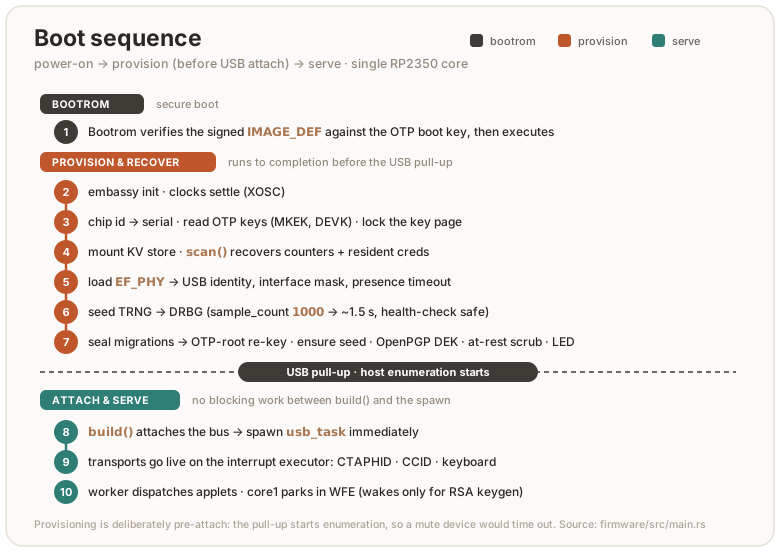
Crates
The workspace splits along a strict dependency gradient: the firmware binary
is thin glue over the applet crates, which build on a handful of host-tested
platform libraries. The per-crate detail is in the table. The shape is:
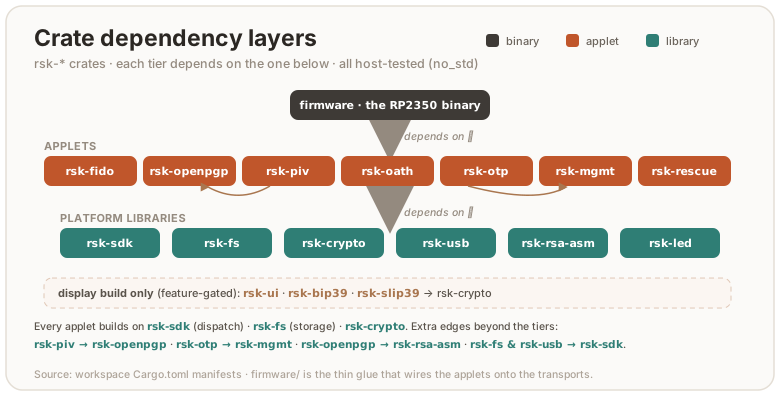
No applet names another applet — the count is zero, in code and in the manifests. This page used to name three cross-edges (piv→openpgp, openpgp→rsa, piv→rsa), only the first of which was one applet reaching sideways; the manifests carried six — fido→mgmt, fido→rescue, openpgp→mgmt, piv→mgmt, piv→openpgp, otp→mgmt. The machinery under each moved down instead: the phy record into rsk-phy, the DeviceInfo record into rsk-devconf, RSA into rsk-rsa, and the EC key type both card applets seal (PrivKey over Curve, the [curve_id] ‖ scalar blob) into rsk-ec. Six rsk_<applet>:: mentions do survive across the applet tier, every one inside a comment where one applet explains its ordering by pointing at a sibling — a cross-reference, not a dependency.
What holds that now is deny.toml: each applet crate is banned except behind the composition roots that wire it, so a sideways edge fails the cargo deny row of the gate instead of waiting on a reviewer. The same stanza keeps a hash backend to rsk-crypto and puts rsk-ec/rsk-rsa behind a named allowlist. The drawing above is generated by scripts/crate_graph.py, which checks the shape from the other side — every member placed in a tier, every edge strictly downward — and fails the gate when the committed SVG has drifted from the manifests.
| Crate | Contents |
|---|---|
firmware | the only crate that touches the HAL: board bring-up, USB descriptors, executors, the worker, OTP fuse access, LED, BOOTSEL touch |
rsk-wipe | the second flashable image: a RAM-only flash erase for clean-slate testing — wipes all of flash, leaves a NUKE eyecatcher, reboots to BOOTSEL. Runs from SRAM because erasing the sectors a flash-resident image executes from would crash on return |
rsk-sdk | APDU parsing (cases 1–4, short + extended), BER-TLV, status words, the Applet trait + dispatcher, and the seams a board hands every applet: Rng, UserPresence/Presence |
rsk-fs | the flash filesystem: 16-bit file ids over two sequential-storage KV partitions (main + high-churn counters), ACLs, metadata records |
rsk-crypto | one wrapper over RustCrypto: hashes, HMAC/HKDF, AES-CBC/CFB/GCM, ChaCha20-Poly1305, PIN KDFs, HMAC-DRBG, ML-DSA-44/-65/-87 (rsk-mldsa) / ML-KEM, base64url, CRC |
rsk-mldsa | stack-optimized ML-DSA (FIPS 204) for all three parameter sets: streams the matrix A on the fly (one polynomial resident, not the full k×l) so even ML-DSA-87 fits the RP2350 stack where the by-value fips204 crate’s -65 overflowed it. no_std, no alloc, no unsafe; checked byte-for-byte vs NIST ACVP KATs, with Kani proofs over the reductions and rounding |
rsk-sha512 | SHA-512/384 for the Cortex-M33, byte-identical to sha2 but a compact rolled compression (~0.9 KB) that fits the XIP cache instead of sha2’s ~28 KB unrolled body — ~4× faster end-to-end on a FIDO getAssertion, with the identical digest, so hmac/hkdf compose over it byte-for-byte |
rsk-usb | the CTAPHID reassembler/framer and the CCID state machine, transport-agnostic and fully host-testable |
rsk-fido | FIDO2 (CTAP 2.1) + U2F: credentials, clientPIN (protocols 1+2), credManagement, extensions (hmac-secret, credProtect, credBlob, largeBlobs, minPinLength), enterprise attestation, seed backup + soft-lock vendor commands |
rsk-openpgp | OpenPGP card 3.4: DO model, PW1/RC/PW3, import/generate, PSO, AES PSO, certs — EC + RSA-2048/3072/4096 |
rsk-piv | PIV: 24 key slots + F9 attestation, management-key auth, generate/import/sign/ECDH, on-card X.509 via a hand-rolled backward DER writer |
rsk-oath | YKOATH protocol: TOTP/HOTP, touch-required accounts, access codes |
rsk-otp | Yubico OTP slots ×4: CCID command surface + the keyboard frame protocol and typed-ticket generation |
rsk-mgmt | the YubiKey management applet: the CCID command surface for READ/WRITE CONFIG and the device-wide reset (the record itself is rsk-devconf), served over both CCID and CTAPHID |
rsk-rescue | recovery/provisioning applet: identity, the phy config record (codec in rsk-phy), flash info, secure-boot status, attestation key, reboot, the one OTP-lock write |
rsk-store | the rsk_fs::Storage backend the device runs: two sequential-storage map partitions (credentials vs. the hot counters), the counter-FID routing, and the scrub lap that physically destroys superseded secrets — generic over the flash, so the fuzzer can cut its power and the emulator can mount a file |
rsk-device | the applet wiring both the firmware and the emulator run: which applets exist, what capability gates each, and how a CTAPHID or CCID message reaches one — the board’s own parts behind a Hooks trait. Also the presence-scope arbitration (presence): which transport owns the one button, whose cancel may end its wait, and the spent latch, with the button and clock behind a Board seam |
rsk-vendor | the vendor AID: the persisted test counter, SET/GET LED, the reboot request, and — gated out of every shipped image — core1 stats and the measurement benches; the hardware behind a Platform the firmware fills in |
rsk-rsa | the RSA family: the key type, key generation, the sealed CRT layout and its blinded, fault-checked private operation, PKCS#1 v1.5, the 7F49 public-key DO — over vendored C/ARM-asm modular exponentiation behind one FFI fn (host build uses a pure-Rust fallback). The OpenPGP and PIV applets add only their own framing and seal I/O |
rsk-ec | the EC family: the private key both card applets seal (PrivKey over Curve — the persisted [curve_id] ‖ scalar blob), its ECDSA/EdDSA signing, d·G public-point derivation and ECDH, the 7F49 { 86 } public-key DO, and underneath them the fixed-base Lim–Lee comb k·G/d·G that FIDO, PIV and OpenPGP all sign on — bit-identical to the RustCrypto generic path, several× faster on the Cortex-M33 |
rsk-led | the EF_LED_CONF codec for the status-LED config block, shared by the firmware and the rsk led host tool |
rsk-devconf | the EF_DEV_CONF codec: the Yubico DeviceInfo record — which applications are enabled, the capability vocabulary, the validate/merge/trim write path and the READ CONFIG response built around it. Written by four command surfaces (CCID, the OTP keyboard slots, CTAPHID, the FIDO vendor config-write), so it sits below all of them rather than inside the management applet |
rsk-phy | the EF_PHY codec: the PicoForge-compatible device-config TLV record — USB identity, LED wiring, the interface mask — plus its clamped load and its read-modify-write save. Read by the rescue and FIDO applets, rsk-device, rsk-display and the boot path, so it sits below all of them rather than inside one |
rsk-bench | robust summary statistics (median, MAD, a separate cold sample) for the on-device latency harness. Steady-state timing on the RP2350 is XIP-cache sensitive to ±~30 ms, so a mean fakes regressions; compiled in only under the bench feature, never into a shipped image |
rsk-bip39 | BIP-39 mnemonic encode for the trusted display’s recovery-phrase screen; display build only |
rsk-slip39 | SLIP-39 (Shamir) share encode for the same screen, mirroring the host shamir_mnemonic exactly so rsk backup restore recombines; display build only |
rsk-ui | the trusted-display UI model (operation prompts, untrusted relying-party-string sanitizing, Allow/Deny button geometry) plus its compact retained scene and 8-row rasterizer; compiled only into the display build |
rsk-display | the trusted display’s flow — which screen is shown when, the PIN pad, the browse modals, the Approve/Deny wait — over a panel and a touch controller it takes as type parameters, so the firmware drives an ST7789 with semantic damage + two-band DMA and the emulator replays the same retained scene into a window; display build only |
Everything except the two binaries is hardware-agnostic and runs the full test suite on the host (testing.md).
Flash layout
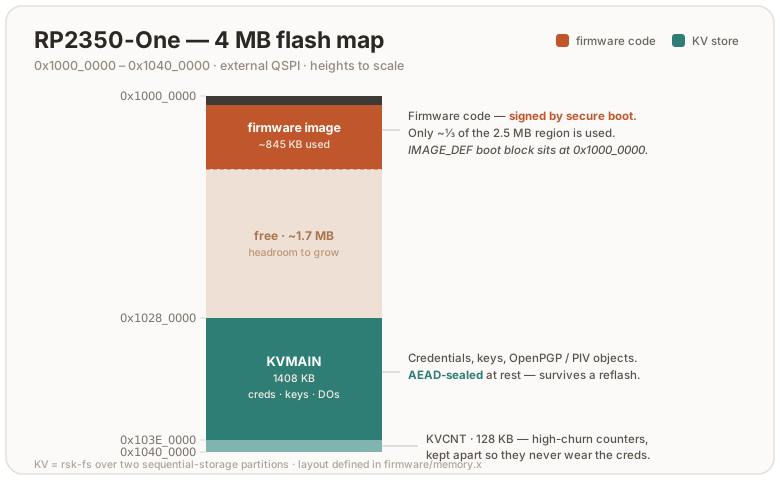
Two KV partitions at fixed offsets (firmware/memory.x): the main store, and
a small separate partition for the per-operation counters so their churn
never forces compaction of long-lived records. Files are 16-bit ids. Each
applet owns disjoint ranges (FIDO 0x10xx/0xCxxx/0xCFxx/0xD0xx, OpenPGP DO
mirrors, PIV 0xD1xx/0xD2xx, OTP slots 0xBBxx, phy/rescue 0xE0xx) and a
reset wipes exactly its own predicate, never a range shared with another
applet.
Both regions sit behind one RP2350 partition table entry carried in the
shipped image: the USB bootloader is denied read and write over
__kvmain_start..__kvcnt_end, while secure code — the running firmware,
rsk-wipe, the rescue applet — keeps rw. The table is derived from those
linker symbols rather than restated, so it follows FLASH_SIZE/KVMAIN on its
own (build.md). What it is and is not worth:
threat-model.md.
Key sealing at rest: kbase = HKDF(serial_hash, otp_master_key) keys
AES-CBC for the FIDO seed (tagged formats: plain vs OTP-rooted generation)
and AES-GCM for PIV keys. OpenPGP keys sit under the PIN-wrapped DEK chain.
When the OTP master key gets provisioned later in a device’s life, a boot
pass and lazy PIN-verify hooks migrate every sealed object to the new root
without losing data. Until that burn the root derives from on-chip state
alone, which an attacker with full flash and chip access could reconstruct.
threat-model.md covers what at-rest sealing does and does
not buy before provisioning.
One sealed object worth spelling out is the FIDO credential box. It doubles as
the opaque credential ID a relying party stores, so its size caps the reported
maxCredentialIdLength (748):
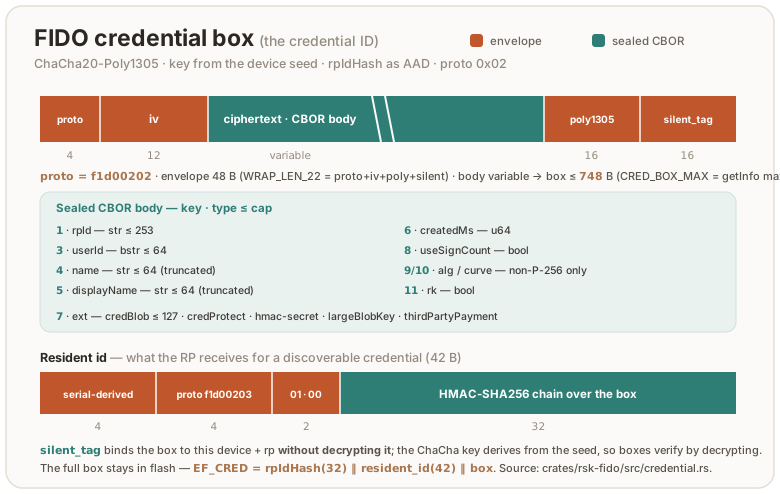
The 42-byte resident id carries a version byte at offset 8, a reserved
header byte outside the [10..42] HMAC chain, so it never changes the id’s
entropy. It is 1 (v2) for every resident credential created since RS-Key
0x0806: a v2 credential derives its signing key, hmac-secret and largeBlobKey
from this stable id, so an updateUserInformation reseal (which draws a
fresh box IV) no longer rotates them and the relying party’s stored public key
keeps verifying. Resident credentials from older firmware carry an implicit 0
(v1) and keep deriving from the box, so an already-provisioned device stays
compatible across the upgrade.
Capacity — why the flash is mostly empty
The KV store is 1.5 MB by default whatever the FLASH_SIZE, so a larger flash only
grows the code region, most of which no firmware writes (build.md). That
is deliberate. (A 2 MB board is the one exception: it shrinks the main partition via
KVMAIN to leave room for code — still far more than a key ever fills.) A security key’s maximum logical state is small and hard-capped:
MAX_RESIDENT_CREDENTIALS (256 passkeys), MAX_DYNAMIC_FILES (1280 files, one
budget shared by every applet), MAX_OATH_CRED (255), plus a handful of
OpenPGP/PIV slots. The passkeys dominate the bytes — a file-count ceiling is not
a size ceiling — so a fully provisioned device fills only a few hundred KB, well
under the 1408 KB main partition. Growing the store to “fill” a 16 MB board would buy nothing usable: it
lengthens the sequential-storage scan behind every cold boot and absent-key
probe (the present cache exists to dodge exactly that full-partition ~0.2 s cost),
and forces the logical caps (and the RAM/stack buffers sized to them) up for
capacity no one reaches. Empty flash here is headroom, not waste.
Device identity
USB VID/PID, product strings and the reported firmware version are
compile-time knobs (build.md). The default is RS-Key’s own
identity: VID:PID 0x1209:0x0001 (pid.codes), manufacturer “RS-Key”,
product “RS-Key Security Key” (the RSKey preset). An opt-in VIDPID=Yubikey5
preset builds the Yubico interop flavor (0x1050:0x0407, reader name “Yubico
YubiKey”) for the tools that auto-recognize the device purely by that reader
name. A flash-resident phy record can override VID/PID and the product
string at boot (the store mounts before the USB builder runs for exactly this
reason). FIDO tools find the device by HID usage page, CCID tools by the
reader name.
User presence
One presence button (BOOTSEL by default, or PRESENCE_PIN), shared by all
applets through rsk_sdk::UserPresence, which the firmware implements once:
FIDO operations, OpenPGP UIF, PIV touch policies, OATH touch accounts, and OTP
slot typing (1–4 presses select the slot) all gate on it. The trait has two
asks, because a screen answers them differently: request for a smartcard
touch policy, one per signature, and request_ceremony for a ceremony a host
raised — a CTAP2 command, or the pinpad’s “Allow host PIN entry?” gate — which
alone can be cancelled mid-wait (CTAPHID_CANCEL) and so alone can answer
Presence::Cancelled. The no-touch build (--features no-touch)
auto-confirms. For test rigs, not for daily use.
Provenance
RS-Key reimplements the applet behaviour, file layouts and protocol surface of pico-keys (AGPL, see NOTICE) in Rust, replacing the C HAL/runtime/transport stack with embassy and RustCrypto:
| was (C) | is (Rust) |
|---|---|
| pico-sdk runtime + TinyUSB | embassy-rp + embassy-usb |
| mbedTLS | RustCrypto (p256/p384/p521/k256, ed25519-dalek, …) + our own rsk-rsa |
| TinyCBOR | minicbor |
| bespoke wear-leveled flash writer | sequential-storage |
| core0/core1 + queues | one async executor pair; core1 = a keygen math engine only |
Where the two implementations deliberately differ (at-rest sealing, seed PIN-wrapping, OTP provisioning policy, several upstream bugs not carried over), the divergence is a documented design decision. See threat-model.md and the crate docs.
RS-Key host protocol reference
This document specifies the host-facing protocol of the RS-Key firmware: how a configuration/management tool talks to the device, what commands exist, the exact byte layout of each request and response, and what authenticates each one.
It exists so that third-party tooling (e.g. PicoForge) can configure and
manage RS-Key devices without reverse-engineering the firmware. The canonical,
runnable reference client is the rsk Python CLI. Every command
below is implemented there; file/line pointers are given throughout.
Audience & scope. This is a wire spec, not a tutorial. It documents the commands a host sends and the bytes it gets back. It does not cover the on-device storage format, the crypto internals, or the build system. Those live in architecture.md and the crate sources.
Licensing. RS-Key firmware is AGPL-3.0-only. This protocol description is published as part of the same repository; you are free to implement a client against it under any license. Interop implementations do not inherit AGPL by talking to the device.
Stability. The two transports and the standard applets (FIDO2, U2F, PIV, OATH, OTP, OpenPGP, Yubico Management) are stable. They follow public specs. The RS-Key-specific surface (Rescue applet, Vendor/LED applet, CTAPHID
authenticatorVendor 0x41) is versioned bybcdDeviceand may grow; new tags/subcommands are added, existing ones are not silently repurposed. Probe the version handshakes (§3, §6.1) and treat unknown tags as skippable.
1. Transports
RS-Key is a USB composite device exposing two host-reachable transports:
| Transport | Carries | Host API |
|---|---|---|
CTAPHID (FIDO HID, usage page 0xF1D0) | CTAP1/U2F, CTAP2, and the authenticatorVendor 0x41 vendor command | hidapi |
| CCID (PC/SC smart-card) | All ISO-7816 applets, selected by AID | pyscard / PC/SC |
A keyboard (HID) interface also exists for Yubico OTP. On the default build it
also carries the ykman OTP-HID admin writes (SET_DEVICE_INFO 0x15,
DEVICE_CONFIG 0x11, SCAN_MAP 0x12, NDEF 0x08/0x09) — ungated, like a stock
YubiKey; strict-config refuses them. SET_DEVICE_INFO shares the same
EF_DEV_CONF DeviceInfo store as the CCID WRITE CONFIG (§6); the rest are inert
on this USB-only board except SCAN_MAP (it remaps typed OTP output). Each admin
write advances the status frame’s program-sequence byte — that increment is
how ykman/yubikit confirm it (a write that left the sequence unchanged reports
CommandRejectedError: No data, which is what blocked ykman config usb over
this transport before). The frame codec itself is otherwise out of scope here.
The interfaces are presented in the stock YubiKey order — keyboard/OTP, FIDO
HID, CCID — because some hosts address the OTP interface by index instead of
by descriptor: the libusb backend ykpers/ykcore ships (KeePassXC,
ykchalresp, pam_yubico) claims interface 0 and sends the OTP frame reports
there whatever the descriptors say. An interface switched off in
ENABLED_USB_ITF (§7) is omitted and the rest keep that relative order, so a
host that assumes a fixed index only holds where the same interface set is
enabled.
The OTP frame protocol answers a HID feature GET/SET_REPORT on the keyboard
interface only. The keyboard interface being first (index 0) is what those
index-addressing hosts need; serving the frames on the FIDO interface too was
tried but reverted (audit run-30) — it gained no host that the keyboard interface
does not already serve, and on macOS it removed a real privilege boundary (IOKit
gates a keyboard-usage HID nub behind Input Monitoring while the 0xF1D0 FIDO nub
opens to any console-user process). The FIDO interrupt endpoints carry CTAPHID and
nothing else, and its report descriptor declares no feature report.
A slot programmed to require a touch answers its challenge only after a button
press, and reports the wait in the status byte (0x20) meanwhile. Two things end
that wait early, both matching a YubiKey: the host’s dummy write — a report
whose sequence byte is out of range, 0x8f, which also resets the read mode after
a response — and any new frame, which supersedes the pending challenge. A host
that does neither waits out the touch timeout (§7 PRESENCE_TIMEOUT), during
which the transport reports only that it is waiting.
Once announced, 0x20 holds for the rest of the command — the press itself does
not clear it, only the response frame or the idle status frame does. ykpers reads
a byte carrying neither the pending nor the waiting bit as a touch timeout, so a
device that dropped the wait between the press and its answer would lose
challenges it had in fact completed.
1.1 CCID APDU framing
Standard ISO-7816 short APDUs. SELECT is always 00 A4 04 00 Lc <AID> 00; the
selected applet then receives CLA INS P1 P2 [Lc <data>] [Le]. There is no ISO
master file, so the master-file SELECT (00 A4 00 0C …, GnuPG’s 3F00 probe)
answers 6D00 like a YubiKey. The power-on ATR is T=1, its historical bytes labelled
YubiKey on a Yubico-identity build and RS-Key on the default build (identical
card capabilities). The reference transport is tools/rsk/ccid.py:
def select(conn, aid):
    return transmit(conn, [0x00, 0xA4, 0x04, 0x00, len(aid)] + list(aid) + [0x00])
The class byte is judged before the command, for every applet and for SELECT
itself. Bit 0x10 marks a command-chaining segment and is looked at first, so
10, 1C, 90 and FF are all ordinary segments. Otherwise a class carrying a
secure-messaging indication (CLA & 0x0C: 04, 0C, 84, 8C, …) answers
6E00 — no applet here implements secure messaging, and OpenPGP’s Extended
Capabilities says so. Applets that additionally name a class of their own reject
anything else themselves (OATH, management, OTP and U2F want 00; rescue wants
80). A chain is reassembled into a single command of at most 2038 bytes
(one CCID frame); a segment that would reach or pass that is 6700, and the
partial chain is dropped rather than dispatched — so a host that retries the
segment is starting a new chain, not continuing the old one.
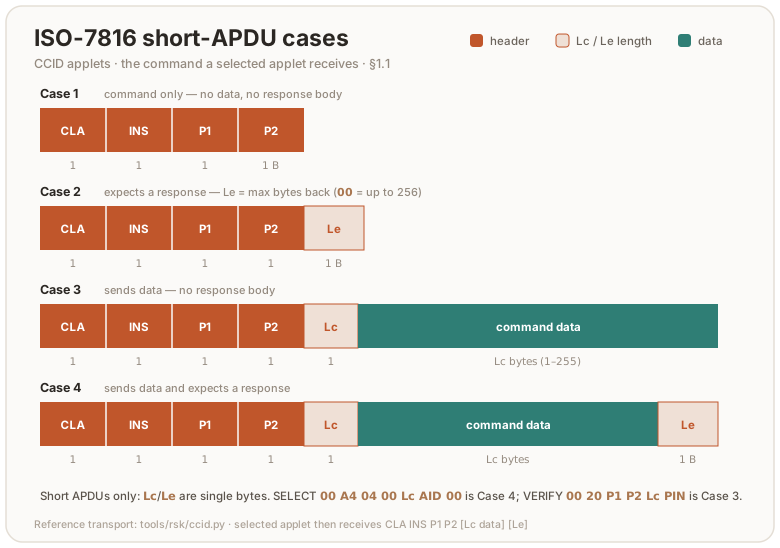
A success body longer than the request’s Le (including a Case-3 command that
carries no Le at all, capped at 256) is returned with ISO-7816 response
chaining: the first chunk ships with status 61 XX (XX = further bytes
available, 00 = 256+), and the host issues GET RESPONSE (00 C0 00 00 <Le>)
until 9000. Any GET DATA reading a certificate object over 256 bytes chains
this way, so a host that sends GET DATA without an Le must still follow 61xx.
OATH LIST (0xA1) and CALCULATE ALL (0xA4) responses that outgrow one
frame chain the YubiKey-OATH way instead: 61 XX followed by SEND REMAINING
(00 A5 00 00) rather than GET RESPONSE, matching what ykman / Yubico
Authenticator send. A host that stops at the first frame still sees a valid
(shorter) list.
Seven OATH rules a host has to expect, all matching a YubiKey 5.7.4. PUT
(0x01) is strict about the credential body — KEY TLV 16..=66 bytes (a secret
shorter than 14 bytes is refused, not padded: zero-pad it first, as ykman does,
and the codes do not change), digits 6/7/8, type 0x10/0x20, algorithm 1/2/3,
name 1..=64 bytes, the initial moving factor on HOTP only and exactly 4 bytes,
the PROPERTY byte as the bare 78 vv pair, the four YKOATH tags in that order,
no duplicate, no unknown tag and no trailing byte. Anything else is 6A80 with
nothing stored, so a rejected PUT leaves an existing credential of that
name working. (RS-Key also stores the password-safe fields 0x83/0x84/0x85,
≤255 bytes each, which may sit anywhere in the body.) SET CODE (0x03) holds
its key to the same measured rule: the 73 TLV is one algorithm byte plus
14..=64 bytes of key material, or empty to remove the access code — anything
else is 6A80 and whatever code was installed is left exactly as it was. Its
proof travels over an exactly 8-byte 74 challenge (os.urandom(8), as
ykman sends it); any other width is 6A80, and removing a code needs no
challenge at all. VALIDATE (0xA3) then refuses a proof that does not match
with 6A80 as well; 6984 from it means something else entirely — no access
code is installed to match against. And PROPERTIES bit 0, only increasing, is
enforced: a TOTP credential carrying it computes only for a challenge strictly
greater than the highest one it has served, comparing the raw challenge bytes
zero-extended on the right — plain numeric > for the usual 8-byte counter. A
challenge at or below that mark is 6A80, and in CALCULATE ALL one such
credential fails the whole command with an empty body. The one exception is a
credential a build before this rule stored: its body can leave no room for the
mark, and CALCULATE ALL then reports it with 77 (no response) and computes
the rest of the store rather than failing — its own CALCULATE still answers
6A80.
The fourth is the challenge itself. CALCULATE (0xA2) and CALCULATE ALL
(0xA4) take an opaque byte string of 0..=64 bytes in the 74 TLV and HMAC
all of it; 65 or more is 6A80, judged before the credential is looked up and
whatever the credential’s type, so a HOTP account that ignores the challenge
refuses an over-wide one too. Both read paths therefore answer the same code for
the same challenge at every accepted width — including across a SEND REMAINING
page — and the usual 8-byte TOTP counter is simply the common case.
The fifth is how the bodies are read. CALCULATE, VALIDATE and SET CODE
are parsed by position: exactly the documented TLVs, in the documented
order, with nothing before, between or after them — 71 then 74 for
CALCULATE, 75 then 74 for VALIDATE (the response comes first, as
ykman sends it), 73 then 74 then 75 for SET CODE, or a lone 73 00 to
remove the code — that spelling and no other, so a SET CODE carrying no body
at all is 6A80 and the standing code goes on opening the applet, as on a
YubiKey. A reordering, a repeated tag, an unknown tag or a trailing byte is
6A80, with nothing stored. CALCULATE ALL is the one exception the card
makes: its 74 must be the first TLV, and whatever follows it is ignored.
The sixth is what a truncated response carries. With P2 = 0x01 the 76 TLV is
[digits][code(4)], and the four bytes are the RFC 4226 dynamic truncation
already reduced to that credential’s digit count — big-endian, so a 6-digit
account never exceeds 000F 423F. A host must not reduce a second time expecting
a different answer, and VERIFY CODE (0xB1) compares exactly the value
CALCULATE sent. The untruncated form (P2 = 0x00, tag 75) is unaffected: it
carries the whole HMAC.
The seventh runs across the whole table: the parameter bytes. Every OATH command
is sent P1 = 00, P2 = 00. The 01 that selects the truncated form belongs to
CALCULATE and CALCULATE ALL and to nothing else — on PUT, DELETE, SET CODE, RENAME and LIST it is refused like any other stray byte. RESET alone
takes DE AD, and VALIDATE is the card’s own exception: it refuses only when
both bytes are non-zero. Anything else is 6B00, judged before the
command’s body and before the access-code gate so nothing is written; an
instruction the applet does not implement still answers 6D00 first.
1.2 CTAPHID framing
64-byte HID reports. Init frame: CID(4) | CMD(1) | BCNT_HI | BCNT_LO | data[:57];
continuation frames: CID(4) | SEQ(1) | data[:59]. CTAPHID_INIT = 0x86,
CTAPHID_CBOR = 0x90, CTAPHID_KEEPALIVE = 0xBB. A CTAP2 message is
command_byte | CBOR_payload. Reference: tools/rsk/ctaphid.py.
Take the channel id from the CTAPHID_INIT response and use that one: every INIT on
the broadcast CID allocates a fresh id, so an id hardcoded or cached across sessions
will not be yours. CTAPHID_LOCK is honoured for the 1–10 seconds it asks for, and
the INIT capability byte carries CAPABILITY_LOCK (0x02) to say so. Meanwhile
every other channel gets ERR_CHANNEL_BUSY — including one sending CTAPHID_INIT
to resynchronise itself. The exception is an INIT on the broadcast CID, which
still gets through: a client arriving mid-lock is given an id, then turned away on
it.
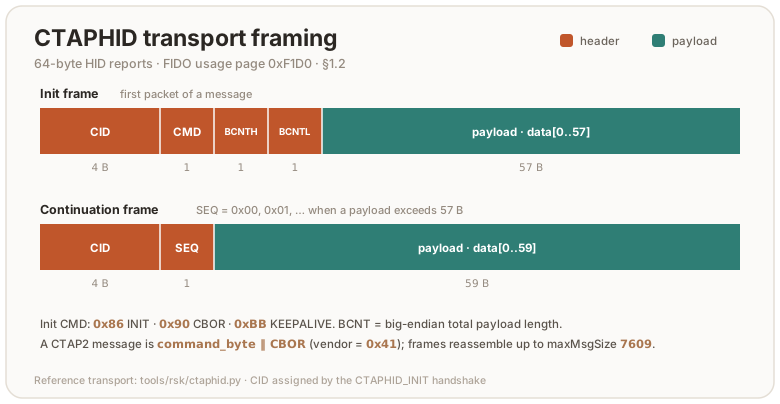
1.3 CCID secure PIN entry (pinpad) — display builds only
A trusted-display build advertises bPINSupport = 0x01 (VERIFY) in its CCID class
descriptor (body byte 50 / full descriptor byte 52), so a host driver treats it as
a pinpad reader and sends PC_to_RDR_Secure (0x69) instead of a plaintext
VERIFY; the PIN is then typed on the device’s own screen. A standard (no-screen)
build leaves bPINSupport = 0x00 and rejects 0x69. No control transfer is
involved. The host CCID driver reads bPINSupport straight from the descriptor;
the device only has to handle 0x69. The validated trigger is GnuPG’s internal
CCID driver (keys solely off bPINSupport); PC/SC + libccid and macOS
CryptoTokenKit also expose pinpad from the descriptor, but their FEATURE_VERIFY_PIN_DIRECT
coverage varies, so treat the GnuPG-internal path as the reliable one.
Scope (honest): this keeps the PIN off the wire only when the host uses
pinpad mode. The device still accepts a normal plaintext XfrBlock VERIFY
(00 20 P1 P2 Lc <PIN>), so a host that chooses to send one puts the PIN on the
wire. Standard pinpad enables on-device entry, it does not enforce it (a
device-enforced mode is a planned opt-in follow-up).
Whatever the host driver, the bytes on the wire follow the CCID structure
below, not the PC/SC v2 Part 10 IOCTL structure (the driver drops that structure’s
bTimeOut2 and ulDataLength when it builds the 0x69), so the VERIFY template is
always at abData offset 15. The 0x69 payload is the CCID abPINDataStructure for
VERIFY:
bPINOperation(1)=0x00 verify | bTimeOut(1) | bmFormatString(1) | bmPINBlockString(1) |
bmPINLengthFormat(1) | wPINMaxExtraDigit(2 LE) | bEntryValidationCondition(1) |
bNumberMessage(1) | wLangId(2 LE) | bMsgIndex(1) | bTeoPrologue(3) |
abPINApdu = CLA INS=0x20 P1 P2 …   (the VERIFY template, at offset 15)
The device reads the template’s P2 (OpenPGP 0x81/0x82/0x83 = PW1-sign /
PW1-other / PW3-admin; PIV 0x80 = application PIN), collects the PIN on the pad,
builds the real VERIFY APDU (00 20 P1 P2 Lc <ASCII PIN>; PIV pads with 0xFF to
8 bytes), runs it through the selected applet, and replies with a normal
RDR_to_PC_DataBlock (0x80) carrying only the status word:
- success →
90 00,bStatus = 0,bError = 0. - wrong PIN → the card’s real
63 Cx(tries left, reported saturated atx = Fso a larger configured retry total cannot wrap into63 C0= blocked) /69 83(blocked),bStatus = 0,bError = 0(the command succeeded; the card said wrong). - user cancel →
bStatus = 0x40(failed),bError = 0xEF→SCARD_W_CANCELLED_BY_USER. - pad timeout →
bStatus = 0x40,bError = 0xF0→SCARD_E_TIMEOUT.
The transport streams T=1 time-extensions for the whole on-screen entry, so the host
transaction does not time out. The device ignores the host’s format/offset bits and
builds the APDU from its own buffers, so a crafted 0x69 can’t index out of bounds.
Trigger from GnuPG: gpg-connect-agent "scd checkpin OPENPGP.1" /bye (internal CCID,
no host config). PIN parse + APDU assembly: crates/rsk-usb/src/secure_pin.rs.
2. Status words & error codes
2.1 CCID status words (ISO-7816 SW1 SW2)
Source: crates/rsk-sdk/src/sw.rs.
| SW | Name | Meaning |
|---|---|---|
9000 | OK | success |
6400 | EXEC_ERROR | execution error (internal) |
6581 | MEMORY_FAILURE | flash access failed — a write, or a read whose answer the command must not guess (1E/01 READ phy, 1C/01 WRITE phy, WRITE CONFIG’s merge) |
6700 | WRONG_LENGTH | bad Lc/Le for this command |
6883 | LAST_CHAIN_EXPECTED | an APDU arrived that neither continues nor closes the open command chain |
6982 | SECURITY_STATUS_NOT_SATISFIED | auth/precondition missing |
6984 | DATA_INVALID | malformed payload (e.g. bad guard magic) |
6985 | CONDITIONS_NOT_SATISFIED | state precondition unmet (e.g. RTC unset) |
6A80 | WRONG_DATA | bad data field |
6A86 | INCORRECT_P1P2 | unsupported P1/P2 |
6A88 | REFERENCE_NOT_FOUND | the object, key or PIN the request names is absent (PIV GET METADATA, MOVE KEY, the PIN commands’ key reference; OpenPGP SELECT DATA and in-application SELECT) |
6B00 | WRONG_P1P2 | P1/P2 outside what this command takes — including a DO that P1P2 addresses and the command does not serve (OpenPGP GET DATA, PUT DATA) |
6D00 | INS_NOT_SUPPORTED | unknown INS for this applet |
6E00 | CLA_NOT_SUPPORTED | wrong CLA for this applet |
2.2 CTAP2 errors
Standard CTAP2 status bytes (0x00 = success), returned by CTAP2 and by the
0x41 vendor command. Source: crates/rsk-fido/src/error.rs. The ones the vendor
surface returns:
| Byte | Name | Meaning here |
|---|---|---|
0x00 | OK | success |
0x02 | INVALID_PARAMETER | malformed param / bad key / wrong blob length |
0x12 | INVALID_CBOR | the body is not exactly one CBOR item (trailing bytes) |
0x14 | MISSING_PARAMETER | required field absent (e.g. blob/pinUvAuthParam) |
0x27 | OPERATION_DENIED | touch declined / timed out |
0x30 | NOT_ALLOWED | precondition unmet (no MSE channel, one already spent or owned by another CTAPHID channel, an MSE while one is live (§9.1), sealed, soft-locked, or an authenticatorReset outside the §5.1 power-up window) |
0x33 | PIN_AUTH_INVALID | pinUvAuthParam MAC or acfg permission wrong |
0x36 | PUAT_REQUIRED | a PIN is set but no pinUvAuthToken was supplied |
0x39 | REQUEST_TOO_LARGE | subCommandParams over the limit |
0x3D | INTEGRITY_FAILURE | blob failed authenticated decryption |
0x3E | INVALID_SUBCOMMAND | unknown vendorCommandId under authenticatorConfig’s 0xFF. A 0x41 subcommand this build does not implement is 0x02, matching a YubiKey |
3. Device identity & discovery
3.1 USB identity
The build picks a VID/PID preset (firmware/build.rs):
| Preset | VID:PID | Manufacturer / Product strings | Notes |
|---|---|---|---|
RSKey (default) | 1209:0001 | RS-Key / RS-Key Security Key | pid.codes identity; not a masquerade |
Yubikey5 (opt-in interop) | 1050:0407 | Yubico / YubiKey RSK OTP+FIDO+CCID | so ykman/Yubico Authenticator derive PID from the PC/SC reader name |
| others | NitroHSM, NitroFIDO2, GnuPG, Pico, Dev | — | local interop only |
The VID/PID, the product string and the manufacturer string can all be overridden
at runtime via the phy record (§7), taking effect at the next boot: VID/PID
(tag 0x00), product (tag 0x09) and manufacturer (tag 0x0F). If a runtime
product looks like a YubiKey (yubikey, any case) but omits the smartcard CCID
token, the firmware appends OTP+FIDO+CCID before enumerating — a token-less
Yubico YubiKey reader name otherwise crashes ykman / Yubico Authenticator on
Windows (_pid_from_name → PID.of → KeyError('YK4_'), which aborts the whole
PC/SC scan). Source: normalize_usb_product in crates/rsk-phy/src/lib.rs.
Each string is resolved in precedence order: an explicit phy tag (0x0F /
0x09) wins; otherwise the effective VID picks a default — a Yubico VID
(0x1050) yields Yubico / YubiKey RSK OTP+FIDO+CCID plus the Yubico OpenPGP AID
vendor, so setting only the Yubico VID/PID makes the whole identity “just work” for
ykman / Yubico Authenticator; otherwise the build const. The OpenPGP AID
vendor id stays keyed on the effective VID (a registered number, not a free
string). ⚠️ so a phy-repointed default key can present a full Yubico identity at
runtime; the USB/smartcard identity is cosmetic and host-configurable, never a
security or anti-counterfeiting control (see docs/threat-model.md).
Recognizing an RS-Key by PC/SC reader name: the reader name contains RS-Key
(default build) or RSK (Yubico-interop build). Neither appears in a genuine
YubiKey’s reader name. Reference: RSK_READER_TOKENS in
tools/rsk/ccid.py.
3.2 Firmware version & bcdDevice
| Field | Value | Where |
|---|---|---|
| firmwareVersion | 5.8.0 → 0x00050800 | CTAP getInfo 0x0E; Management/OTP DeviceInfo TAG_VERSION; Management SELECT ("5.8.0" ASCII) |
bcdDevice | 0x0780 (build counter, increments per firmware change) | USB device descriptor (firmware/src/main.rs device_release) |
| AAGUID | 2479c7bf-6b30-5683-9ec8-0e8171a918b7 | CTAP getInfo 0x03; one value across every VID/PID flavor of a build, overridable at build time with AAGUID=<uuid> |
The firmware version is overridable at build time (FW_VERSION=X.Y.Z); 5.8.0
mirrors a current YubiKey 5 so Yubico tooling is satisfied under the Yubico VID.
4. AID registry
SELECT an applet with 00 A4 04 00 Lc <AID> 00.
How an AID is matched (RS-Key 0x088C+): ISO 7816-4 truncated select — the
AID you send must be a prefix of a registered one, and the first applet it
matches wins. So a shortened AID selects (PIV answers to A0 00 00 03 08), an
AID with anything appended does not (earlier builds selected on
registered AID ‖ junk, which let PIV answer to A0 00 00 03 08 00 00 00 00 —
the AID SP 800-85A-4 C.1.1.2 names as invalid), and an empty AID is refused
rather than treated as “select the default application”. Two consequences worth
planning for: OpenPGP is selected by the 6-byte AID below, not by the 16-byte
value it reports in DO 4F (that one carries the device serial and is longer, so
it is not a prefix — a real YubiKey refuses it too); and a prefix short enough to
match several applets resolves by registration order, which is the order of the
table below, so probe with the full AID unless you mean to. OATH and OTP are
registered by their full 8-byte instance AIDs, as a YubiKey registers them:
Yubico’s Android SDK selects by all 8 bytes, while ykman sends the 7-byte prefix,
and both select (0x09D4+; from 0x088C to 0x09D3 only the 7-byte form did).
Where that SELECT works. The recipe above is CCID’s (§1.1), and two of the ten
rows below are not CCID applets: the FIDO2 backup id and the standalone U2F AID
answer 6A82 (FILE_NOT_FOUND) — registered identifiers rather than anything this
build dispatches to. The FIDO2 AID is selectable over CCID and carries CTAP2
and U2F there (§5.2); over CTAPHID the same applet has no SELECT at all (§1.2),
which is why its row names both. The other transport is narrower still:
CTAPHID_MSG offers
exactly one applet, the vendor one, and every other AID answers 6A82 there —
which is why a U2F command arriving after a vendor SELECT on the same session was
a real bug (tests/15_u2f_vendor_msg_isolation.py). Measured on both transports,
all ten AIDs, and recorded in the Transport column.
| Applet | AID | Transport | Spec status | Config-relevant? |
|---|---|---|---|---|
| FIDO2 / U2F | A0 00 00 06 47 2F 00 01 | CCID (§5.2) + CTAPHID (no SELECT) | Standard (CTAP2 + CTAP1) | identity only |
| FIDO2 (backup id) | B0 00 00 06 47 2F 00 01 | none — unregistered | RS-Key | — |
| U2F (standalone id) | A0 00 00 05 27 10 02 | none — unregistered; U2F rides the FIDO2 AID | Standard (CTAP1/U2F) | — |
| Management | A0 00 00 05 27 47 11 17 | CCID | Yubico-compatible | yes — §6 |
| OATH | A0 00 00 05 27 21 01 01 | CCID | Yubico OATH | data only |
| OTP | A0 00 00 05 27 20 01 01 | CCID | Yubico OTP | data only |
| PIV | A0 00 00 03 08 00 00 10 00 01 00 | CCID | NIST SP 800-73 | data only |
| OpenPGP | D2 76 00 01 24 01 | CCID | OpenPGP card 3.x | data only |
| Rescue | A0 58 3F C1 9B 7E 4F 21 | CCID | RS-Key-specific | yes — §7 |
| Vendor / LED | F0 00 00 00 01 | CCID + CTAPHID_MSG | RS-Key-specific | yes — §8 |
Sources: crates/rsk-fido/src/consts.rs,
crates/rsk-mgmt (+ crates/rsk-devconf for the DeviceInfo record),
crates/rsk-oath,
crates/rsk-otp,
crates/rsk-piv,
crates/rsk-openpgp/src/consts.rs,
crates/rsk-rescue,
firmware/src/vendor.rs. Which AID each transport actually offers is not in any
of those: it is the applet list crates/rsk-device/src/ccid.rs builds for CCID
and the one-entry list in crates/rsk-device/src/ctap.rs for CTAPHID_MSG.
5. Standard interfaces (pointers, not re-specified)
These follow public specifications; a tool that already speaks YubiKey/FIDO2 needs only the identifiers above. RS-Key implements:
- FIDO2 / CTAP 2.1 (
versionsadvertises up toFIDO_2_3; neverFIDO_2_2, which CTAP 2.3 §6.4 says was never defined): getInfo, makeCredential, getAssertion, getNextAssertion, clientPIN, reset, selection, credentialManagement, authenticatorConfig, largeBlobs (writable without apinUvAuthParamuntil a PIN is set oralwaysUvis on, per §6.10.2 — a--features largeblob-extbuild serves the CTAP 2.3 §12.4largeBlobextension in its place and answers0x0CwithCTAP1_ERR_INVALID_COMMAND, because §12.4 forbids supporting both; detect it from getInfo, which dropslargeBlobs,maxSerializedLargeBlobArrayand thelargeBlobKeyextension in that build).options.perCredMgmtROis true, so a tool may request thepcmrpermission (0x40, alone) and get the persistent pinUvAuthToken: it drives getCredsMetadata / enumerateRPs / enumerateCredentials, never the two writers, and survives replugs until a PIN change or a reset — a credential list can be refreshed without re-prompting for the PIN. The enumerate walk it opens is not that durable: the cursor behindgetNextRP/getNextCredentialretires after 30 s idle, and after any command that is not one of those two continuations (CTAP 2.3 §6), so draw a list in one uninterrupted pass and restart from the Begin if it stalls. The same 30 s applies between the fragments of alargeBlobsset; there an abandoned transfer answersCTAP2_ERR_INVALID_SEQand the previously stored array is left intact.maxMsgSize=7609.transportsForReset(0x1A) is["usb", "smart-card"]— identical totransports(0x09), because a reset is reachable exactly where the applet is, and §5.2 routes the FIDO AID onto CCID as well as CTAPHID. It is an array ofAuthenticatorTransportstrings, not a bit field. There is nonfc: no radio.pinComplexityPolicy(0x1B) istrueonly on a build that refuses a PIN beyond the length floor — thestrong-pinandfips-profileimages block a repeated code point and a ±1 run; the default build answersfalse, and the optionalpinComplexityPolicyURL(0x1C) is never emitted.longTouchForReset(0x18) isfalse: a reset takes the same touch as any other presence check — CTAP 2.3 cut the long-touch hold from 2.2’s 10 s to 5 s, and RS-Key implements neither gesture.encIdentifier(0x19) is present from provisioning — boot,authenticatorResetand a seedBACKUP_LOADmint the persistent pinUvAuthToken it is keyed by; setting or changing the PIN, or forcing a change, revokes that grant until the next boot orpcmrrequest, and a soft-locked key omits it — and carriesiv ‖ AES-128-CBC(k, id)— 32 bytes — whereidis a 128-bit device identifier andk = HKDF-SHA-256(salt = 32 zero bytes, IKM = that token, info = "encIdentifier", L = 16). The IV is regenerated on every getInfo, so the bytes differ each time while the identifier under them does not: a tool holding the token recognises the device across sessions, and one without it learns nothing. The identifier is derived from the device seed, soauthenticatorResetchanges it.encCredStoreState(0x1E) is that same construction under the labelencCredStoreState, over a 128-bit tag that moves whenever the set of discoverable credentials does — a create, adeleteCredential, anupdateUserInformation, or a delete driven from the trusted display. Reads never move it. A platform holding the token caches the plaintext and re-enumerates only when it differs; one without the token sees bytes that change every call and learns nothing. The tag is stored, not counted in RAM, so a power cycle does not reset it — and it is written ahead of the change it describes, so what a torn write leaves is a tag that over-reports (one wasted re-enumeration) rather than one that under-reports (a stale cache). A tag the flash cannot serve omits the member rather than publishing the zero one: zero is what a fresh device carries, so a platform can be holding it, while an absent member matches no cached tag at all and costs only the walk.authenticatorResetclears it back to zero along with the credentials it summarises. makeCredential acceptsattestationFormatsPreference(request0x0B): a list of exactly["none"]is answered withfmt:"none"and an empty — but present —attStmt, and nothing is signed. Any other list, an empty one, or an absent field leaves the usualpackedstatement, because choosing by lowest supported index needs more than one supported format andattestationFormats(0x16) stays["packed"]. An enterprise attestation that was actually performed outranks the preference and is still returned in full. Vendor-facilitated (type 1) enterprise attestation reads a stored RP list.enterpriseAttestation: 1returnsepand the org certificate only for an RP on that list; any other RP gets the ordinarypackedstatement with the device’s own certificate and noep. The list holds up to 8sha256(rpId)entries and is empty until written, so a device upgraded from firmware without it behaves exactly as before;authenticatorResetclears it. Write it withauthenticatorConfig(0x0D) subCommandvendorPrototype(0xFF) and subCommandParams{1: 0x0e6841934e719be7, 4: [rpId…]}— the ids as text, hashed on the device — gated by anacfgpinUvAuthToken and no touch, the same authorizationenableEnterpriseAttestationitself takes. An empty array clears the list; more than 8 entries is refused withCTAP2_ERR_KEY_STORE_FULL, never truncated. Type 2 (platform-managed) is unaffected — it applies to any RP once enterprise attestation is enabled. Supported COSE algorithms: ES256-7, ES384-35, ES512-36, ES256K-47, EdDSA-8, ML-DSA-44-48, ML-DSA-65-49, ML-DSA-87-50(all three negotiable viapubKeyCredParams; advertised in getInfo only under theadvertise-pqcbuild, in descending security order). ML-DSA-87’s 2592-byte public key and 4627-byte signature are the widest the device mints, and the org attestation chain cap (ATT_CHAIN_MAX) is derived so the worst-case makeCredential still fits the 7609-bytemaxMsgSize. The curve-explicit ids ESP256-9, Ed25519-19, ESP384-51and ESP512-52are negotiable and unadvertised on the same terms, and the attested key carries the id the request selected rather than the classic spelling of the same curve. (crates/rsk-fido/src/consts.rs.) - CTAP1 / U2F 1.1/1.2.
- PIV: NIST SP 800-73 (Yubico PIV extensions for metadata).
GET DATAfor the CHUID (5FC102) returns a synthesized default (non-federal FASC-N + a device-stable GUID =sha256(serial)[..16]) when the host has not written one, so the Windows minidriver can enumerate the card; a host-written CHUID overrides it. The Card Capability Container (5FC107, mandatory per SP 800-73-4 pt1 §3.1.1) is served on the same terms: with no host-written object the card answers a 9-byte synthesized default (F0 00 F1 00 F2 00 F5 01 10— zero-length mandatory elements plus the PIV data model number0x10) instead of6A82, a hostPUT DATAoverrides it, and an emptyPUT DATAfalls back to the default again. - OATH: Yubico OATH (TOTP/HOTP).
- OTP: Yubico OTP / HOTP keyboard + CCID.
- OpenPGP card 3.x. PUT DATA C1/C2/C3 changes a slot’s algorithm attribute; when the value changes, RS-Key invalidates that slot’s existing private/public key pair before the new attribute becomes visible. An idempotent same-value write preserves the pair.
The only RS-Key-specific bytes a config tool needs are §6 (Management config),
§7 (Rescue), §8 (Vendor/LED) and §9 (CTAPHID 0x41).
5.1 Where a standard command answers differently
Three places where a host that works against other authenticators sees a status byte it may not expect. All are spec-permitted strictness, not extensions, and the third matches the reference this project is measured against.
authenticatorReset has a power-up window. CTAP 2.1 §6.6 lets an
authenticator with no display refuse a reset that does not follow a fresh
power-up. RS-Key does: more than 10 s after the device attached, command
0x07 answers 0x30 CTAP2_ERR_NOT_ALLOWED before the touch prompt, so a host
waiting on a press gets an immediate refusal instead. Four properties a host
implementation has to plan for:
- The origin is the USB attach, not power-on. Boot spends seconds before the bus pull-up goes up (TRNG seeding, seal migrations, the one-shot at-rest hardening lap), and none of it is time a host could have used.
- A warm reset closes the window, it does not reopen one. The vendor REBOOT
(§8
INS 1FP1=0), its rescue twin, and the auto-reboot after a phyCONFIG_WRITEare all host-requestable without a credential, so a window a host can restart at will would be no window at all. Only a real power cycle opens one. - Trusted-display builds are exempt. Their prompt names the operation on screen, which is what the window substitutes for; a reset is accepted at any time there and still needs the on-screen confirmation.
- The touch is unchanged. Inside the window the reset still requires user
presence, and a decline or timeout answers
0x27 OPERATION_DENIED.
Practically: prompt the user to replug, then send the reset. rsk offboard does
exactly that — it sends the reset, and only on 0x30 prints the unplug/replug
prompt and retries in the new window (tools/rsk/offboard.py), so it stays
correct against a display build and against pre-0x0854 firmware, which both
accept the first attempt.
PIV refuses a one-byte command body, whatever the instruction. A PIV APDU
carrying Lc = 1 answers 6A80 before anything else — before the PIN or the
management key, before P1/P2, and before the instruction is looked up, so
even an unimplemented INS answers 6A80 rather than 6D00. No PIV command
takes a one-byte body, and a YubiKey 5.7.4 does the same on every instruction.
The rule is PIV-only: OATH’s LIST takes a legitimate Lc = 1, and
SELECT-by-AID with a one-byte AID prefix is served by the transport before any
applet sees it.
U2F AUTHENTICATE rejects a reserved P1. U2F Raw Message Formats §7.2 assigns
three control bytes; RS-Key accepts exactly those and answers 6A86
(INCORRECT_P1P2) to anything else, before parsing the request body.
| P1 | Name | Behaviour |
|---|---|---|
03 | enforce-user-presence-and-sign | touch required; TUP flag set in the response |
07 | check-only | valid handle → 6985, unknown handle → 6A80; never touches |
08 | don’t-enforce-user-presence-and-sign | signs with no touch, TUP flag clear; rejected with 6A86 under --features strict-up, which promises a touch on every assertion |
5.2 CTAP over CCID
The FIDO applet answers on the CCID interface as well as on CTAPHID, as ISO 7816
APDUs — the encoding CTAP 2.1 §11.2.1 defines for ISO7816 readers, which
python-fido2’s CtapPcscDevice (and therefore ykman over PC/SC) speaks
unchanged. PC/SC does not distinguish an NFC reader from the device’s own CCID
interface, so this is reachable over plain USB.
| Step | APDU | Answer |
|---|---|---|
| Select | 00 A4 04 00 08 A0000006472F0001 00 | 9000 with body U2F_V2 |
| CTAP2 | 80 10 00 00 Lc <cmd ‖ CBOR> 00 | 9000 (or 61xx, below) with <status ‖ CBOR> |
| U2F | any interindustry-class APDU (00 01/02/03 …) | the CTAP1 answer |
| Cancel | 80 11 11 00 | 9000 |
Chaining runs in both directions and a host needs both. A CTAP2 command longer
than 255 bytes arrives in CLA|0x10 segments; a response longer than the short
Le ships its first chunk with 61xx and the rest through GET RESPONSE
(00 C0 00 00 <Le>). A bare getInfo is already ~520 bytes, so a client that does
not follow 61xx sees nothing useful. Extended-length APDUs work too, in one
exchange each way.
No 91 00 keep-alive is ever returned. A touch wait blocks inside the
exchange while the CCID transport streams T=1 time extensions, exactly as an OATH
touch-flagged CALCULATE and an OpenPGP UIF signature already do, so the
NFCCTAP_GETRESPONSE poll loop never runs. The cancel is still answered, because a
host that gave up on a wait sends it regardless.
The transport is smaller than CTAPHID. One CCID frame carries 2038 bytes, so
that is the ceiling on a command and on a response here, against the 4078 that
getInfo’s maxMsgSize reports for CTAPHID. Commands stay well inside it; a
response that does not fit comes back as a CTAP error rather than truncated. An
ML-DSA credential’s attestation does not fit and is CTAPHID-only in practice.
Both applications are gated separately. One AID serves CTAP2 and U2F, and
ykman config usb --disable fido2 / --disable u2f name them apart, so the
commands are gated rather than the SELECT: disabling one leaves the AID
selectable for the other and answers the disabled half 6986. With neither
enabled the AID is gone (6A82).
⚠️ On the default 0x1209:0x0001 identity most hosts never bind the CCID
interface at all — the ccid driver whitelists USB ids and that one is not
listed — so none of this is reachable there. A VIDPID=Yubikey5 build, or a host
carrying the ccid-rs-key overlay, is what makes the interface appear.
6. Management applet (Yubico-compatible) — applet enable/disable
AID A0 00 00 05 27 47 11 17. CLA 00. This is what ykman / Yubico
Authenticator SELECT first to identify the key and to read/write which
applications are enabled. Source: crates/rsk-mgmt/src/lib.rs for the command
surface, crates/rsk-devconf/src/lib.rs for the EF_DEV_CONF record it reads
and writes.
SELECT returns the firmware version as an ASCII string, e.g. 35 2E 38 2E 30
("5.8.0").
| INS | Name | Request | Response |
|---|---|---|---|
1D | READ CONFIG | — | DeviceInfo TLV (see below) |
1C | WRITE CONFIG | data[0] = inner length n, then n bytes of enabled-apps TLV (n ≤ 64) | — (ungated by default; presence-gated under strict-config) |
1E / 1F | RESET / DEVICE RESET | — | device-wide factory reset (presence-gated) on the default build; 6D00 under strict-config |
6.1 DeviceInfo TLV (READ CONFIG 0x1D)
Response = one leading overall-length byte, then concatenated TAG LEN VALUE:
| Tag | Name | Len | Value |
|---|---|---|---|
01 | USB_SUPPORTED | 2 | capability bitmask (BE16) of applications the firmware implements |
02 | SERIAL | 4 | 8-digit serial (chip-id[0..4], MSB masked & 0x03) |
04 | FORM_FACTOR | 1 | 01 = USB-A keychain |
05 | VERSION | 3 | major, minor, patch (05 07 04) |
03 | USB_ENABLED | 2 | currently-enabled capability bitmask (BE16) |
08 | DEVICE_FLAGS | 1 | 80 = eject |
0A | CONFIG_LOCK | 1 | 00 = unlocked |
When no host config has been written, the device returns the defaults:
USB_ENABLED = all-supported, DEVICE_FLAGS = 80, CONFIG_LOCK = 00. Once
WRITE CONFIG has stored a blob, READ CONFIG echoes that blob after the fixed
USB_SUPPORTED/SERIAL/FORM_FACTOR/VERSION prefix, then always appends
CONFIG_LOCK = 00.
A stored blob is echoed only if it still satisfies the WRITE CONFIG rules —
each tag at most once, USB_ENABLED exactly two bytes. One that does not (a record
an older, laxer build accepted) is not echoed verbatim; the response instead
carries a synthesised USB_ENABLED equal to the mask the device actually enforces.
So READ CONFIG is always parseable and never contradicts enforcement, whatever is
in flash (audit run-34 #25). The config-lock tags (0A set-code, 0B unlock) are write-
only on real hardware; RS-Key does not implement the lock, so it strips them on
write and never stores or echoes a lock code (audit run-30) — 0A on read is
always the 1-byte 00.
Capability bits (USB_SUPPORTED / USB_ENABLED):
| Bit | Application |
|---|---|
0x0001 | OTP |
0x0002 | U2F |
0x0008 | OpenPGP |
0x0010 | PIV |
0x0020 | OATH |
0x0200 | FIDO2 |
USB_SUPPORTED is fixed at 0x023B (all six). To enable/disable applications,
WRITE CONFIG a TAG_USB_ENABLED(03) TLV with the desired mask, e.g. enable only
FIDO2+U2F → inner blob 03 02 02 02, full APDU
00 1C 00 00 05 04 03 02 02 02.
USB_ENABLED is enforced, not merely reported: a cleared bit makes that
application’s applet stop answering — PIV/OpenPGP/OATH/OTP return 6A82 on
CCID SELECT, FIDO2 (CBOR) and U2F (MSG) are refused over CTAPHID, and the OTP
keyboard goes inert. The change is live (next command; no replug). Its ceiling
is USB_SUPPORTED, so a wider host-written mask is clamped. The re-enable path
is never gated — the Management applet (§6), the FIDO vendor CONFIG_WRITE
(§9) and the OTP-HID identify/config slots stay reachable — so a disable is
always reversible. The mask is; the flash it lives in is not, and a replay of
these ungated writes spends erase cycles nothing returns
(threat-model.md §1). Identical records are dropped before
the write, so only distinct ones cost anything. Building --features strict-config gates the write on
operator presence; the enforcement of a persisted mask is the same on both
builds.
WRITE CONFIG validates the inner blob (
6A80otherwise): it must be well-formed TLV, carry only tags a host may write (03,06,07,08,0A,0B,0C,0E,17— ykman’sDeviceConfigset), and fit the smallest transport’s response buffer. The device-owned identity tags (01supported,02serial,04form factor,05version) are emitted by the card and refused on write: READ CONFIG echoes the stored blob after them, and host parsers take the last occurrence, so a stored duplicate would override the real identity and a malformed one would make the whole DeviceInfo unparseable — permanently, since this record survivesauthenticatorReset. On the default build the write is ungated (full ykman parity — any USB host can rewrite the reported config, matching a stock YubiKey with no config-lock code). Building--features strict-configrestores an on-device user-presence confirmation (Approve on the trusted-display build, a BOOTSEL press otherwise), so a hostile host cannot rewrite it unattended (declined/timed-out →6985). RESET (1E/1F) is a device-wide factory reset on the default build — presence-gated even there, since an ungated one-APDU wipe would be a footgun — and6D00understrict-config. Either way the identity is cosmetic, never an authenticity signal (see docs/threat-model.md §1/§3).
7. Rescue applet (RS-Key configuration conduit)
AID A0 58 3F C1 9B 7E 4F 21. CLA 80 for every INS below (SELECT itself is
the standard 00 A4 …). This applet carries the phy device-config record
(USB identity + LED hardware), RTC, flash/secure-boot status, the device
attestation key, and the one-way OTP fuses. Source:
crates/rsk-rescue/src/lib.rs.
SELECT response (identity): MCU(1) | PRODUCT(1) | SDK_MAJOR(1) | SDK_MINOR(1) | serial(8)
= 01 02 08 06 <8-byte chip serial>. (MCU 1 = RP2350, PRODUCT 2 = FIDO,
SDK 8.6 is the applet SDK version, distinct from the 5.8.0 firmware version.)
Use this as the capability/version handshake: a non-9000 here means the
firmware predates the rescue applet.
| INS | P1 | P2 | Request data | Response | Purpose |
|---|---|---|---|---|---|
10 | 01 | 00 | 32-byte SHA-256 digest | 64-byte secp256k1 signature | KEYDEV: sign a digest with the device attestation key |
10 | 02 | 00 | — | 65-byte uncompressed pubkey (04 ‖ X ‖ Y) | KEYDEV: read the device attestation pubkey |
10 | 03 | 00 | X.509 DER cert | — | KEYDEV: store the device end-entity cert |
1C | 01 | 00 | phy TLV blob (§7.1) | — | WRITE phy record |
1C | 02 | 01 | YYYY(BE2) Mon Day Wday Hour Min Sec (8 B) | — | SET RTC (civil; Wday ignored) |
1C | 02 | 02 | epoch seconds (BE4) | — | SET RTC (Unix) |
1E | 01 | 00 | — | phy TLV blob (§7.1) | READ phy record; 6581 if the record cannot be read (never the never-written default — the host RMWs on this answer) |
1E | 02 | 00 | — | free ‖ used ‖ kv_total ‖ nfiles ‖ flash_size (5×BE4 = 20 B) | READ flash usage |
1E | 03 | 00 | — | enabled(1) ‖ locked(1) ‖ bootkey_slot(1) (FF = none) | READ secure-boot status |
1E | 04 | 01 | — | YYYY(BE2) Mon Day Wday Hour Min Sec (8 B) | READ RTC (civil); 6985 if unset |
1E | 04 | 02 | — | epoch seconds (BE4) | READ RTC (Unix); 6985 if unset |
1E | 06 | 00 | — | required(1) ‖ version(1) ‖ capacity(1) | READ anti-rollback state |
1B | 58 | 00 | "LOCK58" | — | ⚠️ IRREVERSIBLE — burn page-58 access lock (user-presence-gated) |
1B | 48 | 00 | "ROLLBK" | — | ⚠️ IRREVERSIBLE — set ROLLBACK_REQUIRED fuse (user-presence-gated) |
1F | 00 | 00 | — | — | REBOOT (warm; device drops off bus) |
1F | 01 | 00 | — | — | REBOOT to BOOTSEL bootloader |
Every P1 this applet implements is in that table. A P1 outside it answers
6A86 (RS-Key 0x088E+; earlier builds answered 9000 to an unimplemented
1C selector without writing anything, so a newer client could not tell a
too-old firmware from a completed write). Use that, and the SELECT handshake
above, to detect a firmware that predates a selector you send.
⚠️ Irreversible operations — handle with explicit confirmation
1B/58("LOCK58") permanently locks OTP page-58;1B/48("ROLLBK") permanently sets the anti-rollback-required fuse. Both are one-way fuse burns that cannot be undone and can brick a device if misapplied. The firmware triple-guards each (exact P1, exact magic payload, and a provisioning precondition), both are idempotent, and the firmware now also requires an on-device user-presence confirmation before the burn (the magic payload is a source-visible constant, not authentication). A config tool must still put these behind an explicit, clearly-worded user confirmation: never a default action, never a bulk “apply”. Most management tools should not expose them at all.1F/01(BOOTSEL) drops the device into the bootloader for reflashing; also confirm.
In BOOTSEL, the KV store is fenced off
Since
bcdDevice 0x0871the image carries an RP2350 partition table: the bootloader is denied read and write over the KV store, sopicotool save,loadanderaseacross that range answerpermission failure. A tool that offers “back up / restore the device’s flash” must expect that and must not present the failure as a device fault. Whole-image flashing is unaffected — the firmware partition stays bootloader-writable. Rationale, and why this is not a substitute for secure boot: threat-model.md.
User-presence gate (runtime)
The runtime-reachable privileged commands require an on-device user-presence confirmation (a button touch, or an Approve on the trusted-display build) before the firmware acts, and return
6985(CONDITIONS_NOT_SATISFIED) if the operator declines or the wait times out. This gates10/01(attestation sign),10/03(store cert),1C/01(WRITE phy record), the irreversible OTP fuse burns1B/58and1B/48, and1F/01(reboot to BOOTSEL) against a hostile USB host. Read-only status (1E/*), the pubkey read (10/02), SET RTC (1C/02) and a warm reboot (1F/00) stay ungated.The Management applet’s WRITE CONFIG (
§6, INS1C) is gated the same way only understrict-config; the default build ungates it (§6). The rescue phy WRITE (1C/01), OTP-fuse burns and BOOTSEL reboot above stay gated in both builds — they are not part of the ykman admin-write flip.The vendor applet (§8) exposes the same reboot verb, reachable over both the CCID and CTAPHID transports; its
1F/01(BOOTSEL) is gated identically, so the gate cannot be bypassed via the vendor AID. Its warm reboot (1F/00) is ungated. Its test-counter write (01) is gated in every build — see §8.
7.1 The phy record (EF_PHY) — PicoForge-compatible
The phy record is the device-config TLV blob. It is the same format PicoForge
already writes, so an existing PicoForge config path largely works
as-is. Source: crates/rsk-phy/src/lib.rs.
Wire format: a flat sequence of TAG(1) LEN(1) VALUE(LEN) records, any order, all
optional. An unknown tag is skipped; a record whose length runs past the buffer
ends the parse. The firmware applies the record at boot (USB identity + LED
hardware).
A write (CCID WRITE 0x1C §6, or FIDO CONFIG_WRITE 0x0C target 1 §9) is a
read-modify-write merge: only the tags the blob carries are updated; every
untouched tag keeps its stored value. So a host may send just the fields it
changed without wiping the rest, and a tag is cleared only by an explicit
zero/empty TLV. (A host may still do a full read-modify-write for clarity.)
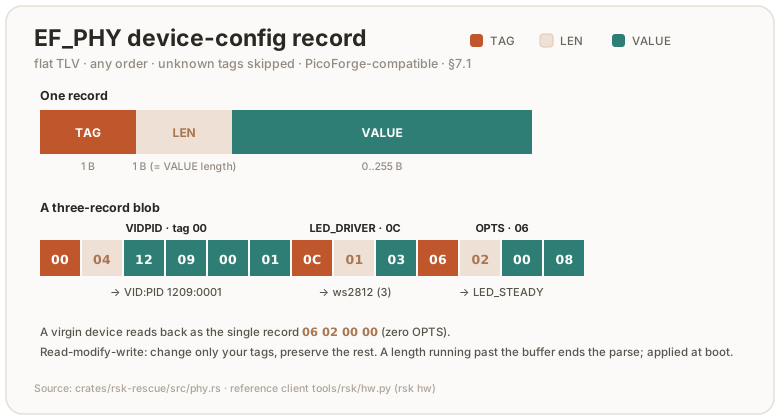
| Tag | Name | Len | Value |
|---|---|---|---|
00 | VIDPID | 4 | VID(BE2) ‖ PID(BE2) |
04 | LED_GPIO | 1 | data-pin GPIO 0..=29 |
05 | LED_BRIGHTNESS | 1 | global channel max 0..=255 |
06 | OPTS | 2 | flags (BE16): WCID 0x1, DIMM 0x2, DISABLE_POWER_RESET 0x4, LED_STEADY 0x8 |
08 | PRESENCE_TIMEOUT | 1 | touch-wait timeout in seconds, bounding the whole ceremony on a button build — the press wait and the release debounce that follows a confirm share it; a trusted-display ceremony may add up to 3 s absorbing a resting finger (0/absent ⇒ firmware default 30 s; a non-zero value below 10 is raised to 10). Matches PicoForge PresenceTimeout. |
09 | USB_PRODUCT | 1..33 | product string + trailing NUL (length includes the NUL). A 33-byte value with no terminating NUL is malformed and leaves the stored string unchanged; an empty value is the explicit clear |
0A | ENABLED_CURVES | 4 | FIDO curve bitmask (BE32) |
0B | ENABLED_USB_ITF | 1 | interface mask: CCID 0x1, WCID 0x2, HID 0x4, KB 0x8, LWIP 0x10 |
0C | LED_DRIVER | 1 | 1 = gpio, 2 = pimoroni, 3 = ws2812 (follows PicoForge LedDriverType) |
0D | LED_ORDER | 1 | RS-Key extension — WS2812 wire order: 0 = rgb, 1 = grb |
0E | LED_NUM | 1 | RS-Key extension — addressable LEDs actually connected (1..=255; 0/absent = the build’s MAX_LEDS). Firmware saturates a value above its compiled MAX_LEDS ceiling. |
0F | USB_MANUFACTURER | 1..33 | RS-Key extension — iManufacturer string + trailing NUL (length includes the NUL). Absent ⇒ the VID-derived default, then the build const. |
Notes for a host implementation:
- Read-modify-write. READ the record, change only your tags, WRITE it back.
This is exactly what
rsk hwdoes (tools/rsk/hw.py). Preserving tags you don’t recognize costs you nothing, but note the device does not:merge_saveoverlays your blob onto the parsed record and re-serializes only the tags this firmware knows, so a tag it does not recognize is dropped at the first write whatever the host sends. - RS-Key-specific tags PicoForge skips as unknown:
0x0B(ENABLED_USB_ITF),0x0E(LED_NUM) and0x0F(USB_MANUFACTURER). RS-Key’s own tools preserve them across a RMW; LED_NUM sets how many daisy-chained addressable LEDs are lit (the binary carries a compile-timeMAX_LEDSceiling and drives the first LED_NUM of it). The rest, including0x08(PRESENCE_TIMEOUT) and0x0D(LED_ORDER), is shared with PicoForge. PRESENCE_TIMEOUThas a floor. The record is host-writable and the touch wait reads it live, so a one-second window could expire in the middle of a press and let the next queued request inherit that same hold. The firmware raises any non-zero value below 10 seconds. The floor is applied at boot, on the way to the wait. The stored record keeps the value as written, so a read-modify-write round-trip is lossless;CONFIG_READ’s effective map (§9) reports the floored value, because that is the window the device actually waits.ENABLED_USB_ITF: absent ⇒ ALL. A mask that would disable every interface the firmware actually builds (CCID | HID | KB) is rejected and falls back to ALL. Otherwise CCID would vanish and the rescue applet that could fix it would be unreachable. Never write a mask without CCID unless you intend that.- A never-written record reads back as the single zero-OPTS TLV
06 02 00 00.
8. Vendor / LED applet — per-status LED color & effects
AID F0 00 00 00 01. CLA 00. Live LED customization (color/brightness/effect
per device status), persisted in flash and applied immediately. Source:
crates/rsk-vendor/src/lib.rs,
firmware/src/led.rs. Reference client:
tools/rsk/led.py.
| INS | P1 | P2 | Request | Response | Purpose |
|---|---|---|---|---|---|
01 | — | — | — | counter (BE4) | INCREMENT test counter, return new value. User-presence-gated (6985 if declined) |
02 | — | — | — | counter (BE4) | GET test counter |
10 | brightness 0..255 | color | steady | status<<4 | [effect[, speed]] opt. | — | SET LED for one status |
11 | 00 | 00 | — | 17-byte config block | GET LED config |
1F | 00/01 | 00 | — | — | REBOOT (warm / BOOTSEL). 01 is user-presence-gated (6985 if declined; see §7) |
INS 12 (CORE1_STATS) and INS 13 (KEYGEN_BENCH) exist only in the measurement
builds that ask for them (--features core1-stats / keygen-bench); a shipped
image answers 6D00, and neither is part of the stable surface.
SET LED 0x10 gating: ungated by default (like the rest of the config surface),
user-presence-gated under strict-config — the FIDO twin
(CONFIG_WRITE/CONFIG_TARGET_LED) is gated there too, so the vendor AID cannot be
used to bypass it.
SET LED 0x10 is idempotent. A request whose resulting 17-byte block already
matches the stored EF_LED_CONF answers 9000 and writes no flash, exactly as the
FIDO twin does. The LED is still applied live, so the two are indistinguishable from
the host; what changes is the flash. Before this, a replayed SET LED appended
28.1 bytes of the main (credential) partition every time — measured over the
device’s own store on the board’s 352-page ring — rising to 117.0 / 203.8 B on a
74.8 % / 85.2 % live ring, where reclaim had to migrate credential records past it.
A record written by an older firmware (a 13/9/3/2-byte layout) is not a match and
is upgraded on the next write. This bounds the replay only: the command stays
ungated by default, so a host that varies the block on every call still churns
those pages, as do the other ungated config writes beside it.
INCREMENT 0x01 gating: user-presence-gated in every build. The applet answers
on both CCID and CTAPHID, so ungated this was a flash-write primitive for anything
that can open either interface — measured at ~390 writes/s, 16 bytes of the counter
partition each. A test hook with no product function should not offer one; the
config-surface writes next to it (SET LED, and the FIDO CONFIG_WRITE twin) stay
ungated by default on purpose, which is a separate decision (§9, strict-config).
GET 0x02 reads and stays ungated. A no-touch build confirms without a button, which
is what tests/01_flash_persistence.py and tests/30_ccid_transport.py run against;
on a button build the CTAPHID caller sees KEEPALIVE(UPNEEDED) until the touch lands.
Touch-status normalization. The awaiting-touch indicator is the only consent
signal on a build without the trusted display, so the EF_LED_CONF codec — not any
one command handler — normalizes it on every decode: the vendor SET LED, the
FIDO CONFIG_WRITE LED target (§9), and the boot reload of the stored record
alike. Four rules, in that order:
color 0(off) on the touch status becomes the default touch colour (yellow).- its
brightnessis raised to8. - a non-zero
speedis raised to2(speed 1makes the breathing effect render an all-black frame every tick while the brightness byte still reads compliant). - the touch colour is the touch status’s alone. Any other status configured in
that colour is reset to its own factory look — whatever its effect, brightness or
speed. Uniqueness deliberately keys on colour rather than on the whole
(effect, color, brightness, speed)quad: brightness and speed are continuous bytes, so a one-unit nudge is byte-unequal and eye-identical; steady mode renders a solid frame for every effect; and on a one-LED boardbounceandflowboth collapse to the same solid frame, so the effect byte carries no signal there.
The give-way case. If the status wearing the touch colour has that colour as
its factory colour, resetting it would not resolve the clash, so the touch
status reverts to its factory look (bounce / yellow) instead. Only boot (red) and
idle/processing (green) can trigger this. A red touch status therefore sticks
only while boot is not red, and a green one only while neither idle nor
processing is green. Yellow is nobody else’s factory colour, which is what makes
the fallback converge: enforcing twice is enforcing once.
What this does not guarantee. Two statuses in different colours can still be
hard to tell apart. The gpio backend has no hue at all — the indicator is lit or
unlit; red, green and yellow are mutually confusable under red-green colour
blindness; and on a one-LED board the effect adds nothing. What separates the
states there is the per-status blink timing (touch 1000/100 ms vs idle
500/500 ms), which is compile-time fixed and cannot be reconfigured — but the
global steady toggle suppresses blinking altogether, and on a single-colour backend
that leaves nothing at all to tell the states apart. A build with the trusted
display remains the strong answer for consent signalling.
So the bytes you write are not always the bytes that render. SET LED 0x10
normalizes before it persists, and GET LED 0x11 always returns what is actually
showing. The FIDO CONFIG_WRITE LED target (§9) stores the block you sent
verbatim and CONFIG_READ echoes that, so after a CONFIG_WRITE read back with
GET LED to see the rendered values.
SET LED 0x10 P2 layout: bits [2:0] = color, bit 3 (0x08) = steady
(solid, no blink, a global toggle), bits [5:4] = status. P1 = per-channel
brightness. The command data field is optional: data[0] sets the status’s
effect, data[1] its speed (0 = the effect’s built-in default). They
are independent: send no data to leave both unchanged, one byte to set only the
effect (the current speed is kept), two bytes to set both.
GET LED 0x11 response (config_block, 17 bytes):
steady(1) | (effect, color, brightness, speed) × 4 for statuses idle,
processing, touch, boot in that order. (block[0] = steady; status s →
effect block[1+4s], color block[2+4s], brightness block[3+4s], speed
block[4+4s].) Read the response length: older firmware returns a 13-byte
(effect, color, brightness) or 9-byte (color, brightness) block. The stride
is (len − 1) / 4.
| Color | Code | Status | Code | |
|---|---|---|---|---|
| off | 0 | idle | 0 | |
| red | 1 | processing | 1 | |
| green | 2 | touch | 2 | |
| blue | 3 | boot | 3 | |
| yellow | 4 | |||
| magenta | 5 | |||
| cyan | 6 | |||
| white | 7 |
Effects (the effect byte, ws2812 backend only; gpio/pimoroni always
use the classic on/off blink). legacy reproduces the original blink; the rest
animate across the connected LEDs and reduce gracefully on a single LED:
| Effect | Code | Effect | Code | |
|---|---|---|---|---|
| legacy (classic blink) | 0 | flow | 3 | |
| vapor (breathing) | 1 | sparkle | 4 | |
| bounce | 2 |
Example. Set the idle status to solid blue at brightness 0x20:
P2 = color 3 | steady 0x08 | status 0<<4 = 0x0B, APDU 00 10 20 0B.
Example. Set touch to yellow bounce at brightness 0x10, speed 0x0F:
P2 = color 4 | status 2<<4 = 0x24, data = effect 2 ‖ speed 0x0F,
APDU 00 10 10 24 02 02 0F.
9. CTAPHID authenticatorVendor (0x41) — seed backup, attestation, audit
A CTAP2 vendor command (command byte 0x41) carrying a CBOR map. This is the
most security-sensitive surface: it can export the device master seed. Source:
crates/rsk-fido/src/vendor.rs, constants in
crates/rsk-fido/src/consts.rs.
Request map: {1: subcommand(uint), 2: subCommandParams(map), 3: pinUvAuthProtocol(uint), 4: pinUvAuthParam(bstr)}.
Keys 3/4 are present only when a PIN is set (see gating).
| Sub | Name | Params (key 2) | Response | Gate |
|---|---|---|---|---|
01 | MSE | {1: COSE_Key, 2: mlkem_ek?} | {1: COSE_Key, 2: ct?} | none (establishes channel) |
02 | BACKUP_EXPORT | — | {1: blob(60)} | MSE + touch + PIN-token; refused if sealed |
03 | BACKUP_LOAD | {1: blob(60)} | — | MSE + touch + PIN-token; refused if soft-locked. With no PIN set it additionally takes a distinct “Replace device seed?” confirmation — the PIN-token half is waived in that state, and a LOAD re-keys every existing credential |
04 | BACKUP_FINALIZE | — | — | touch + PIN-token when a PIN is set (no MSE) |
05 | BACKUP_STATE | — | {1: sealed, 2: has_seed, 3: locked, 4: unlocked, 5: rescrub_refused} | ungated |
06 | UNLOCK | {1: blob(60)} | — | MSE (the lock key is the auth) |
07 | AUDIT_READ | — | journal window | PIN-token; touch if no PIN |
08 | AUDIT_CHECKPOINT | {1: nonce ≤32} | DEVK signature over chain head ‖ nonce | PIN-token + touch |
09 | ATT_IMPORT | {1: blob(60), 2: DER chain} | — | MSE + touch + PIN-token. With no PIN set it additionally takes a distinct “Replace this identity?” confirmation — the PIN-token half is waived in that state, and an import replaces the identity every later U2F REGISTER signs with |
0A | ATT_CLEAR | — | — | MSE + touch + PIN-token |
0B | ATT_STATE | — | {1: present, 2: sha256(chain)?} | ungated |
0C | CONFIG_WRITE | {1: target(uint), 2: blob(bstr)} — target 0=DEV_CONF, 1=PHY, 2=LED | — | ungated by default; touch + PIN-token under strict-config; no MSE. A write that changes nothing is a no-op: no flash write, no journal entry, and for PHY no reboot latch |
0D | CONFIG_READ | {1: target(uint)} — target 1=PHY, 2=LED | {1: blob(bstr)[, 2: {phy_tag: uint}]} | ungated; CTAP2_ERR_OTHER if the record cannot be read — an empty blob means absent, never unreadable, because the host read-modify-writes on this answer |
0E | AUDIT_CONFIG | {1: op(uint)} — 0=disable, 1=enable, 2=status | {1: enabled(bool)} | set: PIN-token + touch; status (2): ungated |
rescrub_refused(BACKUP_STATEkey 5, bcdDevice ≥0x09C5)Flash health for this power cycle, and nothing more. After the one-shot at-rest hardening lap has run, any command that supersedes a record still sealed to the pre-OTP root must re-arm that lap by clearing its marker. The wipe paths —
authenticatorResetand the applet factory resets — take that re-arm best-effort and go on regardless, because refusing there would mean leaving the secrets live, and they answer0x00whatever the flash said. Key 5 istruewhen a re-arm this power cycle could not be shown to have landed, so a stuck medium is reported somewhere other than in the answer to a reset that did succeed.It does not say the hardening marker is wrong, or that hardening failed. Away from the wipe paths the re-arm gates the write that follows it, so a refusal stops that write: nothing is superseded, and the command either errors or skips a lazy migration and leaves the older record in force. Read key 5 as “this device’s flash refused a write it was asked for”, and nothing stronger.
Coverage is lost in one arm only, a wipe whose refusal was persistent. A wipe tries more than once — ahead of its sweep and again after it — and a refusal the retry recovers still sets key 5 even though the marker is then gone and the next boot laps as it should. When no attempt lands, the marker stays latched over the records the wipe superseded, no later boot ever laps, and those copies stay recoverable from a physical flash dump while the reset answered
0x00. Key 5 does not say which arm it is, and repeating the reset does not recover what that one already exposed, so a device that keeps reporting it has a failing medium and should be retired rather than trusted at rest. It is RAM state, so it clears on the next power cycle whether or not the flash recovered, and an older build simply omits the key.
Device configuration over FIDO (
CONFIG_WRITE 0x0C)The pcscd-free twin of the CCID device-config writes (§6 WRITE CONFIG and the
§7/§8phy/LED records): a host that cannot reach the CCID interface writes the same config over CTAPHID.targetselects the record:0x00= the management enabled-apps TLV (EF_DEV_CONF, the §6 blob,≤ 64bytes → the sameCTAP1_ERR_INVALID_LENGTH 0x03cap);0x01= the phy record (EF_PHY, §7.1: VID/PID, USB interfaces, LED wiring, presence-timeout; a read-modify-write merge — only the TLV tags in the blob are updated, the rest preserved (the samemerge_savethe CCID path uses), effective on the next boot);0x02= the LED config block (EF_LED_CONF, §8,CONF_LENbytes), persisted and then applied live by the firmware, which reloads the block after a0x41command (the LED atomics are firmware-side;CONFIG_READ 0x02returns the current block, seeded with the build defaults on first boot, so a host can read-modify-write it — verbatim, so it can differ from what renders once §8’s touch normalization applies). No MSE channel. The config is not secret. On the default build this write is ungated (full ykman parity — any USB host process can rewrite it). Building--features strict-configgates it on a physical touch and, when a PIN is set, apinUvAuthTokenwith theacfgpermission (the MAC below): a stronger gate than the CCID path’s presence-only, because CTAPHID is reachable by any unprivileged host process. The write lands in the sameEF_DEV_CONF, so a later CCID READ CONFIG echoes it.Replays and the audit journal. A write whose result equals what is already stored returns
0x00and does nothing at all — no flash write, no journal entry, and forPHYno auto-reboot latch. The comparison is against the merged record forPHY, so a partial blob that changes nothing is also a no-op; an absent or unreadableEF_PHYis never “unchanged”, so a host writing the default values to repair one is not answered0x00with nothing stored.A write that does change something is journalled, and a run of them costs a single ring entry.
CONFIG_WRITEis one of three journalled events an ungated host can drive on demand — the others are agetAssertioncarryingup:falseand a U2FAUTHENTICATEwithP1=0x08, both of which take the spec-mandated silent path — so appending one per call would let any of them evict the 128-entry window. All three coalesce. ForCONFIG_WRITE, when the newest entry is already a config write the device folds into it. The entry keeps itsseq, its timestamp (the first write of the run) and itsaux(the target that opened it), and itsdetailbecomesrepeats(2 LE) ‖ targets(1)— the number of further writes absorbed (saturating) and a1 << targetmask of every record the run touched. A run never folds across a power cycle, so theBOOTentry between two runs is never swallowed.The two silent FIDO events use a different encoding: the entry keeps the
detailof the first occurrence (the rpIdHash shown is the run’s first site) and the count of further folded occurrences is a saturating LEu16in the entry’s trailing two bytes — previously reserved and always zero, so an older build’s entries decode as a single occurrence. That fold scans the whole window, not just the newest entry, so interleaving two silent classes does not defeat it. A gestured assertion never folds. For a host re-checking the chain: a fold changes the head without advancingseq_next, so the sameseq_nextwith a different head is legitimate and is not a tamper signal (start,seq_nextand the epoch are untouched, so the window still folds to the head exactly as before).
CONFIG_READ 0x0DPHY key 2 (RS-Key0x0852+): the PHY read also returns an optional2:map of the boot-effective values a host can’t otherwise know — keyed by phy tag:4= LED GPIO pin,12= LED driver,8= presence timeout (seconds) — resolved to the build default when the record has no override. Tag8reports the window the wait actually uses, i.e. with the 10 s floor of §7.1 already applied. It is display-only (the1:blob stays the raw override record for read-modify-write); absent (empty map) on a headlessled_kind="none"build, and older hosts ignore it.
⚠️ Seed export hands out a normally non-exportable key
BACKUP_EXPORT (0x02)returns the device’s 32-byte master seed (encrypted over the MSE channel). It is gated by a one-time setup window (re-opened only by anauthenticatorReset) and physical touch and, when a PIN is set, apinUvAuthToken. A management tool exposing this must treat it as a destructive-trust operation: clear warning, explicit confirm, and ideally a “show the mnemonic once” flow rather than storing the blob.BACKUP_FINALIZEseals the window. Thefips-profilebuild refuses export entirely.
9.1 The MSE channel (0x41 / 0x01)
Establishes an encrypted channel for the seed-moving subcommands.
- Request
subCommandParams = {1: COSE_Key}where the COSE key is the host’s P-256 public key{1:2, 3:-25, -1:1, -2:X, -3:Y}.XandYare each exactly 32 bytes — a coordinate whose leading zero your bignum dropped is0x02 INVALID_PARAMETER, not left-padded (RS-Key0x089C+; the same rule the clientPIN and hmac-secret COSE parses apply, and what a YubiKey 5.7.4 does). Optional key2= the host’s ML-KEM-768 encapsulation key (1184 B) to make the channel hybrid PQC. - Response
{1: COSE_Key}= the device’s ephemeral P-256 public key (same COSE shape,-2:dx, -3:dy). If the request included an ML-KEM ek, the response adds key2= the 1088-byte ML-KEM ciphertext. - Channel key (32 bytes):
- classical:
HKDF-SHA256(salt="", ikm = ECDH_x(32), info = dev_pub(65)) - hybrid:
HKDF-SHA256(salt="RSK-MSE-PQ-v1", ikm = ECDH_x(32) ‖ ss_mlkem(32), info = dev_pub(65) ‖ ct(1088)) dev_pubis the 65-byte uncompressed device key04 ‖ dx ‖ dy.
- classical:
Blob format (the 60-byte blob in EXPORT/LOAD/UNLOCK/ATT_IMPORT):
nonce(12) ‖ ciphertext(32) ‖ tag(16), ChaCha20-Poly1305 under the channel key
with AAD = dev_pub (65 bytes).
Channel lifetime — the channel is ONE-SHOT: handshake, then immediately run the one subcommand it protects. (RS-Key
0x0866+.) The device holds one channel key per power cycle. Every gated consumer (BACKUP_EXPORT,BACKUP_LOAD,UNLOCK,ATT_IMPORT,ATT_CLEAR,authenticatorConfigAUT_ENABLE) spends it, whatever the outcome — a declined touch or a failed decrypt spends it too — and a secondMSEwhile one is live answers0x30NOT_ALLOWED and drops the channel, so both parties must re-handshake.This is the boundary, not the CID check below it. A CTAPHID channel id is a routing label the sender writes into its own frame header (CTAP 2.1 §11.2.5), so an interloper forges the victim’s CID rather than using its own, and comparing
mse_cidto the request’s channel compares the attacker’s bytes against themselves. Refusing the re-key is what stops a co-resident process re-keying between yourMSEand yourBACKUP_EXPORTand receiving the master seed instead of you. The cost is that such a process can deny you a handshake; it can never redirect one.For clients: run
MSEimmediately before each subcommand, on the same CTAPHID channel (a subcommand arriving on a different CID still answers0x30), and never cache a channel across two operations. If a handshake answers0x30, a previous run died between itsMSEand its subcommand — the refusal has now cleared it, so retry once; a second0x30means another process is squatting. Unchanged on the wire; behaviour since bcdDevice0x0862.
9.2 PIN gating
When a PIN is configured, seed-moving and audit subcommands require
pinUvAuthProtocol (key 3) and pinUvAuthParam (key 4). The param is
HMAC-SHA256(pinUvAuthToken, 0xFF×32 ‖ 0x41 ‖ subcommand ‖ rawSubCommandParams)
and the token must carry the acfg permission (0x20). rawSubCommandParams is
the verbatim CBOR bytes of the key-2 map. Reference flow:
tools/rsk/backup.py.
An omitted pinUvAuthProtocol is 0x14 MISSING_PARAMETER; one this build does
not support is 0x02 INVALID_PARAMETER, and a value of 0 counts as unsupported
rather than omitted (it used to answer 0x14, as did 3 and every other unknown
value). Since bcdDevice 0x0894.
An unsupported one is judged before the algorithm, the extensions and the
remaining options — makeCredential and getAssertion included, where it used
to be judged after all of them, so a request that got two things wrong was told
about the wrong one (bcdDevice 0x08B6). Two things still outrank it, both
because a YubiKey 5.7.4 puts them there:
- the request map’s own shape — keys 1..=4 of
makeCredentialand 1..=2 ofgetAssertionare read in order, and an absent, empty or over-long one is answered before any value is validated; - the option values of §6.1.2/§6.2.2 step 4:
up:falseonmakeCredential, anduv:truewith nopinUvAuthParamon a build without built-in user verification, are0x2C INVALID_OPTIONwhateverpinUvAuthProtocolsays.options.rkis not in that class and loses to the protocol, on that card and here.
10. Worked examples
All bytes hex; → shows the response (status word omitted when 9000).
Identify the device (Management DeviceInfo):
SELECT  00 A4 04 00 08 A0 00 00 05 27 47 11 17 00
READ    00 1D 00 00 00
→  <len> 01 02 023B 02 04 <serial> 04 01 01 05 03 050800 03 02 023B 08 01 80 0A 01 00
Read the phy record (Rescue):
SELECT  00 A4 04 00 08 A0 58 3F C1 9B 7E 4F 21 00
→  01 02 08 06 <8-byte serial>            # identity handshake
READ    80 1E 01 00 00
→  <phy TLV blob>                          # e.g. 06 02 00 00 on a virgin device
Switch USB identity to 1209:0001 (phy RMW): read the blob, upsert tag 00
with 12 09 00 01, write back:
WRITE   80 1C 01 00 <Lc> <…00 04 12 09 00 01…> 00
REBOOT  80 1F 00 00 00
Set processing-status LED to red, brightness 64 (Vendor/LED):
SELECT  00 A4 04 00 05 F0 00 00 00 01 00
SET     00 10 40 11        # P1=0x40 brightness, P2 = color 1 | status 1<<4 = 0x11
Read backup state (CTAPHID 0x41): CTAP2 message 41 A1 01 05
(0x41 + CBOR {1: 5}) → on a fresh provisioned device
00 A4 01 F4 02 F5 03 F4 04 F4 (status 00, then CBOR
{1:sealed=false, 2:has_seed=true, 3:locked=false, 4:unlocked=false};
F5=true, F4=false).
11. Integration notes for PicoForge
- The phy record (§7.1) is your existing PicoForge config path. Same TLV
layout, same
LedDriverTypenumbering. The differences to handle: the Rescue AID isA0 58 3F C1 9B 7E 4F 21(not the upstream one), the Rescue CLA is0x80, and tag0x0D(LED_ORDER) is an RS-Key extension you can skip on read. You need not re-send unmodelled/untouched tags: the phy write is a merge (§7.1), so omitting a tag no longer wipes it — send only the fields you changed. - Hardware config over FIDO (no PC/SC) is supported: PicoForge’s legacy
hardware-config path. Send
authenticatorConfig(CTAP0x0D) with subCommandvendorPrototype(0xFF) and subCommandParams{1: vendorCommandId(u64), 3: value(uint)}, gated by anacfgpinUvAuthToken (no touch). getInfo’sauthenticatorConfigCommands(0x1F) lists0xFF, andvendorPrototypeConfigCommands(0x15) is present, so the arm is detectable without probing — §6.11.3 ties the two, so a build that hides one hides both. From0x09D5that array is empty: the IDs are 64-bit, and Yubico’s Android SDK rejects a getInfo carrying one (issue #111), so they are listed here instead. The arm is more than its hardware half:0x03e43f56b34285e2/0x1831a40f04a25ed9enable and disable the soft-lock, and0x0e6841934e719be7is the enterprise-attestation RP list (§5), which takes an rpId array at key 4 and writes no hardware. The phy IDs, the ones PicoForge writes, set the phy record and take effect on the next boot:PhysicalVidPid 0x6fcb19b0cbe3acfa(value(vid<<16)|pid),PhysicalLedGpio 0x7b392a394de9f948,PhysicalLedBrightness 0x76a85945985d02fd,PhysicalOptions 0x269f3b09eceb805f(bitmask0x2dimmable /0x4disable-power-reset /0x8led-steady — all three are honoured: dimmable gates the global boot-brightness override, led-steady forces a solid LED, and disable-power-reset — clear by default — lets a FIDO phy write auto-reboot so the change applies without a replug). Product name, touch-timeout, LED driver and curves stay Rescue-only. RS-Key reports firmware5.x(< 7), so PicoForge enables its legacy hardware-config path. (RS-Key’s ownrskuses the CTAPHID0x41CONFIG_WRITE/READpath instead, see §9, which also covers those extras.) - Applet enable/disable is the Yubico-compatible Management applet (§6),
identical to how you’d configure a YubiKey’s USB applications — and enforced:
a disabled application’s applet stops answering (see §6,
USB_ENABLED). - Version-gate on the Rescue SELECT identity (
01 02 08 06 …, §7) and the Management SELECT version string. Treat unknown phy tags /0x41subcommands as skippable, not errors. - Keep the dangerous surface behind explicit confirmation: the OTP fuse burns (§7), BOOTSEL reboot (§7/§8), and seed export (§9). Consider not exposing the fuse burns at all in a general management UI.
- Reference client:
tools/rskis a complete, runnable implementation of everything here:ccid.py(transport),ctaphid.py(CTAP),hw.py(phy),led.py(LED),backup.py(0x41),status.py/inventory.py(DeviceInfo). When in doubt, match its bytes.
Testing
Several layers, fastest first. The protocol and applet crates are
hardware-agnostic on purpose (only firmware touches the HAL), so everything
except board bring-up is tested and fuzzed on the host. The device is reserved
for end-to-end integration.
| Layer | What it checks | Where |
|---|---|---|
| Host unit tests | parsers, state machines, applets, crypto, the display flow (~1500 tests) | #[cfg(test)] in each crate |
| Fuzzing | the same logic under adversarial bytes | fuzz/ |
| Miri | the fuzz targets’ logic under the UB checker | fuzz/tests/miri.rs |
| Kani proofs | bounded model checking — every input, not a sample | #[cfg(kani)] in the crates |
no_std build | the crates still link for the device | default thumbv8m target |
| On-device tests | real USB + flash on the board | tests/*.py |
flowchart TD
    u["Host unit tests"] --> f["Fuzzing"] --> m["Miri"] --> k["Kani proofs"] --> n["no_std build"] --> d["On-device tests"]
Top to bottom: fast and host-only, tapering to slow and needs-a-board.
The one command
nix develop -c ./scripts/check.sh
runs fmt, clippy (embedded and host targets, -D warnings), rustdoc over
every workspace (also -D warnings, so a broken intra-doc link fails the gate,
private items included — but only links in /// and //!: a name in a plain
// comment is not parsed, and rots unseen), all host tests, both firmware
builds (touch + no-touch), the rsk-wipe build, a firmware flash-size ratchet
(the shipping image must stay under a ceiling that hugs its current size, well
below the 2560K code region), cargo-audit, cargo-deny, cargo-vet and
gitleaks.
Green check.sh is the bar for every commit.
Two of those rows hold the crate tiers of
architecture.md rather than a dependency’s licence or
CVEs. cargo-deny’s [bans] stanza is the enforcing one: an applet that names
another applet, or any crate but rsk-crypto that names one of the four
hash/signature backends, is a banned edge and the row exits 2. The
-D unused-wrapper flag fails it the other way too, when an allowlisted edge is
gone and its entry has quietly become decoration. The crate graph row
regenerates docs/images/crate-graph.svg from the manifests and fails when the
committed drawing has drifted from them; its mutation table is
scripts/test_crate_graph.py.
Host tests
cargo test must target the host explicitly (the workspace defaults to
thumbv8m):
nix develop -c cargo test --workspace --exclude firmware --exclude rsk-wipe \
    --target aarch64-apple-darwin
(The two excludes are the whole of the exclusion: they are the only workspace
members not under crates/, and both are thumbv8m-only. HOST_TARGET env
overrides the triple in check.sh, which selects the same way — this used to be
a hand-written 24-crate -p list written out nine times over four files, and
it had rotted to 16 crates here, 20 on the nightly coverage row and 12 in
nix flake check. scripts/roster_gate.py now holds every copy of the
selection to that pair, and finds the copies rather than being told where they
are.) Crypto tests pin NIST/RFC vectors; applet tests drive full protocol flows
(register → assert, PIN lockout ladders, OpenPGP import → sign → verify, PIV
generate → attest → parse with x509-parser).
RSA has no second implementation in the tree to check itself against — the rsa
crate that used to serve as one left with RUSTSEC-2023-0071 — so its ground
truth is frozen instead: crates/rsk-rsa/src/vectors.rs holds OpenSSL
signatures and ciphertexts under three fixed keys, and every signature the card
produces is compared to them byte for byte. scripts/rsa_vectors.py regenerates
that file from python-cryptography; run it inside nix develop.
Fixed vectors cannot say which imported (p, q, e) a key assembly refuses, so
that half is settled by a differential against rsa 0.9.10 in a throwaway crate
outside the workspace — rsk-rsa by path with test-util, plus
rsa = "=0.9.10" — because the crate must not come back into any lockfile the
SCA rows read. Rebuild it whenever the key assembly moves. Two things it teaches
about itself: the comparison has to be reachable (a first attempt gated it
behind ra.is_ok() || ra.is_err(), which is always true, and reported zero
mismatches over zero comparisons — falsify each arm by perturbing one side), and
upstream cannot be asked about an unbalanced key at all, because its CRT
recombination is while m.is_negative() { m += p } and for q ≫ p that does not
return.
rsk-display is the odd one: its subject is a screen, and it is tested by
giving the flow a panel that records what was drawn, a touch pad that reads back
a scripted sequence of samples, and a board whose backlight, wake button and
presence flags are plain fields. The panel and the touch controller are type
parameters and the rest sits behind Hooks, so the gestures that carry the
security — the hold that approves a ceremony, the retry ladder behind the PIN
pad, the auto-lock a host must not be able to postpone — run on the host at the
same code the board runs. embassy-time’s std feature supplies the clock, so
the deadlines and debounces are the real ones (see crates/rsk-display/src/tests.rs).
Fuzzing
Every parser and every applet’s full dispatch has a cargo-fuzz target.
30+ of them: APDU, BER-TLV, CTAPHID reassembly (+ round-trip property), CCID
framing, all the FIDO command surfaces (CBOR dispatch, credentials,
credMgmt, U2F, extensions, large blobs, the vendor backup/lock commands,
half that corpus runs soft-locked), OpenPGP dispatch + the EC/RSA crypto
parsers, OATH/OTP/PIV/management/rescue dispatch, the keyboard frame codec,
the phy TLV codec (parse∘serialize round-trip is an asserted invariant), the
PIN protocols, AEADs, the DRBG, ML-DSA (all three parameter sets: attacker-shaped
verify decode, plus a keygen→sign→verify property that a one-bit tamper must
break) / ML-KEM decoding, the FIDO post-quantum credential path (the
(alg, curve) box codec + CredKey dispatch → sign / COSE-AKP encode), the
trusted-display Label sanitizer (attacker rpId / account text must stay
printable ASCII, no bidi / homoglyph escape, and the confirm screen must
render without panic), and the seed-blob format/migration state machine.
Most targets drive one applet from a fresh state. Four are stateful. They replay an attacker-chosen sequence against persistent state, hunting the multi-step seams a fresh-state target can’t reach (both real bugs of this class, the largeBlobs overflow and the mgmt write→read mismatch, were multi-step):
cross_appletwires the realDispatcherto the OpenPGP / Management / OATH / OTP / PIV set over a single sharedFs: SELECT switches, command chaining and the file system persist across APDUs. State leaking between applets, a SELECT mid-chain, FID collisions. (GENERATE is skipped, as on device the RSA prime search is fast-pathed off the dispatcher.)fido_sessionreplays a CTAPHID_CBOR message sequence against oneFidoState+Fswith an all-permissions token armed and a resident credential provisioned. PIN/token state, the credential store, large blobs and the journal persist across commands.now_msadvances over the token-timeout edges. A mid-sequence reset wipes the store under the session’s feet. getInfo must still succeed after anything.fs_opsdrives put / read / delete / meta ops / reboot (into_storage→scan) over one image against aHashMapshadow model: every read checks the full-length-returned / copy-clamped contract (the mgmt bug was a caller missing it),meta_addis checked against the exactMETA_MAXboundary, and the live key set must equal the model’s after any prefix of operations.power_cutis the torture extension offs_ops: the same op-sequence shadow model, but over the on-device storage stack itself —rsk-store, the twosequential-storagepartitions with their counter-FID routing and caches — on a mock NOR flash whose power can be cut after any byte of any write or erase. It tortured a hand-written mirror of that stack until the backend moved into a crate; the mirror had drifted (nolast_error, nocompact, a missing counter FID), which is the argument for not having one. Once a cut fires, a dead-latch fails every further mutation (a dead device cannot keep writing), the stack is rebuilt with fresh caches over the surviving bytes, and the model checks atomicity (the torn op reads as old or new, never garbage; a torndeletenever leaves the value gone but its metadata alive), durability (every committed file reads back exactly; a spurious “absent” is the on-device “seed lost” disaster), and the key set. Cuts landing inside the next mount’s own repair are survived by dying again. A dedicated input class also runs the real FIDO reset on that same store, checksResetNeverWeakensSurvivingStateafter boot-time seed provisioning, then mounts a second time to cross the reboot boundary again.
nix develop .#fuzz -c cargo fuzz list
nix develop .#fuzz -c cargo fuzz run <target> -- -max_total_time=60
The fuzz workspace is separate (nightly + libfuzzer), but check.sh lints it on
stable — the clippy (fuzz) row, --all-targets against the host target — so a
shared type change that breaks a target fails the gate rather than the next
nightly. The instrumented build still needs the nightly shell:
nix develop .#fuzz -c cargo fuzz build. House rule: new attacker-facing parser
or dispatch surface ⇒ new fuzz target in the same change.
Miri runs every target’s logic once more as plain tests under the UB
checker, reporting undefined behavior instead of panics (fuzz/tests/miri.rs;
the MIRIFLAGS policy is set by the .#fuzz shell):
nix develop .#fuzz -c cargo miri test --manifest-path fuzz/Cargo.toml
Neither suite gates a commit. CI runs both daily in the deep-checks
workflow: the Miri suite, plus a timed libFuzzer pass over every target with
the corpus carried between runs, crash artifacts uploaded. A separate
fuzz-coverage job then measures per-target region/line coverage over that
accumulated corpus (scripts/fuzz-coverage.sh, run it the same way locally),
writing a summary table and uploading a per-target HTML report. A
for t in $(cargo fuzz list) word list reports green when the list is empty, so
both loops floor the roster first — FUZZ_TARGET_FLOOR in the workflow and the
same number in the script. Lower it only in the commit that removes a target.
Coverage says which lines a corpus reached. scripts/fuzz-dimensions.py says
which inputs it explored, for power_cut: how much of the storage was
invalid before init, how many operations and distinct FIDs an exec drove, how
many times the power went, how many erases and bytes the store spent. It replays
a corpus with RSK_POWER_CUT_STATS=1 and prints one log-bucket row per axis.
nix develop .#fuzz -c ./scripts/fuzz-dimensions.py fuzz/corpus/power_cut
It gates nothing and is not in CI — there is no coverage floor anywhere in this tree, and a reporter that looks like a gate is worse than none.
Kani proofs
Where a fuzzer samples inputs, Kani
(a bounded model checker over CBMC) checks every input up to a stated
bound: no panic, no overflow, no out-of-bounds access, and the asserted
invariants hold. The harnesses live next to the unit tests as
#[cfg(kani)] mod proofs and cover the small, total, attacker- or
crypto-critical helpers, where a proof genuinely beats a sample:
rsk-sdk: BER-TLV walk over arbitrary bytes — every yielded value is a sub-slice of the input, and successive values neither overlap nor run backwards;format_lenround-trip for everyu16; APDU case-1..4 parsing over every buffer up to the bound; and the dispatcher over every pair of raw APDUs up to six bytes each — the one harness here that applies a sequence to a stateful object, because command chaining’s three audit findings each needed two commands to express. It pins that the applet is never handed a body from a command it did not itself terminate, that a dropped chain leaves no bytes behind, that a secure-messaging class reaches no applet, and that a SELECT for a registered AID always arrives. Its bound is acfg(kani)shrink of production source — the table below is the whole set — and it states what it stops proving where it is written, this one inapplet_kani.rs.rsk-fs: theEF_METArecord-walk (rebuild_meta) over arbitrary (corrupt) blobs — nothing written past the length it reports, and the old record for the rebuilt fid is gone from the output, which is whatmeta_deleteandmeta_add’s replace both mean. Stated by feeding the output back through the same function rather than by a second decoder, which would only prove two copies of one walk agree.rsk-rsa:mod_smallproven functionally (== v % m, every dividend up to 2 bytes and every modulus) and panic-free /< mfor every input up to 8 bytes; theIncrementalSieveresidue invariant (res[i] == cand mod p_iafter a step, verdict identical to the flat sieve) for every seed, plus the concrete-seed twin that keeps that invariant from holding over a sieve which never steps.rsk-crypto: thebase64urllength helpers (encoded_len/decoded_len) panic-free (no overflow/underflow) and mutually inverse for every length up to 64 KiB;encode∘decode == idfor every input up to 9 bytes (everylen % 3tail, with and without preceding full chunks);decodepanic-free over every byte string up to 8 chars and writing exactly the length it reports, never a byte past it.rsk-phy: theEF_PHYdevice-configuration record:parsetotal over every byte string up to 12 bytes, always materializing an interface mask and always yielding a record that serializes back intoPHY_MAX_SIZE(the read-modify-write the rescue interface performs);overlaynever turning a stored field back into “absent”, and leaving a field whose tag the host blob never mentions exactly as it was — the merge’s own promise, and the data-loss one;serialize∘parse == idfor everyPhyData(every field-presence combination and value, product strings up to 4 bytes), modulo the documented missing-ENABLED_USB_ITF→ALL normalization.rsk-device: the presence-scope arbitration — one physical button, four transports. Over a symbolic interleaving of button samples and host cancels, a touch wait endsCancelledonly for the transport that owns it (so a CCID or on-panel wait cannot be cancelled at all), is advertised as pending to that transport and no other, and one unbroken hold satisfies at most one ceremony. Those areNoCrossTransportTouchConsumption’sTouchCancelandTouchConfirmclauses; the arbitration was lifted out offirmware/src/presence.rsso a harness could reach it, since nocargo kani -pbuilds a thumbv8m binary.rsk-fido: the tree’s only state-sequence proofs. The others each check one call; these drive a symbolic four- to five-operation sequence over the realFidoStateand check an invariant after every step — a pinUvAuthToken dies on each invalidation and only a fresh issuance brings one back (NoTokenAfterInvalidation, asserted both on the state the call sites read and on the realverify_cm_tokenwith a replayed genuine MAC), and a credentialManagement enumerate walk is servable only to the channel whose Begin opened it (NoAuthorizationBypass). The names are the onesformal/RSKeySecurityState.tlauses, so one property can be traced model → code → harness by grep. Phase 6 adds four one-step induction harnesses over the reset’s security-visible concrete projection: initialization and every begin/delete/advance/abort/finish/power-cut step preserveResetNeverWeakensSurvivingStateand its three independently named clauses.
What a proof no longer sees
Some of that production source means something different under Kani than in the
shipped build: an array cut to 16 so CBMC does not bit-blast 2 KiB, a file id
aliased into a 24-bit map. Each such shrink narrows every proof over it, so each
one says beside itself what it stops proving — and three cfg(not(kani))
compile-time assertions carry the part of that shape a shrunk proof no longer
can, about the width that ships.
| Crate | Source | Kani-only item |
|---|---|---|
rsk-device | ctap.rs | const _ |
rsk-fs | fs.rs | FID_PRESENT_BYTES |
rsk-fs | fs.rs | const _ |
rsk-fs | lib.rs | EF_META |
rsk-sdk | applet.rs | CHAIN_BUF_SIZE |
rsk-sdk | applet.rs | RESP_CHAIN_CAP |
rsk-usb | ctaphid.rs | CTAP_MAX_MESSAGE |
rsk-usb | ctaphid.rs | const _ |
scripts/shrink_gate.py derives that table from the crates and fails the merge
gate on either direction — a shrink that arrives unrostered, and a row whose item
has gone away — and on one that carries no reason above it. The rows are names
only, deliberately: the values and the reason live in the code, and copying either
here would give them a second place to rot — which is what the sentence above did
until now. It said “one of four in the tree” and named three of them, having twice
stayed green while a new shrink arrived, and rsk-sdk shrinks two constants rather
than the one it was counted for.
Kani is not in nixpkgs and its setup downloads a prebuilt CBMC bundle, so this is the one deliberately non-nix tool (install once, outside the dev shell):
cargo install --locked kani-verifier --version 0.67.0 && cargo kani setup
./scripts/kani.sh pr       # the fast tier — what every pull request runs
./scripts/kani.sh state    # rsk-fido + rsk-fs, the security-state sequences
./scripts/kani.sh all      # every harness — the roster, and the local command
./scripts/kani.sh light1   # one of the three weekly shards of "all but heavy"
./scripts/kani.sh light2
./scripts/kani.sh light3
./scripts/kani.sh heavy    # rsk-phy alone, in its own job
scripts/kani.sh owns the tier → crate table and nothing else does, and it
floors the number of harnesses each tier has to come back with — a roster that
selects nothing prints a summary and exits 0, the same shape as a cargo test
name filter that matches no test. scripts/kani_gate.py reads that table back
with --tiers and fails the merge gate on a crate that carries a
#[kani::proof] and is on no tier.
It also reads back every kani::cover!, because Kani does not fail a harness
on one nothing satisfies: 0.67.0 has no --fail-uncoverable, so an
unsatisfiable or unreachable cover prints “N of M cover properties satisfied”
and the run still reports SUCCESSFUL. Since a cover is what says a guarded
assertion was reached at all, that made every “vacuity guard” in the tree a
comment. The row groups Kani’s per-check verdicts by harness and source location
and fails on a cover no execution reaches — grouped, not off that summary line,
because one cover! becomes several CBMC properties wherever the enclosing MIR
branches on something the condition re-tests, and the copies on the contradicting
arms are dead by construction. rebuild_meta_any_blob is the worked example: its
!with_new && … cover is reported twice, UNSATISFIABLE on the with_new arm and
SATISFIED on the other, and the summary line says “2 of 3” over a cover that is
genuinely reached. Reading the summary would have failed a correct harness and
sent someone to repair it.
That grouping is why scripts/kani.sh refuses --jobs. Extra arguments go
through to cargo kani, and parallel harnesses would interleave Checking harness with another one’s checks, filing every verdict under whichever printed
last. On the pinned 0.67.0 that cannot actually happen: --jobs there requires
--output-format=terse and refuses the combination otherwise, and a terse run
carries no per-check listing at all — which the row already fails on, by name. So
the refusal buys a message that says which flag and why, one step before a run
that would otherwise die half an hour later on a confusing one. It is also the
thing that has to be revisited if a later Kani lets the two combine, because then
the interleaving becomes real and grouping by harness stops being safe.
The split is by measured cost, not by guess — but a row is not one reading, and
its two halves must not be read as if they were. Crates, Harnesses and Covers
are the current tree’s counts, derived from source by scripts/kani_gate.py
and held against scripts/kani.sh’s floors in both directions; they move the day
a harness lands, and no run stands behind them. Solve, Wall, Peak and Slowest
harness are a measurement, of one run of the command above the table, taken on
2026-08-26 under kani 0.67.0 on the maintainer’s 18-core Apple M5 Pro (48 GB,
macOS 27) with nothing else on the machine. Nothing re-checks those four:
kani_gate.py reads a row’s Crates, Harnesses and Covers cells and stops there,
so a tier that has gained harnesses since keeps the timing it was given before
them, and only a fresh measurement moves it. “Solve” is the sum of Kani’s own
per-harness Verification Time and so excludes compilation; “Wall” is the whole
command with it. “Peak” is the tier’s maximum resident set size under
/usr/bin/time -l — the largest single CBMC process, not the sum of them:
| Tier | Crates | Harnesses | Covers | Solve | Wall | Peak | Slowest harness |
|---|---|---|---|---|---|---|---|
pr | 13 | 65 | 41 | 229 s | 251 s | 2.8 GiB | rsk-usb::no_buffer_overrun_after_any_single_frame, 39 s |
state | 2 | 29 | 36 | 1341 s | 1365 s | 15.3 GiB | rsk-fido::…_at_call_site, 6 m 06 s |
all | 17 | 94 | 67 | 3735 s | 3770 s | 19.0 GiB | rsk-phy::serialize_parse_roundtrip, 19 m 07 s |
light1 | 4 | 32 | 35 | 528 s | 538 s | 9.3 GiB | rsk-fido::…_at_call_site, 5 m 35 s |
light2 | 5 | 29 | 12 | 1289 s | 1300 s | 8.9 GiB | rsk-rsa::sieve_step_keeps_residues, 17 m 38 s |
light3 | 7 | 28 | 19 | 162 s | 176 s | 2.4 GiB | rsk-usb::no_buffer_overrun_after_any_single_frame, 36 s |
heavy | 1 | 5 | 1 | 1785 s | 1788 s | 19.9 GiB | rsk-phy::serialize_parse_roundtrip, 18 m 35 s |
stateis the one row re-measured after the authorization slice, and it more than doubled. Three newcredmgmt_kani.rsharnesses drive a realpinUvAuthParamthroughverify_cm_token, and an HMAC-SHA-256 evaluation is what a bounded proof pays for at this call site: measured, a harness whose only content is two of them costs 233 s on its own. Solving went 546 → 1341 s and the peak 9.3 → 15.3 GiB, over what a hostedubuntu-latesthas.stateis a CI step (ci.yml, gated onproofs_state), and the margin is negative before the OS is counted: the measured peak is 16 418 144 256 bytes and aubuntu-latestrunner is advertised at 16 GB — 16 000 000 000 bytes — so the single largest CBMC process is already 418 MB over the machine’s whole RAM, with the kernel, the runner agent and cargo still to fit. Three ways out, and the one that is cheapest to reverse is the first: a largerruns-on:label is one line, moves no floor and re-measures nothing. Shrinking acfg(kani)constant acrossrsk-fido(CredMgmtState::rp_indexalone is 1 KiB of symbolic struct) changes every existing proof’s domain, owes each one a “what stops being proved”, and cannot be undone without re-measuring the ratchets a second time. Moving the crate to a weekly-only tier is one commit but takesrsk-fidoout of PR-time proof coverage, which is a gate weakening rather than a scheduling change. The other six rows were NOT re-measured; their harness and cover counts moved with the ratchets and their timings are the 2026-08-26 reading.
Every tier came back at exactly the floor it carried that day: the four weekly
shards ran separately in the same session and checked the same harness names as
all did, compared name by name out of the four logs against all’s own
listing, for 3763 s of solving against all’s 3735 s. That count was the all
roster of the 2026-08-26 tree: 89 names. The same tier is today’s
FLOOR_all of 94 — the all row above, five harnesses later — and the four
weekly floors still sum to it, because the shards partition the crates and
kani.sh refuses to run when they stop. The count adds up; the solving does
not, which is what 3763 s against 3735 s says. So FLOOR_all and COVERS_all
are numbers a run has reached, and the reading they have reached is the 89 —
moving it onto the 94 takes a fresh run of the four shards.
Two figures this page carried are refuted by that run rather than confirmed.
rsk-phy’s tier peaks at 19.9 GiB against the 11.1 GB recorded for the
harness alone while it still lived in rsk-rescue — not a like-for-like pair,
and not a close one either, wrong in the direction that makes heavy’s own job
more necessary rather than less. And light3’s slowest harness is not
rsk-mldsa’s rounding round-trips: all four of those together take 3.7 s, and
the shard’s cost is rsk-usb at 54 s and rsk-led at 36 s. So the three shards
are balanced 528 : 1289 : 162 s, and the crate placed in light3 to weigh it
down weighs nothing. Left as it is on purpose — re-balancing moves harnesses between
shards and every shard floor with them, which is a change to make deliberately
and not as a side effect of measuring.
Where each of these has actually run. The four weekly shards are the CI half.
deep-checks.yml run 32621720655, the Sunday cron of 2026-08-23, took light1
20 m 33 s, light2 54 m 52 s, light3 4 m 59 s and heavy 1 h 33 m 41 s on
hosted ubuntu-latest runners, all four inside the 6 h job cap — and only one of
the four is a reading of the roster above. That run was main at 06813cc1,
where FLOOR_all was 66 against today’s FLOOR_all of 94, light1 carried 17
harnesses against today’s FLOOR_light1 of 32 and light2 21 against today’s
FLOOR_light2 of 29. A run that proved 17 of light1 is not evidence for a
light1 floor of 32.
By cost it reads better than by count, and the two answers should not be
conflated. Every harness the three shards have gained since is in one crate each
— rsk-fido 3 → 13 in light1, rsk-fs 5 → 13 in light2, rsk-usb 3 → 8 in
light3 — and the single harness that dominates any of them,
rsk-rsa::sieve_step_keeps_residues at 82% of light2, was in that run already.
So the times are better evidence than the floors are. heavy needs no such
correction at all: 5 harnesses and 1 cover then and now, over a proof file
189f24c moved byte-identical. It is also the job that died twice while this
split was being drawn, which makes its 1 h 33 m 41 s the figure that mattered.
The three light* floors still owe a reading, and the next Sunday cron is the
first that can give them one.
all is the maintainer’s half and stays off CI by arithmetic: one job costs what
the four cost between them, which on this machine is 3770 s of wall clock against
their 3802 s. It runs where the table says.
None of the fourteen figures in the Harnesses and Covers columns is kept by hand, and
neither are kani.sh’s FLOOR_*/COVERS_*. scripts/kani_gate.py counts the
tree’s #[kani::proof] and kani::cover! per tier — comments stripped, since two
*_kani.rs files discuss kani::cover! in prose — and fails the merge gate on
any of the four copies that disagrees, in either direction. They had been kept
by the instruction “raise it in the commit that adds one”, and FLOOR_all drifted
to 64 against a tree of 65: one harness could have gone missing under a floor that
still passed.
pr passes --harness-timeout 5m, seven times its slowest harness. That cap is
the tripwire on the tier assignment: a fast-tier harness that grows past it
fails the pull request instead of quietly making every one of them wait, and the
answer is to move its crate to the slow list, never to raise the cap.
A harness that trips its cap ends the whole row, and it ends it above the floor
checks: cargo kani exits 1, pipefail makes that the pipeline’s, and the script
stops at the tee. Both measured on kani 0.67.0, 2026-08-13. That is why all
and the four weekly tiers now cap at 6h, the runner’s own ceiling: there a cap
that fires costs the row its floors, so it reports nothing rather than reporting
a slow proof. The 30-minute cap it replaced had an 8% margin over
serialize_parse_roundtrip at 27 m 42 s and none at all against the ~80 min a
hosted runner once recorded; the harness takes 18 m 35 s on the machine above.
Pin the version — a verdict belongs to the tool that gave it, and an unpinned
install is not the one CI runs. --harness-timeout is experimental (hence the
-Z) and applies per harness, not per run: one that stops converging is failed
after half an hour and the rest still run, so a verdict comes back at all
instead of the run hanging on it.
The proofs are bounded, and the bound is the honest fine print. A 16- to 20-byte symbolic buffer reaches every branch of the TLV/APDU parsers; bigger inputs are the fuzzers’ job. Big loops (a full modexp, Baillie–PSW) are out of CBMC’s reach by design and stay covered by the differential tests and on-device KATs.
For a sequence proof the bound is the sequence, and three more walls stand behind
it. Cost: one HMAC-SHA-256 evaluation over concrete bytes costs CBMC ~130 s,
so a harness that drives a real MAC-checking gate can afford it once at the end,
never once per step. Codegen: a harness that reaches p256’s field arithmetic
aborts in codegen — Kani 0.67.0 panics on crypto-bigint 0.7.5’s
UintRef::lowest_u64 (“BinaryOperation Expression does not typecheck Plus …
FlexibleArray”), upstream
kani#2683 — whose
ConstantIndex path main fixed in
#4681, in no release, and
without closing the issue. It is the build profile that selects that path, not
the dependency: the crash needs a MIR ConstantIndex, which every opt-level
but 0 produces (swept 0/1/2/3/s/z), so
[profile.dev.package.crypto-bigint] opt-level = 0 removes it — measured, and
this tree deliberately does not carry that override, because the wall behind
it stands anyway. Merely holding a Ctx never triggers it either: Kani
codegens what a harness reaches, not what its types mention. Reach: behind
the ICE sits cmov 0.5.4’s asm! backend, reached via ctutils, which Kani
cannot model on either host target — it answers VERIFICATION: FAILED on an
unsupported reachable construct (measured), so the path is closed loudly, never
by a silent pass. Hence three of the four token gates are represented by the
state predicates they read rather than invoked. Each harness names what it does
not prove.
The sharpest bound is on functional division specs. Proving
mod_small == v % m makes the solver equate two division circuits
(mod_small’s byte-wise Horner reduction against one wide %), which is the
shape resolution-based SAT handles worst: it discharges in ~100 s at a 2-byte
dividend, but the cost climbs steeply per added byte and a full u32 dividend
(4 bytes) does not converge (it ran ~30 min without a verdict; the early
SATISFIABLE lines are Kani’s reachability covers, not the property). So
mod_small’s exact value is pinned exhaustively at 2 bytes
(mod_small_matches_value), its panic-freedom and range over the full 8
(mod_small_in_range), and the full-width semantics by the 32-byte BigUint
differential test plus the division-free IncrementalSieve proof. The earlier
instinct, “never spec a division functionally”, was half right: avoid it at
wide dividends; at a narrow width it is the strongest evidence there is.
House rule: a small total helper in a parsing or arithmetic hot path gets a
proof harness sized to what CBMC can swallow: functional where it converges,
structural (< m, panic-free) where it doesn’t, or relational against a
division-free reformulation. Anything bigger gets a fuzz target.
CI runs the tiers above, from this same script (rustup-based, version pinned,
~/.kani cached — Kani is the one tool outside the nix shell). ci.yml’s
proofs job runs pr on any change under crates/, and adds state when the
diff reaches rsk-fido, rsk-fs, rsk-store or rsk-wipe — the surface those
sequence proofs are about (scripts/ci-scope.sh, PROOFS / PROOFS_STATE,
both covered by its --self-test). deep-checks.yml’s weekly kani job runs the
three light* shards and heavy, one runner each, which together are all.
scripts/kani_gate.py is in the merge gate and holds the tiers to their word:
the all tier must be exactly the crates carrying a #[kani::proof] less the
exclusion below, every other tier a non-empty subset of it, every tier both run
by a CI row and written on this page, and no workflow or page may hand-write a
cargo kani … -p … roster of its own. That guard exists because the row named
“prove every harness” was running 29 of 49, and because commenting the run:
line out once left the file’s other copies agreeing with each other over a job
that proved nothing. Its own mutation table is scripts/test_kani_gate.py.
One crate is deliberately off the tiers. rsk-bench’s summarize sorts
samples[warmup..], whose length is symbolic, so CBMC unwinds it unbounded and
returns no verdict — not in 5 minutes, and not with --default-unwind 5. The
exclusion and its reason live in that guard, next to the roster it belongs to.
The security-state model (TLA+)
formal/RSKeySecurityState.tla models the authenticator’s security state
machine — PIN retries, the pinUvAuthToken and its permissions, which transport
owns the touch, which channel owns a stateful walk, the reset window, the
persistent gate records, and the position at which power is lost inside a
multi-write flash sequence. TLC checks eight security invariants exhaustively at
the firmware’s own PIN-retry constants — Shipped.cfg’s INVARIANTS block names
nine, and TypeOK is the one no mutant targets. Four of the eight are also Kani
harness names — three in rsk-fido, NoCrossTransportTouchConsumption in
rsk-device — so those four read model → code → harness by grep.
It exists because Kani proves a property over one call and RS-Key’s dangerous
defects have lived in orderings. It is a design artefact, not a proof of the
firmware: a green run is a statement about the model. formal/README.md is
its scope statement — what it covers, where it departs from the firmware and
in which direction, the mutation experiment that keeps its invariants
falsifiable, and the counterexamples it has produced on the shipped tree. Read
that before quoting a result from it.
nix develop            # exports TLA2TOOLS_JAR; the JVM comes with it
cd formal && ./gen-configs.sh && ./run-tlc.sh safety   # the tier CI runs
safety is the nine shipped models, the 90 mutation switches that have a
configuration family of their own (92 Bug* switches exist;
BugDeadTokenAuthorized, BugRecordWriteBeforeRearm have none), floors and
the vacuity check.
That tier is deep-checks.yml’s weekly formal row, which also fires on any
push touching formal/. liveness is the temporal half and is not in CI: it
needs a 12g heap. all is both. Tier membership lives in formal/run-tlc.sh.
Both tiers are measured runs, not sums. On 2026-09-19, on the Apple M5 Pro (18
cores) of the Kani table above at the default WORKERS=2, safety came back
over 224 configurations in 8683 s — 25 GREEN, 199 RED, and not one row that
missed what floors.txt asks of it; liveness took 2616 s for its 4, at
the heap that file gives each of them.
Every number in that paragraph is counted out of formal/runs.toml, which keeps
the runner’s own matrix per tier; scripts/run_count_gate.py writes the
paragraph and refuses a run-count typed anywhere else on this page. CI has the
safety half: deep-checks.yml run 32684551258 discharged it in 1 h 14 m 47 s
against a 120-minute cap.
That cap is the thing to watch, and the margin shrank once already.
safetywas 2003 s here before the token-lessmakeCredentialwidening, andShipped.cfgalone went 48 679 968 distinct to the count the generated paragraph above prints — which is why what it costs now is not typed here. The CI figure was measured on that older tree, so scaling it by the ratio between the two local readings is the only projection available, and it leaves the row minutes of headroom rather than the three quarters of an hour it used to have. Nothing has timed out — that is a projection off one local ratio, not a measurement of the runner — but the next model widening should re-measure the CI row before assuming it fits.livenesshas no CI row and is the maintainer’s, andLiveness_Full.cfgis nobody’s yet —floors.txtreserves it a 24 GB heap that no run has asked for.
The emulator CI also records raw security-state snapshots from the real
21_pin_webauthn suite and replays them against RSKeySecurityState. R4a
independently computes β from the raw fields; R4b compares the implementation’s
untrusted abstract_token() hint with the canonical TLA+ γ. The gate floors the
trace at 10 commands, 20 B steps and 12 distinct actions, reports model actions
not reached by traffic, and keeps one β mutation plus one α-only mutation RED.
See formal/README.md for the exact boundary and claim.
Phase 5 adds a narrower but connected refinement pilot for the token lifecycle. Its A relation and domains are exported by computation into Rust, TLC checks B→A, Kani checks bounded C→A obligations, and the emulator carries raw outcomes through a consensus validator. See Token refinement pilot for the exact InitC/wf boundary and the reset evidence table.
Phase 6 closes that pilot’s reset/reboot seam for
ResetNeverWeakensSurvivingState. The bounded C→B projection uses the shipped
reset classifier, the existing rsk-fs torn-delete rules compose underneath
it, the power_cut target runs the real reset over byte-cuttable flash, and a
destructive HIL script performs the same check across physical USB power loss.
See Cross-reset refinement pilot for the abstraction
boundary, measurements, and the still-required per-board HIL witness.
The companion co-refutation run asks whether production tests reject those same semantic defects.
The original phase-2 baseline is fixed at 31 rows, and the full 85-entry live roster runs weekly.
Which of those rows a code-level harness kills, and which are unreachable by
construction, is the generated table in formal/README.md and is not restated
here; ordinary check.sh rejects a stale copy of it.
python scripts/comutate.py --lint
python scripts/comutate.py run
python scripts/comutate.py run --write-readme  # full run, then refresh its table
Formal claims — what is and is not verified
This is the paragraph to quote, and it is deliberately narrow. Everything in it is measured; nothing in it is an aspiration.
RS-Key is not formally verified. Two narrow, bounded layers exist. With Kani (a bounded model checker) the tree proves specific properties of parsers, codecs, file metadata and arithmetic helpers — over all inputs up to a stated bound, not over all inputs — and three proofs about short sequences of security-state transitions on the real
FidoState: apinUvAuthTokenretired bystopUsingPinUvAuthToken, a reroll, anauthenticatorReset, a power cycle or its own usage timer never authorizes again, and acredentialManagementenumerate walk is servable only to the channel whose Begin opened it. Those hold for every four- or five-operation sequence from one starting state; longer sequences, other starting states and the flash-backed persistent grant are outside them. Four more harnesses prove initialization and one-step preservation of a finite reset projection across reset phases, abort and reboot; the completeFidoStateand byte-level flash are linked by unit tests and sampled power-cut fuzz, not by that proof. On top of that sits a TLA+ model of the authenticator’s security state.TLC checks 11 named invariants exhaustively over 108 618 956 distinct states at the firmware’s own PIN-retry constants.
That is a result about the model, not about the firmware binary: it is only as good as the model’s fidelity to the code. Citations and co-refutation are maintained by hand; a bounded emulator trace also checks raw C-state → B and α(C) = γ(B) at recorded boundaries, but says nothing about unrecorded runs. Every invariant has been shown to be breakable by an injected defect, so none of them is a check that cannot fail — and the model has already produced two counterexamples on the shipped tree, both fixed and co-refuted since.
The hedging is load-bearing, and the tree’s own history is why. The model’s green run once rested on an abstraction that made it narrower than the firmware — a power cut left the device permanently seedless, where the real one regenerates the seed on every boot — so a class of reachable states was never explored at all. A green result over an unfaithful model proves nothing, and only a hand review found it. Hand-maintained fidelity is the weak link here, and saying so is part of the claim rather than a footnote to it.
On-device tests
Numbered, self-contained scripts under tests/, run from the dev shell
against a flashed board:
nix develop -c python tests/10_fido_getinfo.py
nix develop -c python tests/80_piv.py
nix develop -c python tests/75_seed_backup.py --pin <your PIN>
- Most need the no-touch build (
--features no-touch): they cannot press the button. If the board runs secure boot, sign the test build too. - One key attached, or name the one you mean. A board built
VIDPID=Yubikey5answers on the same1050:0407as a real YubiKey, so a first match over the HID enumeration can run the suite against the wrong device and report its answers as your failures.tests/_device.pybreaks the tie on theRSKmarker, in the HID product string and in the PC/SC reader name alike, and stops the run instead of guessing when that is not enough. Name a target withRSK_TEST_SERIAL=rs-key-0001(orRSK_TEST_PATH, when two boards answer to the same serial), and over CCID withRSK_TEST_READER=<part of the reader name>; every run prints the device it picked. - The destructive and reboot-polling suites want that marker.
80and90rewrite the card, and14,51and76ask “is the board back yet?” of a reader a real YubiKey would answer just as well (51probes Yubico’s own management AID). Those five refuse an unmarked reader rather than accept a lone stranger, so a build whoseUSB_PRODUCTdrops the marker has to name its reader withRSK_TEST_READER. - Version assertions follow
FW_VERSION(default 5.8.0, build.md). An image built with an override needs the same value in the test environment:FW_VERSION=1.4.0 python tests/31_openpgp_select.py. - Numbering:
0xtransport smoke,1xFIDO basics,2xFIDO full,3x/4x/5xOpenPGP,6xPQC,7xmanagement/OATH/OTP/backup/lock,8xPIV/rescue,9xOTP-fuse migration. - Tests that reboot the device do it hands-free over CCID and wait for re-enumeration; tests are idempotent where the applet allows it and say so in their docstring when they are destructive (resets).
- A factory reset needs you at the desk. On a screenless build the firmware
honours
authenticatorResetonly within 10 s of a USB attach, and a warm reboot does not reopen that window (protocol.md). So the eleven suites that reset (22–27,60,61,63–65) prompt for a physical unplug/replug and send the reset the moment the key re-enumerates. The prompt lives intests/replug.py, shared by both transports (resetfor the raw-CTAPHID scripts,reset_fido2for the python-fido2 ones); its docstring is the reference. On a trusted-display build the prompt is redundant — that build is exempt from the window. tests/27_reset_window.pyexercises the window itself: reset immediately after the replug (expectsCTAP2_OK), then again past 10 s (expects0x30 NOT_ALLOWED). It needs theno-touch, non-displayimage and it wipes FIDO state.tests/28_ctap_spec_alignment.pycovers the CTAP 2.1 spec-alignment surface the per-command suites do not reach: CTAPHID channel allocation andCTAPHID_LOCK, theuv/pinUvAuthParamprecedence rule,makeCredUvNotRqd, the largeBlobs parameter validation,setMinPINLengthoverflow, the rpId-scopedcredentialManagementtoken, and the U2F gate underalwaysUv. It neither resets nor replugs, but it does need--pin, and it togglesalwaysUvon and back off — so start it withalwaysUvoff, which it checks.tests/54_sram_residue.pymeasures what the reboot scrub is for, in two steps.controlasks whether this board’s SRAM can be read back at all: it drops to BOOTSEL through the presence-gated reboot, reads a window of.text(which both provespicotool save -rworks and pins the ELF to the image actually running), then checks main SRAM for the RAM-resident asm andSMALL_PRIMEStable that live in.data— known byte-for-byte from the file, so the control is a priori and needs no key.residuethen generates an RSA key on-card and hunts a factor of its modulus, reported per region (the main stack between_stack_endand_stack_start, core1’s stack,.bss,.data) with a zero assertion on each static the reboot claims to scrub. Neither reports “clean” from a dump that proves nothing: an all-zero read is equally consistent with a working scrub, with the platform clearing SRAM, and with picoboot refusing to serve it. The last two are separated by writing a pattern through picoboot and reading it back, so the exit code says which —0as expected,1expectation or setup failed,2INCONCLUSIVE,3settled without the scan. Runresidueon a build without the scrub (--expect present) before trusting anabsentresult; a loneabsentrun is how audit run-34 #3 found a “HW-VERIFIED” claim resting on 520 KiB of zeros. Measured 2026-08-05 on RP2350 A4 (secure boot off): the platform clears main SRAM across the drop, so there is nothing to recover. Both subcommands leave the board in BOOTSEL, so reflash afterwards, andresidueoverwrites the OpenPGP signature key.- The FIDO PIN is never guessed: destructive PIN tests take
--pinexplicitly.
The vendored upstream suites
Two other ecosystems’ own conformance suites live in
third_party/ —
pico-fido’s and pico-openpgp/Gnuk’s — and tests/third_party.py runs them against
RS-Key:
nix develop -c python tests/third_party.py openpgp   # over the emulator's card socket
nix develop -c python tests/third_party.py fido      # needs a board, or --usbip
No assertion in those directories is edited. The run is steered from outside by a
pytest plugin that supplies the power cycle the CTAP 2.1 §6.6 reset window needs,
names every deliberate divergence as a strict xfail, and deselects the modules
that exercise a vendor extension RS-Key does not implement. Both lists carry a
spec citation per entry, and strict means a divergence that gets fixed fails
the run instead of staying listed for ever — which is how the last refresh caught
one that upstream had corrected.
The one thing repaired in place is a suite’s own harness: a test that raises in its own Python before a byte reaches the device measures nothing, so listing it would record only that it is broken. Those edits are marked at the site and in third_party/README.md.
Running an upstream corpus shows conformance on the cases it covers; it is not a security audit.
Without a board — the emulator
tools/emu runs the applet crates on the host and serves CTAPHID and APDUs over
TCP, so the suites above can run with no hardware attached:
nix develop -c cargo run --manifest-path tools/emu/Cargo.toml \
  --target "$HOST" -- --store ./emu.store
nix develop -c python tests/emu.py tests/11_fido_makecredential.py
tests/emu.py puts a fake hid module and a fake smartcard package in front of
the target script and points the power-cycle helper at the emulator’s replug
opcode, so no test file changes and neither hidapi nor pyscard need be installed.
42 of the 52 suites pass, FIDO and card alike (two want --pin, one wants
--yubico; a 43rd needs an enrolled ed25519-sk key and skips without one); the
other 9 are refused by name with their reason and exit 77 — they need raw USB,
python-fido2, or hardware, and tools/emu/README.md lists which is which. The
store underneath is the device’s own (crates/rsk-store) over a mock NOR flash
with the board’s geometry, so the suites run against a log-structured ring that
migrates and reclaims — not a map that overwrites in place. A harness that cannot
tell “does not apply here” from “broken” hides the second one, which is the whole
reason the refused suites are named rather than left to fail somewhere in the
middle — and the reason the two that want --pin are refused the same way when it
is not given, rather than dying in argparse where a sweep reads them as broken.
--touch prompts for every presence on the terminal (and prints what a
trusted display would have shown); --trace logs each command and its status.
One command runs everything that needs no board — the suites above plus the vendored OpenPGP conformance suite, each against a fresh flash image:
nix develop -c ./scripts/emu-suites.sh
That is what CI runs (.github/workflows/emulator.yml), on pull requests and
nightly. It is the answer to the oldest gap in this table: tests/*.py were
hand-run against a flashed key, so nothing caught a test that had rotted — and
several had.
--usbip goes further: it serves the USB/IP protocol, so a Linux host’s
vhci_hcd attaches the emulator as a genuine USB device — /dev/hidraw*, a
PC/SC reader, something a browser can talk to. What enumerates there is the
device’s own stack (the same embassy_usb::Builder, the same rsk-usb
transports, over a driver written against URBs), so the descriptors and the
interface order are the real ones. The suites this shim refuses for wanting raw
USB — 02_usb_interfaces, 61/65 (python-fido2’s own transport),
73_otp_keyboard, 77_otp_touch_wait — run there instead, as ordinary hardware
suites with nothing faked, and so does the pico-fido conformance suite. Needs
Linux and root; the emulator itself can stay on a Mac, because USB/IP is
network-transparent. See tools/emu/README.md.
scripts/usbip-suites.sh is that run in one command, and it is what CI calls:
nix develop -c ./scripts/usbip-suites.sh # Linux only
A GitHub-hosted runner cannot supply vhci_hcd — it cannot load a module, and
has no reliable /dev/kvm either — so the script boots a QEMU guest that can
(nix build .#usbip-vm, defined in nix/usbip-vm.nix) and attaches the
emulator to it over the network. The emulator itself stays outside the guest:
it is a TCP peer, not a device, which keeps the guest a fixed appliance —
kernel, usbip, pcscd, Python — that a firmware change cannot invalidate.
There is no KVM, so everything inside runs on software emulation; budget minutes,
not seconds.
What it buys is the run these suites otherwise never get: they are hand-run
against a flashed board, so nothing catches a test that has rotted. What it
cannot stand in for is the hardware under the applet layer — no secure boot, no
OTP, no fuses — and the flash is a mock: the log structure and the --power-cut
injector are real, the medium’s wear and partial-erase physics are not. The USB
stack is real under --usbip and absent otherwise, so a plain run proves nothing
about enumeration or interface order. The applet wiring
is shared (crates/rsk-device), so a routing or gating bug does show up here;
what is still written twice is the worker’s sequencing and the board’s own
firmware/src/{main,worker,presence,led}.rs
(tools/emu/README.md
lists the gaps). A green emulator run is a protocol result, not a device result.
Latency harness
Timing a crypto primitive from the host is noisy. On the RP2350 the hot working set (the variable-base P-256 scalar multiply is ~34 KB) overflows the 16 KB XIP cache, so which cache lines evict depends on where the linker placed the code. Steady-state EC latency then swings ±~30 ms from an innocent code move, and a host-timed mean over a few USB round-trips reports that swing as a regression.
rsk bench measures on the device instead. The bench firmware feature adds a
vendor command (like keygen-bench, never shipped) that times a primitive with
the RP2350’s own timer, so there is no USB jitter, and returns a robust summary:
a median and MAD over the warm samples plus a separate cold first sample
(the ~1.4x cold-cache op right after a power-cycle). The summary is computed
on-device by the Kani-proved rsk-bench crate, so the number is not re-derived
host-side.
# build + flash a bench image (it is a --features bench build, so never ship it)
cargo build --release -p firmware --features bench,no-touch
# then, from the dev shell or the venv that has pyscard:
rsk bench ecdh                 # variable-base P-256 ECDH (the layout-sensitive one)
rsk bench sign                 # P-256 comb sign (the getAssertion hot path)
rsk bench ratchet              # the HKDF-SHA512 key-derivation ratchet
To A/B two builds without the cross-session trap that faked a “-33%” during the
0.14 EC migration: measure one build with --save a.json, flash the other,
measure with --save b.json, then rsk bench --compare a.json b.json prints
whether the median moved by more than the pooled noise. Always compare in one
sitting; comparing raw numbers across sessions or builds reads cache-layout luck
as a real change.
FIDO conformance
RS-Key is run against the FIDO Alliance Conformance Tools (v1.8.5.1), the same protocol test suites the FIDO certification programs are built on, and passes them clean:
| Suite | Result |
|---|---|
CTAP2.3 (profile_featureful — the strictest profile) | 235 / 0 |
| U2F 1.1 / 1.2 | 55 / 0 |
A green run exercises the full CTAP2/U2F wire surface: makeCredential /
getAssertion validation and up/uv privacy, clientPIN protocols 1 and 2
(including the force-PIN-change and PIN-policy edge cases), credential
management, large blobs, authenticatorConfig (alwaysUv, setMinPINLength,
enterprise attestation), CTAPHID framing + CANCEL, and U2F register /
authenticate with batch attestation.
Two honest caveats:
- This is a self-run pass, not a “FIDO Certified” mark. Those are the publicly available conformance tools (the same ones a lab uses), so a clean result is strong evidence the protocol behaviour is spec-correct, but RS-Key is not listed in the FIDO Metadata Service and claims no certification. That is a deliberate non-goal (membership + a lab + fees, not a code change). See AAGUID & metadata.
- The full enterprise-attestation suite needs a conformance-only build. It
asserts against the suite’s own test RP ID, which a build flag
(
ea-conformance-rpid) whitelists; the shipping build does not bake it in (build options). Everything else runs on the normal firmware.
As with any corpus, this shows conformance on the cases the tools cover. It is not a security audit.
Real-world interop
Protocol conformance is necessary but not sufficient: a response can be
spec-arguable yet still trip a strict third-party parser. The layer above
drives the real consumer software (gpg, ssh, libfido2, ykman,
OpenSC, browsers) and records whether the device works end to end. The
ykman and Yubico Authenticator cells gate on the “Yubico YubiKey” reader
name, so they run against the opt-in VIDPID=Yubikey5 interop flavor (never
distributed); the default RS-Key build (0x1209:0x0001) does not expose itself
to them. The sweep tests/interop/run.py automates the read-only CLI cells;
the full matrix (including the GUI/ceremony cells) lives in
interop.md. It is how the ykman openpgp info GET DATA 6E
wrapper bug was caught: every protocol test passed, only the real ykman
parser rejected the reply.
For the same reason, the matrix carries an untested row for
Telesma and its go-ctap/ctap client stack:
every FIDO cell above reads the device through libfido2 or python-fido2, so a
divergence both of them tolerate is invisible here. It is the cheapest available
third reader of our CTAP replies, and the only one that claims 2.3.
CI parity
check.sh is plain bash over the Nix dev shell. A CI job is
nix develop -c ./scripts/check.sh plus the proofs job — scripts/kani.sh,
which cannot join check.sh because Kani is not in the dev shell — plus, on a
runner with the board attached, the tests/ scripts. The scheduled
deep-checks workflow runs on two cadences. Daily: the Miri and fuzz commands
from this page, both sharded across runners, a repro job that builds the
hermetic firmware twice and requires bit-identical outputs
(build.md), and an llvm-cov job
that floors host-crate line coverage. Weekly, on Sunday: the full Kani roster,
one runner per tier, an advisory cargo-mutants sweep, the semantic
co-refutation roster and TLC’s formal safety tier. No hidden state.
flowchart TB
    a["Merge gate — every commit / PR<br/>check.sh: fmt · clippy · host tests · firmware builds · size ratchet · audit · deny · vet · gitleaks<br/>proofs: Kani pr tier (+ state tier when the diff reaches it)"]
    b["Daily — deep-checks<br/>Miri (3 shards) · timed libFuzzer (4 shards) · repro (bit-identical build) · llvm-cov (coverage floor)"]
    c["Weekly — deep-checks<br/>Kani all roster · cargo-mutants (advisory)<br/>semantic co-refutation · TLC safety tier"]
    a ~~~ b ~~~ c
One more workflow reports on a pull request and is deliberately absent from
that diagram. codeql.yml runs GitHub’s CodeQL over the Rust and Python
sources — buildless (build-mode: none), since firmware/ does not build on a
host runner at all. It is advisory, not a gate: check.sh is still the whole
bar. It runs on pull requests and on demand only, so there is no default-branch
baseline and findings surface on the PR itself.
Not over all of them: .github/codeql/codeql-config.yml keeps the test
suites, the Kani siblings, fuzz/, tests/ and third_party/ out. Those are
where the KATs and fixtures live, and a hard-coded-key query cannot tell a test
vector from a secret — measured, they were 229 of 289 first-run alerts. The
exclusion is at extraction, so a defect in a test helper is not found rather
than found and filtered.
Refactor metrics (advisory)
scripts/metrics.sh is reconnaissance, not a gate. Run it to decide
where to refactor. It reports the heaviest functions by cognitive/cyclomatic
complexity (rust-code-analysis), firmware size by crate and function
(cargo-bloat), and generic monomorphization (cargo-llvm-lines). The tools are
pulled ad-hoc via nix shell nixpkgs#…, so they never join the pinned dev
shell or a shipping build:
nix develop -c ./scripts/metrics.sh            # applet handlers by default
nix develop -c ./scripts/metrics.sh crates/rsk-piv/src
Read the cognitive column, not cyclomatic: a high cyclomatic with a low
cognitive is a flat serializer (a long match that just encodes), not a
refactor target.
The same signal has a ratcheted, automated sibling. scripts/complexity_gate.sh
runs inside check.sh, on every pull request, and fails if any crate-library
function crosses a
cognitive-complexity ceiling (COGNITIVE_CEILING), catching a new hotspot the
day it lands. Lower the ceiling as the peak falls; raise it only for a justified
growth, in the same commit. firmware/ is out of scope: it is embedded glue plus
the trusted-display UI state machines, whose complexity is a separate concern.
Reproducing the evidence
This page is for someone who did not write the code and is checking what the project claims: a reviewer with a clean checkout, no board, and no reason to take anybody’s word for a number.
Everything below the hardware fence is reproducible from source alone. The hardware half is not, is destructive, and is the maintainer’s — it is fenced off at the end of this page and no instructions for it are given here.
The one command
git clone https://github.com/TheMaxMur/RS-Key && cd RS-Key
nix develop -c ./scripts/reproduce.sh quick     # start here
scripts/reproduce.sh runs the evidence-producing commands in tiers, prints the
command and the exit code of each, and ends on a verdict line. It also prints,
every time and whether or not the run passed, the classes of evidence it did
not attempt. That block is the point of the script: a wrapper that quietly
omits what it cannot do is worse than the list of commands it replaced.
nix develop -c ./scripts/reproduce.sh --list        # the phases and what each reproduces
nix develop -c ./scripts/reproduce.sh --refusals    # what this checkout cannot produce, by name
nix develop -c ./scripts/reproduce.sh quick merge   # minutes, then the per-commit gate
nix develop -c ./scripts/reproduce.sh model         # the TLA+ tiers, hours
nix develop -c ./scripts/reproduce.sh deep          # the weekly rows, most of a day
Tiers exist so the cheap half can be run first. quick is a couple of minutes
and re-derives the generated assurance pages from the tree; merge is what
every pull request runs; model is the model checker, which is hours and wants
the machine to itself; deep is the weekly matrix. Any phase can also be named
on its own, and phases can be combined — a repeated phase runs once.
One run at a time. Two gate runs collide on the build tree and two TLC runs collide on the model checker’s per-configuration logs, so a second copy refuses to start rather than interleaving with the first.
What a clean checkout does not have
Three preconditions are real, and the script says so rather than failing obscurely two minutes in:
- A built firmware image. Three gate rows disassemble the image the tree
builds — the constant-time audit, the segment and allocator map, and the
registered-owner binding — and their mutation tables inject a machine-code
defect into it. With no image they fail rather than skip, on purpose: a table
that stops running is indistinguishable from one that passes. Inside
scripts/check.shthe image is built by an earlier row, so thegatephase is self-contained; run one of those gates on its own and build the firmware first. Note which image you are auditing — the gate builds several flavours in sequence and the last one wins, which is why those rows sit where they do in the file rather than at the end. - Kani. The proof runner is rustup-based and deliberately outside the pinned
dev shell, so CI installs it out of band and so must you. The
proofsphases refuse by name, with the install command, when it is absent. - Network, once. The dev shell, the crate registry and the advisory database are fetched on first use. After that a run is offline apart from the supply-chain rows.
What cannot be reproduced from software
--refusals prints this list at every run; it is repeated here so the page and
the script cannot come apart on which half is which. Nothing on it is a
shortcoming of the script — each is evidence about something a checkout is not.
- On-device suites. The numbered scripts under
tests/drive real USB and real flash. Most of them run against the software emulator instead, and theemuphase is exactly that; the rest need a board. - The USB-stack suites. They run the emulator’s USB/IP mode inside a Linux
guest with
vhci_hcdand KVM. A macOS checkout has neither. - Two-key interop. The RS-Key/YubiKey differential cells need both keys attached. The allow-list that separates an expected divergence from a fidelity gap is held by the gate; the cells themselves are not run.
- Fuzz-corpus coverage. The coverage report measures the corpus the weekly job accumulates across runs, which is a CI cache and not a property of any checkout.
- CodeQL. Advisory, runs on GitHub’s infrastructure, no local entry point.
- Release provenance. Signing, attestation and the published-artifact half of the release manifest need a tag and the maintainer’s signing identity. The gate checks the recipe; only a release exercises it.
- Board measurement. Latency, SRAM residue, side-channel and secure-boot measurements are taken off silicon.
Where the numbers come from
No count on this page, because a count typed here is a second copy of a truth
that lives somewhere else and rots on its own schedule. What each tier covers
and what the last recorded run of it produced is derived and published in
Testing and the formal model; the model checker’s own
matrix is kept per run in formal/runs.toml, and the assurance pages under
Security are regenerated by the quick phase and diffed
against what is committed.
Keeping the script honest
scripts/reproduce.sh --self-test holds the phase table against the tree: every
gate row, every shell runner under scripts/ and formal/, and every job of
the three workflows that produce evidence must be claimed by a phase or excluded
with a reason, in both directions. A new evidence runner, a new weekly job, or a
gate row that starts needing something a checkout has not got lands unclaimed
and fails the self-test, which is the only thing that stops this page and that
script from slowly describing a tree that no longer exists. Its mutation table
is scripts/test_reproduce.py.
Maintainer-only: the hardware half
Do not attempt any of the following, and do not ask an agent to. They are irreversible, key-dependent, or both, and they belong to the maintainer alone:
- flashing an image to a board,
- secure-boot signing and sealing an image,
- writing OTP fuses, including the anti-rollback epoch,
- any destructive hardware-in-the-loop run: factory resets on a provisioned key, the SRAM-residue scan, and anything that leaves the board in BOOTSEL.
Each already has a page written for the person who owns the keys — Production setup, Signing keys, OTP fuses and Anti-rollback — and the procedures live there, not here. A reviewer who wants the hardware evidence should ask the maintainer to run it and publish the log, not run it themselves: a wrong fuse is not recoverable, and a test board that has been sealed to somebody else’s key cannot be reflashed back.
scripts/reproduce.sh has no hardware phase and never will. It refuses the
whole class up front, names this page, and never flashes, signs, or writes a
fuse.
Interop — does it actually work with the real tools?
RS-Key has three test layers below this one (tests/, the vendored
third_party/
suites, and the host cargo test / fuzz / Kani stack, see
testing.md). All of them drive the device at the protocol
level: APDUs, CBOR, CTAPHID frames. They prove the wire format is correct
against our reading of the specs and against two upstream suites.
flowchart BT
    a["Host cargo test · fuzz · Kani<br/>(protocol logic)"] --> c
    b["Vendored third_party suites<br/>(python-fido2, OpenPGP card)"] --> c
    c["Interop — this page<br/>real gpg / ssh / ykman / browsers, on hardware"]
This document is the layer above: does the device work end-to-end with the
software a real user actually runs (gpg, ssh, a browser’s WebAuthn
stack, ykman, fido2-token, OpenSC), not with our own scripts. Protocol
conformance is necessary but not sufficient: a response can be spec-arguable
yet still trip a strict third-party parser. (The canonical example is the
ykman openpgp info crash below: our GET DATA 6E was readable by gpg but
rejected by ykman’s stricter Tlv.unpack(0x6E, …).)
This is experimental firmware with no security audit. Most cells below run on the default RS-Key build (USB VID:PID
0x1209:0x0001, reader name “RS-Key”).gpg,ssh, browsers, OpenSC, and libfido2 bind the ATR / FIDO HID usage page, not the VID/PID, so they don’t care about branding. Theykmanand Yubico Authenticator cells are the exception: they derive the device from the “Yubico YubiKey” reader name, so they need the opt-inVIDPID=Yubikey5interop flavor (0x1050:0x0407), see build.md. A ✅ means the cell was observed working on the dated build; it is a record, not a guarantee of future builds or other hosts.
The matrix is a living artifact. A cell is evidence only once it has been
run on hardware and dated; everything else is ⏳ untested. The 0758 /
0759 tags in the Status column are the firmware bcdDevice the cell was run
against.
Baseline, 2026-06-13, firmware 0x0758 (tests/interop/run.py, live
device): libfido2 enumeration + getInfo, gpg --card-status, and ykman
piv/oath/otp info all ✅; ykman openpgp info ❌ (the GET DATA 6E
wrapper bug below, reproduced live as ERROR: Incorrect TLV length).
Re-verified, 2026-06-13, firmware 0x0759 (the fix): the full CLI sweep
is green: 7 passed, 0 failed, ssh-sk skipped (touch). ykman openpgp info now prints the card (OpenPGP version: 3.4, app 4.6.0, PIN counters)
instead of the TLV error.
Touch / GUI round, 2026-06-13, firmware 0x0759→0x075A (--features up-button confirmed live): ssh-keygen -t ed25519-sk enrol, fido2-cred/
fido2-assert (assertion verified), and the OTP HID keyboard (short-tap typed
the static slot verbatim) all ✅ with a real button press; Chrome / Firefox /
Safari WebAuthn ✅ by user attestation. gpg --edit-card generate was the lone
❌ on 0x0759, not a crypto failure (the APDU suites GENERATE
P-256/Ed25519/RSA-2048 and UIF-sign fine) but a GET DATA 6E short-Le
overflow in scdaemon; fixed in 0x075A (dispatcher response chaining) and
re-verified end-to-end. See
Known issues.
Status legend
| Mark | Meaning |
|---|---|
| ✅ | verified end-to-end on hardware (date + firmware in Notes) |
| ⚠️ | works with caveats / partial coverage |
| ❌ | broken — known defect (link the issue/fix) |
| ⏳ | not yet run on hardware |
| 🚫 | not applicable on this platform / not implemented |
A note on firmware builds
The CLI suites cannot press the BOOTSEL button, so anything touch-gated either
needs the no-touch test build (cargo build -p firmware --features no-touch, see build.md) or a human. The matrix splits
accordingly:
- CLI sweep: run on the no-touch build; fully automatable
(
tests/interop/run.py). - GUI / ceremony: run on the touch build with a finger on the button
(browser WebAuthn,
ssh-keygen -t ed25519-sk, OpenPGP UIF signing).
Matrix
FIDO2 / WebAuthn / U2F
| Consumer | What it exercises | Build | How | Status |
|---|---|---|---|---|
fido2-token -L / -I (libfido2) | enumeration + getInfo | no-touch | tests/interop/run.py | ✅ 0759 |
fido2-cred / fido2-assert (libfido2) | make credential / get assertion | touch | manual (fido2-cred -M ‖ fido2-assert -G) | ✅ 0759 (touch ×2, assertion verified 2026-06-13) |
| python-fido2 (Yubico) | full CTAP2 flows | no-touch build | pytest third_party/pico-fido-tests/pico-fido | ⚠️ 075A — 191 passed / 4 failed / 9 errored; all test-side, not firmware defects |
Telesma (go-ctap/ctap) | inspect + manage over a CTAP client stack that is neither libfido2 nor python-fido2, and claims 2.0–2.3 | touch | manual (desktop app) | ⏳ untested |
| Chrome WebAuthn | register + authenticate | touch | webauthn.io (manual) | ✅ user-attested (macOS/Linux/Win, 2026-06-13) |
| Firefox WebAuthn | register + authenticate | touch | webauthn.io (manual) | ✅ user-attested (macOS/Linux/Win, 2026-06-13) |
| Safari WebAuthn | register + authenticate | touch | webauthn.io (manual) | ✅ user-attested (2026-06-13) |
ssh-keygen -t ed25519-sk + ssh | sk-key enrol + auth | touch | tests/interop/run.py --touch | ✅ 0759 (touch, ed25519-sk enrolled 2026-06-13) |
OpenPGP card
| Consumer | What it exercises | Build | How | Status |
|---|---|---|---|---|
gpg --card-status | application-related-data read | either | tests/interop/run.py | ✅ 0759 |
gpg --edit-card keygen/sign/encrypt | full card lifecycle | touch (UIF) | manual | ✅ 075A (EC+RSA generate land on-card after the GET DATA short-Le fix; was ❌ on 0759) |
ykman openpgp info | Tlv.unpack(0x6E, …) strict parse | either (needs VIDPID=Yubikey5) | tests/interop/run.py | ✅ 0759 (was ❌ on 0758) |
| openpgp-card-tests (Gnuk-derived) | spec suite | no-touch | pytest third_party/openpgp-card-tests/… | ⚠️ 075A — 001_initial_check 31/34; 3 fails, one root, not a defect |
PIV
| Consumer | What it exercises | Build | How | Status |
|---|---|---|---|---|
ykman piv info | discovery + slot state | no-touch (needs VIDPID=Yubikey5) | tests/interop/run.py | ✅ 0759 |
OpenSC pkcs11-tool | PKCS#11 module load + enumerate | no-touch | pkcs11-tool --module …/opensc-pkcs11.so -L -O | ✅ 075A (loads + enumerates; OpenSC auto-selects the OpenPGP app via PKCS#15 emulation — 2 slots, metadata + object store read clean; sign/cert untested on a fresh card) |
macOS native (sc_auth, Keychain) | system smartcard discovery | no-touch | sc_auth identities, system_profiler SPSmartCardsDataType | ✅ 075A (CryptoTokenKit sees the reader + ATR, binds pivtoken.appex; no paired identity on a fresh card) |
OATH / OTP
| Consumer | What it exercises | Build | How | Status |
|---|---|---|---|---|
ykman oath accounts list | OATH credential listing | no-touch (needs VIDPID=Yubikey5) | tests/interop/run.py | ✅ 0759 |
| Yubico Authenticator (app) | TOTP/HOTP GUI | no-touch (needs VIDPID=Yubikey5) | manual (desktop app) | ✅ 075A — detects the key + all 6 apps; OATH add/calc/delete work; TOTP crypto-verified (2026-06-13) |
ykman otp info | OTP slot state | no-touch (needs VIDPID=Yubikey5) | tests/interop/run.py | ✅ 0759 |
| OTP keyboard (types the code) | USB-HID keyboard emulation | touch | manual (focus a text field) | ✅ 0759 (short-tap typed the static slot verbatim, 2026-06-13) |
Differential against a real YubiKey
The matrix above proves each RS-Key cell works. This layer asks a sharper
question: run the same reads against RS-Key and a genuine YubiKey with the
same fill, then diff every field. Anything that is not a documented, expected
divergence is a fidelity gap. The harness lives in
tests/interop/
(capture.py → snapshot, diff.py → classify against the divergences.py
allow-list, parity.py → OATH crypto known-answer); see its README to run it.
Both keys stay plugged: the VIDPID=Yubikey5 build carries an RSK marker in
its USB product string, FIDO HID descriptor and PC/SC reader name that a real
key never has, and ykman cells target by --device <serial>. An identity guard
refuses a snapshot whose FIDO AAGUID does not match its --label.
Result, 2026-07-16, macOS 27 — RS-Key VIDPID=Yubikey5 vs a real YubiKey
5C NFC, both fw 5.7.4, 162 canonical fields. The first run
(bcd 0x081b) surfaced 1 unexpected field — the usbEnabled mask, a real
fidelity gap
(fixed on 0x081C).
The re-run on the fixed build (bcd 0x081C) is clean: 85 identical, 77
expected-divergence, 0 rule-violations, 0 unexpected. Representative expected
divergences:
| Field | Real | RS-Key | Why it is expected |
|---|---|---|---|
ccid.atr | 3bfd13…5900 | same | RS-Key reproduces the YubiKey ATR byte-for-byte (a MATCH, not a diff) |
fido.getinfo.aaguid | (Yubico’s model AAGUID) | 2479c7bf-… | RS-Key self-assigns its AAGUID, deliberately not Yubico’s |
fido.getinfo.versions | …FIDO_2_1_PRE | …FIDO_2_3 | RS-Key targets the final specs; drops the legacy _PRE (and never claims FIDO_2_2 — CTAP 2.3 §6.4 forbids that string) |
fido.getinfo.algorithms / extensions | ES256/EdDSA/… | superset | RS-Key adds ES384/512 (+ML-DSA, credBlob, thirdPartyPayment) |
fido.getinfo.maxMsgSize etc. | 1536 | 7609 | RS-Key’s buffers/capacities are larger |
fido.getinfo.transports | nfc, usb | usb | RS-Key is USB-only, no NFC |
mgmt.formFactor | USB-C (3) | USB-A (1) | RS-Key reports the 5A form factor; the reference is a 5C |
mgmt.usbSupported | 0x033f | 0x023b | the real 5C also has YubiHSM Auth, which RS-Key does not implement |
openpgp.application_version | 5.7.4 | 4.6.0 | RS-Key’s OpenPGP app is pico-openpgp 4.6.x |
usb.serialNumber / bcdDevice | (none) / fw | rs-key-0001 / 0x081b | RS-Key’s USB serial is fixed; bcdDevice is a build counter |
Notable matches (not just structural, but exact): the CCID ATR, PIN retry
budget (8), minPINLength (4), pinUvAuthProtocols ([2, 1]), the six USB
capability bits, and every unprivileged FIDO option (rk, up, clientPin,
credMgmt, pinUvAuthToken, …).
Crypto parity (OATH) — parity.py provisions the RFC 4226 appendix-D
known-answer credential and reads it back: RS-Key returns 755224 → 287082 → 359152, byte-identical to the RFC vector every conforming YubiKey produces, so
the HMAC-SHA1 + dynamic-truncation engine matches. The same control could not run
on the reference key here because its OATH store was full (64/64, the YubiKey
5.7 cap) — itself a capacity divergence, RS-Key holds more.
Suite triage
Detail for the ⚠️ / multi-result cells above.
python-fido2 (Yubico): 075A, 191 passed / 4 failed / 9 errored (8m26s). All
four failures are test-side, not firmware defects:
test_lockout/test_pin_attemptsneed a manualdevice.reboot()(conftest.py:205 human prompt, unanswered headless) → our spec-correctPIN_AUTH_BLOCKEDcorrectly persists.test_option_upcallsdoGA(options=…), no such kwarg — a broken upstream test, since repaired in our fork of it (third_party/README.md); it passes.test_bad_authexpects the upstream0xE0for an invalid(0,0)EC keyAgreement, where ourINVALID_PARAMETERis spec-reasonable.- The 9 errors are
test_070_oathfixture setup, not core CTAP2.
openpgp-card-tests (Gnuk-derived): 075A, 001_initial_check 31/34. The
3 fails (6E, 65, 7A) share one root and are not a defect:
util.get_data_object strips the constructed-DO wrapper only when
is_yubikey=True (never set in this Gnuk config), so our deliberately-wrapped
templates (the bug-#1 ykman/real-Yubikey requirement) fail the Gnuk “unwrapped”
asserts. Wrapping is mandatory for ykman; the two expectations are mutually
exclusive.
Yubico Authenticator (app): 075A (built VIDPID=Yubikey5; the GUI gates
on the “Yubico YubiKey” reader name). Detects the key + all 6 apps
(OTP/PIV/OATH/OpenPGP/U2F/FIDO2); OATH add → calculate → delete all work in-GUI.
The displayed TOTP 111429 then 629022 cryptographically matched an
independent software HMAC-SHA1 TOTP of the same secret/window (2026-06-13).
Known issues
ykman openpgp info rejected our GET DATA 6E — FIXED (0x0759)
ykman/yubikit parse the application-related-data response with
ApplicationRelatedData.parse, which calls
Tlv.unpack(0x6E, response): it requires the whole GET DATA 6E reply to be
a single TLV tagged 6E. RS-Key stripped the outer 6E 82 LL LL wrapper for
every non-flash DO, returning the bare nested 4F …, so ykman failed with
ERROR: Incorrect TLV length (the 4F TLV parses but leaves a trailing
remainder Tlv.unpack rejects) while gpg (which tolerates either form)
worked. Fixed by keeping
the wrapper on constructed template DOs (6E/65/73/7A/FA, BER constructed
bit 0x20) and stripping only primitive DOs, which is what real OpenPGP
cards do. See crates/rsk-openpgp/src/getdata.rs. Verified on hardware
2026-06-13 (firmware 0x0759): ykman openpgp info prints the card data
(OpenPGP version: 3.4, app 4.6.0, PIN counters) instead of ERROR: Incorrect TLV length.
ykman openpgp info # prints card data, no TLV traceback
GET DATA short-Le chaining FIXED on 0x075A
Was (0x0759): gpg/scdaemon read the application-related-data template
with the short APDU 00 CA 00 6E 00 (Le = 256). Once keys are present the
6E template is 269 bytes (> 256); the firmware returned the whole 269-byte
body instead of truncating to 256 with 61 0D (“13 more bytes”) for a
GET RESPONSE follow-up. scdaemon’s 256-byte buffer overflowed → PC/SC
SCARD_E_INSUFFICIENT_BUFFER (0x80100008) → apdu_send_simple … failed: invalid value, so key enumeration and gpg --edit-card generate aborted with
card_key_generate … General error / KEY_NOT_CREATED. Reproduced on two
boards. The on-card crypto was never the problem: tests/36_openpgp_keygen.py
GENERATEs P-256/Ed25519/ECDH/RSA-2048 (3.7 s) and tests/52_openpgp_uif_touch.py
UIF-signs with a real touch, both fine, because they use extended Le and so
never overran the buffer (which masked the bug). Likely surfaced by the bug-#1
fix, which restored the 6E wrapper and pushed the template past 256 bytes.
Fix: the dispatcher (crates/rsk-sdk/src/applet.rs) now does ISO 7816-4
outgoing response chaining: when an opted-in applet’s body exceeds the command’s
short Le it ships the first Le bytes with 61xx and serves the remainder on
GET RESPONSE (0xC0); the held tail is zeroized after delivery. OpenPGP and PIV
opt in via Applet::response_chaining; OATH (own 0xA5 SEND REMAINING) and the
vendor/rescue tools (extended Le) are untouched, so every extended-Le
consumer (ykman, the APDU suites) is byte-for-byte unchanged.
Verified on hardware 2026-06-13 (0x075A): with EC keys present the 6E
read returns 256 + 61 0D then GET RESPONSE → 13 + 9000 (0 insufficient buffer in the scdaemon log), gpg --card-status prints the full card, and both
EC and RSA gpg --edit-card generate complete (KEY_CREATED, keys land
on-card). The RSA GENERATE response itself never needed chaining: scdaemon
issues GENERATE with extended Le (em=1), so its 270-byte pubkey is fine.
# before (0x0759): short-Le 6E with keys present
send apdu: c=00 i=CA p1=00 p2=6E  le=256 em=0  ->  pcsc: insufficient buffer (0x80100008)
# after (0x075A): chained per ISO 7816-4
send apdu: c=00 i=CA p1=00 p2=6E  le=256 em=0  ->  response sw=610D datalen=256
send apdu: c=00 i=C0 00 00 ...                 ->  response sw=9000 (remaining 13 B)
sequenceDiagram
    participant S as scdaemon
    participant F as firmware
    S->>F: 00 CA 00 6E  (short Le = 256)
    F-->>S: 256 bytes + 61 0D  ("13 more")
    S->>F: 00 C0 …  (GET RESPONSE)
    F-->>S: 13 bytes + 9000
READ CONFIG usbEnabled clamped to supported — FIXED (0x081C)
The two-device diff (2026-07-16) surfaced one unexpected divergence. The
management applet READ CONFIG (0x1D) reported usbEnabled = 0x3a3b on the test
board while usbSupported = 0x023b — the enabled mask carries bits (0x3800)
the supported mask does not, so enabled ⊄ supported. A real YubiKey guarantees
enabled ⊆ supported (both were 0x033f on the reference).
Root cause was not the default: config_tlv (crates/rsk-devconf/src/lib.rs) sets
the default USB_ENABLED to SUPPORTED_CAPS (0x023b), which is correct. But
once a host had written an enabled-applications config, READ CONFIG echoed the
persisted EF_DEV_CONF blob verbatim without clamping the mask. A host that
once wrote a wider mask (a newer ykman that knows capability bits RS-Key lacks)
left the device advertising enabled apps it does not support.
Fixed on 0x081C: config_tlv now masks the USB_ENABLED TLV against
SUPPORTED_CAPS on read, so enabled ⊆ supported always holds and an
already-provisioned board heals without a rewrite. The dated differential result
above was recorded against 0x081b, before the fix.
How to run the CLI sweep
# Flash the no-touch build first (signed, if secure boot is on).
nix develop -c python tests/interop/run.py            # automatable cells only
nix develop -c python tests/interop/run.py --touch    # also the touch cells (presses needed)
nix develop -c python tests/interop/run.py --json      # machine-readable
The runner discovers the device via fido2-token -L (HID) and ykman info
(CCID), runs each probe, and prints this matrix’s automatable rows with live
results. The ykman-based probes only see the device on the opt-in
VIDPID=Yubikey5 build (they gate on the “Yubico YubiKey” reader name); on the
default RS-Key build the HID and gpg/PC/SC probes still run. It never mutates
state by default (read-only probes); destructive cells (enrol/keygen) are
opt-in.
Versions
What the firmware advertises itself as, per protocol: the place to look when a host tool gates a feature on a version number. The build knobs that change any of this are documented in Build options; what has actually been checked against real host software is in the Interop matrix.
Firmware version
5.8.0 (rsk_sdk::FIRMWARE_VERSION) is reported everywhere a tool reads a device
firmware version: FIDO getInfo and CTAPHID INIT, the YubiKey Management
DeviceInfo (ykman info), the OATH / OTP / PIV version fields, and OpenPGP’s
vendor VERSION command (INS 0xF1). It mimics a current YubiKey 5 so Yubico
tooling unlocks its feature gates. Override it with the FW_VERSION build
variable. It is not the OpenPGP card version and not the USB
bcdDevice.
| Surface | Advertised version | Spec implemented |
|---|---|---|
| FIDO / CTAPHID | getInfo versions = U2F_V2, FIDO_2_0, FIDO_2_1, FIDO_2_3; device version 5.8.0 | CTAP2 (FIDO2) + CTAP1 (U2F) |
| OpenPGP card | 3.4 | OpenPGP Smart Card Application 3.4 |
| PIV | 5.8.0 | NIST SP 800-73-4 (command subset) |
| OATH | SELECT version 5.8.0 | YKOATH (Yubico OATH over CCID), AID A0 00 00 05 27 21 01 01 |
| Management | DeviceInfo version 5.8.0 | YubiKey Management over the FIDO / CCID transports |
USB bcdDevice | a four-digit hex counter (current value: the top of the changelog) | internal build counter — bumped on every behaviour change, not a protocol version |
U2F_V2 drops out of versions on a build with alwaysUv enabled (CTAP 2.1
§7.2.4 disables U2F there). FIDO_2_2 is deliberately absent: CTAP 2.3 §6.4 says
that string “MUST not be present”, and the 2.2 surface is discovered through
option ids and getInfo members instead.
Which build is on this device?
Not the firmware version — 5.8.0 is a compatibility constant, identical on
every build of a release (5.7.4 before bcdDevice 0x09CC), so it answers “what
will Yubico tooling unlock”, never “what is flashed here”. The build identity is
the bcdDevice counter:
rsk-tui --once          # prints "bcdDevice 0x…" alongside the applet state
lsusb -v -d 1209:0001 | grep bcdDevice          # Linux
ioreg -p IOUSB -l | grep -i bcdDevice           # macOS
Map that value to a release through the changelog;
each entry names the counter it shipped at. A host tool that shows bcdDevice
and calls it “the version” is reading the right field — it is the only number
that changes between builds.
The image file itself carries no version. nix build output is unsigned and
unstamped, so nothing distinguishes two .uf2s but their bytes. If you need a
version readable from the file, picotool seal --major/--minor stamps one into
the RP2350 boot metadata that picotool info reads back without flashing
(production.md); that is part of the signing path, not the plain
build.
Algorithms, by build knob
The default algorithm menu and the two feature flags that change it (full mechanics in Build options):
| Default | --features advertise-pqc | --features fips-profile | |
|---|---|---|---|
| FIDO signature algorithms (COSE) | ES256 (−7), ES384 (−35), ES512 (−36), ES256K (−47), EdDSA / Ed25519 (−8) | ML-DSA-87 (−50), ML-DSA-65 (−49) and ML-DSA-44 (−48) prepended to the getInfo algorithms list | ES256K (−47) removed from the menu |
| Post-quantum | all three ML-DSA sets negotiable from pubKeyCredParams (capability always on); not advertised | advertised in getInfo | same as default |
| Minimum PIN length | 4 | 4 | 6 |
| Vendor seed export | allowed | allowed | refused |
| PIV | 3DES management keys + RSA-1024 import allowed | same | new 3DES management keys + RSA-1024 refused |
- PQC capability is on in every build.
advertise-pqconly controls whether the three ML-DSA sets appear in the getInfoalgorithmslist, in descending security order. It is off by default because released Firefox aborts the entire getInfo parse on an unknown COSE id. makeCredential negotiates −50 / −49 / −48 from the request’spubKeyCredParamsregardless — the RP lists the one it wants first, since the first supported entry is selected (CTAP 2.1 §6.1.2). fips-profileis a locked policy, not a FIPS validation. See the FIPS-style profile guide.
Toolchain
The project tracks the latest stable Rust, pinned hermetically rather than to a
declared MSRV. nix develop / nix build take the toolchain from the flake
(fenix stable, frozen in flake.lock, currently rustc 1.96), on Rust edition
2024. rust-toolchain.toml (channel = "stable") is only the fallback for the
non-Nix rustup path. “Which Rust built this image” is answered by the committed
flake.lock, so there is no separate minimum-version commitment to drift.
Motivation
The short version
Commercial security keys are excellent, and closed. The firmware is a black box. The capacity limits are product-segmentation choices. When a key dies or a vendor discontinues a line, your enrolled identity dies with it. RS-Key exists to see how far an open, auditable, memory-safe implementation can get on a $5 board.
The honest long version is a story about how one open-source project first amazed me, then demonstrated, very concretely, what trust in a security project actually rests on.
The story
In the spring of 2025 I came across
pico-fido, a firmware that turns
a Raspberry Pi Pico into a FIDO2 key. A five-dollar board passed for a
YubiKey. The ecosystem tooling (browsers, ssh-keygen -t ed25519-sk, ykman)
worked with it like with the real thing. Next to it lived pico-openpgp.
Together they looked like a small miracle: a complete security key you assemble
yourself and can read down to the last byte.
I was hooked and got involved right away. WebAuthn was broken in Firefox on
Linux. Chromium worked, Firefox silently refused. I dug in with
RUST_LOG=authenticator=debug and traced it down: Firefox’s strict CTAP2
parser was rejecting the device’s responses over garbage zero bytes trailing
the CBOR payload
(pico-fido#129). The
fix was accepted and everything worked. For the next year the key was simply
part of my daily life.
The turn
On October 26, 2025, this commit landed: “Update license models and add ENTERPRISE.md”.
Point by point, without emotion:
- The project split into a “Community Edition” and a proprietary “Enterprise Edition”, priced on request.
- The list of paid enterprise options includes post-quantum cryptography support. Protection from a quantum adversary became a premium feature.
- The combined firmware, pico-fido2
(FIDO + OpenPGP), moved into a repository consisting of three markdown
files. There is no source code. Releases v7.0 and v7.2 exist, with
zero attached files. The README, meanwhile, lists “Open source” among
the features, and its build instructions begin with
git clone https://github.com/youruser/pico-fido2, an address with nothing behind it to clone. - There is exactly one way to get the firmware: through the companion app, under a per-device license: €29.49 for a single key, €49.49 for “Primary + Backup”. A firmware license for a five-dollar board, priced in the range of an entry-level commercial key (which at least ships with a secure element and audits behind it).
I am not arguing the maintainer has no right to earn money. He does; it is his code and his time. A security key is a special case. The only thing separating a DIY key from a no-name dongle off AliExpress is that you can read the firmware down to the last byte. A binary-only security-key firmware is a “trust me” from a single person: no source, no audit, no guarantees, exactly the thing this project had been an escape from. That day I understood the project was over for me, and that I would have to write the replacement myself.
The principle
The irony is that Raspberry Pi themselves champion the opposite approach for the RP2350: security through transparency. Open hacking challenges against their own chip, public write-ups of the attacks that succeeded, and a second round on fixed silicon. TROPIC01 does the same at the secure-element level: an open, auditable architecture instead of an NDA. That is the right side of this story, and RS-Key intends to stay on it.
What RS-Key does differently
- AGPL-3.0-only, irreversibly. RS-Key is a derivative work of the AGPL-licensed pico-keys (see NOTICE), so the “relicense it proprietary” trick is legally impossible here, for anyone, me included. There is no CLA; contributors keep their copyright. This is not a promise of good behaviour. It is how the licensing is built.
- Post-quantum in the open tree. ML-DSA-44, ML-DSA-65 and ML-DSA-87 credentials work today, for free, with the source in front of you.
- The “enterprise” features live in the public tree. Attestation, secure boot, backup, audit: the things usually kept behind a paywall land in the open repository.
- Transparency as artifacts, not as a slogan. Every external-facing parser
has a fuzz target, every
unsafeis documented and justified, and the threat model was written down before anyone is asked to trust the key with something real. - Accessibility. A Trezor or a Nitrokey is hard and expensive to get in Russia. An RP2350 board is 500 rubles and a friend with a 3D printer.
And yes, this is still a love letter to writing real systems software in Rust on a ten-dollar board. Only now it comes with a moral: the openness of a security project is tested not by years of honest work, but by a single commit. RS-Key is built so that the relicensing in that commit cannot happen here.
Roadmap
Where RS-Key is going, and where it is deliberately not going. Directions, not dates: this is a single-maintainer project, and a schedule would be a promise nobody here can keep. What has already happened is in CHANGELOG.md; why some things will never happen is argued in limitations.md. This page is the middle.
Everything below is a direction, which means it can be abandoned. A direction that stops being true gets deleted from this page rather than quietly left to rot — if you find one that no longer matches the tree, that is a bug worth an issue.
Where the work is going
Post-quantum, at the speed of the protocol. ML-DSA-44, -65 and -87 credentials work today, checked against the NIST ACVP vectors. ML-KEM-768 is compiled in and reached by nothing, because no CTAP PIN/UV protocol uses it yet. The direction is to follow that standardisation rather than run ahead of it: shipping a key-exchange no host speaks would be motion, not progress.
Formal verification, from pilots to coverage. The models and their harnesses already run in CI, with three refinement pilots — the PIN token, the cross-reset state, the store — tying a model to the code it claims to abstract (formal.md). The direction is more of the security-relevant state under models that actually run, and keeping the checks-of-the-checks honest: a proof nobody executes is documentation with a false badge on it.
Conformance parity. The bar is a real YubiKey and the specification, in that order when they disagree and the spec is on our side, and the other order when it is not — matching a behaviour real hosts depend on beats being right alone (interop.md). The direction is closing divergences one at a time, each with the measurement that found it.
The trusted display. The variant with a screen is where the anti-phishing promise lives: what you are approving, shown by something the host cannot repaint (guides/display.md). The direction is to make that path as boring and as well-tested as the headless one, because a display that is occasionally wrong is worse than no display.
Host tooling. Fewer steps between a fresh board and a working key — the
rsk CLI, the TUI cockpit, and the platform notes for Linux and Windows. Most
of the friction people actually hit is here, not in the firmware.
Supply chain. Releases are signed and carry build provenance; the direction is that every artifact can be verified without taking this repository’s word for anything (supply-chain.md).
What this project will not do
Some of these are settled and argued elsewhere; they are listed here so the absence is a decision rather than an omission.
- Pursue certification. Not certified by the FIDO Alliance and not seeking it: certification needs a legal entity and fees a hobby project does not have. If your threat model requires a certified key, buy one.
- Maintain release branches. The tip of
mainis what is supported; a fix is a commit there plus an advisory (SECURITY.md). - Promise dates. See the top of this page.
How this page changes
By pull request, like everything else, and the maintainer decides (GOVERNANCE.md). Proposals belong in an issue first — the cheapest moment to hear that something is out of scope is before it is written.