Seed backup — BIP-39 / SLIP-39
Hardware-wallet-style backup of the FIDO master seed. The 32-byte seed is
exported once and rendered as words. Later it can resurrect your deterministic
FIDO identity on a fresh board. Every non-resident credential (ssh ed25519-sk keys, classic 2FA registrations) derives from the seed. After a
restore the same key files and registrations keep working.
Not covered (sealed to the chip, not derivable from the seed): resident passkeys, OpenPGP keys, PIV keys, OATH accounts, OTP slots.
Two ways to stay recoverable
Seed backup is one strategy. A primary + backup device pair is the other. They are complementary:
- Back up the seed (this page): one identity, kept recoverable by its mnemonic. Restore it onto a replacement board to resurrect the same credentials. Simple, but it is a single secret, and resident passkeys / PIV / OpenPGP don’t come back.
- Primary + backup pair (backup-key.md): two independent keys with different seeds, both registered on every account. Lose one and the other already works. No restore, no shared secret to leak. The cost is registering both keys everywhere (and enrolling resident passkeys on each).
Many people do both: two devices and a written mnemonic for each.
Export (once, at setup)
rsk backup export --scheme bip39                       # 24 words
# or Shamir shares — any 2 of 3 reconstruct:
rsk backup export --scheme slip39 --threshold 2 --shares 3
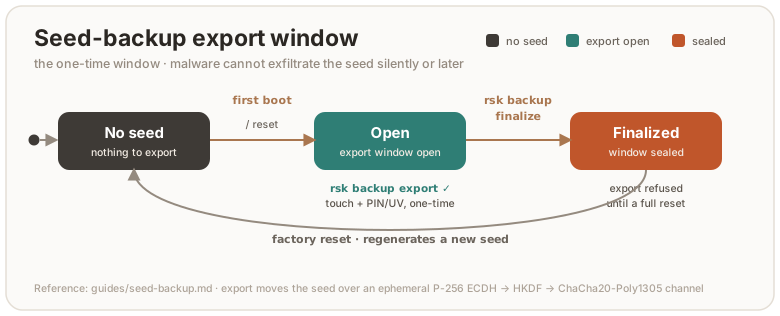
Gates, all enforced by the firmware: an encrypted transport channel, a touch, the FIDO PIN (when set), and the setup window (below). Write the words on paper. The host that runs the export sees the seed, so do this on a machine you trust.
rsk backup finalize        # seals the export window — typed confirmation
rsk backup status
After finalize, export is refused forever (until a factory reset makes
a new seed). That’s the anti-exfiltration gate: malware on a later host
cannot quietly re-export your seed. Corollary: lost words cannot be
re-exported either, so pick a SLIP-39 share count with margin (2-of-3 minimum,
3-of-5 for the paranoid).
Restore (onto any RS-Key board)
rsk backup restore --scheme bip39          # prompts for the 24 words
# or: --scheme slip39                      # prompts for ≥ threshold shares
Touch + PIN gated. The incoming seed is re-sealed under the destination device’s own root. A restored board is cryptographically indistinguishable from the original for every derived credential. Restore overwrites the destination’s auto-generated seed (it warns; a fresh board loses nothing).
After restoring: your ~/.ssh/id_*_sk files log in again, 2FA
registrations answer again. Resident passkeys do not come back, so re-enroll
those.
The TUI
rsk-tui has the same export/restore/finalize flows interactively (BIP-39
only; SLIP-39 stays in the CLI), with the seed phrase revealed on-screen and
zeroized after.
Mechanics (for the curious)
The seed crosses USB only inside an ephemeral encrypted channel: P-256 ECDH →
HKDF-SHA256 → ChaCha20-Poly1305, fresh nonce per message. The mnemonic
encodings are entirely host-side. BIP-39 (24 words) and SLIP-39 (Shamir
T-of-N) both encode the same raw 32 bytes, so either reconstructs the seed.
The setup-window flag lives with the seed’s lifecycle: cleared when a seed is
generated (first boot, factory reset), set by finalize.