LED
The status LED is the device’s only display. On the reference board (the Waveshare RP2350-One), it’s a WS2812 addressable RGB on GPIO16.
Build-time knobs
Three hardware properties of the indicator are compile-time knobs set by build
flags. A fourth, MAX_LEDS, sets the upper bound for the PIO buffer. The actual
number of connected LEDs is configured at runtime via rsk hw --led-num (or
PicoForge) and must be ≤ MAX_LEDS.
| Knob | Default | When to change it |
|---|---|---|
LED_KIND | ws2812 | ws2812 (addressable RGB, default), gpio (plain on/off), pimoroni (3-pin PWM RGB), or none (no indicator). See build.md. |
LED_PIN | 16 | A board whose addressable LED is on a different GPIO (0..=29). |
LED_ORDER | rgb | A WS2812 board with swapped red/green: set grb (the WS2812B standard). The Waveshare RP2350-One is rgb; most other parts are grb. |
MAX_LEDS | 1 | A board with multiple daisy-chained addressable LEDs: set it to the chain length (max 64). Default 1 is a single onboard LED. The actual connected count is set at runtime with rsk hw --led-num. |
# example: build for a 4-LED board with standard GRB order
env MAX_LEDS=4 LED_ORDER=grb cargo build --release -p firmware
# then set the runtime count (persists across reboots):
rsk hw --led-num 4
Once built, a non-none build compiles all backends, so the pin, driver, wire
order, and LED count are runtime-changeable (no reflash) with rsk hw
(build.md). The build knobs set the boot defaults.
What the LED shows (colour, brightness, and the visual effect) is runtime-configurable separately, covered next.
Effects
Each of the four states can run one of several animated effects. The effect
determines how the LED(s) display the state’s colour and brightness. All
effects work with any number of LEDs. vapor and sparkle shine on a single
LED too. bounce and flow naturally reduce to a static colour or a single
pixel when there is only one LED.
Effects only render on the ws2812 backend (addressable RGB). The gpio and
pimoroni backends always use the classic on/off blink, regardless of the
effect setting. They lack per-LED control and pixel-level colour.
| Effect | ID | What you see | Suits |
|---|---|---|---|
legacy | 0 | Classic on/off blink (TIMING table) | Original blink behaviour |
vapor | 1 | All LEDs breathe together, smooth triangle-wave brightness | Idle (default) |
bounce | 2 | A wide hump of light glides back and forth with half-step interpolation | Touch (default) |
flow | 3 | Yellow→red gradient flowing left to right with a trailing wake | Processing (default) |
sparkle | 4 | Each LED flashes an independent random colour | Boot (default) |
Default mapping (multiple LEDs)
| State | Default effect | Default colour | Means |
|---|---|---|---|
| idle | vapor: gentle breathing | green | ready, nothing in flight |
| processing | flow: warm-colour flow | yellow→red gradient | handling an APDU / crypto op |
| waiting for touch | bounce: smooth bounce | yellow | press the button to confirm |
| boot | sparkle: random sparkle | red | the brief power-up state |
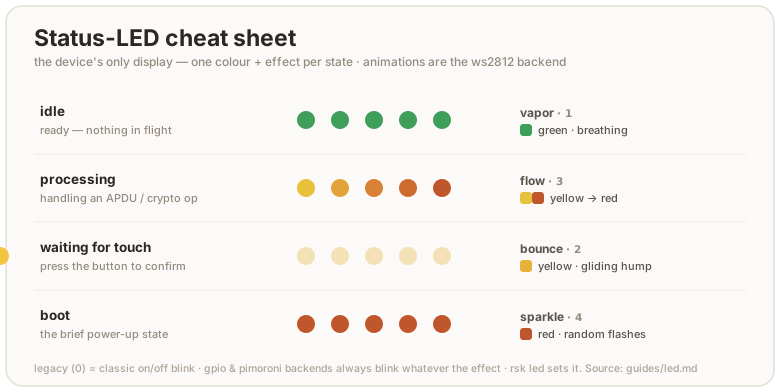
A few honest details:
- No dedicated error colour. The firmware does not light a distinct “error” state. A failed operation just drops back to idle. Read the host tool’s exit code, not the LED, for success or failure.
- The touch state needs the touch build. It is only ever shown on the
default touch build. A no-touch build (
--features no-touch) never enters it. The processing state still flashes during the operation either way (build.md). - Default brightness is gentle. 16 of 255 per channel, so the indicator is visible without being a flashlight. Turn it up if you want.
- Boot is brief. You normally see it only for the moment between power-up and the first idle, so don’t tune your eye to it.
This is not the BOOTSEL / picotool state. Holding the button while
plugging in puts the RP2350 in its ROM bootloader, where this firmware (and
therefore this LED engine) isn’t running, so the LED is dark or shows
whatever the ROM does. That mode is for flashing firmware and OTP, covered in
build.md and otp-fuses.md.
Customize
Colour & brightness
Per-state colour and per-channel brightness are configurable. The values
persist in flash (EF_LED_CONF) and apply live, no reboot:
rsk led --get                                  # print the current config
rsk led --status idle --color blue             # recolor a state
rsk led --status idle --brightness 64          # 0–255; 0 = that state goes dark
rsk led --status idle --color blue --brightness 64
touchcannot be switched off, and its colour is reserved. On a build without the trusted display the touch state is the only signal that the key is waiting for your consent. You can restyle it — colour, effect, speed, brighter — but the firmware normalizes four things on every write, whatever transport it came in on (rsk led,rsk led --transport fido, or a boot reload of the stored record):
--color offon--status touchbecomes the default yellow.--brightness 0on--status touchis raised to8.--speed 1is raised to2. At1the breathing effect renders an all-black frame every tick while the brightness byte still reads fine.- no other state may wear the touch state’s colour. One that does is reset to its own factory look, whatever its effect, brightness or speed. The rule keys on colour alone because a brightness or speed one unit off is identical to the eye, and the effect is no signal at all in
--steadymode or on a one-LED board.Every other state still goes fully dark on
--brightness 0.rsk led --getshows what the device is actually rendering, so read it back after a write that hits one of these rules.
There is one case where touch gives way instead. If the state wearing the touch
colour has that colour as its own factory colour, resetting it would not resolve
the clash, so touch reverts to its factory look (yellow, bounce). Only boot
(red) and idle/processing (green) can trigger that:
rsk led --status touch --color red      # sticks — unless boot is red
rsk led --status touch --color green    # sticks — unless idle or processing is green
rsk led --status boot  --color blue     # …then a red touch is legitimate and kept
What this does not promise. Two states in different colours can still be
hard to tell apart. On a single-colour (gpio) build hue collapses to lit or
unlit; red, green and yellow are mutually confusable under red-green colour
blindness; and on a one-LED board bounce, flow and steady mode all render the
same solid frame. What separates the states there is the per-state blink timing
(touch 1000/100 ms vs idle 500/500 ms), which no host write can change — but
--steady suppresses blinking altogether, so on a single-colour build it leaves
nothing to distinguish them. If the consent signal has to be unambiguous, use a
trusted-display build, which names the operation on screen.
Effect & speed
Each state’s effect and animation speed are configurable the same way:
rsk led --status idle --effect vapor          # change the effect
rsk led --status touch --effect bounce --speed 15  # custom speed (ticks per step)
rsk led --status processing --effect legacy   # revert to classic on/off blink
--speed 0 (or omitting --speed) uses the effect’s built-in default.
Steady / blink
--steady and --blink are global, not per-state: the firmware keeps each
state’s timing internally, but a single flag decides whether any of them
blink. --steady makes the whole indicator a solid lamp whose colour tracks
the current state. --blink brings the blink patterns back.
rsk led --status idle --color cyan --steady    # solid cyan at idle, no pulse
rsk led --blink                                # back to the blink patterns
rsk-tui has a “cycle idle color” action that steps the idle state through
the palette, plus “Read LED state”. For per-state colour, brightness, or the
steady toggle, use rsk led.
Identify (CTAPHID wink)
A host can ask the key to point at itself — CTAPHID_WINK — which is how you tell
two identical keys apart when both are plugged in. The indicator answers with four
fast blinks over about half a second in the touch colour, then goes back to
whatever it was showing.
rsk identify              # wink every attached key in turn, naming each
rsk identify --repeat 3   # three bursts each, if you looked away
rsk-tui has the same thing as “Identify this key” in Overview — that one winks
the device the dashboard is showing, rather than walking them all.
The burst deliberately overrides the configured effect and --steady: the
command is only useful if the key visibly flashes. It also uses the touch
colour because that is the one state rsk led keeps above a visibility floor,
so a key dimmed everywhere else still answers something you can see.
Two bounds follow from borrowing that colour. Repeated WINKs do not extend a burst already running — it always ends 600 ms after the first one — and a WINK arriving while the key is waiting for a touch shows the real prompt, not the burst. Without both, a host could hold the awaiting-touch indicator lit and forge the one consent signal a build without the display has.
A build with no indicator (LED_KIND=none, which includes the display build)
does not advertise the wink capability at all, rather than accepting the command
and doing nothing.
Selectors and values
| Flag | Values |
|---|---|
--status | idle, processing, touch, boot (default idle) |
--color | off, red, green, blue, yellow, magenta, cyan, white |
--brightness | 0–255 per channel (0 = off, except --status touch, see above) |
--effect | legacy, vapor, bounce, flow, sparkle |
--speed | 0–255 (0 = effect’s built-in default; 1 is raised to 2 on --status touch) |
--steady | solid colour, no blinking, global, affects every state |
--blink | the opposite: restore blinking |
Hardware wiring (rsk hw)
See the phy record spec for the full reference. The LED wiring
(pin, driver, wire order) lives in the phy record, shared with PicoForge:
rsk hw --led-pin 22                     # move the WS2812/gpio data pin to GPIO22
rsk hw --led-driver gpio                # switch to a plain on/off LED
rsk hw --led-order grb                  # fix a red/green swap on a GRB part
By default rsk hw speaks CCID (PC/SC). On a host where pcscd can’t read or
write the card, add --transport fido to do the same read-modify-write over the
FIDO HID transport instead. It is gated by a device touch and, if a PIN is set,
--pin (a pinUvAuthToken). rsk led takes the same flag. Wiring (rsk hw)
applies on the next boot, so re-plug the device. Colours (rsk led) apply live:
rsk hw  --transport fido --touch-timeout 45   # wiring; approve with a touch
rsk led --transport fido --status idle --color blue   # colours, applied live
--touch-timeout has a floor of 10 seconds. A shorter window can expire
while your finger is still on the button, and the next queued request would then
inherit that same press as its consent. rsk hw refuses anything below 10, and
the firmware raises it anyway if some other host writes the record directly.
It bounds the whole ceremony, not just the wait for a press: a key that confirms and then waits for the finger to lift stops waiting at the same deadline, so no one request occupies a button key for longer than the window. (A trusted-display key may add up to 3 s absorbing a finger already on the panel.)
Reset to defaults
rsk led --status idle       --color green  --brightness 16 --effect vapor
rsk led --status processing --color green  --brightness 16 --effect flow
rsk led --status touch      --color yellow --brightness 16 --effect bounce
rsk led --status boot       --color red    --brightness 16 --effect sparkle
rsk led --blink
Under the hood
rsk led talks to the firmware’s vendor applet over CCID
(tools/rsk/led.py, firmware/src/vendor.rs):
- SET LED (
INS 0x10) packs brightness intoP1and colour + the steady bit + the target state intoP2. When the caller sends 1–2 data bytes, they set the effect and speed for that state. - GET LED (
INS 0x11) returns the whole config block:[steady:1, (effect:1, color:1, brightness:1, speed:1) × 4](17 bytes).
The firmware writes the block to EF_LED_CONF and reloads it on every boot,
so your settings survive a power cycle but not an OpenPGP/FIDO factory reset
(those don’t touch this file). The led.rs module keeps per-status atomics
that the render task reads live. SET LED updates them immediately, then
persists the full block to flash — unless the record already holds exactly that
block, in which case it answers 9000 and leaves the flash alone.
The touch rules above live in the block codec (crates/rsk-led), not in any one
command handler, so they apply wherever a block is decoded: the CCID setter, the
FIDO CONFIG_WRITE LED target, and the boot reload. The CCID path persists the
normalized block; a FIDO CONFIG_WRITE stores your bytes as sent and normalizes
them on the way to the pixels, so CONFIG_READ can echo a record the device is
not rendering. rsk led --get (GET LED) always reports the rendered values.
For the wiring half (rsk hw), see the phy record spec. It
writes to EF_PHY via the rescue applet and applies at next boot.
Troubleshooting
- LED is dark and stays dark. Either the board has no addressable LED, or
the data pin / driver is wrong for your wiring. Fix it live with
rsk hw --led-pin N/--led-driver …(or rebuild with the rightLED_PIN/LED_KIND, build.md). If a known-good board goes dark mid-session, the firmware task is likely wedged, not the LED. - Red and green look swapped. Wrong wire order for your LED part. Flip it
with
rsk hw --led-order grb(or build withLED_ORDER=grb). See the RGB-vs-GRB note above. - Only the first LED lights up; the rest stay dark. The board has multiple
daisy-chained addressable LEDs, but the runtime LED count was never set.
Run
rsk hw --led-num <your count>to configure it (persists across reboots; the change applies after a warm reboot). If you need a higher buffer ceiling, rebuild withMAX_LEDS=<n>. rsk ledcan’t reach the device. It needs the CCID interface up (pcscdon Linux). Ifgpg --card-status/rsk statusalso fail, fix that first (linux.md).- An app looks frozen. Check for the long-on yellow touch state and tap the button. If the LED is idle-green and the app is still stuck, it isn’t waiting on the device.