Production setup — signed boot + OTP master key
⚠️ EXPERIMENTAL. IRREVERSIBLE. BRICK RISK. Everything on this page burns one-time-programmable fuses or changes what the chip will ever boot again. A mistake can permanently brick the board or permanently lose your enrolled credentials. Read the whole page before running anything. The tools refuse to act without typed confirmations and support
--dry-run. Use it.
Out of the box, RS-Key’s at-rest encryption roots in a key derived on the device and stored sealed in flash. That stops casual key extraction. But a motivated attacker who steals the board can dump flash over BOOTSEL and grind offline. The production path closes that in two independent stages:
- OTP master key (MKEK): fuse a random 32-byte key into RP2350 OTP page 58 and re-root all at-rest sealing in it, then hard-lock the page so neither BOOTSEL nor non-secure code can ever read it. A flash dump alone is then worthless — for every record the burn actually re-roots; a PIN-derived one waits for its own reference to be presented (stage 1).
- Secure boot: fuse your public-key fingerprint and the
SECURE_BOOT_ENABLEbit so the bootrom runs only images you signed. Attacker-flashed firmware (the remaining way to read the OTP key) no longer runs.
A third, optional stage builds on those: anti-rollback, so that old images you signed (with bugs you have since fixed) stop booting too. It has its own page: anti-rollback.md.
Each stage is usable alone. Together they are the full story. All are driven
from the host. The firmware never burns a fuse behind your back. The two
exceptions are rows that physically cannot be written from BOOTSEL
(bootloader-read-only OTP pages): the page-58 lock and the
ROLLBACK_REQUIRED flag, each applied by the firmware on explicit command. The
fuses these stages write are explained in otp-fuses.md.
flowchart TD
    d["Default<br/>flash-derived root · any image boots"]
    d --> s1["Stage 1 — OTP master key<br/>burn page 58 · migrate · lock"]
    s1 --> s2a["Stage 2 — secure boot<br/>load-key · harden (non-enforcing)"]
    s2a --> s2b{{"ENABLE<br/>the one irreversible bit"}}
    s2b --> s2c["lock key slots + fuse pages"]
    s2c --> s3["Stage 3 — anti-rollback<br/>(optional)"]
    s2b -. "a correctly-signed UF2 can always be re-flashed over BOOTSEL" .-> rec["BOOTSEL recovery"]
Every command on this page, in order
The CLI groups by fuse family — rsk otp owns the OTP master key and the
rollback flag, rsk secure-boot owns the boot-key and enforcement fuses — while
this page groups by goal. The two cuts cross, which is why rsk otp shows up
in stage 1 and again in stage 3. Nothing is out of order; they are different
axes. The stages themselves are independent and usable alone, and this is the
order to run them in if you are doing all three.
| # | Command | Stage | What it writes | Undo |
|---|---|---|---|---|
| 1 | rsk otp burn | 1 | random MKEK + DEVK into OTP page 58 | never |
| 2 | rsk otp lock-page58 | 1 | the page-58 read lock | never |
| 3 | picotool seal --sign … | 2b | nothing — host-only, and it produces the otp.json step 4 needs | re-run it |
| 4 | rsk secure-boot load-key <otp.json> | 2c | boot-key fingerprint + KEY_VALID | never |
| 5 | rsk secure-boot harden | 2c | DEBUG_DISABLE + glitch detectors | never |
| 6 | rsk secure-boot enable | 2c | SECURE_BOOT_ENABLE — the brick bit | never |
| 7 | rsk secure-boot lock | 2c | revokes unused key slots, locks the fuse pages | never |
| 8 | rsk otp rollback-require | 3 | ROLLBACK_REQUIRED | never |
rsk secure-boot status reads the whole fuse state and is safe at any point.
Every burning command takes --dry-run and a typed confirmation.
Before you start
- Make a seed backup first if you haven’t:
rsk backup export(guides/seed-backup.md). It is the only thing that survives a board swap. The production path is exactly when you start caring about that. - Plan for the signing key. Stage 2 generates an ECDSA key. Losing it bricks the board for new firmware. Decide now where you’ll keep it durably.
- Understand the substrate. These stages write OTP fuses. otp-fuses.md explains what is irreversible and why.
- Rehearse. Every step supports
--dry-run, which prints the exactpicotoolcommands without touching anything.
Stage 1 — OTP master key
What it does: writes a random DEVK (device attestation key) and MKEK (master
sealing key) plus anti-imaging chaff into OTP page 58, ECC-verified, then
locks the page. On the next boot the firmware notices the provisioned key and
migrates what it can reach (FIDO seed, attestation key, the persistent
pcmr grant, PIV keys) under the new root. Anything keyed by a PIN is the
exception — re-keying it needs the secret — so each PIN verifier and the DEK copy
behind it moves at that reference’s own next VERIFY. OpenPGP’s private keys are
sealed under that DEK and never move. After the burn, verify PW3 once and set
your OpenPGP resetting code again: those are the two references ordinary use
does not present, and until they are presented they stay on the pre-burn root
(limitations). Your enrolled credentials
survive. That is the point of the migration layer.
At-rest hardening pass. The migration re-seals each secret under the new root. But the flash store is append-only, so the old chip-serial-sealed copies linger until their page is reclaimed. To stop a flash dump from recovering them, that same first post-burn boot runs a one-shot compaction that physically scrubs the credential partition. It is a multi-second stall that runs before the device re-attaches to USB, so on that one boot the device stays dark a little longer than usual. Don’t cut power during it. It runs once (a flash marker gates it) and re-runs if interrupted.
New deployments: burn OTP before you enroll. A seed generated after the burn is sealed under the fused root from birth, so no chip-serial-sealed copy ever exists and the hardening pass has nothing to scrub. The migrate-in-place path above is for hardening a device you have already been using.
rsk reboot bootsel               # picotool needs the chip in BOOTSEL
rsk otp burn --dry-run           # preview every step
rsk otp burn                     # typed confirmation; keys are generated and FORGOTTEN
picotool reboot -a               # back to the app; migration runs at boot
rsk otp lock-page58              # firmware applies the page-58 hard lock (typed confirm)
Facts to internalize first:
- The burn tool generates MKEK/DEVK randomly and forgets them. There is no copy to lose, and none to back up. The fuses are the key.
- After the burn, the device attestation public key changes (it now derives from the fused DEVK). FIDO/PIV identities survive. The rescue attestation key does not. That is expected, not data loss. If you use audit or fleet verification, re-record the device’s fingerprint afterward (guides/fleet.md).
- The lock is the half that matters for at-rest. Burning the MKEK without
lock-page58leaves the key fused but still readable over BOOTSEL. The flash dump is not yet worthless. Runlock-page58to actually close it. - After
lock-page58,picotool otp geton page 58 fails with a permission error forever. Only the secure-mode firmware can read the keys. That failure is the lock working. - A seed backup (
rsk backup) made before or after is unaffected. Backups carry the seed value, which gets re-sealed under whatever root the device has. - Never flash a
FAKE_MKEKtest build onto a provisioned board. It migrates the data under a fake, greppable key and orphans it (build.md).
Stage 2 — secure boot
What it does: the RP2350 bootrom verifies an ECDSA (secp256k1 + SHA-256) signature on every image against a fingerprint fused into OTP. Unsigned or foreign-signed images do not boot. The chip falls back to BOOTSEL, where you can always drag a correctly-signed UF2 (recovery path).
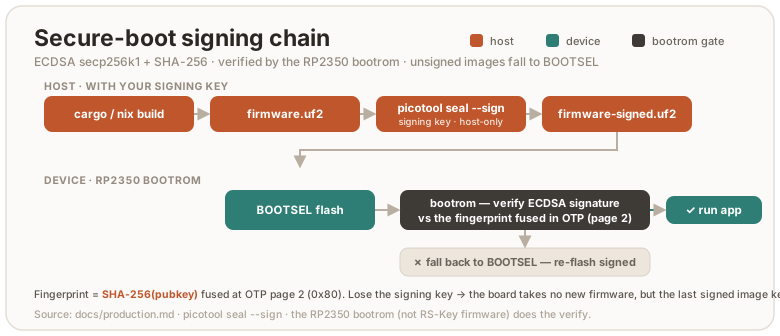
The permanent consequences:
- Every future flash must be signed with your key. The dev loop becomes
build →
picotool seal --sign→ flash. - Losing the signing key bricks the board for new firmware (the current signed image keeps booting). Back the key up before enabling enforcement.
DEBUG_DISABLEis burned along the way. SWD is gone (flashing is BOOTSEL anyway).
2a. Generate a signing key (once, off-repo)
mkdir -p ~/.rs-key-secrets && cd ~/.rs-key-secrets
openssl ecparam -genkey -name secp256k1 -noout -out secure_boot_key.pem
openssl ec -in secure_boot_key.pem -pubout -out secure_boot_pub.pem
chmod 600 secure_boot_key.pem
# BACK IT UP somewhere that survives this machine.
That is the whole of what you create by hand. The otp_secureboot.json the next
step passes around is produced by seal, not written here — see 2b.
This key is the root of trust for the board’s whole life. Treat it like the most
important secret you have here: if you lose it after enable, you can never
flash new firmware to that board (the running image keeps booting). It is also
what makes key rotation
possible later, so a single, well-kept key with a backup is the goal. The full
key lifecycle is in signing-keys.md: passphrase protection
(and the decrypt-for-seal step it implies), backup, one fresh key per
board, rotation, and recovery.
2b. Sign and prove a signed image boots (before any fuse)
# 1. an image to sign. The partition table has to be in it BEFORE sealing, or
#    the signature does not cover the fence (build.md#the-partition-table).
cargo build --release -p firmware
scripts/pt.sh target/thumbv8m.main-none-eabihf/release/firmware firmware-pt.elf
#    (or a single `nix build .#firmware`, whose result/firmware.elf already has it)

# 2. sign the ELF — NOT the UF2, and convert afterwards. `seal` retires the
#    image's own IMAGE_DEF (the linker's, carrying no signature and no rollback
#    version) only when handed an ELF; given a UF2 it appends its signed block and
#    leaves that one live and FIRST, which a SECURE_BOOT_ENABLE + ROLLBACK_REQUIRED
#    device meets first and refuses — while the host still prints
#    "signature: verified". otp_secureboot.json does NOT exist yet: you pick the
#    path, and `seal` creates the file there. It is the artifact stage 2c fuses.
picotool seal --sign --hash firmware-pt.elf -t elf firmware-signed.elf -t elf \
    ~/.rs-key-secrets/secure_boot_key.pem ~/.rs-key-secrets/otp_secureboot.json \
    --major 1 --minor 0 --rollback 1
picotool uf2 convert firmware-signed.elf -t elf firmware-signed.uf2
picotool info -a firmware-signed.elf   # "signature: verified", and block 1 "ignored"
ls -l ~/.rs-key-secrets/otp_secureboot.json    # seal wrote this; 2c needs it

# 3. BOOTSEL, then flash + confirm the device works:
picotool load -v firmware-signed.uf2 && picotool reboot   # or drag it onto the RP2350 drive
What otp_secureboot.json is for
The one part of this page with no obvious purpose until you see both ends of it.
The bootrom’s check is: does SHA-256(the public key inside this image) equal a
fingerprint fused in OTP? So that fingerprint has to get into the fuses. But
signing happens on your host, with a private key that must never go near the
device, while fusing happens against the board — two separate operations,
possibly on different machines and months apart. Nothing in the signed image can
carry the value across: the device is exactly what you don’t trust yet.
That file is the courier, and its whole job:
| Written by | picotool seal (2b) — it derives the fingerprint from your .pem |
| Read by | rsk secure-boot load-key <that file> (2c) — burns it into a boot-key slot |
| Contains | bootkey0 (the 32-byte fingerprint, length-checked before the burn) + key_valid + secure_boot_enable |
| Verified after the burn | load-key reads the slot back and compares it to the fingerprint it wrote — a mismatch fails with verify failed: slot N reads back … rather than leaving an unusable slot marked valid |
| Touched by anything else | no |
You do not back it up, and losing it costs nothing. It is a pure function of
your signing key — sealing any image with the same .pem regenerates it
byte-for-byte, and --major / --minor / --rollback do not change a byte of
it. It holds no private material, so it is not a secret either. The .pem is the
thing to protect; this is a derived artifact you can recreate in one command.
It is per-key, so with one key per board (recommended —
signing-keys.md) keep each next to the .pem that produced
it, under names you can tell apart.
The other arguments:
secure_boot_key.pem: your signing key. It signs the image.--major/--minor: an image version (major.minor) stamped into the RP2350 boot metadata. It is a plain version label, distinct from the firmware version RS-Key reports (5.8.0by default, build.md) and from the rollback version. The bootrom can use it to prefer the newer of two images in an A/B setup. RS-Key ships a single image, so here it is effectively a label. Keep1 0.--rollback: the anti-rollback version, a separate counter (not the image version). It is harmless before anti-rollback is enabled, and having a version in every sealed image from day one makes that stage cheap. What it means and how to choose it: anti-rollback.md.
picotool info firmware-signed.uf2 must report signature: verified. The
firmware’s image definition is already secure-boot compatible. The sealed UF2
carries the signature block.
Sealing also covers the image’s partition table, the fence that keeps the USB
bootloader out of the KV store (build.md). That is
the whole reason the fence is worth anything: on an unsigned board an attacker
simply flashes an image carrying a permissive table, while a sealed table cannot
be replaced without this key. It closes the one snapshot/restore gap secure boot
does not close by itself — writing the data region is not code execution
(threat-model.md).
Prove it, don’t assume it: picotool info -a firmware-signed.uf2 must show the
store partition as NSBOOT(-), and a byte flipped anywhere in the table must turn
hash: verified into hash: incorrect.
2c. Burn, staged
rsk secure-boot splits provisioning so every irreversible write is proven
by a real boot before the next. The only true point of no return is one
bit:
rsk secure-boot status      # read the current fuse state any time
rsk secure-boot load-key ~/.rs-key-secrets/otp_secureboot.json   # 1. boot-key fingerprint + KEY_VALID (non-enforcing)
rsk secure-boot harden      # 2. DEBUG_DISABLE + glitch detectors   (non-enforcing)
rsk secure-boot enable      # 3. SECURE_BOOT_ENABLE = 1  ← the brick bit
rsk secure-boot lock        # 4. revoke unused key slots + lock the fuse pages
Each step has --dry-run and a typed confirmation. Between steps, reboot and
confirm the device still works. After enable, verify the negative case:
drag an unsigned UF2. The bootrom must reject it and fall back to BOOTSEL.
Re-drag the signed one to recover.
lockand key rotation: a decision to make now. Thelockstage revokes the three unused boot-key slots (KEY_INVALID), maximizing hardening against an attacker who tries to inject their own key. It also forecloses key rotation, the escape valve if you ever exhaust the 48-step anti-rollback budget (you rotate to a new signing key and revoke the old one). If you want to keep that valve, don’t run the fulllock. Leave a slot. The trade-off is in anti-rollback.md. Most users should run the fulllock. You will almost certainly never reach the ceiling.
The new flash workflow (forever)
cargo build --release -p firmware
scripts/pt.sh target/thumbv8m.main-none-eabihf/release/firmware firmware-pt.elf
# seal the ELF, convert after — a UF2 in leaves the unsigned IMAGE_DEF first (2b)
picotool seal --sign --hash firmware-pt.elf -t elf firmware-signed.elf -t elf \
    ~/.rs-key-secrets/secure_boot_key.pem ~/.rs-key-secrets/otp_secureboot.json \
    --major 1 --minor 0 --rollback 1
picotool uf2 convert firmware-signed.elf -t elf firmware-signed.uf2
# BOOTSEL (hands-free: rsk reboot bootsel), then:
picotool load -v firmware-signed.uf2 && picotool reboot   # or drag it onto the RP2350 drive
The pt.sh line is not optional here, and its position is the point. It
embeds the partition table that fences the KV store off from the bootloader
(build.md); cargo build alone never produces
one. Running it before seal is what puts the table under the signature —
which is the only thing that stops an attacker flashing a permissive table of
their own. Seal a table-less image and you have signed away the fence without
any error telling you so.
The --rollback value is your board’s current floor (see
anti-rollback.md). 1 is the usual starting value.
To seal an image others can independently verify, build it with
nix build .#firmware instead of the dev-shell cargo build. That path is
bit-for-bit reproducible from the source tree
(build.md), so anyone can rebuild
at your release commit and confirm the payload you signed.
Stage 3 — anti-rollback (optional)
This stage stops your own older signed images from booting, so a bug you have since fixed can’t be re-introduced by downgrading. Read anti-rollback.md first. It is the full model: how the floor works, the 48-burn budget, when (and whether) to raise it, what to do at the ceiling, and the new-board case. This section is only the steps to turn it on.
The mechanism is two RP2350-native pieces: a per-image rollback version
(--rollback N at seal time) checked against a 48-bit OTP thermometer, and the
ROLLBACK_REQUIRED fuse that makes that check mandatory. Until the fuse is
burned, versionless images boot and the feature is off.
Turning it on
- Seal and flash firmware with a rollback version (start at
--rollback 1), reboot, and confirmrsk secure-boot statusreportsboot version 1/48. If it still reads0/48, stop and investigate. Never burn the fuse on an unproven setup. - Re-seal
rsk-wipeat the same version. The recovery escape hatch must stay bootable. - From the running firmware:
rsk otp rollback-require(typed confirmation;--dry-runreports state without burning). The firmware refuses unless secure boot is enabled, so it can only run from an image that itself passed the rollback check, and the “fuse before a versioned image” footgun can’t happen. - Negative-test: drag any versionless signed UF2. The bootrom must refuse it and fall back to BOOTSEL. Re-drag the current image to recover.
After it’s on
- Every
picotool sealmust include--rollback <your floor>. A versionless sealed image no longer boots (fail-closed). You find out at flash time and recover by re-sealing. - To raise the floor and close a downgrade-fix, seal one step higher
(
--rollback <floor + 1>). The default is not to raise it. When, why, and the budget math are all in anti-rollback.md. - A board that has burned to floor N never boots an image below N again. No undo.
Everything about whether to bump, the 48-budget, the ceiling, key rotation, and moving to a new board lives in anti-rollback.md.
Recovery and failure cases
| Situation | What happens / what to do |
|---|---|
| Bad or wrong flash | BOOTSEL stays enabled — drag a correctly-signed UF2 to recover. |
| Unsigned / foreign-signed image (secure boot on) | Bootrom refuses it, falls back to BOOTSEL. Drag your signed image. |
| Lost the signing key (secure boot on) | The current signed image keeps booting, but you can never flash new firmware. There is no recovery for the key — back it up before enable. |
| Image sealed below your rollback floor | Refused at boot → BOOTSEL. Re-seal at ≥ your floor. |
| Image sealed above your floor by accident | It boots and burns the thermometer up to it, spending budget irreversibly. Seal at exactly your floor unless you mean to raise it. |
rsk-wipe won’t boot after enabling anti-rollback | Re-seal it at your current floor — the recovery image must carry a version too. |
picotool save/load/erase over the store answers permission failure | Expected: the partition table denies the bootloader there (build.md). Erase from the running side instead — rsk-wipe and the rescue applet execute as secure code, which the table leaves rw. |
| 48-step rollback budget exhausted | Key rotation, or a new board — see anti-rollback.md. |
Page 58 read fails after lock-page58 | That’s the lock working — only secure firmware can read the keys now. |
| Replacing the board entirely | Provision the new chip with a new signing key; restore your FIDO identity with rsk backup restore. Resident passkeys / OpenPGP / PIV don’t migrate — see anti-rollback.md. |
Deliberate choices
- USB BOOTSEL stays enabled. It is the only reflash and the only recovery path (no debugger). It cannot bypass signature enforcement, and after the page-58 lock it cannot read the OTP keys. Disabling it (the datasheet’s full checklist) would turn every bad flash into a permanent brick.
- No image encryption. The code is open source. There is nothing secret in the image (secrets live sealed in flash, rooted in OTP). The RP2350 also has no transparent XIP decryption. Encrypted boot requires fitting the image in SRAM, which a ~1.7 MB image does not.
Residual risks (still open after all stages)
- XIP TOCTOU: the image executes from external QSPI flash. Hardware that swaps or emulates the flash chip between the bootrom’s signature check and execution can subvert it. Decap/side-channel-class attack, out of scope.
- A host compromised while the device is plugged in can drive normal operations (as with any security key). See threat-model.md.
- An older signed image of yours re-opens the store fence. The partition
table travels inside the image, so anything you signed before
0x0871carries none, and flashing it makes the KV store bootloader-writable again — the snapshot/restore rollback is back. This is an ordinary downgrade attack, so the version axis is what answers it: raise your rollback floor past your pre-table builds (anti-rollback.md). Until you do, the fence is worth exactly as much as your oldest signed artifact.