Anti-rollback
Secure boot (production.md) refuses foreign images. Every image you signed stays valid forever. The first time a release fixes an exploitable bug, your previous signed image becomes a hole: an attacker with the device drags your old, signed UF2 over BOOTSEL and attacks the bug you already fixed. Anti-rollback closes that downgrade path.
Scope: this page is about rolling back the image. Rolling back the data — snapshotting flash over BOOTSEL and restoring it later to reset a wrong-PIN counter — is a separate attack with separate defenses, in threat-model.md. Neither mechanism sees the other’s rollback.
This page is the model and every case. The operational steps to turn it on are in production.md, stage 3; the fuses it touches are in otp-fuses.md. It is optional. Until you enable it, nothing here applies.
Read this whole page before enabling it. Anti-rollback burns one-time fuses. Once enforced, it changes which images your board will boot. None of it is reversible.
Two independent axes
The single most important idea: an old, vulnerable image can be refused by two different mechanisms. They do not depend on each other.
| Axis | What it refuses on | Budget per chip |
|---|---|---|
| Version | a rollback counter in OTP (“don’t boot below my floor”) | 48 steps |
| Key | the signature (“don’t boot if signed by a key I don’t trust”) | 4 key slots |
While you have version budget, the first axis does the work. When it runs out, the second takes over. A fresh chip with a fresh key resets both. The rest of this page is those two axes and what happens at their limits.
Axis 1 — version (the rollback floor)
Two different numbers
- Firmware version (
v0.3.1, semver): “which build is this”, changes every release. - Rollback floor: a number on your board. It refuses to boot anything below it. You move it, rarely, by hand.
RS-Key does not assign project-wide “epoch” numbers. There is only your own floor, on each board, and you manage it.
How it works in hardware
The floor lives in RP2350 OTP as a 48-bit thermometer (its value is the number of burned bits). At boot the bootrom (not our firmware) compares the image’s rollback version against your board’s floor:
- image version below the floor → refused, fall back to BOOTSEL;
- equal → boots;
- above → boots and immediately burns the thermometer up to the image’s version.
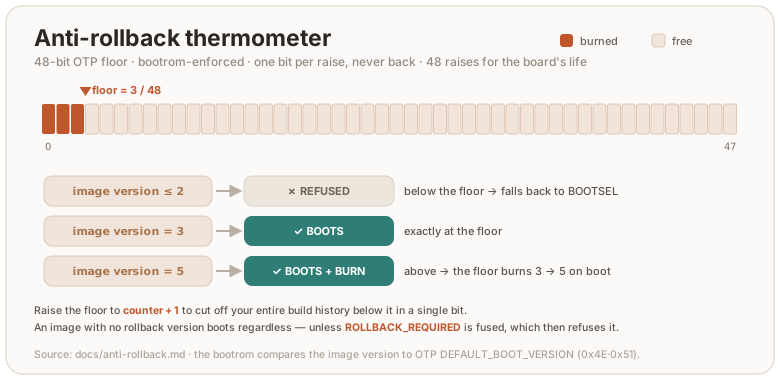
The whole mechanism has an on/off fuse, ROLLBACK_REQUIRED. Until it is burned,
images carrying no rollback version boot regardless (anti-rollback has no
teeth). You burn it from firmware:
rsk secure-boot status      # shows ROLLBACK_REQUIRED and the boot version N/48
rsk otp rollback-require     # fuse ROLLBACK_REQUIRED (requires secure boot enabled)
⚠️ Burning the thermometer is irreversible. OTP is one-time-programmable: a bit goes 0→1 and never back. See otp-fuses.md.
Budget: 48 steps per chip, for the board’s whole life
The thermometer is 48 bits, so the floor can advance 48 times over the entire life of that board, and never again. That is not “48 releases”. It is 48 burns. Treat each advance as spending an irreversible, finite resource.
The project flags downgrade-fixes; you decide
Because secure boot is rooted in your own signing key, there are no project-signed images. Every owner signs and chooses their own floor. So the project’s only job is to mark, in the changelog, which releases fix a downgrade-exploitable bug:
| Release | downgrade-fix? |
|---|---|
v0.2.0 (OATH features) | no |
v0.3.0 (PIN-bypass fix) | yes |
v0.4.0 (PIV slots) | no |
v0.5.0 (signature-check fix) | yes |
When you build firmware, you check: were there downgrade-fix releases since my last build? If so, it is your call:
- Raise the floor (close those bugs): seal with
--rollback <your counter + 1>. The board burns up to it. Your older images below it stop booting. - Leave it (you accept the risk): seal with
--rollback <your current counter>. Everything still boots, nothing burns.
The default is not to burn. Raising the floor is a deliberate act tied to a specific security release, not routine.
If you don’t burn, the downgrade attack stays possible. Your old signed image will still boot. That is a fine, conscious trade-off (you keep your 48-budget and don’t orphan working images), but it is your choice of risk, not a default-protected state.
Why +1 is enough
The floor only needs to sit above your own vulnerable builds. Every build
you made was sealed at a version ≤ your current counter. So raising the floor to
counter + 1 cuts off your entire build history below it in a single bit.
There is no absolute number to “catch up” to.
A bonus falls out of this: “decline, decline, then raise once when you decide to care” spends fewer bits than raising the floor on every release, for the same protection, because all your older builds sit below the one bump.
Concretely:
rsk secure-boot status         # read your floor, say "boot version 2/48"
# build the fixed firmware, then seal it one step higher:
picotool seal --sign --hash firmware-pt.elf -t elf firmware-signed.elf -t elf \
    ~/.rs-key-secrets/secure_boot_key.pem ~/.rs-key-secrets/otp_secureboot.json \
    --major 1 --minor 0 --rollback 3        # 3 = counter (2) + 1
picotool uf2 convert firmware-signed.elf -t elf firmware-signed.uf2
# flash it; on boot the floor burns 2 → 3, and every image sealed ≤ 2 is now refused
One caveat for correctness: you must seal the fixed firmware strictly above the version you used for the vulnerable build. In practice that is
counter + 1. If you accidentally seal the fixed image at the same version as a vulnerable one, the floor didn’t rise and you are not protected.
Your floor is per-board
The floor is private to each board. It equals the highest version that that board has booted. It depends only on your burns, not on how many releases exist. Different boards carry different floors. This is normal and needs no coordination. The one rule: a board will not boot an image below its own floor. You cannot go back down past a floor you’ve burned.
At the ceiling (floor = 48)
The thermometer is full, but you can still update forever. You seal every future image at version 48 and it boots. You lose only the growth of version-based downgrade protection: a new release can no longer out-version a previous one (there is no 49th step). The device works. Secure boot still holds. From here, downgrade protection moves to axis 2.
Axis 2 — key (the signature)
How the bootrom checks a signature
- OTP holds not the key but a fingerprint (
SHA-256(public key)) in a boot-key slot. - A signed image carries, inside it, the full public key plus an ECDSA signature (secp256k1 + SHA-256) over the image hash.
- At boot the bootrom hashes the public key from the image and compares it to the fused fingerprints. No match → refused, before it even checks the signature. Match → it verifies the ECDSA signature with that key → boots.
This can’t be forged: an attacker can’t sign for a key they don’t hold, and they can’t make a different public key hash to a fused fingerprint (SHA-256).
Key revocation = downgrade defense without the thermometer
When the version budget is spent, you switch axes. For each new downgrade-fix:
- sign the fixed firmware with a new key K2;
- confirm it boots;
- revoke the old key K1 (
KEY_INVALID).
The old vulnerable image, signed by K1, now fails secure boot by signature. The version counter is not involved. RP2350 has 4 key slots, so this buys roughly 3 more rounds on top of the 48.
A decision you must make before the ceiling
Key revocation needs a free key slot reserved at provisioning time. Today
rsk secure-boot lock (stage D) revokes all three unused slots. After that
there is nowhere to rotate to. So this is a genuine trade-off, made up front:
Full lock (current default) | Reserve a slot for rotation | |
|---|---|---|
| Hardening against attacker key injection | maximum | the free slot is reachable by an attacker with physical access who can burn fuses |
| Escape valve at the 48 ceiling | none (new chip only) | ~3 key rotations |
Detail: after
lock, the key pages stay secure-writable (the firmware must still writeROLLBACK_REQUIREDand the page-58 lock), so a future firmware command could in principle provision a key into a free, un-revoked slot even after lock. That command does not exist yet.
When the 48 budget is exhausted — the ladder
- Rotate the key on the same board (~3 rounds, if you reserved a slot). Old images die by signature.
- New board + new key (next section): a fresh 48, and the whole old history is dead by signature.
- Accept the residual: secure boot still holds. A downgrade is then only possible to an attacker with physical access and one of your old signed artifacts. Document it; for most threat models this is acceptable.
This is the RP2350’s hard limit, not an RS-Key flaw. Any firmware on this chip has the same ceiling (48 versions + 4 keys). There is no software trick around it: a software rollback counter in the firmware would be weaker. It runs after the bootrom already booted the (possibly vulnerable) image, and its store would live in flash — which the same attacker can rewrite, by first flashing a partition table that permits it (threat-model.md: the table we ship fences BOOTSEL out, and only secure boot stops it being replaced).
Prevention beats cure. 48 genuine downgrade-exploitable fixes on a single
chip is beyond even commercial keys over a decade. If you are approaching the
limit, you are almost certainly flagging as “downgrade-fix” releases where
booting the old image gains the attacker nothing. The real discipline is: floor
+1 only when the old image is a working exploit.
Moving to a new board
A fresh chip gives a fresh 48 and fresh 4 slots. You provision a new signing key (yours, backed up) and trust only it on the new board.
Why the new board’s floor is 1, not a repeat of every old risk
This is the subtle part. Starting a new board at floor 1 can look like you are re-accepting every downgrade risk you defended against on the old board. You are not. The protection didn’t disappear. It moved from the version axis to the key axis:
- the old vulnerable images are signed with the old key;
- the new board trusts only the new key, so those images are refused by signature;
- and there are no vulnerable images signed with the new key. You signed only the current, fixed firmware with it.
So there is nothing below floor 1 (on the new key) to block. Floor 1 is safe precisely because no image exists that is both (a) vulnerable and (b) signed by a trusted key.
The rule that makes this work: an image is dangerous only if it is both signed by a trusted key and exists as a file. On the new board, old vulnerable images are signed by an untrusted key, and the new key has signed only the fixed firmware.
⚠️ Required condition: the new board trusts only the new key. If you also provision the old key on the new board, the old vulnerable images pass the signature check again and floor 1 will not stop them. New board ⇒ fresh key, old key not carried over.
What migrates, what doesn’t
- Migrates: your FIDO identity, via seed backup
(
ssh ed25519-sk, 2FA registrations), withrsk backup restore. - Does not migrate: resident passkeys, OpenPGP and PIV keys, sealed to the old chip, not derivable from the seed. Re-enroll those.
How to verify all of this
rsk secure-boot status              # fused boot-key fingerprint, ROLLBACK_REQUIRED, boot version N/48
picotool info firmware-signed.uf2   # the image's key fingerprint — compare to the fused one
Negative tests are the real proof:
- an unsigned UF2 → bootrom refuses it, falls back to BOOTSEL;
- an image below your floor → refused (the version axis works);
- an image signed by the old / a foreign key → refused by signature (the key axis works).
Cheat sheet
- Firmware version ≠ rollback floor. The project assigns no epochs. The floor is on your board and you control it.
- The project only flags a release as a downgrade-fix; you decide and you burn.
- Raise = your board’s current counter + 1. Default: don’t burn.
- Don’t burn ⇒ downgrade is possible (your conscious risk).
- Budget is 48 per chip; burning is irreversible.
- At the ceiling, updates still work; protection moves to key revocation.
- A new chip + new key is a clean restart at floor 1; the old history is dead by signature, not by version.