Build options
Every knob is compile-time. Set environment variables and cargo features at
cargo build and they bake into the image. Nothing here changes at runtime
(except where noted for the phy record).
# the general shape
nix develop -c env KNOB=value cargo build --release -p firmware [--features ...]
nix develop -c scripts/pt.sh target/thumbv8m.main-none-eabihf/release/firmware firmware-pt.elf
picotool uf2 convert firmware-pt.elf -t elf firmware.uf2
The middle step embeds the partition table; skip it and
the key ships with its storage exposed to the bootloader. nix build .#firmware
folds all three together.
flowchart TD
    knobs["env knobs + cargo features"] --> build["cargo build (or nix build)"]
    build --> elf["firmware.elf"]
    elf --> pt["scripts/pt.sh<br/>embed partition table"]
    pt --> conv["picotool uf2 convert"]
    conv --> uf2["firmware.uf2"]
    uf2 --> flash["BOOTSEL flash"]
    pt -. "secure boot only — seal the ELF" .-> seal["picotool seal --sign<br/>signing key (host-only)"]
    seal -.-> sconv["picotool uf2 convert"]
    sconv -.-> signed["firmware-signed.uf2"]
    signed -.-> flash
Cargo features
| Feature | Default | Effect |
|---|---|---|
no-touch | off | Auto-confirm user presence. FIDO operations (makeCredential, getAssertion, U2F, reset, selection) and OpenPGP UIF data objects no longer require a press of the presence button (BOOTSEL by default, or PRESENCE_PIN when set). Requiring a touch is the default and is not a feature; --features no-touch is the explicit escape hatch for the automated suites (tests/, python-fido2, OpenPGP card tests), which cannot press a button and would hang on the (default) touch build. Never ship a no-touch build. |
advertise-pqc | off | Prepends ML-DSA-87 (COSE −50), ML-DSA-65 (−49) and ML-DSA-44 (−48) to the getInfo algorithms list, in descending security order. Off by default because released Firefox versions abort the entire getInfo parse on an unknown COSE id and report the authenticator broken. PQC capability is on regardless of this flag. makeCredential negotiates −49 / −48 from the request’s pubKeyCredParams; the flag only controls advertising. |
fips-profile | off | Bakes a locked FIPS-style policy into the image: ES256K (secp256k1) leaves the FIDO menu, the minimum PIN rises to 6 and trivially guessable PINs are refused (the strong-pin policy below), the vendor seed export is refused, and PIV refuses new 3DES management keys and RSA-1024. The default build is unchanged; with secure boot the policy is sealed by your signature. A profile, not a FIPS validation. Details and rationale: guides/fips.md. |
strong-pin | off | Raises the FIDO clientPIN minimum to 6 code points (from CTAP’s default 4) and refuses the most guessable PINs: a repeated period (000000, 121212, 123123), a ±1 run (123456, 654321), two or fewer distinct code points (112211 — two smudges on the glass is a two-symbol search space at any length), and ten denylisted keypad shapes (159753, 123321, …). Every rule counts code points, not bytes, matching the floor beside it. A narrow PIN-hardening knob: unlike fips-profile (which bundles this same PIN policy with dropping secp256k1, refusing the seed export, and constraining PIV), it changes only the PIN policy. Off by default; the default build keeps the CTAP-standard 4-code-point floor. Rationale: on the RP2350 a BOOTSEL flash snapshot/restore rolls back the wrong-PIN counter (#37), so a longer, non-trivial PIN is the practical bound on offline brute force. Enforced on the host setPIN/changePIN path and the trusted-display PIN pad. |
strict-up | off | Require a touch on every getAssertion. By default RS-Key honors the platform’s silent pre-flight probe (up:false): it returns the discovery assertion with no touch and the UP flag clear, so a WebAuthn login with an allowCredentials (non-resident) credential is a single touch, matching the CTAP2 spec and YubiKey. With strict-up the button is polled even for that probe, so such a login asks for two touches (one for the probe, one for the real assertion). A deliberately stricter “every assertion needs an explicit gesture” stance for those who want it; it is not spec-conformant for up:false. Resident-credential / passkey logins are a single touch either way. fido-conformance enables this implicitly (the conformance pass was validated with it). |
always-uv | off | Bake the CTAP 2.1 alwaysUv option on by default, so the key requires user verification (a PIN — or the display build’s built-in UV pad) for every makeCredential / getAssertion straight out of the box, with no post-flash ykman fido config toggle-always-uv. The shipped image leaves alwaysUv off until a platform turns it on; this flag flips the default. It stays runtime-toggleable — toggleAlwaysUv writes an override that survives reboots but not an authenticatorReset, which restores this compiled default. Set a PIN after flashing: with alwaysUv on and no PIN, FIDO operations return CTAP2_ERR_PUAT_REQUIRED until one is set — the standard cue for the platform (Windows, Chrome) to prompt for a PIN. While alwaysUv is on the CTAP1/U2F interface is disabled (CTAP 2.1 §7.2.4, as on a YubiKey): U2F only proves presence, never verification, so legacy U2F-only logins stop working, and getInfo drops U2F_V2 from its advertised versions; WebAuthn / CTAP2 (passkeys) are unaffected. The one exception §7.2.4 allows is a build “protected by a built-in user verification method”: on a display build with a PIN set, U2F stays available and every register / authenticate collects the PIN on the panel instead of a touch. |
largeblob-ext | off | Serve the CTAP 2.3 §12.4 largeBlob extension instead of the CTAP 2.1 large-blob design. Not additive, and not a choice the firmware could dodge: §12.4 says “Authenticators MUST NOT support both extensions”, so enabling it withdraws the largeBlobKey extension, the authenticatorLargeBlobs command (0x0C, which then answers CTAP1_ERR_INVALID_COMMAND), the largeBlobs option and maxSerializedLargeBlobArray. Blobs then live per credential (discoverable credentials only) instead of in one platform-managed array, and a whole blob rides in the getAssertion that reads or writes it — up to 4046 bytes, sealed at rest under the device seed with the credential id as AAD, which the 2.1 design does not need because the platform encrypts that array itself. Off by default, and think before turning it on: the 2.1 pair is what every shipping browser drives today, so a largeblob-ext key loses WebAuthn largeBlob support with current clients. |
display | off | Experimental trusted-display build for a screen + touch board (Waveshare RP2350-Touch-LCD-2.8). Adds an on-screen Approve / Deny that paints the real relying party for every touch (Deny refuses with OPERATION_DENIED), an on-device PIN pad (built-in user verification (options.uv), plus a CCID pinpad so GnuPG / OpenSC collect the OpenPGP / PIV PIN on the panel, never over USB), a read-only Apps browser (OpenPGP / PIV / OATH state, no PIN), a Passkeys manager (delete / rename on-device), and Settings (device & FIDO PINs, an optional scrambled PIN pad, on-screen BIP-39 / SLIP-39 recovery export, audit log, factory reset). Entirely dep:-gated. A standard key compiles none of it, so its image is unaffected. Build it LED_KIND=none FLASH_SIZE=16M … --features display (the panel takes GPIO16 for its backlight; a compile-time guard enforces LED_KIND=none). Full walkthrough with screenshots: guides/display.md. |
strict-config | off | Restores the historical strict admin-write authorization. The DEFAULT build is now the permissive, full-ykman/YubiKey-compatible admin surface: device-config writes (CCID Management WRITE CONFIG, FIDO vendor CONFIG_WRITE, the CTAPHID 0x43 and OTP-HID 0x15 transport writes) are ungated, and Management RESET (device-wide factory reset) plus the OTP-HID DEVICE_CONFIG / SCAN_MAP / NDEF slots are served. --features strict-config re-imposes the presence/PIN gates and refuses the ungated transport writes — the historical shipped behavior. This deliberately weakens the DEFAULT threat model: any USB host can rewrite the reported identity with no operator confirmation (threat-model.md). Not the runtime flash flag EF_HARDENED. Ship it as firmware-strict-config. |
Environment variables
| Variable | Default | Values | Effect |
|---|---|---|---|
BOARD | none | a file name under firmware/boards/ (abrobot-4m, abrobot-16m, waveshare-one, waveshare-touch-lcd, tenstar-usb, seeed-xiao) | Load that board’s knob set instead of setting the LED / presence / flash / display variables one by one. Every variable below still wins when you set it explicitly, so a board file is a default set, not a lock. It selects no cargo features — a display board still needs --features display. Each shipped board file is smoke-built in CI. |
VIDPID | RSKey | RSKey, Yubikey5, YubikeyNeo, YubiHSM, NitroHSM, NitroFIDO2, NitroStart, NitroPro, Nitro3, Gnuk, GnuPG, Pico, Dev | USB VID/PID preset. The default RSKey (0x1209:0x0001) is this project’s own pid.codes identity, not a masquerade. The opt-in Yubikey5 (0x1050:0x0407) instead presents Yubico’s VID/PID and swaps the descriptor strings to Yubico / YubiKey RSK …. That is what makes ykman, Yubico Authenticator and the stock Yubico udev rules recognize the device; build it only for local interop / the interop suite. Pico = the Raspberry Pi generic id (0x2E8A:0x10FD); Dev = a non-colliding placeholder (0xFEFF:0xFCFD). An unknown preset fails the build. The vendor-mimicking presets are for local interop only. Never distribute hardware carrying them. |
USB_VID / USB_PID | from preset | 0xHHHH | Raw override, applied on top of the preset (you can override either half alone). |
USB_MANUFACTURER / USB_PRODUCT | from preset | string | Raw override of the USB descriptor strings. The default is RS-Key / RS-Key Security Key; the Yubico VID instead bakes Yubico / YubiKey RSK OTP+FIDO+CCID. The project’s own tools (rsk, rsk-tui) match the reader by the RS-Key (or RSK) token in the product string. |
FW_VERSION | 5.8.0 | X.Y.Z or X.Y | The firmware version reported everywhere a tool looks: management DeviceInfo (ykman info), FIDO getInfo, CTAPHID INIT, OATH/OTP/PIV version fields, OpenPGP’s vendor VERSION (INS 0xF1). Yubico tools gate features on it; 5.8.0 mimics a current YubiKey 5. Does not change the OpenPGP card version (3.4) or the USB bcdDevice (an internal build counter). |
XOSC_DELAY_MULT | 128 | 1..=1024 | Crystal-oscillator startup-delay multiplier (“delayed boot”). A longer settle wait is intended to harden the early-boot clock-switch window against glitch/fault injection. 128 is the embassy default. |
FLASH_SIZE | 4M | bytes, 0xHEX, or <n>K/<n>M | External QSPI flash size. build.rs regenerates memory.x from it. The KV store (KVMAIN + KVCNT) stays pinned at the top and the code region is the rest; 4M with the default KVMAIN reproduces the checked-in layout byte-for-byte. Use this for boards with a different flash chip (e.g. 8M); must be ≤ 16 MB and leave ≥ 1 MB for code after the KV store (a 2 MB board needs a smaller KVMAIN, below). |
KVMAIN | 1408K | bytes, 0xHEX, or <n>K/<n>M | Size of the KV main partition (credentials, keys, OpenPGP DOs). The default 1408K is the checked-in layout; shrink it to free code space on a small flash. A 2 MB board (Seeed XIAO RP2350, Waveshare RP2350-Zero-CM) can’t fit the firmware (~900K) under a 1408K KVMAIN, so build it FLASH_SIZE=2M KVMAIN=896K (896K creds + 128K counters + 1024K code). Sector-aligned, min 128K; the counter partition (KVCNT, 128K) is fixed. Baked into both memory.x and flash_storage.rs from one value, so the two never drift. Set at build time only — changing it on a provisioned device shifts the partition offsets and orphans the store. |
LED_PIN | 16 | 0..=29 | The status-LED GPIO for the ws2812 and gpio backends (RP2350A). Default GPIO16 is the Waveshare RP2350-One. Point it at a free GPIO on boards that use 16 for something else; the indicator simply drives whatever pin you pick. (Unused by pimoroni, which has fixed PWM pins, and by none.) |
LED_POWER_PIN | none | none or 0..=29 | An optional GPIO driven high at boot to power a gated LED rail — some boards put the addressable LED behind a load switch. The Seeed XIAO RP2350 is the case in point: its onboard WS2812 data is on GP22 but its power sits behind GP23, so the LED stays dark until GP23 is high (LED_PIN=22 LED_ORDER=grb LED_POWER_PIN=23). Held for the device’s lifetime; must differ from LED_PIN and a GPIO PRESENCE_PIN (rejected at compile time). Boot-only, so it is not in the runtime phy record. Ignored by LED_KIND=none. |
USR_LED_PIN | none | none or 0..=29 | An optional GPIO wired to a nuisance onboard user/status LED that the firmware drives to its OFF level at boot and holds. The Seeed XIAO RP2350’s USR LED sits on GP25, is active-low, and comes up lit (weak pull-down); USR_LED_PIN=25 parks it high so it stays dark. Independent of the addressable status LED, so it works on a LED_KIND=none build too. Held for the device’s lifetime; must differ from LED_PIN, LED_POWER_PIN, and a GPIO PRESENCE_PIN (rejected at compile time), and is unsupported on a display build (the panel replaces the onboard LED). Boot-only, not in the runtime phy record. |
USR_LED_ACTIVE_HIGH | 0 | 0 / 1 | Polarity of the USR_LED_PIN LED. 0 (default) = active-low (lit when the pin is low, so OFF = drive high — the XIAO USR LED). 1 = active-high (lit when high, so OFF = drive low). Ignored without a USR_LED_PIN. |
PRESENCE_PIN | bootsel | bootsel or 0..=29 | User-presence input source. Default bootsel keeps the BOOTSEL hardware-button path. Set a GPIO number for a dedicated button (active-low with an internal pull-up by default; flip with PRESENCE_ACTIVE_HIGH). Example: PRESENCE_PIN=0 for a button to ground on GPIO0. |
PRESENCE_ACTIVE_HIGH | 0 | 0 / 1 | GPIO presence-button polarity, only meaningful with a GPIO PRESENCE_PIN. 0 (default) = active-low: button to ground, internal pull-up, a press reads low. 1 = active-high: internal pull-down, a press reads high, for a capacitive touch sensor or a button to VCC. Ignored for the BOOTSEL default. |
WAKE_PIN | 25 | none or 0..=29 | display builds only. The button that wakes the panel from display sleep. Default 25 is the Waveshare RP2350-Touch-LCD-2.8’s BAT_PWR button. none makes wake touch-only (no button); any other GPIO selects a different button. A value in the LCD/touch range (10..=18) is rejected at compile time. The display-sleep timeout itself is set on-device (Settings → Display sleep). |
WAKE_ACTIVE_HIGH | 0 | 0 / 1 | Wake-button polarity (display builds, with a GPIO WAKE_PIN). 0 (default) = active-low (internal pull-up, press reads low, e.g. BAT_PWR to ground); 1 = active-high (internal pull-down). |
LED_KIND | ws2812 | ws2812 / gpio / pimoroni / none | The LED driver backend, and the boot default. A non-none build compiles all three so the driver/pin/order are runtime-switchable via rsk hw / PicoForge (see below). ws2812 = a single addressable RGB on LED_PIN (the Waveshare default). gpio = a plain on/off LED on LED_PIN. Hue/brightness collapse to lit/unlit, but the blink pattern still distinguishes statuses. pimoroni = a 3-pin PWM RGB (Pimoroni Tiny 2350: R=GPIO18, G=GPIO19, B=GPIO20, common-anode). none = no indicator (the status engine still runs; nothing renders it, and the phy LED fields are ignored). |
LED_ORDER | rgb | rgb / grb | WS2812 wire byte order (ws2812 backend only). The Waveshare RP2350-One is unusually rgb (the default); standard WS2812B parts (e.g. the TenStar RP2350-USB) are grb. If a ws2812 board comes up with red and green swapped (blue fine), flip this to grb. |
MAX_LEDS | 1 | 1–64 | PIO state-machine and frame-buffer ceiling for addressable LEDs. The actual connected count is set at runtime via rsk hw --led-num and must be ≤ MAX_LEDS. Default 1 is a single onboard LED; a board with a chain of N builds with MAX_LEDS=N (up to 64). |
FAKE_MKEK / FAKE_DEVK | unset | 64 hex chars | Test builds only. Bakes a fake OTP master key / device key into the image instead of reading the OTP fuses, so the whole OTP migration path can be exercised with zero fuse writes. The build prints a loud warning and the key is greppable in the binary. Flashing a FAKE build onto a provisioned device migrates its data under the fake key. Going back orphans that data (recovery = per-applet resets). Never flash one on a device you care about. |
The LED_PIN / LED_KIND / LED_ORDER / MAX_LEDS values are boot defaults
only. A
non-none build compiles all three backends, so the LED pin, driver, and wire
order are runtime-configurable (no reflash) with rsk hw (or PicoForge),
which write them to the device’s phy record. The build knobs decide the
out-of-the-box behaviour and let you drop to a lean none build. Everything
else is a rsk hw call away (guides/led.md).
Verify what got baked without flashing:
rg PK_USB_VID  target/thumbv8m.main-none-eabihf/release/build/firmware-*/output   # decimal: 4617 = 0x1209
rg PK_FW_VERSION target/thumbv8m.main-none-eabihf/release/build/rsk-sdk-*/output
rg PK_XOSC_DELAY_MULT target/thumbv8m.main-none-eabihf/release/build/firmware-*/output
The firmware-* glob matches one build dir per feature combination you have
built, so a stale entry can show an old value. Read the freshest one (or
cargo clean -p firmware first) if the output looks doubled.
Flash size and the memory map
FLASH_SIZE regenerates memory.x: the KV store stays pinned to the top
of flash and only the code region grows. A 16 MB board just gets more (unused)
code headroom. The credential capacity is unchanged (why the flash is mostly
empty by design: architecture.md).
One exception, and only at 16 MB: the store stops a sector short of the top,
because the bootrom’s RP2350-E10 workaround owns the last 256 bytes of the XIP
window (0x10FFFF00) and picotool partition create refuses a table that claims
them — so a 16 MB image could not carry the fence at all. The reserved 4 KB is
outside every partition, which is where the bootrom needs it.
The KV store is 1.5 MB by default (KVMAIN 1408K + KVCNT 128K). On a 2 MB
board that leaves too little for the ~900K image, so the firmware can’t link.
KVMAIN shrinks the main partition to make room: build a 2 MB Seeed XIAO RP2350
or Waveshare RP2350-Zero-CM with FLASH_SIZE=2M KVMAIN=896K (896K creds + 128K
counters + 1024K code). build.rs bakes the size into both memory.x and
flash_storage.rs, so the two partitions never disagree, and it rejects a split
that leaves under 1 MB for code with a message that names the fix. A fully
provisioned key needs only a few hundred KB, so 896K is ample.
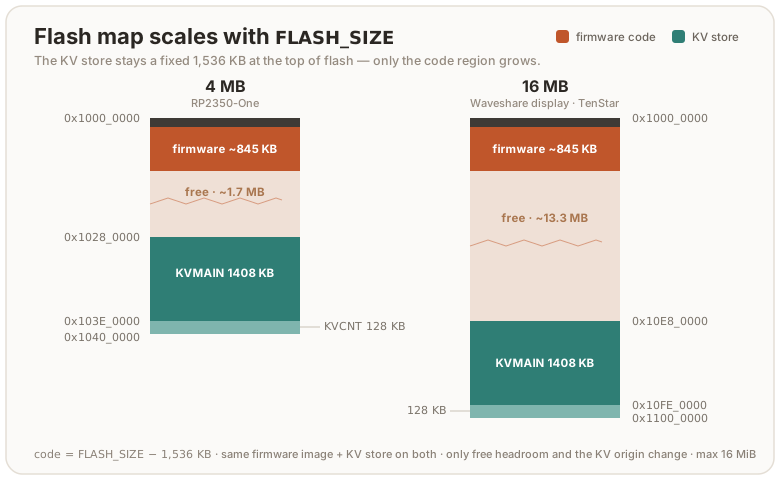
At the 4M default the code region is 2560K; the shipping image uses roughly a
third of it. check.sh enforces a ratchet well under that: a ceiling that
hugs the current image, so a runaway dependency (a whole extra EC curve is
~150 KiB) or any surprise growth trips it long before the linker’s hard limit.
Lower FIRMWARE_FLASH_BUDGET_KIB when the image shrinks; raise it in the same
commit when a real feature legitimately grows it.
RAM has the mirror-image ratchet, FIRMWARE_STACK_FLOOR_KIB. Whatever .data
and .bss do not take is stack, so a new static costs stack depth — and the
deepest paths on this chip (ML-DSA-65 keygen, the RSA modexp chain) run close
enough to the ceiling that it has already wedged a device. The gate reads the
figure straight out of the ELF and fails under the floor. The images link
through flip-link, which places
the stack below the statics, so an overflow faults on unmapped memory instead of
quietly overwriting them; that needs rust-lld on PATH, which the dev shell
arranges, so build inside nix develop.
The partition table
The shipped image carries an RP2350 partition table that fences the KV store off
from the USB bootloader: picotool save and picotool load over the store answer
permission failure, while the running firmware keeps full access to it. It is a
defence-in-depth layer against the BOOTSEL snapshot/restore rollback, and it is a
real barrier only where secure boot is on — read
threat-model.md
before quoting it as protection.
scripts/pt.sh reads the fence out of the built ELF’s own __kvmain_start /
__kvcnt_end symbols — the same ones flash_storage.rs uses to find the store —
so it follows FLASH_SIZE / KVMAIN / BOARD with no second copy of the layout
to keep in step. check.sh asserts the emitted table back against those symbols,
because a table that misses the store still links, still boots, and then loses the
firmware’s writes at runtime.
⚠️ A bare
cargo builddoes not produce it. The table is added after linking, sotarget/…/release/firmwarecarries none and a key flashed straight from that ELF is unfenced.nix build .#firmwareapplies it; for a local cargo build, apply it yourself:cargo build --release -p firmware scripts/pt.sh target/thumbv8m.main-none-eabihf/release/firmware firmware-pt.elf picotool load firmware-pt.elf -t elf
Examples
# default: touch build, RS-Key identity (0x1209:0x0001), fw 5.8.0
cargo build --release -p firmware

# opt-in Yubico interop flavor (so ykman / Yubico Authenticator see the device)
env VIDPID=Yubikey5 cargo build --release -p firmware

# no-touch test build (for the automated suites)
cargo build --release -p firmware --features no-touch

# Nitrokey FIDO2 identity with its own version number
env VIDPID=NitroFIDO2 FW_VERSION=1.4.0 cargo build --release -p firmware

# advertise PQC in getInfo (breaks released Firefox — see above)
cargo build --release -p firmware --features advertise-pqc

# ship with CTAP 2.1 alwaysUv enabled by default (set a PIN after flashing)
cargo build --release -p firmware --features always-uv

# strict admin-write posture (the historical default; config writes stay gated)
cargo build --release -p firmware --features strict-config
nix build (hermetic, no dev shell)
The flake exposes the firmware as a package, so you can build a UF2 without entering the dev shell or having a Rust toolchain installed. Nix pins the toolchain, the cross target, and every dependency:
nix build .#firmware                 # default touch image
ls result/                           # firmware.elf  firmware.uf2
result/firmware.uf2 is functionally the image the dev-shell cargo build
produces. Unlike the dev-shell build, it is bit-for-bit
reproducible: the derivation remaps the two absolute build inputs out of
the binary (the per-build sandbox dir and the toolchain store path; both
land in panic-location strings in .rodata, plus DWARF in the .elf) with
stable --remap-path-prefix, so one flake.lock yields one firmware.uf2
on every machine of a platform. The daily repro job in
deep-checks
proves it (nix build twice, the second with --rebuild so nix compares
every output byte) and publishes the canonical sha256 in its run summary.
To verify a published image: nix build .#firmware at the release commit
and compare hashes. A sealed image can’t be reproduced by a third party
(the signature is the signer’s); verify the unsigned payload instead, then
check the seal with picotool. The flavors mirror the
CI matrix:
| Attribute | Image |
|---|---|
.#firmware (default) | touch build, RS-Key identity (0x1209:0x0001), fw 5.8.0 |
.#firmware-no-touch | --features no-touch (the test build) |
.#firmware-fips | --features fips-profile |
.#firmware-pqc | --features advertise-pqc |
.#firmware-strong-pin | --features strong-pin (6-code-point PIN floor + trivial-PIN block; also .#firmware-strong-pin-pqc) |
.#firmware-always-uv | --features always-uv (CTAP 2.1 alwaysUv on by default; also .#firmware-always-uv-pqc) |
.#firmware-strict-up | --features strict-up (touch on every assertion — not spec-conformant for up:false; also .#firmware-strict-up-pqc) |
.#firmware-display | --features display, FLASH_SIZE=16M, LED_KIND=none (experimental, Waveshare RP2350-Touch-LCD-2.8) |
.#firmware-2mb | default features + RS-Key identity, FLASH_SIZE=2M, KVMAIN=896K (2 MB boards: Seeed XIAO RP2350, Waveshare RP2350-Zero-CM) |
.#firmware-16mb | default features + RS-Key identity, FLASH_SIZE=16M (16 MB boards, e.g. TenStar RP2350-USB) |
.#firmware-strict-config | --features strict-config (historical strict admin-write posture; the default firmware is now the permissive full-ykman admin surface) |
Two caveats:
-
The output is UNSIGNED. On a secure-boot device you still seal it with your key. The signing key deliberately never enters the build sandbox:
# the ELF, not the UF2: sealing a UF2 leaves the image's own unsigned
# IMAGE_DEF first in the chain, and a secure-boot device refuses that
picotool seal --sign --hash result/firmware.elf -t elf firmware-signed.elf -t elf \
    ~/.rs-key-secrets/secure_boot_key.pem ~/.rs-key-secrets/otp_secureboot.json \
    --major 1 --minor 0 --rollback 1
picotool uf2 convert firmware-signed.elf -t elf firmware-signed.uf2
The
.pemis your signing key, the.jsonis wheresealwrites the boot-key fingerprint, and--major/--minorstamp an image version into the boot metadata: a plainmajor.minorlabel, separate from both the firmware version RS-Key reports (5.8.0by default) and the rollback version. The full meaning of each flag is in production.md.If you have enabled anti-rollback, the seal additionally needs
--rollback <your board's floor>, a separate, deliberate step with its own rules and a finite OTP budget. Don’t add it blindly; the full flashing-with-rollback workflow is in anti-rollback.md. -
The env knobs above are declarative Nix args, not ambient env. A plain
nix buildbakes the defaults; to customize, pass them to the builder. For a config you reuse, add a one-line preset package (the flake shipsfirmware-pico = mkFirmware { name = "firmware-pico"; vidpid = "Pico"; }as a copy-me example) and build it:nix build .#firmware-picoFor a one-off without committing a package, call the exposed builder. (The
--impurehere only letsgetFlakeread the working tree; the knobs themselves are pure. A committed/pushed flakeref needs no flag.)nix build --impure --expr \ '(builtins.getFlake (toString ./.)).lib.${builtins.currentSystem}.mkFirmware { name = "fw"; vidpid = "Nitro3"; fwVersion = "2.0.0"; }'Knobs:
vidpid,usbVid,usbPid,fwVersion,xoscDelayMult,flashSize,ledPin,presencePin,fakeMkek,fakeDevk(mirroring the env vars above). As a convenience each also falls back to the like-named env var, soVIDPID=Pico nix build --impure .#firmwareworks for a quick throwaway, but the declarative arg is the reproducible path and needs no--impure.
nix run — host tools without the dev shell
The host tooling is also exposed as flake apps, so it runs straight from the
flake without nix develop (Nix pins every dependency):
nix run .#rsk -- status          # the Python device CLI (rsk --help for groups)
nix run .#rsk-tui                # the live ratatui dashboard (prebuilt binary)
nix run .#flash -- --help        # build + sign + flash, one command (secure boot)
#rsk wraps the bundled tools/rsk package on the pinned interpreter; #rsk-tui
is a prebuilt host binary (no compile-on-run). Both are also buildable as
packages (nix build .#rsk-tui).
nix run .#flash wraps the secure-boot flash ritual end to end: it seals
(signs) an unsigned image, reboots the device into BOOTSEL, loads it, then
reboots. With no argument it seals the reproducible default firmware
(.#firmware); pass a path to seal a flavor you built yourself
(nix run .#flash -- firmware-no-touch.uf2). It reads the signing key from the
host (~/.rs-key-secrets/{secure_boot_key.pem,otp_secureboot.json} by default,
override the directory with RS_KEY_SECRETS) and stamps --rollback 1 into the
seal (set RSK_ROLLBACK to change). It prompts before flashing (-y skips). The
device must already run secure boot with the matching boot key provisioned; the
full ritual, the anti-rollback rules, and recovery are in
production.md and anti-rollback.md.
Runtime overrides (phy record)
The rescue applet can store a small config record in flash (rsk /
rsk-tui expose the safe fields). At boot, a stored VID/PID and product
string override the compile-time defaults, useful to re-identify a device
without rebuilding. A bad value can make the device enumerate strangely;
recovery is a BOOTSEL reflash (which never reads the record) or rewriting the
record over CCID.
The effective identity is resolved in this order:
flowchart TD
    a["VIDPID preset"] --> b["USB_VID / USB_PID raw override (compile time)"]
    b --> c["phy record (runtime, at boot)"]
    c --> d["effective VID/PID + product string"]
Notes
- The PC/SC reader name comes from the USB strings. The default build reads
RS-Key RS-Key Security Key …, and the project’s own tools (rsk,rsk-tui) match theRS-Keytoken.ykmanand Yubico Authenticator derive the device’s PID purely from that name. They need theYubico YubiKeywords and theOTP/FIDO/CCIDtokens, which only the opt-inVIDPID=Yubikey5flavor supplies (Yubico YubiKey RSK OTP+FIDO+CCID); on the default build those tools do not see the device.gpg,ssh -sk, browsers, libfido2 and OpenSC are identity-independent and work on either build. bcdDevice(USB device release) is an internal build counter, not the firmware version.- The two UF2 flavors on a release build of this repo:
firmware.uf2(touch) andfirmware-test.uf2(no-touch).scripts/check.shbuilds both.