rsk-tui — the terminal cockpit
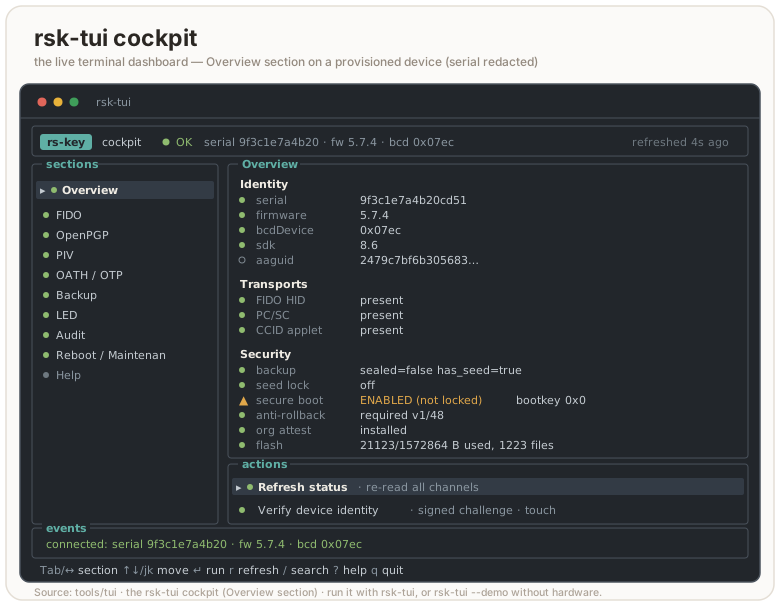
rsk-tui is a host-side dashboard for an RS-Key. It talks to the device
directly (CTAPHID over hidapi and the CCID applets over PC/SC), so it does not
shell out to rsk or any other process. It lives in its own workspace
(tools/tui), separate from the firmware, and links the host PC/SC and HID
stacks.
It is a companion to the rsk CLI, not a replacement: the cockpit covers the
safe, day-to-day reads and a few in-band actions (LED, seed backup, reboot,
audit, identity verify). Irreversible production rituals (secure-boot staging,
OTP fuses, factory resets, soft-lock, attestation import) stay in the CLI on
purpose. The cockpit points you at the exact command instead of doing them.
flowchart LR
    tui["rsk-tui (host process)"] -->|hidapi / CTAPHID| fido["Device — FIDO"]
    tui -->|PC/SC / pcscd| ccid["Device — CCID applets<br/>OpenPGP · PIV · OATH · OTP"]
Running it
In the dev shell rsk-tui is on PATH:
nix develop
rsk-tui              # interactive cockpit
Without Nix, run it from its workspace (the repo defaults to the firmware target, so name the host target explicitly; this is what the launcher does):
cargo run --release --manifest-path tools/tui/Cargo.toml \
  --target "$(rustc -vV | sed -n 's/host: //p')"
On Linux the CCID half needs pcscd + a polkit rule; see
linux.md. FIDO works as soon as the udev rules are in place. If
PC/SC is down, the cockpit still starts: the FIDO sections work and every CCID
field shows CCID unavailable rather than a fabricated value.
Flags
| Flag | Effect |
|---|---|
| (none) | interactive cockpit |
--demo, --mock | interactive cockpit against a simulated device, no hardware needed |
--once | print the gathered status once (human-readable) and exit |
--json | one-shot machine-readable status (JSON) and exit |
--identify | blink this key’s indicator and exit (the Overview action, scripted) |
--selftest [PIN] | native backup export/restore round-trip (needs a no-touch build) |
-h, --help | usage |
--demo is handy for screenshots, docs, and trying the navigation without a
key plugged in. Demo data is clearly labelled [DEMO] and every simulated
action is prefixed [demo]; it never pretends to touch hardware.
--json and --once are the scriptable paths. Both gather one snapshot and
exit, so they fit a health check or a CI probe. --json emits a stable,
explicit object (identity, fido, backup, secure_boot, rollback,
applets, led, pgp, piv_meta, errors, …); --once is the same data formatted for a human. Either
honours --demo, so you can shape a pipeline against the mock first:
rsk-tui --json | jq '.secure_boot, .rollback'
rsk-tui --once --demo            # see the field layout without a key
--selftest drives the native MSE channel + clientPIN token + BIP-39 path
end-to-end: export a seed, re-derive its fingerprint, restore it, confirm the
fingerprint is stable, all without revealing the seed. It needs a no-touch
firmware build (the touch build would block waiting for a button press), and
takes the FIDO2 PIN as an optional positional argument if one is set.
It talks to real hardware, so it refuses two invocations that would otherwise
mislead: a flag where the PIN should be (--selftest --demo would have sent the
literal string --demo as the PIN, spending a real retry), and --demo in any
position (it does not apply — there is no simulated round-trip).
A non-interactive snapshot of the simulated device (rsk-tui --once --demo)
gives a sense of what the cockpit reads:
[DEMO — simulated device]
device     : serial 37bebfdca282 · fw 5.7.4 · bcd 0x0759
transports : HID present  PC/SC present  CCID present
serial     : 37bebfdca282523b
firmware   : 5.7.4  bcdDevice 0x0759  sdk 3.4
fido       : U2F_V2, FIDO_2_0, FIDO_2_1  clientPin=true
backup     : sealed=false  has_seed=true
seed lock  : off
secure boot: ENABLED (not locked)  (enabled=true locked=false bootkey=0x1)
rollback   : not required  boot version 0/48
org attest : not installed
applets    : OpenPGP present  PIV present  OATH present  OTP present
openpgp    : 2 keys  serial 2a1b3c4d  retries PW1 3 RC 0 PW3 3
piv        : PIN 3/3 tries (default)
led        : steady  idle cyan  processing blue  touch green  boot white
Layout
┌ header: app · health · device identity · refreshed ─────────────┐
│ sections │ selected section: status fields + action menu        │
│  …       │                                                      │
├──────────┴──────────────────────────────────────────────────────┤
│ events: recent operations and errors                            │
├─────────────────────────────────────────────────────────────────┤
│ last result · key bindings                                      │
└─────────────────────────────────────────────────────────────────┘
The sidebar narrows and the event panel drops away on small terminals; the UI
keeps working down to a few rows. Status uses an OK / WARN / ERR / UNK / N/A
word plus a colored glyph, so it reads on a monochrome or color-blind terminal.
N/A is reserved for things the device supports but the TUI deliberately leaves
to the CLI. It is never a faked or unknown value. Set RSK_TUI_ASCII=1 (or run
in a non-UTF-8 locale) to force ASCII glyphs ([+] [!] [x] [?] [-] instead of
● ▲ ✖ ○ –); a UTF-8 LANG/LC_* is auto-detected otherwise.
Key bindings
| Key | Action |
|---|---|
Tab / Shift-Tab, ← / → | switch section |
↑ ↓ or j k | move selection in the action list |
Enter | run the selected action |
r | refresh device status |
/ | search actions across all sections |
? | jump to Help |
Esc | cancel a modal / input |
q or Ctrl-C | quit (terminal restored on exit) |
The status also auto-refreshes every few seconds while you are in the normal view, never while a modal is open, so a read can’t redraw over a PIN prompt or hammer the CCID bus mid-task.
Inside a modal the keys narrow to that modal: a text/PIN input takes characters +
Backspace, Enter submits, Esc cancels (and wipes the buffer); a yes/no
prompt takes y/n or Enter/Esc; a reveal panel dismisses on any key (a
shoulder-surfed secret clears fast); a message panel (audit output, LED state, a
verify report) scrolls with the arrows / j k / PgUp / PgDn / Home /
End and closes on Enter, Esc, q, or space. The / palette filters by a case-insensitive substring of the action label
as you type, ↑/↓ pick, Enter jumps to that action’s section and starts it.
Sections and what they do
| Section | Reads (safe) | In-band actions |
|---|---|---|
| Overview | identity (serial, fw, bcdDevice, sdk, aaguid), transports, backup/lock/secure-boot/rollback/attestation/flash | Refresh, Verify identity |
| FIDO | CTAPHID presence, versions, clientPIN, options | Count resident passkeys (PIN · credMgmt) |
| OpenPGP | applet presence, card serial, PIN retries, populated key slots (from 6E) | — |
| PIV | applet presence, PIN retries + default-PIN flag (from GET METADATA) | — |
| OATH / OTP | applet presence | — |
| Backup | seed / sealed / lock state | Export (BIP-39 · SLIP-39 2-of-3), Restore, Finalize |
| LED | LED mode + per-state color/brightness, with a live colour swatch | Read state, Cycle idle color |
| Audit | journal head + checkpoint key hint | Read journal, Verify identity |
| Reboot / Maintenance | device summary | Reboot → app, Reboot → BOOTSEL |
| Help | key bindings, section guide, safety model | — |
OpenPGP and PIV show a little more than presence, from unauthenticated reads in
the same gather: OpenPGP parses its 6E application-related data (card serial,
the PW1/RC/PW3 retry counters, and how many of the three key slots hold a key);
PIV reads the PIN’s GET METADATA (retries left, and whether the PIN is still the
factory default). OATH and OTP stay presence only. The full card contents
(individual keys, accounts) still need the applet’s own tooling, so those rows
point you at it: gpg --card-status (openpgp.md), ykman piv info, ykman oath accounts, and so on.
Verify identity issues a fresh 16-byte challenge, has the device sign it
with its DEVK-derived P-256 attestation key (vendor AUDIT_CHECKPOINT), and
verifies the ECDSA signature locally over tag‖head‖seq‖challenge. This is a
real cryptographic check, not a display of device-asserted bytes. On success it
prints an 8-byte fingerprint of the attestation public key. Record that
fingerprint: a later rsk inventory verify --expect-key <hex> (or rsk audit verify --expect-key …) pins it, so a swapped or cloned board fails the check
instead of quietly verifying. Verify needs a touch, the FIDO2 PIN if one is set,
and a provisioned OTP DEVK. Without the DEVK it says
no OTP DEVK provisioned — attestation unavailable rather than guessing.
Read journal dumps the tamper-evident audit log (vendor AUDIT_READ): a
hash-chained sequence of events (BOOT, MAKE_CREDENTIAL, GET_ASSERTION,
PIN_SET, BACKUP_EXPORT, CHECKPOINT, …) folded into an epoch, with the
running chain head. It is read-only (the device never lets the host rewrite
it) and asks for the FIDO2 PIN if one is set, or a physical touch if not. The full cross-check against the
signed head lives in rsk audit verify.
LED reads the four LED states the firmware drives (idle, processing,
touch, boot), each with a color and brightness, plus whether the idle LED is
steady or blinking. The section paints a colour swatch beside each state — a
background-filled block, so it shows with no block-glyph support, and the colour
name is printed too — refreshed live with the status. Cycle idle color steps the idle color through the palette
(red → green → blue → yellow → magenta → cyan → white, then wraps) and writes
it back; it is a cosmetic, unauthenticated setting, not a security control.
PINs in the cockpit
Every PIN the TUI asks for is the FIDO2 clientPIN (the same one
rsk fido set-pin manages), not an OpenPGP PW1/PW3 or a PIV PIN. It gates the
in-band actions that need it: Verify, Read journal, and seed Export/Restore (when
a PIN is set). If no clientPIN is set, those actions skip the prompt. OpenPGP and
PIV PINs are only ever entered in their own tools (gpg, ykman), never here.
CLI-only / unsupported in the TUI
These are surfaced as menu entries that, when selected, print the exact command to run. They are never performed from the cockpit:
- FIDO: set/change PIN (
rsk fido set-pin), list resident passkeys (rsk fido list-passkeys --pin …), factory reset (ykman fido reset) - OpenPGP / PIV / OATH / OTP: full card data and factory resets (
gpg --card-status,ykman piv info,ykman oath accounts,rsk openpgp reset,ykman piv reset, …). Theykmancommands gate on the “Yubico YubiKey” reader name, so they only see the device on the opt-inVIDPID=Yubikey5build;gpgandrskwork on the default RS-Key build. - Backup: SLIP-39 restore (recombining shares):
rsk backup restore --scheme slip39. SLIP-39 export is now in the cockpit (2-of-3 shares, via the in-treersk-slip39crate); other T-of-N splits stay in the CLI (seed-backup.md) - Maintenance (Reboot section): seed soft-lock (
rsk lock enable | unlock | disable), org-attestation import/clear (rsk fido attestation import | clear), secure-boot staging, OTP fuses. See production.md and otp-fuses.md
The FIDO section’s Count resident passkeys action reads the count over
credMgmt getCredsMetadata. It needs the FIDO2 PIN — there is no unauthenticated
way to read it — and reports how many passkeys are stored plus roughly how many
slots remain. Enumerating the passkeys themselves stays in the CLI: rsk fido list-passkeys --pin ….
Safety model — what is and is not logged
- Destructive or irreversible operations require a typed confirmation, not a
single keypress: export (
EXPORT), restore (RESTORE), finalize/seal (SEAL), reboot to BOOTSEL (BOOTSEL). The typed word must match exactly (case-sensitive); anything else cancels the action. Reboot to app uses a yes/no prompt. Finalize is refused outright once the window is already sealed. It explains rather than re-confirming. - PINs are masked on entry and never written to the event log. The log additionally redacts any live PIN/phrase substring as a backstop, and it is a bounded ring (the last 200 lines), so nothing accumulates on disk. It is only ever in memory.
- The seed is shown only after you confirm export. It appears once, in a modal, is zeroized from memory when you press a key, and never reaches the event log or any file. The same goes for a restore phrase you type in.
- Sensitive buffers (PIN, phrase, revealed seed) are wiped (
zeroize) on cancel, on submit, and on Ctrl-C.Ctrl-Cwipes the in-flight buffer before it quits, from any modal. - The terminal is restored on every exit path:
q,Ctrl-C, an I/O error, or a panic (device I/O can panic, so a panic hook leaves the alternate screen and raw mode first).
The seed backup flows here are exactly the BIP-39 export/restore/finalize of
rsk backup, just interactive: same touch + PIN + setup-window gates, same
forever-sealed semantics after finalize. Read seed-backup.md
for what a backup does and does not recover before you rely on it.
Architecture (for contributors)
tools/tui/src is split so rendering, state, and I/O stay separate and the UI
is testable without hardware:
model.rs: typed state (DeviceSnapshot,TransportStatus,Section,Action,ActionResult,EventLog, …) and--jsonserialization. No I/O.device.rs: native CTAPHID + PC/SC I/O behind aDeviceProvidertrait, withHardwareProvider(real) andMockProvider(--demo). Holds the native seed backup crypto: the MSE channel (P-256 ECDH → HKDF → ChaCha20-Poly1305) and the clientPIN protocol-two token (ECDH + HKDF + AES-CBC + HMAC).app.rs: app state, navigation, and the modal/confirmation flow.actions.rs: action dispatch + result handling (the one place that blocks on device I/O; it paints a “working — touch the device…” line and redraws before the blocking call so the prompt is visible).input.rs: key handling → state change +Flow.ui.rs: rendering only.theme.rs: styles, colors, ASCII fallback.
Because the UI is driven by a DeviceProvider, the whole cockpit (navigation,
confirmation flows, secret redaction, rendering) is unit-tested against the
mock with no device attached.
# fmt / clippy / test / build, host target (the merge gate runs these too):
H="$(rustc -vV | sed -n 's/host: //p')"
cargo fmt   --manifest-path tools/tui/Cargo.toml --check
cargo clippy --manifest-path tools/tui/Cargo.toml --target "$H" --all-targets -- -D warnings
cargo test   --manifest-path tools/tui/Cargo.toml --target "$H"
cargo build --release --manifest-path tools/tui/Cargo.toml --target "$H"
The --target "$H" is load-bearing: the repo’s .cargo/config.toml defaults to
the thumbv8m firmware target, and tools/tui is a detached workspace (note the
empty [workspace] table in its Cargo.toml) precisely so it builds for the
host instead. See build.md for the workspace layout.