Hardware
RS-Key targets the Arm cores of the RP2350 family. That includes RP2354, which puts 2 MiB of flash in the same package. The flash size, presence input and status indicator depend on the board design. RP2350 datasheet
Tested boards
These are examples of boards that have run RS-Key. To use another board, match the build to its wiring and flash size.
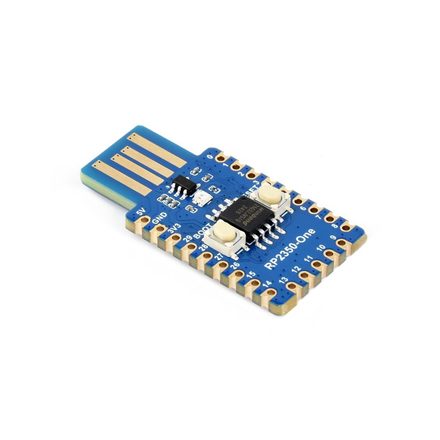 |
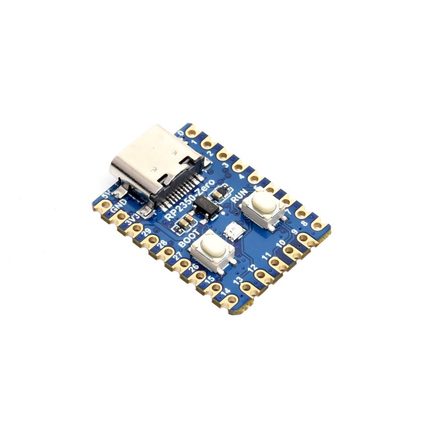 |
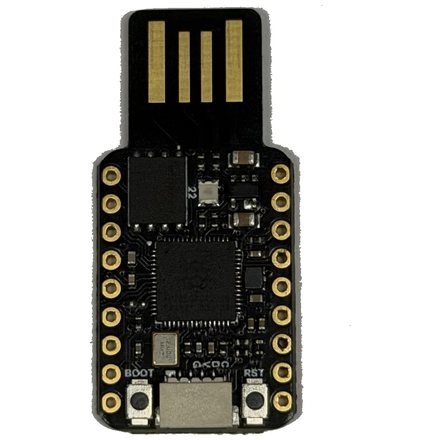 |
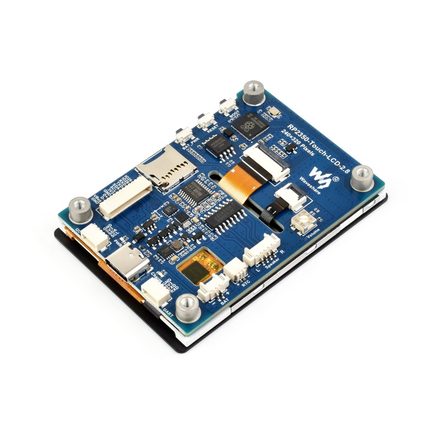 |
| RP2350-One reference · USB-A WS2812 on GPIO16 |
RP2350-Zero 4 MiB flash · USB-C |
TenStar RP2350-USB USB-A stick WS2812 on GP22 |
RP2350-Touch-LCD-2.8 trusted display · 2.8″ LCD |
Board photos: Waveshare (RP2350-One / Zero / Touch-LCD-2.8).
The Waveshare RP2350-One is the reference board. The default image matches its 4 MiB flash, WS2812 on GPIO16 and BOOTSEL button for presence.
Bitmerse tested FIDO2 on Romu (RP2354A) with its RS-Key fork. Their build
uses the 2 MiB layout, reads the active-high capacitive touch sensor on GPIO20,
and adds an rgb_gpio driver for Romu’s common-anode RGB LED.
Romu on Crowd Supply ·
Bitmerse’s RS-Key build guide
Trusted display
The display build currently supports one board, the Waveshare
RP2350-Touch-LCD-2.8. Both revisions use a 240×320 ST7789 panel. V1
uses a CST328 touch controller, and V2 uses a CST3530. The similarly named
RP2350-Touch-LCD-2.8C uses a round ST7701 panel and needs its own port.
Waveshare 2.8 specifications ·
Waveshare 2.8C specifications
nix build .#firmware-display     # V1
nix build .#firmware-display-v2  # V2
The preset selects 16 MiB of flash and LED_KIND=none. The screen handles
presence and status. See the Trusted display guide.
Defaults and the knobs to change them
Current builds assume a 12 MHz crystal and use the RP2350’s native USB port. USB BOOTSEL lets you load the firmware without a programmer. Board settings cover GPIO 0–29. Using GPIO 30–47 on an RP2350B or RP2354B requires firmware changes.
Start with a preset under firmware/boards/ if one matches your board. Pass
its filename without .toml as BOARD. For example, seeed-xiao sets up
the 2 MiB flash, powers the WS2812 through GPIO23 and holds the separate user
LED off. For a custom board, set the flash size and match the presence input
and LED to the wiring. See Build options for the full list.
| Knob | Default | When to change it |
|---|---|---|
FLASH_SIZE | 4M | Match the flash capacity, up to 16 MiB. The linker derives the firmware and storage layout from it. |
KVMAIN | 1408K | Use 896K with FLASH_SIZE=2M on boards such as the Seeed XIAO RP2350, Waveshare RP2350-Zero-CM or Romu. Leave at least 1 MiB for firmware. Keep both settings when updating a provisioned key. |
LED_KIND | ws2812 | ws2812 for addressable RGB, gpio for a plain on/off LED, pimoroni for the fixed Pimoroni PWM wiring, or none to omit the status LED. |
LED_PIN | 16 | Data GPIO for ws2812 or output GPIO for gpio. |
LED_ORDER | rgb | Set grb if the addressable LED’s red and green are swapped. |
LED_POWER_PIN | none | GPIO to hold high for an LED power gate, such as GPIO23 on the Seeed XIAO RP2350. |
USR_LED_PIN | none | GPIO of a separate onboard LED to hold off, such as GPIO25 on the Seeed XIAO RP2350. Set USR_LED_ACTIVE_HIGH=1 for an active-high LED. |
MAX_LEDS | 1 | Compiled capacity of the addressable LED chain, up to 64. Set the active count at runtime. |
PRESENCE_PIN | bootsel | Use BOOTSEL or set the GPIO of a dedicated button or touch sensor. A GPIO input defaults to active-low with a pull-up. |
PRESENCE_ACTIVE_HIGH | 0 | Set 1 for a GPIO button or touch sensor that goes high when pressed. |
# Seeed XIAO RP2350 and TenStar RP2350-USB presets
nix develop -c env BOARD=seeed-xiao bash scripts/build.sh
nix develop -c env BOARD=tenstar-usb bash scripts/build.sh

# Custom board with 8 MiB flash, a plain LED and an active-high touch sensor
nix develop -c env FLASH_SIZE=8M LED_KIND=gpio LED_PIN=25 \
  PRESENCE_PIN=0 PRESENCE_ACTIVE_HIGH=1 bash scripts/build.sh
With LED support compiled in, rsk hw can change the pin, driver, wire
order and active LED count. The settings take effect on reboot. The compiled
MAX_LEDS caps the active count. See the LED guide.
Adding a board
If the peripherals already have drivers, add a board preset with the flash
size and pin assignments. A peripheral that uses a different protocol or
wiring may need a driver change. Romu’s RGB LED is one example. The status
LED is optional, so you can use LED_KIND=none while bringing up the rest
of the board.
We welcome pull requests for board presets and drivers. Include a pinout or schematic reference and what you tested on the board, such as USB boot, FIDO2 registration and login, presence, and the LED or display.
Enclosures
Community designs for 3D-printed enclosures are available for several boards.
- Waveshare RP2040-One / RP2350-One case by Patrick van der Leer. Sized for the reference board.
- RP2350 USB case by Vladimir Varzaru (a remix of Patrick’s design). A slimmer USB-stick form.
- Pico 2 Zero FIDO2 case (RP2350) on MakerWorld. Fits the RP2350-Zero.
- Waveshare RP2350 2.8-inch case by @cofob. Designed for RS-Key and recommended for the RP2350-Touch-LCD-2.8. PETG is the recommended print material.
- Waveshare RP2350 2.8-inch case by Mono. Designed for RS-Key on the RP2350-Touch-LCD-2.8.
See each model page for its license.
What the hardware does not give you
RS-Key uses the microcontroller’s own OTP and Secure Boot for production hardening. The threat model excludes lab attacks such as decapping, microprobing, advanced fault injection and power or EM side channels. See Production setup, the threat model and limitations.